(*) in the base environment:
| OS | Architecture | Download |
|---|---|---|
| Linux | x86_64 (amd64) | Miniforge3-Linux-x86_64 |
| Linux | aarch64 (arm64) (**) |
Miniforge3-Linux-aarch64 |
| Linux | ppc64le (POWER8/9) | Miniforge3-Linux-ppc64le |
| OS X | x86_64 | Miniforge3-MacOSX-x86_64 |
| OS X | arm64 (Apple Silicon) (***) |
Miniforge3-MacOSX-arm64 |
| Windows | x86_64 | Miniforge3-Windows-x86_64 |
(*) The Python version is specific only to the base environment. Conda can create new environments with different Python versions and implementations.
(**) While the Raspberry PI includes a 64 bit processor, the RasbianOS is built on a 32 bit kernel and is not a supported configuration for these installers. We recommend using a 64 bit linux distribution such as Ubuntu for Raspberry PI.
(***) Apple silicon builds are experimental and haven't had testing like the other platforms.
虽然conda对m1对支持还处于experimental阶段,但是python3.9是原生支持m1处理器的,我们只是用conda管理python的包。
在安装过程中,可能是因为之前安装了anaconda,遇到了conda被zsh kill的问题,试了好多方法,包括装了完整的xcode,都没解决问题,后来换了个安装路径解决了。理论上不需要安装xcode,直接安装miniforge就行。
https://github.com/conda-forge/miniforge/issues/190
安装很简单,只要下载了安装程序,直接执行即可。
./Miniforge3-MacOSX-arm64.sh
(base)  ~ % python
Python 3.9.6 | packaged by conda-forge | (default, Jul 11 2021, 03:35:11)
[Clang 11.1.0 ] on darwin
Type "help", "copyright", "credits" or "license" for more information.
>>>
channels:
 - https://mirrors.ustc.edu.cn/anaconda/pkgs/main/
 - https://mirrors.ustc.edu.cn/anaconda/cloud/conda-forge/
 - https://mirrors.tuna.tsinghua.edu.cn/anaconda/pkgs/free/
 - defaults
show_channel_urls: true
(base) niuxinli@niuxinlideMacBook-Pro ~ % conda install pandas
Collecting package metadata (current_repodata.json): done
Solving environment: done

## Package Plan ##

  environment location: /Users/niuxinli/miniforge3

  added / updated specs:
    - pandas


The following packages will be downloaded:

    package                    |            build
    ---------------------------|-----------------
    bottleneck-1.3.2           |   py39heec5a64_1          96 KB  https://mirrors.ustc.edu.cn/anaconda/pkgs/main
    ca-certificates-2021.7.5   |       hca03da5_1         113 KB
 给pycharm创建一个环境
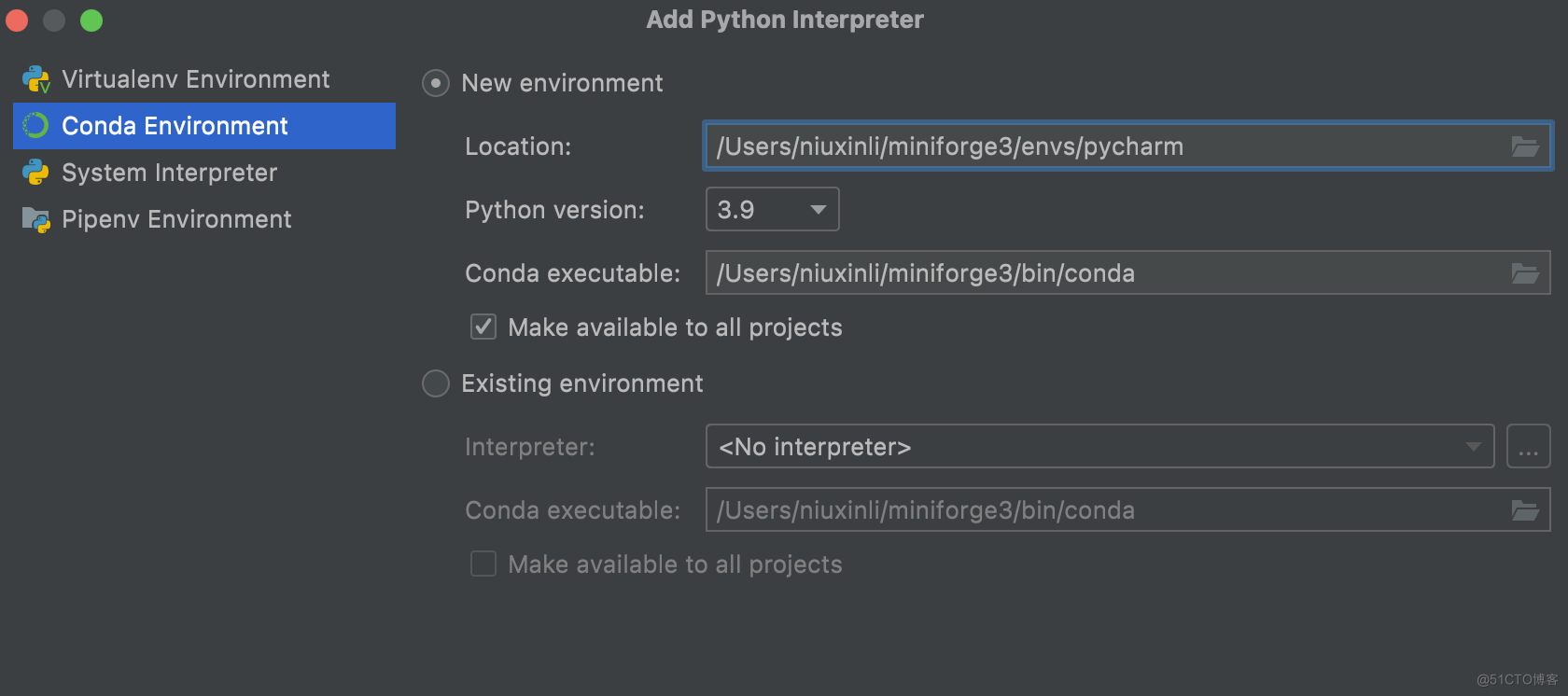
conda activate pycharm
conda install -c apple tensorflow-deps
python -m pip install tensorflow-macos -i https://mirrors.aliyun.com/pypi/simple/
python -m pip install tensorflow-metal -i https://mirrors.aliyun.com/pypi/simple/
brew install libjpeg
pip install tensorflow-datasets -i https://mirrors.aliyun.com/pypi/simple/
conda install -y pandas matplotlib scikit-learn jupyterlab
Original error was: dlopen(/Users/niuxinli/miniforge3/envs/pycharm/lib/python3.9/site-packages/numpy/core/_multiarray_umath.cpython-39-darwin.so, 0x0002): Library not loaded: @rpath/libcblas.3.dylib
pip install opencv-python -i https://mirrors.aliyun.com/pypi/simple/
ERROR: pip's dependency resolver does not currently take into account all the packages that are installed. This behaviour is the source of the following dependency conflicts.
tensorflow-macos 2.5.0 requires numpy~=1.19.2, but you have numpy 1.21.2 which is incompatible.
import tensorflow as tf
import tensorflow_datasets as tfds
import time
from datetime import timedelta
from tensorflow.python.framework.ops import disable_eager_execution
disable_eager_execution()

(ds_train, ds_test), ds_info = tfds.load(
    'mnist',
    split=['train', 'test'],
    shuffle_files=True,
    as_supervised=True,
    with_info=True,
)


def normalize_img(image, label):
    return tf.cast(image, tf.float32) / 255., label

batch_size = 128

ds_train = ds_train.map(
normalize_img, num_parallel_calls=tf.data.experimental.AUTOTUNE)
ds_train = ds_train.cache()
ds_train = ds_train.shuffle(ds_info.splits['train'].num_examples)
ds_train = ds_train.batch(batch_size)
ds_train = ds_train.prefetch(tf.data.experimental.AUTOTUNE)


ds_test = ds_test.map(
normalize_img, num_parallel_calls=tf.data.experimental.AUTOTUNE)
ds_test = ds_test.batch(batch_size)
ds_test = ds_test.cache()
ds_test = ds_test.prefetch(tf.data.experimental.AUTOTUNE)

model = tf.keras.models.Sequential([
 tf.keras.layers.Conv2D(32, kernel_size=(3, 3), activation='relu'),
 tf.keras.layers.Conv2D(64, kernel_size=(3, 3), activation='relu'),
 tf.keras.layers.MaxPooling2D(pool_size=(2, 2)),
 tf.keras.layers.Flatten(),
 tf.keras.layers.Dense(128, activation='relu'),
 tf.keras.layers.Dense(10, activation='softmax')
])

model.compile(
 loss='sparse_categorical_crossentropy',
 optimizer=tf.keras.optimizers.Adam(0.001),
 metrics=['accuracy'],
)


start = time.time()


model.fit(
 ds_train,
 epochs=10,
 # validation_steps=1,
 # steps_per_epoch=469,
 # validation_data=ds_test # 此处如果按原脚本添加这行,脚本无法运行,暂时未有解决方法
)


delta = (time.time() - start)
elapsed = str(timedelta(seconds=delta))
print('Elapsed Time: {}'.format(elapsed))
 运行时间几乎稳定在1分32秒,比博主3分20秒的成绩提高了一半,接近Colab GPU。
 因此,在m1上安装macos 12以及tensorflow 2.5, 性能比之前接近翻倍。
我正在使用Ruby解决一些ProjectEuler问题,特别是这里我要讨论的问题25(Fibonacci数列中包含1000位数字的第一项的索引是多少?)。起初,我使用的是Ruby2.2.3,我将问题编码为:number=3a=1b=2whileb.to_s.length但后来我发现2.4.2版本有一个名为digits的方法,这正是我需要的。我转换为代码:whileb.digits.length当我比较这两种方法时,digits慢得多。时间./025/problem025.rb0.13s用户0.02s系统80%cpu0.190总计./025/problem025.rb2.19s用户0.0
我正在寻找一个用ruby演示计时器的在线示例,并发现了下面的代码。它按预期工作,但这个简单的程序使用30Mo内存(如Windows任务管理器中所示)和太多CPU有意义吗?非常感谢deftime_blockstart_time=Time.nowThread.new{yield}Time.now-start_timeenddefrepeat_every(seconds)whiletruedotime_spent=time_block{yield}#Tohandle-vesleepinteravalsleep(seconds-time_spent)iftime_spent
如果用户是所有者,我有一个条件来检查说删除和文章。delete_articleifuser.owner?另一种方式是user.owner?&&delete_article选择它有什么好处还是它只是一种写作风格 最佳答案 性能不太可能成为该声明的问题。第一个要好得多-它更容易阅读。您future的自己和其他将开始编写代码的人会为此感谢您。 关于ruby-on-rails-如果条件与&&,是否有任何性能提升,我们在StackOverflow上找到一个类似的问题:
我编写了一个Ruby应用程序,它可以解析来自不同格式html、xml和csv文件的源中的大量数据。我如何找出代码的哪些区域花费的时间最长?有没有关于如何提高Ruby应用程序性能的好资源?或者您是否有任何始终遵循的性能编码标准?例如,你总是用加入你的字符串吗?output=String.newoutput或者你会使用output="#{part_one}#{part_two}\n" 最佳答案 好吧,有一些众所周知的做法,例如字符串连接比“#{value}”慢得多,但是为了找出您的脚本在哪里消耗了大部分时间或比所需时间更多,您需要进行分
LL库和HAL库简介LL:Low-Layer,底层库HAL:HardwareAbstractionLayer,硬件抽象层库LL库和hal库对比,很精简,这实际上是一个精简的库。LL库的配置选择如下:在STM32CUBEMX中,点击菜单的“ProjectManager”–>“AdvancedSettings”,在下面的界面中选择“AdvancedSettings”,然后在每个模块后面选择使用的库总结:1、如果使用的MCU是小容量的,那么STM32CubeLL将是最佳选择;2、如果结合可移植性和优化,使用STM32CubeHAL并使用特定的优化实现替换一些调用,可保持最大的可移植性。另外HAL和L
我使用高级EstimatorAPI(DNNClassifier)在Python中构建并保存了一个非常简单的模型。它需要2个float并输出两个类之一。我正在尝试使用tensorflow.rbgem在Ruby中加载它,并用它做出预测。这应该很相似totheCAPTCHAexampleprovidedbytensorflow.rb.我使用export_saved_model保存了它。这是训练模型的Python代码。它可以正确地预测类别。将numpy导入为np将Pandas导入为pd将tensorflow导入为tfdataframe=pd.read_csv("remediations_imp
是否存在GC.disable会降低性能的情况?只要我使用的是真正的RAM而不是交换内存,就可以这样做吗?我正在使用MRIRuby2.0,据我所知,它是64位的,并且使用的是64位的Ubuntu:ruby2.0.0p0(2013-02-24revision39474)[x86_64-linux]Linux[redacted]3.2.0-43-generic#68-UbuntuSMPWedMay1503:33:33UTC2013x86_64x86_64x86_64GNU/Linux 最佳答案 GC.disable将禁用垃圾回收。像rub
我尝试在Internet上搜索有关使用angularJS进入RubyonRails项目与RubyonRailspure的View性能的信息。我的问题是因为2个月前我开始使用纯AngularJS,现在我需要将AngularJS集成到一个新项目中,但需要展示使用带有RubyonRails的AngularJS呈现View的性能如何,并消除对RubyonRails的负担.例如:带Rails的Angular:使用RubyonRails获取数据(从数据库或GET请求),将信息发送到file.js.erb并使用AngularJS操作数据并显示带有解析数据的View。纯粹的Rails:(自然流程)使用
我觉得我理解require和require_dependency之间的区别(来自Howarerequire,require_dependencyandconstantsreloadingrelatedinRails?)。但是,我想知道如果我使用一些不同的方法(参见http://hemju.com/2010/09/22/rails-3-quicktip-autoload-lib-directory-including-all-subdirectories/和Bestwaytoloadmodule/classfromlibfolderinRails3?)来加载所有文件会发生什么,所以我们:
设置一个临时变量来交换数组中的两个元素似乎比使用并行赋值更有效。谁能帮忙解释下?require"benchmark"Benchmark.bmdo|b|b.reportdo40000000.times{array[1],array[2]=array[2],array[1]}endendBenchmark.bmdo|b|b.reportdo40000000.timesdot=array[1]array[1]=array[2]array[2]=tendendend结果:usersystemtotalreal4.4700000.0200004.490000(4.510368)usersyste
