import Vue from 'vue'
import Router from 'vue-router'

Vue.use(Router)

//避免导航守卫报错
const originalPush = Router.prototype.push
Router.prototype.push = function push(location, onResolve, onReject) {
  if (onResolve || onReject) return originalPush.call(this, location, onResolve, onReject)
  return originalPush.call(this, location).catch(err => err)
}
/* Layout */
import Layout from '@/layout'

//所有人可见
export const constantRoutes = [
  {
    path: '/login',
    component: () => import('@/views/login/index'),
    hidden: true
  },

  {
    path: '/404',
    component: () => import('@/views/404'),
    hidden: true
  },

  {
    path: '/',
    component: Layout,
    redirect: '/dashboard',
    children: [
      {
        path: 'dashboard',
        name: 'Dashboard',
        component: () => import('@/views/dashboard/index'),
        meta: {
          title: '首页',
          icon: 'dashboard'
        }
      }
    ]
  },

  {
    path: '/example',
    component: Layout,
    children: [
      {
        path: 'index',
        name: 'Table',
        component: () => import('@/views/table/index'),
        meta: {
          title: '所有人可见',
          icon: 'table'
        }
      }
    ]
  },
  // 404 page must be placed at the end !!!
  { path: '*', redirect: '/404', hidden: true }
]

//相应权限人员可见
export const asyncRouterMap = [
  {
    path: '/form',
    component: Layout,
    children: [
      {
        path: 'index',
        name: 'Form',
        component: () => import('@/views/form/index'),
        meta: {
          title: '所有人可见',
          icon: 'form',
          role: ['admin']
        }
      }
    ]
  },
  {
    path: '/system',
    component: Layout,
    redirect: 'system/test',
    name: 'System',
    alwaysShow: true,
    meta:{title:'系统管理', icon: 'nested', role: ['admin','editor']},
    children: [
      {
        path: '权限管理',
        name: 'test',
        name: 'Test',
        component: () => import('@/views/system/index'),
        meta: {
          title: '权限修改',
          icon: 'table',
          role: ['admin']
        }
      }
    ]
  }
]

const createRouter = () =>
  new Router({
    // mode: 'history', // require service support
    scrollBehavior: () => ({ y: 0 }),
    routes: constantRoutes
  })

const router = createRouter()

// Detail see: https://github.com/vuejs/vue-router/issues/1234#issuecomment-357941465
export function resetRouter() {
  const newRouter = createRouter()
  router.matcher = newRouter.matcher // reset router
}

export default router
import { asyncRouterMap, constantRoutes } from '@/router'

/**
 * Use meta.role to determine if the current user has permission
 * @param role
 * @param route
 */
function hasPermission(role, route) {
    if (route.meta && route.meta.role) {
        // return roleArr.some(role => route.meta.role.includes(role))  //当给的角色权限为数组形式可采取该方式判断返回值
        return route.meta.role.includes(role)?true:false  //当角色权限为字符串时,采用该方式判断
    } else {
        return true
    }
}

/**
 * 将符合相应权限的路由表筛选出来
 * @param routes asyncRouterMap
 * @param role
 */
export function filterasyncRouterMap(routes, role) {
    const res = []
    routes.forEach(route => {
        const tmp = { ...route }
        if (hasPermission(role, tmp)) {
            console.log(111);
            if (tmp.children) {
                tmp.children = filterasyncRouterMap(tmp.children, role)
            }
            res.push(tmp)
        }
    })

    return res
}

const permission = {
    state: {
        routes: [],
        addRoutes: []
    },
    mutations: {
        SET_ROUTES: (state, routes) => {
            state.addRoutes = routes
            state.routes = constantRoutes.concat(routes)
        }
    },
    actions: {
        generateRoutes({ commit }, role) {
            return new Promise(resolve => {
                let accessedRoutes
                //如果角色是admin
                if (role.includes('admin')) {
                //将route.js中的admin权限人员可见的路由表加入,此处我们只有admin和editor两个角色
                    accessedRoutes = asyncRouterMap || []
                } else {
                    accessedRoutes = filterasyncRouterMap(asyncRouterMap, role) || []
                }
                commit('SET_ROUTES', accessedRoutes)
                resolve(accessedRoutes)
            })
        }
    }

}

export default permission
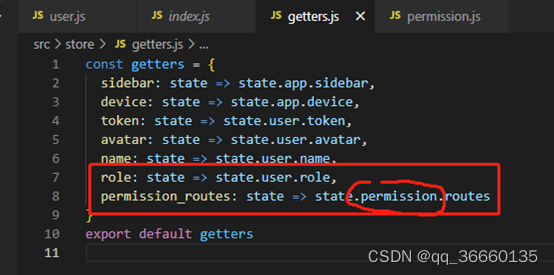
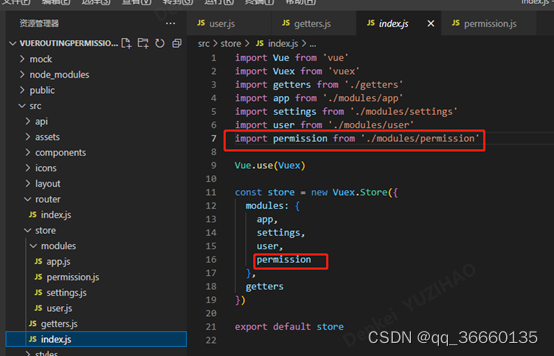
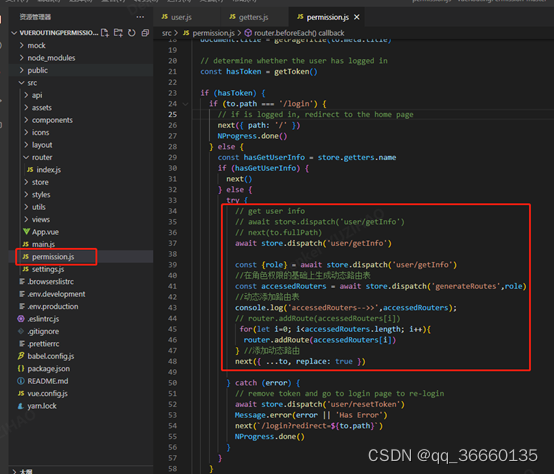
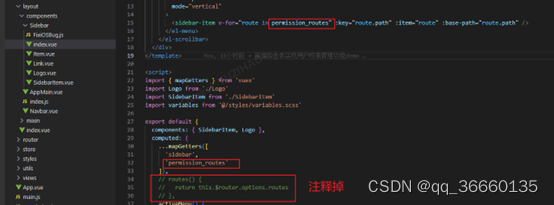
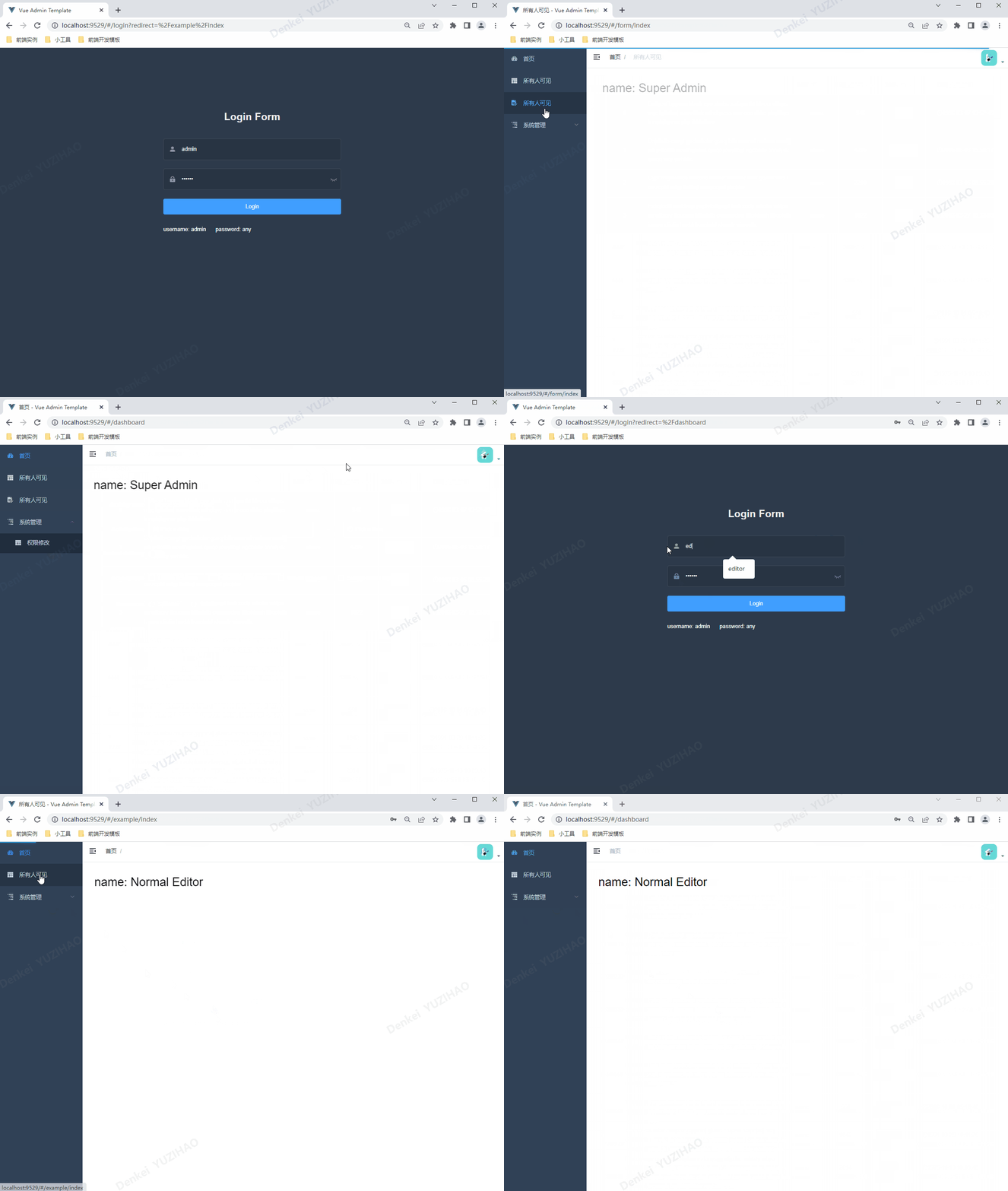
最终可以实现文章首部动图效果,简单的记录下前端路由表权限管理功能实现,若有不正确处,评论处可交流讨论,文末会贴源码,安装依赖后可直接运行。
文末demo码云链接:权限管理demo
我正在使用i18n从头开始构建一个多语言网络应用程序,虽然我自己可以处理一大堆yml文件,但我说的语言(非常)有限,最终我想寻求外部帮助帮助。我想知道这里是否有人在使用UI插件/gem(与django上的django-rosetta不同)来处理多个翻译器,其中一些翻译器不愿意或无法处理存储库中的100多个文件,处理语言数据。谢谢&问候,安德拉斯(如果您已经在rubyonrails-talk上遇到了这个问题,我们深表歉意) 最佳答案 有一个rails3branchofthetolkgem在github上。您可以通过在Gemfi
我得到了一个包含嵌套链接的表单。编辑时链接字段为空的问题。这是我的表格:Editingkategori{:action=>'update',:id=>@konkurrancer.id})do|f|%>'Trackingurl',:style=>'width:500;'%>'Editkonkurrence'%>|我的konkurrencer模型:has_one:link我的链接模型:classLink我的konkurrancer编辑操作:defedit@konkurrancer=Konkurrancer.find(params[:id])@konkurrancer.link_attrib
我主要使用Ruby来执行此操作,但到目前为止我的攻击计划如下:使用gemsrdf、rdf-rdfa和rdf-microdata或mida来解析给定任何URI的数据。我认为最好映射到像schema.org这样的统一模式,例如使用这个yaml文件,它试图描述数据词汇表和opengraph到schema.org之间的转换:#SchemaXtoschema.orgconversion#data-vocabularyDV:name:namestreet-address:streetAddressregion:addressRegionlocality:addressLocalityphoto:i
所以我在关注Railscast,我注意到在html.erb文件中,ruby代码有一个微弱的背景高亮效果,以区别于其他代码HTML文档。我知道Ryan使用TextMate。我正在使用SublimeText3。我怎样才能达到同样的效果?谢谢! 最佳答案 为SublimeText安装ERB包。假设您安装了SublimeText包管理器*,只需点击cmd+shift+P即可获得命令菜单,然后键入installpackage并选择PackageControl:InstallPackage获取包管理器菜单。在该菜单中,键入ERB并在看到包时选择
我试图在索引页中创建一个超链接,但它没有显示,也没有给出任何错误。这是我的index.html.erb代码。ListingarticlesTitleTextssss我检查了我的路线,我认为它们也没有问题。PrefixVerbURIPatternController#Actionwelcome_indexGET/welcome/index(.:format)welcome#indexarticlesGET/articles(.:format)articles#indexPOST/articles(.:format)articles#createnew_articleGET/article
我是rails的新手,想在form字段上应用验证。myviewsnew.html.erb.....模拟.rbclassSimulation{:in=>1..25,:message=>'Therowmustbebetween1and25'}end模拟Controller.rbclassSimulationsController我想检查模型类中row字段的整数范围,如果不在范围内则返回错误信息。我可以检查上面代码的范围,但无法返回错误消息提前致谢 最佳答案 关键是您使用的是模型表单,一种显示ActiveRecord模型实例属性的表单。c
我安装了ruby版本管理器,并将RVM安装的ruby实现设置为默认值,这样'哪个ruby'显示'~/.rvm/ruby-1.8.6-p383/bin/ruby'但是当我在emacs中打开inf-ruby缓冲区时,它使用安装在/usr/bin中的ruby。有没有办法让emacs像shell一样尊重ruby的路径?谢谢! 最佳答案 我创建了一个emacs扩展来将rvm集成到emacs中。如果您有兴趣,可以在这里获取:http://github.com/senny/rvm.el
是否有简单的方法来更改默认ISO格式(yyyy-mm-dd)的ActiveAdmin日期过滤器显示格式? 最佳答案 您可以像这样为日期选择器提供额外的选项,而不是覆盖js:=f.input:my_date,as::datepicker,datepicker_options:{dateFormat:"mm/dd/yy"} 关于ruby-on-rails-事件管理员日期过滤器日期格式自定义,我们在StackOverflow上找到一个类似的问题: https://s
目前,Itembelongs_toCompany和has_manyItemVariants。我正在尝试使用嵌套的fields_for通过Item表单添加ItemVariant字段,但是使用:item_variants不显示该表单。只有当我使用单数时才会显示。我检查了我的关联,它们似乎是正确的,这可能与嵌套在公司下的项目有关,还是我遗漏了其他东西?提前致谢。注意:下面的代码片段中省略了不相关的代码。编辑:不知道这是否相关,但我正在使用CanCan进行身份验证。routes.rbresources:companiesdoresources:itemsenditem.rbclassItemi
前言一般来说,前端根据后台返回code码展示对应内容只需要在前台判断code值展示对应的内容即可,但要是匹配的code码比较多或者多个页面用到时,为了便于后期维护,后台就会使用字典表让前端匹配,下面我将在微信小程序中通过wxs的方法实现这个操作。为什么要使用wxs?{{method(a,b)}}可以看到,上述代码是一个调用方法传值的操作,在vue中很常见,多用于数据之间的转换,但由于微信小程序诸多限制的原因,你并不能优雅的这样操作,可能有人会说,为什么不用if判断实现呢?但是if判断的局限性在于如果存在数据量过大时,大量重复性操作和if判断会让你的代码显得异常冗余。wxswxs相当于是一个独立
