本篇以DX12为API实现局部光照,有关局部光照的知识还请移步https://www.cnblogs.com/chenglixue/p/17140982.html
计算三角形\(\triangle p_0 p_1 p_2\)的的平面法线
\(u = p_1 - p_0, v = p_2 - p_0 \Rightarrow n = \frac{u \times v}{\| u \times v ||}\)
XMVECTOR ComputeNormal(FXMVECTOR p0,FXMVECTOR p1,FXMVECTOR p2)
{
    XMVECTOR u = p1 - p0;
    XMVECTOR v = p2 - p0;
    return XMVector3Normalize(XMVector3Cross(u,v));
}
给定三角网格的顶点列表和索引列表,求得顶点的法线平均值
//顶点数组mVertices.每个顶点包含一个位置分量和一个法线分量
//索引数组mIndices
//对于网格中的每个三角形
for(UINT i = 0; i < mNumTriangles; ++i)
{
    //第i个三角形的索引
    UINT i0 = mIndices[i*3+0];
	UINT i1 = mIndices[i*3+1];
	UINT i2 = mIndices[i*3+2];

    //第i个三角形的顶点
    Vertex v0 = mVertices[i0];
	Vertex v1 = mVertices[i1];
	Vertex v2 = mVertices[i2];

    //计算法线
    Vector3 e0 = v1.pos - v0.pos;
	Vector3 e1 = v2.pos - v0.pos;
	Vector3 faceNormal = Cross(e0, e1);

    //将平面法线和三个顶点法线相加求平均
	mVertices[i0].normal += faceNormal;
	mVertices[i1].normal += faceNormal;
	mVertices[i2].normal += faceNormal;
}

//规范化处理
for(UINT i = 0; i < mNumVertices; ++i)
    mVertices[i].normal = Normalize(&mVertices[i].normal));
DirectX::XMMATRIX InverseTranspose(DirectX::CXMMATRIX M)
{
    DirectX::XMMATRIX A = M;
    //逆转置矩阵主要应用于法向量,通过将此矩阵中和平移操作有关的项置零,只允许点进行平移变换
    //且这样的做法还可以预防一个错误,将逆转置矩阵乘以不含非等比缩放的矩阵,如此转置后的逆转置矩阵的第4列平移项将带入最终的矩阵,导致错误结果
    A.r[3] = DirectX::XMVectorSet(0.0f, 0.0f, 0.0f, 1.0f);

    DirectX::XMVECTOR det = DirectX::XMMatrixDeterminant(A);
    return DirectX::XMMatrixTranspose(DirectX::XMMatrixInverse(&det, A));
}
考虑漫反射光,环境光,镜面光即为Blinn-Phong模型光照模型。这三种光照的计算公式如下
漫反射(diffuse reflection)光照
\(c_d = m_d \bigotimes B_L max(0, L·n)\),其中\(m_d\)表示漫反射反射率,\(B_L\)表示入射光量,L为入射光线
环境光(ambient light)照
\(c_a = A_L \bigotimes m_d\),其中\(A_L\)为表面收到的间接光量,\(m_d\)漫反射反射率
环境光照实则以漫反射率进行建模,所有的环境光都以统一的亮度将物体稍稍照亮,没有按真实的物理效果进行计算
镜面反射(specular reflection)
微表面(microfacet)
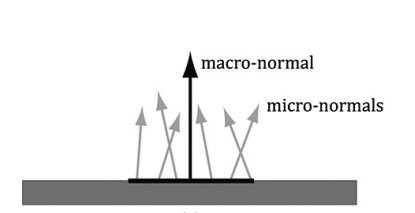
在真实世界中的物体表面往往不是理想镜面,以微观角度上看,绝大部分物体都有粗糙度。如下图所示,若物体有一定的粗糙度,微观表面的法线和宏观表面的法线方向是不同的,且随着粗糙度的增加,微观表面法线的方向会逐渐偏离宏观表面法线
为了以数学方式对这种表面粗糙度进行建模,我们便采用微表面模型。在此模型中,将微观表面模拟为由多个微小且平滑的微表面构成,而微观表面法线正是这些微表面上的法线.我们需要求得入射光线L经镜面反射后反射光线在观察方向v上的微表面片段在所有微表面中的占比,这种微表面片段越多,镜面光强度越高。下图中,h为此类微表面片段的真正法线
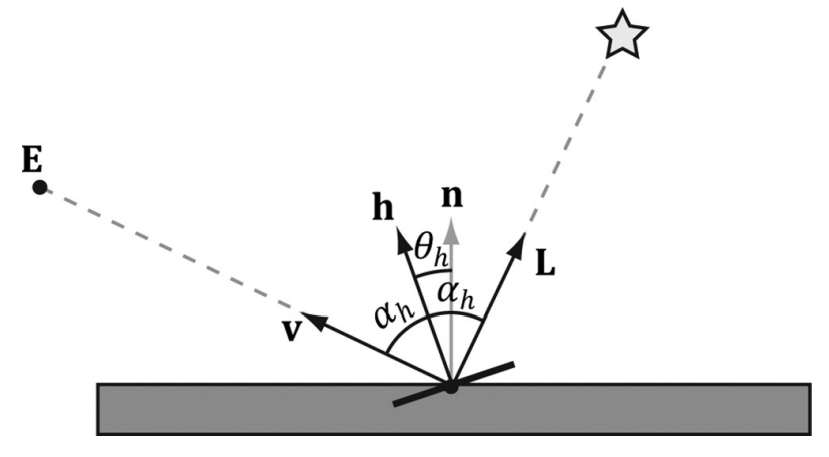
此外,还需引入夹角\(\theta_h\)表示h半程向量和和宏观表面法线n之间的角度,且定义归一化分布函数\(\rho(\theta_h) \in [0,1]\)表示\(\theta_h\)的微表面分布情况。\(\theta_h = 0°\)时取得最大值(此时期望的微表面最多),意为微表面法线平行于宏观表面法线,随着\(\theta _h\)的增加,以h为法线的微表面片段会逐渐减少。此归一化分布函数为:\(\rho(\theta_h) = cos^m(\theta_h) = cos^m(n·h)\),其中m控制的是粗糙度,m减小,表面变得更粗糙;m增大,表面更光滑。下图展示了m不同取值的情况

但这有一个问题,没法达到光能守恒,因此我们需要加上一个归一化因子,用于控制上图中曲线的高度,即新函数应是如此:\(S(\theta_h) = \frac{m+8}{8} cos^m (\theta_h)\)。如此,随着m变小,表面变得更粗糙,镜面瓣(镜面反射光的范围)变宽,使得光能散播更广,高光会暗一点,也就是说m实际控制着镜面瓣的扩散程度
将菲涅尔反射于微表面归一化函数的公式相结合,可得:\(c_s = B_L \bigotimes R_F(\alpha_h)\frac{m+8}{8}(n · h)^m max(0,L· n)\),其中\(B_L\)表示入射光量,n为法线,h为微表面的半程向量,,\(R_F(\alpha_h)\)表示关于h射入v的反射光量,\(\frac{m+8}{8} cos^m (\theta_h)\)为粗糙度
材料结构体,用于存储物体的材料属性
//d3dUtil.h
struct Material
{
	// 材质的名称
	std::string Name;

	// 材质的常量缓冲区索引
	int MatCBIndex = -1;

	// 漫反射纹理在SRV堆中的索引
	int DiffuseSrvHeapIndex = -1;

	// 法向量纹理在SRV堆中的索引
	int NormalSrvHeapIndex = -1;

    //判断本材质是否有改动的标志
	int NumFramesDirty = gNumFrameResources;

	//用于着色的材质的常量缓冲区数据
	DirectX::XMFLOAT4 DiffuseAlbedo = { 1.0f, 1.0f, 1.0f, 1.0f };	//漫反射反射率
	DirectX::XMFLOAT3 FresnelR0 = { 0.01f, 0.01f, 0.01f };	//材质属性RF(0°)
	float Roughness = .25f;		//粗糙度
	DirectX::XMFLOAT4X4 MatTransform = MathHelper::Identity4x4();
};
为每种材质定义属性,并将其置于一个表中
std::unordered_map<std::string, std::unique_ptr<Material>> mMaterials;

void LitColumnsApp::BuildMaterials()
{
	auto grass = std::make_unique<Material>();
	grass->Name = "grass";
	grass->MatCBIndex = 0;
    grass->DiffuseAlbedo = XMFLOAT4(0.2f, 0.6f, 0.2f, 1.0f);
    grass->FresnelR0 = XMFLOAT3(0.01f, 0.01f, 0.01f);
    grass->Roughness = 0.125f;

    // This is not a good water material definition, but we do not have all the rendering
    // tools we need (transparency, environment reflection), so we fake it for now.
	auto water = std::make_unique<Material>();
	water->Name = "water";
	water->MatCBIndex = 1;
    water->DiffuseAlbedo = XMFLOAT4(0.0f, 0.2f, 0.6f, 1.0f);
    water->FresnelR0 = XMFLOAT3(0.1f, 0.1f, 0.1f);
    water->Roughness = 0.0f;

	mMaterials["grass"] = std::move(grass);
	mMaterials["water"] = std::move(water);
}
但为了GPU能够访问表中的材质数据,我们还需将相关材质常量数据复制到常量缓冲区中,因此FrameResource中还需增加一个材质常量缓冲区
struct MaterialConstants
{
	DirectX::XMFLOAT4 DiffuseAlbedo = { 1.0f, 1.0f, 1.0f, 1.0f };
	DirectX::XMFLOAT3 FresnelR0 = { 0.01f, 0.01f, 0.01f };
	float Roughness = 0.25f;

	// Used in texture mapping.
	DirectX::XMFLOAT4X4 MatTransform = MathHelper::Identity4x4();
};

struct FrameResource
{
    //...
    std::unique_ptr<UploadBuffer<MaterialConstants>> MaterialCB = nullptr;
}

//若当前帧中,材质常量数据有所变化,则需调用此函数更新材质常量缓冲区
void LitWavesApp::UpdateMaterialCBs(const GameTimer& gt)
{
	auto currMaterialCB = mCurrFrameResource->MaterialCB.get();
	for(auto& e : mMaterials)
	{
		// Only update the cbuffer data if the constants have changed.  If the cbuffer
		// data changes, it needs to be updated for each FrameResource.
		Material* mat = e.second.get();
		if(mat->NumFramesDirty > 0)
		{
			XMMATRIX matTransform = XMLoadFloat4x4(&mat->MatTransform);

			MaterialConstants matConstants;
			matConstants.DiffuseAlbedo = mat->DiffuseAlbedo;
			matConstants.FresnelR0 = mat->FresnelR0;
			matConstants.Roughness = mat->Roughness;

			currMaterialCB->CopyData(mat->MatCBIndex, matConstants);

			// Next FrameResource need to be updated too.
			mat->NumFramesDirty--;
		}
	}
}
用不同材质绘制渲染项。每个material记录它在常量缓冲区的索引,根据这个索引我们便可以引用对应的常量数据与所需的根描述符绑定
void LitWavesApp::DrawRenderItems(ID3D12GraphicsCommandList* cmdList, const std::vector<RenderItem*>& ritems)
{
	UINT objCBByteSize = d3dUtil::CalcConstantBufferByteSize(sizeof(ObjectConstants));
	UINT matCBByteSize = d3dUtil::CalcConstantBufferByteSize(sizeof(MaterialConstants));

	auto objectCB = mCurrFrameResource->ObjectCB->Resource();
	auto matCB = mCurrFrameResource->MaterialCB->Resource();

	// For each render item...
	for(size_t i = 0; i < ritems.size(); ++i)
	{
		auto ri = ritems[i];

		cmdList->IASetVertexBuffers(0, 1, &ri->Geo->VertexBufferView());
		cmdList->IASetIndexBuffer(&ri->Geo->IndexBufferView());
		cmdList->IASetPrimitiveTopology(ri->PrimitiveType);

		D3D12_GPU_VIRTUAL_ADDRESS objCBAddress = objectCB->GetGPUVirtualAddress() + ri->ObjCBIndex*objCBByteSize;
		D3D12_GPU_VIRTUAL_ADDRESS matCBAddress = matCB->GetGPUVirtualAddress() + ri->Mat->MatCBIndex*matCBByteSize;	//引用材质常量缓冲区中的对应材质

		cmdList->SetGraphicsRootConstantBufferView(0, objCBAddress);
		cmdList->SetGraphicsRootConstantBufferView(1, matCBAddress);	//将材质与根描述符绑定

		cmdList->DrawIndexedInstanced(ri->IndexCount, 1, ri->StartIndexLocation, ri->BaseVertexLocation, 0);
	}
}
D3D中光源共有三种类型:平行光,点光源,聚光灯
平行光(亦称方向光)
定义:一种距离目标物体非常远的光源
特点
下图中左边光源发出的的光线近似为平行光

点光源
定义:具有颜色和位置,但它向所有方向发射的光都一样。如电灯泡
特点
向各个方向射出的光线的强度是一样的
受距离影响,光强会发生改变
在物理学中,光强根据平方反比定律而随距离函数发生衰减,因此距离光源d处的某点光强为:\(I(d) = \frac{I_0}{d^2}\),\(I_0\)表示d = 1处的光强
因此在此处运用一个线性衰减(fallof)函数来控制点光源的衰减:\(att(d) = saturate(\frac{fallofEnd - d}{fallofEnd - fallofStart})\),此函数会将参数限定在[0,1]区间:\(saturate(x) = \left\{ \begin{array}{rcl} x & 0 \leqq x \leqq 1 \\ 0 & x < 0 \\ 1 & x > 1 \end{array}\right.\).此线性衰减函数并不会影响环境光,因为环境光模拟的是向四处反弹后的结果
如下图所示,当d的距离大于等于falloEnd便衰减至0,不受光照

此函数的好处:在着色器程序中,若一个点超出光照有效范围,便可采用动态分支跳过此处的计算并提前返回
开销比平行光昂贵。因为需要针对距离d进行计算
聚光灯光源
定义:聚光灯是由位置Q向方向d照射出呈圆锥体的光

特点
在上图中,只有在-L(L表示指向光源的光向量)与d间的夹角\(\phi\)小于圆锥体的半顶角\(\phi_{\max}\)时,P(物体)才处于聚光灯的圆锥体范围内
聚光灯圆锥体范围内所有光线强度不尽相同。位于圆锥体中心的光线(Qd)强度最强,随着角\(\theta\)增大,光强会逐渐趋于0
如何控制光强的衰减和圆锥体大小?
使用先前提到的控制粗糙度来模拟镜面光照的函数,但需用\(\phi\)替换\(\theta_h\),以s替换m:\(k_{spot}(\phi) = max(0,cos\phi)^s\).此公式描述了,光强随着\(\phi\)增加而连续且平滑地衰减,而s用于控制\(\phi_{\max}\)的角度,如s = 8,则半顶角逼近45°
代价最高,因为需要额外计算聚光灯因子\(k_{spot}\),并让其与聚光灯光强相乘
具体实现
光源
//d3dUtil.h
struct Light
{
    DirectX::XMFLOAT3 Strength = { 0.5f, 0.5f, 0.5f };	//光源颜色
    float FalloffStart = 1.0f;                          // 点光源/聚光灯使用
    DirectX::XMFLOAT3 Direction = { 0.0f, -1.0f, 0.0f };// 方向光源/聚光灯使用
    float FalloffEnd = 10.0f;                           // 点光源/聚光灯使用
    DirectX::XMFLOAT3 Position = { 0.0f, 0.0f, 0.0f };  // 点光源/聚光灯使用
    float SpotPower = 64.0f;                            // 聚光灯使用
};
着色器中的定义
struct Light
{
    float3 Strength;
    float FalloffStart;
    float3 Direction;
    float FalloffEnd;
    float3 Position;
    float SpotPower;
};

//注意这里的成员排列顺序不可随意指定,必须以填充对齐的方式,将结构体中的元素打包为4D向量
//如下所示
vector 1: (Strength.x, Strength.y, Strength.z,FalloffStart)
vector 2: (Direction.x, Direction.y, Direction.z,FalloffEnd)
vector 3: (Position.x, Position.y, Position.z,SpotPower)

//若随意指定排列顺序,很有可能造成浪费,但问题不止于此,c++结构体和HLSL结构体的封装规则不完全相同,也就是说很有可能造成两者布局不匹配
//如下所示
struct Light
{
	DirectX::XMFLOAT3 Strength;
	DirectX::XMFLOAT3 Direction;
	DirectX::XMFLOAT3 Position;
	float FalloffStart;
	float FalloffEnd;
	float SpotPower;
};

vector 1: (Strength.x, Strength.y, Strength.z, empty)
vector 2: (Direction.x, Direction.y, Direction.z,empty)
vector 3: (Position.x, Position.y, Position.z, empty)
vector 4: (FalloffStart, FalloffEnd, SpotPower, empty)
三个辅助函数
CalcAttenuation():实现线性衰减因子,用于点光源和聚光灯
//.hlsl
float CalcAttenuation(float d, float falloffStart, float falloffEnd)
{
    // 线性衰减
    return saturate((falloffEnd-d) / (falloffEnd - falloffStart));
}
SchlickFresnel():代替菲涅尔方程的石里克近似
// R0 = ( (n-1)/(n+1) )^2, n为反射率
float3 SchlickFresnel(float3 R0, float3 normal, float3 lightVec)
{
    float cosIncidentAngle = saturate(dot(normal, lightVec));

    float f0 = 1.0f - cosIncidentAngle;
    float3 reflectPercent = R0 + (1.0f - R0)*(f0*f0*f0*f0*f0);

    return reflectPercent;
}
BlinnPhong():计算反射至观察者眼中的光量,该值为漫反射光量和镜面反射光量的和
struct Material
{
    float4 DiffuseAlbedo;
    float3 FresnelR0;
    float Shininess;	//光泽度,与粗糙度性质相反。Shininess = 1 - roughness
};

float3 BlinnPhong(float3 lightStrength, float3 lightVec, float3 normal, float3 toEye, Material mat)
{
    const float m = mat.Shininess * 256.0f;
    float3 halfVec = normalize(toEye + lightVec);

    float roughnessFactor = (m + 8.0f)*pow(max(dot(halfVec, normal), 0.0f), m) / 8.0f;
    float3 fresnelFactor = SchlickFresnel(mat.FresnelR0, halfVec, lightVec);

    float3 specAlbedo = fresnelFactor*roughnessFactor;

    //虽然我们进行低动态范围(LDR)渲染,但镜面反射得到的结果仍会超出范围[0,1],因此按比例缩小
    specAlbedo = specAlbedo / (specAlbedo + 1.0f);

    return (mat.DiffuseAlbedo.rgb + specAlbedo) * lightStrength;
}
为什么这里进行低动态范围渲染,不直接将范围钳制于[0,1],而是按比例缩小?
因为当镜面反射值大于1,这是非常耀眼的高光,为了柔和的镜面高光则需要按比例缩小,而非简单的钳制
方向光源
// Evaluates the lighting equation for directional lights
float3 ComputeDirectionalLight(Light L, Material mat, float3 normal, float3 toEye)
{
    // 光向量和光线传播方向相反
    float3 lightVec = -L.Direction;

    //Lambert's Cosine 定律
    float ndotl = max(dot(lightVec, normal), 0.0f);
    float3 lightStrength = L.Strength * ndotl;

    return BlinnPhong(lightStrength, lightVec, normal, toEye, mat);
}
点光源
// Evaluates the lighting equation for point lights.
float3 ComputePointLight(Light L, Material mat, float3 pos, float3 normal, float3 toEye)
{
    // 表面指向光源的向量
    float3 lightVec = L.Position - pos;

    // 表面到光源的距离
    float d = length(lightVec);

    // 范围检测
    if(d > L.FalloffEnd)
        return 0.0f;

    // 规范化光向量
    lightVec /= d;

    // Lambert's Cosine 定律
    float ndotl = max(dot(lightVec, normal), 0.0f);
    float3 lightStrength = L.Strength * ndotl;

    // 根据距离d计算光的衰减
    float att = CalcAttenuation(d, L.FalloffStart, L.FalloffEnd);
    lightStrength *= att;

    return BlinnPhong(lightStrength, lightVec, normal, toEye, mat);
}
聚光灯
float3 ComputeSpotLight(Light L, Material mat, float3 pos, float3 normal, float3 toEye)
{
    // 表面指向光源的向量
    float3 lightVec = L.Position - pos;

    // 表面到光源的距离
    float d = length(lightVec);

    // 范围检测
    if(d > L.FalloffEnd)
        return 0.0f;

    // 规范化光向量
    lightVec /= d;

    // Lambert's Cosine 定律
    float ndotl = max(dot(lightVec, normal), 0.0f);
    float3 lightStrength = L.Strength * ndotl;

    // 根据距离d计算光的衰减
    float att = CalcAttenuation(d, L.FalloffStart, L.FalloffEnd);
    lightStrength *= att;

    // 对光强进行线性缩放
    float spotFactor = pow(max(dot(-lightVec, L.Direction), 0.0f), L.SpotPower);
    lightStrength *= spotFactor;

    return BlinnPhong(lightStrength, lightVec, normal, toEye, mat);
}
叠加多种光照
叠加光照只需遍历每个光源,并将它们加到对应的像素上
//该实例最多支持16个光源
#define MaxLights 16
cbuffer cbPass : register(b2)
{
    //...
    Light gLights[MaxLights];
}

float4 ComputeLighting(Light gLights[MaxLights], Material mat,
                       float3 pos, float3 normal, float3 toEye,
                       float3 shadowFactor)	//shadowFactor阴影因素在后续学习才会使用,暂设(1.0,1.0,1.0),如此不会产生任何影响
{
    float3 result = 0.0f;

    int i = 0;

//该实例中,排列顺序为方向光源,点光源,聚光灯光源
//NUM_DIR_LIGHTS,NUM_POINT_LIGHTS,NUM_SPOT_LIGHTS分别表示方向光源的数量,点光源的数量,聚光灯数量
#if (NUM_DIR_LIGHTS > 0)
    for(i = 0; i < NUM_DIR_LIGHTS; ++i)
    {
        result += shadowFactor[i] * ComputeDirectionalLight(gLights[i], mat, normal, toEye);
    }
#endif

#if (NUM_POINT_LIGHTS > 0)
    for(i = NUM_DIR_LIGHTS; i < NUM_DIR_LIGHTS+NUM_POINT_LIGHTS; ++i)
    {
        result += ComputePointLight(gLights[i], mat, pos, normal, toEye);
    }
#endif

#if (NUM_SPOT_LIGHTS > 0)
    for(i = NUM_DIR_LIGHTS + NUM_POINT_LIGHTS; i < NUM_DIR_LIGHTS + NUM_POINT_LIGHTS + NUM_SPOT_LIGHTS; ++i)
    {
        result += ComputeSpotLight(gLights[i], mat, pos, normal, toEye);
    }
#endif

    return float4(result, 0.0f);
}
全部的HLSL实现
//Default.hlsl
// Defaults for number of lights.
#ifndef NUM_DIR_LIGHTS
    #define NUM_DIR_LIGHTS 1
#endif

#ifndef NUM_POINT_LIGHTS
    #define NUM_POINT_LIGHTS 0
#endif

#ifndef NUM_SPOT_LIGHTS
    #define NUM_SPOT_LIGHTS 0
#endif

// Include structures and functions for lighting.
#include "LightingUtil.hlsl"

// Constant data that varies per frame.

cbuffer cbPerObject : register(b0)
{
    float4x4 gWorld;
};

cbuffer cbMaterial : register(b1)
{
	float4 gDiffuseAlbedo;
    float3 gFresnelR0;
    float  gRoughness;
	float4x4 gMatTransform;
};

// Constant data that varies per material.
cbuffer cbPass : register(b2)
{
    float4x4 gView;
    float4x4 gInvView;
    float4x4 gProj;
    float4x4 gInvProj;
    float4x4 gViewProj;
    float4x4 gInvViewProj;
    float3 gEyePosW;
    float cbPerObjectPad1;
    float2 gRenderTargetSize;
    float2 gInvRenderTargetSize;
    float gNearZ;
    float gFarZ;
    float gTotalTime;
    float gDeltaTime;
    float4 gAmbientLight;

    // Indices [0, NUM_DIR_LIGHTS) are directional lights;
    // indices [NUM_DIR_LIGHTS, NUM_DIR_LIGHTS+NUM_POINT_LIGHTS) are point lights;
    // indices [NUM_DIR_LIGHTS+NUM_POINT_LIGHTS, NUM_DIR_LIGHTS+NUM_POINT_LIGHT+NUM_SPOT_LIGHTS)
    // are spot lights for a maximum of MaxLights per object.
    Light gLights[MaxLights];
};

struct VertexIn
{
	float3 PosL    : POSITION;
    float3 NormalL : NORMAL;
};

struct VertexOut
{
	float4 PosH    : SV_POSITION;
    float3 PosW    : POSITION;
    float3 NormalW : NORMAL;
};

VertexOut VS(VertexIn vin)
{
	VertexOut vout = (VertexOut)0.0f;

    // Transform to world space.
    float4 posW = mul(float4(vin.PosL, 1.0f), gWorld);
    vout.PosW = posW.xyz;

    // 假设为等比缩放
    vout.NormalW = mul(vin.NormalL, (float3x3)gWorld);

    // Transform to homogeneous clip space.
    vout.PosH = mul(posW, gViewProj);

    return vout;
}

float4 PS(VertexOut pin) : SV_Target
{
    // Interpolating normal can unnormalize it, so renormalize it.
    pin.NormalW = normalize(pin.NormalW);

    // Vector from point being lit to eye.
    float3 toEyeW = normalize(gEyePosW - pin.PosW);

	// Indirect lighting.
    float4 ambient = gAmbientLight*gDiffuseAlbedo;

    const float shininess = 1.0f - gRoughness;
    Material mat = { gDiffuseAlbedo, gFresnelR0, shininess };
    float3 shadowFactor = 1.0f;
    float4 directLight = ComputeLighting(gLights, mat, pin.PosW,
        pin.NormalW, toEyeW, shadowFactor);

    float4 litColor = ambient + directLight;

    // 从漫反射材质中获取alpha值
    litColor.a = gDiffuseAlbedo.a;

    return litColor;
}
//LightingUtil.hlsl
#define MaxLights 16

struct Light
{
    float3 Strength;
    float FalloffStart; // point/spot light only
    float3 Direction;   // directional/spot light only
    float FalloffEnd;   // point/spot light only
    float3 Position;    // point light only
    float SpotPower;    // spot light only
};

struct Material
{
    float4 DiffuseAlbedo;
    float3 FresnelR0;
    float Shininess;
};

float CalcAttenuation(float d, float falloffStart, float falloffEnd)
{
    // Linear falloff.
    return saturate((falloffEnd-d) / (falloffEnd - falloffStart));
}

// Schlick gives an approximation to Fresnel reflectance (see pg. 233 "Real-Time Rendering 3rd Ed.").
// R0 = ( (n-1)/(n+1) )^2, where n is the index of refraction.
float3 SchlickFresnel(float3 R0, float3 normal, float3 lightVec)
{
    float cosIncidentAngle = saturate(dot(normal, lightVec));

    float f0 = 1.0f - cosIncidentAngle;
    float3 reflectPercent = R0 + (1.0f - R0)*(f0*f0*f0*f0*f0);

    return reflectPercent;
}

float3 BlinnPhong(float3 lightStrength, float3 lightVec, float3 normal, float3 toEye, Material mat)
{
    const float m = mat.Shininess * 256.0f;
    float3 halfVec = normalize(toEye + lightVec);

    float roughnessFactor = (m + 8.0f)*pow(max(dot(halfVec, normal), 0.0f), m) / 8.0f;
    float3 fresnelFactor = SchlickFresnel(mat.FresnelR0, halfVec, lightVec);

    float3 specAlbedo = fresnelFactor*roughnessFactor;

    // Our spec formula goes outside [0,1] range, but we are
    // doing LDR rendering.  So scale it down a bit.
    specAlbedo = specAlbedo / (specAlbedo + 1.0f);

    return (mat.DiffuseAlbedo.rgb + specAlbedo) * lightStrength;
}

//---------------------------------------------------------------------------------------
// Evaluates the lighting equation for directional lights.
//---------------------------------------------------------------------------------------
float3 ComputeDirectionalLight(Light L, Material mat, float3 normal, float3 toEye)
{
    // The light vector aims opposite the direction the light rays travel.
    float3 lightVec = -L.Direction;

    // Scale light down by Lambert's cosine law.
    float ndotl = max(dot(lightVec, normal), 0.0f);
    float3 lightStrength = L.Strength * ndotl;

    return BlinnPhong(lightStrength, lightVec, normal, toEye, mat);
}

//---------------------------------------------------------------------------------------
// Evaluates the lighting equation for point lights.
//---------------------------------------------------------------------------------------
float3 ComputePointLight(Light L, Material mat, float3 pos, float3 normal, float3 toEye)
{
    // The vector from the surface to the light.
    float3 lightVec = L.Position - pos;

    // The distance from surface to light.
    float d = length(lightVec);

    // Range test.
    if(d > L.FalloffEnd)
        return 0.0f;

    // Normalize the light vector.
    lightVec /= d;

    // Scale light down by Lambert's cosine law.
    float ndotl = max(dot(lightVec, normal), 0.0f);
    float3 lightStrength = L.Strength * ndotl;

    // Attenuate light by distance.
    float att = CalcAttenuation(d, L.FalloffStart, L.FalloffEnd);
    lightStrength *= att;

    return BlinnPhong(lightStrength, lightVec, normal, toEye, mat);
}

//---------------------------------------------------------------------------------------
// Evaluates the lighting equation for spot lights.
//---------------------------------------------------------------------------------------
float3 ComputeSpotLight(Light L, Material mat, float3 pos, float3 normal, float3 toEye)
{
    // The vector from the surface to the light.
    float3 lightVec = L.Position - pos;

    // The distance from surface to light.
    float d = length(lightVec);

    // Range test.
    if(d > L.FalloffEnd)
        return 0.0f;

    // Normalize the light vector.
    lightVec /= d;

    // Scale light down by Lambert's cosine law.
    float ndotl = max(dot(lightVec, normal), 0.0f);
    float3 lightStrength = L.Strength * ndotl;

    // Attenuate light by distance.
    float att = CalcAttenuation(d, L.FalloffStart, L.FalloffEnd);
    lightStrength *= att;

    // Scale by spotlight
    float spotFactor = pow(max(dot(-lightVec, L.Direction), 0.0f), L.SpotPower);
    lightStrength *= spotFactor;

    return BlinnPhong(lightStrength, lightVec, normal, toEye, mat);
}

float4 ComputeLighting(Light gLights[MaxLights], Material mat,
                       float3 pos, float3 normal, float3 toEye,
                       float3 shadowFactor)
{
    float3 result = 0.0f;

    int i = 0;

#if (NUM_DIR_LIGHTS > 0)
    for(i = 0; i < NUM_DIR_LIGHTS; ++i)
    {
        result += shadowFactor[i] * ComputeDirectionalLight(gLights[i], mat, normal, toEye);
    }
#endif

#if (NUM_POINT_LIGHTS > 0)
    for(i = NUM_DIR_LIGHTS; i < NUM_DIR_LIGHTS+NUM_POINT_LIGHTS; ++i)
    {
        result += ComputePointLight(gLights[i], mat, pos, normal, toEye);
    }
#endif

#if (NUM_SPOT_LIGHTS > 0)
    for(i = NUM_DIR_LIGHTS + NUM_POINT_LIGHTS; i < NUM_DIR_LIGHTS + NUM_POINT_LIGHTS + NUM_SPOT_LIGHTS; ++i)
    {
        result += ComputeSpotLight(gLights[i], mat, pos, normal, toEye);
    }
#endif

    return float4(result, 0.0f);
}
Directx12 3D 游戏开发实战
如thisquestion,当在其自己的赋值中使用未定义的局部变量时,它的计算结果为nil。x=x#=>nil但是当局部变量的名称与现有的方法名称冲突时,就比较棘手了。为什么下面的最后一个示例返回nil?{}.instance_eval{a=keys}#=>[]{}.instance_eval{keys=self.keys}#=>[]{}.instance_eval{keys=keys}#=>nil 最佳答案 在Ruby中,因为可以在没有显式接收器和括号的情况下调用方法,所以在局部变量引用和无接收器无参数方法调用之间存在语法歧义:f
我正在尝试完成本教程:http://guides.rubyonrails.org/getting_started.html#say-hello-rails但是我遇到了一个错误:我有下一个错误:undefinedlocalvariableormethod`articles_path'for#:0x4661d30>Extractedsource(aroundline#1):rake路线:PrefixVerbURIPatternController#Actionwelcome_indexGET/welcome/index(.:format)welcome#indexarticles_newG
这个问题在这里已经有了答案:Inrubyhowtouseclasslevellocalvariable?(arubynewbie'squestion)(4个答案)关闭6年前。我注意到以下代码在语法上是正确的:classFoobar=3end现在,我知道实例变量由@访问,类变量由@@访问,但我不知道在哪里bar存储在这种情况下或如何访问它。如何找到bar的范围?
深度学习12.CNN经典网络VGG16一、简介1.VGG来源2.VGG分类3.不同模型的参数数量4.3x3卷积核的好处5.关于学习率调度6.批归一化二、VGG16层分析1.层划分2.参数展开过程图解3.参数传递示例4.VGG16各层参数数量三、代码分析1.VGG16模型定义2.训练3.测试一、简介1.VGG来源VGG(VisualGeometryGroup)是一个视觉几何组在2014年提出的深度卷积神经网络架构。VGG在2014年ImageNet图像分类竞赛亚军,定位竞赛冠军;VGG网络采用连续的小卷积核(3x3)和池化层构建深度神经网络,网络深度可以达到16层或19层,其中VGG16和VGG
这个问题在这里已经有了答案:Unabletoinstallgem-Failedtobuildgemnativeextension-cannotloadsuchfile--mkmf(LoadError)(17个答案)关闭9年前。嘿,我正在尝试在一台新的ubuntu机器上安装rails。我安装了ruby和rvm,但出现“无法构建gemnative扩展”错误。这是什么意思?$sudogeminstallrails-v3.2.9(没有sudo表示我没有权限)然后它会输出很多“获取”命令,最终会出现这个错误:Buildingnativeextensions.Thiscouldtakeawhi
我有一个循环,我在远程机器上执行一系列命令:ssh.exec('cd/vmfs/volumes/4c6d95d2-b1923d5d-4dd7-f4ce46baaadc/ghettoVCB;./ghettoVCB.sh-fvms_to_backup-ddryrun')do|ch,stream,data|if#{stream}=~/vmupgrade/putsvalue_hosts+"is"+dataputs#{stream}putsdataendend我想在do-end循环之外访问#{stream}和数据如果有任何帮助,我将不胜感激。谢谢,嗨,约格,我实现了您的建议,但现在出现错误:Wr
我想知道如何从Apple.p12文件中提取key。根据我有限的理解,.p12文件是X504证书和私钥的组合。我看到我遇到的每个.p12文件都有一个X504证书和至少一个key,在某些情况下有两个key。这是因为每个.p12都有一个Apple开发人员key,有些还有一个额外的key(可能是Appleroot授权key)。我只考虑那些具有两个key的.p12文件是有效的。我的目标是区分具有一个key的.p12文件和具有两个key的.p12文件。到目前为止,我已经使用OpenSSL来检查X504文件和任何.p12的key。例如,我有这段代码可以检查目录中的所有.p12文件:Dir.glob(
require'openssl'ifARGV.length==2pkcs12=OpenSSL::PKCS12.new(File.read(ARGV[0]),ARGV[1])ppkcs12.certificateelseputs"Usage:load_cert.rb"end运行它会在Windows上产生错误,但在Linux上不会。错误:OpenSSL::PKCS12::PKCS12Error:PKCS12_parse:macverifyfailurefrom(irb):21:ininitializefrom(irb):21:innewfrom(irb):21fromC:/Ruby192/
我是新手,但我有以下代码:when/^read(.+)$/puts"Reading#{$1}:"puts$1.description.downcase我想使用$1作为我可以调用方法的变量,目前解释器返回一个"NoMethodError:undefinedmethod'description'for"Door":String"。编辑:例如:door=Item.new(:name=>"Door",:description=>"alockeddoor")key=Item.new(:name=>"Key",:description=>"akey") 最佳答案
Ignoringbinding_of_caller-0.7.2becauseitsextensionsarenotbuilt.Try:gempristinebinding_of_caller--version0.7.2Ignoringbyebug-9.0.6becauseitsextensionsarenotbuilt.Try:gempristinebyebug--version9.0.6Ignoringcapybara-webkit-1.11.1becauseitsextensionsarenotbuilt.Try:gempristinecapybara-webkit--versio
