目录
表白墙
使用 IDEA 创建一个 Maven 项目
1) 菜单 -> 文件 -> 新建项目 -> Maven
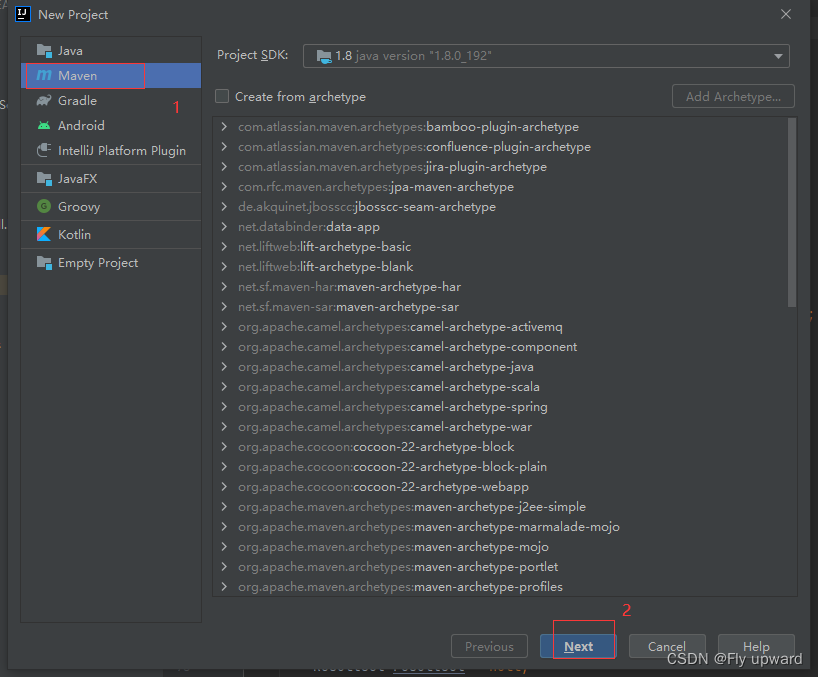
2) 项目创建完毕
创建好之后,会生成一些默认的目录
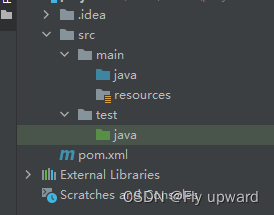
3)添加文件
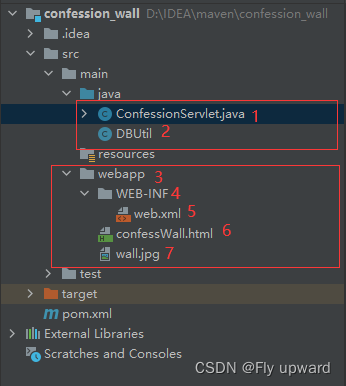
我们需要手动添加6个文件,
一个是在java 路径下建一个ConfessionServlet 文件,用来存放服务器代码。
在Java路径下创建 DBUtil 文件,用来与MySQL之间的交互
然后再 main 路径下创建一个webapp文件夹
再在webapp文件夹下创建一个WEB_INF文件夹 、一个 .html文件(用来存放客户端代码)、 一个 .jpg 文件(存放背景图,可以根据自己的喜好来选择图片)
在WEB_INF文件夹下创建 web.xml 文件
<!DOCTYPE web-app PUBLIC
        "-//Sun Microsystems, Inc.//DTD Web Application 2.3//EN"
        "http://java.sun.com/dtd/web-app_2_3.dtd" >
<web-app>
    <display-name>Archetype Created Web Application</display-name>
</web-app>
在pom.xml文件下增加以下代码片段,如果代码出现报红出错状态的话,点击右上角Maven 的刷新图标,等待即可。
<dependencies>
        <!-- https://mvnrepository.com/artifact/javax.servlet/javax.servlet-api -->
        <dependency>
            <groupId>javax.servlet</groupId>
            <artifactId>javax.servlet-api</artifactId>
            <version>3.1.0</version>
            <scope>provided</scope>
        </dependency>

        <!-- https://mvnrepository.com/artifact/com.fasterxml.jackson.core/jackson-databind -->
        <dependency>
            <groupId>com.fasterxml.jackson.core</groupId>
            <artifactId>jackson-databind</artifactId>
            <version>2.12.6.1</version>
        </dependency>

        <!-- 引入  mysql  驱动包       -->
        <!-- https://mvnrepository.com/artifact/mysql/mysql-connector-java -->
        <dependency>
            <groupId>mysql</groupId>
            <artifactId>mysql-connector-java</artifactId>
            <version>5.1.47</version>
        </dependency>

</dependencies>用来存在服务器代码。
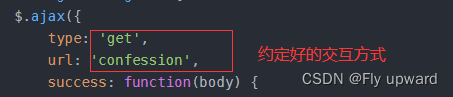
其中 @WebServlet("/confession") 是客户端向服务器约定好的请求方式
import com.fasterxml.jackson.databind.ObjectMapper;

import javax.servlet.ServletException;
import javax.servlet.annotation.WebServlet;
import javax.servlet.http.HttpServlet;
import javax.servlet.http.HttpServletRequest;
import javax.servlet.http.HttpServletResponse;
import java.io.IOException;
import java.sql.Connection;
import java.sql.PreparedStatement;
import java.sql.ResultSet;
import java.sql.SQLException;
import java.util.ArrayList;
import java.util.List;

class Confession {
    public String from;
    public String to;
    public String confession;
}

@WebServlet("/confession")
public class ConfessionServlet extends HttpServlet {
    private ObjectMapper objectMapper = new ObjectMapper();
    @Override
    protected void doPost(HttpServletRequest req, HttpServletResponse resp) throws ServletException, IOException {
        //处理提交消息请求
        Confession confession = objectMapper.readValue(req.getInputStream(),Confession.class);
        //保存到内存中
        // 通过 ContentType 来告知页面, 返回的数据是 json 格式.
        // 有了这样的声明, 此时 jquery ajax 就会自动的帮我们把字符串转成 js 对象.
        // 如果没有, jquery ajax 就只是当成字符串来处理的
        save(confession);
        resp.setContentType("application/json; charset=utf8");
        resp.getWriter().write("{\"ok\":true}");
    }

    @Override
    protected void doGet(HttpServletRequest req, HttpServletResponse resp) throws ServletException, IOException {
        //获取到消息列表,只要把消息列表中的内容整个都返回给客户端即可
        //此处需要使用objectMapper 把 Java 对象,转换成json 格式的字符串
        List<Confession> confessions = load();
        String jsonString = objectMapper.writeValueAsString(confessions);
        System.out.println("jsonString: " + jsonString);
        resp.setContentType("application/json; charset=utf8");
        resp.getWriter().write(jsonString);
    }

    private void save(Confession confession)  {
        //把第一条消息保存到数据库中
        Connection connection = null;
        PreparedStatement statement = null;

        //1.和数据库建立连接
        try {
            connection = DBUtil.getConnection();
            //2.构造 SQL
            String sql = "insert into confession values(?, ?, ?)";
            statement = connection.prepareStatement(sql);
            statement.setString(1,confession.from);
            statement.setString(2,confession.to);
            statement.setString(3,confession.confession);
            //3.执行SQL
            statement.executeUpdate();
        } catch (SQLException e) {
            e.printStackTrace();
        } finally {
            //关闭连接,释放资源
            DBUtil.close(connection,statement,null);
        }
    }

    private List<Confession> load() {
        //从数据库中获取到所有的消息
        List<Confession> confessions = new ArrayList<>();
        Connection connection = null;
        PreparedStatement statement = null;
        ResultSet resultSet = null;
        try {
            connection = DBUtil.getConnection();
            String sql = "select * from confession";
            statement = connection.prepareStatement(sql);
            resultSet = statement.executeQuery();
            while (resultSet.next()) {
                Confession confession = new Confession();
                confession.from = resultSet.getString("from");
                confession.from = resultSet.getString("to");
                confession.from = resultSet.getString("confession");
                confessions.add(confession);
            }
        } catch (SQLException throwables) {
            throwables.printStackTrace();
        } finally {
            DBUtil.close(connection, statement, resultSet);
        }
        return confessions;
    }

}
这个类是用来与Mysql 建立连接,将表白的话存放到 Mysql 中,使用到的是JDBC编程。
使用JDBC基本流程:
1.创建数据源
2.和数据库建立连接
3.构造sq|语句
4.执行sq|语句
5.如果是查询语句,需要遍历结果集.如果是插入/删除/修改,则不需要
6.关闭连接,释放资源
import com.mysql.jdbc.jdbc2.optional.MysqlDataSource;
import javax.sql.DataSource;
import java.sql.Connection;
import java.sql.PreparedStatement;
import java.sql.ResultSet;
import java.sql.SQLException;

public class DBUtil {
    //与数据库建立连接
    private static final String URL = "jdbc:mysql://127.0.0.1:3306/java?characterEncoding=utf8&useSSL=false";
    private static final String USERNAME = "root";
    private static final String PASSWORD = "123456";

    private volatile static DataSource dataSource = null;

    private static DataSource getDataSource() {
        if (dataSource == null) {
            synchronized (DBUtil.class) {
                if (dataSource == null) {
                    dataSource = new MysqlDataSource();
                    ((MysqlDataSource)dataSource).setUrl(URL);
                    ((MysqlDataSource)dataSource).setUser(USERNAME);
                    ((MysqlDataSource)dataSource).setPassword(PASSWORD);
                }
            }
        }
        return dataSource;
    }

    public static Connection getConnection() throws SQLException {
        return getDataSource().getConnection();
    }

    public static void close(Connection connection, PreparedStatement statement, ResultSet resultSet) {
        if (resultSet != null) {
            try {
                resultSet.close();
            } catch (SQLException e) {
                e.printStackTrace();
            }
        }
        if (statement != null) {
            try {
                statement.close();
            } catch (SQLException e) {
                e.printStackTrace();
            }
        }
        if (connection != null) {
            try {
                connection.close();
            } catch (SQLException e) {
                e.printStackTrace();
            }
        }
    }
}
在上述代码中

这个代码是客户端代码
<!DOCTYPE html>
<html lang="en">

<head>
    <meta charset="UTF-8">
    <meta http-equiv="X-UA-Compatible" content="IE=edge">
    <meta name="viewport" content="width=device-width, initial-scale=1.0">
    <title>表白墙</title>
</head>

<body>
    <style>
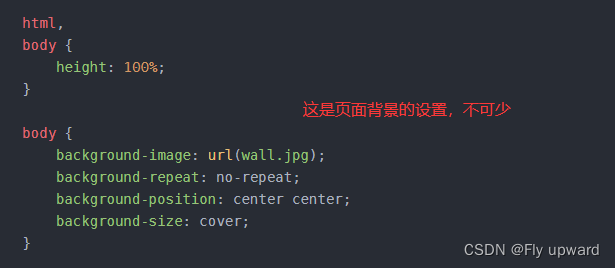
        /* 整个页面放背景图的,html, 不可少*/

        html,
        body {
            height: 100%;
        }

        body {
            background-image: url(wall.jpg);
            background-repeat: no-repeat;
            background-position: center center;
            background-size: cover;
        }

        * {
            margin: 0;
            padding: 0;
            box-sizing: border-box;
        }

        .container {
            width: 100%;
        }

        h3 {
            text-align: center;
            padding: 30px 0;
            font-size: 24px;
            color: black;
        }

        p {
            text-align: center;
            color: rgb(241, 236, 35);
            padding: 10px 0;
        }

        .row {
            width: 400px;
            height: 50px;
            margin: 0 auto;
            display: flex;
            justify-content: center;
            align-items: center;
        }

        .row span {
            width: 60px;
            font-size: 20px;
            /* color: azure; */
        }

        .row input {
            width: 300px;
            height: 40px;
            line-height: 40px;
            font-size: 20px;
            text-indent: 0.5em;
            /* 去掉输入框的轮廓线 */
            outline: none;
        }

        .row #submit {
            width: 200px;
            height: 40px;
            font-size: 20px;
            line-height: 40px;
            margin: 0 auto;
            color: white;
            background-color: rgb(241, 238, 35);
            /* 去掉框的轮廓线 */
            border: none;
            border-radius: 10px;
        }

        .row #submit:active {
            background-color: gray;
        }
    </style>


    <div class="container">
        <h3>表白墙</h3>
        <p>欢迎来到表白墙,勇敢说出你心灵深处的爱吧!</p>
        <div class="row">
            <span>谁:</span>
            <input type="text">
        </div>
        <div class="row">
            <span>对谁:</span>
            <input type="text">
        </div>
        <div class="row">
            <span>说:</span>
            <input type="text">
        </div>
        <div class="row">
            <button id="submit">提交</button>
        </div>
    </div>

    <script src="https://cdn.bootcdn.net/ajax/libs/jquery/3.6.0/jquery.min.js"></script>
    <script>
        //加入Ajax的代码,此处加入的逻辑有两部分
        //1) 点击按钮提交的时候,Ajax 要构造数据发送给服务器,
        // 2) 页面加载的时候,从服务器获取消息列表,并在界面上显示
        function getMessages() {
            $.ajax({
                type: 'get',
                url: 'confession',
                success: function(body) {
                    //当前body 已经是一个js 对象数组了,Ajax 会根据响应的 content type 来进行解析
                    //如果服务器返回的content-type 已经是application/json 了,Ajax就会把body自动转换成js对象
                    //如果客户端没有自动链接,也可以通过JSON.parse() 这个函数自动转换

                    //依次来取数组转换的每个元素
                    let container = document.querySelector('.container');
                    for (let confession of body) {
                        let div = document.createElement('div');
                        div.innerHTML = from + ' 对 ' + to + ' 说: ' + msg;
                        div.className = 'row';
                        container.appendChild(div);
                    }
                }
            });
        }
        //加上函数调用
        getMessages();

        // 当用户点击 submit, 就会获取到 input 中的内容, 从而把内容构造成一个 div, 插入到页面末尾
        let submitBtn = document.querySelector('#submit');
        submitBtn.onclick = function() {
            // 1.获取到3个input中的内容
            let inputs = document.querySelectorAll('input');
            let from = inputs[0].value;
            let to = inputs[1].value;
            let msg = inputs[2].value;
            if (from == '' || to == '' || msg == '') {
                //用户没填写完,暂时部提交数据
                ruturn;
            }
            // 2. 生成一个新的 div, 内容就是 input 里的内容. 把这个新的 div 加到页面中.
            let div = document.createElement('div');
            div.innerHTML = from + ' 对 ' + to + ' 说: ' + msg;
            div.className = 'row';
            let container = document.querySelector('.container');
            container.appendChild(div);
            // 3. 清空之前输入框的内容.
            for (let i = 0; i < inputs.length; i++) {
                inputs[i].value = '';
            }

            //4.把当前获取到的输入框内容,构造成一个HTTP post 请求,通过Ajax 发送给服务器
            let body = {
                from: from,
                to: to,
                confession: msg
            };
            $.ajax({
                type: "post",
                url: "confession",
                contentType: "application/json;charset=utf8",
                data: JSON.stringify(body),
                success: function(body) {
                    alert("表白成功");

                },
                error: function() {
                    alert("表白失败");
                }
            })
        }
    </script>
</body>

</html>
在上述代码中
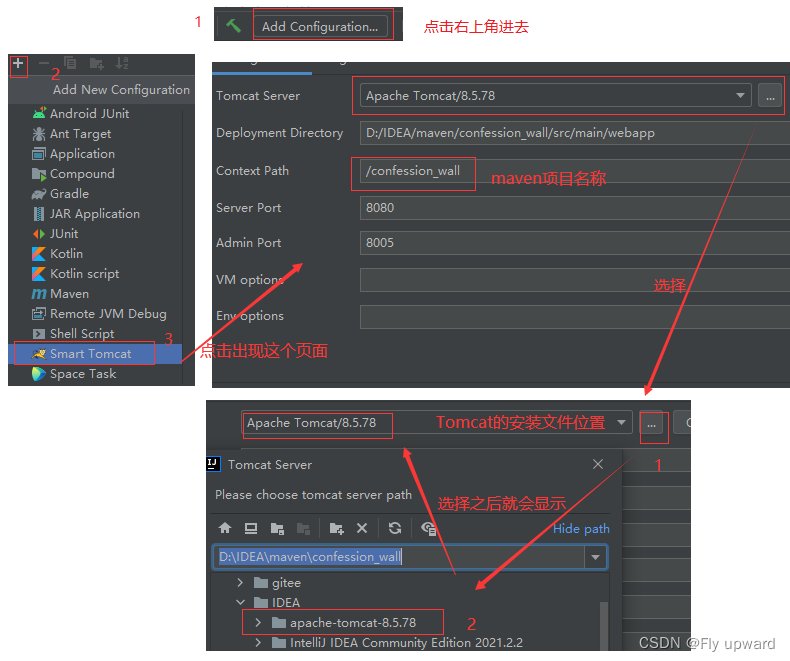
在MySQL创建一个库,然后再库里创建一个表,来保存表白的数据。
其中 from 和 to 使用的是反引号。在键盘的左上角。
create database if not exists confession_wall;

use confession_wall;

drop table if exists confession;
create table confession (
    `from` varchar(1024),
    `to` varchar(1024),
    message varchar(4096)
);将库和表创建到云服务器上,即 xshell 软件

1)先在pom.xml 中增加 war 包的名字
<packaging>war</packaging>
    <build>
        <finalName>confession</finalName>
    </build>
2)DBUtil 类中的密码去掉,如下
 private static final String USERNAME = "root";
 private static final String PASSWORD = "";
3) 打包
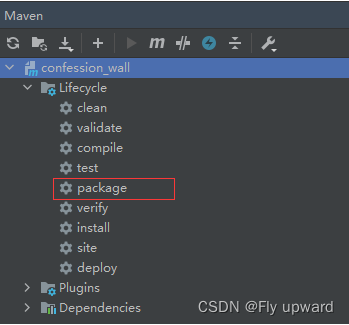
在右上角Maven处找到如下双击打包
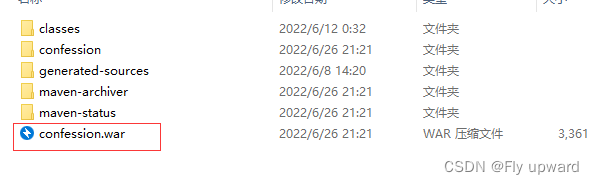
然后再左边目录栏就可以生成 confession.war 包,然后操作如下
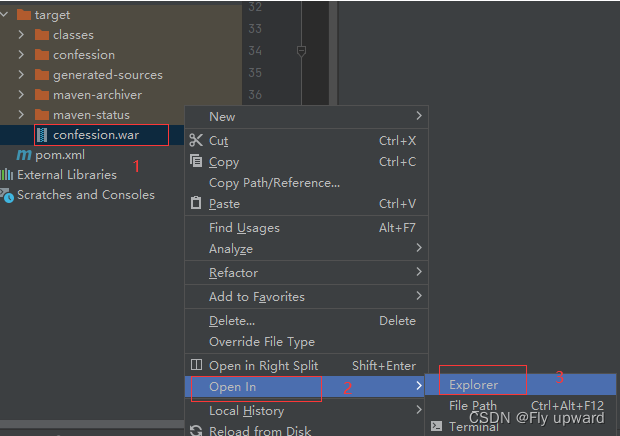
就可以打开 confession.war 所在的文件夹位置
4)部署到云服务器
先在 xshell 中输入以下命令,即打开Tomcat
//打开Tomcat所在的目录

cd java/

//打开安装的Tomcat

cd apache-tomcat-8.5.78/


//打开webapps

cd webapps/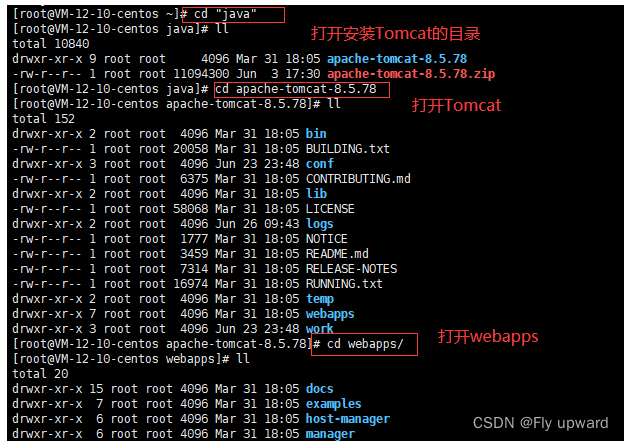
然后 将打包的 confession.war 包拖到 xshell
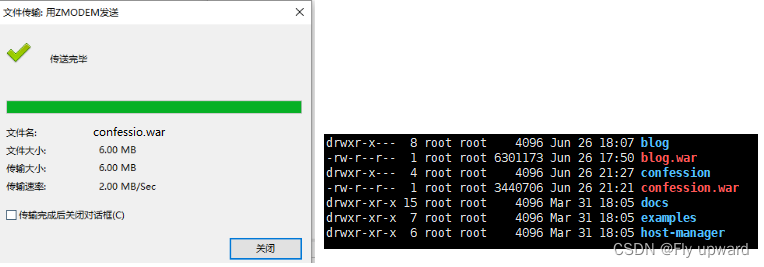
这样子就部署完成
因为我们已经约定好交互方式并且部署好了,所以就可以生成连接:(如果想让别人也放访问到,就需要与云服务器连接,云服务连接在开头。不然只能直接创建项目来部署,自己访问,自己访问连接如下)http://127.0.0.1:8080/confession_wall/confessWall.html
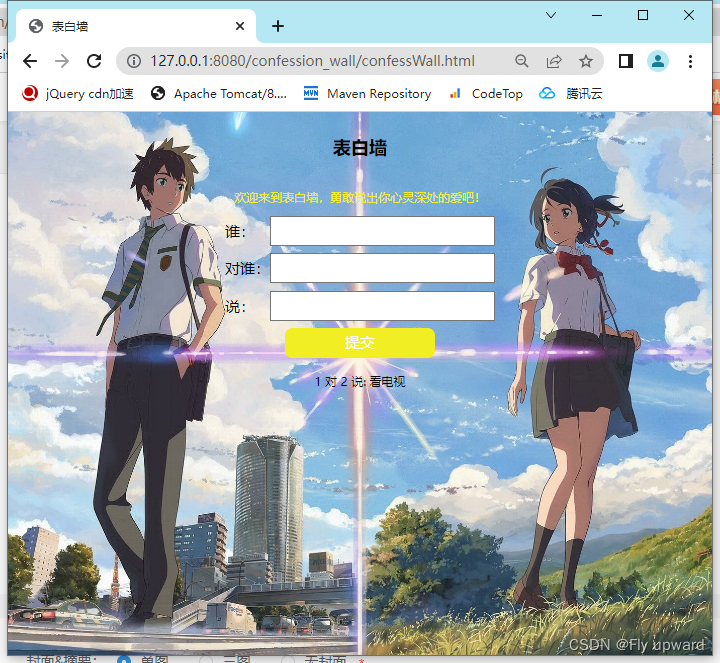
表白的数据存储在数据库
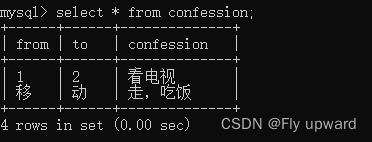
在文中 1-4段 和第6 段是可以单独在idea上面部署的,不过结果只能自己看。第5段是在云服务器上面部署的,部署了别就可以通过连接看到。
使用带有Rails插件的vim,您可以创建一个迁移文件,然后一次性打开该文件吗?textmate也可以这样吗? 最佳答案 你可以使用rails.vim然后做类似的事情::Rgeneratemigratonadd_foo_to_bar插件将打开迁移生成的文件,这正是您想要的。我不能代表textmate。 关于ruby-使用VimRails,您可以创建一个新的迁移文件并一次性打开它吗?,我们在StackOverflow上找到一个类似的问题: https://sta
我需要从一个View访问多个模型。以前,我的links_controller仅用于提供以不同方式排序的链接资源。现在我想包括一个部分(我假设)显示按分数排序的顶级用户(@users=User.all.sort_by(&:score))我知道我可以将此代码插入每个链接操作并从View访问它,但这似乎不是“ruby方式”,我将需要在不久的将来访问更多模型。这可能会变得很脏,是否有针对这种情况的任何技术?注意事项:我认为我的应用程序正朝着单一格式和动态页面内容的方向发展,本质上是一个典型的网络应用程序。我知道before_filter但考虑到我希望应用程序进入的方向,这似乎很麻烦。最终从任何
我想要做的是有2个不同的Controller,client和test_client。客户端Controller已经构建,我想创建一个test_clientController,我可以使用它来玩弄客户端的UI并根据需要进行调整。我主要是想绕过我在客户端中内置的验证及其对加载数据的管理Controller的依赖。所以我希望test_clientController加载示例数据集,然后呈现客户端Controller的索引View,以便我可以调整客户端UI。就是这样。我在test_clients索引方法中试过这个:classTestClientdefindexrender:template=>
如果您尝试在Ruby中的nil对象上调用方法,则会出现NoMethodError异常并显示消息:"undefinedmethod‘...’fornil:NilClass"然而,有一个tryRails中的方法,如果它被发送到一个nil对象,它只返回nil:require'rubygems'require'active_support/all'nil.try(:nonexisting_method)#noNoMethodErrorexceptionanymore那么try如何在内部工作以防止该异常? 最佳答案 像Ruby中的所有其他对象
关闭。这个问题需要detailsorclarity.它目前不接受答案。想改进这个问题吗?通过editingthispost添加细节并澄清问题.关闭8年前。Improvethisquestion为什么SecureRandom.uuid创建一个唯一的字符串?SecureRandom.uuid#=>"35cb4e30-54e1-49f9-b5ce-4134799eb2c0"SecureRandom.uuid方法创建的字符串从不重复?
我有一个正在构建的应用程序,我需要一个模型来创建另一个模型的实例。我希望每辆车都有4个轮胎。汽车模型classCar轮胎模型classTire但是,在make_tires内部有一个错误,如果我为Tire尝试它,则没有用于创建或新建的activerecord方法。当我检查轮胎时,它没有这些方法。我该如何补救?错误是这样的:未定义的方法'create'forActiveRecord::AttributeMethods::Serialization::Tire::Module我测试了两个环境:测试和开发,它们都因相同的错误而失败。 最佳答案
我想在Ruby中创建一个用于开发目的的极其简单的Web服务器(不,不想使用现成的解决方案)。代码如下:#!/usr/bin/rubyrequire'socket'server=TCPServer.new('127.0.0.1',8080)whileconnection=server.acceptheaders=[]length=0whileline=connection.getsheaders想法是从命令行运行这个脚本,提供另一个脚本,它将在其标准输入上获取请求,并在其标准输出上返回完整的响应。到目前为止一切顺利,但事实证明这真的很脆弱,因为它在第二个请求上中断并出现错误:/usr/b
我想让一个yaml对象引用另一个,如下所示:intro:"Hello,dearuser."registration:$introThanksforregistering!new_message:$introYouhaveanewmessage!上面的语法只是它如何工作的一个例子(这也是它在thiscpanmodule中的工作方式。)我正在使用标准的rubyyaml解析器。这可能吗? 最佳答案 一些yaml对象确实引用了其他对象:irb>require'yaml'#=>trueirb>str="hello"#=>"hello"ir
我的问题的一个例子是体育游戏。一场体育比赛有两支球队,一支主队和一支客队。我的事件记录模型如下:classTeam"Team"has_one:away_team,:class_name=>"Team"end我希望能够通过游戏访问一个团队,例如:Game.find(1).home_team但我收到一个单元化常量错误:Game::team。谁能告诉我我做错了什么?谢谢, 最佳答案 如果Gamehas_one:team那么Rails假设您的teams表有一个game_id列。不过,您想要的是games表有一个team_id列,在这种情况下
Unity自动旋转动画1.开门需要门把手先动,门再动2.关门需要门先动,门把手再动3.中途播放过程中不可以再次进行操作觉得太复杂?查看我的文章开关门简易进阶版效果:如果这个门可以直接打开的话,就不需要放置"门把手"如果门把手还有钥匙需要旋转,那就可以把钥匙放在门把手的"门把手",理论上是可以无限套娃的可调整参数有:角度,反向,轴向,速度运行时点击Test进行测试自己写的代码比较垃圾,命名与结构比较拉,高手轻点喷,新手有类似的需求可以拿去做参考上代码usingSystem.Collections;usingSystem.Collections.Generic;usingUnityEngine;u
