多旋翼无人机仿真 rotors_simulator:用键盘控制无人机飞行
RotorS 是一个MAV gazebo 仿真系统。
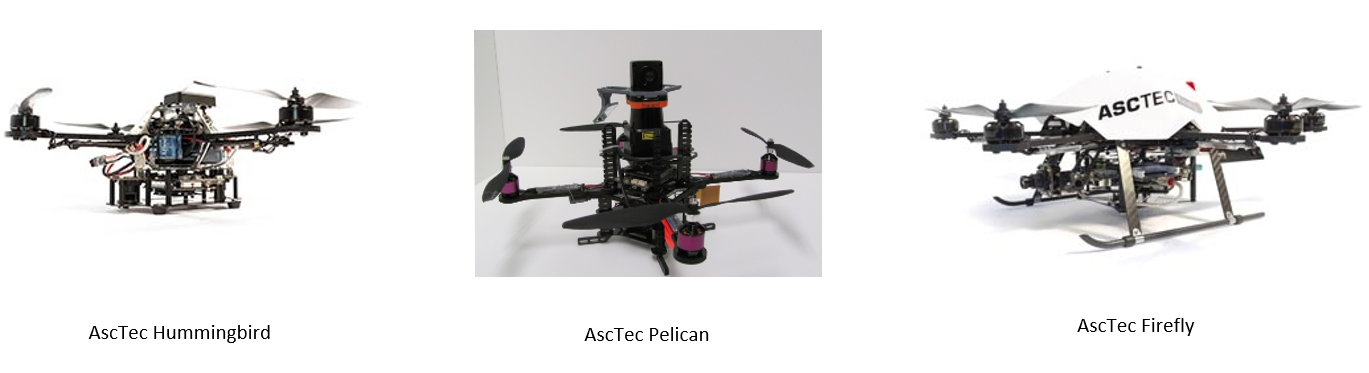
提供了几种多旋翼仿真模型,例如
但是仿真系统不限于使用这几种模型
AscTec 是 德国Ascending Technologies公司的缩写。
是很早的无人机了,实物张下面这个样子:
仿真系统中包含很多种仿真传感器,都可以安装在无人机上,例如:
功能包中包含了几种控制器,包含位置控制,游戏手柄控制灯
github的地址为:https://github.com/ethz-asl/rotors_simulator
在上一篇博客中 : https://www.guyuehome.com/40362 分析了 rotors_simulator 自带的一个控制接口
需要输入 roll pitch yawrate thrust 的指令即可控制无人机的飞行。
但是在那篇文章也说了,它自带的键盘控制的节点功能启动不成功,导致无法在gazebo里控制无人机飞。
本篇博客将基于上篇分析的控制接口,再写一个键盘的指令发布功能,对应到接口指令的转换,来控制无人机先飞起来。
RollPitchYawrateThrustControllerNode.cpp 中
送到控制器的 控制指令变量类型是这个
mav_msgs::EigenRollPitchYawrateThrust
这变量类型的定义是这样的
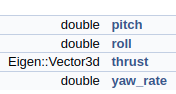
所以推力是 三维 的
给z轴一个推力,那么可以这样写
在里程计的回调函数里
  mav_msgs::EigenRollPitchYawrateThrust roll_pitch_yawrate_thrust;
    // 先自己固定一个控制量
  roll_pitch_yawrate_thrust.roll = 0.1;
  roll_pitch_yawrate_thrust.thrust.z() = 15;

  // 送入控制器中
  roll_pitch_yawrate_thrust_controller_.SetRollPitchYawrateThrust(roll_pitch_yawrate_thrust);
相当于 给一直给 z轴一个15的推力 期望的横滚角是0.1 弧度
可看到飞机横着飞了起来
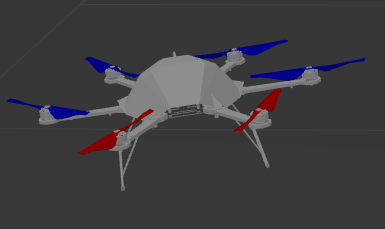
ok,接口测通了,那么可自己写个键盘的指令发送器了。
键盘的指令发布有很多的现成功能包
我使用的最多的就是 teleop_twist_keyboard 这个功能包。
运行的时候终端会出现下面的界面:
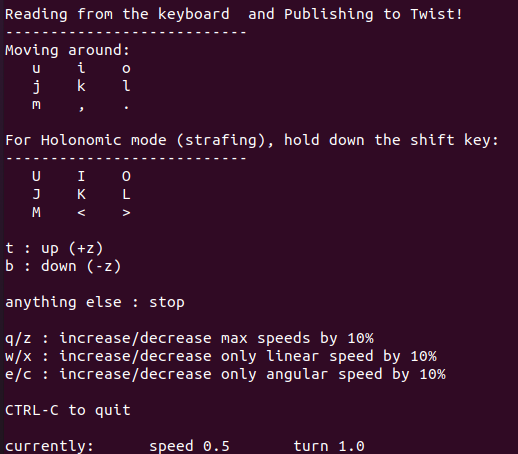
从输出的信息上可以看出,其功能是发布Twist的速度控制指令。
其源码如下:
#!/usr/bin/env python

from __future__ import print_function

import roslib; roslib.load_manifest('teleop_twist_keyboard')
import rospy

from geometry_msgs.msg import Twist

import sys, select, termios, tty

msg = """
Reading from the keyboard  and Publishing to Twist!
---------------------------
Moving around:
   u    i    o
   j    k    l
   m    ,    .

For Holonomic mode (strafing), hold down the shift key:
---------------------------
   U    I    O
   J    K    L
   M    <    >

t : up (+z)
b : down (-z)

anything else : stop

q/z : increase/decrease max speeds by 10%
w/x : increase/decrease only linear speed by 10%
e/c : increase/decrease only angular speed by 10%

CTRL-C to quit
"""

moveBindings = {
        'i':(1,0,0,0),
        'o':(1,0,0,-1),
        'j':(0,0,0,1),
        'l':(0,0,0,-1),
        'u':(1,0,0,1),
        ',':(-1,0,0,0),
        '.':(-1,0,0,1),
        'm':(-1,0,0,-1),
        'O':(1,-1,0,0),
        'I':(1,0,0,0),
        'J':(0,1,0,0),
        'L':(0,-1,0,0),
        'U':(1,1,0,0),
        '<':(-1,0,0,0),
        '>':(-1,-1,0,0),
        'M':(-1,1,0,0),
        't':(0,0,1,0),
        'b':(0,0,-1,0),
    }

speedBindings={
        'q':(1.1,1.1),
        'z':(.9,.9),
        'w':(1.1,1),
        'x':(.9,1),
        'e':(1,1.1),
        'c':(1,.9),
    }

def getKey():
    tty.setraw(sys.stdin.fileno())
    select.select([sys.stdin], [], [], 0)
    key = sys.stdin.read(1)
    termios.tcsetattr(sys.stdin, termios.TCSADRAIN, settings)
    return key


def vels(speed,turn):
    return "currently:\tspeed %s\tturn %s " % (speed,turn)

if __name__=="__main__":
    settings = termios.tcgetattr(sys.stdin)

    pub = rospy.Publisher('cmd_vel', Twist, queue_size = 1)
    rospy.init_node('teleop_twist_keyboard')

    speed = rospy.get_param("~speed", 0.5)
    turn = rospy.get_param("~turn", 1.0)
    x = 0
    y = 0
    z = 0
    th = 0
    status = 0

    try:
        print(msg)
        print(vels(speed,turn))
        while(1):
            key = getKey()
            if key in moveBindings.keys():
                x = moveBindings[key][0]
                y = moveBindings[key][1]
                z = moveBindings[key][2]
                th = moveBindings[key][3]
            elif key in speedBindings.keys():
                speed = speed * speedBindings[key][0]
                turn = turn * speedBindings[key][1]

                print(vels(speed,turn))
                if (status == 14):
                    print(msg)
                status = (status + 1) % 15
            else:
                x = 0
                y = 0
                z = 0
                th = 0
                if (key == '\x03'):
                    break

            twist = Twist()
            twist.linear.x = x*speed; twist.linear.y = y*speed; twist.linear.z = z*speed;
            twist.angular.x = 0; twist.angular.y = 0; twist.angular.z = th*turn
            pub.publish(twist)

    except Exception as e:
        print(e)

    finally:
        twist = Twist()
        twist.linear.x = 0; twist.linear.y = 0; twist.linear.z = 0
        twist.angular.x = 0; twist.angular.y = 0; twist.angular.z = 0
        pub.publish(twist)

        termios.tcsetattr(sys.stdin, termios.TCSADRAIN, settings)
通过查看源码可知,该功能包最终通过扫描键盘按键,
最终发布 topic 名称为 cmd_vel 的消息
消息的格式为:geometry_msgs::Twist
由于键盘指令发布功能包 发布的命令和rotors_simulator我想用的控制接口的命令不一致
所以需要写一个节点来进行控制指令的转换
下面给出指令转换节点的 核心思想和重要代码
ros::Subscriber keyboard_cmd_vel_sub_;
声明订阅句柄
keyboard_cmd_vel_sub_ = nh.subscribe("/cmd_vel",1,&PidPositionControllerNode::KeyboardCmdVelCallback,this);
订阅句柄赋值 /cmd_vel 就是键盘指令发布节点发布的topic的名称
然后实现其回调函数
    void KeyboardCmdVelCallback(const geometry_msgs::TwistConstPtr& cmdvel_msg)
    {
        // 取出指令
        geometry_msgs::Twist cmd_vel = *cmdvel_msg;

        roll =gain_roll* cmd_vel.linear.x ;
        pitch = gain_pitch*  cmd_vel.linear.y ;
        thrust = gain_thrust*  cmd_vel.linear.z ;
        yawrate = gain_yawrate*  cmd_vel.angular.z ;
    }
将指令转换成 roll pitch thrust yawrate的指令
ros::Publisher Control_RollPitchYawrateThrust_pub_;
声明转换后指令的发布句柄
Control_RollPitchYawrateThrust_pub_ = nh.advertise<mav_msgs::RollPitchYawrateThrust>("control_keyboard_cmd",1);
赋值句柄,将发布的消息名称定义为:control_keyboard_cmd
    void PubControlMsg()
    {
        // 控制量
        mav_msgs::RollPitchYawrateThrust roll_pitch_yawrate_thrust;
        roll_pitch_yawrate_thrust.thrust.z= thrust_z;
        roll_pitch_yawrate_thrust.roll = roll_;
        roll_pitch_yawrate_thrust.pitch = pitch_;
        roll_pitch_yawrate_thrust.yaw_rate = yawrate_;
        Control_RollPitchYawrateThrust_pub_.publish(roll_pitch_yawrate_thrust);
    }
最后写一个发布指令msg的函数,完成对接口指令的发布
下面需要做的就是修改rotors_simulator的控制接口节点
也就是roll_pitch_yawrate_thrust_controller_node.cpp
ros::Subscriber Control_RollPitchYawrateThrust_sub_;
声明订阅指令的句柄
  Control_RollPitchYawrateThrust_sub_ = nh.subscribe("/control_pid_pos", 1,
                                     &RollPitchYawrateThrustControllerNode::ControlCallback, this);
赋值订阅句柄,消息名称要是 control_keyboard_cmd 和上面的能对应上
// 控制指令回调函数
void RollPitchYawrateThrustControllerNode::ControlCallback(
    const mav_msgs::RollPitchYawrateThrustConstPtr& roll_pitch_yawrate_thrust_reference_msg) {

  // 转成eigen的格式
  mav_msgs::EigenRollPitchYawrateThrust roll_pitch_yawrate_thrust;
  mav_msgs::eigenRollPitchYawrateThrustFromMsg(*roll_pitch_yawrate_thrust_reference_msg, &roll_pitch_yawrate_thrust);

  // 送入控制器中
  roll_pitch_yawrate_thrust_controller_.SetRollPitchYawrateThrust(roll_pitch_yawrate_thrust);
}
在回调函数中,将接收的指令,完成对控制器的输送。
下面则可以打开 gazebo 和控制节点、键盘发布节点和指令转换节点,来进行测试了。
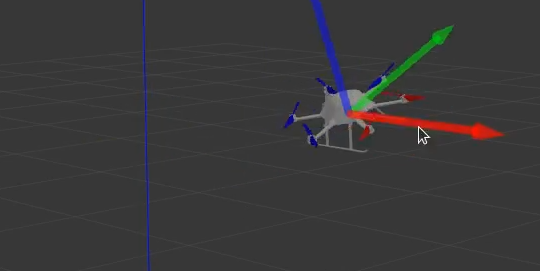
无人机可以按照期望的指令飞行。
但是无人机非常的不好控制,比如上下需要不断的改变推力,使得无人机高度保持。
也需要不断的改变姿态,使得无人机不至于飘的太远。
这是因为控制接口实现的仅是姿态控制,垂直上,没有实现闭环控制。
下一节将基于roll pitch yawrate thrust 控制接口,并订阅无人机里程计数据,实现pid闭环控制。使得无人机飞行更加稳定。
当我在Rails控制台中按向上或向左箭头时,出现此错误:irb(main):001:0>/Users/me/.rvm/gems/ruby-2.0.0-p247/gems/rb-readline-0.4.2/lib/rbreadline.rb:4269:in`blockin_rl_dispatch_subseq':invalidbytesequenceinUTF-8(ArgumentError)我使用rvm来管理我的ruby安装。我正在使用=>ruby-2.0.0-p247[x86_64]我使用bundle来管理我的gem,并且我有rb-readline(0.4.2)(人们推荐的最少
我正在使用Ruby2.1.1和Rails4.1.0.rc1。当执行railsc时,它被锁定了。使用Ctrl-C停止,我得到以下错误日志:~/.rvm/gems/ruby-2.1.1/gems/spring-1.1.2/lib/spring/client/run.rb:47:in`gets':Interruptfrom~/.rvm/gems/ruby-2.1.1/gems/spring-1.1.2/lib/spring/client/run.rb:47:in`verify_server_version'from~/.rvm/gems/ruby-2.1.1/gems/spring-1.1.
我将我的Rails应用程序部署到OpenShift,它运行良好,但我无法在生产服务器上运行“Rails控制台”。它给了我这个错误。我该如何解决这个问题?我尝试更新rubygems,但它也给出了权限被拒绝的错误,我也无法做到。railsc错误:Warning:You'reusingRubygems1.8.24withSpring.UpgradetoatleastRubygems2.1.0andrun`gempristine--all`forbetterstartupperformance./opt/rh/ruby193/root/usr/share/rubygems/rubygems
我正在尝试在Ruby中制作一个cli应用程序,它接受一个给定的数组,然后将其显示为一个列表,我可以使用箭头键浏览它。我觉得我已经在Ruby中看到一个库已经这样做了,但我记不起它的名字了。我正在尝试对soundcloud2000中的代码进行逆向工程做类似的事情,但他的代码与SoundcloudAPI的使用紧密耦合。我知道cursesgem,我正在考虑更抽象的东西。广告有没有人见过可以做到这一点的库或一些概念证明的Ruby代码可以做到这一点? 最佳答案 我不知道这是否是您正在寻找的,但也许您可以使用我的想法。由于我没有关于您要完成的工作
说在前面这部分我本来是合为一篇来写的,因为目的是一样的,都是通过独立按键来控制LED闪灭本质上是起到开关的作用,即调用函数和中断函数。但是写一篇太累了,我还是决定分为两篇写,这篇是调用函数篇。在本篇中你主要看到这些东西!!!1.调用函数的方法(主要讲语法和格式)2.独立按键如何控制LED亮灭3.程序中的一些细节(软件消抖等)1.调用函数的方法思路还是比较清晰地,就是通过按下按键来控制LED闪灭,即每按下一次,LED取反一次。重要的是,把按键与LED联系在一起。我打算用K1来作为开关,看了一下开发板原理图,K1连接的是单片机的P31口,当按下K1时,P31是与GND相连的,也就是说,当我按下去时
在我的Character模型中,我添加了:字符.rbbefore_savedoself.profile_picture_url=asset_path('icon.png')end但是,对于数据库中已存在的所有角色,它们的profile_picture_url为nil。因此,我想进入控制台并遍历所有这些并进行设置。在我试过的控制台中:Character.find_eachdo|c|c.profile_picture_url=asset_path('icon.png')end但这给出了错误:NoMethodError:undefinedmethod`asset_path'formain:O
当我进入Rails控制台时,我已将pry设置为加载代替irb。我找不到该页面或不记得如何将其恢复为默认行为,因为它似乎干扰了我的Rubymine调试器。有什么建议吗? 最佳答案 我刚发现问题,pry-railsgem。忘记了它的目的是让“railsconsole”打开pry。 关于ruby-on-rails-带有Pry的Rails控制台,我们在StackOverflow上找到一个类似的问题: https://stackoverflow.com/question
我正在尝试将$stdout设置为临时写入一个文件,然后返回到一个文件。test.rb:old_stdout=$stdout$stdout.reopen("mytestfile.out",'w+')puts"thisgoesinmytestfile"$stdout=old_stdoutputs"thisshouldbeontheconsole"$stdout.reopen("mytestfile1.out",'w+')puts"thisgoesinmytestfile1:"$stdout=old_stdoutputs"thisshouldbebackontheconsole"这是输出。r
我在思考流量控制的最佳实践。我应该走哪条路?1)不要检查任何东西并让程序失败(更清晰的代码,自然的错误消息):defself.fetch(feed_id)feed=Feed.find(feed_id)feed.fetchend2)通过返回nil静默失败(但是,“CleanCode”说,你永远不应该返回null):defself.fetch(feed_id)returnunlessfeed_idfeed=Feed.find(feed_id)returnunlessfeedfeed.fetchend3)抛出异常(因为不按id查找feed是异常的):defself.fetch(feed_id
我真的只是不确定这意味着什么或我应该做什么才能让网页在我的本地主机上运行。现在它只是显示一个错误,上面写着“我们很抱歉,但出了点问题。”当我运行railsserver并在chrome中打开localhost:3000时。这是控制台输出:StartedGET"/users/sign_in"for127.0.0.1at2013-07-0512:07:07-0400ProcessingbyDevise::SessionsController#newasHTMLCompleted500InternalServerErrorin55msNoMethodError(undefinedmethod`
