Interpolator 被用来修饰动画效果,定义动画的变化率。在Android源码中对应的接口类为TimeInterpolator,通过输入均匀变化的0~1之间的值,可以得到匀速、正加速、负加速、无规则变加速等0~1之间的变化曲线。
曲线举例:
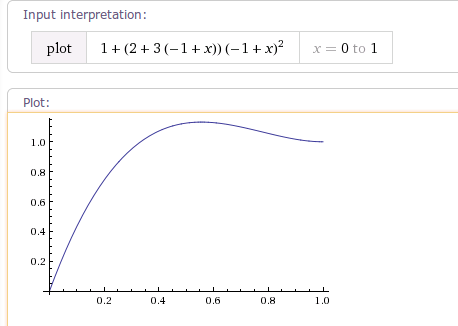
如下图所示,为Android源码中OvershootInterpolator插值器变化率曲线。
输入为均匀变化0~1.0f之间浮点值,输出为先加速超过临界值1.0f 再慢慢又回落到1.0f 连续变化的浮点值。
效果举例:
使用OvershootInterpolator动画插值器后,动画的运行效果如下所示:

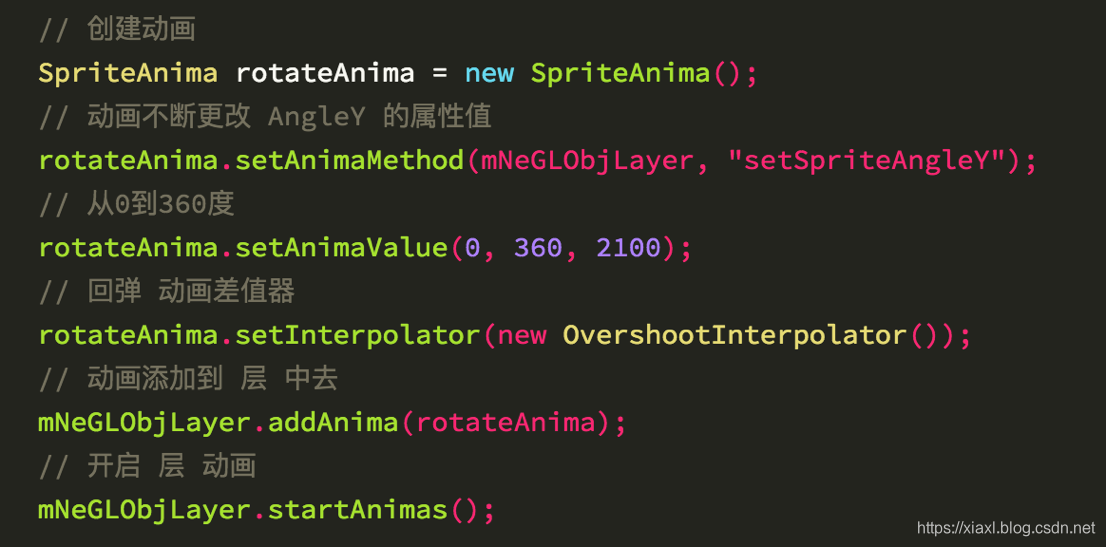
上图中,旋转放大效果中,旋转动画就是使用了OvershootInterpolator动画插值器。
可以看到3D勋章 360度旋转时,旋转角度先超过了360度,然后慢慢又回到了360度位置,从而呈现一个回弹的视觉效果。
注:
了解 3D勋章具体实现,参考文章《3D勋章实现方案》:
https://xiaxl.blog.csdn.net/article/details/77048507
Android源码中使用 TimeInterpolator 接口修饰动画效果,定义动画的变化率。
代码位于android.animation包下,只包含一个抽象方法为getInterpolation(float input)。
// 位于android.animation包下
package android.animation;
// Android源码中的 动画插值器
public interface TimeInterpolator {
	// 差值计算(输入为0~1.0f之间的浮点值,输出为连续的变化率曲线)
    float getInterpolation(float input);
}
TimeInterpolator接口类中,只有一个方法float getInterpolation(float input),根据输入的浮点值input(0~1.0f之间),输出为连续的变化率曲线。
Android中动画插值器的使用方式如下:
// view 位移动画
AnimatorSet localAnimatorSet = new AnimatorSet();
float[] arrayOfFloat = new float[2];
arrayOfFloat[0] = y0;
arrayOfFloat[1] = y1;
// 位移动画使用了 DecelerateInterpolator() 动画插值器
// 动画效果:先位移超过临界值,再回到临界值
ObjectAnimator localObjectAnimator = ObjectAnimator.ofFloat(view,
    "translationY", arrayOfFloat);
localObjectAnimator.setDuration(240L);
localObjectAnimator.setInterpolator(new DecelerateInterpolator());
localAnimatorSet.play(localObjectAnimator);
localAnimatorSet.start();
TimeInterpolator为接口类,其有如下接口实现类。
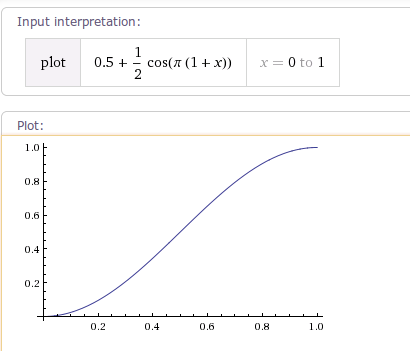
AccelerateDecelerateInterpolator 该插值器运动曲线 两边慢 中间快,其运动曲线如下图所示:
/**
 * An interpolator where the rate of change starts and ends slowly but
 * accelerates through the middle.
 * 两边慢 中间快
 */
public class AccelerateDecelerateInterpolator extends BaseInterpolator
        implements NativeInterpolatorFactory {
    public AccelerateDecelerateInterpolator() {
    }

    public float getInterpolation(float input) {
        return (float)(Math.cos((input + 1) * Math.PI) / 2.0f) + 0.5f;
    }
}
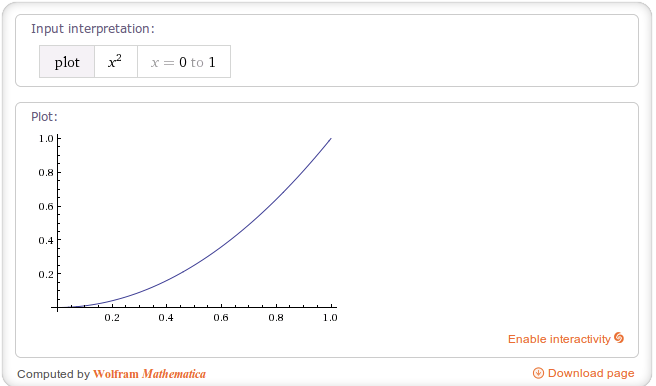
AccelerateInterpolator 该插值器运动曲线 先慢 后快,其运动曲线如下图所示(factor值为1):
/**
 * An interpolator where the rate of change starts out slowly and
 * and then accelerates.
 * 先慢 后快
 */
public class AccelerateInterpolator extends BaseInterpolator implements NativeInterpolatorFactory {
    private final float mFactor;
    private final double mDoubleFactor;

    public AccelerateInterpolator() {
        mFactor = 1.0f;
        mDoubleFactor = 2.0;
    }

    /**
     * Constructor
     *
     * @param factor Degree to which the animation should be eased. Seting
     *        factor to 1.0f produces a y=x^2 parabola. Increasing factor above
     *        1.0f  exaggerates the ease-in effect (i.e., it starts even
     *        slower and ends evens faster)
     */
    public AccelerateInterpolator(float factor) {
        mFactor = factor;
        mDoubleFactor = 2 * mFactor;
    }


    public float getInterpolation(float input) {
        if (mFactor == 1.0f) {
            return input * input;
        } else {
            return (float)Math.pow(input, mDoubleFactor);
        }
    }
}
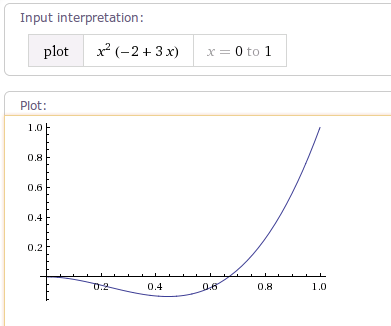
AnticipateInterpolator 该插值器运动曲线 先向后超过临界值,再快速向前,像一个回荡的秋千,因此被称为回荡秋千插值器曲线图如下:
/**
 * An interpolator where the change starts backward then flings forward.
 * 先向后 再向前
 */
public class AnticipateInterpolator extends BaseInterpolator implements NativeInterpolatorFactory {
    private final float mTension;

    public AnticipateInterpolator() {
        mTension = 2.0f;
    }

    /**
     * @param tension Amount of anticipation. When tension equals 0.0f, there is
     *                no anticipation and the interpolator becomes a simple
     *                acceleration interpolator.
     */
    public AnticipateInterpolator(float tension) {
        mTension = tension;
    }

    public float getInterpolation(float t) {
        // a(t) = t * t * ((tension + 1) * t - tension)
        return t * t * ((mTension + 1) * t - mTension);
    }
}
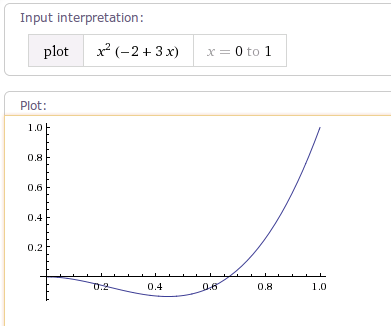
AnticipateOvershootInterpolator 该插值器运动曲线 先向后运动 超过临界值,再快速向前运动到达临界值,其运动曲线如下图所示:
/**
 * An interpolator where the change starts backward then flings forward and overshoots
 * the target value and finally goes back to the final value.
 * 先向后运动 超过临界值,再快速向前运动超过临界值,最后慢慢回到临界值
 */
public class AnticipateOvershootInterpolator extends BaseInterpolator
        implements NativeInterpolatorFactory {
    private final float mTension;

    public AnticipateOvershootInterpolator() {
        mTension = 2.0f * 1.5f;
    }

    /**
     * @param tension Amount of anticipation/overshoot. When tension equals 0.0f,
     *                there is no anticipation/overshoot and the interpolator becomes
     *                a simple acceleration/deceleration interpolator.
     */
    public AnticipateOvershootInterpolator(float tension) {
        mTension = tension * 1.5f;
    }

    /**
     * @param tension Amount of anticipation/overshoot. When tension equals 0.0f,
     *                there is no anticipation/overshoot and the interpolator becomes
     *                a simple acceleration/deceleration interpolator.
     * @param extraTension Amount by which to multiply the tension. For instance,
     *                     to get the same overshoot as an OvershootInterpolator with
     *                     a tension of 2.0f, you would use an extraTension of 1.5f.
     */
    public AnticipateOvershootInterpolator(float tension, float extraTension) {
        mTension = tension * extraTension;
    }

    private static float a(float t, float s) {
        return t * t * ((s + 1) * t - s);
    }

    private static float o(float t, float s) {
        return t * t * ((s + 1) * t + s);
    }

    public float getInterpolation(float t) {
        // a(t, s) = t * t * ((s + 1) * t - s)
        // o(t, s) = t * t * ((s + 1) * t + s)
        // f(t) = 0.5 * a(t * 2, tension * extraTension), when t < 0.5
        // f(t) = 0.5 * (o(t * 2 - 2, tension * extraTension) + 2), when t <= 1.0
        if (t < 0.5f) return 0.5f * a(t * 2.0f, mTension);
        else return 0.5f * (o(t * 2.0f - 2.0f, mTension) + 2.0f);
    }
}
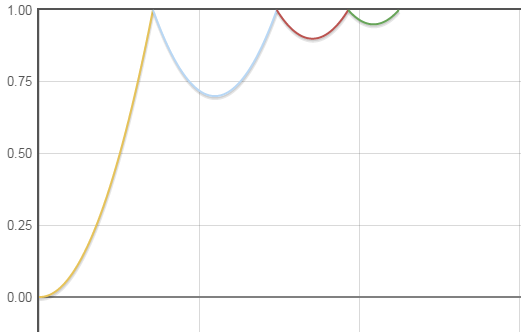
BounceInterpolator 该插值器运动曲线 快速运动到临界值后,进行几次回跳,类似一个从高空坠落篮球的运动曲线,其运动曲线如下图所示:
/**
 * An interpolator where the change bounces at the end.
 * 快速运动到临界值后,进行几次回跳,类似一个从高空坠落篮球的运动曲线。
 */
public class BounceInterpolator extends BaseInterpolator implements NativeInterpolatorFactory {
    public BounceInterpolator() {
    }

    private static float bounce(float t) {
        return t * t * 8.0f;
    }

    public float getInterpolation(float t) {
        // _b(t) = t * t * 8
        // bs(t) = _b(t) for t < 0.3535
        // bs(t) = _b(t - 0.54719) + 0.7 for t < 0.7408
        // bs(t) = _b(t - 0.8526) + 0.9 for t < 0.9644
        // bs(t) = _b(t - 1.0435) + 0.95 for t <= 1.0
        // b(t) = bs(t * 1.1226)
        t *= 1.1226f;
        if (t < 0.3535f) return bounce(t);
        else if (t < 0.7408f) return bounce(t - 0.54719f) + 0.7f;
        else if (t < 0.9644f) return bounce(t - 0.8526f) + 0.9f;
        else return bounce(t - 1.0435f) + 0.95f;
    }
}
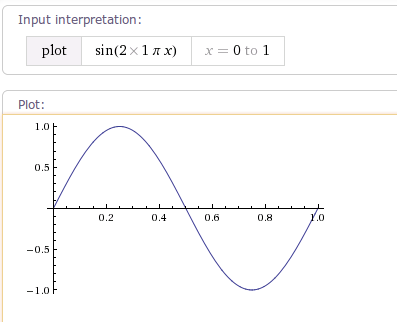
CycleInterpolator 该插值器运动曲线 正弦变化曲线,其运动曲线如下图所示:
/**
 * Repeats the animation for a specified number of cycles. The
 * rate of change follows a sinusoidal pattern.
 * sin正弦变化曲线
 */
@HasNativeInterpolator
public class CycleInterpolator extends BaseInterpolator implements NativeInterpolatorFactory {
    private float mCycles;

    public CycleInterpolator(float cycles) {
        mCycles = cycles;
    }

    public float getInterpolation(float input) {
        return (float)(Math.sin(2 * mCycles * Math.PI * input));
    }
}
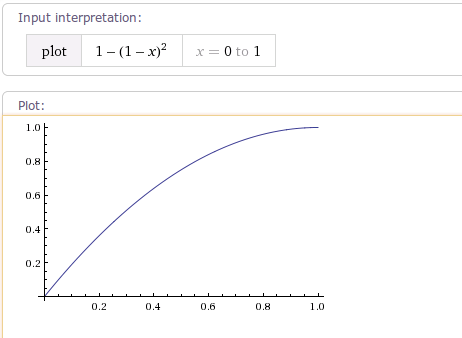
DecelerateInterpolator 该插值器运动曲线 减速插值器变化曲线,其算法为AccelerateInterpolator的完全倒置,同样有DecelerateInterpolator(float factor)构造函数来指定mFactor运动曲线如下图所示(factor值为1):
/**
 * An interpolator where the rate of change starts out quickly and
 * and then decelerates.
 * 减速插值器变化曲线,其算法为AccelerateInterpolator的完全倒置。
 */
public class DecelerateInterpolator extends BaseInterpolator implements NativeInterpolatorFactory {
    private float mFactor = 1.0f;

    public DecelerateInterpolator() {
    }

    /**
     * Constructor
     *
     * @param factor Degree to which the animation should be eased. Setting factor to 1.0f produces
     *        an upside-down y=x^2 parabola. Increasing factor above 1.0f exaggerates the
     *        ease-out effect (i.e., it starts even faster and ends evens slower).
     */
    public DecelerateInterpolator(float factor) {
        mFactor = factor;
    }

    public float getInterpolation(float input) {
        float result;
        if (mFactor == 1.0f) {
            result = (float)(1.0f - (1.0f - input) * (1.0f - input));
        } else {
            result = (float)(1.0f - Math.pow((1.0f - input), 2 * mFactor));
        }
        return result;
    }
}
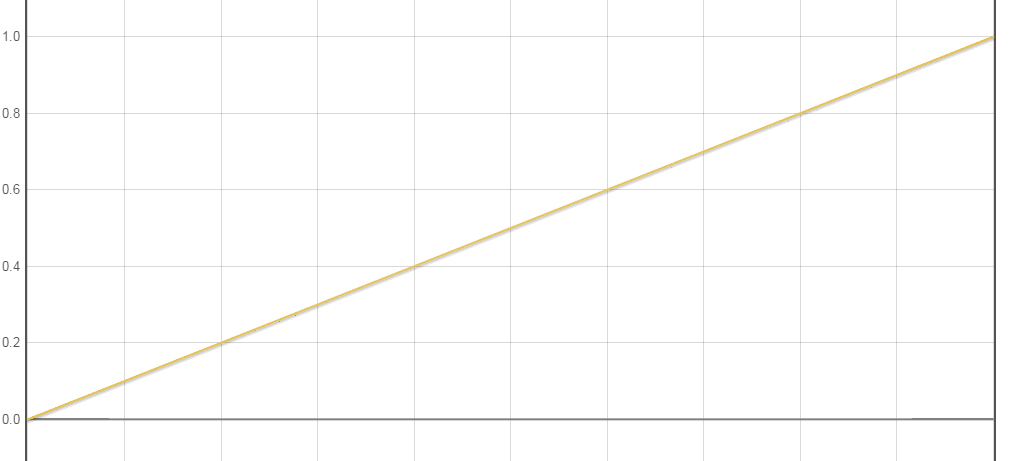
LinearInterpolator 该插值器运动曲线 为0~1之间匀速变化的一条直线,其运动曲线如下图所示:
/**
 * An interpolator where the rate of change starts out quickly and
 * and then decelerates.
 * 为0~1之间匀速变化的一条直线。
 */
/**
 * An interpolator where the rate of change is constant
 */
public class LinearInterpolator extends BaseInterpolator implements NativeInterpolatorFactory {

    public LinearInterpolator() {
    }

    public float getInterpolation(float input) {
        return input;
    }
}
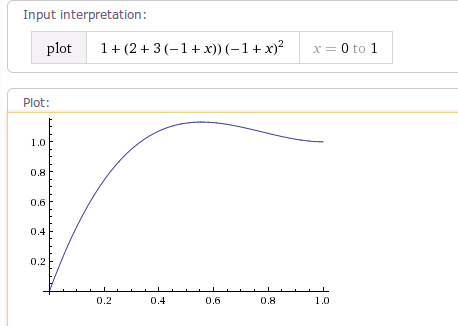
OvershootInterpolator 该插值器运动曲线 先加速超过临界值1.0f 再慢慢又回落到1.0f,有一个回弹的效果。
可使用OvershootInterpolator(float tension)构造函数设置mTension弹力值,mTension值越大,超出目标值的时间点越靠前,超出目标值的回弹距离越大,回弹越明显。
其运动曲线如下图所示:
/**
 * An interpolator where the change flings forward and overshoots the last value
 * then comes back.
 * 先超过临界值 再慢慢回到临界值
 */
public class OvershootInterpolator extends BaseInterpolator implements NativeInterpolatorFactory {
    private final float mTension;

    public OvershootInterpolator() {
        mTension = 2.0f;
    }

    /**
     * @param tension Amount of overshoot. When tension equals 0.0f, there is
     *                no overshoot and the interpolator becomes a simple
     *                deceleration interpolator.
     */
    public OvershootInterpolator(float tension) {
        mTension = tension;
    }

    public float getInterpolation(float t) {
        // _o(t) = t * t * ((tension + 1) * t + tension)
        // o(t) = _o(t - 1) + 1
        t -= 1.0f;
        return t * t * ((mTension + 1) * t + mTension) + 1.0f;
    }
}
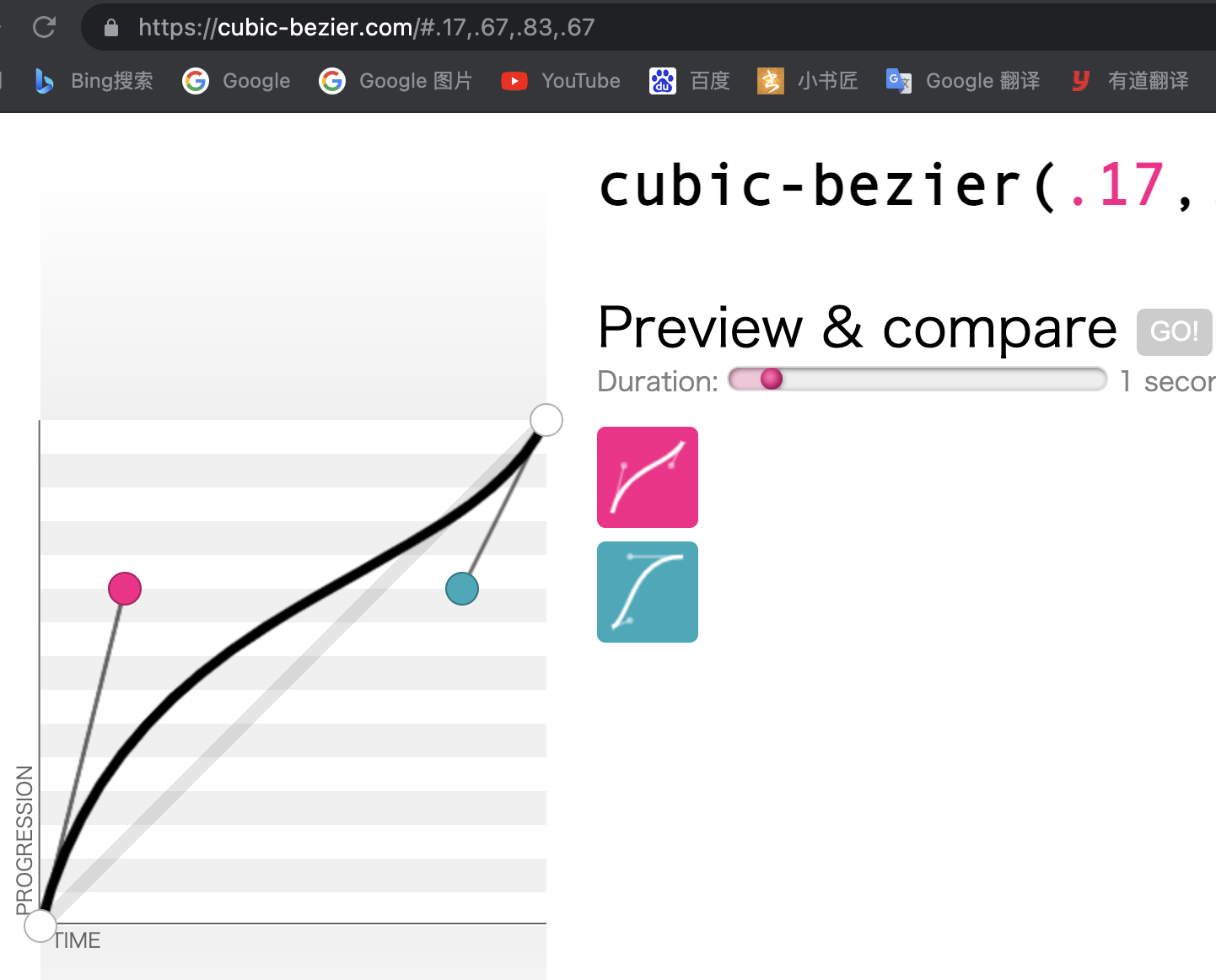
PathInterpolator 可以称之为万能插值器,可以通过PathInterpolator构造一个Path路径 或 通过传入点来构造一个贝塞尔曲线(通过这个贝塞尔曲线,我们可以构造任意的变化曲线)。
//创建一个任意Path的插值器
PathInterpolator(Path path)
//创建一个二阶贝塞尔曲线的插值器
PathInterpolator(float controlX, float controlY)
//创建一个三阶贝塞尔曲线的插值器
PathInterpolator(float controlX1, float controlY1, float controlX2, float controlY2)
贝塞尔曲线的构建,可以使用如下辅助工具 cubic-bezier:
https://cubic-bezier.com/
/**
 * An interpolator that can traverse a Path that extends from <code>Point</code>
 * <code>(0, 0)</code> to <code>(1, 1)</code>. The x coordinate along the <code>Path</code>
 * is the input value and the output is the y coordinate of the line at that point.
 * This means that the Path must conform to a function <code>y = f(x)</code>.
 *
 * <p>The <code>Path</code> must not have gaps in the x direction and must not
 * loop back on itself such that there can be two points sharing the same x coordinate.
 * It is alright to have a disjoint line in the vertical direction:</p>
 * <p><blockquote><pre>
 *     Path path = new Path();
 *     path.lineTo(0.25f, 0.25f);
 *     path.moveTo(0.25f, 0.5f);
 *     path.lineTo(1f, 1f);
 * </pre></blockquote></p>
 * 构造一个普通Path路径或者贝塞尔曲线的插值器
 */
public class PathInterpolator extends BaseInterpolator implements NativeInterpolatorFactory {

    // This governs how accurate the approximation of the Path is.
    private static final float PRECISION = 0.002f;

    private float[] mX; // x coordinates in the line

    private float[] mY; // y coordinates in the line

    /**
     * Create an interpolator for an arbitrary <code>Path</code>. The <code>Path</code>
     * must begin at <code>(0, 0)</code> and end at <code>(1, 1)</code>.
     *
     * @param path The <code>Path</code> to use to make the line representing the interpolator.
     */
    public PathInterpolator(Path path) {
        initPath(path);
    }

    public PathInterpolator(float controlX, float controlY) {
        initQuad(controlX, controlY);
    }

    /**
     * Create an interpolator for a cubic Bezier curve.  The end points
     * <code>(0, 0)</code> and <code>(1, 1)</code> are assumed.
     *
     * @param controlX1 The x coordinate of the first control point of the cubic Bezier.
     * @param controlY1 The y coordinate of the first control point of the cubic Bezier.
     * @param controlX2 The x coordinate of the second control point of the cubic Bezier.
     * @param controlY2 The y coordinate of the second control point of the cubic Bezier.
     */
    public PathInterpolator(float controlX1, float controlY1, float controlX2, float controlY2) {
        initCubic(controlX1, controlY1, controlX2, controlY2);
    }

    private void initQuad(float controlX, float controlY) {
        Path path = new Path();
        path.moveTo(0, 0);
        path.quadTo(controlX, controlY, 1f, 1f);
        initPath(path);
    }

    private void initCubic(float x1, float y1, float x2, float y2) {
        Path path = new Path();
        path.moveTo(0, 0);
        path.cubicTo(x1, y1, x2, y2, 1f, 1f);
        initPath(path);
    }

    private void initPath(Path path) {
        float[] pointComponents = path.approximate(PRECISION);

        int numPoints = pointComponents.length / 3;
        if (pointComponents[1] != 0 || pointComponents[2] != 0
                || pointComponents[pointComponents.length - 2] != 1
                || pointComponents[pointComponents.length - 1] != 1) {
            throw new IllegalArgumentException("The Path must start at (0,0) and end at (1,1)");
        }

        mX = new float[numPoints];
        mY = new float[numPoints];
        float prevX = 0;
        float prevFraction = 0;
        int componentIndex = 0;
        for (int i = 0; i < numPoints; i++) {
            float fraction = pointComponents[componentIndex++];
            float x = pointComponents[componentIndex++];
            float y = pointComponents[componentIndex++];
            if (fraction == prevFraction && x != prevX) {
                throw new IllegalArgumentException(
                        "The Path cannot have discontinuity in the X axis.");
            }
            if (x < prevX) {
                throw new IllegalArgumentException("The Path cannot loop back on itself.");
            }
            mX[i] = x;
            mY[i] = y;
            prevX = x;
            prevFraction = fraction;
        }
    }

    /**
     * Using the line in the Path in this interpolator that can be described as
     * <code>y = f(x)</code>, finds the y coordinate of the line given <code>t</code>
     * as the x coordinate. Values less than 0 will always return 0 and values greater
     * than 1 will always return 1.
     *
     * @param t Treated as the x coordinate along the line.
     * @return The y coordinate of the Path along the line where x = <code>t</code>.
     * @see Interpolator#getInterpolation(float)
     */
    @Override
    public float getInterpolation(float t) {
        if (t <= 0) {
            return 0;
        } else if (t >= 1) {
            return 1;
        }
        // Do a binary search for the correct x to interpolate between.
        int startIndex = 0;
        int endIndex = mX.length - 1;

        while (endIndex - startIndex > 1) {
            int midIndex = (startIndex + endIndex) / 2;
            if (t < mX[midIndex]) {
                endIndex = midIndex;
            } else {
                startIndex = midIndex;
            }
        }

        float xRange = mX[endIndex] - mX[startIndex];
        if (xRange == 0) {
            return mY[startIndex];
        }

        float tInRange = t - mX[startIndex];
        float fraction = tInRange / xRange;

        float startY = mY[startIndex];
        float endY = mY[endIndex];
        return startY + (fraction * (endY - startY));
    }
}
OvershootInterpolator 该插值器运动曲线 先加速超过临界值1.0f 再慢慢又回落到1.0f,有一个回弹的效果。
可使用OvershootInterpolator(float tension)构造函数设置mTension弹力值,mTension值越大,超出目标值的时间点越靠前,超出目标值的回弹距离越大,回弹越明显。
其运动曲线如下图所示:
/**
 * An interpolator where the change flings forward and overshoots the last value
 * then comes back.
 * 先超过临界值 再慢慢回到临界值
 */
public class OvershootInterpolator extends BaseInterpolator implements NativeInterpolatorFactory {
    private final float mTension;

    public OvershootInterpolator() {
        mTension = 2.0f;
    }

    /**
     * @param tension Amount of overshoot. When tension equals 0.0f, there is
     *                no overshoot and the interpolator becomes a simple
     *                deceleration interpolator.
     */
    public OvershootInterpolator(float tension) {
        mTension = tension;
    }

    public float getInterpolation(float t) {
        // _o(t) = t * t * ((tension + 1) * t + tension)
        // o(t) = _o(t - 1) + 1
        t -= 1.0f;
        return t * t * ((mTension + 1) * t + mTension) + 1.0f;
    }
}
注:
使用PathInterpolator插值器会消耗更多的内存,不同于其他简单插值器,一般的插值器都是在算法上来生成插值,而PathInterpolator是在初始化时依赖Path算法生成一系列插值点存储,源码显示是以0.02为step在0到1范围内取点,生成500个x样本和500个y样本共计1000个float数据,相比其他插值器消耗了相当1000倍的内存,虽然对目前手机性能来说微不足道,但在动画这种要求高性能的操作时建议谨慎使用,不要频繁初始化,尽量复用同参数的插值器,以提高性能。
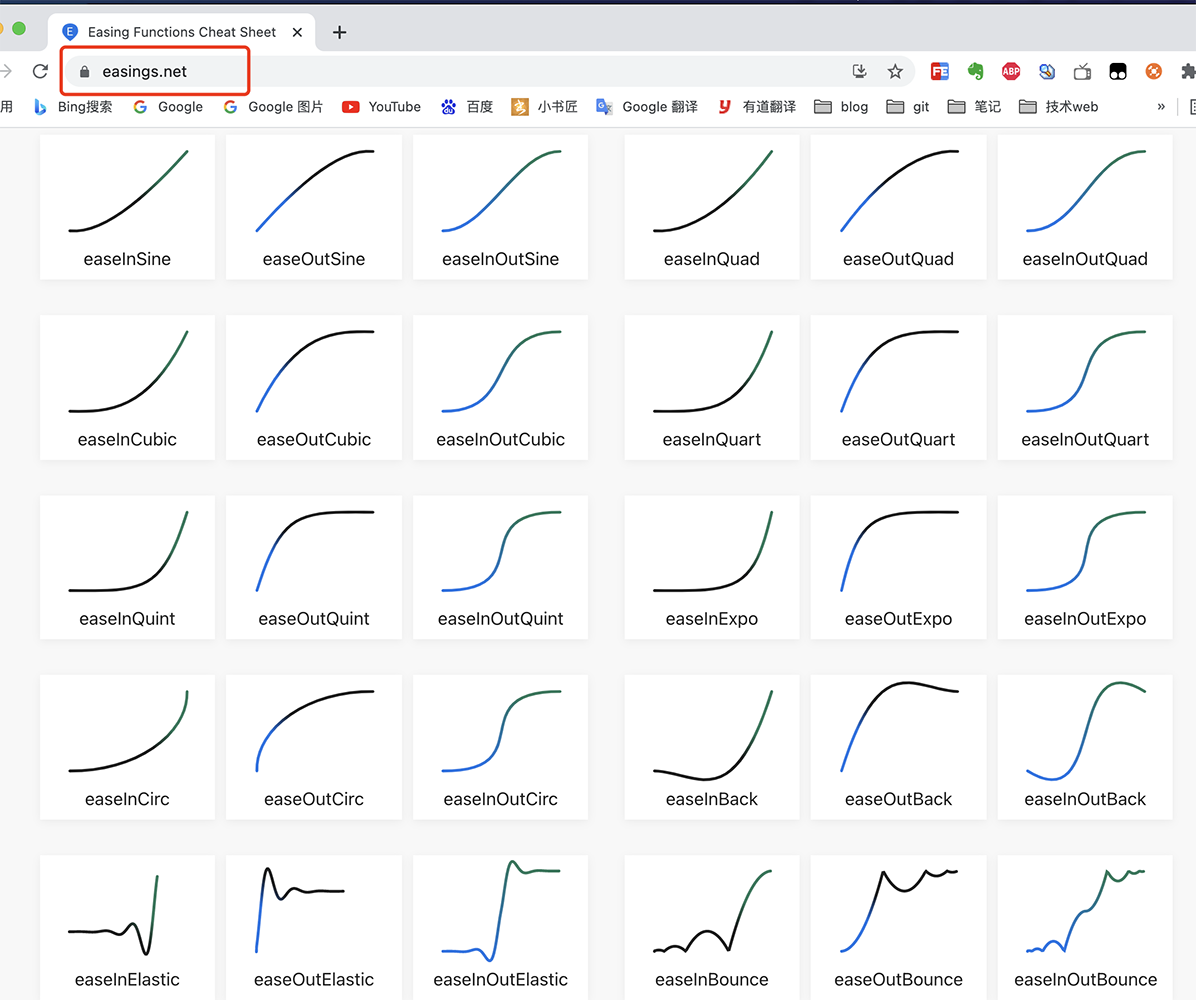
Easing算法是业界著名的一组插值器算法,涵盖了各种速率的曲线算法。
其涵盖的曲线算法如下图所示:
注:
easings 官方网址:
https://easings.net/
举例一个动画插值器 easeInOutBounce。Easing官方对于每一个动画插值器,均给出了完整的算法实现和动画运动曲线,开发者可以根据自己的需要自行选择对应的插值器算法,构造自己的动画插值器。
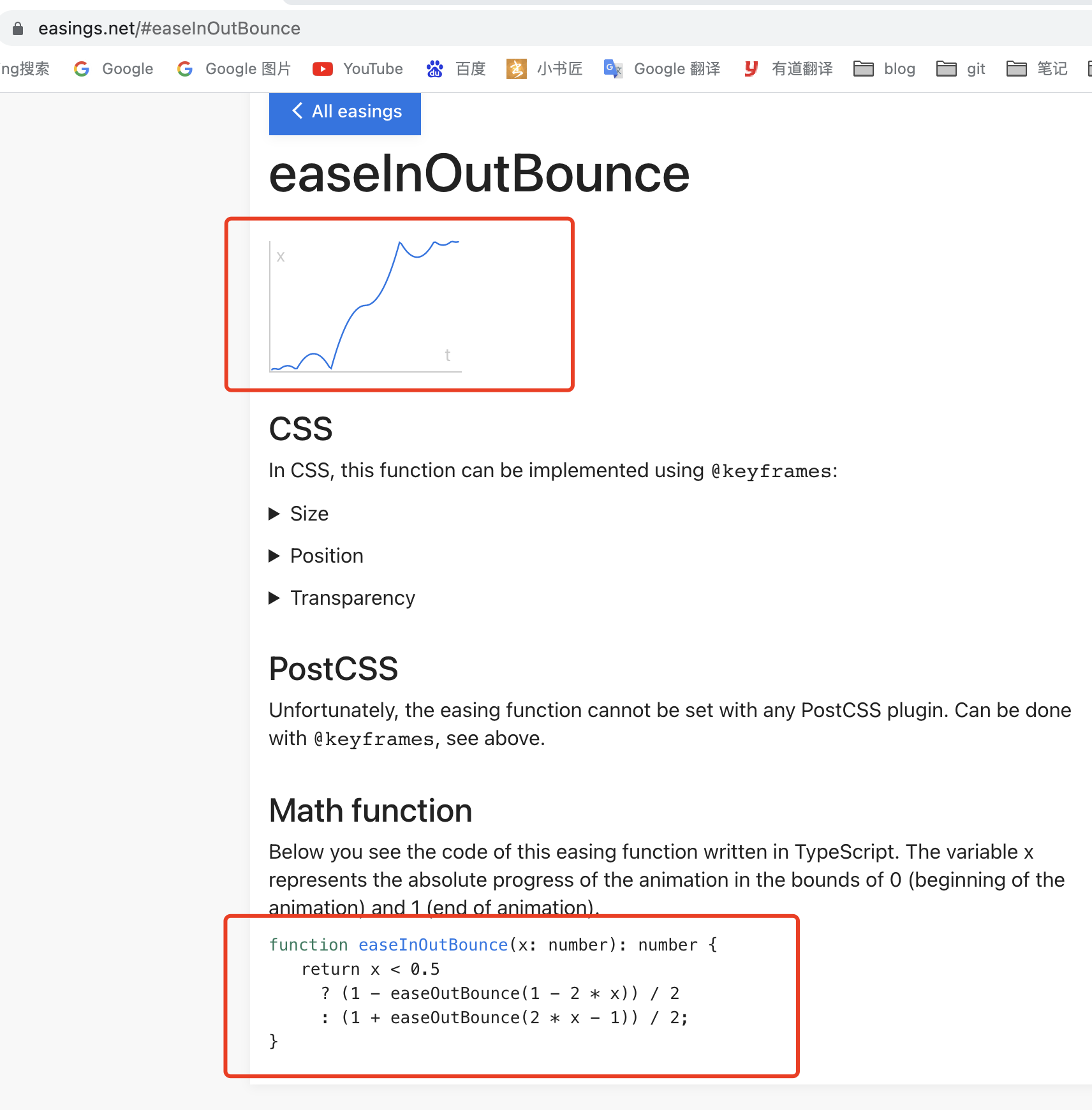
function easeInOutBounce(x: number): number {
return x < 0.5
  ? (1 - easeOutBounce(1 - 2 * x)) / 2
  : (1 + easeOutBounce(2 * x - 1)) / 2;
}
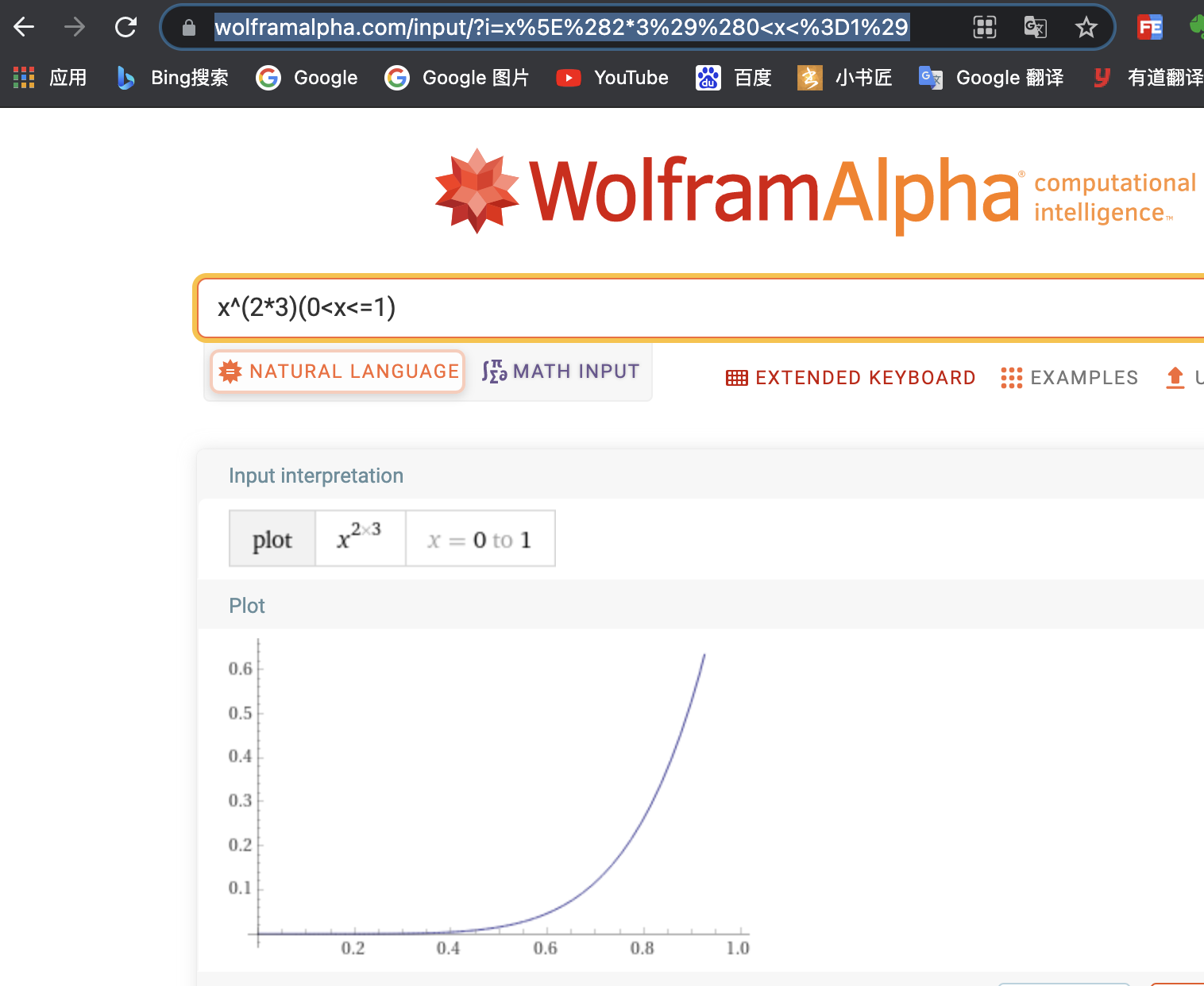
调试动画插值器,可以使用如下小工具:
wolframalpha 调试动画插值器:
https://www.wolframalpha.com/input/?i=x%5E%282*3%29%280%3Cx%3C%3D1%29
wolframalpha调试工具:
https://www.wolframalpha.com/input/?i=x%5E%282*3%29%280%3Cx%3C%3D1%29
cubic-bezier辅助工具:
https://cubic-bezier.com/
easings 插值器:
https://easings.net/
3D勋章实现方案:
https://xiaxl.blog.csdn.net/article/details/77048507

大家好!我对我的:username字段进行了一个小的验证,它应该是4到30个字符。我写了一个验证::length=>{:within=>4..30,:message=>I18n.t('activerecord.errors.range')-我想显示一个错误各种错误的消息(不像,太长或太短),但这里有一个问题-我可以将最小值和最大值都传递给翻译,以便有类似的东西:用户名应该在4到30个字符之间。目前我有:range:"shouldbebetween%{count}and%{count}characters",这显然不起作用(只是为了检查)。是否可以从范围中获取这些值?谢谢大家的指教!
Unity自动旋转动画1.开门需要门把手先动,门再动2.关门需要门先动,门把手再动3.中途播放过程中不可以再次进行操作觉得太复杂?查看我的文章开关门简易进阶版效果:如果这个门可以直接打开的话,就不需要放置"门把手"如果门把手还有钥匙需要旋转,那就可以把钥匙放在门把手的"门把手",理论上是可以无限套娃的可调整参数有:角度,反向,轴向,速度运行时点击Test进行测试自己写的代码比较垃圾,命名与结构比较拉,高手轻点喷,新手有类似的需求可以拿去做参考上代码usingSystem.Collections;usingSystem.Collections.Generic;usingUnityEngine;u
给定这段代码:has_many:foos,:finder_sql=#{id}部分被过早插入。我如何逃脱它? 最佳答案 在定界符两边加上单引号:has_many:foos,:finder_sql= 关于ruby-如何转义Ruby字符串插值?,我们在StackOverflow上找到一个类似的问题: https://stackoverflow.com/questions/2052724/
动画/*INITIALIZEANANIMATION 初始化一个动画*-----------------------*/lv_anim_ta;lv_anim_init(&a);/*MANDATORYSETTINGS 必选设置*------------------*//*Setthe"animator"function 设置“动画”功能*/lv_anim_set_exec_cb(&a,(lv_anim_exec_xcb_t)lv_obj_set_x);/*Setthe"animator"function*/lv_anim_set_var(&a,obj);/*Lengthoftheanim
一、什么是MQTT协议MessageQueuingTelemetryTransport:消息队列遥测传输协议。是一种基于客户端-服务端的发布/订阅模式。与HTTP一样,基于TCP/IP协议之上的通讯协议,提供有序、无损、双向连接,由IBM(蓝色巨人)发布。原理:(1)MQTT协议身份和消息格式有三种身份:发布者(Publish)、代理(Broker)(服务器)、订阅者(Subscribe)。其中,消息的发布者和订阅者都是客户端,消息代理是服务器,消息发布者可以同时是订阅者。MQTT传输的消息分为:主题(Topic)和负载(payload)两部分Topic,可以理解为消息的类型,订阅者订阅(Su
TCL脚本语言简介•TCL(ToolCommandLanguage)是一种解释执行的脚本语言(ScriptingLanguage),它提供了通用的编程能力:支持变量、过程和控制结构;同时TCL还拥有一个功能强大的固有的核心命令集。TCL经常被用于快速原型开发,脚本编程,GUI和测试等方面。•实际上包含了两个部分:一个语言和一个库。首先,Tcl是一种简单的脚本语言,主要使用于发布命令给一些互交程序如文本编辑器、调试器和shell。由于TCL的解释器是用C\C++语言的过程库实现的,因此在某种意义上我们又可以把TCL看作C库,这个库中有丰富的用于扩展TCL命令的C\C++过程和函数,所以,Tcl是
一文解决关于VLAN所有的疑惑VLAN基本概念为什么需要VLAN?怎么在交换机上划分VLAN,VLAN的工作原理有了子网,已经隔离了广播,还需要VLAN干啥?只进行子网划分,不进行VLAN划分VLAN划分与子网划分附加VLAN信息的方法VLAN划分交换机的端口类型(Access和Trunk)一、访问链接二、汇聚链接汇聚链接VLAN间通信为什么要进行VLAN间通信?路由器实现VLAN间通信路由器和交换机的连接方式通信细节三层交换机实现VLAN间通信加速VLAN间通信三层交换机与路由器三层交换机路由器路由器和交换机配合构建LAN的实例使用VLAN设计局域网的特点VLAN增加网络的灵活性不使用VLA
开门见山|拉取镜像dockerpullelasticsearch:7.16.1|配置存放的目录#存放配置文件的文件夹mkdir-p/opt/docker/elasticsearch/node-1/config#存放数据的文件夹mkdir-p/opt/docker/elasticsearch/node-1/data#存放运行日志的文件夹mkdir-p/opt/docker/elasticsearch/node-1/log#存放IK分词插件的文件夹mkdir-p/opt/docker/elasticsearch/node-1/plugins若你使用了moba,直接右键新建即可如上图所示依次类推创建
文章目录概念索引相关操作创建索引更新副本查看索引删除索引索引的打开与关闭收缩索引索引别名查询索引别名文档相关操作新建文档查询文档更新文档删除文档映射相关操作查询文档映射创建静态映射创建索引并添加映射概念es中有三个概念要清楚,分别为索引、映射和文档(不用死记硬背,大概有个印象就可以)索引可理解为MySQL数据库;映射可理解为MySQL的表结构;文档可理解为MySQL表中的每行数据静态映射和动态映射上面已经介绍了,映射可理解为MySQL的表结构,在MySQL中,向表中插入数据是需要先创建表结构的;但在es中不必这样,可以直接插入文档,es可以根据插入的文档(数据),动态的创建映射(表结构),这就
HTTP缓存是指浏览器或者代理服务器将已经请求过的资源保存到本地,以便下次请求时能够直接从缓存中获取资源,从而减少网络请求次数,提高网页的加载速度和用户体验。缓存分为强缓存和协商缓存两种模式。一.强缓存强缓存是指浏览器直接从本地缓存中获取资源,而不需要向web服务器发出网络请求。这是因为浏览器在第一次请求资源时,服务器会在响应头中添加相关缓存的响应头,以表明该资源的缓存策略。常见的强缓存响应头如下所述:Cache-ControlCache-Control响应头是用于控制强制缓存和协商缓存的缓存策略。该响应头中的指令如下:max-age:指定该资源在本地缓存的最长有效时间,以秒为单位。例如:Ca
