FastAPI 是一个用于构建 API 的现代、快速(高性能)的 web 框架,使用 Python 3.6+ 并基于标准的 Python 类型提示。
它具有如下这些优点:
pip install fastapi
ASGI 服务器可以使用uvicorn:
pip install uvicorn[standard]
创建一个 main.py 文件并写入以下内容:
from typing import Optional

from fastapi import FastAPI

app = FastAPI()


@app.get("/")
def read_root():
    return {"Hello": "World"}


@app.get("/items/{item_id}")
def read_item(item_id: int, q: Optional[str] = None):
    return {"item_id": item_id, "q": q}
启动服务器:
uvicorn main:app --reload
访问URL:http://127.0.0.1:8000/items/5?q=somequery,你将会看到如下 JSON 响应:
{"item_id": 5, "q": "somequery"}
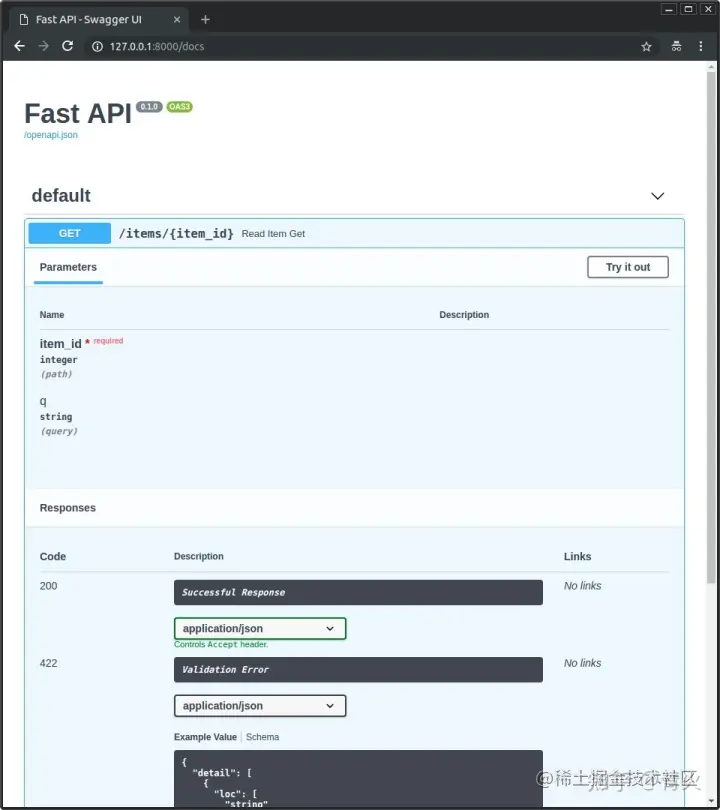
访问URL:http://127.0.0.1:8000/docs,你会看到自动生成的交互式 API 文档,由Swagger UI 生成:
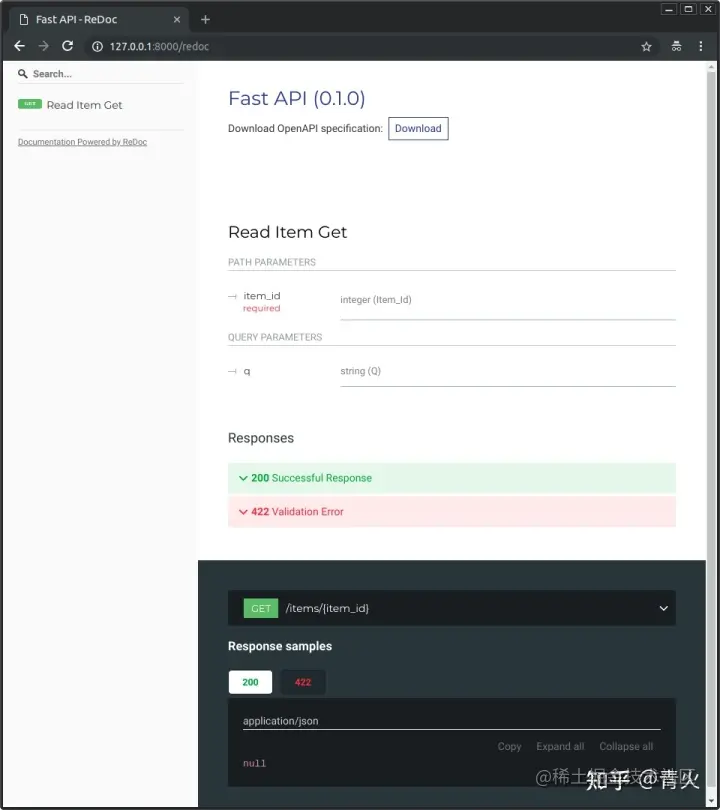
访问URL:http://127.0.0.1:8000/redoc,你会看到另一个自动生成的文档(由ReDoc生成):
使用与 Python 格式化字符串相同的语法来声明路径"参数"或"变量":
from fastapi import FastAPI

app = FastAPI()


@app.get("/items/{item_id}")

async def read_item(item_id):

    return {"item_id": item_id}
路径参数item_id的值将作为参数item_id传递给你的函数。声明不属于路径参数的其他函数参数时,它们将被自动解释为"查询字符串"参数:
from fastapi import FastAPI

app = FastAPI()

fake_items_db = [{"item_name": "Foo"}, {"item_name": "Bar"}, {"item_name": "Baz"}]


@app.get("/items/")

async def read_item(skip: int = 0, limit: int = 10):

    return fake_items_db[skip : skip + limit]
查询字符串是键值对的集合,这些键值对位于 URL 的?之后,并以&符号分隔。
可以使用Query对查询进行额外的校验:
from typing import Optional


from fastapi import FastAPI, Query

app = FastAPI()


@app.get("/items/")
async def read_items(q: Optional[str] = Query(None, max_length=50)):
    results = {"items": [{"item_id": "Foo"}, {"item_id": "Bar"}]}
    if q:
        results.update({"q": q})
    return results
Query 有如下这些字段校验:
...表示是必需的Path和Query用法一样,也能对查询字段进行校验。
而且你还可以声明数值校验:
from fastapi import FastAPI, Path, Query

app = FastAPI()


@app.get("/items/{item_id}")
async def read_items(
    *,
    item_id: int = Path(..., title="The ID of the item to get", ge=0, le=1000),
    q: str,

    size: float = Query(..., gt=0, lt=10.5)

):
    results = {"item_id": item_id}
    if q:
        results.update({"q": q})
    return results
gt:大于ge:大于等于lt:小于le:小于等于类似的还有Cookie:
from typing import Optional


from fastapi import Cookie, FastAPI


app = FastAPI()


@app.get("/items/")
async def read_items(ads_id: Optional[str] = Cookie(None)):
    return {"ads_id": ads_id}
以及Header:
from typing import Optional


from fastapi import FastAPI, Header


app = FastAPI()


@app.get("/items/")
async def read_items(user_agent: Optional[str] = Header(None)):
    return {"User-Agent": user_agent}
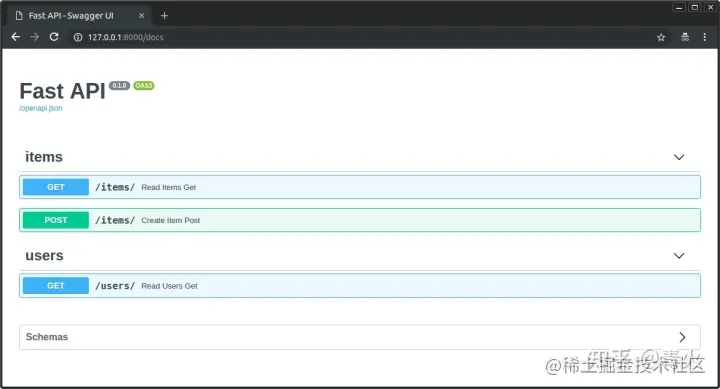
还可以为路径设置tags标签进行分组:
from typing import Optional, Set

from fastapi import FastAPI
from pydantic import BaseModel

app = FastAPI()


class Item(BaseModel):
    name: str
    description: Optional[str] = None
    price: float
    tax: Optional[float] = None
    tags: Set[str] = []


@app.post("/items/", response_model=Item, tags=["items"])

async def create_item(item: Item):
    return item


@app.get("/items/", tags=["items"])

async def read_items():
    return [{"name": "Foo", "price": 42}]


@app.get("/users/", tags=["users"])

async def read_users():
    return [{"username": "johndoe"}]
还可以设置summary 和 description:
from typing import Optional, Set

from fastapi import FastAPI
from pydantic import BaseModel

app = FastAPI()


class Item(BaseModel):
    name: str
    description: Optional[str] = None
    price: float
    tax: Optional[float] = None
    tags: Set[str] = []


@app.post(
    "/items/",
    response_model=Item,

    summary="Create an item",

    description="Create an item with all the information, name, description, price, tax and a set of unique tags",

)
async def create_item(item: Item):
    return item
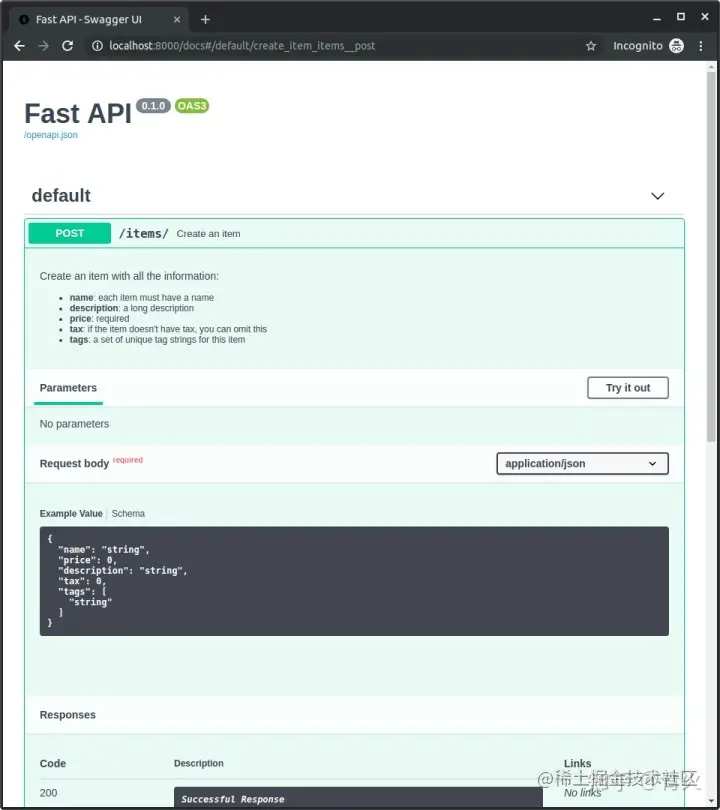
多行注释:
from typing import Optional, Set

from fastapi import FastAPI
from pydantic import BaseModel

app = FastAPI()


class Item(BaseModel):
    name: str
    description: Optional[str] = None
    price: float
    tax: Optional[float] = None
    tags: Set[str] = []


@app.post("/items/", response_model=Item, summary="Create an item")
async def create_item(item: Item):

    """

    Create an item with all the information:


    - **name**: each item must have a name

    - **description**: a long description

    - **price**: required

    - **tax**: if the item doesn't have tax, you can omit this

    - **tags**: a set of unique tag strings for this item

    """

    return item
废弃路由:
from fastapi import FastAPI

app = FastAPI()


@app.get("/items/", tags=["items"])
async def read_items():
    return [{"name": "Foo", "price": 42}]


@app.get("/users/", tags=["users"])
async def read_users():
    return [{"username": "johndoe"}]


@app.get("/elements/", tags=["items"], deprecated=True)

async def read_elements():
    return [{"item_id": "Foo"}]
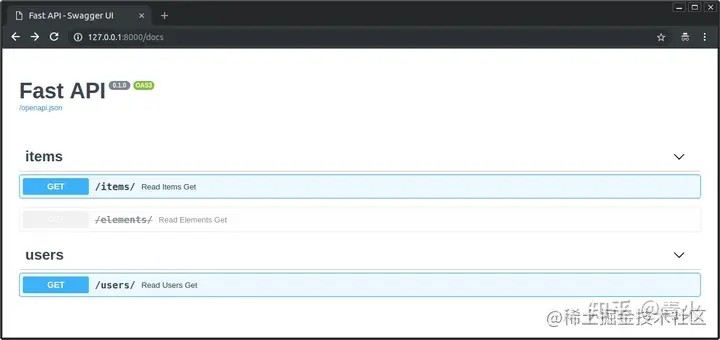
使用response_model参数来声明用于响应的模型:
from typing import List, Optional

from fastapi import FastAPI
from pydantic import BaseModel

app = FastAPI()


class Item(BaseModel):
    name: str
    description: Optional[str] = None
    price: float
    tax: Optional[float] = None
    tags: List[str] = []


@app.post("/items/", response_model=Item)

async def create_item(item: Item):
    return item
response_model_exclude_unset=True:响应中将不会包含那些默认值,而是仅有实际设置的值response_model_include包含哪些属性response_model_exclude省略某些属性status_code参数来声明用于响应的 HTTP 状态码:
from fastapi import FastAPI

app = FastAPI()


@app.post("/items/", status_code=201)

async def create_item(name: str):
    return {"name": name}
表单字段时,要使用Form:
from fastapi import FastAPI, Form


app = FastAPI()


@app.post("/login/")
async def login(username: str = Form(...), password: str = Form(...)):
    return {"username": username}
File用于定义客户端的上传文件(接收上传文件,要预先安装[python-multipart](https%3A//andrew-d.github.io/python-multipart/)):
from fastapi import FastAPI, File, UploadFile


app = FastAPI()


@app.post("/files/")
async def create_file(file: bytes = File(...)):
    return {"file_size": len(file)}


@app.post("/uploadfile/")
async def create_upload_file(file: UploadFile = File(...)):
    return {"filename": file.filename}
向客户端返回 HTTP 错误响应,可以使用HTTPException。
from fastapi import FastAPI, HTTPException


app = FastAPI()

items = {"foo": "The Foo Wrestlers"}


@app.get("/items/{item_id}")
async def read_item(item_id: str):
    if item_id not in items:
        raise HTTPException(status_code=404, detail="Item not found")
    return {"item": items[item_id]}
使用response_description设置响应描述:
from typing import Optional, Set

from fastapi import FastAPI
from pydantic import BaseModel

app = FastAPI()


class Item(BaseModel):
    name: str
    description: Optional[str] = None
    price: float
    tax: Optional[float] = None
    tags: Set[str] = []


@app.post(
    "/items/",
    response_model=Item,
    summary="Create an item",

    response_description="The created item",

)
async def create_item(item: Item):
    """
    Create an item with all the information:

    - **name**: each item must have a name
    - **description**: a long description
    - **price**: required
    - **tax**: if the item doesn't have tax, you can omit this
    - **tags**: a set of unique tag strings for this item
    """
    return item
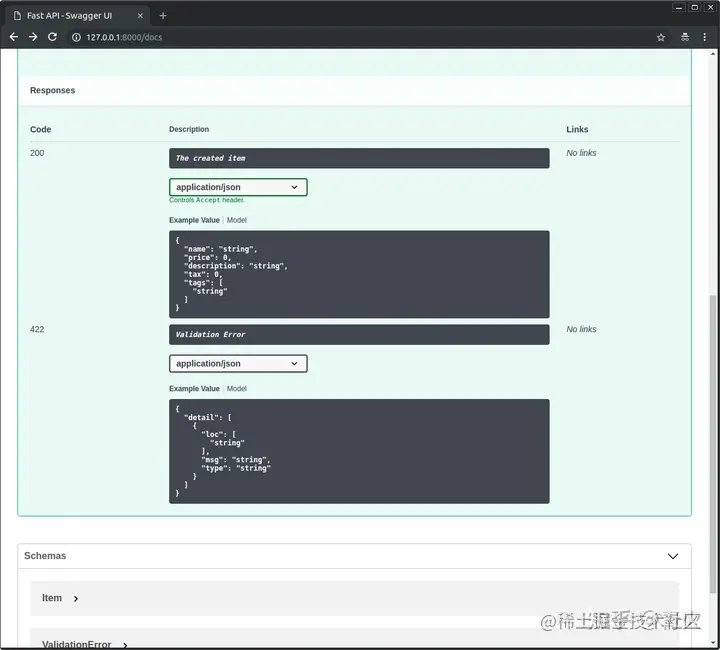
在某些情况下,你可能需要把数据(例如Pydantic模型)转换成JSON形式,例如存储在数据库中,这时候你就需要用到jsonable_encoder()方法。
from datetime import datetime
from typing import Optional

from fastapi import FastAPI

from fastapi.encoders import jsonable_encoder

from pydantic import BaseModel

fake_db = {}


class Item(BaseModel):
    title: str
    timestamp: datetime
    description: Optional[str] = None


app = FastAPI()


@app.put("/items/{id}")
def update_item(id: str, item: Item):

    json_compatible_item_data = jsonable_encoder(item)

    fake_db[id] = json_compatible_item_data
FastAPI 提供了简单易用,但功能强大的依赖注入系统,可以让开发人员轻松地把组件集成至FastAPI。
什么是「依赖注入」?
依赖注入是一种消除类之间依赖关系的设计模式。把有依赖关系的类放到容器中,解析出这些类的实例,就是依赖注入。目的是实现类的解耦。
示例:
from typing import Optional

from fastapi import Depends, FastAPI

app = FastAPI()


async def common_parameters(q: Optional[str] = None, skip: int = 0, limit: int = 100):

    return {"q": q, "skip": skip, "limit": limit}


@app.get("/items/")
async def read_items(commons: dict = Depends(common_parameters)):
    return commons


@app.get("/users/")
async def read_users(commons: dict = Depends(common_parameters)):
    return commons
本例中的依赖项预期接收如下参数:
str 的可选查询参数 qint 的可选查询参数 skip,默认值是 0int 的可选查询参数 limit,默认值是 100然后,依赖项函数返回包含这些值的 dict。
使用Class作为依赖:
from typing import Optional

from fastapi import Depends, FastAPI

app = FastAPI()


fake_items_db = [{"item_name": "Foo"}, {"item_name": "Bar"}, {"item_name": "Baz"}]


class CommonQueryParams:
    def __init__(self, q: Optional[str] = None, skip: int = 0, limit: int = 100):
        self.q = q
        self.skip = skip
        self.limit = limit


@app.get("/items/")

async def read_items(commons: CommonQueryParams = Depends(CommonQueryParams)):

    response = {}
    if commons.q:
        response.update({"q": commons.q})
    items = fake_items_db[commons.skip : commons.skip + commons.limit]
    response.update({"items": items})
    return response
使用嵌套子依赖:
from typing import Optional

from fastapi import Cookie, Depends, FastAPI

app = FastAPI()


def query_extractor(q: Optional[str] = None):
    return q


def query_or_cookie_extractor(
    q: str = Depends(query_extractor), last_query: Optional[str] = Cookie(None)
):
    if not q:
        return last_query
    return q


@app.get("/items/")

async def read_query(query_or_default: str = Depends(query_or_cookie_extractor)):

    return {"q_or_cookie": query_or_default}
在路径中使用依赖:
from fastapi import Depends, FastAPI, Header, HTTPException

app = FastAPI()


async def verify_token(x_token: str = Header(...)):
    if x_token != "fake-super-secret-token":
        raise HTTPException(status_code=400, detail="X-Token header invalid")


async def verify_key(x_key: str = Header(...)):
    if x_key != "fake-super-secret-key":
        raise HTTPException(status_code=400, detail="X-Key header invalid")
    return x_key


@app.get("/items/", dependencies=[Depends(verify_token), Depends(verify_key)])

async def read_items():
    return [{"item": "Foo"}, {"item": "Bar"}]
全局依赖项,可以为所有_路径操作_应用该依赖项:
from fastapi import Depends, FastAPI, Header, HTTPException


async def verify_token(x_token: str = Header(...)):
    if x_token != "fake-super-secret-token":
        raise HTTPException(status_code=400, detail="X-Token header invalid")


async def verify_key(x_key: str = Header(...)):
    if x_key != "fake-super-secret-key":
        raise HTTPException(status_code=400, detail="X-Key header invalid")
    return x_key


app = FastAPI(dependencies=[Depends(verify_token), Depends(verify_key)])


@app.get("/items/")
async def read_items():
    return [{"item": "Portal Gun"}, {"item": "Plumbus"}]


@app.get("/users/")
async def read_users():
    return [{"username": "Rick"}, {"username": "Morty"}]
在许多框架和系统中,仅处理安全性和身份认证就会花费大量的精力和代码(在许多情况下,可能占编写的所有代码的 50% 或更多)。
FastAPI 提供了多种工具,可帮助你以标准的方式轻松、快速地处理安全性,而无需研究和学习所有的安全规范。
JWT 表示 「JSON Web Tokens」。
它是一个将 JSON 对象编码为密集且没有空格的长字符串的标准。字符串看起来像这样:
eyJhbGciOiJIUzI1NiIsInR5cCI6IkpXVCJ9.eyJzdWIiOiIxMjM0NTY3ODkwIiwibmFtZSI6IkpvaG4gRG9lIiwiaWF0IjoxNTE2MjM5MDIyfQ.SflKxwRJSMeKKF2QT4fwpMeJf36POk6yJV_adQssw5c
它没有被加密,因此任何人都可以从字符串内容中还原数据。
但它经过了签名。因此,当你收到一个由你发出的令牌时,可以校验令牌是否真的由你发出。
通过这种方式,你可以创建一个有效期为 1 周的令牌。然后当用户第二天使用令牌重新访问时,你知道该用户仍然处于登入状态。
一周后令牌将会过期,用户将不会通过认证,必须再次登录才能获得一个新令牌。而且如果用户(或第三方)试图修改令牌以篡改过期时间,你将因为签名不匹配而能够发觉。
OAuth2
OAuth2是一个规范,它定义了几种处理身份认证和授权的方法。
它是一个相当广泛的规范,涵盖了一些复杂的使用场景。
它包括了使用「第三方」进行身份认证的方法。
这就是所有带有「使用 Facebook,Google,Twitter,GitHub 登录」的系统背后所使用的机制。
下面演示了如何使用OAuth2 和 JWT进行用户验证。
from datetime import datetime, timedelta
from typing import Optional

from fastapi import Depends, FastAPI, HTTPException, status
from fastapi.security import OAuth2PasswordBearer, OAuth2PasswordRequestForm
from jose import JWTError, jwt

from passlib.context import CryptContext

from pydantic import BaseModel

# to get a string like this run:
# openssl rand -hex 32
SECRET_KEY = "09d25e094faa6ca2556c818166b7a9563b93f7099f6f0f4caa6cf63b88e8d3e7"
ALGORITHM = "HS256"
ACCESS_TOKEN_EXPIRE_MINUTES = 30


fake_users_db = {
    "johndoe": {
        "username": "johndoe",
        "full_name": "John Doe",
        "email": "johndoe@example.com",
        "hashed_password": "$2b$12$EixZaYVK1fsbw1ZfbX3OXePaWxn96p36WQoeG6Lruj3vjPGga31lW",
        "disabled": False,
    }
}


class Token(BaseModel):
    access_token: str
    token_type: str


class TokenData(BaseModel):
    username: Optional[str] = None


class User(BaseModel):
    username: str
    email: Optional[str] = None
    full_name: Optional[str] = None
    disabled: Optional[bool] = None


class UserInDB(User):
    hashed_password: str


pwd_context = CryptContext(schemes=["bcrypt"], deprecated="auto")


oauth2_scheme = OAuth2PasswordBearer(tokenUrl="token")

app = FastAPI()


def verify_password(plain_password, hashed_password):

    return pwd_context.verify(plain_password, hashed_password)


def get_password_hash(password):
    return pwd_context.hash(password)


def get_user(db, username: str):
    if username in db:
        user_dict = db[username]
        return UserInDB(**user_dict)


def authenticate_user(fake_db, username: str, password: str):
    user = get_user(fake_db, username)

    if not user:

        return False

    if not verify_password(password, user.hashed_password):

        return False

    return user


def create_access_token(data: dict, expires_delta: Optional[timedelta] = None):
    to_encode = data.copy()
    if expires_delta:
        expire = datetime.utcnow() + expires_delta
    else:
        expire = datetime.utcnow() + timedelta(minutes=15)
    to_encode.update({"exp": expire})
    encoded_jwt = jwt.encode(to_encode, SECRET_KEY, algorithm=ALGORITHM)
    return encoded_jwt


async def get_current_user(token: str = Depends(oauth2_scheme)):
    credentials_exception = HTTPException(
        status_code=status.HTTP_401_UNAUTHORIZED,
        detail="Could not validate credentials",
        headers={"WWW-Authenticate": "Bearer"},
    )
    try:
        payload = jwt.decode(token, SECRET_KEY, algorithms=[ALGORITHM])
        username: str = payload.get("sub")
        if username is None:
            raise credentials_exception
        token_data = TokenData(username=username)
    except JWTError:
        raise credentials_exception
    user = get_user(fake_users_db, username=token_data.username)
    if user is None:
        raise credentials_exception
    return user


async def get_current_active_user(current_user: User = Depends(get_current_user)):
    if current_user.disabled:
        raise HTTPException(status_code=400, detail="Inactive user")
    return current_user


@app.post("/token", response_model=Token)
async def login_for_access_token(form_data: OAuth2PasswordRequestForm = Depends()):
    user = authenticate_user(fake_users_db, form_data.username, form_data.password)
    if not user:
        raise HTTPException(
            status_code=status.HTTP_401_UNAUTHORIZED,
            detail="Incorrect username or password",
            headers={"WWW-Authenticate": "Bearer"},
        )
    access_token_expires = timedelta(minutes=ACCESS_TOKEN_EXPIRE_MINUTES)
    access_token = create_access_token(
        data={"sub": user.username}, expires_delta=access_token_expires
    )
    return {"access_token": access_token, "token_type": "bearer"}


@app.get("/users/me/", response_model=User)
async def read_users_me(current_user: User = Depends(get_current_active_user)):
    return current_user


@app.get("/users/me/items/")
async def read_own_items(current_user: User = Depends(get_current_active_user)):
    return [{"item_id": "Foo", "owner": current_user.username}]
OAuth2PasswordBearer:访问tokenUrl地址,获取token并返回OAuth2PasswordRequestForm是一个类依赖项,声明了如下的请求表单:
usernamepasswordscope 字段,是一个由空格分隔的字符串组成的大字符串grant_typeclient_idclient_secret"中间件"是一个函数,它在每个请求被特定的_路径操作_处理之前,以及在每个响应返回之前工作。
要创建中间件你可以在函数的顶部使用装饰器 @app.middleware("http").
中间件参数接收如下参数:
requestcall_next 它将接收 request 作为参数
request 传递给相应的 路径操作responseresponse 前进一步修改它import time
from fastapi import FastAPI, Request
app = FastAPI()
@app.middleware("http")
async def add_process_time_header(request: Request, call_next):
start_time = time.time()
response = await call_next(request)
process_time = time.time() - start_time
response.headers["X-Process-Time"] = str(process_time)
return response
你可以在FastAPI应用中使用CORSMiddleware来配置跨域:
from fastapi import FastAPI

from fastapi.middleware.cors import CORSMiddleware


app = FastAPI()


origins = [
    "http://localhost.tiangolo.com",
    "https://localhost.tiangolo.com",
    "http://localhost",
    "http://localhost:8080",

]


app.add_middleware(
    CORSMiddleware,
    allow_origins=origins,
    allow_credentials=True,
    allow_methods=["*"],
    allow_headers=["*"],

)


@app.get("/")
async def main():
    return {"message": "Hello World"}
它支持以下参数:
allow_origins - 一个允许跨域请求的源列表。例如 ['https://example.org', 'https://www.example.org']。你可以使用 ['*'] 允许任何源。allow_origin_regex - 一个正则表达式字符串,匹配的源允许跨域请求。例如 'https://.*\.example\.org'。allow_methods - 一个允许跨域请求的 HTTP 方法列表。默认为 ['GET']。你可以使用 ['*'] 来允许所有标准方法。allow_headers - 一个允许跨域请求的 HTTP 请求头列表。默认为 []。你可以使用 ['*'] 允许所有的请求头。Accept、Accept-Language、Content-Language 以及 Content-Type 请求头总是允许 CORS 请求。allow_credentials - 指示跨域请求支持 cookies。默认是 False。另外,允许凭证时 allow_origins 不能设定为 ['*'],必须指定源。expose_headers - 指示可以被浏览器访问的响应头。默认为 []。max_age - 设定浏览器缓存 CORS 响应的最长时间,单位是秒。默认为 600。APIRouter使用APIRouter同样也能对路由进行操作:
from fastapi import APIRouter

router = APIRouter()


@router.get("/users/", tags=["users"])

async def read_users():
    return [{"username": "Rick"}, {"username": "Morty"}]


@router.get("/users/me", tags=["users"])

async def read_user_me():
    return {"username": "fakecurrentuser"}


@router.get("/users/{username}", tags=["users"])

async def read_user(username: str):
    return {"username": username}
为所有路径进行同样的操作:
from fastapi import APIRouter, Depends, HTTPException

from ..dependencies import get_token_header


router = APIRouter(
    prefix="/items",
    tags=["items"],
    dependencies=[Depends(get_token_header)],
    responses={404: {"description": "Not found"}},
)


fake_items_db = {"plumbus": {"name": "Plumbus"}, "gun": {"name": "Portal Gun"}}


@router.get("/")

async def read_items():
    return fake_items_db


@router.get("/{item_id}")

async def read_item(item_id: str):
    if item_id not in fake_items_db:
        raise HTTPException(status_code=404, detail="Item not found")
    return {"name": fake_items_db[item_id]["name"], "item_id": item_id}


@router.put(
    "/{item_id}",
    tags=["custom"],
    responses={403: {"description": "Operation forbidden"}},
)
async def update_item(item_id: str):
    if item_id != "plumbus":
        raise HTTPException(
            status_code=403, detail="You can only update the item: plumbus"
        )
    return {"item_id": item_id, "name": "The great Plumbus"}
该示例,就为所有的路径添加了前缀,标签、依赖和返回,而不用在每个路径上单独声明,简化了代码。
background tasks 就是在返回响应之后立即运行的任务。
from fastapi import BackgroundTasks, FastAPI


app = FastAPI()


def write_notification(email: str, message=""):
    with open("log.txt", mode="w") as email_file:
        content = f"notification for {email}: {message}"
        email_file.write(content)


@app.post("/send-notification/{email}")
async def send_notification(email: str, background_tasks: BackgroundTasks):
    background_tasks.add_task(write_notification, email, message="some notification")
    return {"message": "Notification sent in the background"}
首先需要安装aiofiles:
pip install aiofiles
使用:
from fastapi import FastAPI

from fastapi.staticfiles import StaticFiles


app = FastAPI()


app.mount("/static", StaticFiles(directory="static"), name="static")
如果你有2个独立的FastAPI的应用,你可以设置一个为主应用,另外一个为子应用:
from fastapi import FastAPI


app = FastAPI()


@app.get("/app")

def read_main():
    return {"message": "Hello World from main app"}


subapi = FastAPI()


@subapi.get("/sub")
def read_sub():
    return {"message": "Hello World from sub API"}


app.mount("/subapi", subapi)
可以使用root_path来设置代理。
使用命令行:
uvicorn main:app --root-path /api/v1
或者在代码中设置:
from fastapi import FastAPI, Request


app = FastAPI(root_path="/api/v1")


@app.get("/app")
def read_main(request: Request):
    return {"message": "Hello World", "root_path": request.scope.get("root_path")}
你可以在FastAPI中使用任何模板,常用的选择是Jinja2。
pip install jinja2
使用:
from fastapi import FastAPI, Request
from fastapi.responses import HTMLResponse
from fastapi.staticfiles import StaticFiles

from fastapi.templating import Jinja2Templates


app = FastAPI()

app.mount("/static", StaticFiles(directory="static"), name="static")


templates = Jinja2Templates(directory="templates")


@app.get("/items/{id}", response_class=HTMLResponse)

async def read_item(request: Request, id: str):
    return templates.TemplateResponse("item.html", {"request": request, "id": id})
模板文件templates/item.html:
<html>
<head>
    <title>Item Details</title>
    <link href="{{ url_for('static', path='/styles.css') }}" rel="stylesheet">
</head>
<body>

    <h1>Item ID: {{ id }}</h1>

</body>
</html>
from fastapi import FastAPI, WebSocket

from fastapi.responses import HTMLResponse

app = FastAPI()

html = """
<!DOCTYPE html>
<html>
    <head>
        <title>Chat</title>
    </head>
    <body>
        <h1>WebSocket Chat</h1>
        <form action="" οnsubmit="sendMessage(event)">
            <input type="text" id="messageText" autocomplete="off"/>
            <button>Send</button>
        </form>
        <ul id='messages'>
        </ul>
        <script>
            var ws = new WebSocket("ws://localhost:8000/ws");
            ws.onmessage = function(event) {
                var messages = document.getElementById('messages')
                var message = document.createElement('li')
                var content = document.createTextNode(event.data)
                message.appendChild(content)
                messages.appendChild(message)
            };
            function sendMessage(event) {
                var input = document.getElementById("messageText")
                ws.send(input.value)
                input.value = ''
                event.preventDefault()
            }
        </script>
    </body>
</html>
"""


@app.get("/")
async def get():
    return HTMLResponse(html)


@app.websocket("/ws")

async def websocket_endpoint(websocket: WebSocket):
    await websocket.accept()
    while True:
        data = await websocket.receive_text()
        await websocket.send_text(f"Message text was: {data}")
你可以设置应用的启动和关闭事件回调函数:
from fastapi import FastAPI

app = FastAPI()

items = {}

@app.on_event("shutdown")
def shutdown_event():
    with open("log.txt", mode="a") as log:
        log.write("Application shutdown")


@app.on_event("startup")
async def startup_event():
    items["foo"] = {"name": "Fighters"}
    items["bar"] = {"name": "Tenders"}


@app.get("/items/{item_id}")
async def read_items(item_id: str):
    return items[item_id]
关闭。这个问题是opinion-based.它目前不接受答案。想要改进这个问题?更新问题,以便editingthispost可以用事实和引用来回答它.关闭4年前。Improvethisquestion我想在固定时间创建一系列低音和高音调的哔哔声。例如:在150毫秒时发出高音调的蜂鸣声在151毫秒时发出低音调的蜂鸣声200毫秒时发出低音调的蜂鸣声250毫秒的高音调蜂鸣声有没有办法在Ruby或Python中做到这一点?我真的不在乎输出编码是什么(.wav、.mp3、.ogg等等),但我确实想创建一个输出文件。
这个问题在这里已经有了答案:关闭10年前。PossibleDuplicate:Pythonconditionalassignmentoperator对于这样一个简单的问题表示歉意,但是谷歌搜索||=并不是很有帮助;)Python中是否有与Ruby和Perl中的||=语句等效的语句?例如:foo="hey"foo||="what"#assignfooifit'sundefined#fooisstill"hey"bar||="yeah"#baris"yeah"另外,类似这样的东西的通用术语是什么?条件分配是我的第一个猜测,但Wikipediapage跟我想的不太一样。
什么是ruby的rack或python的Java的wsgi?还有一个路由库。 最佳答案 来自Python标准PEP333:Bycontrast,althoughJavahasjustasmanywebapplicationframeworksavailable,Java's"servlet"APImakesitpossibleforapplicationswrittenwithanyJavawebapplicationframeworktoruninanywebserverthatsupportstheservletAPI.ht
无论您是想搭建桌面端、WEB端或者移动端APP应用,HOOPSPlatform组件都可以为您提供弹性的3D集成架构,同时,由工业领域3D技术专家组成的HOOPS技术团队也能为您提供技术支持服务。如果您的客户期望有一种在多个平台(桌面/WEB/APP,而且某些客户端是“瘦”客户端)快速、方便地将数据接入到3D应用系统的解决方案,并且当访问数据时,在各个平台上的性能和用户体验保持一致,HOOPSPlatform将帮助您完成。利用HOOPSPlatform,您可以开发在任何环境下的3D基础应用架构。HOOPSPlatform可以帮您打造3D创新型产品,HOOPSSDK包含的技术有:快速且准确的CAD
华为OD机试题本篇题目:明明的随机数题目输入描述输出描述:示例1输入输出说明代码编写思路最近更新的博客华为od2023|什么是华为od,od薪资待遇,od机试题清单华为OD机试真题大全,用Python解华为机试题|机试宝典【华为OD机试】全流程解析+经验分享,题型分享,防作弊指南华为o
我想解析一个已经存在的.mid文件,改变它的乐器,例如从“acousticgrandpiano”到“violin”,然后将它保存回去或作为另一个.mid文件。根据我在文档中看到的内容,该乐器通过program_change或patch_change指令进行了更改,但我找不到任何在已经存在的MIDI文件中执行此操作的库.他们似乎都只支持从头开始创建的MIDI文件。 最佳答案 MIDIpackage会为您完成此操作,但具体方法取决于midi文件的原始内容。一个MIDI文件由一个或多个音轨组成,每个音轨是十六个channel中任何一个上的
本文主要介绍在使用Selenium进行自动化测试或者任务时,对于使用了iframe的页面,如何定位iframe中的元素文章目录场景描述解决方案具体代码场景描述当我们在使用Selenium进行自动化测试的时候,可能会遇到一些界面或者窗体是使用HTML的iframe标签进行承载的。对于iframe中的标签,如果直接查找是无法找到的,会抛出没有找到元素的异常。比如近在咫尺的例子就是,CSDN的登录窗体就是使用的iframe,大家可以尝试通过F12开发者模式查看到的tag_name,class_name,id或者xpath来定位中的页面元素,会抛出NoSuchElementException异常。解决
2022/8/4更新支持加入水印水印必须包含透明图像,并且水印图像大小要等于原图像的大小pythonconvert_image_to_video.py-f30-mwatermark.pngim_dirout.mkv2022/6/21更新让命令行参数更加易用新的命令行使用方法pythonconvert_image_to_video.py-f30im_dirout.mkvFFMPEG命令行转换一组JPG图像到视频时,是将这组图像视为MJPG流。我需要转换一组PNG图像到视频,FFMPEG就不认了。pyav内置了ffmpeg库,不需要系统带有ffmpeg工具因此我使用ffmpeg的python包装p
Transformers开始在视频识别领域的“猪突猛进”,各种改进和魔改层出不穷。由此作者将开启VideoTransformer系列的讲解,本篇主要介绍了FBAI团队的TimeSformer,这也是第一篇使用纯Transformer结构在视频识别上的文章。如果觉得有用,就请点赞、收藏、关注!paper:https://arxiv.org/abs/2102.05095code(offical):https://github.com/facebookresearch/TimeSformeraccept:ICML2021author:FacebookAI一、前言Transformers(VIT)在图
ValidPalindromeGivenastring,determineifitisapalindrome,consideringonlyalphanumericcharactersandignoringcases. [#125]Example:"Aman,aplan,acanal:Panama"isapalindrome."raceacar"isnotapalindrome.Haveyouconsiderthatthestringmightbeempty?Thisisagoodquestiontoaskduringaninterview.Forthepurposeofthisproblem
