后面对Sklearn的学习主要以《Python机器学习基础教程》和《机器学习实战基于scikit-learn和tensorflow》,两本互为补充进行学习,下面是开篇的学习内容。
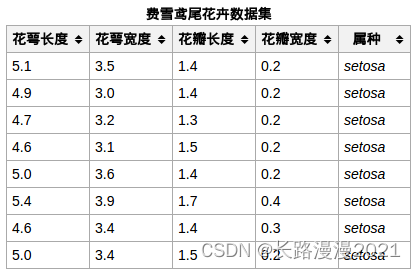
iris数据集的中文名是安德森鸢尾花卉数据集,英文全称是Anderson’s Iris data set。iris包含150个样本,对应数据集的每行数据。每行数据包含每个样本的四个特征和样本的类别信息,所以iris数据集是一个150行5列的二维表。
通俗地说,iris数据集是用来给花做分类的数据集,每个样本包含了花萼长度、花萼宽度、花瓣长度、花瓣宽度四个特征(前4列),我们需要建立一个分类器,分类器可以通过样本的四个特征来判断样本属于山鸢尾、变色鸢尾还是维吉尼亚鸢尾(这三个名词都是花的品种)。
iris的每个样本都包含了品种信息,即目标属性(第5列,也叫target或label)。如下所示:
1. 导入数据集
(1) 在线导入
调用load_iris函数来加载数据:
from sklearn.datasets import load_iris

iris_dataset = load_iris()
load_iris 返回的 iris 对象是一个 Bunch 对象,与字典非常相似,里面包含键和值:
print(iris_dataset.keys())
# dict_keys(['data', 'target', 'frame', 'target_names', 'DESCR', 'feature_names', 'filename', 'data_module'])
print(iris_dataset["DESCR"][:193])
DESCR 键对应的值是数据集的简要说明。这里给出说明的开头部分。
target_names 键对应的值是一个字符串数组,里面包含我们要预测的花的品种:
print("Target names: {}".format(iris_dataset["target_names"]))
# Target names: ['setosa' 'versicolor' 'virginica']
feature_names 键对应的值是一个字符串列表,对每一个特征进行了说明:
print("Feature names: {}".format(iris_dataset['feature_names']))
# Feature names: ['sepal length (cm)', 'sepal width (cm)', 'petal length (cm)', 'petal width (cm)']
数据包含在target 和data 字段中。data 里面是花萼长度、花萼宽度、花瓣长度、花瓣宽度的测量数据,格式为NumPy 数组:
print("Type of data: {}".format(type(iris_dataset['data'])))
# Type of data: <class 'numpy.ndarray'>
data 数组的每一行对应一朵花,列代表每朵花的四个测量数据:
print("shape of data: {}".format(iris_dataset['data'].shape))
# shape of data: (150, 4)
可以看出,数组中包含150 朵不同的花的测量数据。前机器学习中的个体叫作样本(sample),其属性叫作特征(feature)。data 数组的形状(shape)是样本数乘以特征数。这是 scikit-learn 中的约定,你的数据形状应始终遵循这个约定。下面给出前 5 个样本的特征数值:
print("First five rows of data:\n{}".format(iris_dataset['data'][:5]))
# First five rows of data:
#   [[5.1 3.5 1.4 0.2]
#    [4.9 3.  1.4 0.2]
#    [4.7 3.2 1.3 0.2]
#    [4.6 3.1 1.5 0.2]
#    [5.  3.6 1.4 0.2]]
从数据中可以看出,前5 朵花的花瓣宽度都是0.2cm,第一朵花的花萼最长,是5.1cm。
target 数组包含的是测量过的每朵花的品种,也是一个NumPy 数组:
print("Type of target:{}".format(type(iris_dataset['target'])))
# Type of target:<class 'numpy.ndarray'>
target 是一维数组,每朵花对应其中一个数据:
print("Shape of target:{}".format(iris_dataset['target'].shape))
# Shape of target:(150,)
品种被转换成从 0 到 2 的整数:
print("target:\n{}".format(iris_dataset['target']))
'''
target:
[0 0 0 0 0 0 0 0 0 0 0 0 0 0 0 0 0 0 0 0 0 0 0 0 0 0 0 0 0 0 0 0 0 0 0 0 0
 0 0 0 0 0 0 0 0 0 0 0 0 0 1 1 1 1 1 1 1 1 1 1 1 1 1 1 1 1 1 1 1 1 1 1 1 1
 1 1 1 1 1 1 1 1 1 1 1 1 1 1 1 1 1 1 1 1 1 1 1 1 1 1 2 2 2 2 2 2 2 2 2 2 2
 2 2 2 2 2 2 2 2 2 2 2 2 2 2 2 2 2 2 2 2 2 2 2 2 2 2 2 2 2 2 2 2 2 2 2 2 2
 2 2]
 '''
上述数字的代表含义由iris_dataset['target']数组给出:0 代表setosa,1 代表versicolor,2 代表virginica。
(2) 本地导入
# 导入相关包
import numpy as np
import pandas as pd
import seaborn as sns
import matplotlib.pyplot as plt
from sklearn import datasets
# 导入数据集
data = "../seaborn-data-master/iris.csv"

iris_local = pd.read_csv(data, usecols=[0, 1, 2, 3, 4])
iris_local = iris_local.dropna()    # 丢弃含空值的行、列
iris_local.head()
 可以发现本地导入和在线导入的键是不同的(即列名),而且这里最后一列标签值未编码,后面在使用的时候需要注意。
# 查看数据集信息
iris_local.info()
'''
<class 'pandas.core.frame.DataFrame'>
Int64Index: 150 entries, 0 to 149
Data columns (total 5 columns):
sepal_length    150 non-null float64
sepal_width     150 non-null float64
petal_length    150 non-null float64
petal_width     150 non-null float64
species         150 non-null object
dtypes: float64(4), object(1)
memory usage: 7.0+ KB
'''
# 载入特征和标签集
X = iris_local[['sepal_length', 'sepal_width', 'petal_length', 'petal_width']]        # 等价于iris_dataset.data
y = iris_local['species']     # 等价于iris_dataset.target
下面需要对对标签集进行编码:
# 对标签集进行编码
from sklearn.preprocessing import LabelEncoder

encoder = LabelEncoder()
y = encoder.fit_transform(y)
print(y)
将收集好的带标签数据(此例中是150 朵花的测量数据)分成两部分。一部分数据用于构建机器学习模型,叫作训练数据(training data)或训练集(training set)。其余的数据用来评估模型性能,叫作测试数据(test data)、测试集(test set)或留出集(hold-out set)。
scikit-learn 中的train_test_split 函数可以打乱数据集并进行拆分。这个函数将75% 的行数据及对应标签作为训练集,剩下25% 的数据及其标签作为测试集。训练集与测试集的分配比例可以是随意的,但使用25% 的数据作为测试集是很好的经验法则。
对数据调用train_test_split,并对输出结果采用下面这种命名方法:
from sklearn.model_selection import train_test_split

X_train, X_test, y_train, y_test = train_test_split(iris_dataset['data'], iris_dataset['target'], random_state=0)
# X_train, X_test, y_train, y_test = train_test_split(X, y, random_state=0)
在对数据进行拆分之前,train_test_split 函数利用伪随机数生成器将数据集打乱。如果我们只是将最后25% 的数据作为测试集,那么所有数据点的标签都是2,因为数据点是按标签排序的(参见之前iris[‘target’] 的输出)。测试集中只有三个类别之一,这无法告诉我们模型的泛化能力如何,所以我们将数据打乱,确保测试集中包含所有类别的数据。
为了确保多次运行同一函数能够得到相同的输出,我们利用random_state 参数指定了随机数生成器的种子。这样函数输出就是固定不变的,所以这行代码的输出始终相同。
train_test_split 函数的输出为X_train、X_test、y_train 和y_test,它们都是NumPy数组。X_train 包含75% 的行数据,X_test 包含剩下的25%:
print("X_train shape: {}".format(X_train.shape))        # X_train shape: (112, 4)
print("y_train shape: {}".format(y_train.shape))        # y_train shape: (112,)
print("X_test shape: {}".format(X_test.shape))          # X_test shape: (38, 4)
print("y_test shape: {}".format(y_test.shape))          # y_test shape: (38,)
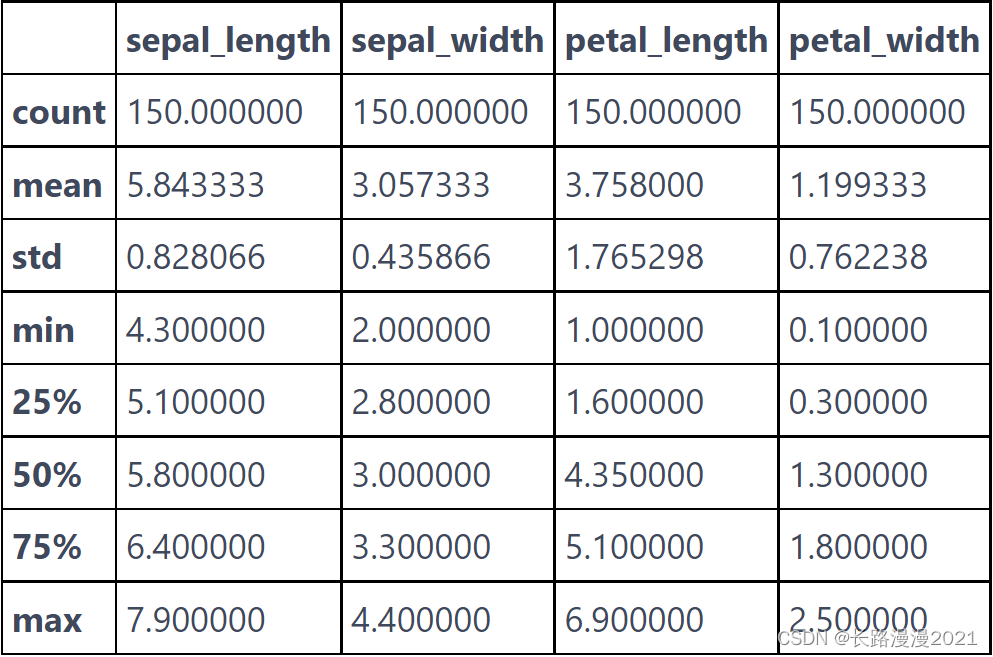
检查数据也是发现异常值和特殊值的好方法。检查数据的最佳方法之一就是将其可视化。先查看数据集各特征列的摘要统计信息:
iris_local.describe()
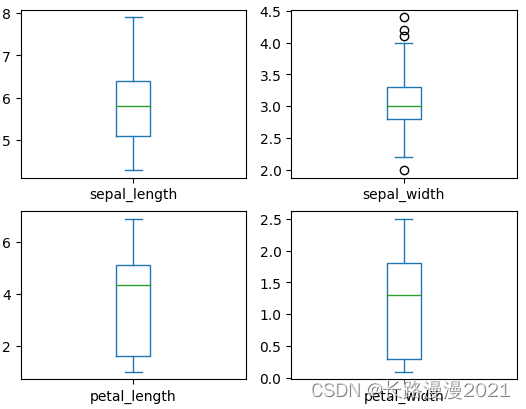
箱线图描述了数据的分布情况,包括:上下界,上下四分位数和中位数,可以简单的查看数据的分布情况。比如:上下四分位数相隔较远的话,一般可以很容易分为2类。
iris_local.plot(kind='box', subplots=True, layout=(2, 2), sharex=False, sharey=False)
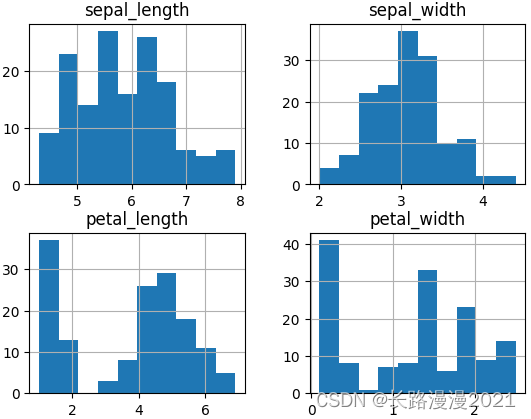
直方图,反馈的是数据的频度,一般常见的是高斯分布(正态分布)。
iris_local.hist()
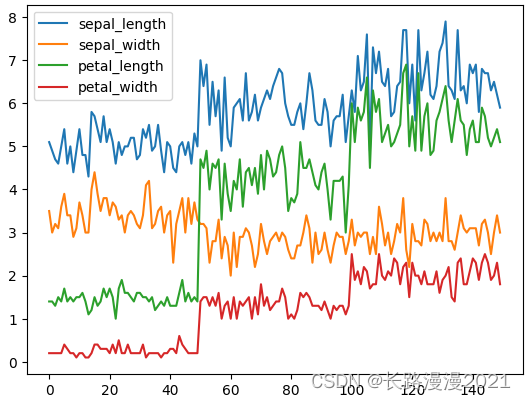
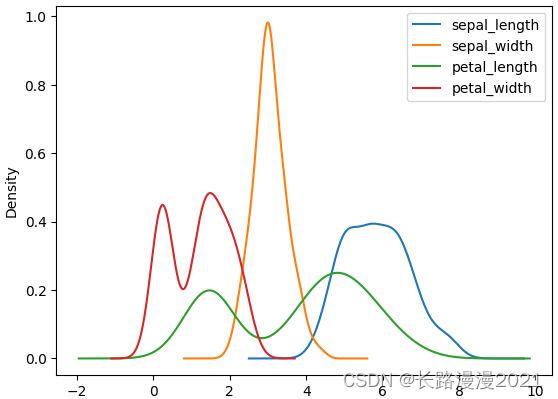
plot直接展示数据的分布情况,kde核密度估计对比直方图来看
iris_local.plot()
iris_local.plot(kind='kde')
径向可视化是多维数据降维的可视化方法,不管是数据分析还是机器学习,降维是最基础的方法之一,通过降维,可以有效的减少复杂度。径向坐标可视化是基于弹簧张力最小化算法。它把数据集的特征映射成二维目标空间单位圆中的一个点,点的位置由系在点上的特征决定。把实例投入圆的中心,特征会朝圆中此实例位置(实例对应的归一化数值)“拉”实例。
ax = pd.plotting.radviz(iris_local, 'species', colormap='brg')
ax.add_artist(plt.Circle((0,0), 1, color='r', fill = False))

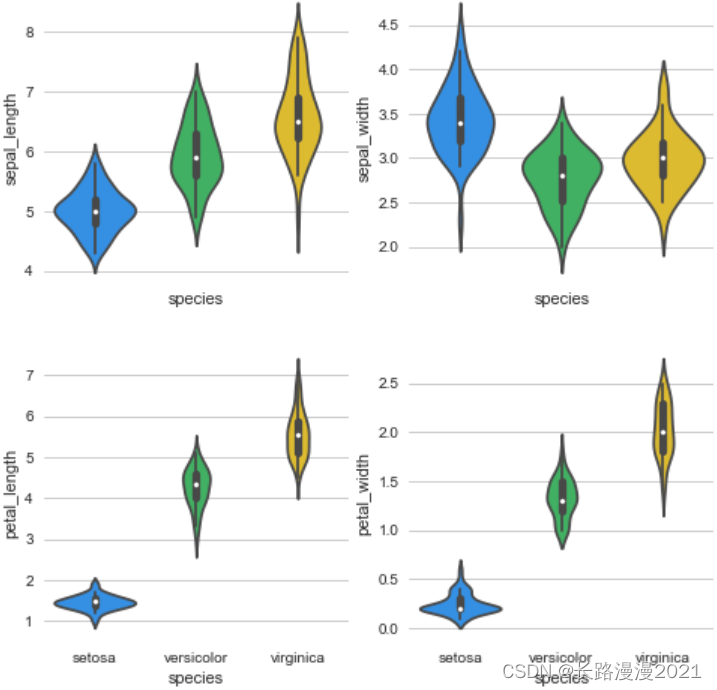
通过Violinplot 和 Pointplot,分别从数据分布和斜率,观察各特征与品种之间的关系
# 设置颜色主题
antV = ['#1890FF', '#2FC25B', '#FACC14', '#223273', '#8543E0', '#13C2C2', '#3436c7', '#F04864']

# 绘制  Violinplot
f, axes = plt.subplots(2, 2, figsize=(8, 8), sharex=True)
sns.despine(left=True)

sns.violinplot(x='species', y='sepal_length', data=iris_local, palette=antV, ax=axes[(0, 0)])
sns.violinplot(x='species', y='sepal_width', data=iris_local, palette=antV, ax=axes[(0, 1)])
sns.violinplot(x='species', y='petal_length', data=iris_local, palette=antV, ax=axes[(1, 0)])
sns.violinplot(x='species', y='petal_width', data=iris_local, palette=antV, ax=axes[(1, 1)])

plt.show()
# 绘制  pointplot
f, axes = plt.subplots(2, 2, figsize=(8, 8), sharex=True)
sns.despine(left=True)

sns.pointplot(x='species', y='sepal_length', data=iris_local, color=antV[0], ax=axes[0, 0])
sns.pointplot(x='species', y='sepal_width', data=iris_local, color=antV[0], ax=axes[0, 1])
sns.pointplot(x='species', y='petal_length', data=iris_local, color=antV[0], ax=axes[1, 0])
sns.pointplot(x='species', y='petal_width', data=iris_local, color=antV[0], ax=axes[1, 1])

plt.show()

生成各特征之间关系的矩阵图
g = sns.pairplot(data=iris_local, palette=antV, hue= 'species')
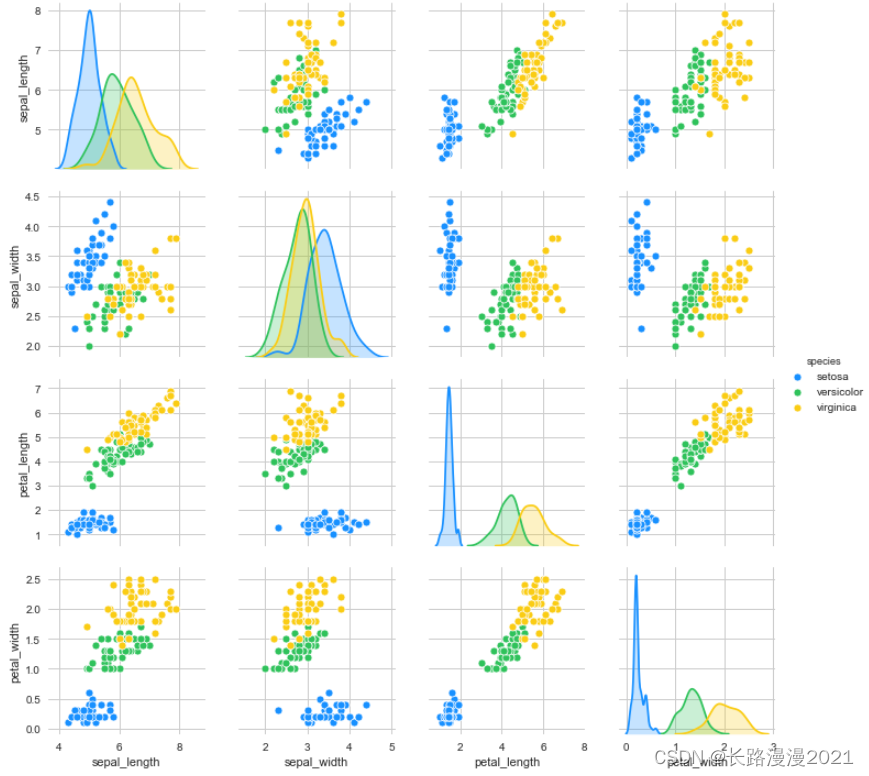
从图中可以看出,利用花瓣和花萼的测量数据基本可以将三个类别区分开。这说明机器学习模型很可能可以学会区分它们。
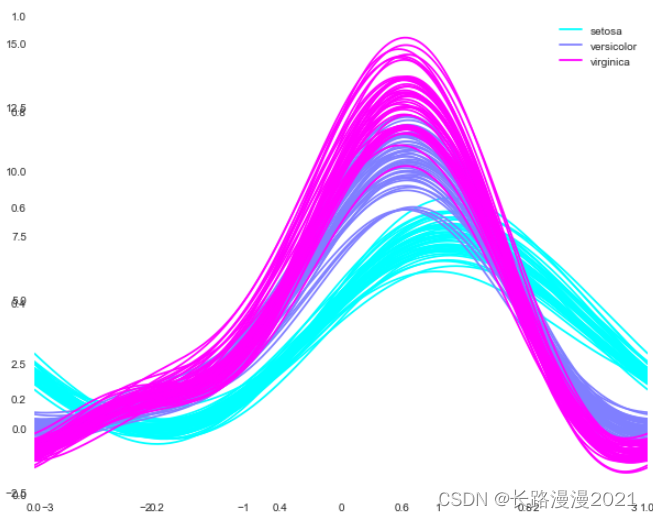
Andrews曲线将每个样本的属性值转化为傅里叶序列的系数来创建曲线,这对于检测时间序列数据中的异常值很有用。通过将每一类曲线标成不同颜色可以可视化聚类数据,属于相同类别的样本的曲线通常更加接近并构成了更大的结构。
# 使用 Andrews Curves 将每个多变量观测值转换为曲线并表示傅立叶级数的系数,这对于检测时间序列数据中的异常值很有用。
plt.subplots(figsize = (10,8))
pd.plotting.andrews_curves(iris_local, 'species', colormap='cool')

plt.show()
平行坐标可以看到数据中的类别以及从视觉上估计其他的统计量。使用平行坐标时,每个点用线段联接,每个垂直的线代表一个属性, 一组联接的线段表示一个数据点。可能是一类的数据点会更加接近。
pd.plotting.parallel_coordinates(iris_local, 'species', colormap = 'brg')

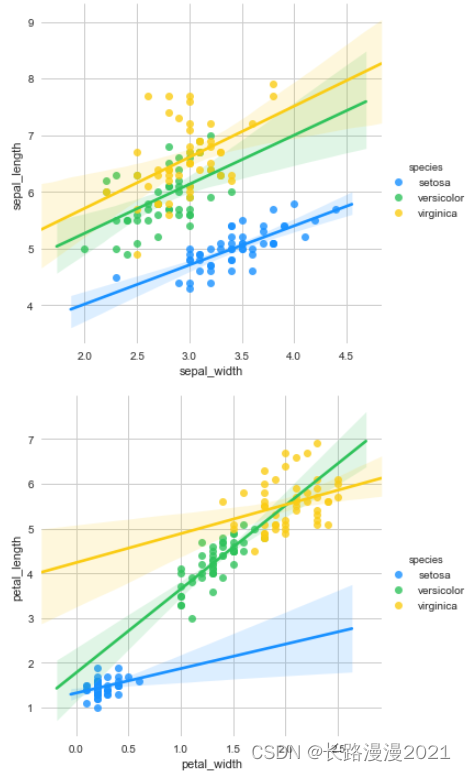
#下面分别基于花萼和花瓣做线性回归的可视化:

g = sns.lmplot(data=iris_local, x='sepal_width', y='sepal_length', palette=antV, hue='species')
g = sns.lmplot(data=iris_local, x='petal_width', y='petal_length', palette=antV, hue='species')
#最后,通过热图找出数据集中不同特征之间的相关性,高正值或负值表明特征具有高度相关性:
fig=plt.gcf()
fig.set_size_inches(12, 8)
fig=sns.heatmap(iris_local.corr(), annot=True, cmap='GnBu', linewidths=1, linecolor='k', \
                square=True, mask=False, vmin=-1, vmax=1, cbar_kws={"orientation": "vertical"}, cbar=True)

温馨提示: 如果你想更方便快捷地了解数据的全貌,泣血推荐一个python库:pandas_profiling,这个库只需要一行代码就可以生成数据EDA报告。pandas_profiling基于pandas的DataFrame数据类型,可以简单快速地进行探索性数据分析。
对于数据集的每一列,pandas_profiling会提供以下统计信息:
import pandas_profiling as pp
report = pp.ProfileReport(iris_local)
report.to_file('report.html')
scikit-learn 中有许多可用的分类算法。这里我们用的是 k 近邻分类器,这是一个很容易理解的算法。
要对一个新的数据点做出预测,算法会在训练集中寻找与这个新数据点距离最近的数据点,然后将找到的数据点的标签赋值给这个新数据点。
k 近邻算法中 k 的含义是,我们可以考虑训练集中与新数据点最近的任意 k 个邻居(比如说,距离最近的3 个或5 个邻居),而不是只考虑最近的那一个。然后,我们可以用这些邻居中数量最多的类别做出预测。
k 近邻分类算法是在 neighbors 模块 KNeighborsClassifier 类中实现的。KNeighborsClassifier 最重要的参数就是邻居的数目,这里我们设为1:
from sklearn.neighbors import KNeighborsClassifier

knn = KNeighborsClassifier(n_neighbors=1)
想要基于训练集来构建模型,需要调用 knn 对象的fit 方法,输入参数为 X_train 和 y_train,二者都是 NumPy 数组,前者包含训练数据,后者包含相应的训练标签:
knn.fit(X_train, y_train)
想象一下,我们在野外发现了一朵鸢尾花,花萼长5cm 宽2.9cm,花瓣长1cm 宽0.2cm。这朵鸢尾花属于哪个品种?我们可以将这些数据放在一个NumPy 数组中,再次计算形状,数组形状为样本数(1)乘以特征数(4):
X_new = np.array([[5, 2.9, 1, 0.2]])
print("X_new.shape: {}".format(X_new.shape))
注意,我们将这朵花的测量数据转换为二维NumPy 数组的一行,这是因为scikit-learn的输入数据必须是二维数组。我们调用knn 对象的predict 方法来进行预测:
prediction = knn.predict(X_new)
print("Prediction: {}".format(prediction))          # Prediction: [0]
print("Predicted target name: {}".format(iris_dataset['target_names'][prediction]))     # Predicted target name: ['setosa']
根据我们模型的预测,这朵新的鸢尾花属于类别0,也就是说它属于setosa 品种。
我们可以对测试数据中的每朵鸢尾花进行预测,并将预测结果与标签(已知的品种)进行对比。我们可以通过计算精度(accuracy)来衡量模型的优劣,精度就是品种预测正确的花所占的比例:
y_pred = knn.predict(X_test)
print("Test set predictions: \n {}".format(y_pred))
'''
Test set predictions:
 [2 1 0 2 0 2 0 1 1 1 2 1 1 1 1 0 1 1 0 0 2 1 0 0 2 0 0 1 1 0 2 1 0 2 2 1 0
 2]
 '''
print("Test set score: {:.2f}".format(np.mean(y_pred == y_test))) # Test set score: 0.97
这一步为了方便,也可以直接使用下面的方法来计算测试集的精度:
print('Test set score: {:.2f}'.format(metrics.accuracy_score(y_pred, y_test))) # Test set score: 0.97
我们还可以使用knn 对象的 score 方法来计算测试集的精度:
print("Test set score: {:.2f}".format(knn.score(X_test, y_test))) # Test set score: 0.97
对于这个模型来说,测试集的精度约为0.97,也就是说,对于测试集中的鸢尾花,我们的预测有 97% 是正确的。下面对比其他模型在该数据集的分类效果。
1. 使用全部特征
from sklearn.linear_model import LogisticRegression
from sklearn.neighbors import KNeighborsClassifier
from sklearn import svm
from sklearn.tree import DecisionTreeClassifier
from sklearn import metrics
# Support Vector Machine
model = svm.SVC()
model.fit(X_train, y_train)
prediction = model.predict(X_test)
print('The accuracy of the SVM is: {:.3f}'.format(metrics.accuracy_score(prediction, y_test)))
The accuracy of the SVM is: 0.974
# Logistic Regression
model = LogisticRegression()
model.fit(X_train, y_train)
prediction = model.predict(X_test)
print('The accuracy of the Logistic Regression is: {:.3f}'.format(metrics.accuracy_score(prediction, y_test)))
The accuracy of the Logistic Regression is: 0.974
# Decision Tree
model=DecisionTreeClassifier()
model.fit(X_train, y_train)
prediction = model.predict(X_test)
print('The accuracy of the Decision Tree is: {:.3f}'.format(metrics.accuracy_score(prediction, y_test)))
The accuracy of the Logistic Regression is: 0.974
# K-Nearest Neighbours
model=KNeighborsClassifier(n_neighbors=3)
model.fit(X_train, y_train)
prediction = model.predict(X_test)
print('The accuracy of the KNN is: {:.3f}'.format(metrics.accuracy_score(prediction, y_test)))
The accuracy of the Logistic Regression is: 0.974
2. 使用部分特征
上面使用了数据集的所有特征,下面将分别使用花瓣和花萼的尺寸:
petal = iris_local[['petal_length', 'petal_width', 'species']]
train_p, test_p = train_test_split(petal, test_size=0.3, random_state=0)
X_train_p = train_p[['petal_length', 'petal_width']]
y_train_p = train_p.species
X_test_p = test_p[['petal_length', 'petal_width']]
y_test_p = test_p.species

sepal = iris_local[['sepal_length', 'sepal_width', 'species']]
train_s, test_s = train_test_split(sepal, test_size=0.3, random_state=0)
X_train_s = train_s[['sepal_length','sepal_width']]
y_train_s = train_s.species
X_test_s = test_s[['sepal_length','sepal_width']]
y_test_s = test_s.species
model=svm.SVC()

model.fit(X_train_p, y_train_p)
prediction=model.predict(X_test_p)
print('The accuracy of the SVM using Petals is: {:.3f}'.format(metrics.accuracy_score(prediction, y_test_p)))

model.fit(X_train_s, y_train_s)
prediction=model.predict(X_test_s)
print('The accuracy of the SVM using Sepal is: {:.3f}'.format(metrics.accuracy_score(prediction, y_test_s)))
The accuracy of the SVM using Petals is: 0.978
The accuracy of the SVM using Sepal is: 0.800
model = LogisticRegression()

model.fit(X_train_p, y_train_p)
prediction = model.predict(X_test_p)
print('The accuracy of the Logistic Regression using Petals is: {:.3f}'.format(metrics.accuracy_score(prediction, y_test_p)))

model.fit(X_train_s, y_train_s)
prediction = model.predict(X_test_s)
print('The accuracy of the Logistic Regression using Sepals is: {:.3f}'.format(metrics.accuracy_score(prediction, y_test_s)))
The accuracy of the Logistic Regression using Petals is: 0.978
The accuracy of the Logistic Regression using Sepals is: 0.822
model=DecisionTreeClassifier()

model.fit(X_train_p, y_train_p)
prediction = model.predict(X_test_p)
print('The accuracy of the Decision Tree using Petals is: {:.3f}'.format(metrics.accuracy_score(prediction, y_test_p)))

model.fit(X_train_s, y_train_s)
prediction = model.predict(X_test_s)
print('The accuracy of the Decision Tree using Sepals is: {:.3f}'.format(metrics.accuracy_score(prediction, y_test_s)))
The accuracy of the Decision Tree using Petals is: 0.956
The accuracy of the Decision Tree using Sepals is: 0.644
model=KNeighborsClassifier(n_neighbors=3)

model.fit(X_train_p, y_train_p)
prediction = model.predict(X_test_p)
print('The accuracy of the KNN using Petals is: {:.3f}'.format(metrics.accuracy_score(prediction, y_test_p)))

model.fit(X_train_s, y_train_s)
prediction = model.predict(X_test_s)
print('The accuracy of the KNN using Sepals is: {:.3f}'.format(metrics.accuracy_score(prediction, y_test_s)))
The accuracy of the KNN using Petals is: 0.978
The accuracy of the KNN using Sepals is: 0.733
从中不难看出,使用花瓣的尺寸来训练数据较花萼更准确。正如在探索性分析的热图中所看到的那样,花萼的宽度和长度之间的相关性非常低,而花瓣的宽度和长度之间的相关性非常高。
我主要使用Ruby来执行此操作,但到目前为止我的攻击计划如下:使用gemsrdf、rdf-rdfa和rdf-microdata或mida来解析给定任何URI的数据。我认为最好映射到像schema.org这样的统一模式,例如使用这个yaml文件,它试图描述数据词汇表和opengraph到schema.org之间的转换:#SchemaXtoschema.orgconversion#data-vocabularyDV:name:namestreet-address:streetAddressregion:addressRegionlocality:addressLocalityphoto:i
有时我需要处理键/值数据。我不喜欢使用数组,因为它们在大小上没有限制(很容易不小心添加超过2个项目,而且您最终需要稍后验证大小)。此外,0和1的索引变成了魔数(MagicNumber),并且在传达含义方面做得很差(“当我说0时,我的意思是head...”)。散列也不合适,因为可能会不小心添加额外的条目。我写了下面的类来解决这个问题:classPairattr_accessor:head,:taildefinitialize(h,t)@head,@tail=h,tendend它工作得很好并且解决了问题,但我很想知道:Ruby标准库是否已经带有这样一个类? 最佳
我正在尝试使用Curbgem执行以下POST以解析云curl-XPOST\-H"X-Parse-Application-Id:PARSE_APP_ID"\-H"X-Parse-REST-API-Key:PARSE_API_KEY"\-H"Content-Type:image/jpeg"\--data-binary'@myPicture.jpg'\https://api.parse.com/1/files/pic.jpg用这个:curl=Curl::Easy.new("https://api.parse.com/1/files/lion.jpg")curl.multipart_form_
无论您是想搭建桌面端、WEB端或者移动端APP应用,HOOPSPlatform组件都可以为您提供弹性的3D集成架构,同时,由工业领域3D技术专家组成的HOOPS技术团队也能为您提供技术支持服务。如果您的客户期望有一种在多个平台(桌面/WEB/APP,而且某些客户端是“瘦”客户端)快速、方便地将数据接入到3D应用系统的解决方案,并且当访问数据时,在各个平台上的性能和用户体验保持一致,HOOPSPlatform将帮助您完成。利用HOOPSPlatform,您可以开发在任何环境下的3D基础应用架构。HOOPSPlatform可以帮您打造3D创新型产品,HOOPSSDK包含的技术有:快速且准确的CAD
本教程将在Unity3D中混合Optitrack与数据手套的数据流,在人体运动的基础上,添加双手手指部分的运动。双手手背的角度仍由Optitrack提供,数据手套提供双手手指的角度。 01 客户端软件分别安装MotiveBody与MotionVenus并校准人体与数据手套。MotiveBodyMotionVenus数据手套使用、校准流程参照:https://gitee.com/foheart_1/foheart-h1-data-summary.git02 数据转发打开MotiveBody软件的Streaming,开始向Unity3D广播数据;MotionVenus中设置->选项选择Unit
文章目录一、概述简介原理模块二、配置Mysql使用版本环境要求1.操作系统2.mysql要求三、配置canal-server离线下载在线下载上传解压修改配置单机配置集群配置分库分表配置1.修改全局配置2.实例配置垂直分库水平分库3.修改group-instance.xml4.启动监听四、配置canal-adapter1修改启动配置2配置映射文件3启动ES数据同步查询所有订阅同步数据同步开关启动4.验证五、配置canal-admin一、概述简介canal是Alibaba旗下的一款开源项目,Java开发。基于数据库增量日志解析,提供增量数据订阅&消费。Git地址:https://github.co
1.postman介绍Postman一款非常流行的API调试工具。其实,开发人员用的更多。因为测试人员做接口测试会有更多选择,例如Jmeter、soapUI等。不过,对于开发过程中去调试接口,Postman确实足够的简单方便,而且功能强大。2.下载安装官网地址:https://www.postman.com/下载完成后双击安装吧,安装过程极其简单,无需任何操作3.使用教程这里以百度为例,工具使用简单,填写URL地址即可发送请求,在下方查看响应结果和响应状态码常用方法都有支持请求方法:getpostputdeleteGet、Post、Put与Delete的作用get:请求方法一般是用于数据查询,
我正在尝试在Rails上安装ruby,到目前为止一切都已安装,但是当我尝试使用rakedb:create创建数据库时,我收到一个奇怪的错误:dyld:lazysymbolbindingfailed:Symbolnotfound:_mysql_get_client_infoReferencedfrom:/Library/Ruby/Gems/1.8/gems/mysql2-0.3.11/lib/mysql2/mysql2.bundleExpectedin:flatnamespacedyld:Symbolnotfound:_mysql_get_client_infoReferencedf
Ⅰ软件测试基础一、软件测试基础理论1、软件测试的必要性所有的产品或者服务上线都需要测试2、测试的发展过程3、什么是软件测试找bug,发现缺陷4、测试的定义使用人工或自动的手段来运行或者测试某个系统的过程。目的在于检测它是否满足规定的需求。弄清预期结果和实际结果的差别。5、测试的目的以最小的人力、物力和时间找出软件中潜在的错误和缺陷6、测试的原则28原则:20%的主要功能要重点测(eg:支付宝的支付功能,其他功能都是次要的)80%的错误存在于20%的代码中7、测试标准8、测试的基本要求功能测试性能测试安全性测试兼容性测试易用性测试外观界面测试可靠性测试二、质量模型衡量一个优秀软件的维度①功能性功
文章目录1.开发板选择*用到的资源2.串口通信(个人理解)3.代码分析(注释比较详细)1.主函数2.串口1配置3.串口2配置以及中断函数4.注意问题5.源码链接1.开发板选择我用的是STM32F103RCT6的板子,不过代码大概在F103系列的板子上都可以运行,我试过在野火103的霸道板上也可以,主要看一下串口对应的引脚一不一样就行了,不一样的就更改一下。*用到的资源keil5软件这里用到了两个串口资源,采集数据一个,串口通信一个,板子对应引脚如下:串口1,TX:PA9,RX:PA10串口2,TX:PA2,RX:PA32.串口通信(个人理解)我就从串口采集传感器数据这个过程说一下我自己的理解,
