目前的机型出厂都会自带一些内置软件。个别的还无法删除。各种弹窗广告 等等占用系统资源。操作卡顿。而很多卸载软件有需要root权限才可以运行。那么有没有方法可以无需root就可以卸载内置软件呢。答案是有的。而且方法很多。今天的帖子就列举一下常用的操作步骤

操作前了解的常识
----操作前我们需要清除的了解软件的包名 以免卸载错误导致手机运行不了.可能个别小白朋友询问。不就是中文名字吗有不是不认识。。。。其实包名与软件的名字是两个概念哦。最简单的方法是手机安装一些查看软件 类似《包名查看器》
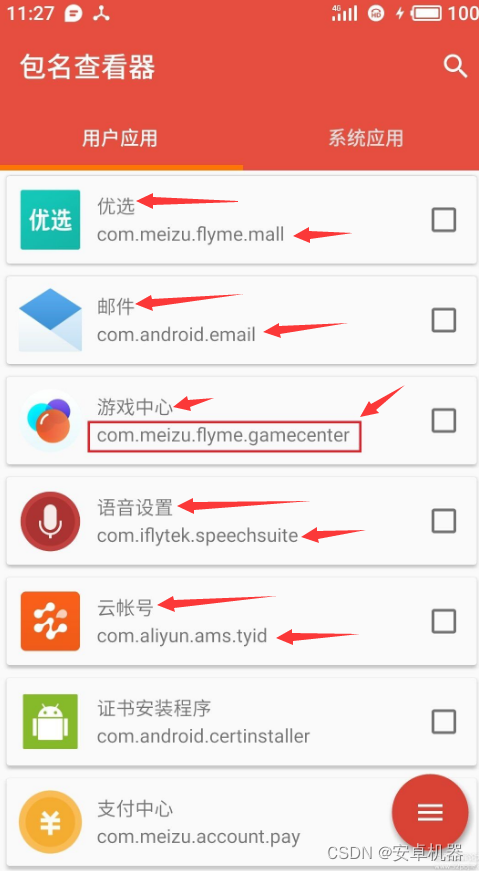
他在系统中显示的名字与实际的英文包名是不同的。所有卸载软件要注意。
一 adb卸载不需要的软件
配置adb命令环境等等这些教程很多的。这边不在多做阐述。给出一个链接
adb连接手机工具:https://dl.google.com/android/repository/platform-tools-latest-windows.zip
安装后先了解基本的卸载 安装 冻结指令
禁用应用:adb shell pm disable-user 应用包名
开启应用:adb shell pm enable 应用包名
卸载应用:adb shell pm uninstall --user 0 应用包名
查看手机已装应用列表:adb shell pm list packages
找到你需要卸载的文件包名。按以上指令输入卸载即可、例如卸载下方软件
adb shell pm uninstall --user 0 com.iflytek.inputmethod.oppo
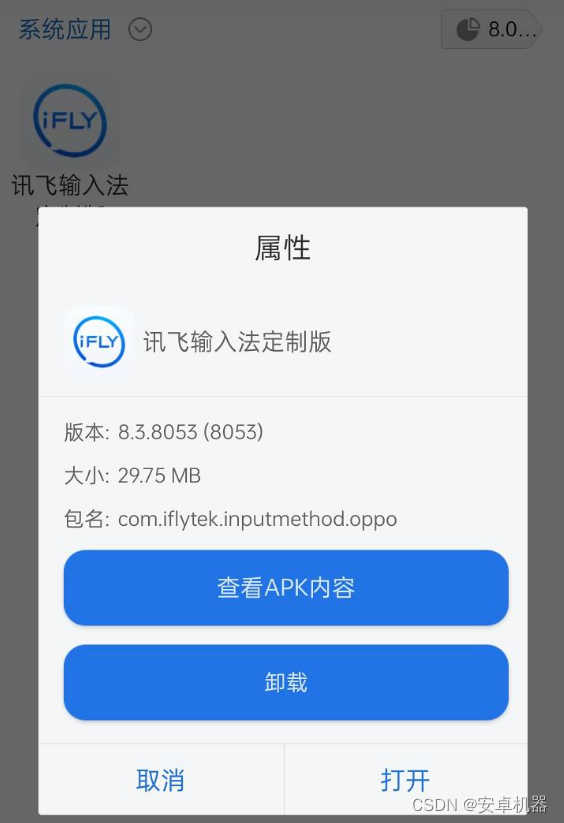
类似卸载即可,一定要注意名字
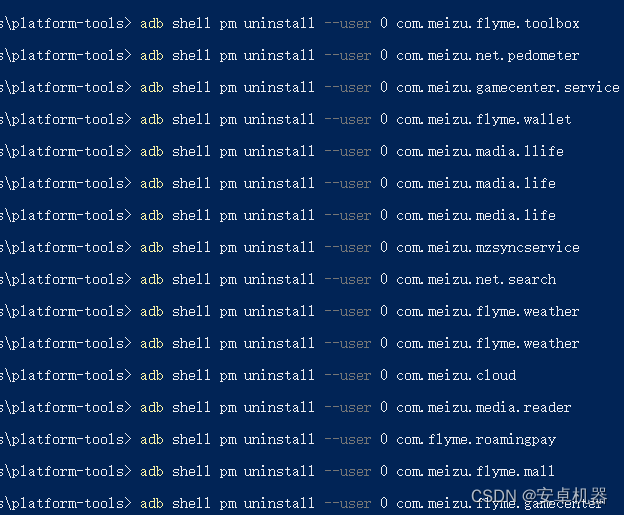
若卸载成功会出现成功的英文Success
下方给出小米系列常用的卸载方法和包名对照。
adb shell pm uninstall --user 0 com.miui.analytics # 小米广告分析,必删
adb shell pm uninstall --user 0 com.miui.systemAdSolution # 小米系统广告解决方案,必删
adb shell pm uninstall --user 0 com.miui.aod    # 万象息屏
adb shell pm uninstall --user 0 com.miui.audiomonitor   # 小米录音
adb shell pm uninstall --user 0 com.miui.bugreport # 用户反馈
adb shell pm uninstall --user 0 com.miui.cit # CIT手机测试
adb shell pm uninstall --user 0 com.miui.compass # 小米指南针
adb shell pm uninstall --user 0 com.miui.contentcatcher # 应用程序扩展服务
adb shell pm uninstall --user 0 com.miui.contentextension # 传送门
adb shell pm uninstall --user 0 com.miui.easygo # EasyGo
adb shell pm uninstall --user 0 com.miui.freeform   # 自由窗口
adb shell pm uninstall --user 0 com.miui.huanji # 小米换机
adb shell pm uninstall --user 0 com.miui.hybrid # 快应用服务框架
adb shell pm uninstall --user 0 com.miui.hybrid.accessory # 智慧生活
adb shell pm uninstall --user 0 com.miui.maintenancemode    # 维修模式
adb shell pm uninstall --user 0 com.miui.miservice # 服务与反馈
adb shell pm uninstall --user 0 com.miui.mishare.connectivity # 小米互传
adb shell pm uninstall --user 0 com.miui.miwallpaper.earth # 地球超级壁纸
adb shell pm uninstall --user 0 com.miui.miwallpaper.geometry # 几何超级壁纸
adb shell pm uninstall --user 0 com.miui.miwallpaper.mars # 火星超级壁纸
adb shell pm uninstall --user 0 com.miui.miwallpaper.saturn # 土星超级壁纸
adb shell pm uninstall --user 0 com.miui.miwallpaper.snowmountain # 雪山超级壁纸(默认的,卸了也会更新)
adb shell pm uninstall --user 0 com.miui.newhome # 内容中心
adb shell pm uninstall --user 0 com.miui.newmidrive # 小米云盘
adb shell pm uninstall --user 0 com.miui.notes #小米笔记
adb shell pm uninstall --user 0 com.miui.securityadd # 游戏加速
adb shell pm uninstall --user 0 com.miui.smarttravel # 智能出行
adb shell pm uninstall --user 0 com.miui.accessibility # 小米闻声
adb shell pm uninstall --user 0 com.miui.touchassistant # 悬浮球
adb shell pm uninstall --user 0 com.miui.thirdappassistant # 三方应用异常分析
adb shell pm uninstall --user 0 com.miui.tsmclient # 小米智能卡
adb shell pm uninstall --user 0 com.miui.virtualsim # 全球上网
adb shell pm uninstall --user 0 com.miui.voiceassist # 小爱同学
adb shell pm uninstall --user 0 com.miui.voicetrigger # 语音唤醒
adb shell pm uninstall --user 0 com.miui.weather2 # 小米天气
adb shell pm uninstall --user 0 com.miui.yellowpage # 生活黄页
adb shell pm uninstall --user 0 com.miui.phrase # 常用语
adb shell pm uninstall --user 0 com.miui.translation.kingsoft   # 金山翻译
adb shell pm uninstall --user 0 com.miui.translation.youdao # 有道翻译
adb shell pm uninstall --user 0 com.miui.translation.xmcloud    # 小米云翻译
adb shell pm uninstall --user 0 com.miui.translationservice # 翻译服务
adb shell pm uninstall --user 0 com.miui.wmsvc  # 不知道干啥的

# Xiaomi 相关
adb shell pm uninstall --user 0 com.xiaomi.ab   # 小米商城系统组件
adb shell pm uninstall --user 0 com.xiaomi.aiasst.service # AI虚拟助手
adb shell pm uninstall --user 0 com.xiaomi.aiasst.vision # AI虚拟助手
adb shell pm uninstall --user 0 com.xiaomi.drivemode # 驾车模式
adb shell pm uninstall --user 0 com.xiaomi.gamecenter # 游戏中心
adb shell pm uninstall --user 0 com.xiaomi.gamecenter.sdk.service # 游戏服务
adb shell pm uninstall --user 0 com.xiaomi.joyose # 运动计步
adb shell pm uninstall --user 0 com.xiaomi.jr # 天星金融
adb shell pm uninstall --user 0 com.xiaomi.macro # 自动连招
adb shell pm uninstall --user 0 com.xiaomi.mi_connect_service # 小米互传
adb shell pm uninstall --user 0 com.xiaomi.mibrain.speech # 小迷语音引擎
adb shell pm uninstall --user 0 com.xiaomi.migameservice # 游戏高能时刻
adb shell pm uninstall --user 0 com.xiaomi.mirror # MIUI+ Beta版
adb shell pm uninstall --user 0 com.xiaomi.payment # 米币支付
adb shell pm uninstall --user 0 com.xiaomi.shop # 小米商城
adb shell pm uninstall --user 0 com.xiaomi.mircs    # RCS 增强短信
adb shell pm uninstall --user 0 com.xiaomi.mtb  # Modem 测试工具
adb shell pm uninstall --user 0 com.xiaomi.simactivate.service  # 小米 SIM 卡激活工具
adb shell pm uninstall --user 0 com.xiaomi.oobhelper    # OOB Helper 不知道干什么的
adb shell pm uninstall --user 0 com.xiaomi.dtool    # D Tool 不知道干什么的
adb shell pm uninstall --user 0 com.xiaomi.otrpbroker   # OTRP 协议协商程序(物联网)

# 小米定制应用
adb shell pm uninstall --user 0 cn.wps.moffice_eng.xiaomi.lite # 小米文档查看器(WPS 定制)
adb shell pm uninstall --user 0 com.baidu.input_mi # 百度输入法小米版
adb shell pm uninstall --user 0 com.iflytek.inputmethod.miui # 讯飞输入法小米版
adb shell pm uninstall --user 0 com.sohu.inputmethod.sogou.xiaomi # 搜狗输入法小米版

# 小米官方应用
adb shell pm uninstall --user 0 com.mfashiongallery.emag # 小米画报
adb shell pm uninstall --user 0 com.mi.health # 小米健康
adb shell pm uninstall --user 0 com.mi.liveassistant # 小米直播助手
adb shell pm uninstall --user 0 com.mipay.wallet # 小米钱包

# 第三方应用
adb shell pm uninstall --user 0 cn.wps.moffice_eng # WPS Office
adb shell pm uninstall --user 0 com.achievo.vipshop # 唯品会
adb shell pm uninstall --user 0 com.baidu.searchbox # 百度搜索
adb shell pm uninstall --user 0 com.bsp.catchlog # CatchLog
adb shell pm uninstall --user 0 com.dianping.v1 # 大众点评
adb shell pm uninstall --user 0 com.dragon.read # 番茄免费小说
adb shell pm uninstall --user 0 com.duokan.reader # 多看阅读
adb shell pm uninstall --user 0 com.eastmoney.android.berlin # 东方财富
adb shell pm uninstall --user 0 com.Qunar # 去哪儿旅行
adb shell pm uninstall --user 0 com.qxwz.ps.hpls # 千寻位置
adb shell pm uninstall --user 0 com.sina.weibo # 微博
adb shell pm uninstall --user 0 com.taobao.litetao # 淘宝特价版
adb shell pm uninstall --user 0 com.tencent.mtt # QQ 浏览器
adb shell pm uninstall --user 0 com.tianyancha.skyeye # 天眼查
adb shell pm uninstall --user 0 com.UCMobile # UI 浏览器
adb shell pm uninstall --user 0 com.xunmeng.pinduoduo # 拼多多
adb shell pm uninstall --user 0 ctrip.android.view # 携程旅行
adb shell pm uninstall --user 0 org.codeaurora.ims # IMS
adb shell pm uninstall --user 0 tv.pps.mobile # 爱奇艺随刻

# Android 相关
adb shell pm uninstall --user 0 com.android.apps.tag # Tags
adb shell pm uninstall --user 0 com.android.backupconfirm # 备份确认
adb shell pm uninstall --user 0 com.android.bips # 系统打印服务
adb shell pm uninstall --user 0 com.android.bookmarkprovider # Bookmark Provider
adb shell pm uninstall --user 0 com.android.calendar # 日历
adb shell pm uninstall --user 0 com.android.calllogbackup # 自带通话记录备份
adb shell pm uninstall --user 0 com.android.captiveportallogin # 强制门户登录,测试 WiFi 连接(叹号就这里来的)
adb shell pm uninstall --user 0 com.android.carrierdefaultapp # 运营商默认应用
adb shell pm uninstall --user 0 com.android.chrome # Chrome 浏览器
adb shell pm uninstall --user 0 com.android.companiondevicemanager # 配套设备管理器
adb shell pm uninstall --user 0 com.android.cts.ctsshim # 谷歌兼容性检查
adb shell pm uninstall --user 0 com.android.cts.priv.ctsshim # 谷歌兼容性检查
adb shell pm uninstall --user 0 com.android.deskclock   # 时钟
adb shell pm uninstall --user 0 com.android.dreams.basic # 基本互动屏保
adb shell pm uninstall --user 0 com.android.email # 电子邮箱
adb shell pm uninstall --user 0 com.android.emergency # 急救信息
adb shell pm uninstall --user 0 com.android.externalstorage # 外部存储设备
adb shell pm uninstall --user 0 com.android.hbmsvmanager # 完全不知道这个是什么
adb shell pm uninstall --user 0 com.android.hotspot2.osulogin # OSU 登录
adb shell pm uninstall --user 0 com.android.hotwordenrollment.okgoogle # 谷歌助理
adb shell pm uninstall --user 0 com.android.hotwordenrollment.xgoogle # Google Assistant
adb shell pm uninstall --user 0 com.android.htmlviewer # HTML 查看程序
adb shell pm uninstall --user 0 com.android.inputdevices # 输入设备
adb shell pm uninstall --user 0 com.android.localtransport # 本地传输
adb shell pm uninstall --user 0 com.android.managedprovisioning # 工作设置
adb shell pm uninstall --user 0 com.android.mms.service # MMS 短信服务
adb shell pm uninstall --user 0 com.android.mtp # MTP 主机
adb shell pm uninstall --user 0 com.android.musicfx # MusicFX
adb shell pm uninstall --user 0 com.android.ons # 完全不知道这个是什么
adb shell pm uninstall --user 0 com.android.overlay.gmstelecomm # GMS 电信
adb shell pm uninstall --user 0 com.android.overlay.gmstelephony # GMS 电话通讯
adb shell pm uninstall --user 0 com.android.pacprocessor # PAC 进程(中国用不上)
adb shell pm uninstall --user 0 com.android.printspooler # 打印处理服务
adb shell pm uninstall --user 0 com.android.protips # 主屏幕提示
adb shell pm uninstall --user 0 com.android.providers.blockednumber # 存储已屏蔽的号码
adb shell pm uninstall --user 0 com.android.providers.calendar # 日历存储
adb shell pm uninstall --user 0 com.android.providers.downloads.ui  # 下载(Pixel禁用后第三方软件无法看到下载,MIUI 没事)
adb shell pm uninstall --user 0 com.android.providers.partnerbookmarks # Bookmark Provider
adb shell pm uninstall --user 0 com.android.providers.userdictionary # 用户词典
adb shell pm uninstall --user 0 com.android.quicksearchbox # 搜索
adb shell pm uninstall --user 0 com.android.safetyregulatoryinfo # 安全和监管手册
adb shell pm uninstall --user 0 com.android.se # Secure Element Application
adb shell pm uninstall --user 0 com.android.service.ims # Carrier Services
adb shell pm uninstall --user 0 com.android.service.ims.presence # Presence
adb shell pm uninstall --user 0 com.android.sharedstoragebackup # 共享存储备份13
adb shell pm uninstall --user 0 com.android.simappdialog # SIM App Dialog
adb shell pm uninstall --user 0 com.android.statementservice # 配套设备管理器
adb shell pm uninstall --user 0 com.android.stk # SIM 卡应用
adb shell pm uninstall --user 0 com.android.systemui.plugin.globalactions.wallet # 完全不知道这个是什么
adb shell pm uninstall --user 0 com.android.timezone.updater # 时区更新程序
adb shell pm uninstall --user 0 com.android.traceur # 系统追踪(开发者调试用)
adb shell pm uninstall --user 0 com.android.wallpaper.livepicker    # 安卓壁纸
adb shell pm uninstall --user 0 com.android.wallpaperbackup # 安卓壁纸
adb shell pm uninstall --user 0 com.android.wallpapercropper    # 安卓壁纸

# Android 导航相关
adb shell pm uninstall --user 0 com.android.internal.systemui.navbar.gestural
adb shell pm uninstall --user 0 com.android.internal.systemui.navbar.gestural_extra_wide_back
adb shell pm uninstall --user 0 com.android.internal.systemui.navbar.gestural_narrow_back
adb shell pm uninstall --user 0 com.android.internal.systemui.navbar.gestural_wide_back
adb shell pm uninstall --user 0 com.android.internal.systemui.navbar.threebutton # 三按钮导航
二 第三方软件进行卸载内置。
这类软件和相关的脚本也很多。类似以下
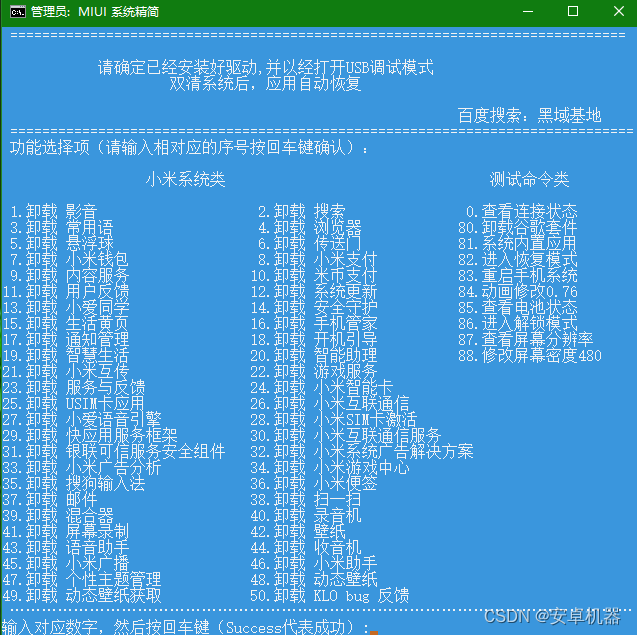
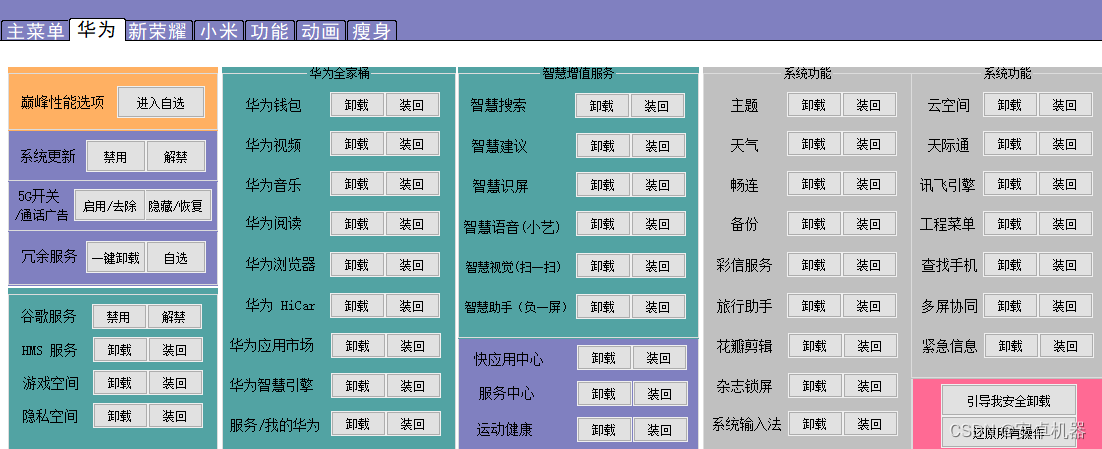
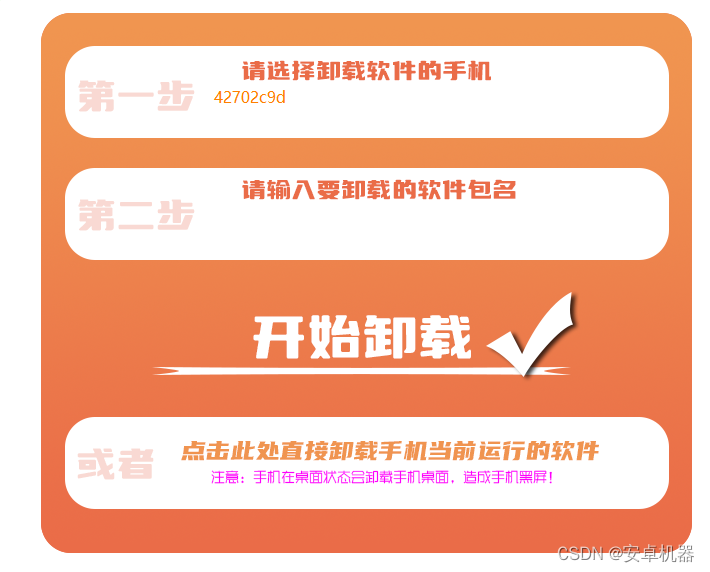
等等类似的卸载内置软件很多。其实原理大都相同。有些软件是冻结原理。有些是真实可以卸载。个人首推以下这款软件。操作方便。而且功能选项较多。(搞机助手)搜很多的
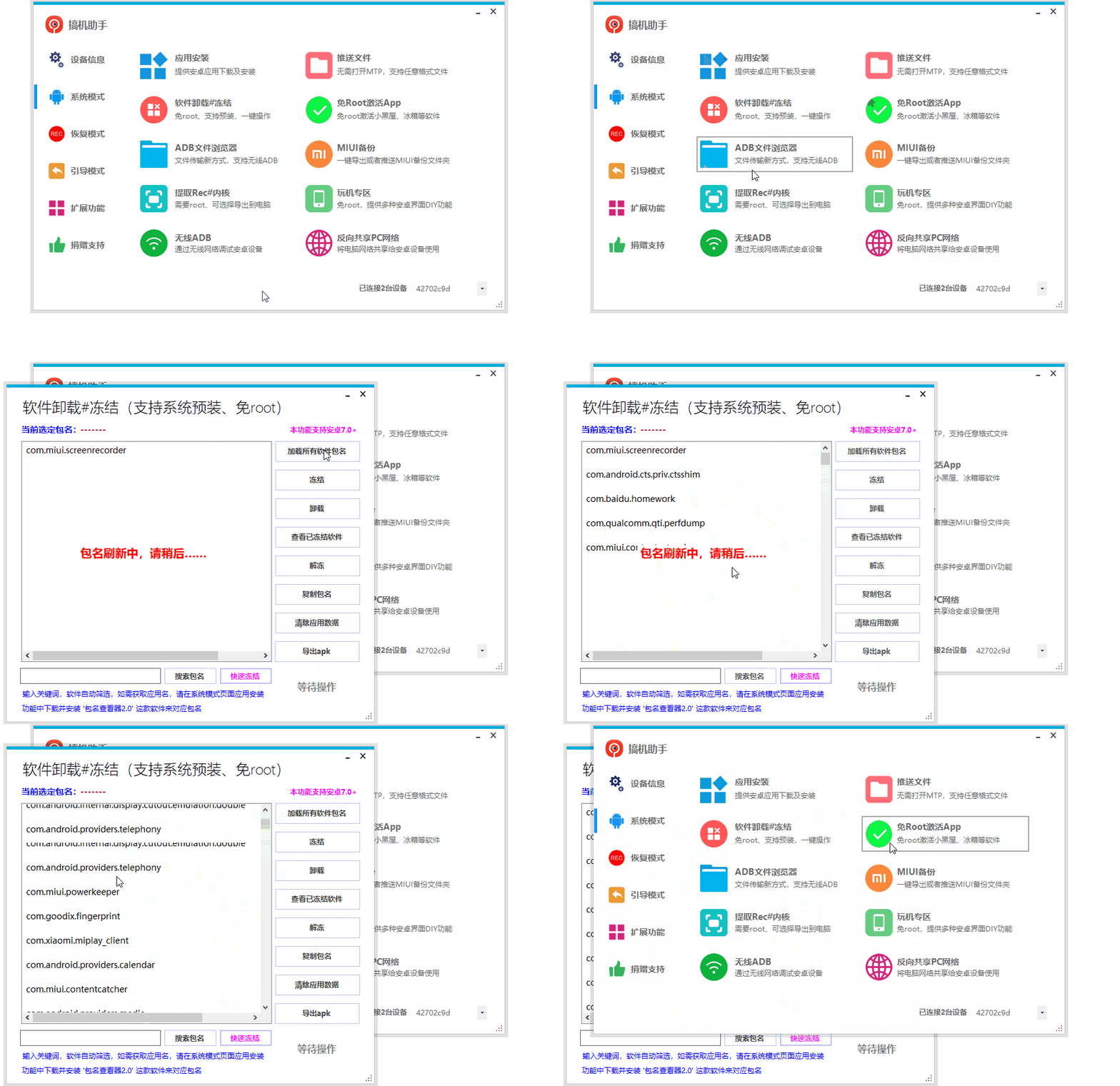
友友梦注意:虽然这些卸载软件真正意义上不是完整卸载。但还是有风险的。如你冻结卸载了系统关联的软件会导致无法进入桌面等等的故障。这种情况如果可以联机正常需要进行恢复操作。或者恢复出厂或者重新刷系统解决。
其他图片软件收纳到csdn。需要的下载即可
https://download.csdn.net/download/u011283906/87216464?spm=1001.2014.3001.5503
三 *******如果可以解锁bl 有第三方twrp的机型,可以尝试刷写第三方rom。一般很多作者都去除精简了很多内置软件。
关注我 了解玩机搞机基本常识和一些问题解决。如对你有帮助。请伸出你那双可爱的双手点个赞赞吧
我正在编写一个小脚本来定位aws存储桶中的特定文件,并创建一个临时验证的url以发送给同事。(理想情况下,这将创建类似于在控制台上右键单击存储桶中的文件并复制链接地址的结果)。我研究过回形针,它似乎不符合这个标准,但我可能只是不知道它的全部功能。我尝试了以下方法:defauthenticated_url(file_name,bucket)AWS::S3::S3Object.url_for(file_name,bucket,:secure=>true,:expires=>20*60)end产生这种类型的结果:...-1.amazonaws.com/file_path/file.zip.A
我最近决定从我的系统中卸载RVM。在thispage提出的一些论点说服我:实际上,我的决定是,我根本不想担心Ruby的多个版本。我只想使用1.9.2-p290版本而不用担心其他任何事情。但是,当我在我的Mac上运行ruby--version时,它告诉我我的版本是1.8.7。我四处寻找如何简单地从我的Mac上卸载这个Ruby,但奇怪的是我没有找到任何东西。似乎唯一想卸载Ruby的人运行linux,而使用Mac的每个人都推荐RVM。如何从我的Mac上卸载Ruby1.8.7?我想升级到1.9.2-p290版本,并且我希望我的系统上只有一个版本。 最佳答案
在Ruby中是否有Gem或安全删除文件的方法?我想避免系统上可能不存在的外部程序。“安全删除”指的是覆盖文件内容。 最佳答案 如果您使用的是*nix,一个很好的方法是使用exec/open3/open4调用shred:`shred-fxuz#{filename}`http://www.gnu.org/s/coreutils/manual/html_node/shred-invocation.html检查这个类似的帖子:Writingafileshredderinpythonorruby?
这个问题在这里已经有了答案:关闭10年前。PossibleDuplicate:Rubysyntaxquestion:Rational(a,b)andRational.new!(a,b)我正在阅读ruby镐书,我对创建有理数的语法感到困惑。Rational(3,4)*Rational(1,2)产生=>3/8为什么Rational不需要new方法(我还注意到例如我可以在没有new方法的情况下创建字符串)?
Ⅰ软件测试基础一、软件测试基础理论1、软件测试的必要性所有的产品或者服务上线都需要测试2、测试的发展过程3、什么是软件测试找bug,发现缺陷4、测试的定义使用人工或自动的手段来运行或者测试某个系统的过程。目的在于检测它是否满足规定的需求。弄清预期结果和实际结果的差别。5、测试的目的以最小的人力、物力和时间找出软件中潜在的错误和缺陷6、测试的原则28原则:20%的主要功能要重点测(eg:支付宝的支付功能,其他功能都是次要的)80%的错误存在于20%的代码中7、测试标准8、测试的基本要求功能测试性能测试安全性测试兼容性测试易用性测试外观界面测试可靠性测试二、质量模型衡量一个优秀软件的维度①功能性功
我正在使用ruby2.1.0我有一个json文件。例如:test.json{"item":[{"apple":1},{"banana":2}]}用YAML.load加载这个文件安全吗?YAML.load(File.read('test.json'))我正在尝试加载一个json或yaml格式的文件。 最佳答案 YAML可以加载JSONYAML.load('{"something":"test","other":4}')=>{"something"=>"test","other"=>4}JSON将无法加载YAML。JSON.load("
我已经开始了:defsplit_array(array,size)index=0results=[]ifsize>0whileindex如果我在[1,2,3,4,5,6]上运行它,比如split_array([1,2,3,4,5,6],3)它将产生这个数组:[[1,2,3],[4,5,6]]。在Ruby1.8.7中是否已经有可用的东西可以做到这一点? 最佳答案 [1,2,3,4,5,6].each_slice(3).to_a#=>[[1,2,3],[4,5,6]]对于1.8.6:require'enumerator'[1,2,3,4
我想在共享服务器上建立一个jekyll博客。当我尝试安装Jekyll时,我得到“您没有写权限”。我该如何在没有root或sudo的情况下解决这个问题?更多细节:我在共享服务器上有空间,但没有根访问权限。我无法安装Ruby,尽管托管公司应我的要求安装了它。当我尝试安装Jekyll时我使用user@hosting.org[~]#geminstalljekyll这是我得到的回应:ERROR:Whileexecutinggem...(Gem::FilePermissionError)Youdon'thavewritepermissionsintothe/usr/lib/ruby/gems/1.
默认情况下:回形针gem将所有附件存储在公共(public)目录中。出于安全原因,我不想将附件存储在公共(public)目录中,所以我将它们保存在应用程序根目录的uploads目录中:classPost我没有指定url选项,因为我不希望每个图像附件都有一个url。如果指定了url:那么拥有该url的任何人都可以访问该图像。这是不安全的。在user#show页面中:我想实际显示图像。如果我使用所有回形针默认设置,那么我可以这样做,因为图像将在公共(public)目录中并且图像将具有一个url:Someimage:看来,如果我将图像附件保存在公共(public)目录之外并且不指定url(同
如果我想要“00001”而不是“1”,除了我自己写填零方法之外,有没有内置的方法可以帮助我为整数填零? 最佳答案 puts"%05d"%1#00001参见:String::%,Kernel::sprintf这是正在发生的事情。%左侧的"%05d"是C风格的格式说明符。%右边的变量就是要格式化的东西。格式说明符可以像这样解码:%-格式说明符的开头0-用前导零填充5-长度为5个字符d-被格式化的是一个整数如果你要格式化多个东西,你会把它们放在一个数组中:"%d-%s"%[1,"One"]#=>1-one
