文章目录
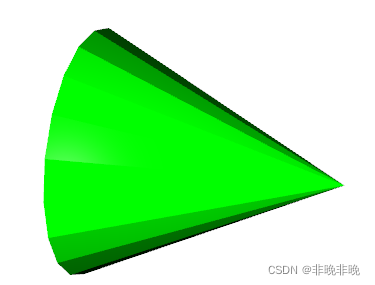
用o3d.geometry.TriangleMesh.create_cone来绘制圆锥,radius控制其半径,height控制其高度
import open3d as o3d

cone = o3d.geometry.TriangleMesh.create_cone(radius=1.0,
                                             height=2.0,
                                             resolution=20,
                                             split=1)
cone.compute_vertex_normals()
cone.paint_uniform_color([0, 1, 0])
o3d.visualization.draw_geometries([cone])
用o3d.geometry.TriangleMesh.create_cylinder绘制圆柱,radius控制圆柱半径,height控制圆柱的高。
import open3d as o3d

mesh_cylinder = o3d.geometry.TriangleMesh.create_cylinder(radius=0.3,
                                                          height=4.0)
mesh_cylinder.compute_vertex_normals()
mesh_cylinder.paint_uniform_color([0.1, 0.4, 0.1])
o3d.visualization.draw_geometries([mesh_cylinder])

用o3d.geometry.TriangleMesh.create_box绘制长方体,width,height,depth对应长方体长、宽和高度。
import open3d as o3d

mesh_box = o3d.geometry.TriangleMesh.create_box(width=2.0,
                                                height=1.0,
                                                depth=1.0)
mesh_box.compute_vertex_normals()
mesh_box.paint_uniform_color([0.9, 0.1, 0.1])
o3d.visualization.draw_geometries([mesh_box])

用o3d.geometry.TriangleMesh.create_sphere绘制球体,radius控制球的半径,resolution控制图形显示的分辨率,如果不设定分配率的话,默认值为20。
import open3d as o3d

mesh_sphere = o3d.geometry.TriangleMesh.create_sphere(radius=1.0,
                                                      resolution=100)
mesh_sphere.compute_vertex_normals()
mesh_sphere.paint_uniform_color([0.1, 0.1, 0.7])
o3d.visualization.draw_geometries([mesh_sphere])

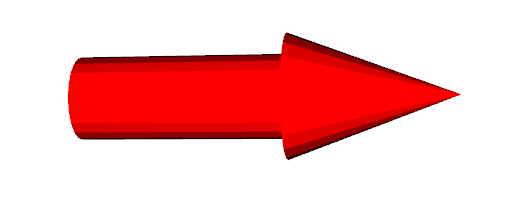
用o3d.geometry.TriangleMesh.create_arrow绘制箭头。
import open3d as o3d

arrow = o3d.geometry.TriangleMesh.create_arrow(cylinder_radius=1.0,
                                               cone_radius=1.5,
                                               cylinder_height=5.0,
                                               cone_height=4.0,
                                               resolution=20,
                                               cylinder_split=4,
                                               cone_split=1)
arrow.compute_vertex_normals()
arrow.paint_uniform_color([1, 0, 0])
o3d.visualization.draw_geometries([arrow])
用o3d.geometry.TriangleMesh.create_coordinate_frame绘制坐标轴,其中size表示粗细,origin标识坐标原点。
import open3d as o3d


mesh_frame = o3d.geometry.TriangleMesh.create_coordinate_frame(
    size=0.6, origin=[-2, -2, -2])

o3d.visualization.draw_geometries([mesh_frame])

可以通过o3d.visualization.Visualizer()添加我们需要的组件,我们在下面使用了vis.add_geometry添加了边和点,同样也可以使用它添加上面讲到的长方体、球形等。
import open3d as o3d
import numpy as np

def polygon():
    #绘制顶点
    polygon_points = np.array([[1, 0, 0], [0, 1, 0], [0, 0, 1],[0,0,5]])
    lines = [[0, 1], [1, 2], [2, 3],[3,0]] #连接的顺序,封闭链接
    color = [[1, 0, 0] for i in range(len(lines))]
    #添加顶点,点云
    points_pcd = o3d.geometry.PointCloud()
    points_pcd.points = o3d.utility.Vector3dVector(polygon_points)
    points_pcd.paint_uniform_color([0, 0.3, 0]) #点云颜色

    #绘制线条
    lines_pcd = o3d.geometry.LineSet()
    lines_pcd.lines = o3d.utility.Vector2iVector(lines)
    lines_pcd.colors = o3d.utility.Vector3dVector(color) #线条颜色
    lines_pcd.points = o3d.utility.Vector3dVector(polygon_points)

    return lines_pcd, points_pcd


if __name__ == "__main__":
    axis_pcd = o3d.geometry.TriangleMesh.create_coordinate_frame(size=0.5, origin=[0, 0, 0])

    vis = o3d.visualization.Visualizer()
    vis.create_window(window_name='绘制多边形')
    #vis.toggle_full_screen() #全屏

    #设置
    opt = vis.get_render_option()
    opt.background_color = np.asarray([0, 0, 0]) #背景
    opt.point_size = 1 #点云大小

    #vis.add_geometry(axis_pcd)
    lines, points = polygon()
    vis.add_geometry(lines)
    vis.add_geometry(points)
    #vis.update_geometry(points)
    vis.run()
    vis.destroy_window()

第7节中讲到了,我们可以使用vis.add_geometry逐个添加我们需要绘制的类型,同样我们也可以使用以下方法一次性添加目标。
import open3d as o3d

mesh_box = o3d.geometry.TriangleMesh.create_box(width=1.0,
                                                height=1.0,
                                                depth=1.0)
mesh_box.compute_vertex_normals()
mesh_box.paint_uniform_color([0.9, 0.1, 0.1])
mesh_sphere = o3d.geometry.TriangleMesh.create_sphere(radius=1.0)
mesh_sphere.compute_vertex_normals()
mesh_sphere.paint_uniform_color([0.1, 0.1, 0.7])
mesh_cylinder = o3d.geometry.TriangleMesh.create_cylinder(radius=0.3,
                                                          height=4.0)
mesh_cylinder.compute_vertex_normals()
mesh_cylinder.paint_uniform_color([0.1, 0.9, 0.1])
mesh_frame = o3d.geometry.TriangleMesh.create_coordinate_frame(
    size=0.6, origin=[-2, -2, -2])


# 一次性添加方法一:
o3d.visualization.draw_geometries(
    [mesh_box, mesh_sphere, mesh_cylinder, mesh_frame])

# 一次性添加方法二:
o3d.visualization.draw_geometries(
    [mesh_box + mesh_sphere + mesh_cylinder + mesh_frame])

大约一年前,我决定确保每个包含非唯一文本的Flash通知都将从模块中的方法中获取文本。我这样做的最初原因是为了避免一遍又一遍地输入相同的字符串。如果我想更改措辞,我可以在一个地方轻松完成,而且一遍又一遍地重复同一件事而出现拼写错误的可能性也会降低。我最终得到的是这样的:moduleMessagesdefformat_error_messages(errors)errors.map{|attribute,message|"Error:#{attribute.to_s.titleize}#{message}."}enddeferror_message_could_not_find(obje
我可以得到Infinity和NaNn=9.0/0#=>Infinityn.class#=>Floatm=0/0.0#=>NaNm.class#=>Float但是当我想直接访问Infinity或NaN时:Infinity#=>uninitializedconstantInfinity(NameError)NaN#=>uninitializedconstantNaN(NameError)什么是Infinity和NaN?它们是对象、关键字还是其他东西? 最佳答案 您看到打印为Infinity和NaN的只是Float类的两个特殊实例的字符串
我不确定传递给方法的对象的类型是否正确。我可能会将一个字符串传递给一个只能处理整数的函数。某种运行时保证怎么样?我看不到比以下更好的选择:defsomeFixNumMangler(input)raise"wrongtype:integerrequired"unlessinput.class==FixNumother_stuffend有更好的选择吗? 最佳答案 使用Kernel#Integer在使用之前转换输入的方法。当无法以任何合理的方式将输入转换为整数时,它将引发ArgumentError。defmy_method(number)
有时我需要处理键/值数据。我不喜欢使用数组,因为它们在大小上没有限制(很容易不小心添加超过2个项目,而且您最终需要稍后验证大小)。此外,0和1的索引变成了魔数(MagicNumber),并且在传达含义方面做得很差(“当我说0时,我的意思是head...”)。散列也不合适,因为可能会不小心添加额外的条目。我写了下面的类来解决这个问题:classPairattr_accessor:head,:taildefinitialize(h,t)@head,@tail=h,tendend它工作得很好并且解决了问题,但我很想知道:Ruby标准库是否已经带有这样一个类? 最佳
我正在尝试解析一个CSV文件并使用SQL命令自动为其创建一个表。CSV中的第一行给出了列标题。但我需要推断每个列的类型。Ruby中是否有任何函数可以找到每个字段中内容的类型。例如,CSV行:"12012","Test","1233.22","12:21:22","10/10/2009"应该产生像这样的类型['integer','string','float','time','date']谢谢! 最佳答案 require'time'defto_something(str)if(num=Integer(str)rescueFloat(s
我正在玩HTML5视频并且在ERB中有以下片段:mp4视频从在我的开发环境中运行的服务器很好地流式传输到chrome。然而firefox显示带有海报图像的视频播放器,但带有一个大X。问题似乎是mongrel不确定ogv扩展的mime类型,并且只返回text/plain,如curl所示:$curl-Ihttp://0.0.0.0:3000/pr6.ogvHTTP/1.1200OKConnection:closeDate:Mon,19Apr201012:33:50GMTLast-Modified:Sun,18Apr201012:46:07GMTContent-Type:text/plain
无论您是想搭建桌面端、WEB端或者移动端APP应用,HOOPSPlatform组件都可以为您提供弹性的3D集成架构,同时,由工业领域3D技术专家组成的HOOPS技术团队也能为您提供技术支持服务。如果您的客户期望有一种在多个平台(桌面/WEB/APP,而且某些客户端是“瘦”客户端)快速、方便地将数据接入到3D应用系统的解决方案,并且当访问数据时,在各个平台上的性能和用户体验保持一致,HOOPSPlatform将帮助您完成。利用HOOPSPlatform,您可以开发在任何环境下的3D基础应用架构。HOOPSPlatform可以帮您打造3D创新型产品,HOOPSSDK包含的技术有:快速且准确的CAD
本教程将在Unity3D中混合Optitrack与数据手套的数据流,在人体运动的基础上,添加双手手指部分的运动。双手手背的角度仍由Optitrack提供,数据手套提供双手手指的角度。 01 客户端软件分别安装MotiveBody与MotionVenus并校准人体与数据手套。MotiveBodyMotionVenus数据手套使用、校准流程参照:https://gitee.com/foheart_1/foheart-h1-data-summary.git02 数据转发打开MotiveBody软件的Streaming,开始向Unity3D广播数据;MotionVenus中设置->选项选择Unit
Unity自动旋转动画1.开门需要门把手先动,门再动2.关门需要门先动,门把手再动3.中途播放过程中不可以再次进行操作觉得太复杂?查看我的文章开关门简易进阶版效果:如果这个门可以直接打开的话,就不需要放置"门把手"如果门把手还有钥匙需要旋转,那就可以把钥匙放在门把手的"门把手",理论上是可以无限套娃的可调整参数有:角度,反向,轴向,速度运行时点击Test进行测试自己写的代码比较垃圾,命名与结构比较拉,高手轻点喷,新手有类似的需求可以拿去做参考上代码usingSystem.Collections;usingSystem.Collections.Generic;usingUnityEngine;u
之前说过10之后的版本没有3dScan了,所以还是9.8的版本或者之前更早的版本。 3d物体扫描需要先下载扫描的APK进行扫面。首先要在手机上装一个扫描程序,扫描现实中的三维物体,然后上传高通官网,在下载成UnityPackage类型让Unity能够使用这个扫描程序可以从高通官网上进行下载,是一个安卓程序。点到Tools往下滑,找到VuforiaObjectScanner下载后解压数据线连接手机,将apk文件拷入手机安装然后刚才解压文件中的Media文件夹打开,两个PDF图打印第一张A4-ObjectScanningTarget.pdf,主要是用来辅助扫描的。好了,接下来就是扫描三维物体。将瓶
