/* 安装所需的软件包 */
yum install -y yum-utils \
  device-mapper-persistent-data \
lvm2yum-config-manager \
> --add-repo \
> https://download.docker.com/linux/centos/docker-ce.repo
yum install docker-ce docker-ce-cli containerd.iosystemctl start docker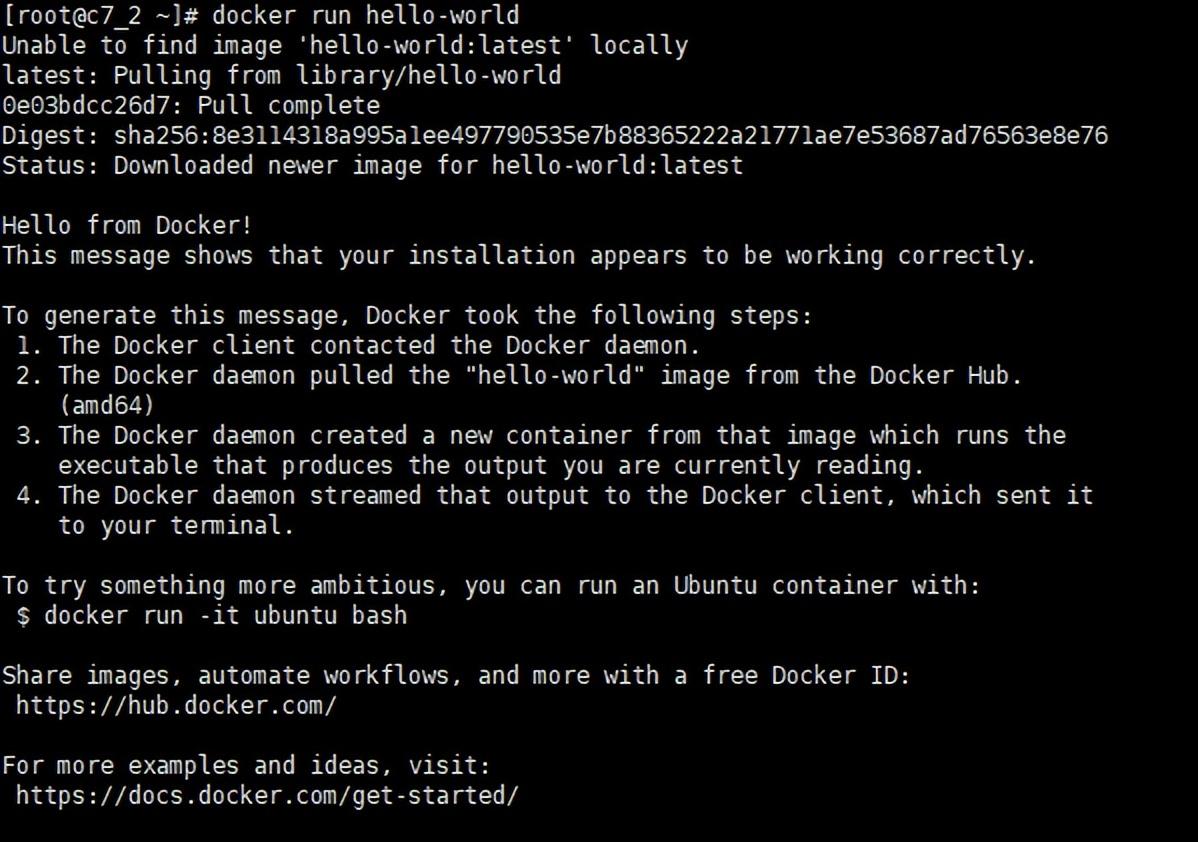 可见docker已部署成功并可以正常运行。
[root@c7_2 local]# docker search mysql
NAME DESCRIPTION STARS OFFICIAL AUTOMATED
mysql MySQL is a widely used, open-source relation… 9453 [OK]
mariadb MariaDB is a community-developed fork of MyS… 3415 [OK]
mysql/mysql-server Optimized MySQL Server Docker images. Create… 691 [OK]
centos/mysql-57-centos7 MySQL 5.7 SQL database server 75
mysql/mysql-cluster Experimental MySQL Cluster Docker images. Cr… 68
centurylink/mysql Image containing mysql. Optimized to be link… 61 [OK]
deitch/mysql-backup REPLACED! Please use http://hub.docker.com/r… 41 [OK]
bitnami/mysql Bitnami MySQL Docker Image 39 [OK]
tutum/mysql Base docker image to run a MySQL database se… 35
schickling/mysql-backup-s3 Backup MySQL to S3 (supports periodic backup… 30 [OK]
prom/mysqld-exporter 27 [OK]
linuxserver/mysql A Mysql container, brought to you by LinuxSe… 25
centos/mysql-56-centos7 MySQL 5.6 SQL database server 19
circleci/mysql MySQL is a widely used, open-source relation… 19
databack/mysql-backup Back up mysql databases to... anywhere! 17
mysql/mysql-router MySQL Router provides transparent routing be… 15
arey/mysql-client Run a MySQL client from a docker container 14 [OK]
openshift/mysql-55-centos7 DEPRECATED: A Centos7 based MySQL v5.5 image… 6
fradelg/mysql-cron-backup MySQL/MariaDB database backup using cron tas… 6 [OK]
genschsa/mysql-employees MySQL Employee Sample Database 5 [OK]
devilbox/mysql Retagged MySQL, MariaDB and PerconaDB offici… 3
ansibleplaybookbundle/mysql-apb An APB which deploys RHSCL MySQL 2 [OK]
jelastic/mysql An image of the MySQL database server mainta… 1
widdpim/mysql-client Dockerized MySQL Client (5.7) including Curl… 0 [OK]
monasca/mysql-init A minimal decoupled init container for mysql 0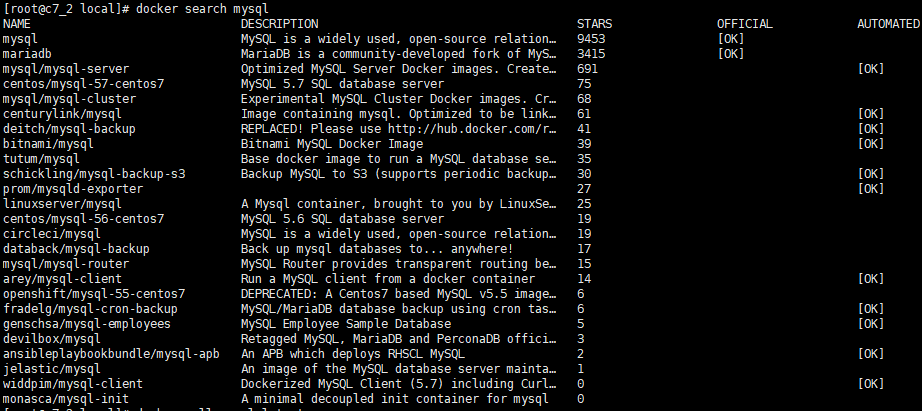
[root@c7_2 local]# docker pull mysql
Using default tag: latest
latest: Pulling from library/mysql
54fec2fa59d0: Pull complete
bcc6c6145912: Pull complete
951c3d959c9d: Pull complete
05de4d0e206e: Pull complete
319f0394ef42: Pull complete
d9185034607b: Pull complete
013a9c64dadc: Pull complete
42f3f7d10903: Pull complete
c4a3851d9207: Pull complete
82a1cc65c182: Pull complete
a0a6b01efa55: Pull complete
bca5ce71f9ea: Pull complete
Digest: sha256:61a2a33f4b8b4bc93b7b6b9e65e64044aaec594809f818aeffbff69a893d1944
Status: Downloaded newer image for mysql:latest
docker.io/library/mysql:latest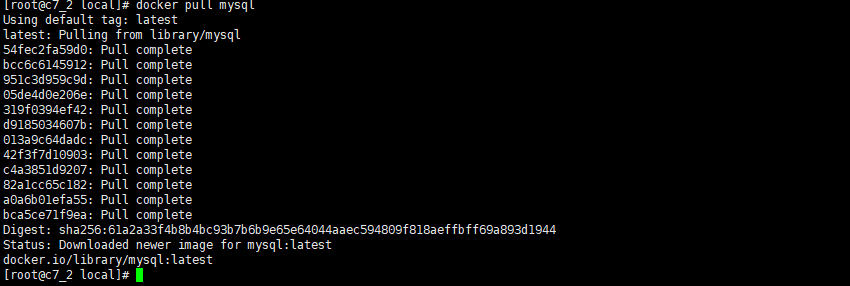 注: 拉取镜像的时候容易出现如下超时错误。
Error response from daemon: Get https://registry-1.docker.io/v2/: net/http: request canceled (Client.Timeout exceeded while awaiting headers)vim /etc/docker/daemon.json
/* 添加如下内容 */{
"registry-mirrors": ["http://hub-mirror.c.163.com","https://registry.docker-cn.com"]}[root@c7_2 containers]# docker image ls # 或使用 docker images 查看
REPOSITORY TAG IMAGE ID CREATED SIZE mysql latest a7a67c95e831 7 days ago 541MB hello-world latest bf756fb1ae65 4 months ago 13.3kB
[root@c7_2 local]# docker run -di --name=mysql  -p 3306:3306 -e MYSQL_ROOT_PASSWORD=Admin@123  mysql
9f6668b5d0292b30308cfc5c6a6b88a34c4d62d9e5c70dff9bfce9f090117968[root@c7_2 local]# docker exec -it mysql /bin/bash
root@9f6668b5d029:/#root@9f6668b5d029:/# mysql -u root -p'Admin@123'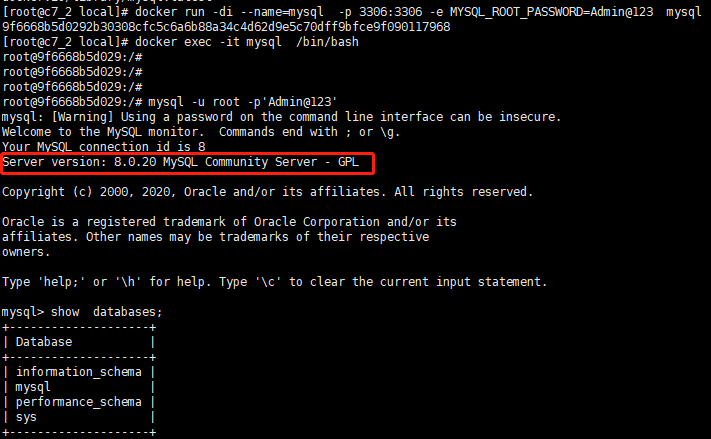 注: MySQL8.0 用户的加密组件做了变更,低版本客户端登录会报错。处理的方式有多种,主要的方式有2种:
[root@c7_2 local]# docker pull centos/mysql-57-centos7
Using default tag: latest
latest: Pulling from centos/mysql-57-centos7
d8d02d457314: Pull complete
a11069b6e245: Pull complete
596303fb1aa3: Pull complete
a29499e779a7: Pull complete
17d1a52c2e00: Pull complete
ed24591227fe: Pull complete
de0ad46e3ed9: Pull complete
c62e4a984a9c: Pull complete
01d54c6bda68: Pull complete
Digest: sha256:e08ee4d43b7356607685b69bde6335e27cf20c020f345b6c6c59400183882764
Status: Downloaded newer image for centos/mysql-57-centos7:latest
docker.io/centos/mysql-57-centos7:latest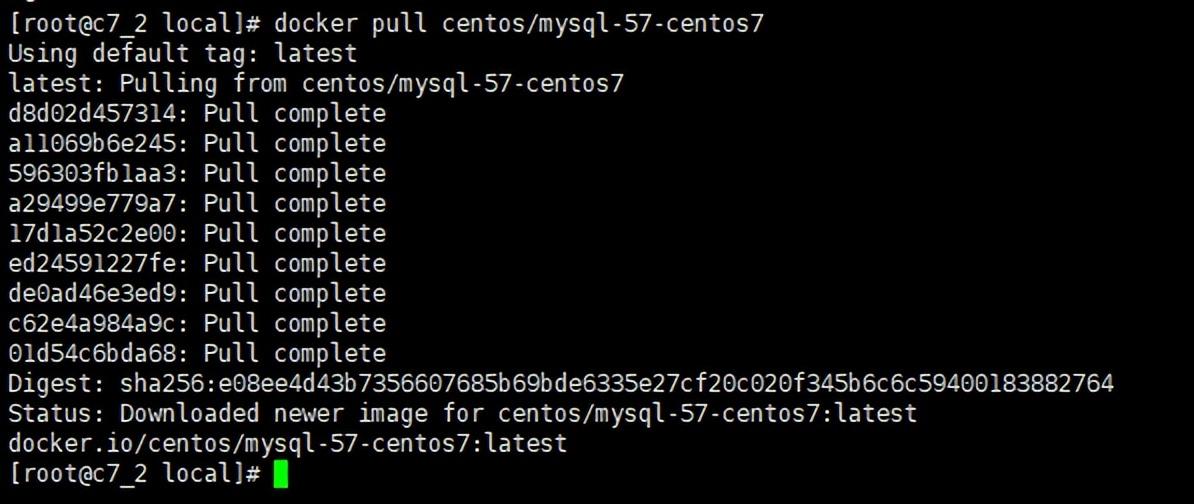 运行mysql5.7的docker
docker run -di --name=mysql5.7 -p 3307:3306 -e MYSQL_ROOT_PASSWORD=Admin@123 centos/mysql-57-centos7 不进入容器,在本地或其他机器上登录mysql5.7
[root@c7_2 local]# /usr/local/mysql5.7/bin/mysql -uroot -p'Admin@123' -P3307 -h 192.168.28.129
mysql: [Warning] Using a password on the command line interface can be insecure.
Welcome to the MySQL monitor. Commands end with ; or \g.
Your MySQL connection id is 11
Server version: 5.7.24 MySQL Community Server (GPL)
Copyright (c) 2009-2019 Percona LLC and/or its affiliates
Copyright (c) 2000, 2019, Oracle and/or its affiliates. All rights reserved.
Oracle is a registered trademark of Oracle Corporation and/or its
affiliates. Other names may be trademarks of their respective
owners.
Type 'help;' or '\h' for help. Type '\c' to clear the current input statement.
mysql> select version();
+-----------+
| version() |
+-----------+
| 5.7.24 |
+-----------+
1 row in set (0.01 sec)
mysql>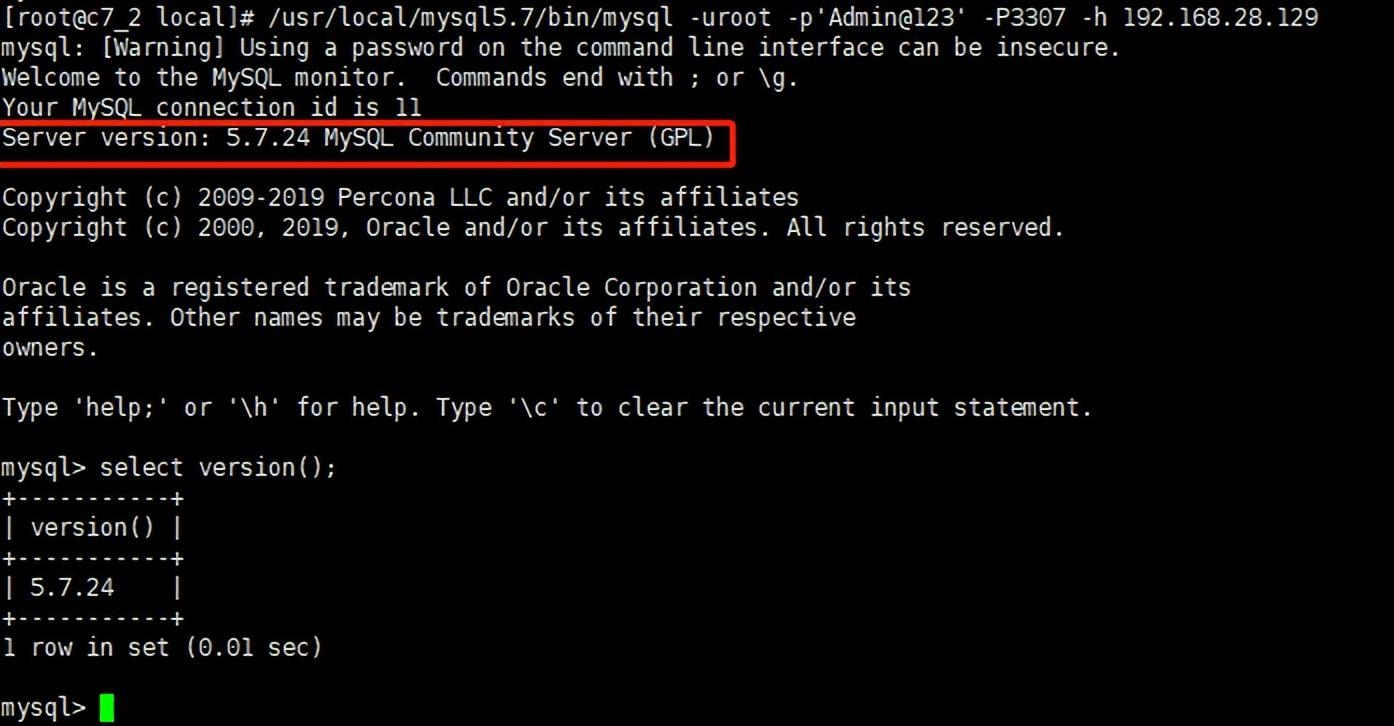
 本地端口信息如下
当我使用Bundler时,是否需要在我的Gemfile中将其列为依赖项?毕竟,我的代码中有些地方需要它。例如,当我进行Bundler设置时:require"bundler/setup" 最佳答案 没有。您可以尝试,但首先您必须用鞋带将自己抬离地面。 关于ruby-我需要将Bundler本身添加到Gemfile中吗?,我们在StackOverflow上找到一个类似的问题: https://stackoverflow.com/questions/4758609/
我注意到像bundler这样的项目在每个specfile中执行requirespec_helper我还注意到rspec使用选项--require,它允许您在引导rspec时要求一个文件。您还可以将其添加到.rspec文件中,因此只要您运行不带参数的rspec就会添加它。使用上述方法有什么缺点可以解释为什么像bundler这样的项目选择在每个规范文件中都需要spec_helper吗? 最佳答案 我不在Bundler上工作,所以我不能直接谈论他们的做法。并非所有项目都checkin.rspec文件。原因是这个文件,通常按照当前的惯例,只
我实际上是在尝试使用RVM在我的OSX10.7.5上更新ruby,并在输入以下命令后:rvminstallruby我得到了以下回复:Searchingforbinaryrubies,thismighttakesometime.Checkingrequirementsforosx.Installingrequirementsforosx.Updatingsystem.......Errorrunning'requirements_osx_brew_update_systemruby-2.0.0-p247',pleaseread/Users/username/.rvm/log/138121
这个问题在这里已经有了答案:关闭10年前。PossibleDuplicate:Rubysyntaxquestion:Rational(a,b)andRational.new!(a,b)我正在阅读ruby镐书,我对创建有理数的语法感到困惑。Rational(3,4)*Rational(1,2)产生=>3/8为什么Rational不需要new方法(我还注意到例如我可以在没有new方法的情况下创建字符串)?
文章目录一、概述简介原理模块二、配置Mysql使用版本环境要求1.操作系统2.mysql要求三、配置canal-server离线下载在线下载上传解压修改配置单机配置集群配置分库分表配置1.修改全局配置2.实例配置垂直分库水平分库3.修改group-instance.xml4.启动监听四、配置canal-adapter1修改启动配置2配置映射文件3启动ES数据同步查询所有订阅同步数据同步开关启动4.验证五、配置canal-admin一、概述简介canal是Alibaba旗下的一款开源项目,Java开发。基于数据库增量日志解析,提供增量数据订阅&消费。Git地址:https://github.co
1.错误信息:Errorresponsefromdaemon:Gethttps://registry-1.docker.io/v2/:net/http:requestcanceledwhilewaitingforconnection(Client.Timeoutexceededwhileawaitingheaders)或者:Errorresponsefromdaemon:Gethttps://registry-1.docker.io/v2/:net/http:TLShandshaketimeout2.报错原因:docker使用的镜像网址默认为国外,下载容易超时,需要修改成国内镜像地址(首先阿里
我需要用任何语言编写一个算法,根据3个因素对数组进行排序。我以度假村为例(如Hipmunk)。假设我想去度假。我想要最便宜的地方、最好的评论和最多的景点。但是,显然我找不到在所有3个中都排名第一的方法。Example(assumingthereare20importantattractions):ResortA:$150/night...98/100infavorablereviews...18of20attractionsResortB:$99/night...85/100infavorablereviews...12of20attractionsResortC:$120/night
修改(澄清问题)我已经花了几天时间试图弄清楚如何从Facebook游戏中抓取特定信息;但是,我遇到了一堵又一堵砖墙。据我所知,主要问题如下。我可以使用Chrome的检查元素工具手动查找我需要的html-它似乎位于iframe中。但是,当我尝试抓取该iframe时,它是空的(属性除外):如果我使用浏览器的“查看页面源代码”工具,这与我看到的输出相同。我不明白为什么我看不到iframe中的数据。答案不是它是由AJAX之后添加的。(我知道这既是因为“查看页面源代码”可以读取Ajax添加的数据,也是因为我有b/c我一直等到我可以看到数据页面之后才抓取它,但它仍然不存在)。发生这种情况是因为
我看到其他人也遇到过类似的问题,但没有一个解决方案对我有用。0.3.14gem与其他gem文件一起存在。我已经完全按照此处指示完成了所有操作:https://github.com/brianmario/mysql2.我仍然得到以下信息。我不知道为什么安装程序指示它找不到include目录,因为我已经检查过它存在。thread.h文件存在,但不在ruby目录中。相反,它在这里:C:\RailsInstaller\DevKit\lib\perl5\5.8\msys\CORE\我正在运行Windows7并尝试在Aptana3中构建我的Rails项目。我的Ruby是1.9.3。$gemin
这个问题在这里已经有了答案:HashsyntaxinRuby[duplicate](1个回答)关闭5年前。我有一个Recipe,其中包含以下未通过lint测试的代码:service'apache'dosupports:status=>true,:restart=>true,:reload=>trueend失败并出现错误:UsethenewRuby1.9hashsyntax.supports:status=>true,:restart=>true,:reload=>true不确定新语法是什么样的...有人可以帮忙吗?
