Protocol buffers are Google's language-neutral, platform-neutral, extensible mechanism for serializing structured data.
Protocol buffers是由Google设计的无关程序语言、平台的、具有可扩展性机制的序列化数据结构。
The
tf.train.Examplemessage (or protosun) is a flexible message type that represents a{"string": value}mapping. It is designed for use with TensorFlow and is used throughout the higher-level APIs such as TFX.
tf.traom.Example是一种表示{“string”:value}映射关系的灵活的消息类型。它被设计用于TensorFlow以及更加高级的API。
一个tf.train.Example的实例是构建的是数个{”string“: tf.train.Feature}映射。
其中,tf.train.Feature可以是以下三种,其他类型的数据格式可以通过一个或多个Feature组合描述:
import tensorflow as tf

with tf.io.TFRecordWriter("train.tfrecords","GZIP") as writer:
    for i in range(200): # Assume there are 200 records
        example_proto = tf.train.Example(
            features=tf.train.Features(
                feature= {
                    'feature0':
                        tf.train.Feature(float_list=tf.train.int64List(value=feature0)),
                    'feature1':
                        tf.train.Feature(float_list=tf.train.FloatList(value=feature1)),
                    'feature2':
                        tf.train.Feature(float_list=tf.train.BtyesList(value=feature2)),
                    'label':
                        tf.train.Feature(float_list=tf.train.int64List(value=[label])),
                }
            )
        )
        writer.write(example_proto.SerializeToString())
One might see performance advantages by batching
Exampleprotos withparse_exampleinstead of using this function directly.
对Example protos分批并使用parse_example会比直接使用parse_single_example有性能优势。
# with map_func using tf.io.parse_single_example
def map_func(example):
    # Create a dictionary describing the features.
    feature_description = {
        'feature0': tf.io.FixedLenFeature([len_feature0], tf.int64),
        'feature1': tf.io.FixedLenFeature([len_feature1], tf.float32),
        'feature2': tf.io.FixedLenFeature([len_feature2], tf.int64),
        'label': tf.io.FixedLenFeature([1], tf.int64),
    }
    parsed_example = tf.io.parse_single_example(example, features=feature_description)

    feature0 = parsed_example["feature0"]
    feature1 = parsed_example["feature1"]
    feature2 = parsed_example["feature2"]
    label = parsed_example["label"]

    return image, label

raw_dataset = tf.data.TFRecordDataset("train.tfrecords","GZIP")
parsed_dataset = raw_dataset.map(map_func=map_func)
parsed_dataset = raw_dataset.batch(BATCH_SIZE)
以下代码和前者的区别在于map_func中使用tf.io.parse_example替换tf.io.parse_single_example,并在调用map方法前先调用batch方法。
# with map_func using tf.io.parse_example
def map_func(example):
    # Create a dictionary describing the features.
    feature_description = {
        'feature0': tf.io.FixedLenFeature([len_feature0], tf.int64),
        'feature1': tf.io.FixedLenFeature([len_feature1], tf.float32),
        'feature2': tf.io.FixedLenFeature([len_feature2], tf.int64),
        'label': tf.io.FixedLenFeature([1], tf.int64),
    }
    parsed_example = tf.io.parse_example(example, features=feature_description)

    # features can be modified here
    feature0 = parsed_example["feature0"]
    feature1 = parsed_example["feature1"]
    feature2 = parsed_example["feature2"]
    label = parsed_example["label"]

    return image, label

raw_dataset = tf.data.TFRecordDataset(["./1.tfrecords", "./2.tfrecords"])
raw_dataset = raw_dataset.batch(BATCH_SIZE)
parsed_dataset = raw_dataset.map(map_func=map_func)
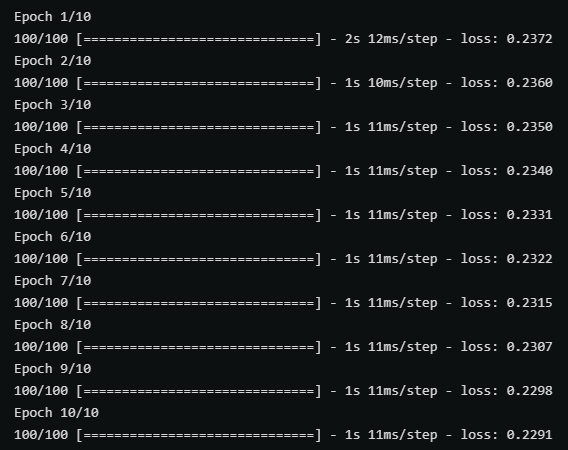
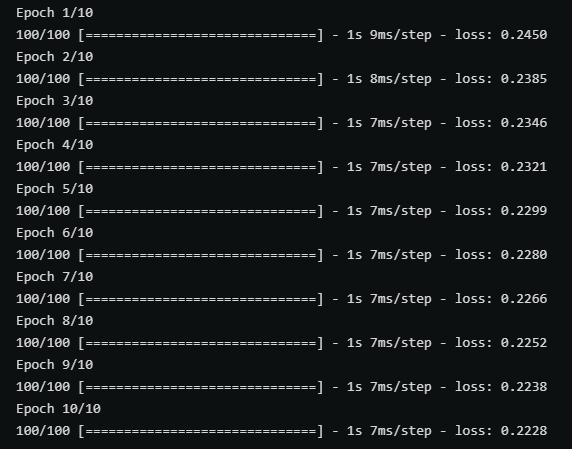
以上两张图分别时使用带有parse_single_example和parse_example的map_func在训练中的性能对比,后者(parse_example)明显性能更优秀。
对于不定长且未padding的数据,写入过程中和定长数据没有区别,但在读取过程中需要使用tf.io.RaggedFeature替代tf.io.FixedLenFeature。
def map_func(example):
    # Create a dictionary describing the features.
    feature_description = {
        'feature': tf.io.RaggedFeature(tf.float32),
        'label': tf.io.FixedLenFeature([1], tf.int64),
    }
    parsed_example = tf.io.parse_example(example, features=feature_description)

    # feature = parsed_example["feature"]
    feature = parsed_example["feature"].to_tensor(shape=[1,100])
    label = parsed_example["label"]

    return feature, label

raw_dataset = tf.data.TFRecordDataset("train_unpadding.tfrecords").batch(1000)
parsed_dataset = raw_dataset.map(map_func=map_func)
下图对比了是否对不定长数据进行padding分别在压缩和未压缩的情况下的文件大小。

我正在寻找执行以下操作的正确语法(在Perl、Shell或Ruby中):#variabletoaccessthedatalinesappendedasafileEND_OF_SCRIPT_MARKERrawdatastartshereanditcontinues. 最佳答案 Perl用__DATA__做这个:#!/usr/bin/perlusestrict;usewarnings;while(){print;}__DATA__Texttoprintgoeshere 关于ruby-如何将脚
我正在使用的第三方API的文档状态:"[O]urAPIonlyacceptspaddedBase64encodedstrings."什么是“填充的Base64编码字符串”以及如何在Ruby中生成它们。下面的代码是我第一次尝试创建转换为Base64的JSON格式数据。xa=Base64.encode64(a.to_json) 最佳答案 他们说的padding其实就是Base64本身的一部分。它是末尾的“=”和“==”。Base64将3个字节的数据包编码为4个编码字符。所以如果你的输入数据有长度n和n%3=1=>"=="末尾用于填充n%
我正在使用puppet为ruby程序提供一组常量。我需要提供一组主机名,我的程序将对其进行迭代。在我之前使用的bash脚本中,我只是将它作为一个puppet变量hosts=>"host1,host2"我将其提供给bash脚本作为HOSTS=显然这对ruby不太适用——我需要它的格式hosts=["host1","host2"]自从phosts和putsmy_array.inspect提供输出["host1","host2"]我希望使用其中之一。不幸的是,我终其一生都无法弄清楚如何让它发挥作用。我尝试了以下各项:我发现某处他们指出我需要在函数调用前放置“function_”……这
好的,所以我的目标是轻松地将一些数据保存到磁盘以备后用。您如何简单地写入然后读取一个对象?所以如果我有一个简单的类classCattr_accessor:a,:bdefinitialize(a,b)@a,@b=a,bendend所以如果我从中非常快地制作一个objobj=C.new("foo","bar")#justgaveitsomerandomvalues然后我可以把它变成一个kindaidstring=obj.to_s#whichreturns""我终于可以将此字符串打印到文件或其他内容中。我的问题是,我该如何再次将这个id变回一个对象?我知道我可以自己挑选信息并制作一个接受该信
无论您是想搭建桌面端、WEB端或者移动端APP应用,HOOPSPlatform组件都可以为您提供弹性的3D集成架构,同时,由工业领域3D技术专家组成的HOOPS技术团队也能为您提供技术支持服务。如果您的客户期望有一种在多个平台(桌面/WEB/APP,而且某些客户端是“瘦”客户端)快速、方便地将数据接入到3D应用系统的解决方案,并且当访问数据时,在各个平台上的性能和用户体验保持一致,HOOPSPlatform将帮助您完成。利用HOOPSPlatform,您可以开发在任何环境下的3D基础应用架构。HOOPSPlatform可以帮您打造3D创新型产品,HOOPSSDK包含的技术有:快速且准确的CAD
在应用开发中,有时候我们需要获取系统的设备信息,用于数据上报和行为分析。那在鸿蒙系统中,我们应该怎么去获取设备的系统信息呢,比如说获取手机的系统版本号、手机的制造商、手机型号等数据。1、获取方式这里分为两种情况,一种是设备信息的获取,一种是系统信息的获取。1.1、获取设备信息获取设备信息,鸿蒙的SDK包为我们提供了DeviceInfo类,通过该类的一些静态方法,可以获取设备信息,DeviceInfo类的包路径为:ohos.system.DeviceInfo.具体的方法如下:ModifierandTypeMethodDescriptionstatic StringgetAbiList()Obt
我想解析一个已经存在的.mid文件,改变它的乐器,例如从“acousticgrandpiano”到“violin”,然后将它保存回去或作为另一个.mid文件。根据我在文档中看到的内容,该乐器通过program_change或patch_change指令进行了更改,但我找不到任何在已经存在的MIDI文件中执行此操作的库.他们似乎都只支持从头开始创建的MIDI文件。 最佳答案 MIDIpackage会为您完成此操作,但具体方法取决于midi文件的原始内容。一个MIDI文件由一个或多个音轨组成,每个音轨是十六个channel中任何一个上的
我正在使用Mandrill的RubyAPIGem并使用以下简单的测试模板:testastic按照Heroku指南中的示例,我有以下Ruby代码:require'mandrill'm=Mandrill::API.newrendered=m.templates.render'test-template',[{:header=>'someheadertext',:main_section=>'Themaincontentblock',:footer=>'asdf'}]mail(:to=>"JaysonLane",:subject=>"TestEmail")do|format|format.h
文章目录1.开发板选择*用到的资源2.串口通信(个人理解)3.代码分析(注释比较详细)1.主函数2.串口1配置3.串口2配置以及中断函数4.注意问题5.源码链接1.开发板选择我用的是STM32F103RCT6的板子,不过代码大概在F103系列的板子上都可以运行,我试过在野火103的霸道板上也可以,主要看一下串口对应的引脚一不一样就行了,不一样的就更改一下。*用到的资源keil5软件这里用到了两个串口资源,采集数据一个,串口通信一个,板子对应引脚如下:串口1,TX:PA9,RX:PA10串口2,TX:PA2,RX:PA32.串口通信(个人理解)我就从串口采集传感器数据这个过程说一下我自己的理解,
作为新的阿里云用户,您可以50免费试用多种优惠,价值高达1,700美元(或8,500美元)。这将让您了解和体验阿里云平台上提供的一系列产品和服务。如果您以个人身份注册免费试用,您将获得价值1,700美元的优惠。但是,如果您是注册公司,您可以选择企业免费试用,提交基本信息通过企业实名注册验证,即可开始价值$8,500的免费试用!本教程介绍了如何设置您的帐户并使用您的免费试用版。关于免费试用在我们开始此试用之前,您还必须遵守以下条款和条件才能访问您的免费试用:只有在一年内创建的账户才有资格获得阿里云免费试用。通过此免费试用优惠,用户可以免费试用免费试用活动页面上列出的每种产品一次。如果您有多个帐
