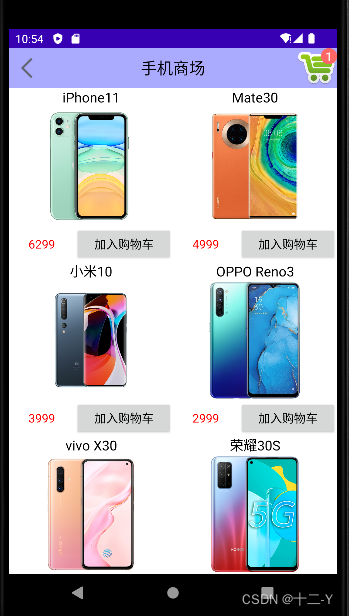
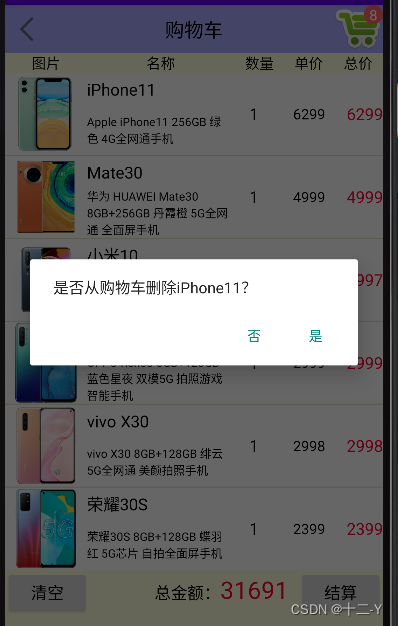
第一次进入购物车页面,购物车里面是空的,同时提示去逛手机商场, 如 首次进入的页面 图所示。接着去商场页面选购手机,随便挑了几部手机加入购物车,再返回购物车页面,即可看 到购物车的商品列表,如 购物车已选列表图 所示,有商品图片、名称、数量、单价、总价等等信息。当然购物车并 不仅仅只是展示待购买的商品,还要支持最终购买的结算操作、支持清空购物车,长按删除单项订单等功能。
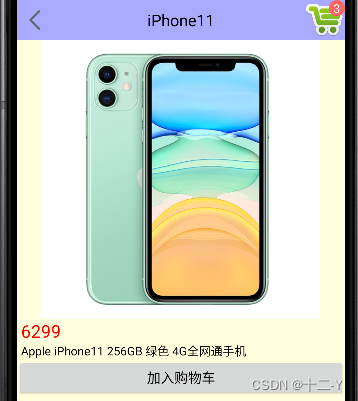
购物车的存在感很强,不仅仅在购物车页面才能看到购物车。往往在商场页面,甚至商品详情页面,都 会看到某个角落冒出购物车图标。一旦有新商品加入购物车,购物车图标上的商品数量立马加一。当然,用户也能点击购物车图标直接跳到购物车页面。商场页面除了商品列表之外,页面右上角还有一个购物车图标,用户把商品加购物车,那么图标上的数字也会加一。
购物车存放着用户准备购买的商品,一开始是空的,随着商品被加入购物车,购物车中就会显示已添加的商品列表。
除了购物车页面,其它页面(如商场频道页面、商品详情页面),都可能在右上角或者右 下角找到购物车图标。购物车图标上会显示已添加的商品数量,且商品数量是实时更新的。
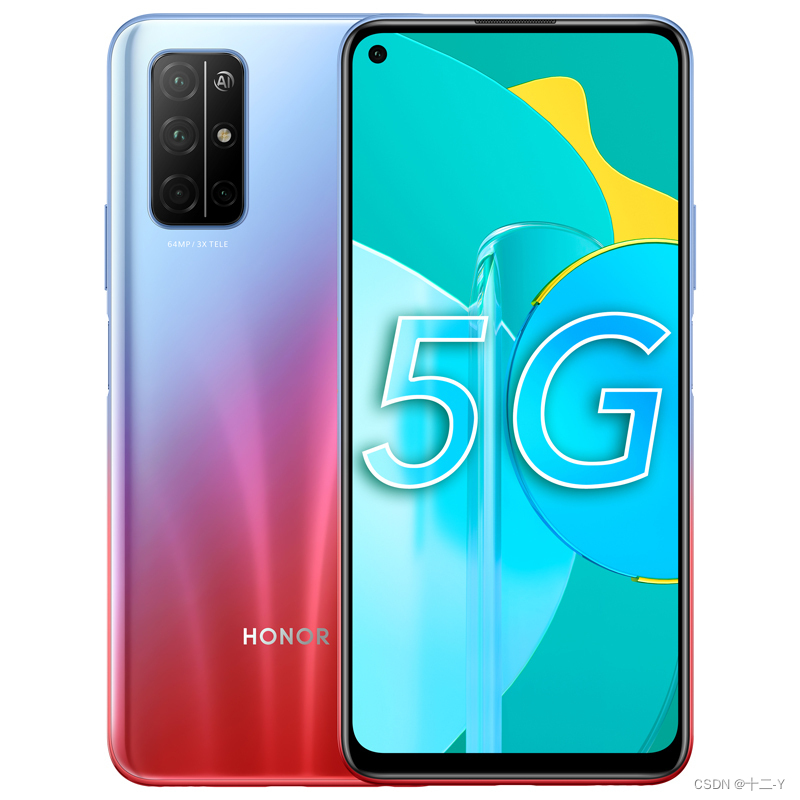
购物车页面、商场频道页面、商品详情页面多处都会显示商品的小图或者大图
线性布局LinearLayout:购物车界面从上往下排列,垂直方向的线性布局
网格布局GridLayout:商场页面的陈列橱柜,允许分行分列展示商品
相对布局RelativeLayout:页面右上角的购物车图标,图标右上角又有数字标记,按照指定方位排列控件
其他常见控件尚有文本视图TextView、图像视图ImageView,按钮控件Button等
数据库SQLite:最直观的是数据库,购物车里的商品列表一定放在SQLite中,增删改查
全局内存:购物车图标右上角的数字表示购物车中的商品数量,该数值建议保存在全局内存中,这样不必每次都到数据库中执行count操作。
存储卡文件:App把下载的商品图片保存在存储卡中,这样下次就能直接从存储卡获取商品图片,加快浏览速度。
共享参数SharedPreferences:是否首次访问网络图片,这个标志位推荐放在共享参数中, 需要持久化存储,并且只有一个参数信息
首次进入的页面图

商品展示列表图
购物车已选列表图

手机详情页面图
长按删除订单图



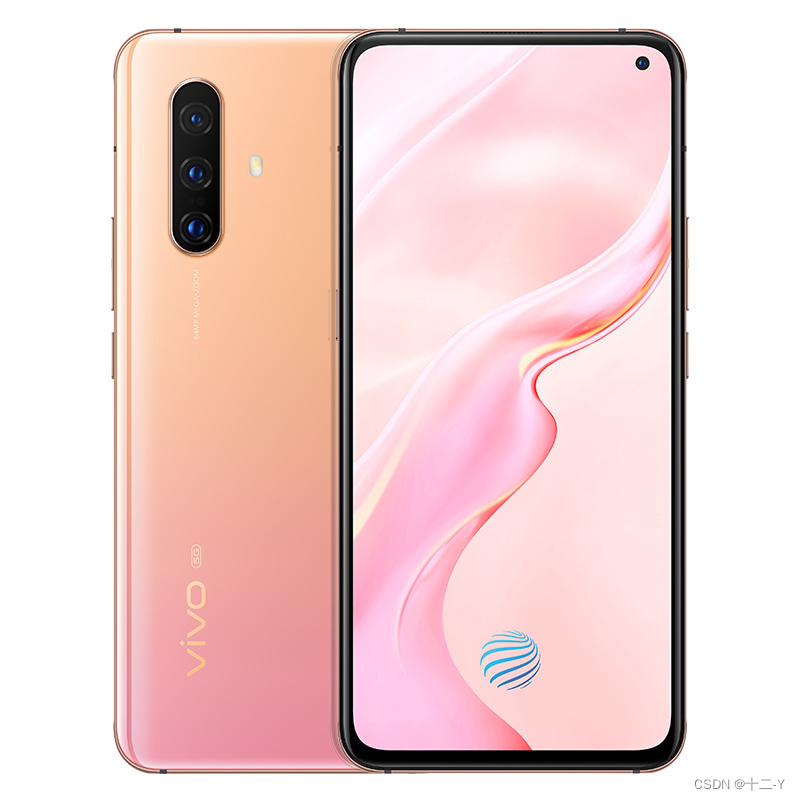

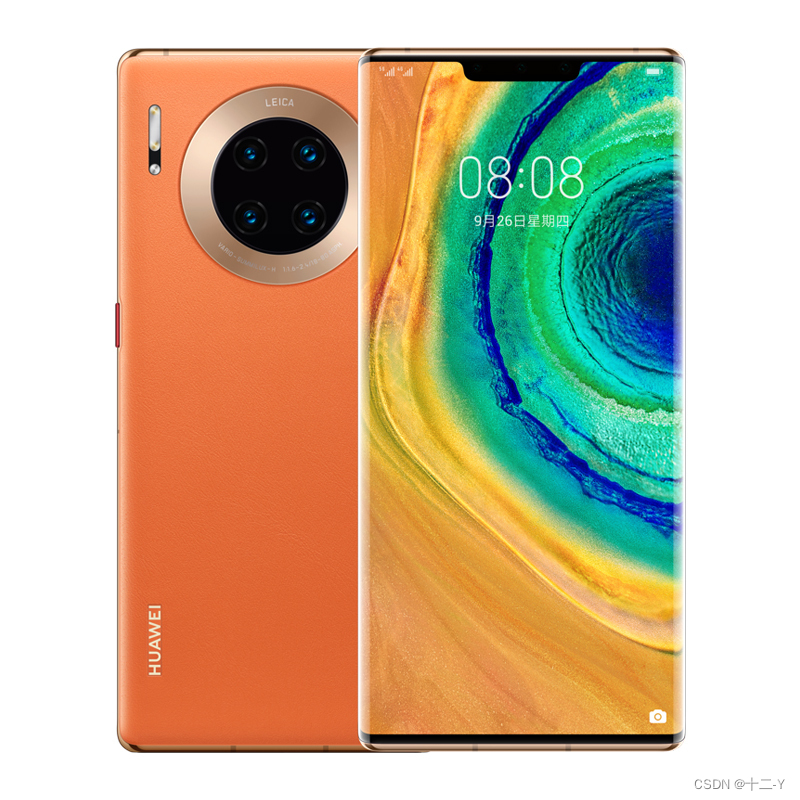
ShoppingChannelActivity.java
package com.kcs.shoppingcart;

import android.content.Intent;
import android.os.Bundle;
import android.view.View;
import android.widget.GridView;
import android.widget.TextView;

import androidx.appcompat.app.AppCompatActivity;

import com.kcs.shoppingcart.adapter.GoodsAdapter;
import com.kcs.shoppingcart.datebase.ShoppingDBHelper;
import com.kcs.shoppingcart.entity.GoodsInfo;
import com.kcs.shoppingcart.utils.ToastUtil;

import java.util.List;

public class ShoppingChannelActivity extends AppCompatActivity implements View.OnClickListener, GoodsAdapter.AddCartListener {

    /**
     * 声明一个商品数据库的帮助器对象
     */
    private ShoppingDBHelper mDBHelper;
    private TextView tv_count;
    private GridView gv_channel;

    @Override
    protected void onCreate(Bundle savedInstanceState) {
        super.onCreate(savedInstanceState);
        setContentView(R.layout.activity_shopping_channel);
        TextView tv_title = findViewById(R.id.tv_title);
        tv_title.setText("手机商场");

        tv_count = findViewById(R.id.tv_count);
        gv_channel = findViewById(R.id.gv_channel);
        findViewById(R.id.iv_back).setOnClickListener(this);
        findViewById(R.id.iv_cart).setOnClickListener(this);

        mDBHelper = ShoppingDBHelper.getInstance(this);
        mDBHelper.openReadLink();
        mDBHelper.openWriteLink();

        // 从数据库查询出商品信息,并展示
        showGoods();
    }

    @Override
    protected void onResume() {
        super.onResume();
        // 查询购物车商品总数,并展示
        showCartInfoTotal();
    }

    /**
     * 查询购物车商品总数,并展示
     */
    private void showCartInfoTotal() {
        int count = mDBHelper.countCartInfo();
        MyApplication.getInstance().goodsCount = count;
        tv_count.setText(String.valueOf(count));
    }

    private void showGoods() {
        // 查询商品数据库中的所有商品记录
        List<GoodsInfo> list = mDBHelper.queryAllGoodsInfo();
        GoodsAdapter adapter = new GoodsAdapter(this, list,this);
        gv_channel.setAdapter(adapter);
    }

    /**
     *  把指定编号的商品添加到购物车
     * @param goodsId
     * @param goodsName
     */

    @Override
    public void addToCart(int goodsId, String goodsName) {
        // 购物车商品数量+1
        int count = ++MyApplication.getInstance().goodsCount;
        tv_count.setText(String.valueOf(count));
        mDBHelper.insertCartInfo(goodsId);
        ToastUtil.show(this, "已添加一部" + goodsName + "到购物车");
    }

    @Override
    protected void onDestroy() {
        super.onDestroy();
        mDBHelper.closeLink();
    }

    @Override
    public void onClick(View v) {
        switch (v.getId()) {
            case R.id.iv_back:
                // 点击了返回图标,关闭当前页面
                finish();
                break;
            case R.id.iv_cart:
                // 点击了购物车图标
                // 从商场页面跳到购物车页面
                Intent intent = new Intent(this, ShoppingCartActivity.class);
                // 设置启动标志,避免多次返回同一页面的
                intent.setFlags(Intent.FLAG_ACTIVITY_CLEAR_TOP);
                startActivity(intent);
                break;
            default:
                break;
        }
    }
}
ShoppingDetailActivity.java
import androidx.appcompat.app.AppCompatActivity;

import android.content.Intent;
import android.net.Uri;
import android.os.Bundle;
import android.view.View;
import android.widget.ImageView;
import android.widget.TextView;

import com.dongnaoedu.chapter06.database.ShoppingDBHelper;
import com.dongnaoedu.chapter06.enity.GoodsInfo;
import com.dongnaoedu.chapter06.util.ToastUtil;

public class ShoppingDetailActivity extends AppCompatActivity implements View.OnClickListener {

    private TextView tv_title;
    private TextView tv_count;
    private TextView tv_goods_price;
    private TextView tv_goods_desc;
    private ImageView iv_goods_pic;
    private ShoppingDBHelper mDBHelper;
    private int mGoodsId;

    @Override
    protected void onCreate(Bundle savedInstanceState) {
        super.onCreate(savedInstanceState);
        setContentView(R.layout.activity_shopping_detail);
        tv_title = findViewById(R.id.tv_title);
        tv_count = findViewById(R.id.tv_count);
        tv_goods_price = findViewById(R.id.tv_goods_price);
        tv_goods_desc = findViewById(R.id.tv_goods_desc);
        iv_goods_pic = findViewById(R.id.iv_goods_pic);
        findViewById(R.id.iv_back).setOnClickListener(this);
        findViewById(R.id.iv_cart).setOnClickListener(this);
        findViewById(R.id.btn_add_cart).setOnClickListener(this);

        tv_count.setText(String.valueOf(MyApplication.getInstance().goodsCount));

        mDBHelper = ShoppingDBHelper.getInstance(this);

    }

    @Override
    protected void onResume() {
        super.onResume();
        showDetail();
    }

    private void showDetail() {
        // 获取上一个页面传来的商品编号
        mGoodsId = getIntent().getIntExtra("goods_id", 0);
        if (mGoodsId > 0) {
            // 根据商品编号查询商品数据库中的商品记录
            GoodsInfo info = mDBHelper.queryGoodsInfoById(mGoodsId);
            tv_title.setText(info.name);
            tv_goods_desc.setText(info.description);
            tv_goods_price.setText(String.valueOf((int) info.price));
            iv_goods_pic.setImageURI(Uri.parse(info.picPath));
        }
    }

    @Override
    public void onClick(View v) {
        switch (v.getId()) {
            case R.id.iv_back:
                finish();
                break;

            case R.id.iv_cart:
                Intent intent = new Intent(this, ShoppingCartActivity.class);
                startActivity(intent);
                break;

            case R.id.btn_add_cart:
                addToCart(mGoodsId);
                break;
        }
    }

    private void addToCart(int goodsId) {
        // 购物车商品数量+1
        int count = ++MyApplication.getInstance().goodsCount;
        tv_count.setText(String.valueOf(count));
        mDBHelper.insertCartInfo(goodsId);
        ToastUtil.show(this, "成功添加至购物车");
    }
}
ShoppingCartActivity.java
package com.kcs.shoppingcart;

import android.content.Intent;
import android.os.Bundle;
import android.view.View;
import android.widget.AdapterView;
import android.widget.LinearLayout;
import android.widget.ListView;
import android.widget.TextView;

import androidx.appcompat.app.AlertDialog;
import androidx.appcompat.app.AppCompatActivity;

import com.kcs.shoppingcart.adapter.CartAdapter;
import com.kcs.shoppingcart.datebase.ShoppingDBHelper;
import com.kcs.shoppingcart.entity.CartInfo;
import com.kcs.shoppingcart.entity.GoodsInfo;
import com.kcs.shoppingcart.utils.ToastUtil;

import java.util.HashMap;
import java.util.List;
import java.util.Map;

public class ShoppingCartActivity extends AppCompatActivity implements View.OnClickListener, AdapterView.OnItemClickListener, AdapterView.OnItemLongClickListener {

    private TextView tv_count;
    private ListView lv_cart;
    private ShoppingDBHelper mDBHelper;

    /**
     * 声明一个购物车中的商品信息列表
     */
    private List<CartInfo> mCartList;
    /**
     * 声明一个根据商品编号查找商品信息的映射,把商品信息缓存起来,这样不用每一次都去查询数据库
     */
    private Map<Integer, GoodsInfo> mGoodsMap = new HashMap<>();
    private TextView tv_total_price;
    private LinearLayout ll_empty;
    private LinearLayout ll_content;
    private CartAdapter mCartAdapter;

    @Override
    protected void onCreate(Bundle savedInstanceState) {
        super.onCreate(savedInstanceState);
        setContentView(R.layout.activity_shopping_cart);
        TextView tv_title = findViewById(R.id.tv_title);
        tv_title.setText("购物车");
        lv_cart = findViewById(R.id.lv_cart);
        tv_total_price = findViewById(R.id.tv_total_price);

        tv_count = findViewById(R.id.tv_count);
        tv_count.setText(String.valueOf(MyApplication.getInstance().goodsCount));

        mDBHelper = ShoppingDBHelper.getInstance(this);

        findViewById(R.id.iv_back).setOnClickListener(this);
        findViewById(R.id.btn_shopping_channel).setOnClickListener(this);
        findViewById(R.id.btn_clear).setOnClickListener(this);
        findViewById(R.id.btn_settle).setOnClickListener(this);
        ll_empty = findViewById(R.id.ll_empty);
        ll_content = findViewById(R.id.ll_content);
    }

    @Override
    protected void onResume() {
        super.onResume();
        showCart();
    }

    /**
     * 展示购物车中的商品列表
     */
    private void showCart() {
        // 查询购物车数据库中所有的商品记录
        mCartList = mDBHelper.queryAllCartInfo();
        if (mCartList.size() == 0) {
            return;
        }
        for (CartInfo info : mCartList) {
            // 根据商品编号查询商品数据库中的商品记录
            GoodsInfo goods = mDBHelper.queryGoodsInfoById(info.goodsId);
            mGoodsMap.put(info.goodsId, goods);
            info.goods = goods;
        }
        mCartAdapter = new CartAdapter(this, mCartList);
        lv_cart.setAdapter(mCartAdapter);
        // 给商品行添加点击事件。点击商品行跳到商品的详情页
        lv_cart.setOnItemClickListener(this);
        // 给商品行添加长按事件。长按商品行就删除该商品
        lv_cart.setOnItemLongClickListener(this);

        // 重新计算购物车中的商品总金额
        refreshTotalPrice();
    }

    private void deleteGoods(CartInfo info) {
        MyApplication.getInstance().goodsCount -= info.count;
        // 从购物车的数据库中删除商品
        mDBHelper.deleteCartInfoByGoodsId(info.goodsId);
        // 从购物车的列表中删除商品
        CartInfo removed = null;
        for (CartInfo cartInfo : mCartList) {
            if (cartInfo.goodsId == info.goodsId) {
                removed = cartInfo;
                break;
            }
        }
        mCartList.remove(removed);
        // 显示最新的商品数量
        showCount();
        ToastUtil.show(this, "已从购物车删除" + mGoodsMap.get(info.goodsId).name);
        mGoodsMap.remove(info.goodsId);
        // 刷新购物车中所有商品的总金额
        refreshTotalPrice();
    }

    /**
     * 显示购物车图标中的商品数量
     */
    private void showCount() {
        tv_count.setText(String.valueOf(MyApplication.getInstance().goodsCount));
        // 购物车中没有商品,显示“空空如也”
        if (MyApplication.getInstance().goodsCount == 0) {
            ll_empty.setVisibility(View.VISIBLE);
            ll_content.setVisibility(View.GONE);
            // 通知适配器发生了数据变化
            mCartAdapter.notifyDataSetChanged();
        } else {
            ll_content.setVisibility(View.VISIBLE);
            ll_empty.setVisibility(View.GONE);
        }
    }

    /**
     * 重新计算购物车中的商品总金额
     */
    private void refreshTotalPrice() {
        int totalPrice = 0;
        for (CartInfo info : mCartList) {
            GoodsInfo goods = mGoodsMap.get(info.goodsId);
            totalPrice += goods.price * info.count;
        }
        tv_total_price.setText(String.valueOf(totalPrice));
    }

    @Override
    public void onClick(View v) {
        switch (v.getId()) {
            case R.id.iv_back:
                // 点击了返回图标
                // 关闭当前页面
                finish();
                break;

            case R.id.btn_shopping_channel:
                // 从购物车页面跳到商场页面
                Intent intent = new Intent(this, com.kcs.shoppingcart.ShoppingChannelActivity.class);
                intent.setFlags(Intent.FLAG_ACTIVITY_CLEAR_TOP);
                startActivity(intent);
                break;

            case R.id.btn_clear:
                // 清空购物车数据库
                mDBHelper.deleteAllCartInfo();
                MyApplication.getInstance().goodsCount = 0;
                // 显示最新的商品数量
                showCount();
                ToastUtil.show(this, "购物车已清空");
                break;

            case R.id.btn_settle:
                // 点击了“结算”按钮
                AlertDialog.Builder builder = new AlertDialog.Builder(this);
                builder.setTitle("结算商品");
                builder.setMessage("客官抱歉,支付功能尚未开通");
                builder.setPositiveButton("我知道了", null);
                builder.create().show();
                break;
            default:
                break;
        }
    }

    /**
     * 给商品行添加点击事件。点击商品行跳到商品的详情页
     */
    @Override
    public void onItemClick(AdapterView<?> parent, View view, int position, long id) {
        Intent intent = new Intent(ShoppingCartActivity.this, com.kcs.shoppingcart.ShoppingDetailActivity.class);
        intent.putExtra("goods_id", mCartList.get(position).goodsId);
        startActivity(intent);
    }

    /**
     *给商品行添加长按事件。长按商品行就删除该商品
     */
    @Override
    public boolean onItemLongClick(AdapterView<?> parent, View view, int position, long id) {
        CartInfo info = mCartList.get(position);
        AlertDialog.Builder builder = new AlertDialog.Builder(ShoppingCartActivity.this);
        builder.setMessage("是否从购物车删除" + info.goods.name + "?");
        builder.setPositiveButton("是", (dialog, which) -> {
            // 从集合中移除数据
            mCartList.remove(position);
            // 通知适配器发生了数据变化
            mCartAdapter.notifyDataSetChanged();
            // 删除该商品
            deleteGoods(info);
        });
        builder.setNegativeButton("否", null);
        builder.create().show();
        return true;
    }
}
MyApplication.java
package com.dongnaoedu.chapter06;

import android.app.Application;
import android.content.res.Configuration;
import android.graphics.Bitmap;
import android.graphics.BitmapFactory;
import android.os.Environment;
import android.util.Log;


import androidx.annotation.NonNull;
import androidx.room.Room;

import com.dongnaoedu.chapter06.database.ShoppingDBHelper;
import com.dongnaoedu.chapter06.enity.GoodsInfo;
import com.dongnaoedu.chapter06.util.FileUtil;
import com.dongnaoedu.chapter06.util.SharedUtil;

import java.io.File;
import java.util.HashMap;
import java.util.List;

public class MyApplication extends Application {

    // 购物车中的商品总数量
    public int goodsCount;

    public static MyApplication getInstance() {
        return mApp;
    }


    //在App启动时调用
    @Override
    public void onCreate() {
        super.onCreate();
        mApp = this;
        Log.d("ning", "MyApplication onCreate");

        // 初始化商品信息
        initGoodsInfo();
    }

    private void initGoodsInfo() {
        // 获取共享参数保存的是否首次打开参数
        boolean isFirst = SharedUtil.getInstance(this).readBoolean("first", true);
        // 获取当前App的私有下载路径
        String directory = getExternalFilesDir(Environment.DIRECTORY_DOWNLOADS).toString() + File.separatorChar;
        if (isFirst) {
            // 模拟网络图片下载
            List<GoodsInfo> list = GoodsInfo.getDefaultList();
            for (GoodsInfo info : list) {
                Bitmap bitmap = BitmapFactory.decodeResource(getResources(), info.pic);
                String path = directory + info.id + ".jpg";
                // 往存储卡保存商品图片
                FileUtil.saveImage(path, bitmap);
                // 回收位图对象
                bitmap.recycle();
                info.picPath = path;
            }
            // 打开数据库,把商品信息插入到表中
            ShoppingDBHelper dbHelper = ShoppingDBHelper.getInstance(this);
            dbHelper.openWriteLink();
            dbHelper.insertGoodsInfos(list);
            dbHelper.closeLink();
            // 把是否首次打开写入共享参数
            SharedUtil.getInstance(this).writeBoolean("first", false);
        }
    }

}
package:adapter
CartAdapter.java
package com.kcs.shoppingcart.adapter;

import android.content.Context;
import android.net.Uri;
import android.view.LayoutInflater;
import android.view.View;
import android.view.ViewGroup;
import android.widget.BaseAdapter;
import android.widget.ImageView;
import android.widget.TextView;


import com.kcs.shoppingcart.R;
import com.kcs.shoppingcart.entity.CartInfo;

import java.util.List;

public class CartAdapter extends BaseAdapter {

    private Context mContext;
    private List<CartInfo> mCartList;

    public CartAdapter(Context mContext, List<CartInfo> mCartList) {
        this.mContext = mContext;
        this.mCartList = mCartList;
    }

    @Override
    public int getCount() {
        return mCartList.size();
    }

    @Override
    public Object getItem(int position) {
        return mCartList.get(position);
    }

    @Override
    public long getItemId(int position) {
        return position;
    }

    @Override
    public View getView(int position, View convertView, ViewGroup parent) {
        ViewHolder holder;
        if (convertView == null) {
            holder = new ViewHolder();
            // 获取布局文件item_cart.xml的根视图
            convertView = LayoutInflater.from(mContext).inflate(R.layout.item_cart, null);
            holder.iv_thumb = convertView.findViewById(R.id.iv_thumb);
            holder.tv_name = convertView.findViewById(R.id.tv_name);
            holder.tv_desc = convertView.findViewById(R.id.tv_desc);
            holder.tv_count = convertView.findViewById(R.id.tv_count);
            holder.tv_price = convertView.findViewById(R.id.tv_price);
            holder.tv_sum = convertView.findViewById(R.id.tv_sum);
            convertView.setTag(holder);
        } else {
            holder = (ViewHolder) convertView.getTag();
        }

        CartInfo info = mCartList.get(position);
        holder.iv_thumb.setImageURI(Uri.parse(info.goods.picPath));
        holder.tv_name.setText(info.goods.name);
        holder.tv_desc.setText(info.goods.description);
        holder.tv_count.setText(String.valueOf(info.count));
        holder.tv_price.setText(String.valueOf((int) info.goods.price));
        // 设置商品总价
        holder.tv_sum.setText(String.valueOf((int) (info.count * info.goods.price)));
        return convertView;
    }

    public final class ViewHolder {
        public ImageView iv_thumb;
        public TextView tv_name;
        public TextView tv_desc;
        public TextView tv_count;
        public TextView tv_price;
        public TextView tv_sum;

    }
}
GoodsAdapter.java
package com.kcs.shoppingcart.adapter;

import android.content.Context;
import android.content.Intent;
import android.net.Uri;
import android.view.LayoutInflater;
import android.view.View;
import android.view.ViewGroup;
import android.widget.BaseAdapter;
import android.widget.Button;
import android.widget.ImageView;
import android.widget.TextView;

import com.kcs.shoppingcart.R;
import com.kcs.shoppingcart.ShoppingDetailActivity;
import com.kcs.shoppingcart.entity.GoodsInfo;

import java.util.List;

public class GoodsAdapter extends BaseAdapter {

    private Context mContext;
    private List<GoodsInfo> mGoodsInfo;

    public GoodsAdapter(Context mContext, List<GoodsInfo> mGoodsInfo, AddCartListener mAddCartListener) {
        this.mContext = mContext;
        this.mGoodsInfo = mGoodsInfo;
        this.mAddCartListener = mAddCartListener;
    }

    @Override
    public int getCount() {
        return mGoodsInfo.size();
    }

    @Override
    public Object getItem(int position) {
        return position;
    }

    @Override
    public long getItemId(int position) {
        return position;
    }

    @Override
    public View getView(int position, View convertView, ViewGroup parent) {
        GoodsInfo info = mGoodsInfo.get(position);
        ViewHolder holder;
        if (convertView == null) {
            convertView = LayoutInflater.from(mContext).inflate(R.layout.item_goods, null);
            holder = new ViewHolder();
            holder.iv_thumb = convertView.findViewById(R.id.iv_thumb);
            holder.tv_name = convertView.findViewById(R.id.tv_name);
            holder.tv_price = convertView.findViewById(R.id.tv_price);
            holder.btn_add = convertView.findViewById(R.id.btn_add);
            convertView.setTag(holder);
        } else {
            holder = (ViewHolder) convertView.getTag();
        }


        // 给控件设置值
        holder.iv_thumb.setImageURI(Uri.parse(info.picPath));
        holder.tv_name.setText(info.name);
        holder.tv_price.setText(String.valueOf((int) info.price));

        // 添加到购物车
        holder.btn_add.setOnClickListener(v -> {
            mAddCartListener.addToCart(info.id, info.name);
        });

        //点击商品图片,跳转到商品详情页面

        holder.iv_thumb.setOnClickListener(v -> {
            Intent intent = new Intent(mContext, ShoppingDetailActivity.class);
            intent.putExtra("goods_id", info.id);
            mContext.startActivity(intent);
        });

        return convertView;
    }

    public final class ViewHolder {
        public ImageView iv_thumb;
        public TextView tv_name;
        public TextView tv_price;
        public Button btn_add;
    }

    /**
     * 声明一个加入购物车的监听器对象
     */
    private AddCartListener mAddCartListener;

    /**
     * 定义一个加入购物车的监听器接口
     */
    public interface AddCartListener {
        void addToCart(int goodsId, String goodsName);
    }
}
package util:
ToastUitl.java
package com.dongnaoedu.chapter06.util;

import android.content.Context;
import android.widget.Toast;

public class ToastUtil {

    public static void show(Context ctx, String desc) {
        Toast.makeText(ctx, desc, Toast.LENGTH_SHORT).show();
    }

}
SharedUtil.java
import android.content.Context;
import android.content.SharedPreferences;

public class SharedUtil {

    private static SharedUtil mUtil;
    private SharedPreferences preferences;

    public static SharedUtil getInstance(Context ctx) {
        if (mUtil == null) {
            mUtil = new SharedUtil();
            mUtil.preferences = ctx.getSharedPreferences("shopping", Context.MODE_PRIVATE);
        }
        return mUtil;
    }

    public void writeBoolean(String key, boolean value) {
        SharedPreferences.Editor editor = preferences.edit();
        editor.putBoolean(key, value);
        editor.commit();
    }

    public boolean readBoolean(String key, boolean defaultValue) {
        return preferences.getBoolean(key, defaultValue);
    }

}
FileUtil.java
import android.graphics.Bitmap;
import android.graphics.BitmapFactory;

import java.io.BufferedReader;
import java.io.BufferedWriter;
import java.io.File;
import java.io.FileInputStream;
import java.io.FileOutputStream;
import java.io.FileReader;
import java.io.FileWriter;
import java.io.IOException;

public class FileUtil {

    // 把位图数据保存到指定路径的图片文件
    public static void saveImage(String path, Bitmap bitmap) {
        FileOutputStream fos = null;
        try {
            fos = new FileOutputStream(path);
            // 把位图数据压缩到文件输出流中
            bitmap.compress(Bitmap.CompressFormat.JPEG, 100, fos);
        } catch (Exception e) {
            e.printStackTrace();
        } finally {
            if (fos != null) {
                try {
                    fos.close();
                } catch (IOException e) {
                    e.printStackTrace();
                }
            }
        }
    }

    // 从指定路径的图片文件中读取位图数据
    public static Bitmap openImage(String path) {
        Bitmap bitmap = null;
        FileInputStream fis = null;
        try {
            fis = new FileInputStream(path);
            bitmap = BitmapFactory.decodeStream(fis);
        } catch (Exception e) {
            e.printStackTrace();
        } finally {
            if (fis != null) {
                try {
                    fis.close();
                } catch (IOException e) {
                    e.printStackTrace();
                }
            }
        }
        return bitmap;
    }
}
package pojo:
CarInfo.java
package com.kcs.shoppingcart.entity;

//购物车信息
public class CartInfo {
    public int id;
    /**
     * 商品编号
     */
    public int goodsId;
    /**
     * 商品数量
     */
    public int count;
    /**
     * 商品信息
     */
    public GoodsInfo goods;

    public CartInfo() {
    }

    public CartInfo(int id, int goodsId, int count) {
        this.id = id;
        this.goodsId = goodsId;
        this.count = count;
        this.goods = new GoodsInfo();
    }
}
GoodsInfo.java
import com.dongnaoedu.chapter06.R;

import java.util.ArrayList;

public class GoodsInfo {

    public int id;
    // 名称
    public String name;
    // 描述
    public String description;
    // 价格
    public float price;
    // 大图的保存路径
    public String picPath;
    // 大图的资源编号
    public int pic;

    // 声明一个手机商品的名称数组
    private static String[] mNameArray = {
            "iPhone11", "Mate30", "小米10", "OPPO Reno3", "vivo X30", "荣耀30S"
    };
    // 声明一个手机商品的描述数组
    private static String[] mDescArray = {
            "Apple iPhone11 256GB 绿色 4G全网通手机",
            "华为 HUAWEI Mate30 8GB+256GB 丹霞橙 5G全网通 全面屏手机",
            "小米 MI10 8GB+128GB 钛银黑 5G手机 游戏拍照手机",
            "OPPO Reno3 8GB+128GB 蓝色星夜 双模5G 拍照游戏智能手机",
            "vivo X30 8GB+128GB 绯云 5G全网通 美颜拍照手机",
            "荣耀30S 8GB+128GB 蝶羽红 5G芯片 自拍全面屏手机"
    };
    // 声明一个手机商品的价格数组
    private static float[] mPriceArray = {6299, 4999, 3999, 2999, 2998, 2399};
    // 声明一个手机商品的大图数组
    private static int[] mPicArray = {
            R.drawable.iphone, R.drawable.huawei, R.drawable.xiaomi,
            R.drawable.oppo, R.drawable.vivo, R.drawable.rongyao
    };

    // 获取默认的手机信息列表
    public static ArrayList<GoodsInfo> getDefaultList() {
        ArrayList<GoodsInfo> goodsList = new ArrayList<GoodsInfo>();
        for (int i = 0; i < mNameArray.length; i++) {
            GoodsInfo info = new GoodsInfo();
            info.id = i;
            info.name = mNameArray[i];
            info.description = mDescArray[i];
            info.price = mPriceArray[i];
            info.pic = mPicArray[i];
            goodsList.add(info);
        }
        return goodsList;
    }
}
package database:
import android.content.ContentValues;
import android.content.Context;
import android.database.Cursor;
import android.database.sqlite.SQLiteDatabase;
import android.database.sqlite.SQLiteOpenHelper;

import com.dongnaoedu.chapter06.enity.CartInfo;
import com.dongnaoedu.chapter06.enity.GoodsInfo;

import java.util.ArrayList;
import java.util.List;

public class ShoppingDBHelper extends SQLiteOpenHelper {

    private static final String DB_NAME = "shopping.db";
    // 商品信息表
    private static final String TABLE_GOODS_INFO = "goods_info";
    // 购物车信息表
    private static final String TABLE_CART_INFO = "cart_info";
    private static final int DB_VERSION = 1;
    private static ShoppingDBHelper mHelper = null;
    private SQLiteDatabase mRDB = null;
    private SQLiteDatabase mWDB = null;

    private ShoppingDBHelper(Context context) {
        super(context, DB_NAME, null, DB_VERSION);
    }

    // 利用单例模式获取数据库帮助器的唯一实例
    public static ShoppingDBHelper getInstance(Context context) {
        if (mHelper == null) {
            mHelper = new ShoppingDBHelper(context);
        }
        return mHelper;
    }

    // 打开数据库的读连接
    public SQLiteDatabase openReadLink() {
        if (mRDB == null || !mRDB.isOpen()) {
            mRDB = mHelper.getReadableDatabase();
        }
        return mRDB;
    }

    // 打开数据库的写连接
    public SQLiteDatabase openWriteLink() {
        if (mWDB == null || !mWDB.isOpen()) {
            mWDB = mHelper.getWritableDatabase();
        }
        return mWDB;
    }

    // 关闭数据库连接
    public void closeLink() {
        if (mRDB != null && mRDB.isOpen()) {
            mRDB.close();
            mRDB = null;
        }

        if (mWDB != null && mWDB.isOpen()) {
            mWDB.close();
            mWDB = null;
        }
    }

    // 创建数据库,执行建表语句
    @Override
    public void onCreate(SQLiteDatabase db) {
        // 创建商品信息表
        String sql = "CREATE TABLE IF NOT EXISTS " + TABLE_GOODS_INFO +
                "(_id INTEGER PRIMARY KEY AUTOINCREMENT NOT NULL," +
                " name VARCHAR NOT NULL," +
                " description VARCHAR NOT NULL," +
                " price FLOAT NOT NULL," +
                " pic_path VARCHAR NOT NULL);";
        db.execSQL(sql);

        // 创建购物车信息表
        sql = "CREATE TABLE IF NOT EXISTS " + TABLE_CART_INFO +
                "(_id INTEGER PRIMARY KEY AUTOINCREMENT NOT NULL," +
                " goods_id INTEGER NOT NULL," +
                " count INTEGER NOT NULL);";
        db.execSQL(sql);
    }

    @Override
    public void onUpgrade(SQLiteDatabase db, int oldVersion, int newVersion) {

    }

    // 添加多条商品信息
    public void insertGoodsInfos(List<GoodsInfo> list) {
        // 插入多条记录,要么全部成功,要么全部失败
        try {
            mWDB.beginTransaction();
            for (GoodsInfo info : list) {
                ContentValues values = new ContentValues();
                values.put("name", info.name);
                values.put("description", info.description);
                values.put("price", info.price);
                values.put("pic_path", info.picPath);
                mWDB.insert(TABLE_GOODS_INFO, null, values);
            }
            mWDB.setTransactionSuccessful();
        } catch (Exception e) {
            e.printStackTrace();
        } finally {
            mWDB.endTransaction();
        }
    }

    // 查询所有的商品信息
    public List<GoodsInfo> queryAllGoodsInfo() {
        String sql = "select * from " + TABLE_GOODS_INFO;
        List<GoodsInfo> list = new ArrayList<>();
        Cursor cursor = mRDB.rawQuery(sql, null);
        while (cursor.moveToNext()) {
            GoodsInfo info = new GoodsInfo();
            info.id = cursor.getInt(0);
            info.name = cursor.getString(1);
            info.description = cursor.getString(2);
            info.price = cursor.getFloat(3);
            info.picPath = cursor.getString(4);
            list.add(info);
        }
        cursor.close();
        return list;
    }

    // 添加商品到购物车
    public void insertCartInfo(int goodsId) {
        // 如果购物车中不存在该商品,添加一条信息
        CartInfo cartInfo = queryCartInfoByGoodsId(goodsId);
        ContentValues values = new ContentValues();
        values.put("goods_id", goodsId);
        if (cartInfo == null) {
            values.put("count", 1);
            mWDB.insert(TABLE_CART_INFO, null, values);
        } else {
            // 如果购物车中已经存在该商品,更新商品数量
            values.put("_id", cartInfo.id);
            values.put("count", ++cartInfo.count);
            mWDB.update(TABLE_CART_INFO, values, "_id=?", new String[]{String.valueOf(cartInfo.id)});
        }
    }

    // 根据商品信息ID查询购物车信息
    private CartInfo queryCartInfoByGoodsId(int goodsId) {
        Cursor cursor = mRDB.query(TABLE_CART_INFO, null, "goods_id=?", new String[]{String.valueOf(goodsId)}, null, null, null);
        CartInfo info = null;
        if (cursor.moveToNext()) {
            info = new CartInfo();
            info.id = cursor.getInt(0);
            info.goodsId = cursor.getInt(1);
            info.count = cursor.getInt(2);
        }
        return info;
    }

    // 统计购物车中商品的总数量
    public int countCartInfo() {
        int count = 0;
        String sql = "select sum(count) from " + TABLE_CART_INFO;
        Cursor cursor = mRDB.rawQuery(sql, null);
        if (cursor.moveToNext()) {
            count = cursor.getInt(0);
        }
        return count;
    }

    // 查询购物车中所有的信息列表
    public List<CartInfo> queryAllCartInfo() {
        List<CartInfo> list = new ArrayList<>();
        Cursor cursor = mRDB.query(TABLE_CART_INFO, null, null, null, null, null, null);
        while (cursor.moveToNext()) {
            CartInfo info = new CartInfo();
            info.id = cursor.getInt(0);
            info.goodsId = cursor.getInt(1);
            info.count = cursor.getInt(2);
            list.add(info);
        }
        return list;
    }

    // 根据商品ID查询商品信息
    public GoodsInfo queryGoodsInfoById(int goodsId) {
        GoodsInfo info = null;
        Cursor cursor = mRDB.query(TABLE_GOODS_INFO, null, "_id=?", new String[]{String.valueOf(goodsId)}, null, null, null);
        if (cursor.moveToNext()) {
            info = new GoodsInfo();
            info.id = cursor.getInt(0);
            info.name = cursor.getString(1);
            info.description = cursor.getString(2);
            info.price = cursor.getFloat(3);
            info.picPath = cursor.getString(4);
        }
        return info;
    }

    // 根据商品ID删除购物车信息
    public void deleteCartInfoByGoodsId(int goodsId) {
        mWDB.delete(TABLE_CART_INFO, "goods_id=?", new String[]{String.valueOf(goodsId)});
    }

    // 删除所有购物车信息
    public void deleteAllCartInfo() {
        mWDB.delete(TABLE_CART_INFO, "1=1", null);
    }
}
activity_shopping_channel.xml
<LinearLayout xmlns:android="http://schemas.android.com/apk/res/android"
    android:layout_width="match_parent"
    android:layout_height="match_parent"
    android:background="@color/orange"
    android:orientation="vertical" >

    <include layout="@layout/title_shopping" />

    <GridView
        android:id="@+id/gv_channel"
        android:layout_width="match_parent"
        android:layout_height="wrap_content"
        android:numColumns="2" />

</LinearLayout>
activity_shopping_detail.xml
<LinearLayout xmlns:android="http://schemas.android.com/apk/res/android"
    xmlns:tools="http://schemas.android.com/tools"
    android:layout_width="match_parent"
    android:layout_height="match_parent"
    android:background="@color/orange"
    android:orientation="vertical">

    <include layout="@layout/title_shopping" />

    <ScrollView
        android:layout_width="match_parent"
        android:layout_height="wrap_content">

        <LinearLayout
            android:layout_width="match_parent"
            android:layout_height="wrap_content"
            android:orientation="vertical">

            <ImageView
                android:id="@+id/iv_goods_pic"
                android:layout_width="match_parent"
                android:layout_height="350dp"
                android:scaleType="fitCenter"
                tools:src="@drawable/xiaomi" />

            <TextView
                android:id="@+id/tv_goods_price"
                android:layout_width="match_parent"
                android:layout_height="wrap_content"
                android:paddingLeft="5dp"
                android:textColor="@color/red"
                android:textSize="22sp"
                tools:text="1990" />

            <TextView
                android:id="@+id/tv_goods_desc"
                android:layout_width="match_parent"
                android:layout_height="wrap_content"
                android:paddingLeft="5dp"
                android:textColor="@color/black"
                android:textSize="15sp"
                tools:text="小米 MI10 8GB+128GB 钛银黑 5G手机 游戏拍照手机" />

            <Button
                android:id="@+id/btn_add_cart"
                android:layout_width="match_parent"
                android:layout_height="wrap_content"
                android:text="加入购物车"
                android:textColor="@color/black"
                android:textSize="17sp" />
        </LinearLayout>
    </ScrollView>

</LinearLayout>
activity_shopping_car.xml
<LinearLayout xmlns:android="http://schemas.android.com/apk/res/android"
    xmlns:tools="http://schemas.android.com/tools"
    android:layout_width="match_parent"
    android:layout_height="match_parent"
    android:background="@color/orange"
    android:orientation="vertical">

    <include layout="@layout/title_shopping" />

    <ScrollView
        android:layout_width="match_parent"
        android:layout_height="wrap_content">

        <RelativeLayout
            android:layout_width="match_parent"
            android:layout_height="wrap_content">

            <LinearLayout
                android:id="@+id/ll_content"
                android:layout_width="match_parent"
                android:layout_height="wrap_content"
                android:orientation="vertical"
                android:visibility="visible">

                <LinearLayout
                    android:layout_width="match_parent"
                    android:layout_height="wrap_content"
                    android:orientation="horizontal">

                    <TextView
                        android:layout_width="85dp"
                        android:layout_height="wrap_content"
                        android:gravity="center"
                        android:text="图片"
                        android:textColor="@color/black"
                        android:textSize="15sp" />

                    <TextView
                        android:layout_width="0dp"
                        android:layout_height="wrap_content"
                        android:layout_weight="3"
                        android:gravity="center"
                        android:text="名称"
                        android:textColor="@color/black"
                        android:textSize="15sp" />

                    <TextView
                        android:layout_width="0dp"
                        android:layout_height="wrap_content"
                        android:layout_weight="1"
                        android:gravity="center"
                        android:text="数量"
                        android:textColor="@color/black"
                        android:textSize="15sp" />

                    <TextView
                        android:layout_width="0dp"
                        android:layout_height="wrap_content"
                        android:layout_weight="1"
                        android:gravity="center"
                        android:text="单价"
                        android:textColor="@color/black"
                        android:textSize="15sp" />

                    <TextView
                        android:layout_width="0dp"
                        android:layout_height="wrap_content"
                        android:layout_weight="1"
                        android:gravity="center"
                        android:text="总价"
                        android:textColor="@color/black"
                        android:textSize="15sp" />

                </LinearLayout>

                <LinearLayout
                    android:id="@+id/ll_cart"
                    android:layout_width="match_parent"
                    android:layout_height="wrap_content"
                    android:orientation="vertical" />

                <LinearLayout
                    android:layout_width="match_parent"
                    android:layout_height="wrap_content"
                    android:orientation="horizontal"
                    android:padding="0dp">

                    <Button
                        android:id="@+id/btn_clear"
                        android:layout_width="wrap_content"
                        android:layout_height="wrap_content"
                        android:gravity="center"
                        android:text="清空"
                        android:textColor="@color/black"
                        android:textSize="17sp" />

                    <TextView
                        android:layout_width="0dp"
                        android:layout_height="wrap_content"
                        android:layout_weight="1"
                        android:gravity="center|right"
                        android:text="总金额:"
                        android:textColor="@color/black"
                        android:textSize="17sp" />

                    <TextView
                        android:id="@+id/tv_total_price"
                        android:layout_width="wrap_content"
                        android:layout_height="wrap_content"
                        android:layout_marginRight="10dp"
                        android:gravity="center|left"
                        android:textColor="@color/red"
                        android:textSize="25sp" />

                    <Button
                        android:id="@+id/btn_settle"
                        android:layout_width="wrap_content"
                        android:layout_height="wrap_content"
                        android:gravity="center"
                        android:text="结算"
                        android:textColor="@color/black"
                        android:textSize="17sp" />
                </LinearLayout>

            </LinearLayout>

            <LinearLayout
                android:id="@+id/ll_empty"
                android:layout_width="match_parent"
                android:layout_height="wrap_content"
                android:orientation="vertical"
                android:visibility="gone"
                tools:visibility="visible">

                <TextView
                    android:layout_width="match_parent"
                    android:layout_height="wrap_content"
                    android:layout_marginTop="100dp"
                    android:layout_marginBottom="100dp"
                    android:gravity="center"
                    android:text="哎呀,购物车空空如也,快去选购商品吧"
                    android:textColor="@color/black"
                    android:textSize="17sp" />

                <Button
                    android:id="@+id/btn_shopping_channel"
                    android:layout_width="match_parent"
                    android:layout_height="wrap_content"
                    android:gravity="center"
                    android:text="逛逛手机商场"
                    android:textColor="@color/black"
                    android:textSize="17sp" />
            </LinearLayout>
        </RelativeLayout>
    </ScrollView>

</LinearLayout>item_cart.xml
<LinearLayout xmlns:android="http://schemas.android.com/apk/res/android"
    xmlns:tools="http://schemas.android.com/tools"
    android:layout_width="match_parent"
    android:layout_height="wrap_content"
    android:background="@color/white"
    android:orientation="horizontal">

    <ImageView
        android:id="@+id/iv_thumb"
        android:layout_width="85dp"
        android:layout_height="85dp"
        android:scaleType="fitCenter"
        tools:src="@drawable/xiaomi"/>

    <LinearLayout
        android:layout_width="0dp"
        android:layout_height="match_parent"
        android:layout_weight="3"
        android:orientation="vertical">

        <TextView
            android:id="@+id/tv_name"
            android:layout_width="match_parent"
            android:layout_height="0dp"
            android:layout_weight="2"
            android:gravity="left|center"
            android:textColor="@color/black"
            android:textSize="17sp"
            tools:text="小米手机"/>

        <TextView
            android:id="@+id/tv_desc"
            android:layout_width="match_parent"
            android:layout_height="0dp"
            android:layout_weight="3"
            android:gravity="left|center"
            android:textColor="@color/black"
            android:textSize="12sp"
            tools:text="小米 MI10 8GB+128GB 钛银黑 5G手机 游戏拍照手机"/>
    </LinearLayout>

    <TextView
        android:id="@+id/tv_count"
        android:layout_width="0dp"
        android:layout_height="match_parent"
        android:layout_weight="1"
        android:gravity="center"
        android:textColor="@color/black"
        android:textSize="17sp"
        tools:text="2"/>

    <TextView
        android:id="@+id/tv_price"
        android:layout_width="0dp"
        android:layout_height="match_parent"
        android:layout_weight="1"
        android:gravity="right|center"
        android:textColor="@color/black"
        android:textSize="15sp"
        tools:text="1000"/>

    <TextView
        android:id="@+id/tv_sum"
        android:layout_width="0dp"
        android:layout_height="match_parent"
        android:layout_weight="1.2"
        android:gravity="right|center"
        android:textColor="@color/red"
        android:textSize="17sp"
        tools:text="2000"/>

</LinearLayout>item_goods.xml
<LinearLayout xmlns:android="http://schemas.android.com/apk/res/android"
    xmlns:tools="http://schemas.android.com/tools"
    android:id="@+id/ll_item"
    android:layout_width="wrap_content"
    android:layout_height="wrap_content"
    android:layout_gravity="center"
    android:background="@color/white"
    android:gravity="center"
    android:orientation="vertical">

    <TextView
        android:id="@+id/tv_name"
        android:layout_width="match_parent"
        android:layout_height="wrap_content"
        android:gravity="center"
        android:textColor="@color/black"
        android:textSize="17sp"
        tools:text="小米手机" />

    <ImageView
        android:id="@+id/iv_thumb"
        android:layout_width="180dp"
        android:layout_height="150dp"
        android:scaleType="fitCenter"
        tools:src="@drawable/xiaomi" />

    <LinearLayout
        android:layout_width="match_parent"
        android:layout_height="45dp"
        android:orientation="horizontal">

        <TextView
            android:id="@+id/tv_price"
            android:layout_width="0dp"
            android:layout_height="match_parent"
            android:layout_weight="2"
            android:gravity="center"
            android:textColor="@color/red"
            android:textSize="15sp"
            tools:text="20" />

        <Button
            android:id="@+id/btn_add"
            android:layout_width="0dp"
            android:layout_height="match_parent"
            android:layout_weight="3"
            android:gravity="center"
            android:text="加入购物车"
            android:textColor="@color/black"
            android:textSize="15sp" />
    </LinearLayout>

</LinearLayout>title_shopping.xml
<RelativeLayout xmlns:android="http://schemas.android.com/apk/res/android"
    android:layout_width="match_parent"
    android:layout_height="50dp"
    android:background="#aaaaff" >

    <ImageView
        android:id="@+id/iv_back"
        android:layout_width="50dp"
        android:layout_height="match_parent"
        android:layout_alignParentLeft="true"
        android:padding="10dp"
        android:scaleType="fitCenter"
        android:src="@drawable/ic_back" />

    <TextView
        android:id="@+id/tv_title"
        android:layout_width="wrap_content"
        android:layout_height="match_parent"
        android:layout_centerInParent="true"
        android:gravity="center"
        android:textColor="@color/black"
        android:textSize="20sp" />

    <ImageView
        android:id="@+id/iv_cart"
        android:layout_width="50dp"
        android:layout_height="match_parent"
        android:layout_alignParentRight="true"
        android:scaleType="fitCenter"
        android:src="@drawable/cart" />

    <TextView
        android:id="@+id/tv_count"
        android:layout_width="20dp"
        android:layout_height="20dp"
        android:layout_alignParentTop="true"
        android:layout_toRightOf="@+id/iv_cart"
        android:layout_marginLeft="-20dp"
        android:gravity="center"
        android:background="@drawable/shape_oval_red"
        android:text="0"
        android:textColor="@color/white"
        android:textSize="15sp" />

</RelativeLayout>
shape_oval_red.xml
<?xml version="1.0" encoding="utf-8"?>
<shape xmlns:android="http://schemas.android.com/apk/res/android"
    android:shape="oval">

    <solid android:color="#ff6666" />

</shape>
colors.xml
<?xml version="1.0" encoding="utf-8"?>
<resources>
    <color name="purple_200">#FFBB86FC</color>
    <color name="purple_500">#FF6200EE</color>
    <color name="purple_700">#FF3700B3</color>
    <color name="teal_200">#FF03DAC5</color>
    <color name="teal_700">#FF018786</color>
    <color name="black">#FF000000</color>
    <color name="white">#FFFFFFFF</color>
    <color name="grey">#cccccc</color>
    <color name="orange">#ffffdd</color>
    <color name="red">#ff0000</color>
</resources>
AndroidManifest.xml
把自己写的MyApplication配置上
<?xml version="1.0" encoding="utf-8"?>
<manifest xmlns:android="http://schemas.android.com/apk/res/android"
    package="com.kcs.shoppingcart">

    <application
        android:name=".MyApplication"
        android:allowBackup="true"
        android:icon="@mipmap/ic_launcher"
        android:label="@string/app_name"
        android:roundIcon="@mipmap/ic_launcher_round"
        android:supportsRtl="true"
        android:theme="@style/Theme.ShoppingCart">

        <activity
            android:name=".ShoppingCartActivity"
            android:exported="true" />
        <activity
            android:name=".ShoppingDetailActivity"
            android:exported="true" />
        <activity
            android:name=".ShoppingChannelActivity"
            android:exported="true">
            <intent-filter>
                <action android:name="android.intent.action.MAIN" />

                <category android:name="android.intent.category.LAUNCHER" />
            </intent-filter>
        </activity>
    </application>

</manifest>最近因为项目需要,需要将Android手机系统自带的某个系统软件反编译并更改里面某个资源,并重新打包,签名生成新的自定义的apk,下面我来介绍一下我的实现过程。APK修改,分为以下几步:反编译解包,修改,重打包,修改签名等步骤。安卓apk修改准备工作1.系统配置好JavaJDK环境变量2.需要root权限的手机(针对系统自带apk,其他软件免root)3.Auto-Sign签名工具4.apktool工具安卓apk修改开始反编译本文拿Android系统里面的Settings.apk做demo,具体如何将apk获取出来在此就不过多介绍了,直接进入主题:按键win+R输入cmd,打开命令窗口,并将路
运行有问题或需要源码请点赞关注收藏后评论区留言一、利用ContentResolver读写联系人在实际开发中,普通App很少会开放数据接口给其他应用访问。内容组件能够派上用场的情况往往是App想要访问系统应用的通讯数据,比如查看联系人,短信,通话记录等等,以及对这些通讯数据及逆行增删改查。首先要给AndroidMaifest.xml中添加响应的权限配置 下面是往手机通讯录添加联系人信息的例子效果如下分成三个步骤先查出联系人的基本信息,然后查询联系人号码,再查询联系人邮箱代码 ContactAddActivity类packagecom.example.chapter07;importandroid
1.前言 在10.0的系统rom定制化开发中,在系统中有多个launcher的时候,会在开机进入launcher的时候弹窗launcher列表,让用户选择进入哪个launcher,这样显得特别的不方便所以产品开发中,要求用RoleManager的相关api来设置默认Launcher,但是在设置完默认Launcher以后,在安装一款Launcher的时候,默认Launcher就会失效,在系统设置的默认应用中Launcher选项就为空,点击home键的时候会弹出默认Launcher列表,让选择进入哪个默认Launcher.所以需要从安装Launcher的流程来分析相关的设置。来解决问题设置默认La
Ai-Bot基于流行的Node.js和JavaScript语言的一款新自动化框架,支持Windows和Android自动化。1、Windowsxpath元素定位算法支持支持Windows应用、.NET、WPF、Qt、Java和Electron客户端程序和ie、edgechrome浏览器2、Android支持原生APP和H5界面,元素定位速度是appium十倍,无线远程自动化操作多台安卓设备3、基于opencv图色算法,支持找图和多点找色,1080*2340全分辨率找图50MS以内4、内置免费OCR人工智能技术,无限制获取图片文字和找字功能。5、框架协议开源,除官方node.jsSDK外,用户可
前一段时间由于工作需要把可爱的小雪狐舍弃了,找到了小蜜蜂。但是新版本的小蜜蜂出现了很多和旧版本不一样的位置。1.功能位置迁移,原来在工程build.gradle的buildscript和allprojects移动至setting.gradle并改名为pluginManagement和dependencyResolutionManagement。里面的东西依旧可以按照原来的copy过来。pluginManagement{repositories{gradlePluginPortal()google()mavenCentral()}}dependencyResolutionManagement{r
关闭。这个问题不符合StackOverflowguidelines.它目前不接受答案。要求我们推荐或查找工具、库或最喜欢的场外资源的问题对于StackOverflow来说是偏离主题的,因为它们往往会吸引自以为是的答案和垃圾邮件。相反,describetheproblem以及迄今为止为解决该问题所做的工作。关闭9年前。Improvethisquestion我几乎用完了Ruby,但现在想试试Ruboto,android上的ruby。谷歌未能给我足够的(几乎没有结果)。所以任何人都可以分享一些关于Ruboto的教程。
Aproblemoccurredconfiguringrootproject'MyApplication2'.>Couldnotresolveallfilesforconfiguration':classpath'. >Couldnotresolvecom.android.tools.build:gradle:7.4.2. Requiredby: project:>com.android.application:com.android.application.gradle.plugin:7.4.2 project:>com.android.library:com.andr
简介:我们都知道在Android开发中,当我们的程序在与用户交互时,用户会得到一定的反馈,其中以对话框的形式的反馈还是比较常见的,接下来我们来介绍几种常见的对话框的基本使用。前置准备:(文章最后附有所有代码)我们首先先写一个简单的页面用于测试这几种Dialog(对话框)代码如下,比较简单,就不做解释了一、提示对话框(即最普通的对话框)首先我们给普通对话框的按钮设置一个点击事件,然后通过AlertDialog.Builder来构造一个对象,为什么不直接Dialog一个对象,是因为Dialog是一个基类,我们尽量要使用它的子类来进行实例化对象,在实例化对象的时候,需要将当前的上下文传过去,因为我这
目录1.首先,需要一个副屏1.1可以通过代码的形式自己创建VirtualDispaly,创建副屏。1.2或者,在手机的开发者模式中直接开启模拟副屏,也是可以的。2.0怎么利用这个副屏幕?2.1 用作presentation演示ppt:2.2克隆主屏幕的内容,就是主屏幕显示什么,副屏显示同样的内容,镜像模式。2.3 将一个activity从第二个屏幕上启动,作为一个独立的屏幕首先说明一下这个多屏幕的概念,这里不是指分屏显示。分屏显示:是一个屏幕分出多个窗口,分别显示不同app.多屏支持:是一个设备有多个屏幕,怎么让不同的屏幕显示不同的app,或者是一个app同时用两个屏幕来显示不同的页面内容。多
我想在我的Rails应用程序中实现基本的购物车功能......是否有任何好的gem可以简化这个过程?即我希望购物者能够在结账时添加产品和数量,我希望管理员能够向商店添加新产品(并编辑/删除现有产品)。建议? 最佳答案 Railscasts涵盖了范围广泛的支付和电子商务gem.gem列表也可以在TheRubyToolbox找到。和heretoo.另外,没有覆盖,你可以使用Saas产品Shopify 关于ruby-on-rails-什么是适合Rails的购物车gem?,我们在StackOve
