vue3不支持vue-count-to插件,无法使用vue-count-to实现数字动效,数字自动分割,vue-count-to主要针对vue2使用,vue3按照会报错:
TypeError: Cannot read properties of undefined (reading '_c')
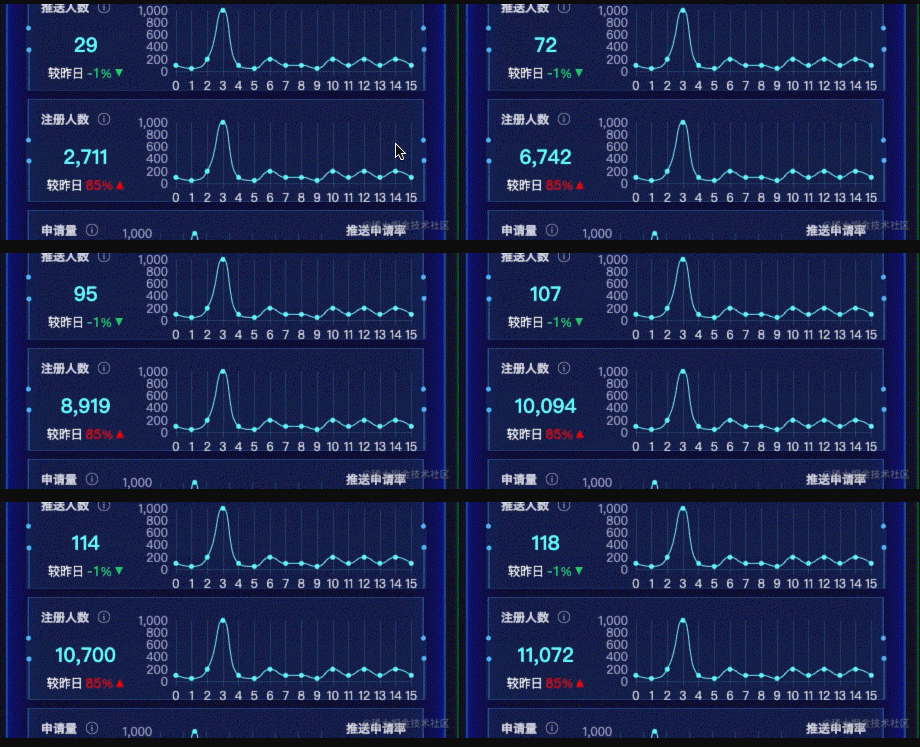
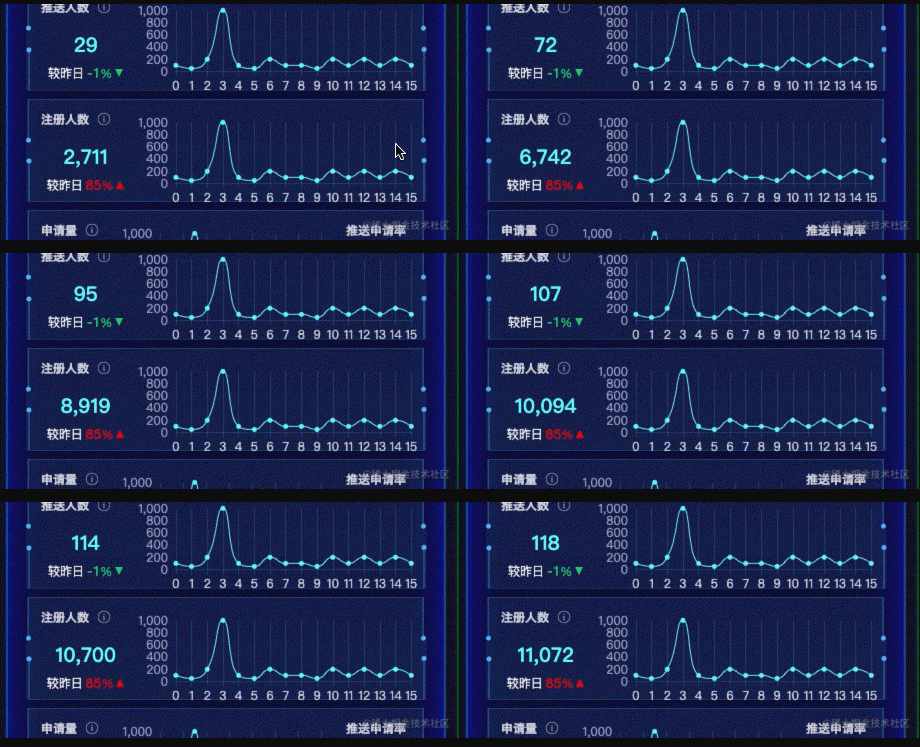
的错误信息。这个时候我们只能自己封装一个CountTo组件实现数字动效。先来看效果图:
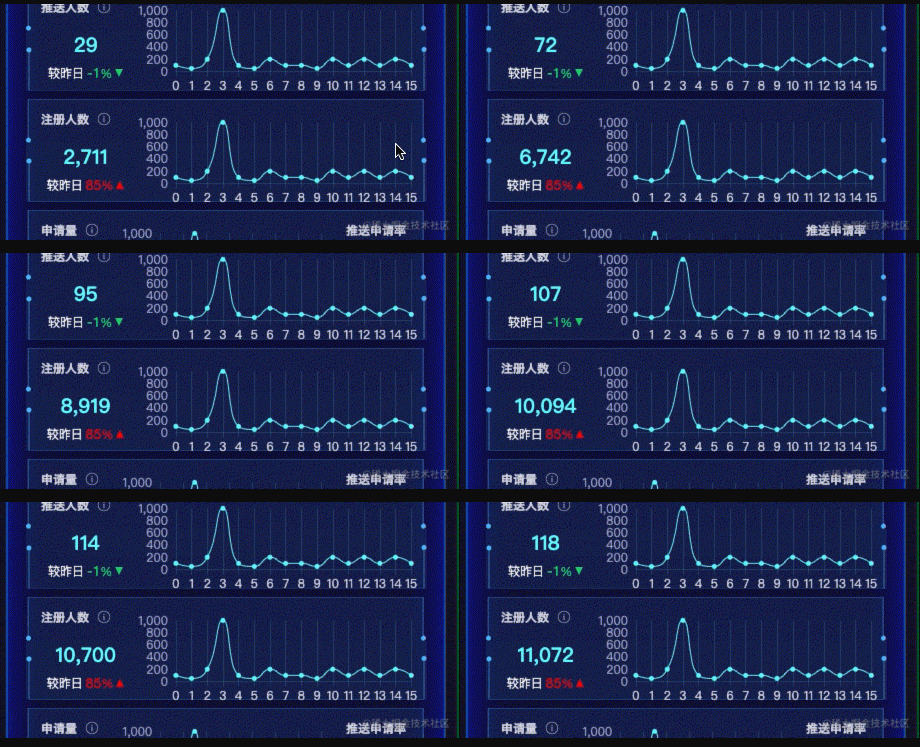
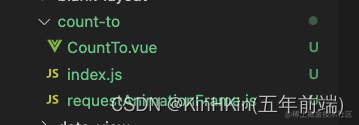
使用Vue.component定义公共组件,使用window.requestAnimationFrame(首选,次选setTimeout)来循环数字动画,window.cancelAnimationFrame取消数字动画效果,封装一个requestAnimationFrame.js公共文件,CountTo.vue组件,入口导出文件index.js。
<CountTo
 :start="0" // 从数字多少开始
 :end="endCount" // 到数字多少结束
 :autoPlay="true" // 自动播放
 :duration="3000" // 过渡时间
 prefix="¥"   // 前缀符号
 suffix="rmb" // 后缀符号
 />
const UILib = {
  install(Vue) {
    Vue.component('CountTo', CountTo)
  }
}

export default UILib
import CountTo from './components/count-to/index';
app.use(CountTo)
各个浏览器前缀:let prefixes =  'webkit moz ms o';
判断是不是浏览器:let isServe = typeof window == 'undefined';
增加各个浏览器前缀:
let prefix;
let requestAnimationFrame;
let cancelAnimationFrame;
// 通过遍历各浏览器前缀,来得到requestAnimationFrame和cancelAnimationFrame在当前浏览器的实现形式
    for (let i = 0; i < prefixes.length; i++) {
        if (requestAnimationFrame && cancelAnimationFrame) { break }
        prefix = prefixes[i]
        requestAnimationFrame = requestAnimationFrame || window[prefix + 'RequestAnimationFrame']
        cancelAnimationFrame = cancelAnimationFrame || window[prefix + 'CancelAnimationFrame'] || window[prefix + 'CancelRequestAnimationFrame']
    }

  //不支持使用setTimeout方式替换:模拟60帧的效果
  // 如果当前浏览器不支持requestAnimationFrame和cancelAnimationFrame,则会退到setTimeout
    if (!requestAnimationFrame || !cancelAnimationFrame) {
        requestAnimationFrame = function (callback) {
            const currTime = new Date().getTime()
            // 为了使setTimteout的尽可能的接近每秒60帧的效果
            const timeToCall = Math.max(0, 16 - (currTime - lastTime))
            const id = window.setTimeout(() => {
                callback(currTime + timeToCall)
            }, timeToCall)
            lastTime = currTime + timeToCall
            return id
        }

        cancelAnimationFrame = function (id) {
            window.clearTimeout(id)
        }
    }
requestAnimationFrame.js
let lastTime = 0
const prefixes = 'webkit moz ms o'.split(' ') // 各浏览器前缀

let requestAnimationFrame
let cancelAnimationFrame

// 判断是否是服务器环境
const isServer = typeof window === 'undefined'
if (isServer) {
    requestAnimationFrame = function () {
        return
    }
    cancelAnimationFrame = function () {
        return
    }
} else {
    requestAnimationFrame = window.requestAnimationFrame
    cancelAnimationFrame = window.cancelAnimationFrame
    let prefix
    // 通过遍历各浏览器前缀,来得到requestAnimationFrame和cancelAnimationFrame在当前浏览器的实现形式
    for (let i = 0; i < prefixes.length; i++) {
        if (requestAnimationFrame && cancelAnimationFrame) { break }
        prefix = prefixes[i]
        requestAnimationFrame = requestAnimationFrame || window[prefix + 'RequestAnimationFrame']
        cancelAnimationFrame = cancelAnimationFrame || window[prefix + 'CancelAnimationFrame'] || window[prefix + 'CancelRequestAnimationFrame']
    }

    // 如果当前浏览器不支持requestAnimationFrame和cancelAnimationFrame,则会退到setTimeout
    if (!requestAnimationFrame || !cancelAnimationFrame) {
        requestAnimationFrame = function (callback) {
            const currTime = new Date().getTime()
            // 为了使setTimteout的尽可能的接近每秒60帧的效果
            const timeToCall = Math.max(0, 16 - (currTime - lastTime))
            const id = window.setTimeout(() => {
                callback(currTime + timeToCall)
            }, timeToCall)
            lastTime = currTime + timeToCall
            return id
        }

        cancelAnimationFrame = function (id) {
            window.clearTimeout(id)
        }
    }
}

export { requestAnimationFrame, cancelAnimationFrame }
首先引入requestAnimationFrame.js,使用requestAnimationFrame方法接受count函数,还需要格式化数字,进行正则表达式转换,返回我们想要的数据格式。
引入 import { requestAnimationFrame, cancelAnimationFrame } from './requestAnimationFrame.js'
需要接受的参数:
const props = defineProps({
  start: {
    type: Number,
    required: false,
    default: 0
  },
  end: {
    type: Number,
    required: false,
    default: 0
  },
  duration: {
    type: Number,
    required: false,
    default: 5000
  },
  autoPlay: {
    type: Boolean,
    required: false,
    default: true
  },
  decimals: {
    type: Number,
    required: false,
    default: 0,
    validator (value) {
      return value >= 0
    }
  },
  decimal: {
    type: String,
    required: false,
    default: '.'
  },
  separator: {
    type: String,
    required: false,
    default: ','
  },
  prefix: {
    type: String,
    required: false,
    default: ''
  },
  suffix: {
    type: String,
    required: false,
    default: ''
  },
  useEasing: {
    type: Boolean,
    required: false,
    default: true
  },
  easingFn: {
    type: Function,
    default(t, b, c, d) {
      return c * (-Math.pow(2, -10 * t / d) + 1) * 1024 / 1023 + b;
    }
  }
})
启动数字动效
const startCount = () => {
  state.localStart = props.start
  state.startTime = null
  state.localDuration = props.duration
  state.paused = false
  state.rAF = requestAnimationFrame(count)
}
核心函数,对数字进行转动
  if (!state.startTime) state.startTime = timestamp
  state.timestamp = timestamp
  const progress = timestamp - state.startTime
  state.remaining = state.localDuration - progress
  // 是否使用速度变化曲线
  if (props.useEasing) {
    if (stopCount.value) {
      state.printVal = state.localStart - props.easingFn(progress, 0, state.localStart - props.end, state.localDuration)
    } else {
      state.printVal = props.easingFn(progress, state.localStart, props.end - state.localStart, state.localDuration)
    }
  } else {
    if (stopCount.value) {
      state.printVal = state.localStart - ((state.localStart - props.end) * (progress / state.localDuration))
    } else {
      state.printVal = state.localStart + (props.end - state.localStart) * (progress / state.localDuration)
    }
  }
  if (stopCount.value) {
    state.printVal = state.printVal < props.end ? props.end : state.printVal
  } else {
    state.printVal = state.printVal > props.end ? props.end : state.printVal
  }

  state.displayValue = formatNumber(state.printVal)
  if (progress < state.localDuration) {
    state.rAF = requestAnimationFrame(count)
  } else {
    emits('callback')
  }
}


// 格式化数据,返回想要展示的数据格式
const formatNumber = (val) => {
  val = val.toFixed(props.default)
  val += ''
  const x = val.split('.')
  let x1 = x[0]
  const x2 = x.length > 1 ? props.decimal + x[1] : ''
  const rgx = /(\d+)(\d{3})/
  if (props.separator && !isNumber(props.separator)) {
    while (rgx.test(x1)) {
      x1 = x1.replace(rgx, '$1' + props.separator + '$2')
    }
  }
  return props.prefix + x1 + x2 + props.suffix
}
取消动效
// 组件销毁时取消动画
onUnmounted(() => {
  cancelAnimationFrame(state.rAF)
})
完整代码
<template>
  {{ state.displayValue }}
</template>

<script setup>  // vue3.2新的语法糖, 编写代码更加简洁高效
import { onMounted, onUnmounted, reactive } from "@vue/runtime-core";
import { watch, computed } from 'vue';
import { requestAnimationFrame, cancelAnimationFrame } from './requestAnimationFrame.js'
// 定义父组件传递的参数
const props = defineProps({
  start: {
    type: Number,
    required: false,
    default: 0
  },
  end: {
    type: Number,
    required: false,
    default: 0
  },
  duration: {
    type: Number,
    required: false,
    default: 5000
  },
  autoPlay: {
    type: Boolean,
    required: false,
    default: true
  },
  decimals: {
    type: Number,
    required: false,
    default: 0,
    validator (value) {
      return value >= 0
    }
  },
  decimal: {
    type: String,
    required: false,
    default: '.'
  },
  separator: {
    type: String,
    required: false,
    default: ','
  },
  prefix: {
    type: String,
    required: false,
    default: ''
  },
  suffix: {
    type: String,
    required: false,
    default: ''
  },
  useEasing: {
    type: Boolean,
    required: false,
    default: true
  },
  easingFn: {
    type: Function,
    default(t, b, c, d) {
      return c * (-Math.pow(2, -10 * t / d) + 1) * 1024 / 1023 + b;
    }
  }
})

const isNumber = (val) => {
  return !isNaN(parseFloat(val))
}

// 格式化数据,返回想要展示的数据格式
const formatNumber = (val) => {
  val = val.toFixed(props.default)
  val += ''
  const x = val.split('.')
  let x1 = x[0]
  const x2 = x.length > 1 ? props.decimal + x[1] : ''
  const rgx = /(\d+)(\d{3})/
  if (props.separator && !isNumber(props.separator)) {
    while (rgx.test(x1)) {
      x1 = x1.replace(rgx, '$1' + props.separator + '$2')
    }
  }
  return props.prefix + x1 + x2 + props.suffix
}

// 相当于vue2中的data中所定义的变量部分
const state = reactive({
  localStart: props.start,
  displayValue: formatNumber(props.start),
  printVal: null,
  paused: false,
  localDuration: props.duration,
  startTime: null,
  timestamp: null,
  remaining: null,
  rAF: null
})

// 定义一个计算属性,当开始数字大于结束数字时返回true
const stopCount = computed(() => {
  return props.start > props.end
})
// 定义父组件的自定义事件,子组件以触发父组件的自定义事件
const emits = defineEmits(['onMountedcallback', 'callback'])

const startCount = () => {
  state.localStart = props.start
  state.startTime = null
  state.localDuration = props.duration
  state.paused = false
  state.rAF = requestAnimationFrame(count)
}

watch(() => props.start, () => {
  if (props.autoPlay) {
    startCount()
  }
})

watch(() => props.end, () => {
  if (props.autoPlay) {
    startCount()
  }
})
// dom挂在完成后执行一些操作
onMounted(() => {
  if (props.autoPlay) {
    startCount()
  }
  emits('onMountedcallback')
})
// 暂停计数
const pause = () => {
  cancelAnimationFrame(state.rAF)
}
// 恢复计数
const resume = () => {
  state.startTime = null
  state.localDuration = +state.remaining
  state.localStart = +state.printVal
  requestAnimationFrame(count)
}

const pauseResume = () => {
  if (state.paused) {
    resume()
    state.paused = false
  } else {
    pause()
    state.paused = true
  }
}

const reset = () => {
  state.startTime = null
  cancelAnimationFrame(state.rAF)
  state.displayValue = formatNumber(props.start)
}

const count = (timestamp) => {
  if (!state.startTime) state.startTime = timestamp
  state.timestamp = timestamp
  const progress = timestamp - state.startTime
  state.remaining = state.localDuration - progress
  // 是否使用速度变化曲线
  if (props.useEasing) {
    if (stopCount.value) {
      state.printVal = state.localStart - props.easingFn(progress, 0, state.localStart - props.end, state.localDuration)
    } else {
      state.printVal = props.easingFn(progress, state.localStart, props.end - state.localStart, state.localDuration)
    }
  } else {
    if (stopCount.value) {
      state.printVal = state.localStart - ((state.localStart - props.end) * (progress / state.localDuration))
    } else {
      state.printVal = state.localStart + (props.end - state.localStart) * (progress / state.localDuration)
    }
  }
  if (stopCount.value) {
    state.printVal = state.printVal < props.end ? props.end : state.printVal
  } else {
    state.printVal = state.printVal > props.end ? props.end : state.printVal
  }

  state.displayValue = formatNumber(state.printVal)
  if (progress < state.localDuration) {
    state.rAF = requestAnimationFrame(count)
  } else {
    emits('callback')
  }
}
// 组件销毁时取消动画
onUnmounted(() => {
  cancelAnimationFrame(state.rAF)
})
</script>
自己封装数字动态效果需要注意各个浏览器直接的差异,手动pollyfill,暴露出去的props参数需要有默认值,数据的格式化可以才有正则表达式的方式,组件的驱动必须是数据变化,根据数据来驱动页面渲染,防止页面出现卡顿,不要强行操作dom,引入的组件可以全局配置,后续组件可以服用,码字不易,请各位看官大佬多多支持,一键三连了~❤️❤️❤️
后续的线上demo演示会放在
demo演示
完整代码会放在
个人主页
希望对vue开发者有所帮助~
我主要使用Ruby来执行此操作,但到目前为止我的攻击计划如下:使用gemsrdf、rdf-rdfa和rdf-microdata或mida来解析给定任何URI的数据。我认为最好映射到像schema.org这样的统一模式,例如使用这个yaml文件,它试图描述数据词汇表和opengraph到schema.org之间的转换:#SchemaXtoschema.orgconversion#data-vocabularyDV:name:namestreet-address:streetAddressregion:addressRegionlocality:addressLocalityphoto:i
我有一个用户工厂。我希望默认情况下确认用户。但是鉴于unconfirmed特征,我不希望它们被确认。虽然我有一个基于实现细节而不是抽象的工作实现,但我想知道如何正确地做到这一点。factory:userdoafter(:create)do|user,evaluator|#unwantedimplementationdetailshereunlessFactoryGirl.factories[:user].defined_traits.map(&:name).include?(:unconfirmed)user.confirm!endendtrait:unconfirmeddoenden
有时我需要处理键/值数据。我不喜欢使用数组,因为它们在大小上没有限制(很容易不小心添加超过2个项目,而且您最终需要稍后验证大小)。此外,0和1的索引变成了魔数(MagicNumber),并且在传达含义方面做得很差(“当我说0时,我的意思是head...”)。散列也不合适,因为可能会不小心添加额外的条目。我写了下面的类来解决这个问题:classPairattr_accessor:head,:taildefinitialize(h,t)@head,@tail=h,tendend它工作得很好并且解决了问题,但我很想知道:Ruby标准库是否已经带有这样一个类? 最佳
我即将开始一个将录制和编辑音频文件的项目,我正在寻找一个好的库(最好是Ruby,但会考虑Java或.NET以外的任何库)以进行实时可视化波形。有人知道我应该从哪里开始搜索吗? 最佳答案 要流入浏览器的数据量很大。Flash或Flex图表可能是唯一能提高内存效率的解决方案。Javascript图表往往会因大型数据集而崩溃。 关于ruby-Ruby中的波形可视化,我们在StackOverflow上找到一个类似的问题: https://stackoverflow.c
我正在尝试解析一个CSV文件并使用SQL命令自动为其创建一个表。CSV中的第一行给出了列标题。但我需要推断每个列的类型。Ruby中是否有任何函数可以找到每个字段中内容的类型。例如,CSV行:"12012","Test","1233.22","12:21:22","10/10/2009"应该产生像这样的类型['integer','string','float','time','date']谢谢! 最佳答案 require'time'defto_something(str)if(num=Integer(str)rescueFloat(s
我正在尝试使用Curbgem执行以下POST以解析云curl-XPOST\-H"X-Parse-Application-Id:PARSE_APP_ID"\-H"X-Parse-REST-API-Key:PARSE_API_KEY"\-H"Content-Type:image/jpeg"\--data-binary'@myPicture.jpg'\https://api.parse.com/1/files/pic.jpg用这个:curl=Curl::Easy.new("https://api.parse.com/1/files/lion.jpg")curl.multipart_form_
无论您是想搭建桌面端、WEB端或者移动端APP应用,HOOPSPlatform组件都可以为您提供弹性的3D集成架构,同时,由工业领域3D技术专家组成的HOOPS技术团队也能为您提供技术支持服务。如果您的客户期望有一种在多个平台(桌面/WEB/APP,而且某些客户端是“瘦”客户端)快速、方便地将数据接入到3D应用系统的解决方案,并且当访问数据时,在各个平台上的性能和用户体验保持一致,HOOPSPlatform将帮助您完成。利用HOOPSPlatform,您可以开发在任何环境下的3D基础应用架构。HOOPSPlatform可以帮您打造3D创新型产品,HOOPSSDK包含的技术有:快速且准确的CAD
目录一.加解密算法数字签名对称加密DES(DataEncryptionStandard)3DES(TripleDES)AES(AdvancedEncryptionStandard)RSA加密法DSA(DigitalSignatureAlgorithm)ECC(EllipticCurvesCryptography)非对称加密签名与加密过程非对称加密的应用对称加密与非对称加密的结合二.数字证书图解一.加解密算法加密简单而言就是通过一种算法将明文信息转换成密文信息,信息的的接收方能够通过密钥对密文信息进行解密获得明文信息的过程。根据加解密的密钥是否相同,算法可以分为对称加密、非对称加密、对称加密和非
华为OD机试题本篇题目:明明的随机数题目输入描述输出描述:示例1输入输出说明代码编写思路最近更新的博客华为od2023|什么是华为od,od薪资待遇,od机试题清单华为OD机试真题大全,用Python解华为机试题|机试宝典【华为OD机试】全流程解析+经验分享,题型分享,防作弊指南华为o
本教程将在Unity3D中混合Optitrack与数据手套的数据流,在人体运动的基础上,添加双手手指部分的运动。双手手背的角度仍由Optitrack提供,数据手套提供双手手指的角度。 01 客户端软件分别安装MotiveBody与MotionVenus并校准人体与数据手套。MotiveBodyMotionVenus数据手套使用、校准流程参照:https://gitee.com/foheart_1/foheart-h1-data-summary.git02 数据转发打开MotiveBody软件的Streaming,开始向Unity3D广播数据;MotionVenus中设置->选项选择Unit
