【Unity】Delegate, Event, UnityEvent, Action, UnityAction, Func 傻傻分不清
Action 代码,而本人委托那一块自己写的时候压根不会用……遂学习相关知识。using System.Collections;
using System.Collections.Generic;
using UnityEngine;
public class TestMyDelegate : MonoBehaviour
{
public delegate void DeleFunc(int x);
// Start is called before the first frame update
void Start()
{
DeleFunc deleFunc;
deleFunc = show;
deleFunc(10);
deleFunc(8);
deleFunc = doubleShow;
deleFunc(10);
}
void show(int x)
{
Debug.Log(x);
}
void doubleShow(int x)
{
Debug.Log(x * 2);
}
}
DeleFunc(就如一个函数指针),使用到关键字 delegatedeleFuncshow,注意这里形参和返回值需要和委托的一致deleFunc 指向 show,进行方法回调doubleShow ,同理,进行方法回调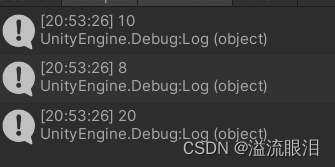
+= 为同一个委托监听多个方法回调-= 删除一个监听方法using System.Collections;
using System.Collections.Generic;
using UnityEngine;
public class TestMyDelegate : MonoBehaviour
{
public delegate void DeleFunc(int x);
// Start is called before the first frame update
public DeleFunc deleFunc;
void Start()
{
deleFunc += show;
deleFunc += doubleShow;
deleFunc(5);
deleFunc -= doubleShow;
deleFunc(5);
}
void show(int x)
{
Debug.Log(x);
}
void doubleShow(int x)
{
Debug.Log(x * 2);
}
}
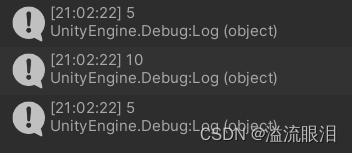
	public delegate void DeleFunc(int x);
    // Start is called before the first frame update
    void Start()
    {
        DeleFunc deleFunc;	// 不能写到里面来,会报错 [使用了未赋值的局部变量“deleFunc”]
        deleFunc += show;
        deleFunc += doubleShow;
        deleFunc(5);
    }
eat(),drink(),sleep(),行为越来越多,相应的调用代码也越来越长class Service{
void eat(){// something}
void drink(){// something}
void sleep(){// something}
public void service(string name){
switch (name){
case "eat":eat();break;
case "drink":drink();break;
case "sleep":sleep();break;
}
}
}
若使用委托进行封装,便可以
class Service{
	void eat(){// something}
	void drink(){// something}
	void sleep(){// something}
	public delegate void action();
	public void service(action act){
		act();
	}
}
调用的时候,这样:
	action act = eat();
	Service.service(act);
	Service.service(cook);
GameOver(),但我目前还不知道该函数里面还需要一些代码和方法public void GameOver(){
GamePause();
PlaySound("death");
ClearFlags();
AddDeathCount(1);
ShowGameOverPanel();
// ……
}
	public delegate void GameOver();
	public GameOver gameOver;
接下来,比如在音效系统的代码中,为其增添回调函数
class VoiceManager{
	// ……
	public void addSounds(){
		gameOver += PlaySound("death");
	}
	public void PlaySound(string name){
		// ……
	}
}
其他系统同理。这样,对于需要更改音效的地方,就集中统一管理到了相应的类。
但注意,这里的 gameOver 的委托实例获取方式仍然有些耦合。需要更解耦貌似还需要使用后续提到其他的内容。
C# 的内容,并且事件是一种特殊的委托TestMyDelegate ,代码同上述AnotherDelegate ,相对第一个类,为一个外部类(这里指委托没有声明在该类)using System.Collections;
using System.Collections.Generic;
using UnityEngine;
public class TestMyDelegate : MonoBehaviour
{
public delegate void DeleFunc(int x);
// Start is called before the first frame update
public DeleFunc deleFunc;
void Start()
{
deleFunc += show;
deleFunc += doubleShow;
deleFunc(1);
}
void show(int x)
{
Debug.Log(x);
}
void doubleShow(int x)
{
Debug.Log(x * 2);
}
}
/*****************************************/
using System.Collections;
using System.Collections.Generic;
using UnityEngine;
public class AnotherDelegate : MonoBehaviour
{
void Start()
{
TestMyDelegate test = GetComponent<TestMyDelegate>();
test.deleFunc += myfunc;
test.deleFunc(100);
}
void myfunc(int x)
{
Debug.Log(x * 3);
}
}
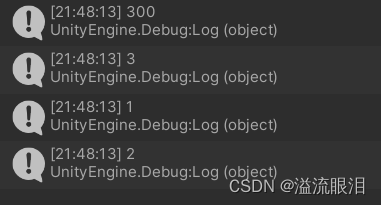
300event 关键字,改成事件public event DeleFunc deleFunc;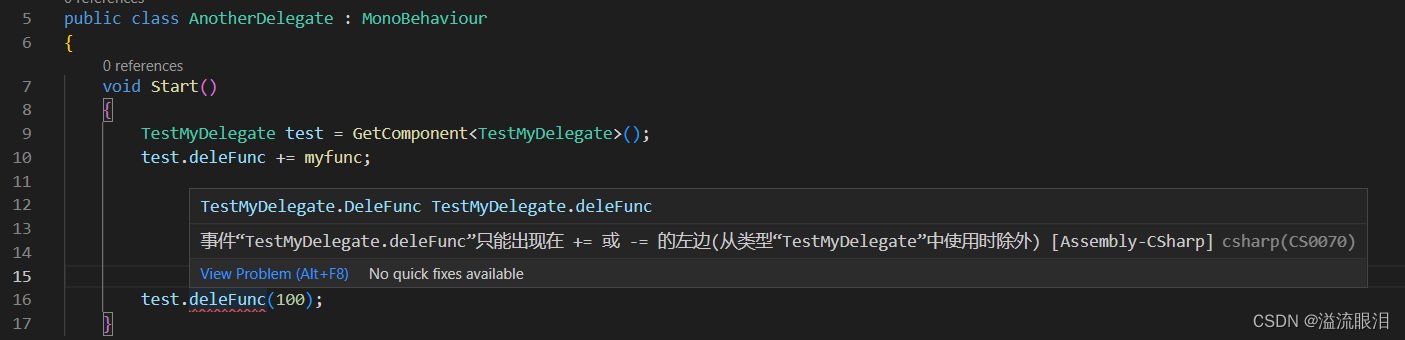
= 。等于的功能即令该委托/事件只监听这个回调函数。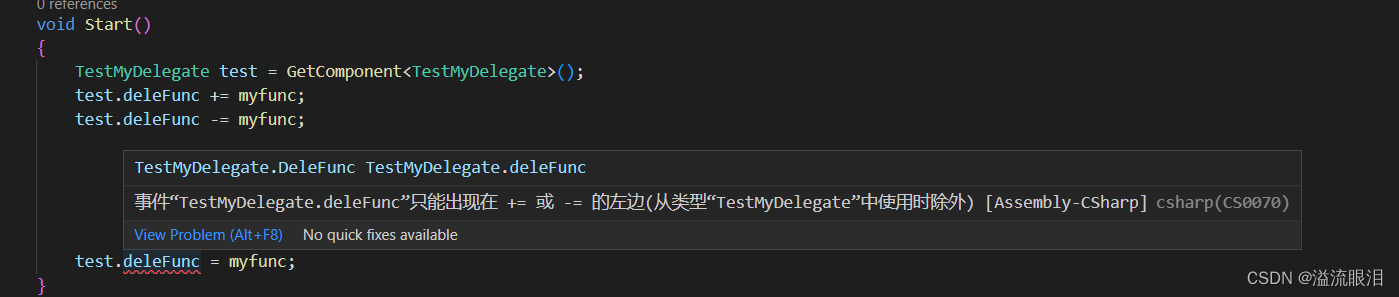
Unity 中的内容,为 Unity 做的一个小封装。UnityEngine.Events,然后写一下 UnityEvent,然后 F12 查看源代码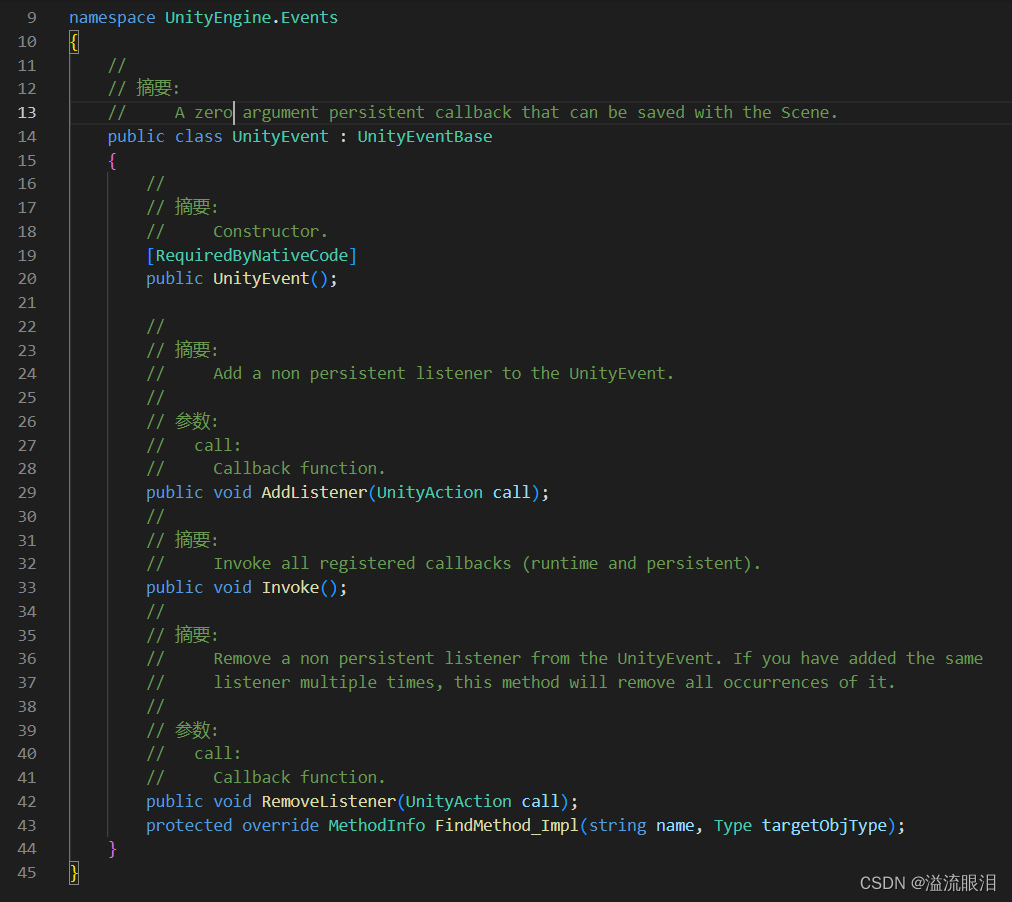
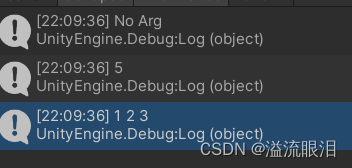
UnityEvent 相较于委托,它规范化了 +=和-=,以 OO 的方式改为了 AdListener(UnityAction call) 和 RemoveListener(UnityAction call),除此之外好处是更容易调试debug,编辑器可视化等。UnityEvent 与其他系统 (如 UnityAction, EventSystem 等)结合,更加方便。UnityEvent 事件,分别监听了无参函数、一参函数和三个参数函数using System.Collections;
using System.Collections.Generic;
using UnityEngine;
using UnityEngine.Events;
public class TestUnityEvent : MonoBehaviour
{
public UnityEvent myEvent;
public UnityEvent<int> anotherEvent;
public UnityEvent<int, int, int> alsoEvent;
// Start is called before the first frame update
void Start()
{
myEvent.AddListener(noArg);
myEvent.Invoke();
anotherEvent.AddListener(show);
anotherEvent.Invoke(5);
alsoEvent.AddListener(threeArgs);
alsoEvent.Invoke(1, 2, 3);
}
void show(int x)
{
Debug.Log(x);
}
void noArg()
{
Debug.Log("No Arg");
}
void threeArgs(int a, int b, int c)
{
Debug.Log(a + " " + b + " " + c);
}
}
顺利运行
Action 为 C# 在 System 库中的内容Action,F12 查看原码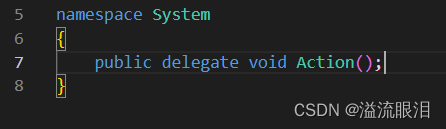
Action 就是一个委托。Action<> 再 F12 进去看,则会显示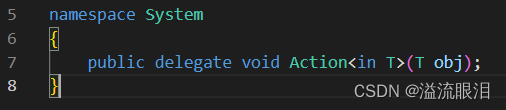
public delegate void myAction<in T>(T obj); ,那么该 myAction 和 Action 就没有区别。using System.Collections;
using System.Collections.Generic;
using UnityEngine;
using UnityEngine.Events;
using System;
public class TestAction : MonoBehaviour
{
public Action<int> myAction;
// Start is called before the first frame update
void Start()
{
myAction = show;
myAction += show;
myAction(100);
}
void show(int x)
{
Debug.Log(x);
}
}
在看这个,这个明显就是 Unity 中的一个 Action
头文件在 UnityEngine.Events中,我们进入查看原码
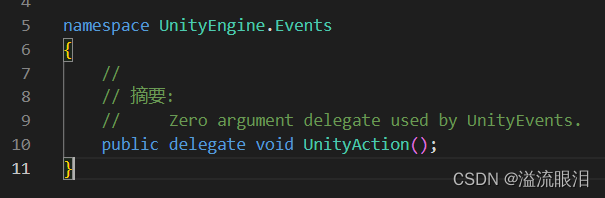
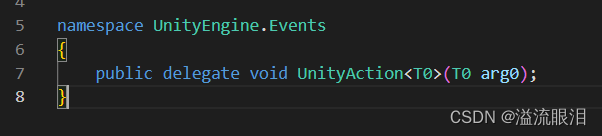
呃呃呃,你们都那么简单,好吧。
那对比,Action 和 UnityAction 只有头文件不同的区别了,其他的部分都一样啊。
System,我们查看原码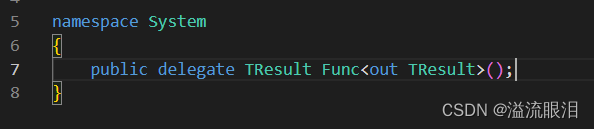
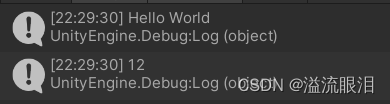
Action,Func 即多了一个返回值的地方,原来他们都这么简单…using System.Collections;
using System.Collections.Generic;
using UnityEngine;
using UnityEngine.Events;
using System;
public class TestFunc : MonoBehaviour
{
public Func<string, int> func; // 这里的 int 就是返回类型
// Start is called before the first frame update
void Start()
{
func += show;
Debug.Log(func("Hello World"));
}
int show(string x)
{
Debug.Log(x);
return 12;
}
}
完美实现
using System.Collections;
using System.Collections.Generic;
using UnityEngine;
using UnityEngine.Events;
public class TestOtherMethods : MonoBehaviour
{
    public UnityAction<int, int> myAction;
    // Start is called before the first frame update
    void Start()
    {
        // anony-
        myAction = delegate (int x, int y)
        {
            Debug.Log(x + " " + y);
        };
        myAction(1, 2);

        // lambda
        myAction = (int x, int y) =>
        {
            Debug.Log(x + " " + y);
        };
        myAction(3, 4);
    }

}
UnityEvent,有人说 Action/Func 直接用,之类的。我怎样才能完成http://php.net/manual/en/function.call-user-func-array.php在ruby中?所以我可以这样做:classAppdeffoo(a,b)putsa+benddefbarargs=[1,2]App.send(:foo,args)#doesn'tworkApp.send(:foo,args[0],args[1])#doeswork,butdoesnotscaleendend 最佳答案 尝试分解数组App.send(:foo,*args)
我知道您通常应该在Rails中使用新建/创建和编辑/更新之间的链接,但我有一个情况需要其他东西。无论如何我可以实现同样的连接吗?我有一个模型表单,我希望它发布数据(类似于新View如何发布到创建操作)。这是我的表格prohibitedthisjobfrombeingsaved: 最佳答案 使用:url选项。=form_for@job,:url=>company_path,:html=>{:method=>:post/:put} 关于ruby-on-rails-rails:Howtomak
我有一个rubyonrails应用程序。我按照facebook的说明添加了一个像素。但是,要跟踪转化,Facebook要求您将页面置于达到预期结果时出现的转化中。即,如果我想显示客户已注册,我会将您注册后转到的页面作为成功对象进行跟踪。我的问题是,当客户注册时,在我的应用程序中没有登陆页面。该应用程序将用户带回主页。它在主页上显示了一条消息,所以我想看看是否有一种方法可以跟踪来自Controller操作而不是实际页面的转化。我需要计数的Action没有页面,它们是ControllerAction。是否有任何人都知道的关于如何执行此操作的gem、文档或最佳实践?这是进入布局文件的像素
?博客主页:https://xiaoy.blog.csdn.net?本文由呆呆敲代码的小Y原创,首发于CSDN??学习专栏推荐:Unity系统学习专栏?游戏制作专栏推荐:游戏制作?Unity实战100例专栏推荐:Unity实战100例教程?欢迎点赞?收藏⭐留言?如有错误敬请指正!?未来很长,值得我们全力奔赴更美好的生活✨------------------❤️分割线❤️-------------------------
本教程将在Unity3D中混合Optitrack与数据手套的数据流,在人体运动的基础上,添加双手手指部分的运动。双手手背的角度仍由Optitrack提供,数据手套提供双手手指的角度。 01 客户端软件分别安装MotiveBody与MotionVenus并校准人体与数据手套。MotiveBodyMotionVenus数据手套使用、校准流程参照:https://gitee.com/foheart_1/foheart-h1-data-summary.git02 数据转发打开MotiveBody软件的Streaming,开始向Unity3D广播数据;MotionVenus中设置->选项选择Unit
目录1.AdmobSDK下载地址2.将下载好的unityPackagesdk导入到unity里编辑 3.解析依赖到项目中
Unity自动旋转动画1.开门需要门把手先动,门再动2.关门需要门先动,门把手再动3.中途播放过程中不可以再次进行操作觉得太复杂?查看我的文章开关门简易进阶版效果:如果这个门可以直接打开的话,就不需要放置"门把手"如果门把手还有钥匙需要旋转,那就可以把钥匙放在门把手的"门把手",理论上是可以无限套娃的可调整参数有:角度,反向,轴向,速度运行时点击Test进行测试自己写的代码比较垃圾,命名与结构比较拉,高手轻点喷,新手有类似的需求可以拿去做参考上代码usingSystem.Collections;usingSystem.Collections.Generic;usingUnityEngine;u
让多条路线去同一条路的最优雅的方式是什么ControllerAction?我有:get'dashboard',to:'dashboard#index'get'dashboard/pending',to:'dashboard#index'get'dashboard/live',to:'dashboard#index'get'dashboard/sold',to:'dashboard#index'这很丑陋。有什么“更优雅”的建议吗?一个类轮的奖励积分。 最佳答案 为什么不只有一个路由和一个Controller操作,并根据传递给它的参数来
我有以下类(class):classAlphabetattr_reader:letter_freqs,:statistic_letterdefinitialize(lang)@lang=langcaselangwhen:en@alphabet=('A'..'Z').to_a@letter_freqs={...}when:ru@alphabet=('А'..'Я').to_a.insert(6,'Ё')@letter_freqs={...}...end@statistic_letter=@letter_freqs.max_by{|k,v|v}[0]endendfoo=Alphabet.n
我正在尝试在我的Controller中测试新操作。目前它看起来像这样:Controllerdefnew@business=Business.new@business.addresses.buildend规范describe'GET#new'doit'assignsanewbusinessto@business'doget:newexpect(assigns(:business)).tobe_a_new(Business)endend我想测试“@business.addresses.build”这一行。我该怎么做?提前致谢! 最佳答案
