一、实验目的
理解模糊逻辑推理的原理及特点,熟练应用模糊推理
二、实验内容
用python设计洗衣机洗涤时间的模糊控制
三、实验要求
已知人的操作经验是
污泥越多,油脂越多,洗涤时间越长
污泥适中,油脂适中,洗涤时间适中
污泥越少,油脂越少,洗涤时间越短
| x | y | z |
| SD | NG | VS |
| SD | MG | M |
| SD | LG | L |
| MD | NG | S |
| MD | MG | M |
| MD | LG | L |
| LD | NG | M |
| LD | MG | L |
| LD | LG | VL |
其中SD(污泥少)、MD(污泥中)、LD(污泥多)、NG油脂少、MG油脂中、LG油脂多、VS洗涤时间很短、S洗涤时间短、M洗涤时间中等、L洗涤时间长、VL洗涤时间很长
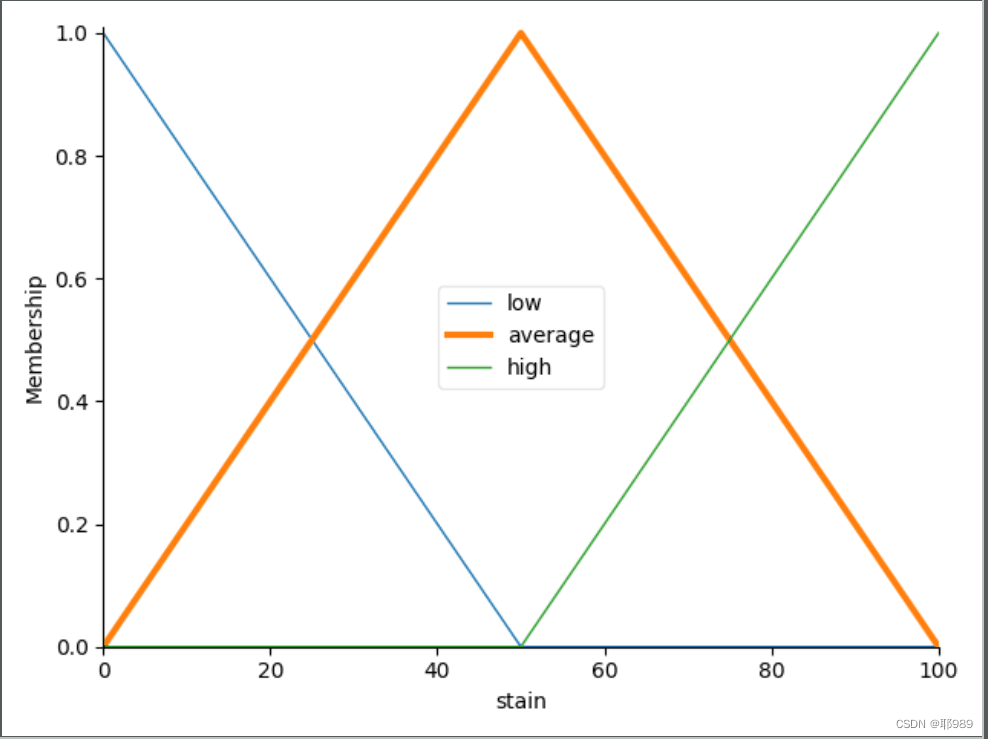
(1)假设污泥、油脂、洗涤时间的论域分别为[0,100] [0,100] [0,120],设计相应的模糊推理系统,给出输入、输出语言变量的隶属函数图,模糊控制规则表和推论结果立体图。
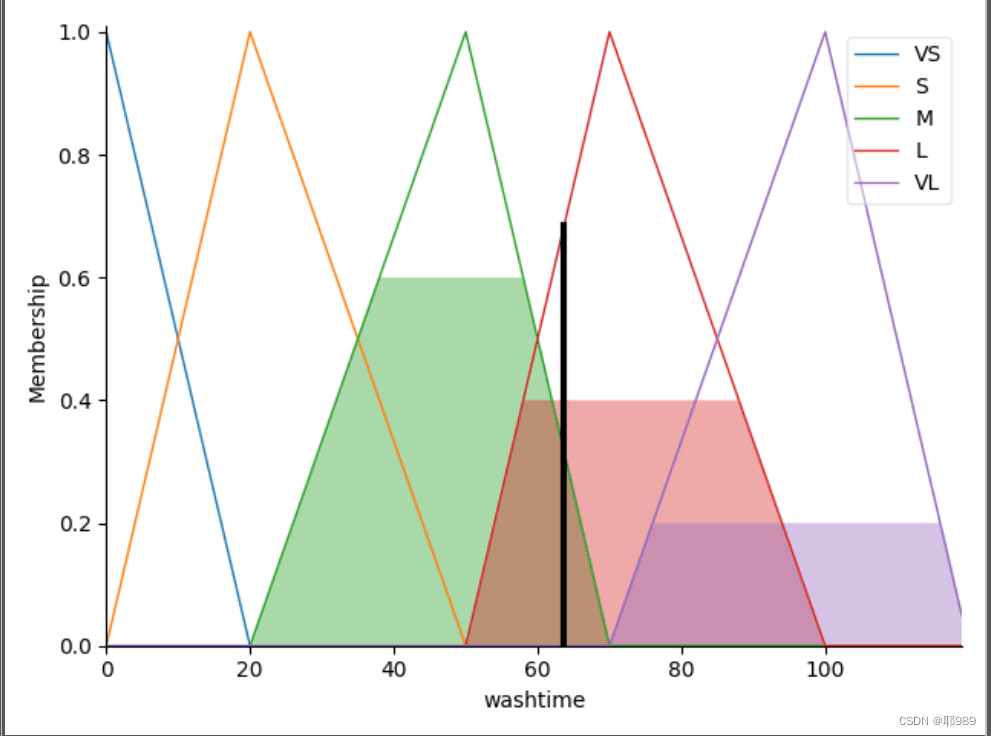
(2)假定当前传感器测得的信息为x0(污泥)=60,y0(油脂)=70,采用模糊决策,给出模糊推理结果,并观察模糊推理的动态仿真环境,给出其动态仿真环境图。
第一小题,代码如下
#需要先安装pip install scikit-fuzzy
#released in 2021.2
"""
==========================================
Fuzzy Control Systems: The washtimeping Problem
==========================================
The 'washtimeping problem' is commonly used to illustrate the power of fuzzy logic
principles to generate complex behavior from a compact, intuitive set of
expert rules.
If you're new to the world of fuzzy control systems, you might want
to check out the `Fuzzy Control Primer
<../userguide/fuzzy_control_primer.html>`_
before reading through this worked example.
The washtimeping Problem
-------------------
Let's create a fuzzy control system which models how you might choose to washtime
at a restaurant.  When washtimeping, you consider the oil and stain,
rated between 0 and 10.  You use this to leave a washtime of between 0 and 25%.
We would formulate this problem as:
* Antecedents (Inputs)
   - `oil`
      * How  was the oil on a scale of 0 to 100?
      * Fuzzy set (ie, fuzzy value range): poor (SD), acceptable(MD), amazing (LD)
   - `stain`
      * Universe: stain on a scale of 0 to 100?
      * Fuzzy set: bad, decent, great
* Consequents (Outputs)
   - `washtime`
      * Universe: How much should we washtime, on a scale of 0 to 120
      * Fuzzy set: low, medium, high
* Rules
   - refer to P302
* Usage
   - If I tell this controller that I rated:
      * the oil as 10, and
      * the stain as 10,
   - it would recommend :
      * a 29 washtime.
Creating the washtimeping Controller Using the skfuzzy control API
-------------------------------------------------------------
We can use the `skfuzzy` control system API to model this.  First, let's
define fuzzy variables
"""
import numpy as np
import skfuzzy as fuzz
from skfuzzy import control as ctrl
import matplotlib.pyplot as plt

# New Antecedent/Consequent objects hold universe variables and membership
# functions
stain = ctrl.Antecedent(np.arange(0, 101, 1), 'stain')
oil = ctrl.Antecedent(np.arange(0, 101, 1), 'oil')
washtime = ctrl.Consequent(np.arange(0, 120, 1), 'washtime')

# Auto-membership function population is possible with .automf(3, 5, or 7)
stain.automf(3, variable_type='quant')
oil.automf(3, variable_type='quant')

# Custom membership functions can be built interactively with a familiar,
# Pythonic API

washtime['VS'] = fuzz.trimf(washtime.universe, [0, 0, 20])
washtime['S'] = fuzz.trimf(washtime.universe, [0, 20, 50])
washtime['M'] = fuzz.trimf(washtime.universe, [20, 50, 70])
washtime['L'] = fuzz.trimf(washtime.universe, [50, 70, 100])
washtime['VL'] = fuzz.trimf(washtime.universe, [70, 100, 120])

"""
To help understand what the membership looks like, use the ``view`` methods.
These return the matplotlib `Figure` and `Axis` objects. They are persistent
as written in Jupyter notebooks; other environments may require a `plt.show()`
command after each `.view()`.
"""

# You can see how these look with .view()
stain['average'].view()
plt.show()

oil.view()
plt.show()

washtime.view()
plt.show()
"""
.. image:: PLOT2RST.current_figure
Fuzzy rules
-----------
Now, to make these triangles useful, we define the *fuzzy relationship*
between input and output variables.
"""
# low = SD or NG;average = MD or MG;high=LD or LG
rule1 = ctrl.Rule(stain['low'] & oil['low'], washtime['VS'])
rule2 = ctrl.Rule(stain['low'] & oil['average'], washtime['M'])
rule3 = ctrl.Rule(stain['low'] & oil['high'], washtime['L'])
rule4 = ctrl.Rule(stain['average'] & oil['low'], washtime['S'])
rule5 = ctrl.Rule(stain['average'] & oil['average'], washtime['M'])
rule6 = ctrl.Rule(stain['average'] & oil['high'], washtime['L'])
rule7 = ctrl.Rule(stain['high'] & oil['low'], washtime['M'])
rule8 = ctrl.Rule(stain['high'] & oil['average'], washtime['L'])
rule9 = ctrl.Rule(stain['high'] & oil['high'], washtime['VL'])


"""
.. image:: PLOT2RST.current_figure
Control System Creation and Simulation
---------------------------------------
Now that we have our rules defined, we can simply create a control system
via:
"""

washtimeping_ctrl = ctrl.ControlSystem([rule1, rule2, rule3, rule4, rule5, rule6, rule7, rule8, rule9])

"""
In order to simulate this control system, we will create a
``ControlSystemSimulation``.  Think of this object representing our controller
applied to a specific set of circumstances.  For washtimeping, this might be washtimeping
Sharon at the local brew-pub.  We would create another
``ControlSystemSimulation`` when we're trying to apply our ``washtimeping_ctrl``
for Travis at the cafe because the inputs would be different.
"""

washtimeping = ctrl.ControlSystemSimulation(washtimeping_ctrl)

"""
We can now simulate our control system by simply specifying the inputs
and calling the ``compute`` method.
"""
# Pass inputs to the ControlSystem using Antecedent labels with Pythonic API
# Note: if you like passing many inputs all at once, use .inputs(dict_of_data)
washtimeping.input['stain'] = 2
washtimeping.input['oil'] = 2

# Crunch the numbers
washtimeping.compute()

"""
Once computed, we can view the result as well as visualize it.
"""
print(washtimeping.output['washtime'])
washtime.view(sim=washtimeping)
plt.show()
第二小题代码在第一小题基础上进行稍微改变
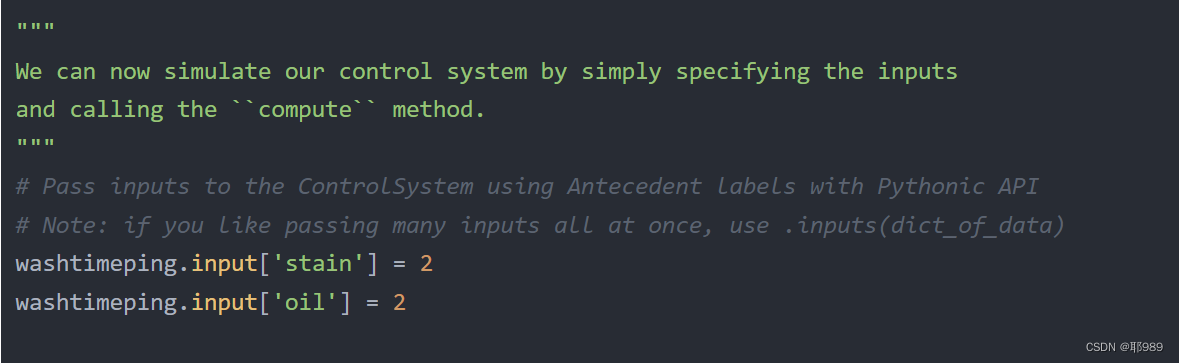
改为 washtimeping.input['stain'] = 60 就可以了
washtimeping.input['oil'] = 70
运行结果如下:
好了,就这些,大家如果觉得有帮助的话就太好了,我做实验的时候就没有 找到这些。
前面一篇关于智能合约翻译文讲到了,是一种计算机程序,既然是程序,那就可以使用程序语言去编写智能合约了。而若想玩区块链上的项目,大部分区块链项目都是开源的,能看得懂智能合约代码,或找出其中的漏洞,那么,学习Solidity这门高级的智能合约语言是有必要的,当然,这都得在公链``````以太坊上,毕竟国内的联盟链有些是不兼容Solidity。Solidity是一种面向对象的高级语言,用于实现智能合约。智能合约是管理以太坊状态下的账户行为的程序。Solidity是运行在以太坊(Ethereum)虚拟机(EVM)上,其语法受到了c++、python、javascript影响。Solidity是静态类型
2022年底,OpenAI的预训练模型ChatGPT给人工智能领域的爱好者和研究人员留下了深刻的印象和启发,他展现的惊人能力将人工智能的研究和应用热度推向高潮,网上也充斥着和ChatGPT的各种聊天,他可以作诗、写小说、写代码、讨论疫情问题等。下面就是一些他的神回复:人命关天的坑: 写歌,留给词作者的机会不多了。。。 回答人类怎么样面对人工智能: 什么是ChatGPT?借用网上的一段介绍,ChatGPT是由人工智能研究实验室OpenAI在2022年11月30日发布的全新聊天机器人模型,一款人工智能技术驱动的自然语言处理工具。它能够通过学习和理解人类的语言来进行对话,还能根据聊天的上下文进行互动
一、RIPV2协议简介 RIP(RoutingInformationProtocol)路由协议是一种相对古老,在小型以及同介质网络中得到了广泛应用的一种路由协议。RIP采用距离向量算法,是一种距离向量协议。RIP-1是有类别路由协议(ClassfulRoutingProtocol),它只支持以广播方式发布协议报文。RIP-1的协议报文无法携带掩码信息,它只能识别A、B、C类这样的自然网段的路由,因此RIP-1不支持非连续子网(DiscontiguousSubnet)。RIP-2是一种无类别路由协议(ClasslessRoutingProtocol),支持路由标记,在路由策略中可根据路由标记对
目录1.1访问Cisco路由器的方法1.1.1通过Console口访问路由器1.1.2通过Telnet访问路由器1.1.3终端访问服务器1.2终端访问服务器配置命令汇总1.1访问Cisco路由器的方法 路由器没有键盘和鼠标,要初始化路由器需要把计算机的串口和路由器的Console口进行连接。访问Cisco路由器的方法还有Telnet、WebBrowser和网络管理软件(如CiscoWorks)等,本节讨论前2种。1.1.1通过Console口访问路由器 计算机的串口和路由器的Console口是通过反转线(Rollover)进行连接的,反转线的一端接在路由器的Console口上,另一
摘要本论文主要论述了如何使用Python技术开发一个短视频智能推荐,本系统将严格按照软件开发流程进行各个阶段的工作,采用B/S架构,面向对象编程思想进行项目开发。在引言中,作者将论述短视频智能推荐的当前背景以及系统开发的目的,后续章节将严格按照软件开发流程,对系统进行各个阶段分析设计。 短视频智能推荐的主要使用者分为管理员和用户,实现功能包括管理员:首页、个人中心、用户管理、热门视频管理、用户上传管理、系统管理,用户:首页、个人中心、用户上传管理、我的收藏管理,前台首页;首页、热门视频、用户上传、公告信息、个人中心、后台管理等功能。由于本网站的功能模块设计比较全面,所以使得整个短视频智能推荐信
文章目录一、用户二、用户分类1、普通用户2、超级用户3、系统用户三、用户相关文件1、/etc/passwd文件2、/etc/shadow文件四、用户管理命令1、useradd2、adduser3、passwd4、usermod5、userdel一、用户Linux系统是一个多用户多任务的分时操作系统,任何一个要使用系统资源的用户都必须先向系统管理员申请一个账号,然后以这个账号的身份进入系统。在Linux系统中,任何文件都属于某一特定用户,而任何用户都隶属于至少一个用户组。用户名(username):每个用户账号都拥有一个惟一的用户名和各自的口令。用户在登录时键入正确的用户名和口令后,就能够进入系
文章目录1简介2绪论2.1课题背景与目的3系统设计详细设计描述3.2硬件部分温度测量电路其他电路部分3.3软件部分主程序子系统程序温湿度程序流程键盘显示子程序3.4实现效果3.5部分相关代码4最后1简介Hi,大家好,这里是丹成学长,今天向大家介绍一个单片机项目基于单片机的智能温控农业大棚系统大家可用于课程设计或毕业设计单片机-嵌入式毕设选题大全及项目分享:https://blog.csdn.net/m0_71572576/article/details/1254090522绪论2.1课题背景与目的近年来我国的温室控制取得了长足的进步,首先在温室群控制方面,进行了初步的探索和理论研究,其次在温室
BigData/CloudComputing:基于阿里云技术产品的人工智能与大数据/云计算/分布式引擎的综合应用案例目录来理解技术交互流程目录一、云计算网站建设:部署与发布网站建设:简单动态网站搭建云服务器管理维护云数据库管理与数据迁移云存储:对象存储管理与安全超大流量网站的负载均衡二、大数据MOOC网站日志分析搭建企业级数据分析平台基于LBS的热点店铺搜索基于机器学习PAI实现精细化营销基于机器学习的客户流失预警分析使用DataV制作实时销售数据可视化大屏使用MaxCompute进行数据质量核查使用Quick BI制作图形化报表使用时间序列分解模型预测商品销量三、云安全云平台使用安全云上服务
文章目录实验要求实验思路IP地址规划路由实验配置R1上配置R2上配置R3上配置R4上配置R5上配置R6上配置R7上配置R8上配置R9上配置R10上配置R11上配置R12上配置实验测试R10pingR4的环回R10pingR12的环回R10pingR1实验要求R4为ISP,其只能配置IP地址;R4与其他所有直连设备间均使用公有IP;R3-R5/6/7为MGRE环境,R3为中心站点;整个OSPF环境IP基于172.16.0.0/16划分;所有设备均可访问R4的环回;减少LSA的更新量,加快收敛,保障更新安全;全网可达实验思路IP地址规划公网IP随便配置,这里我R3-R4的网段为34.1.1.0/2
如何从智能合约中删除数据有了以太坊,我们可以创建一个有状态的系统,我们可以从存储在智能联系人中的数据中添加和删除数据。这是一个有状态的系统,我们可以改变智能联系人的状态,但这需要向矿工支付一些费用。但是我们如何删除数据呢?这里有一个智能合约,用于向myArray中添加和移除字符串:pragmasolidity^0.4.18;contractExampleApp{string[]myArray;functionadd(stringx)public{myArray.push(x);}functiondel(stringx)public{for(uintj=0;jadd()函数相当简单,我们基本上只
