Elasticsearch软件是由 Java 语言开发的,所以也可以通过 Java API 的方式对 Elasticsearch服务进行访问。
修改pom 文件,增加 Maven 依赖关系。
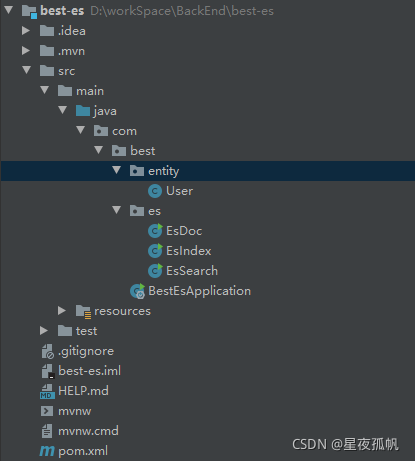
<dependencies>
        <dependency>
            <groupId>org.projectlombok</groupId>
            <artifactId>lombok</artifactId>
            <version>1.16.12</version>
        </dependency>

        <dependency>
            <groupId>org.springframework.boot</groupId>
            <artifactId>spring-boot-starter</artifactId>
        </dependency>

        <dependency>
            <groupId>org.springframework.boot</groupId>
            <artifactId>spring-boot-starter-test</artifactId>
            <scope>test</scope>
        </dependency>

        <dependency>
            <groupId>org.elasticsearch</groupId>
            <artifactId>elasticsearch</artifactId>
            <version>7.8.0</version>
        </dependency>
        <!-- elasticsearch 的客户端 -->
        <dependency>
            <groupId>org.elasticsearch.client</groupId>
            <artifactId>elasticsearch-rest-high-level-client</artifactId>
            <version>7.8.0</version>
        </dependency>
        <!-- elasticsearch 依赖 2.x 的 log4j -->
        <dependency>
            <groupId>org.apache.logging.log4j</groupId>
            <artifactId>log4j-api</artifactId>
            <version>2.8.2</version>
        </dependency>
        <dependency>
            <groupId>org.apache.logging.log4j</groupId>
            <artifactId>log4j-core</artifactId>
            <version>2.8.2</version>
        </dependency>
        <dependency>
            <groupId>com.fasterxml.jackson.core</groupId>
            <artifactId>jackson-databind</artifactId>
            <version>2.9.9</version>
        </dependency>
        <!-- junit 单元测试 -->
        <dependency>
            <groupId>junit</groupId>
            <artifactId>junit</artifactId>
            <version>4.12</version>
        </dependency>
    </dependencies>
创建类,代码中创建 Elasticsearch 客户端对象
因为早期版本的客户端对象已经不再推荐使用,且在未来版本中会被删除,所以这里我们采用高级 REST 客户端对象
    public static void main(String[] args) throws IOException {
        // 创建客户端对象
        RestHighLevelClient client = new RestHighLevelClient(
                RestClient.builder(new HttpHost("127.0.0.1", 9200, "http"))
        );

        // 关闭客户端连接
        client.close();
    }
注意:
9200 端口为 Elasticsearch 的 Web 通信端口 localhost 为启动 ES 服务的主机名
执行代码,查看控制台信息:

ES服务器正常启动后,可以通过 Java API 客户端对象对 ES 索引进行操作
public class EsIndex {

    public static void main(String[] args) throws IOException {

        // 创建客户端对象
        RestHighLevelClient client = new RestHighLevelClient(
                RestClient.builder(new HttpHost("127.0.0.1", 9200, "http"))
        );

        // 关闭客户端连接
        client.close();
    }

    // 创建索引
    public static void createIndex(RestHighLevelClient client) throws IOException {
        // 创建索引 - 请求对象
        CreateIndexRequest request = new CreateIndexRequest("user");
        // 发送请求,获取响应
        CreateIndexResponse response = client.indices().create(request, RequestOptions.DEFAULT);
        boolean acknowledged = response.isAcknowledged();
        // 响应状态
        System.out.println("操作状态 = " + acknowledged);
    }

    // 查看索引
    public static void getIndex(RestHighLevelClient client) throws IOException {
        // 查询索引 - 请求对象
        GetIndexRequest request = new GetIndexRequest("user");
        // 发送请求,获取响应
        GetIndexResponse response = client.indices().get(request, RequestOptions.DEFAULT);
        System.out.println("aliases: " + response.getAliases());
        System.out.println("mappings: " + response.getMappings());
        System.out.println("settings: " + response.getSettings());
    }

    // 删除索引
    public static void deleteIndex(RestHighLevelClient client) throws IOException {
        // 删除索引 - 请求对象
        DeleteIndexRequest request = new DeleteIndexRequest("user");
        // 发送请求,获取响应
        AcknowledgedResponse response = client.indices().delete(request, RequestOptions.DEFAULT);
        // 操作结果
        System.out.println("操作结果: " + response.isAcknowledged());
    }
}
public class EsDoc {

    public static void main(String[] args) throws IOException {
        // 创建客户端对象
        RestHighLevelClient client = new RestHighLevelClient(
                RestClient.builder(new HttpHost("127.0.0.1", 9200, "http"))
        );

        // 关闭客户端连接
        client.close();
    }

    // 创建文档
    public static void createDoc(RestHighLevelClient client) throws IOException {
        // 新增文档 - 请求对象
        IndexRequest request = new IndexRequest();
        // 设置索引及唯一性标识
        request.index("user").id("1001");
        // 创建数据对象
        User user = new User();
        user.setAge(26);
        user.setSex("男");
        user.setName("jak");
        ObjectMapper objectMapper = new ObjectMapper();
        String productJson = objectMapper.writeValueAsString(user);
        // 添加文档数据, 数据格式为Json格式
        request.source(productJson, XContentType.JSON);
        // 客户端发送请求,获取响应对象
        IndexResponse response = client.index(request, RequestOptions.DEFAULT);
        // 打印结果信息
        System.out.println("_index: " + response.getIndex());
        System.out.println("id: " + response.getId());
        System.out.println("_result: " + response.getResult());
    }

    // 修改文档
    public static void updateDoc(RestHighLevelClient client) throws IOException {
        // 修改文档 - 请求对象
        UpdateRequest request = new UpdateRequest();
        // 配置修改参数
        request.index("user").id("1001");
        // 设置请求体,对数据进行修改
        request.doc(XContentType.JSON, "sex", "女");
        // 客户端发送请求,获取响应对象
        UpdateResponse response = client.update(request, RequestOptions.DEFAULT);
        System.out.println("_index: " + response.getIndex());
        System.out.println("_id: " + response.getId());
        System.out.println("_result: " + response.getResult());
    }

    // 查询文档
    public static void getDoc(RestHighLevelClient client) throws IOException {
        // 创建请求对象
        GetRequest request = new GetRequest().index("user").id("1001");
        // 客户端发送请求,获取响应对象
        GetResponse response = client.get(request, RequestOptions.DEFAULT);
        // 打印结果信息
        System.out.println("_index: " + response.getIndex());
        System.out.println("_type: " + response.getType());
        System.out.println("_id: " + response.getId());
        System.out.println("source: " + response.getSourceAsString());
    }

    // 删除文档
    public static void deleteDoc(RestHighLevelClient client) throws IOException {
        // 创建请求对象
        DeleteRequest request = new DeleteRequest().index("user").id("1");
        // 客户端发送请求,获取响应对象
        DeleteResponse response = client.delete(request, RequestOptions.DEFAULT);
        // 打印信息
        System.out.println(response.toString());
    }

    // 批量新增
    public static void bulkCreateDoc(RestHighLevelClient client) throws IOException {
        // 创建批量新增请求对象
        BulkRequest request = new BulkRequest();
        request.add(new IndexRequest().index("user").id("1001").source(XContentType.JSON, "name", "zhangsan"));
        request.add(new IndexRequest().index("user").id("1002").source(XContentType.JSON, "name", "lisi"));
        request.add(new IndexRequest().index("user").id("1003").source(XContentType.JSON, "name", "wangwu"));
        // 客户端发送请求,获取响应对象
        BulkResponse responses = client.bulk(request, RequestOptions.DEFAULT);
        // 打印结果信息
        System.out.println("took: " + responses.getTook());
        System.out.println("items: " + Arrays.toString(responses.getItems()));
    }

    // 批量删除
    public static void bulkDeleteDoc(RestHighLevelClient client) throws IOException {
        // 创建批量删除请求对象
        BulkRequest request = new BulkRequest();
        request.add(new DeleteRequest().index("user").id("1001"));
        request.add(new DeleteRequest().index("user").id("1002"));
        request.add(new DeleteRequest().index("user").id("1003"));
        // 客户端发送请求,获取响应对象
        BulkResponse responses = client.bulk(request, RequestOptions.DEFAULT);
        // 打印结果信息
        System.out.println("took: " + responses.getTook());
        System.out.println("items: " + Arrays.toString(responses.getItems()));

    }
}
public class EsSearch {

    public static void main(String[] args) throws IOException {

        // 创建客户端对象
        RestHighLevelClient client = new RestHighLevelClient(
                RestClient.builder(new HttpHost("127.0.0.1", 9200, "http"))
        );

        // 关闭客户端连接
        client.close();
    }

    // 查询所有索引数据
    public static void matchAllQuery(RestHighLevelClient client) throws IOException {
        // 创建搜索请求对象
        SearchRequest request = new SearchRequest();
        request.indices("student");

        // 构建查询的请求体
        SearchSourceBuilder sourceBuilder = new SearchSourceBuilder();
        // 查询所有数据
        sourceBuilder.query(QueryBuilders.matchAllQuery());
        request.source(sourceBuilder);

        SearchResponse response = client.search(request, RequestOptions.DEFAULT);

        // 查询匹配
        SearchHits hits = response.getHits();
        System.out.println("took: " + response.getTook());
        System.out.println("timeout: " + response.isTimedOut());
        System.out.println("total: " + hits.getTotalHits());
        System.out.println("MaxScore: " + hits.getMaxScore());
        System.out.println("hits------------->");
        for (SearchHit hit : hits) {
            // 输出每条查询的结果信息
            System.out.println(hit.getSourceAsString());
        }
        System.out.println("<-----------------");

    }

    // term查询,查询条件为关键字
    public static void termQuery(RestHighLevelClient client) throws IOException {
        // 创建搜索请求对象
        SearchRequest request = new SearchRequest();
        request.indices("student");

        // 构建查询的请求体
        SearchSourceBuilder sourceBuilder = new SearchSourceBuilder();
        // 查询所有数据
        sourceBuilder.query(QueryBuilders.termQuery("age", "30"));
        request.source(sourceBuilder);

        SearchResponse response = client.search(request, RequestOptions.DEFAULT);

        // 查询匹配
        SearchHits hits = response.getHits();
        System.out.println("took: " + response.getTook());
        System.out.println("timeout: " + response.isTimedOut());
        System.out.println("total: " + hits.getTotalHits());
        System.out.println("MaxScore: " + hits.getMaxScore());
        System.out.println("hits------------->");
        for (SearchHit hit : hits) {
            // 输出每条查询的结果信息
            System.out.println(hit.getSourceAsString());
        }
        System.out.println("<-----------------");
    }

    // 分页查询
    public static void pageQuery(RestHighLevelClient client) throws IOException {
        // 创建搜索请求对象
        SearchRequest request = new SearchRequest();
        request.indices("student");

        // 构建查询的请求体
        SearchSourceBuilder sourceBuilder = new SearchSourceBuilder();
        // 查询所有数据
        sourceBuilder.query(QueryBuilders.matchAllQuery());

        // 分页查询
        // 当前页起始索引(第一条数据的顺序号),from
        sourceBuilder.from(0);
        // 每页显示多少条size
        sourceBuilder.size(2);

        request.source(sourceBuilder);
        SearchResponse response = client.search(request, RequestOptions.DEFAULT);

        // 查询匹配
        SearchHits hits = response.getHits();
        System.out.println("took: " + response.getTook());
        System.out.println("timeout: " + response.isTimedOut());
        System.out.println("total: " + hits.getTotalHits());
        System.out.println("MaxScore: " + hits.getMaxScore());
        System.out.println("hits------------->");
        for (SearchHit hit : hits) {
            // 输出每条查询的结果信息
            System.out.println(hit.getSourceAsString());
        }
        System.out.println("<-----------------");
    }

    // 数据排序
    public static void sortOrderQuery(RestHighLevelClient client) throws IOException {
        // 创建搜索请求对象
        SearchRequest request = new SearchRequest();
        request.indices("student");

        // 构建查询的请求体
        SearchSourceBuilder sourceBuilder = new SearchSourceBuilder();
        // 查询所有数据
        sourceBuilder.query(QueryBuilders.matchAllQuery());

        // 排序
        sourceBuilder.sort("age", SortOrder.ASC);

        request.source(sourceBuilder);
        SearchResponse response = client.search(request, RequestOptions.DEFAULT);

        // 查询匹配
        SearchHits hits = response.getHits();
        System.out.println("took: " + response.getTook());
        System.out.println("timeout: " + response.isTimedOut());
        System.out.println("total: " + hits.getTotalHits());
        System.out.println("MaxScore: " + hits.getMaxScore());
        System.out.println("hits------------->");
        for (SearchHit hit : hits) {
            // 输出每条查询的结果信息
            System.out.println(hit.getSourceAsString());
        }
        System.out.println("<-----------------");
    }

    // 过滤字段
    public static void filterFieldsQuery(RestHighLevelClient client) throws IOException {
        // 创建搜索请求对象
        SearchRequest request = new SearchRequest();
        request.indices("student");

        // 构建查询的请求体
        SearchSourceBuilder sourceBuilder = new SearchSourceBuilder();
        // 查询所有数据
        sourceBuilder.query(QueryBuilders.matchAllQuery());

        // 查询字段过滤
        String[] excludes = {};
        String[] includes = {"name", "age"};
        sourceBuilder.fetchSource(includes, excludes);

        request.source(sourceBuilder);
        SearchResponse response = client.search(request, RequestOptions.DEFAULT);

        // 查询匹配
        SearchHits hits = response.getHits();
        System.out.println("took: " + response.getTook());
        System.out.println("timeout: " + response.isTimedOut());
        System.out.println("total: " + hits.getTotalHits());
        System.out.println("MaxScore: " + hits.getMaxScore());
        System.out.println("hits------------->");
        for (SearchHit hit : hits) {
            // 输出每条查询的结果信息
            System.out.println(hit.getSourceAsString());
        }
        System.out.println("<-----------------");
    }

    // Bool查询
    public static void boolQuery(RestHighLevelClient client) throws IOException {
        // 创建搜索请求对象
        SearchRequest request = new SearchRequest();
        request.indices("student");

        // 构建查询的请求体
        SearchSourceBuilder sourceBuilder = new SearchSourceBuilder();

        BoolQueryBuilder boolQueryBuilder = QueryBuilders.boolQuery();
        // 必须包含
        boolQueryBuilder.must(QueryBuilders.matchQuery("age", "30"));
        // 一定不含
        boolQueryBuilder.mustNot(QueryBuilders.matchQuery("name", "zhangsan"));
        // 可能包含
        boolQueryBuilder.should(QueryBuilders.matchQuery("sex", "男"));

        // 查询所有数据
        sourceBuilder.query(boolQueryBuilder);
        request.source(sourceBuilder);
        SearchResponse response = client.search(request, RequestOptions.DEFAULT);

        // 查询匹配
        SearchHits hits = response.getHits();
        System.out.println("took: " + response.getTook());
        System.out.println("timeout: " + response.isTimedOut());
        System.out.println("total: " + hits.getTotalHits());
        System.out.println("MaxScore: " + hits.getMaxScore());
        System.out.println("hits------------->");
        for (SearchHit hit : hits) {
            // 输出每条查询的结果信息
            System.out.println(hit.getSourceAsString());
        }
        System.out.println("<-----------------");
    }

    // 范围查询
    public static void rangeQuery(RestHighLevelClient client) throws IOException {
        // 创建搜索请求对象
        SearchRequest request = new SearchRequest();
        request.indices("student");

        // 构建查询的请求体
        SearchSourceBuilder sourceBuilder = new SearchSourceBuilder();

        RangeQueryBuilder rangeQuery = QueryBuilders.rangeQuery("age");
        // 大于等于
        rangeQuery.gte("30");
        // 小于等于
        rangeQuery.lte("40");


        // 查询所有数据
        sourceBuilder.query(rangeQuery);
        request.source(sourceBuilder);
        SearchResponse response = client.search(request, RequestOptions.DEFAULT);

        // 查询匹配
        SearchHits hits = response.getHits();
        System.out.println("took: " + response.getTook());
        System.out.println("timeout: " + response.isTimedOut());
        System.out.println("total: " + hits.getTotalHits());
        System.out.println("MaxScore: " + hits.getMaxScore());
        System.out.println("hits------------->");
        for (SearchHit hit : hits) {
            // 输出每条查询的结果信息
            System.out.println(hit.getSourceAsString());
        }
        System.out.println("<-----------------");
    }

    // 范围查询
    public static void fuzzyQuery(RestHighLevelClient client) throws IOException {
        // 创建搜索请求对象
        SearchRequest request = new SearchRequest();
        request.indices("student");

        // 构建查询的请求体
        SearchSourceBuilder sourceBuilder = new SearchSourceBuilder();

        // 查询所有数据
        sourceBuilder.query(QueryBuilders.fuzzyQuery("name", "zhangsan").fuzziness(Fuzziness.ONE));
        request.source(sourceBuilder);
        SearchResponse response = client.search(request, RequestOptions.DEFAULT);

        // 查询匹配
        SearchHits hits = response.getHits();
        System.out.println("took: " + response.getTook());
        System.out.println("timeout: " + response.isTimedOut());
        System.out.println("total: " + hits.getTotalHits());
        System.out.println("MaxScore: " + hits.getMaxScore());
        System.out.println("hits------------->");
        for (SearchHit hit : hits) {
            // 输出每条查询的结果信息
            System.out.println(hit.getSourceAsString());
        }
        System.out.println("<-----------------");
    }

    // 高亮查询
    public static void highLightQuery(RestHighLevelClient client) throws IOException {
        // 创建搜索请求对象
        SearchRequest request = new SearchRequest();
        request.indices("student");

        // 构建查询的请求体
        SearchSourceBuilder sourceBuilder = new SearchSourceBuilder();

        // 构建查询方式: 高亮查询
        TermsQueryBuilder termsQueryBuilder = QueryBuilders.termsQuery("name", "zhangsan");
        // 设置查询方式
        sourceBuilder.query(termsQueryBuilder);

        // 构建高亮字段
        HighlightBuilder highlightBuilder = new HighlightBuilder();
        // 设置标签前缀
        highlightBuilder.preTags("<font color='red'>");
        // 设置标签后缀
        highlightBuilder.postTags("</font>");
        // 设置高亮字段
        highlightBuilder.field("name");
        // 设置高亮构建对象
        sourceBuilder.highlighter(highlightBuilder);
        // 设置请求体
        request.source(sourceBuilder);

        SearchResponse response = client.search(request, RequestOptions.DEFAULT);

        // 查询匹配
        SearchHits hits = response.getHits();
        System.out.println("took: " + response.getTook());
        System.out.println("timeout: " + response.isTimedOut());
        System.out.println("total: " + hits.getTotalHits());
        System.out.println("MaxScore: " + hits.getMaxScore());
        System.out.println("hits------------->");
        for (SearchHit hit : hits) {
            // 输出每条查询的结果信息
            System.out.println(hit.getSourceAsString());
        }
        System.out.println("<-----------------");
    }

    // 聚合查询
    public static void AggrQuery(RestHighLevelClient client) throws IOException {
        // 创建搜索请求对象
        SearchRequest request = new SearchRequest();
        request.indices("student");

        // 构建查询的请求体
        SearchSourceBuilder sourceBuilder = new SearchSourceBuilder();
        sourceBuilder.aggregation(AggregationBuilders.max("maxAge").field("age"));
        // 设置请求体
        request.source(sourceBuilder);
        // 客户端发送请求,获取响应对象
        SearchResponse response = client.search(request, RequestOptions.DEFAULT);

        // 查询匹配
        SearchHits hits = response.getHits();
        System.out.println("took: " + response.getTook());
        System.out.println("timeout: " + response.isTimedOut());
        System.out.println("total: " + hits.getTotalHits());
        System.out.println("MaxScore: " + hits.getMaxScore());
        System.out.println("hits------------->");
        for (SearchHit hit : hits) {
            // 输出每条查询的结果信息
            System.out.println(hit.getSourceAsString());
        }
        System.out.println("<-----------------");
    }

    // 分组统计
    public static void groupQuery(RestHighLevelClient client) throws IOException {
        // 创建搜索请求对象
        SearchRequest request = new SearchRequest();
        request.indices("student");

        // 构建查询的请求体
        SearchSourceBuilder sourceBuilder = new SearchSourceBuilder();
        sourceBuilder.aggregation(AggregationBuilders.terms("age_group_by").field("age"));
        // 设置请求体
        request.source(sourceBuilder);
        // 客户端发送请求,获取响应对象
        SearchResponse response = client.search(request, RequestOptions.DEFAULT);

        // 查询匹配
        SearchHits hits = response.getHits();
        System.out.println("took: " + response.getTook());
        System.out.println("timeout: " + response.isTimedOut());
        System.out.println("total: " + hits.getTotalHits());
        System.out.println("MaxScore: " + hits.getMaxScore());
        System.out.println("hits------------->");
        for (SearchHit hit : hits) {
            // 输出每条查询的结果信息
            System.out.println(hit.getSourceAsString());
        }
        System.out.println("<-----------------");
    }
}
我有一个使用SeleniumWebdriver和Nokogiri的Ruby应用程序。我想选择一个类,然后对于那个类对应的每个div,我想根据div的内容执行一个Action。例如,我正在解析以下页面:https://www.google.com/webhp?sourceid=chrome-instant&ion=1&espv=2&ie=UTF-8#q=puppies这是一个搜索结果页面,我正在寻找描述中包含“Adoption”一词的第一个结果。因此机器人应该寻找带有className:"result"的div,对于每个检查它的.descriptiondiv是否包含单词“adoption
我正在我的Rails项目中安装Grape以构建RESTfulAPI。现在一些端点的操作需要身份验证,而另一些则不需要身份验证。例如,我有users端点,看起来像这样:moduleBackendmoduleV1classUsers现在如您所见,除了password/forget之外的所有操作都需要用户登录/验证。创建一个新的端点也没有意义,比如passwords并且只是删除password/forget从逻辑上讲,这个端点应该与用户资源。问题是Grapebefore过滤器没有像except,only这样的选项,我可以在其中说对某些操作应用过滤器。您通常如何干净利落地处理这种情况?
在我做的一些网络开发中,我有多个操作开始,比如对外部API的GET请求,我希望它们同时开始,因为一个不依赖另一个的结果。我希望事情能够在后台运行。我找到了concurrent-rubylibrary这似乎运作良好。通过将其混合到您创建的类中,该类的方法具有在后台线程上运行的异步版本。这导致我编写如下代码,其中FirstAsyncWorker和SecondAsyncWorker是我编写的类,我在其中混合了Concurrent::Async模块,并编写了一个名为“work”的方法来发送HTTP请求:defindexop1_result=FirstAsyncWorker.new.async.
a=[3,4,7,8,3]b=[5,3,6,8,3]假设数组长度相同,是否有办法使用each或其他一些惯用方法从两个数组的每个元素中获取结果?不使用计数器?例如获取每个元素的乘积:[15,12,42,64,9](0..a.count-1).eachdo|i|太丑了...ruby1.9.3 最佳答案 使用Array.zip怎么样?:>>a=[3,4,7,8,3]=>[3,4,7,8,3]>>b=[5,3,6,8,3]=>[5,3,6,8,3]>>c=[]=>[]>>a.zip(b)do|i,j|c[[3,5],[4,3],[7,6],
我有一个非常简单的Controller来管理我的Rails应用程序中的静态页面:classPagesController我怎样才能让View模板返回它自己的名字,这样我就可以做这样的事情:#pricing.html.erb#-->"Pricing"感谢您的帮助。 最佳答案 4.3RoutingParametersTheparamshashwillalwayscontainthe:controllerand:actionkeys,butyoushouldusethemethodscontroller_nameandaction_nam
不知何故,我似乎无法获得包含我的聚合的响应...使用curl它按预期工作:HBZUMB01$curl-XPOST"http://localhost:9200/contents/_search"-d'{"size":0,"aggs":{"sport_count":{"value_count":{"field":"dwid"}}}}'我收到回复:{"took":4,"timed_out":false,"_shards":{"total":5,"successful":5,"failed":0},"hits":{"total":90,"max_score":0.0,"hits":[]},"a
1.回顾.TransportServicepublicclassTransportServiceextendsAbstractLifecycleComponentTransportService:方法:1publicfinalTextendsTransportResponse>voidsendRequest(finalTransport.Connectionconnection,finalStringaction,finalTransportRequestrequest,finalTransportRequestOptionsoptions,TransportResponseHandlerT>
1、接口请求基本操作1.1例子tips在view的选项可以zoomin调整窗口字帖大小。1、创建一个测试的workspace,并命名为test2、test后面新增一个addrequest3、选择发送GET,URL为一个开源的https://api.apiopen.top/api/sentences获取每日一句4、点击send查看内容Tips:如果提示出现Error:tunnelingsocketcouldnotbeestablished,statusCode=407错误,参照以下解决办法)关于tunnelingsocketcouldnotbeestablished,cause=getaddri
Linux操作系统——网络配置与SSH远程安装完VMware与系统后,需要进行网络配置。第一个目标为进行SSH连接,可以从本机到VMware进行文件传送,首先需要进行网络配置。1.下载远程软件首先需要先下载安装一款远程软件:FinalShell或者xhell7FinalShellxhell7FinalShell下载:Windows下载http://www.hostbuf.com/downloads/finalshell_install.exemacOS下载http://www.hostbuf.com/downloads/finalshell_install.pkg2.配置CentOS网络安装好
Ruby语言是否可以用于创建全新的移动操作系统或桌面操作系统,即是否可以用于系统编程? 最佳答案 嗯,现在有一些操作系统使用比C更高级的语言。基本上,ruby解释器本身需要用一些低级的东西来编写,并且需要一些引导加载代码将功能齐全的ruby解释器作为独立内核加载到内存中。一旦ruby解释器被引导并以内核模式(或innerrings之一)运行,就没有什么可以阻止您在其上构建整个操作系统。不幸的是,它可能会很慢。每个操作系统功能的垃圾收集可能会相当引人注目。ruby解释器将负责任务调度和网络堆栈等基本事情,使用垃圾收集框架会大大
