前端时间买了三年腾讯轻服务器,现在准备学习下K8S,但是服务器资源少,退而求其次的使用腾讯轻服务器默认的K3S系统。
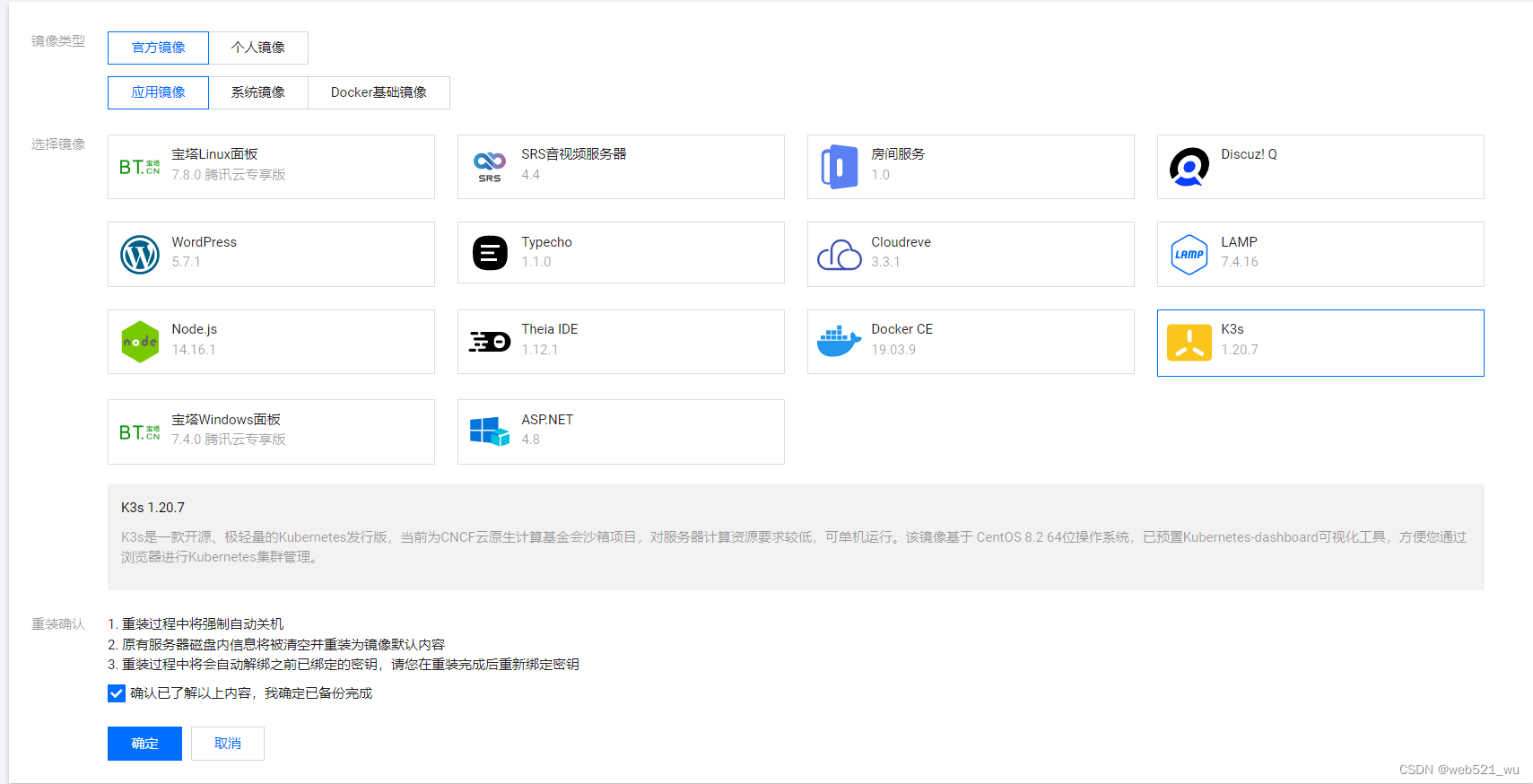
1.获取按照提示,获取token ,
2.防火墙开启9090端口, 输入url:http://公网IP:9090登录;
3.开启SSH远程连接:创建密钥,默认下载文件,windows本地重命名增加后缀.pub,CRT通过公钥进行SSH登录。
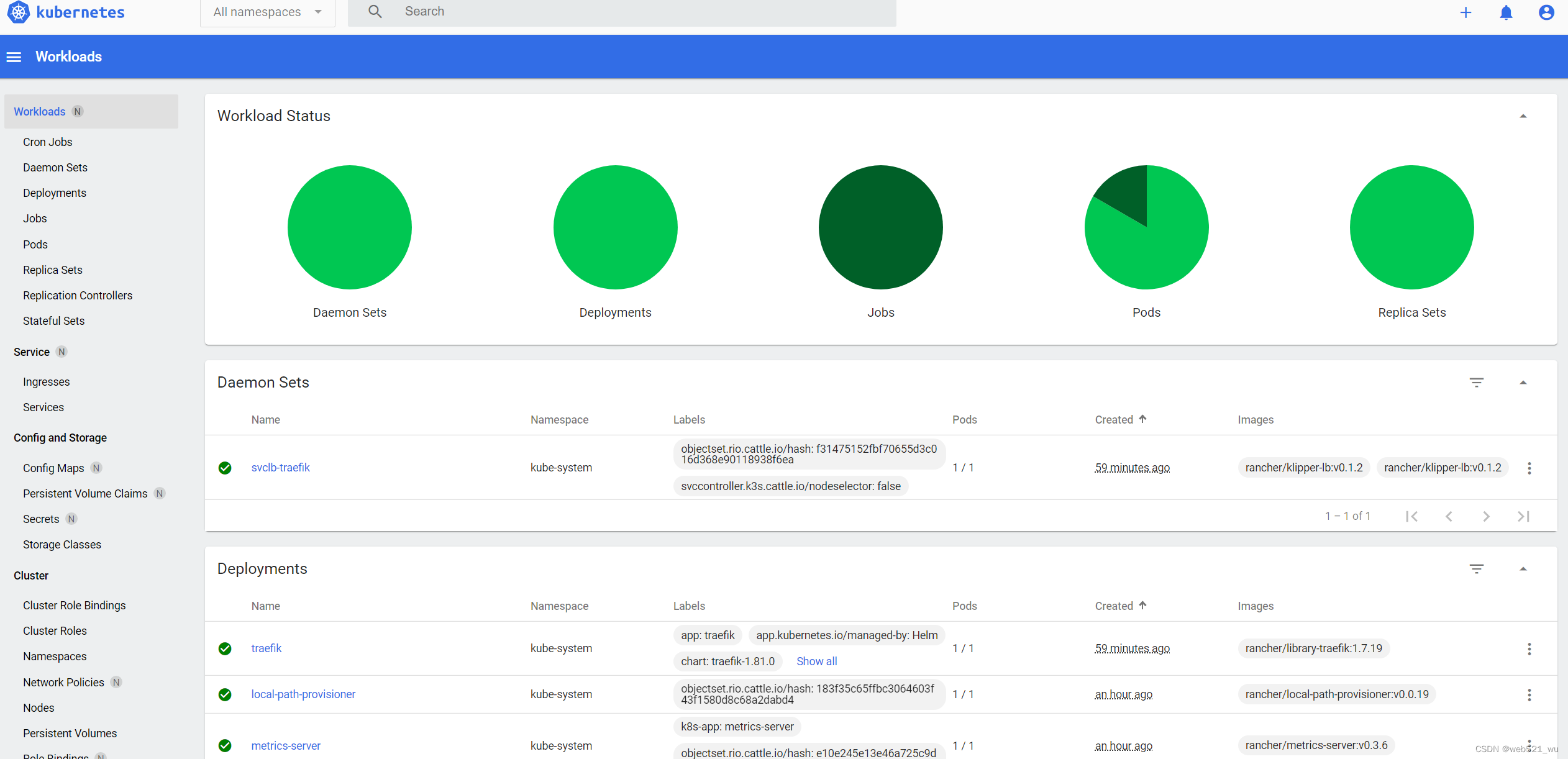
输入url:http://公网IP:9090,可以看到相关菜单
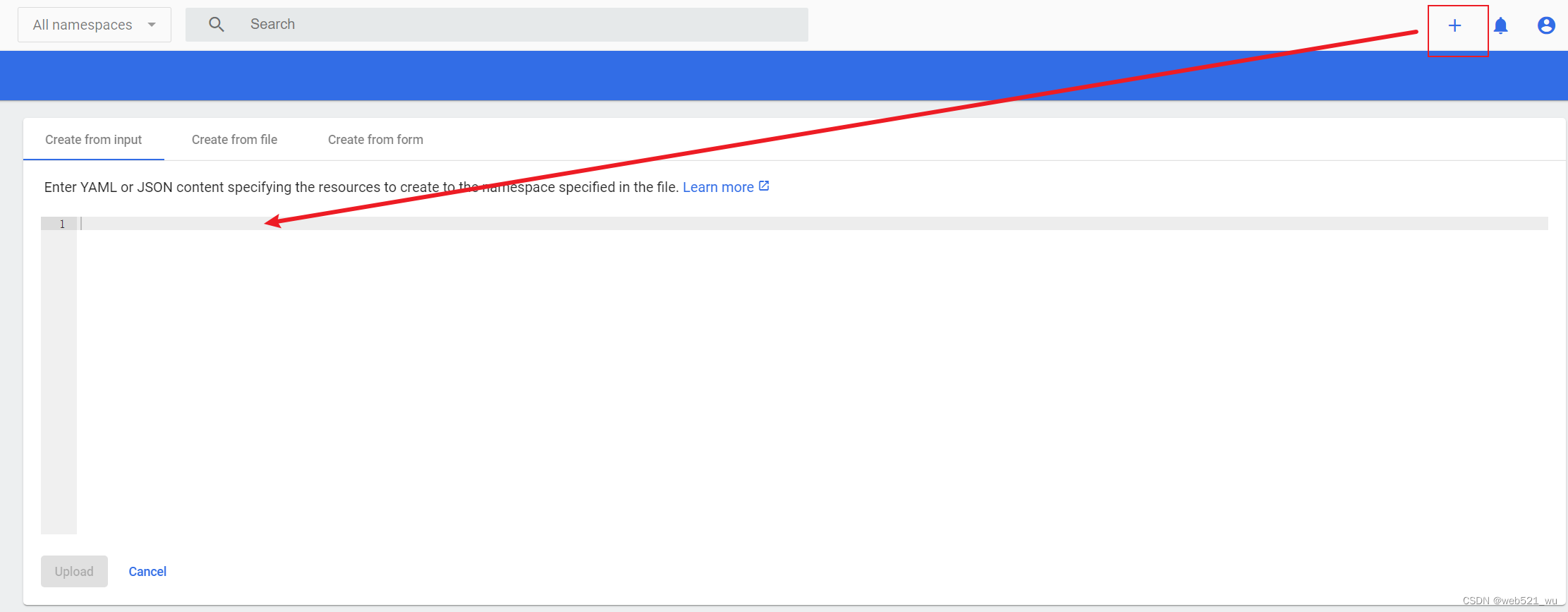
点击右上角“+”,可以创建yaml文件进行服务部署
[root@VM-16-5-centos ~]# hostnamectl
   Static hostname: VM-16-5-centos
         Icon name: computer-vm
           Chassis: vm
        Machine ID: e811d69a833e41beaa003c0e69319e90
           Boot ID: 5816742493464737aa77fb84af907b88
    Virtualization: kvm
  Operating System: CentOS Linux 8 (Core)
       CPE OS Name: cpe:/o:centos:centos:8
            Kernel: Linux 4.18.0-305.3.1.el8.x86_64
      Architecture: x86-64
[root@VM-16-5-centos ~]# cat /etc/redhat-release
CentOS Linux release 8.2.2004 (Core)
[root@VM-16-5-centos ~]# uname -a
Linux VM-16-5-centos 4.18.0-305.3.1.el8.x86_64 #1 SMP Tue Jun 1 16:14:33 UTC 2021 x86_64 x86_64 x86_64 GNU/Linux
[root@VM-16-5-centos ~]# kubectl cluster-info
Kubernetes control plane is running at https://127.0.0.1:6443
CoreDNS is running at https://127.0.0.1:6443/api/v1/namespaces/kube-system/services/kube-dns:dns/proxy
Metrics-server is running at https://127.0.0.1:6443/api/v1/namespaces/kube-system/services/https:metrics-server:/proxy

To further debug and diagnose cluster problems, use 'kubectl cluster-info dump'.
[root@VM-16-5-centos ~]# kubectl get nodes -o wide
NAME             STATUS   ROLES                  AGE   VERSION        INTERNAL-IP   EXTERNAL-IP   OS-IMAGE                KERNEL-VERSION              CONTAINER-RUNTIME
vm-16-5-centos   Ready    control-plane,master   69m   v1.20.7+k3s1   10.0.16.5     <none>        CentOS Linux 8 (Core)   4.18.0-305.3.1.el8.x86_64   containerd://1.4.4-k3s1
[root@VM-16-5-centos ~]# kubectl describe node
Name:               vm-16-5-centos
Roles:              control-plane,master
Labels:             beta.kubernetes.io/arch=amd64
                    beta.kubernetes.io/instance-type=k3s
                    beta.kubernetes.io/os=linux
                    k3s.io/hostname=vm-16-5-centos
                    k3s.io/internal-ip=10.0.16.5
                    kubernetes.io/arch=amd64
                    kubernetes.io/hostname=vm-16-5-centos
                    kubernetes.io/os=linux
                    node-role.kubernetes.io/control-plane=true
                    node-role.kubernetes.io/master=true
                    node.kubernetes.io/instance-type=k3s
Annotations:        flannel.alpha.coreos.com/backend-data: {"VtepMAC":"22:6c:c1:03:83:80"}
                    flannel.alpha.coreos.com/backend-type: vxlan
                    flannel.alpha.coreos.com/kube-subnet-manager: true
                    flannel.alpha.coreos.com/public-ip: 10.0.16.5
                    k3s.io/node-args: ["server","--write-kubeconfig-mode","644"]
                    k3s.io/node-config-hash: XAEWDMOLOUU74BDTBD2U3FVK7PQCFJ4XWLHQCWRAJLPPNWOIBJEA====
                    k3s.io/node-env: {"K3S_DATA_DIR":"/var/lib/rancher/k3s/data/474b7b031f3885345db99df7da66f11d537c75180eb6961b6cf2ec25b92efe65"}
                    node.alpha.kubernetes.io/ttl: 0
                    volumes.kubernetes.io/controller-managed-attach-detach: true
CreationTimestamp:  Fri, 06 May 2022 14:41:53 +0800
Taints:             <none>
Unschedulable:      false
Lease:
  HolderIdentity:  vm-16-5-centos
  AcquireTime:     <unset>
  RenewTime:       Fri, 06 May 2022 15:51:21 +0800
Conditions:
  Type                 Status  LastHeartbeatTime                 LastTransitionTime                Reason                       Message
  ----                 ------  -----------------                 ------------------                ------                       -------
  NetworkUnavailable   False   Fri, 06 May 2022 15:04:23 +0800   Fri, 06 May 2022 15:04:23 +0800   FlannelIsUp                  Flannel is running on this node
  MemoryPressure       False   Fri, 06 May 2022 15:49:41 +0800   Fri, 06 May 2022 14:41:53 +0800   KubeletHasSufficientMemory   kubelet has sufficient memory available
  DiskPressure         False   Fri, 06 May 2022 15:49:41 +0800   Fri, 06 May 2022 14:41:53 +0800   KubeletHasNoDiskPressure     kubelet has no disk pressure
  PIDPressure          False   Fri, 06 May 2022 15:49:41 +0800   Fri, 06 May 2022 14:41:53 +0800   KubeletHasSufficientPID      kubelet has sufficient PID available
  Ready                True    Fri, 06 May 2022 15:49:41 +0800   Fri, 06 May 2022 15:04:27 +0800   KubeletReady                 kubelet is posting ready status
Addresses:
  InternalIP:  10.0.16.5
  Hostname:    vm-16-5-centos
Capacity:
  cpu:                2
  ephemeral-storage:  82503044Ki
  hugepages-1Gi:      0
  hugepages-2Mi:      0
  memory:             3826344Ki
  pods:               110
Allocatable:
  cpu:                2
  ephemeral-storage:  80258961141
  hugepages-1Gi:      0
  hugepages-2Mi:      0
  memory:             3826344Ki
  pods:               110
System Info:
  Machine ID:                 e811d69a833e41beaa003c0e69319e90
  System UUID:                66cd78fa-04cf-4ed0-8d34-e142131d09b7
  Boot ID:                    58167424-9346-4737-aa77-fb84af907b88
  Kernel Version:             4.18.0-305.3.1.el8.x86_64
  OS Image:                   CentOS Linux 8 (Core)
  Operating System:           linux
  Architecture:               amd64
  Container Runtime Version:  containerd://1.4.4-k3s1
  Kubelet Version:            v1.20.7+k3s1
  Kube-Proxy Version:         v1.20.7+k3s1
PodCIDR:                      10.42.0.0/24
PodCIDRs:                     10.42.0.0/24
ProviderID:                   k3s://vm-16-5-centos
Non-terminated Pods:          (5 in total)
  Namespace                   Name                                       CPU Requests  CPU Limits  Memory Requests  Memory Limits  AGE
  ---------                   ----                                       ------------  ----------  ---------------  -------------  ---
  kube-system                 svclb-traefik-szvsd                        0 (0%)        0 (0%)      0 (0%)           0 (0%)         68m
  kube-system                 metrics-server-86cbb8457f-scttb            0 (0%)        0 (0%)      0 (0%)           0 (0%)         69m
  kube-system                 local-path-provisioner-5ff76fc89d-4v6z9    0 (0%)        0 (0%)      0 (0%)           0 (0%)         69m
  kube-system                 coredns-854c77959c-xhn6w                   100m (5%)     0 (0%)      70Mi (1%)        170Mi (4%)     69m
  kube-system                 traefik-6f9cbd9bd4-pcq5g                   0 (0%)        0 (0%)      0 (0%)           0 (0%)         68m
Allocated resources:
  (Total limits may be over 100 percent, i.e., overcommitted.)
  Resource           Requests   Limits
  --------           --------   ------
  cpu                100m (5%)  0 (0%)
  memory             70Mi (1%)  170Mi (4%)
  ephemeral-storage  0 (0%)     0 (0%)
  hugepages-1Gi      0 (0%)     0 (0%)
  hugepages-2Mi      0 (0%)     0 (0%)
Events:
  Type     Reason                   Age   From        Message
  ----     ------                   ----  ----        -------
  Normal   Starting                 69m   kubelet     Starting kubelet.
  Warning  InvalidDiskCapacity      69m   kubelet     invalid capacity 0 on image filesystem
  Normal   NodeHasSufficientMemory  69m   kubelet     Node vm-16-5-centos status is now: NodeHasSufficientMemory
  Normal   NodeHasNoDiskPressure    69m   kubelet     Node vm-16-5-centos status is now: NodeHasNoDiskPressure
  Normal   NodeHasSufficientPID     69m   kubelet     Node vm-16-5-centos status is now: NodeHasSufficientPID
  Normal   NodeAllocatableEnforced  69m   kubelet     Updated Node Allocatable limit across pods
  Normal   Starting                 69m   kube-proxy  Starting kube-proxy.
  Normal   NodeReady                69m   kubelet     Node vm-16-5-centos status is now: NodeReady
  Normal   Starting                 47m   kube-proxy  Starting kube-proxy.
  Normal   Starting                 47m   kubelet     Starting kubelet.
  Warning  InvalidDiskCapacity      47m   kubelet     invalid capacity 0 on image filesystem
  Normal   NodeHasSufficientMemory  47m   kubelet     Node vm-16-5-centos status is now: NodeHasSufficientMemory
  Normal   NodeHasNoDiskPressure    47m   kubelet     Node vm-16-5-centos status is now: NodeHasNoDiskPressure
  Normal   NodeHasSufficientPID     47m   kubelet     Node vm-16-5-centos status is now: NodeHasSufficientPID
  Warning  Rebooted                 47m   kubelet     Node vm-16-5-centos has been rebooted, boot id: 58167424-9346-4737-aa77-fb84af907b88
  Normal   NodeNotReady             47m   kubelet     Node vm-16-5-centos status is now: NodeNotReady
  Normal   NodeAllocatableEnforced  47m   kubelet     Updated Node Allocatable limit across pods
  Normal   NodeReady                47m   kubelet     Node vm-16-5-centos status is now: NodeReady
[root@VM-16-5-centos ~]# ctr
NAME:
   ctr -
        __
  _____/ /______
 / ___/ __/ ___/
/ /__/ /_/ /
\___/\__/_/

containerd CLI


USAGE:
   ctr [global options] command [command options] [arguments...]

VERSION:
   v1.4.4-k3s1

DESCRIPTION:

ctr is an unsupported debug and administrative client for interacting
with the containerd daemon. Because it is unsupported, the commands,
options, and operations are not guaranteed to be backward compatible or
stable from release to release of the containerd project.

COMMANDS:
   plugins, plugin            provides information about containerd plugins
   version                    print the client and server versions
   containers, c, container   manage containers
   content                    manage content
   events, event              display containerd events
   images, image, i           manage images
   leases                     manage leases
   namespaces, namespace, ns  manage namespaces
   pprof                      provide golang pprof outputs for containerd
   run                        run a container
   snapshots, snapshot        manage snapshots
   tasks, t, task             manage tasks
   install                    install a new package
   oci                        OCI tools
   shim                       interact with a shim directly
   help, h                    Shows a list of commands or help for one command

GLOBAL OPTIONS:
   --debug                      enable debug output in logs
   --address value, -a value    address for containerd's GRPC server (default: "/run/k3s/containerd/containerd.sock") [$CONTAINERD_ADDRESS]
   --timeout value              total timeout for ctr commands (default: 0s)
   --connect-timeout value      timeout for connecting to containerd (default: 0s)
   --namespace value, -n value  namespace to use with commands (default: "k8s.io") [$CONTAINERD_NAMESPACE]
   --help, -h                   show help
   --version, -v                print the version
[root@VM-16-5-centos ~]# ctr plugins ls
TYPE                            ID                       PLATFORMS      STATUS
io.containerd.snapshotter.v1    overlayfs                linux/amd64    ok
io.containerd.service.v1        introspection-service    -              ok
io.containerd.content.v1        content                  -              ok
io.containerd.snapshotter.v1    fuse-overlayfs           linux/amd64    ok
io.containerd.snapshotter.v1    native                   linux/amd64    ok
io.containerd.metadata.v1       bolt                     -              ok
io.containerd.differ.v1         walking                  linux/amd64    ok
io.containerd.gc.v1             scheduler                -              ok
io.containerd.service.v1        containers-service       -              ok
io.containerd.service.v1        content-service          -              ok
io.containerd.service.v1        diff-service             -              ok
io.containerd.service.v1        images-service           -              ok
io.containerd.service.v1        leases-service           -              ok
io.containerd.service.v1        namespaces-service       -              ok
io.containerd.service.v1        snapshots-service        -              ok
io.containerd.runtime.v1        linux                    linux/amd64    ok
io.containerd.runtime.v2        task                     linux/amd64    ok
io.containerd.monitor.v1        cgroups                  linux/amd64    ok
io.containerd.service.v1        tasks-service            -              ok
io.containerd.internal.v1       restart                  -              ok
io.containerd.grpc.v1           containers               -              ok
io.containerd.grpc.v1           content                  -              ok
io.containerd.grpc.v1           diff                     -              ok
io.containerd.grpc.v1           events                   -              ok
io.containerd.grpc.v1           healthcheck              -              ok
io.containerd.grpc.v1           images                   -              ok
io.containerd.grpc.v1           leases                   -              ok
io.containerd.grpc.v1           namespaces               -              ok
io.containerd.internal.v1       opt                      -              ok
io.containerd.grpc.v1           snapshots                -              ok
io.containerd.grpc.v1           tasks                    -              ok
io.containerd.grpc.v1           version                  -              ok
io.containerd.grpc.v1           cri                      linux/amd64    ok
[root@VM-16-5-centos ~]# crictl
NAME:
   crictl - client for CRI

USAGE:
   crictl [global options] command [command options] [arguments...]

VERSION:
   v1.20.0-k3s1

COMMANDS:
   attach              Attach to a running container
   create              Create a new container
   exec                Run a command in a running container
   version             Display runtime version information
   images, image, img  List images
   inspect             Display the status of one or more containers
   inspecti            Return the status of one or more images
   imagefsinfo         Return image filesystem info
   inspectp            Display the status of one or more pods
   logs                Fetch the logs of a container
   port-forward        Forward local port to a pod
   ps                  List containers
   pull                Pull an image from a registry
   run                 Run a new container inside a sandbox
   runp                Run a new pod
   rm                  Remove one or more containers
   rmi                 Remove one or more images
   rmp                 Remove one or more pods
   pods                List pods
   start               Start one or more created containers
   info                Display information of the container runtime
   stop                Stop one or more running containers
   stopp               Stop one or more running pods
   update              Update one or more running containers
   config              Get and set crictl client configuration options
   stats               List container(s) resource usage statistics
   completion          Output shell completion code
   help, h             Shows a list of commands or help for one command

GLOBAL OPTIONS:
   --config value, -c value            Location of the client config file. If not specified and the default does not exist, the program's directory is searched as well (default: "/var/lib/rancher/k3s/agent/etc/crictl.yaml") [$CRI_CONFIG_FILE]
   --debug, -D                         Enable debug mode (default: false)
   --image-endpoint value, -i value    Endpoint of CRI image manager service (default: uses 'runtime-endpoint' setting) [$IMAGE_SERVICE_ENDPOINT]
   --runtime-endpoint value, -r value  Endpoint of CRI container runtime service (default: uses in order the first successful one of [unix:///run/k3s/containerd/containerd.sock unix:///var/run/dockershim.sock unix:///run/containerd/containerd.sock unix:///run/crio/crio.sock]). Default is now deprecated and the endpoint should be set instead. [$CONTAINER_RUNTIME_ENDPOINT]
   --timeout value, -t value           Timeout of connecting to the server in seconds (e.g. 2s, 20s.). 0 or less is set to default (default: 2s)
   --help, -h                          show help (default: false)
   --version, -v                       print the version (default: false)


[root@VM-16-5-centos ~]# nerdctl
-bash: nerdctl: command not found
[root@VM-16-5-centos ~]# kubectl get pods --all-namespaces
NAMESPACE     NAME                                      READY   STATUS      RESTARTS   AGE
kube-system   helm-install-traefik-5vl8b                0/1     Completed   0          73m
kube-system   svclb-traefik-szvsd                       2/2     Running     2          73m
kube-system   metrics-server-86cbb8457f-scttb           1/1     Running     1          73m
kube-system   local-path-provisioner-5ff76fc89d-4v6z9   1/1     Running     1          73m
kube-system   coredns-854c77959c-xhn6w                  1/1     Running     1          73m
kube-system   traefik-6f9cbd9bd4-pcq5g                  1/1     Running     1          73m
[root@VM-16-5-centos ~]# kubectl get ns
NAME              STATUS   AGE
default           Active   74m
kube-system       Active   74m
kube-public       Active   74m
kube-node-lease   Active   74m
[root@VM-16-5-centos ~]# kubectl get svc
NAME         TYPE        CLUSTER-IP   EXTERNAL-IP   PORT(S)   AGE
kubernetes   ClusterIP   10.43.0.1    <none>        443/TCP   75m
https://github.com/containerd/nerdctl/releases
[root@VM-16-5-centos ~]# wget https://github.91chi.fun//https://github.com//containerd/nerdctl/releases/download/v0.19.0/nerdctl-0.19.0-linux-amd64.tar.gz

[root@VM-16-5-centos ~]# mkdir -p /usr/local/containerd/bin  && tar -zxvf nerdctl-0.19.0-linux-amd64.tar.gz nerdctl && mv nerdctl /usr/local/containerd/bin

[root@VM-16-5-centos ~]# ln -s /usr/local/containerd/bin/nerdctl /usr/bin/nerdctl
nerdctl运行时路径待解决

安装部署后,使用默认的runtime路径,不是K3s的/run/k3s/containerd/containerd.sock;需要修改路径,按照路径进行修改,未成功,待解决
https://github.com/containerd/nerdctl/blob/master/docs/faq.md#how-to-change-the-runtime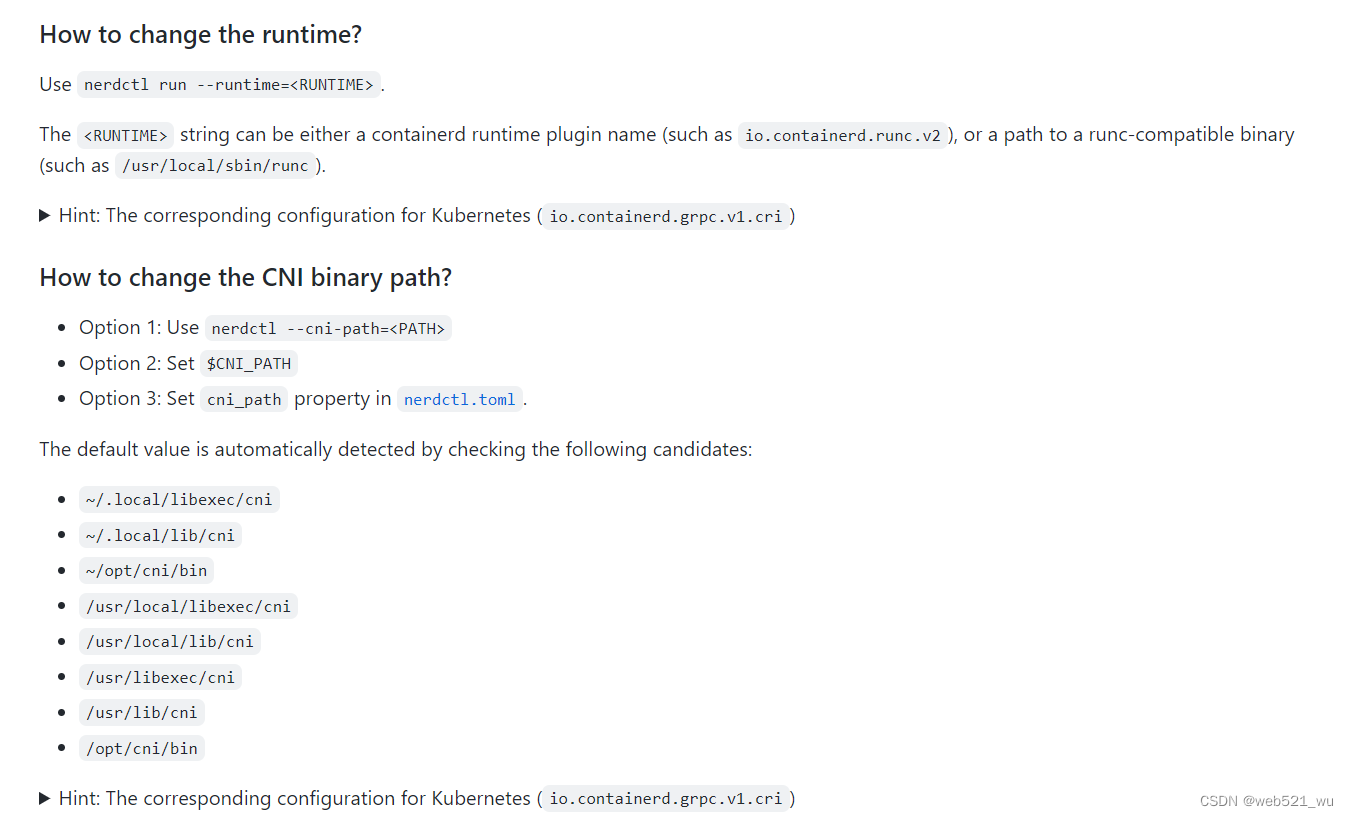
我正在尝试使用ruby和Savon来使用网络服务。测试服务为http://www.webservicex.net/WS/WSDetails.aspx?WSID=9&CATID=2require'rubygems'require'savon'client=Savon::Client.new"http://www.webservicex.net/stockquote.asmx?WSDL"client.get_quotedo|soap|soap.body={:symbol=>"AAPL"}end返回SOAP异常。检查soap信封,在我看来soap请求没有正确的命名空间。任何人都可以建议我
我想安装一个带有一些身份验证的私有(private)Rubygem服务器。我希望能够使用公共(public)Ubuntu服务器托管内部gem。我读到了http://docs.rubygems.org/read/chapter/18.但是那个没有身份验证-如我所见。然后我读到了https://github.com/cwninja/geminabox.但是当我使用基本身份验证(他们在他们的Wiki中有)时,它会提示从我的服务器获取源。所以。如何制作带有身份验证的私有(private)Rubygem服务器?这是不可能的吗?谢谢。编辑:Geminabox问题。我尝试“捆绑”以安装新的gem..
我有一个在Linux服务器上运行的ruby脚本。它不使用rails或任何东西。它基本上是一个命令行ruby脚本,可以像这样传递参数:./ruby_script.rbarg1arg2如何将参数抽象到配置文件(例如yaml文件或其他文件)中?您能否举例说明如何做到这一点?提前谢谢你。 最佳答案 首先,您可以运行一个写入YAML配置文件的独立脚本:require"yaml"File.write("path_to_yaml_file",[arg1,arg2].to_yaml)然后,在您的应用中阅读它:require"yaml"arg
最近,当我启动我的Rails服务器时,我收到了一长串警告。虽然它不影响我的应用程序,但我想知道如何解决这些警告。我的估计是imagemagick以某种方式被调用了两次?当我在警告前后检查我的git日志时。我想知道如何解决这个问题。-bcrypt-ruby(3.1.2)-better_errors(1.0.1)+bcrypt(3.1.7)+bcrypt-ruby(3.1.5)-bcrypt(>=3.1.3)+better_errors(1.1.0)bcrypt和imagemagick有关系吗?/Users/rbchris/.rbenv/versions/2.0.0-p247/lib/ru
在Rails4.0.2中,我使用s3_direct_upload和aws-sdkgems直接为s3存储桶上传文件。在开发环境中它工作正常,但在生产环境中它会抛出如下错误,ActionView::Template::Error(noimplicitconversionofnilintoString)在View中,create_cv_url,:id=>"s3_uploader",:key=>"cv_uploads/{unique_id}/${filename}",:key_starts_with=>"cv_uploads/",:callback_param=>"cv[direct_uplo
我已经在Sinatra上创建了应用程序,它代表了一个简单的API。我想在生产和开发上进行部署。我想在部署时选择,是开发还是生产,一些方法的逻辑应该改变,这取决于部署类型。是否有任何想法,如何完成以及解决此问题的一些示例。例子:我有代码get'/api/test'doreturn"Itisdev"end但是在部署到生产环境之后我想在运行/api/test之后看到ItisPROD如何实现? 最佳答案 根据SinatraDocumentation:EnvironmentscanbesetthroughtheRACK_ENVenvironm
我想在Ruby中创建一个用于开发目的的极其简单的Web服务器(不,不想使用现成的解决方案)。代码如下:#!/usr/bin/rubyrequire'socket'server=TCPServer.new('127.0.0.1',8080)whileconnection=server.acceptheaders=[]length=0whileline=connection.getsheaders想法是从命令行运行这个脚本,提供另一个脚本,它将在其标准输入上获取请求,并在其标准输出上返回完整的响应。到目前为止一切顺利,但事实证明这真的很脆弱,因为它在第二个请求上中断并出现错误:/usr/b
我正在玩HTML5视频并且在ERB中有以下片段:mp4视频从在我的开发环境中运行的服务器很好地流式传输到chrome。然而firefox显示带有海报图像的视频播放器,但带有一个大X。问题似乎是mongrel不确定ogv扩展的mime类型,并且只返回text/plain,如curl所示:$curl-Ihttp://0.0.0.0:3000/pr6.ogvHTTP/1.1200OKConnection:closeDate:Mon,19Apr201012:33:50GMTLast-Modified:Sun,18Apr201012:46:07GMTContent-Type:text/plain
您如何在Rails中的实时服务器上进行有效调试,无论是在测试版/生产服务器上?我试过直接在服务器上修改文件,然后重启应用,但是修改好像没有生效,或者需要很长时间(缓存?)我也试过在本地做“脚本/服务器生产”,但是那很慢另一种选择是编码和部署,但效率很低。有人对他们如何有效地做到这一点有任何见解吗? 最佳答案 我会回答你的问题,即使我不同意这种热修补服务器代码的方式:)首先,你真的确定你已经重启了服务器吗?您可以通过跟踪日志文件来检查它。您更改的代码显示的View可能会被缓存。缓存页面位于tmp/cache文件夹下。您可以尝试手动删除
之前在培训新生的时候,windows环境下配置opencv环境一直教的都是网上主流的vsstudio配置属性表,但是这个似乎对新生来说难度略高(虽然个人觉得完全是他们自己的问题),加之暑假之后对cmake实在是爱不释手,且这样配置确实十分简单(其实都不需要配置),故斗胆妄言vscode下配置CV之法。其实极为简单,图比较多所以很长。如果你看此文还配不好,你应该思考一下是不是自己的问题。闲话少说,直接开始。0.CMkae简介有的人到大二了都不知道cmake是什么,我不说是谁。CMake是一个开源免费并且跨平台的构建工具,可以用简单的语句来描述所有平台的编译过程。它能够根据当前所在平台输出对应的m
