文章目录
I2C(也写做IIC)总线支持设备之间的短距离通信,用于处理器和一些外围设备之间数据传输,它只需要两根信号线来就能完成数据传输,极大地简化了对硬件资源和PCB板布线空间的占用,所以它被EEPROM、时钟等设备与主控的接口中。前一篇简单分析下I2C协议,并且通过IO口模拟了I2C的数据传输,这一篇来分析下linux系统中的I2C协议的使用,分析Linux系统中I2C驱动的体系结构和工作方式。最后通过自行构建一个I2C设备驱动程序来了解I2C设备驱动开发的具体流程。
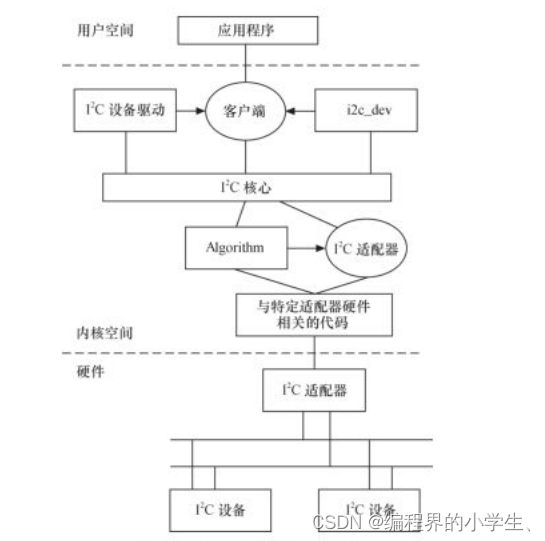
I2C核心向内核注册了I2C总线,同时创建了一个适配器类(/sys/class/i2c-adapter),以便于后面向I2C总线注册适配器时在该适配器类下创建适配器设备。在I2C核心中,提供了I2C适配器和I2C设备驱动的注册、注销方法。
通过 i2c_add_adapter 接口将I2C适配器注册到I2C总线中。
通过 i2c_add_driver 接口将I2C设备驱动注册到I2C总线中。
// linux-2.6.22.6/drivers/i2c/i2c-core.c
struct bus_type i2c_bus_type = {
	.name		= "i2c",
	.dev_attrs	= i2c_dev_attrs,
	.match		= i2c_device_match,
	.uevent		= i2c_device_uevent,
	.probe		= i2c_device_probe,
	.remove		= i2c_device_remove,
	.shutdown	= i2c_device_shutdown,
	.suspend	= i2c_device_suspend,
	.resume		= i2c_device_resume,
};

struct class i2c_adapter_class = {
    .owner			= THIS_MODULE,
    .name			= "i2c-adapter",
    .dev_attrs		= i2c_adapter_attrs,
};

static int __init i2c_init(void)
{
    int retval;

    // 注册i2c总线
    retval = bus_register(&i2c_bus_type);
    if (retval)
        return retval;
    // 在/sys/class/下创建一个适配器类 /sys/class/i2c-adapter
    return class_register(&i2c_adapter_class);
}

subsys_initcall(i2c_init);
由于IIC总线控制器通常是在内存上的,所有它本身也连接在platform总线上,要通过paltform_driver 和paltform_device 的匹配来执行。在该paltform_driver 的probe函数中,通常完成两个工作。
static const struct i2c_algorithm s3c24xx_i2c_algorithm = {
	.master_xfer		= s3c24xx_i2c_xfer,
	.functionality		= s3c24xx_i2c_func,
};

static struct s3c24xx_i2c s3c24xx_i2c = {
	.lock		= __SPIN_LOCK_UNLOCKED(s3c24xx_i2c.lock),
	.wait		= __WAIT_QUEUE_HEAD_INITIALIZER(s3c24xx_i2c.wait),
	.tx_setup	= 50,
	.adap		= {
		.name			= "s3c2410-i2c",
		.owner			= THIS_MODULE,
		.algo			= &s3c24xx_i2c_algorithm,
		.retries		= 2,
		.class			= I2C_CLASS_HWMON,
	},
};

s3c24xx_i2c_probe ->
    ......
    // 时钟
    i2c->clk = clk_get(&pdev->dev, "i2c");
	clk_enable(i2c->clk);
	......
	// i/o资源
    i2c->ioarea = request_mem_region(res->start, (res->end-res->start)+1,
					 pdev->name);
	i2c->regs = ioremap(res->start, (res->end-res->start)+1);
    ......
    //中断
    ret = request_irq(res->start, s3c24xx_i2c_irq, IRQF_DISABLED,
			  pdev->name, i2c);
	......

    struct s3c24xx_i2c *i2c = &s3c24xx_i2c;
	// 注册适配器
	i2c_add_adapter(&i2c->adap)

	......
I2C适配器为后和它匹配的设备驱动提供通信方法,即数据传输的接口。主要是实现i2c_algorithm结构体的master_xfer 函数和 functionality函数。functionality函数用于返回algorithm所支持的通信协议。master_xfer 函数在I2C适配器上完成传递给它的i2c_msg数组中的每个IIC消息。
static u32 s3c24xx_i2c_func(struct i2c_adapter *adap)
{
	return I2C_FUNC_I2C | I2C_FUNC_SMBUS_EMUL | I2C_FUNC_PROTOCOL_MANGLING;
}

static int s3c24xx_i2c_xfer(struct i2c_adapter *adap,
			struct i2c_msg *msgs, int num)
{
	struct s3c24xx_i2c *i2c = (struct s3c24xx_i2c *)adap->algo_data;
	int retry;
	int ret;

	for (retry = 0; retry < adap->retries; retry++) {

		ret = s3c24xx_i2c_doxfer(i2c, msgs, num);

		if (ret != -EAGAIN)
			return ret;

		dev_dbg(i2c->dev, "Retrying transmission (%d)\n", retry);

		udelay(100);
	}

	return -EREMOTEIO;
}
s3c24xx_i2c_probe ->
    struct s3c24xx_i2c *i2c = &s3c24xx_i2c;
	// 注册适配器
	i2c_add_adapter(&i2c->adap) ->
		i2c_register_adapter(adapter) ->
            ......
            // 将该注册的适配器加入到适配器链表中
        	list_add_tail(&adap->list, &adapters);

        	// 在 /sys/class/i2c-adapter设备类下创建一个设备
        	// /sys/class/i2c-adapter/i2c-0
        	sprintf(adap->dev.bus_id, "i2c-%d", adap->nr);
        	adap->dev.release = &i2c_adapter_dev_release;
        	adap->dev.class = &i2c_adapter_class;
        	res = device_register(&adap->dev);

        	// 从I2C设备驱动链表中,取出每一项驱动,执行驱动的attach_adapter接口,以匹配适配器和设备驱动
        	// IIC设备驱动链表由IIC设备驱动注册时设置。
			list_for_each(item,&drivers) {
    		driver = list_entry(item, struct i2c_driver, list);
    		if (driver->attach_adapter)
    			/* We ignore the return code; if it fails, too bad */
                // 调用IIC设备驱动的attach_adapter接口
    			driver->attach_adapter(adap);
    		}
			......
实现了I2C适配器设备文件的功能,每一个IIC适配器都被分配一个设备。通过适配器访问设备时的主设备号都为89,次设备号为0~255。应用程序可以通过"/dev/i2c-%d"设备节点使用文件操作接口open()、write()、read()、ioctl()等来使用对应的IIC适配器访问某个I2C设备。
static const struct file_operations i2cdev_fops = {
	.owner		= THIS_MODULE,
	.llseek		= no_llseek,
	.read		= i2cdev_read,
	.write		= i2cdev_write,
	.ioctl		= i2cdev_ioctl,
	.open		= i2cdev_open,
	.release	= i2cdev_release,
};

static struct i2c_driver i2cdev_driver = {
	.driver = {
		.name	= "dev_driver",
	},
	.id		= I2C_DRIVERID_I2CDEV,
	.attach_adapter	= i2cdev_attach_adapter,
	.detach_adapter	= i2cdev_detach_adapter,
	.detach_client	= i2cdev_detach_client,
};

#define I2C_MAJOR	89		/* Device major number		*/

static int __init i2c_dev_init(void)
{
	int res;

	printk(KERN_INFO "i2c /dev entries driver\n");

	res = register_chrdev(I2C_MAJOR, "i2c", &i2cdev_fops);
	if (res)
		goto out;
	// 创建/sys/class/i2c-dev
	i2c_dev_class = class_create(THIS_MODULE, "i2c-dev");
	if (IS_ERR(i2c_dev_class))
		goto out_unreg_chrdev;

	res = i2c_add_driver(&i2cdev_driver);
	if (res)
		goto out_unreg_class;

	return 0;

out_unreg_class:
	class_destroy(i2c_dev_class);
out_unreg_chrdev:
	unregister_chrdev(I2C_MAJOR, "i2c");
out:
	printk(KERN_ERR "%s: Driver Initialisation failed\n", __FILE__);
	return res;
}
static struct i2c_driver i2cdev_driver = {
	.driver = {
		.name	= "dev_driver",
	},
	.id		= I2C_DRIVERID_I2CDEV,
	.attach_adapter	= i2cdev_attach_adapter,
	.detach_adapter	= i2cdev_detach_adapter,
	.detach_client	= i2cdev_detach_client,
};

i2c_dev_init ->
    // 注册IIC设备驱动,匹配每个适配器进而为每个匹配到的适配器在 /sys/class/i2c-dev设备类下创建适配器设备
    i2c_add_driver(&i2cdev_driver) ->
        i2c_register_driver ->

    		// 将IIC设备驱动添加到驱动链表中
    		list_add_tail(&driver->list,&drivers);

        	// 从IIC适配器链表中,取出每一个适配器,调用IIC设备驱动提供的attach_adapter接口
            list_for_each_entry(adapter, &adapters, list) {
    			driver->attach_adapter(adapter); // 即 调用i2cdev_attach_adapter
    		}

    // 调用i2cdev_attach_adapter
    i2cdev_attach_adapter
    	// 在 /sys/class/i2c-dev设备类下创建适配器设备 /sys/class/i2c-dev/i2c-%d
    	// 同时会以I2C_MAJOR为主设备号,次设备号0~255,在/dev/下生成 /dev/i2c-%d设备节点
    	i2c_dev->dev = device_create(i2c_dev_class, &adap->dev,
    				     MKDEV(I2C_MAJOR, adap->nr),
    				     "i2c-%d", adap->nr);
    	res = device_create_file(i2c_dev->dev, &dev_attr_name);
为某个特定的IIC设备的构建的IIC设备驱动,通常在提供的attach_adapter 接口调用I2C核心提供的i2c_probe接口,同时提供一个设备探测成功后调用的函数"at24cxx_detect"给到i2c_probe,在i2c_probe中会去探测某个设备地址的设备是否存在,如果存在便调用at24cxx_detect。通常来说为某个特定的IIC设备去构建IIC设备驱动、针对平台硬件资源构建IIC适配器便是IIC驱动相关开发所需要做的工作,IIC核心相关、IIC总线驱动相关的部分,系统中一般已经存在。
static struct i2c_driver at24cxx_driver = {
	.driver = {
		.name	= "at24cxx",
	},
	.attach_adapter = at24cxx_attach,
	.detach_client  = at24cxx_detach,
};

static int at24cxx_attach(struct i2c_adapter *adapter)
{
	return i2c_probe(adapter, &addr_data, at24cxx_detect);
}

static int at24cxx_detect(struct i2c_adapter *adapter, int address, int kind)
{
	printk("at24cxx_detect\n");

	/* 构构一个i2c_client结构体: 以后收改数据时会用到它 */
	at24cxx_client = kzalloc(sizeof(struct i2c_client), GFP_KERNEL);
	at24cxx_client->addr    = address;
	at24cxx_client->adapter = adapter;
	at24cxx_client->driver  = &at24cxx_driver;
	strcpy(at24cxx_client->name, "at24cxx");
	i2c_attach_client(at24cxx_client);

    // 注册一个IIC设备的驱动,提供file_operations接口
	major = register_chrdev(0, "at24cxx", &at24cxx_fops);

    // 创建一个设备类/sys/class/at24cxx,并在该设备类下创建一个设备/sys/class/at24cxx/at24cxx
	// 以 major为主设备号,次设备号0~255,生成/dev/at24cxx设备节点,供应用程序使用
    cls = class_create(THIS_MODULE, "at24cxx");
	class_device_create(cls, NULL, MKDEV(major, 0), NULL, "at24cxx"); /* /dev/at24cxx */

	return 0;
}

static int at24cxx_init(void)
{
	i2c_add_driver(&at24cxx_driver);
	return 0;
}

static unsigned short ignore[]      = { I2C_CLIENT_END };
static unsigned short normal_addr[] = { 0x50, I2C_CLIENT_END }; /* 地址值是7位 */

static struct i2c_client_address_data addr_data = {
	.normal_i2c	= normal_addr,  /* 要发出S信号和设备地址并得到ACK信号,才能确定存在这个设备 */
	.probe		= ignore,
	.ignore		= ignore,
	//.forces     = forces, /* 强制认为存在这个设备 */
};
at24cxx_init ->
    i2c_add_driver ->
        i2c_register_driver ->
            // 将IIC设备驱动添加到驱动链表中
    		list_add_tail(&driver->list,&drivers);

        	// 从IIC适配器链表中,取出每一个适配器,调用IIC设备驱动提供的attach_adapter接口
            list_for_each_entry(adapter, &adapters, list) {
    			driver->attach_adapter(adapter); // 即 调用at24cxx_attach
    		}

at24cxx_attach ->
    i2c_probe(adapter, &addr_data, at24cxx_detect) ->
        // 对每个设备地址执行
        i2c_probe_address(adapter,address_data->probe[i + 1],-1, found_proc) ->
            // 判断之前适配器中是否已经有该I2C设备连接了
    		i2c_check_addr(adapter, addr)
            // 去探测这个设备地址的设备
    		i2c_smbus_xfer(adapter, addr, 0, 0, 0,I2C_SMBUS_QUICK, NULL) ->
                i2c_smbus_xfer_emulated(adapter,addr,flags,read_write,command,size,data) ->
                    i2c_transfer(adapter, msg, num)
                        adap->algo->master_xfer(adap,msgs,num) ->
                            // 以i2c-s3c2410.c的适配器为例
                            s3c24xx_i2c_doxfer(i2c, msgs, num)->
                                // 向某设备地址传输一个msg
                                s3c24xx_i2c_message_start(i2c, msgs);
                            	// 等待设备的ACK回应,在s3c24xx_i2c_master_complete会唤醒该wait,并赋值i2c->msg_idx
                                timeout = wait_event_timeout(i2c->wait, i2c->msg_num == 0, HZ * 5);
								ret = i2c->msg_idx;  // 返回ACK的值
        	// 设备有ACK回应则调用found_proc,即at24cxx_detect函数
			found_proc(adapter, addr, kind);

at24cxx_detect中
	设置了i2c_client结构体,记录了I2C设备的设备地址、匹配的适配器等信息
	注册了一个字符设备,提供了file_operations接口,以供应用程序使用
	创建设备类、设备、生成设备节点,以供应用程序使用
应用程序一般通过两种方式和i2c设备进行数据传输
应用程序打开"/dev/i2c-0"节点,使用其file_operations接口(open、read、write、ioctl、close)和某IIC设备进行数据传输。
应用程序打开"/dev/at24cxx"节点,使用其file_operations接口(open、read、write、ioctl、close)和某IIC设备进行数据传输。
进行一次数据传输操作,IIC设备地址为0x50。
#include <stdio.h>
#include <stdlib.h>
#include <string.h>
#include <sys/types.h>
#include <sys/stat.h>
#include <fcntl.h>
#include <sys/ioctl.h>
#include <linux/i2c-dev.h>


/* i2c_test r addr
 * i2c_test w addr val
 */

void print_usage(char *file)
{
	printf("%s r addr\n", file);
	printf("%s w addr val\n", file);
}

int main(int argc, char **argv)
{
	int fd;
	unsigned char buf[2];

	if ((argc != 3) && (argc != 4))
	{
		print_usage(argv[0]);
		return -1;
	}

	// 打开通用设备驱动的设备节点
	fd = open("/dev/i2c-0", O_RDWR);
	if (fd < 0)
	{
		printf("can't open /dev/i2c-0\n");
		return -1;
	}

	ioctl(fd,I2C_SLAVE,0x50); // 设置从设备地址
	ioctl(fd,I2C_TIMEOUT,1);  // 设置超时
	ioctl(fd,I2C_RETRIES,1);  // 设置重试次数

	if (strcmp(argv[1], "r") == 0)
	{
		buf[0] = strtoul(argv[2], NULL, 0);
		write(fd, buf, 1);  // 先写入要读取的设备内部地址
		read(fd, buf, 1);   // 再读取一个字节
		printf("data: %c, %d, 0x%2x\n", buf[0], buf[0], buf[0]);
	}
	else if (strcmp(argv[1], "w") == 0)
	{
		buf[0] = strtoul(argv[2], NULL, 0);
		buf[1] = strtoul(argv[3], NULL, 0);
		write(fd, buf, 2);
	}
	else
	{
		print_usage(argv[0]);
		return -1;
	}

	return 0;
}
IIC通用设备驱动注册了一个字符设备,提供了file_operations 接口(open\read\write\ioctl等),并创建了一个设备节点“/dev/i2c-0”。
open("/dev/i2c-0", O_RDWR) 	  // 即 i2cdev_open
    adap = i2c_get_adapter(i2c_dev->adap->nr); // 获取驱动对应的适配器
	client = kzalloc(sizeof(*client), GFP_KERNEL); // 申请并设置struct i2c_client 结构体
	client->driver = &i2cdev_driver;
	/* registered with adapter, passed as client to user */
	client->adapter = adap;
	file->private_data = client;

ioctl(fd,I2C_SLAVE,0x50) ->   // 即 i2cdev_ioctl
    case I2C_SLAVE:
    	client->addr = arg;   // 设置从设备地址

read(fd, buf, 1) -> // 即 i2cdev_read
    i2c_master_recv ->
        i2c_transfer
        	adap->algo->master_xfer // 以下和上面分析的探测某设备地址的设备一致

write(fd, buf, 1) -> // 即 i2cdev_write
	i2c_master_send ->
       i2c_transfer
        	adap->algo->master_xfer // 以下和上面分析的探测某设备地址的设备一致
#include <stdio.h>
#include <stdlib.h>
#include <string.h>
#include <sys/types.h>
#include <sys/stat.h>
#include <fcntl.h>


/* i2c_test r addr
 * i2c_test w addr val
 */

void print_usage(char *file)
{
	printf("%s r addr\n", file);
	printf("%s w addr val\n", file);
}

int main(int argc, char **argv)
{
	int fd;
	unsigned char buf[2];

	if ((argc != 3) && (argc != 4))
	{
		print_usage(argv[0]);
		return -1;
	}

    // 打开at24cxxIIC设备的设备节点
	fd = open("/dev/at24cxx", O_RDWR);
	if (fd < 0)
	{
		printf("can't open /dev/at24cxx\n");
		return -1;
	}

	if (strcmp(argv[1], "r") == 0)
	{
		buf[0] = strtoul(argv[2], NULL, 0);
		read(fd, buf, 1);
		printf("data: %c, %d, 0x%2x\n", buf[0], buf[0], buf[0]);
	}
	else if (strcmp(argv[1], "w") == 0)
	{
		buf[0] = strtoul(argv[2], NULL, 0);
		buf[1] = strtoul(argv[3], NULL, 0);
		write(fd, buf, 2);
	}
	else
	{
		print_usage(argv[0]);
		return -1;
	}

	return 0;
}
通常来说为某个特定的IIC设备去构建IIC设备驱动、针对平台硬件资源构建IIC适配器便是IIC驱动相关开发所需要做的工作,IIC核心相关、IIC总线驱动相关的部分,系统中一般已经存在。
构建IIC设备驱动一般需要做的工作
构建IIC适配器一般需要做的工作
按照目前的情况,这个问题不适合我们的问答形式。我们希望答案得到事实、引用或专业知识的支持,但这个问题可能会引发辩论、争论、投票或扩展讨论。如果您觉得这个问题可以改进并可能重新打开,visitthehelpcenter指导。关闭10年前。问题1)我想知道rubyonrails是否有功能类似于primefaces的gem。我问的原因是如果您使用primefaces(http://www.primefaces.org/showcase-labs/ui/home.jsf),开发人员无需担心javascript或jquery的东西。据我所知,JSF是一个规范,基于规范的各种可用实现,prim
本教程将在Unity3D中混合Optitrack与数据手套的数据流,在人体运动的基础上,添加双手手指部分的运动。双手手背的角度仍由Optitrack提供,数据手套提供双手手指的角度。 01 客户端软件分别安装MotiveBody与MotionVenus并校准人体与数据手套。MotiveBodyMotionVenus数据手套使用、校准流程参照:https://gitee.com/foheart_1/foheart-h1-data-summary.git02 数据转发打开MotiveBody软件的Streaming,开始向Unity3D广播数据;MotionVenus中设置->选项选择Unit
Linux操作系统——网络配置与SSH远程安装完VMware与系统后,需要进行网络配置。第一个目标为进行SSH连接,可以从本机到VMware进行文件传送,首先需要进行网络配置。1.下载远程软件首先需要先下载安装一款远程软件:FinalShell或者xhell7FinalShellxhell7FinalShell下载:Windows下载http://www.hostbuf.com/downloads/finalshell_install.exemacOS下载http://www.hostbuf.com/downloads/finalshell_install.pkg2.配置CentOS网络安装好
文章目录一基础定义二创建逻辑卷2-1准备物理设备2-2创建物理卷2-3创建卷组2-4创建逻辑卷2-5创建文件系统并挂载文件三扩展卷组和缩减卷组3-1准备物理设备3-2创建物理卷3-3扩展卷组3-4查看卷组的详细信息以验证3-5缩减卷组四扩展逻辑卷4-1检查卷组是否有可用的空间4-2扩展逻辑卷4-3扩展文件系统五删除逻辑卷5-1备份数据5-2卸载文件系统5-3删除逻辑卷5-4删除卷组5-5删除物理卷六LVM逻辑卷缩容6-1缩容注意事项6-2标准缩容步骤一基础定义LVM,LogicalVolumeManger,逻辑卷管理,Linux磁盘分区管理的一种机制,建立在硬盘和分区上的一个逻辑层,提高磁盘分
如何在Ruby中获取linux系统(这必须适用于Fedora、Ubuntu等)的软件/硬件信息? 最佳答案 Chef背后的优秀人才,拥有一颗名为Ohai的优秀gemhttps://github.com/opscode/ohai以散列形式返回系统信息,例如操作系统、内核、规范、fqdn、磁盘、空间、内存、用户、接口(interface)、sshkey等。它非常完整,非常好。它还会安装命令行二进制文件(也称为ohai)。 关于ruby-如何在Ruby中获取linux系统信息,我们在Stack
我在LinuxMint17.2上。我最近使用apt-getpurgeruby删除了ruby。然后我安装了rbenv然后rbenvinstall2.3.0所以现在,~/.rbenv/versions/2.3.0/bin/ruby存在。但是现在,我无法执行geminstallrubocop。我明白了:$geminstallrubocoprbenv:gem:commandnotfoundThe`gem'commandexistsintheseRubyversions:2.3.0但是我可以~/.rbenv/versions/2.3.0/bin/geminstallrubocop。但是,
我是Ruby和RoR的新手。我有一个带有Ubuntu镜像的干净Linode实例,我想从源代码编译Ruby而不是使用apt-get。我已经在谷歌上搜索了执行此操作的说明,但经过一些尝试后,当我尝试运行一些教程示例时,我不断收到有关缺少zlib和其他一些包的错误。任何人都可以给我详细的说明(或链接),教我如何在从源代码编译Ruby之前安装必要的必备包吗?我的目的是编译Ruby的最新稳定版本,然后安装Rubygems和Rails。提前感谢您的帮助!!! 最佳答案 Thisblogpost涵盖从源代码编译ruby所需的包和安装过程;它引
我使用的是最新版本的Chrome(32.0.1700.107)和Chrome驱动程序(V2.8)。但是当我在Ruby中使用以下代码运行示例测试时:require'selenium-webdriver'WAIT=Selenium::WebDriver::Wait.new(timeout:100)$driver=Selenium::WebDriver.for:chrome$driver.manage.window.maximize$driver.navigate.to'https://www.google.co.in'defapps_hoverele_hover=$driver.find_
按照目前的情况,这个问题不适合我们的问答形式。我们希望答案得到事实、引用或专业知识的支持,但这个问题可能会引发辩论、争论、投票或扩展讨论。如果您觉得这个问题可以改进并可能重新打开,visitthehelpcenter指导。关闭9年前。多年来,我一直在使用多种语言进行编程,并且认为自己总体上相当擅长。但是,我从未编写过任何自动化测试:没有单元测试,没有TDD,没有BDD,什么都没有。我已经尝试开始为我的项目编写适当的测试套件。我可以看到在进行任何更改后能够自动测试项目中所有代码的理论值(value)。我可以看到像RSpec和Mocha这样的测试框架应该如何使设置和运行所述测试变得相当容易
如果我在功能规范中调用url_for,它会返回一个以http://www.example.com/开头的绝对URL.Capybara会很乐意尝试加载该站点上的页面,但这与我的应用程序无关。以下是重现该问题的最少步骤:从这个Gemfile开始:source'https://rubygems.org'gem"sqlite3"gem"jquery-rails"gem"draper"gem"rails",'4.1.0'gem"therubyracer"gem"uglifier"gem"rspec-rails"gem"capybara"gem"poltergeist"gem"launchy"运行
