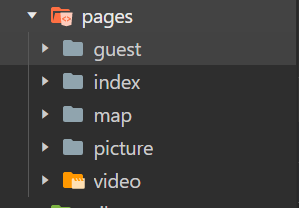
i.app.json文件中的代码:
 "pages":[
    "pages/index/index",
    "pages/picture/picture",
    "pages/video/video",
    "pages/map/map",
    "pages/guest/guest"
  ],
ii.创建后如下:
i.tabBar中代码:
"tabBar":{
    "color": "#999",
    "backgroundColor":"#fafafa",
    "borderStyle": "black",
    "position": "bottom",
    "selectedColor": "#ff4c91",
    "list": [{
        "pagePath": "pages/index/index",
        "text": "邀请函",
        "iconPath": "/image/invite.png",
        "selectedIconPath": "/image/invite.png"
    },
    {
        "pagePath": "pages/picture/picture",
        "text": "照片",
        "iconPath": "/image/marry.png",
        "selectedIconPath": "/image/marry.png"
    },
    {
        "pagePath": "pages/video/video",
        "text": "美好时光",
        "iconPath": "/image/video.png",
        "selectedIconPath": "/image/video.png"
    },
    {
        "pagePath": "pages/map/map",
        "text": "婚礼地点",
        "iconPath": "/image/map.png",
        "selectedIconPath": "/image/map.png"
    },
    {
        "pagePath": "pages/guest/guest",
        "text": "宾客信息",
        "iconPath": "/image/guest.png",
        "selectedIconPath": "/image/guest.png"
    }
]
  },
i.代码:
<!-- 显示歌曲播放暂停的小图标 -->
<view class="player player-{{isPlayingMusic ? 'play':'pause'}}" bindtap="play">
   <image src="/image/music_icon.png"></image>
   <image src="/image/music_play.png"></image>
</view>
<!-- 背景图片 -->
<image class="bg" src="/image/bg_1.png"></image>
<!-- 内容区域 -->
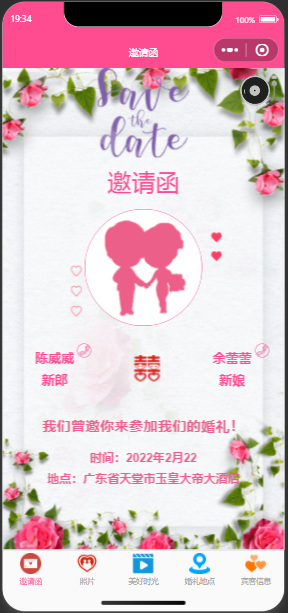
<view class="content">
<!-- 顶部图片区域 -->
   <image class="content-gif" src="/image/save_the_date.gif"></image>
   <!-- 标题 -->
   <view class="content-title">邀请函</view>
   <!-- 新郎和新娘合照 -->
   <view class="content-avatar">
      <image src="/image/avatar.png"></image>
   </view>
   <!-- 新郎和新娘的名字 -->
   <view class="content-info">
      <view class="content-name" bindtap="callGroom">
         <image src="/image/tel.png"></image>
         <view>陈威威</view>
         <view>新郎</view>
      </view>
      <view class="content-wedding">
         <image src="/image/wedding.png"></image>
      </view>
      <view class="content-name" bindtap="callBride">
         <image src="/image/tel.png"></image>
         <view>余蕾蕾</view>
         <view>新娘</view>
      </view>
   </view>
   <!-- 婚礼信息 -->
   <view class="content-address">
         <view>我们曾邀你来参加我们的婚礼!</view>
         <view>时间:2022年2月22</view>
         <view>地点:广东省天堂市玉皇大帝大酒店</view>
      </view>
</view>
i.代码:
Page({
  data: {
    isPlayingMusic:false,
    bgm:null,
    music_url:"image/song.mp3",
    music_coverImgUrl:"image/banner.jpg",
    onReady:function(){
        // 创建getBackgroundAudioManager 实例对象(接口播放音频)
        this.bgm=wx.getBackgroundAudioManager()
        // 音频标题
        this.bgm.title = "marry me"
        // 专辑封面
        this.bgm.epname = "wedding"
        // 歌手名
        this.bgm.singer = "singer"
        // 专辑封面
        this.bgm.coverImgUrl = this.music_coverImgUrl
        this.bgmoncanplay(()=>{
            this.bgm.pause()
        })
        // 指定音频的数据源
        this.bgm.src = this.music_url
    }
  },
    // 播放器的单击事件
  play:function(e){
    // 执行暂停或播放操作,如果值为true则暂停,值为 false则播放
    if(this.data.isPlayingMusic){
      this.bgm.pause()
    }else{
      this.bgm.play()
    }
    this.setData({
        //将data中的isPlayingMusic赋值给它
      isPlayingMusic: !this.data.isPlayingMusic
    })
  },
  //实现拨打电话功能
  callGroom:function(){
    wx.makePhoneCall({
      phoneNumber: '15138726924',
    })
  },
  callBride:function(){
    wx.makePhoneCall({
      phoneNumber: '18236347304',
    })
  },

})
i.代码:
.player{
    position: fixed;
    top: 20rpx;
    right: 20rpx;
    z-index: 1;
}
.player > image:first-child{
    width: 80rpx;
    height: 80rpx;
    animation: musicRotate 3s linear infinite;
}
@keyframes musicRotate{
    from{transform: rotate(0deeg);}
    to{transform: rotate(360deg);}
}
.player > image:last-child{
    width: 28rpx;
    height: 80rpx;
    margin-left: -5px;
}
/* 播放器的播放和暂停效果 */
.player-play > image:first-child{
    animation-play-state: running;
}
.player-play > image:last-child{
    animation: musicStart 0.2s linear forwards;
}
.player-play > image:first-child{
    animation-play-state: paused;
}
.player-play > image:last-child{
    animation: musicStop 0.2s linear forwards;
}
@keyframes musicStart{
    from{transform: rotate(0deg);}
    to{transform: rotate(20deg);}
}
@keyframes musicStop{
    from{transform: rotate(20deg);}
    to{transform: rotate(0deg);}
}
/* 显示歌曲播放暂停的小图标 */
  /* 背景图片 */
  .bg{
    width: 100vw;
    height: 100vh;
  }
  .content{
    width: 100vw;
    height: 100vh;
    /* 绝对定位元素,相对于浏览器 */
    position: fixed;
    display: flex;
    flex-direction: column;
    align-items: center;
  }
  .content-gif{
    width: 19vh;
    height: 18.6vh;
    margin-bottom: 1.5vh;
  }
  .content-title{
    font-size: 5vh;
    color: #ff4c91;
    text-align: center;
    margin-bottom: 2.5vh;
  }
  /* 新郎新娘合照 */
  .content-avatar image{
    width: 24vh;
    height: 24vh;
    border: 3rpx solid #ff4c91;
    border-radius: 50%;
  }
  /* 新郎新郎电话区 */
  .content-info{
    width:45vh;
    text-align: center;
    margin-top: 4vh;
    display: flex;
    align-items: center;
  }
  .content-wedding{
    flex: 1;
  }
  .content-wedding>image{
    width:5.5vh;
    height:5.5vh;
    margin-left: 20rpx;
  }
  .content-name{
    color: #ff4c91;
    font-size: 2.7vh;
    line-height: 4.5vh;
    font-weight: bold;
    position: relative;
  }
  .content-name>image{
    width: 2.6vh;
    height: 2.6vh;
    border: 1px solid #ff4c91;
    border-radius: 50%;
    position: absolute;
    top:-1vh;
    right:-3.6vh;
  }
  .content-address{
    margin-top: 5vh;
    color: #ec5f89;
    font-size: 2.5vh;
    font-weight: bold;
    text-align: center;
    line-height: 4.5vh;
  }
  .content-address view:first-child{
    font-size: 3vh;
    padding-bottom: 2vh;
  }
i.例如
{{isPlayingMusic ‘play’:‘pause’}} 三目运算法:如果是true,则这样,否则那样
i.例如:
isPlayingMusic:false,
bgm:null,
music_url:“image/song.mp3”,
music_coverImgUrl:“image/banner.jpg”,
i.例如:
bindtap=“play” 绑定事件
play:function(e){ 添加一些方法 }, 相应写法
前言一般来说,前端根据后台返回code码展示对应内容只需要在前台判断code值展示对应的内容即可,但要是匹配的code码比较多或者多个页面用到时,为了便于后期维护,后台就会使用字典表让前端匹配,下面我将在微信小程序中通过wxs的方法实现这个操作。为什么要使用wxs?{{method(a,b)}}可以看到,上述代码是一个调用方法传值的操作,在vue中很常见,多用于数据之间的转换,但由于微信小程序诸多限制的原因,你并不能优雅的这样操作,可能有人会说,为什么不用if判断实现呢?但是if判断的局限性在于如果存在数据量过大时,大量重复性操作和if判断会让你的代码显得异常冗余。wxswxs相当于是一个独立
项目介绍随着我国经济迅速发展,人们对手机的需求越来越大,各种手机软件也都在被广泛应用,但是对于手机进行数据信息管理,对于手机的各种软件也是备受用户的喜爱小学生兴趣延时班预约小程序的设计与开发被用户普遍使用,为方便用户能够可以随时进行小学生兴趣延时班预约小程序的设计与开发的数据信息管理,特开发了小程序的设计与开发的管理系统。小学生兴趣延时班预约小程序的设计与开发的开发利用现有的成熟技术参考,以源代码为模板,分析功能调整与小学生兴趣延时班预约小程序的设计与开发的实际需求相结合,讨论了小学生兴趣延时班预约小程序的设计与开发的使用。开发环境开发说明:前端使用微信微信小程序开发工具:后端使用ssm:VU
@作者:SYFStrive @博客首页:HomePage📜:微信小程序📌:个人社区(欢迎大佬们加入)👉:社区链接🔗📌:觉得文章不错可以点点关注👉:专栏连接🔗💃:感谢支持,学累了可以先看小段由小胖给大家带来的街舞👉微信小程序(🔥)目录自定义组件-behaviors 1、什么是behaviors 2、behaviors的工作方式 3、创建behavior 4、导入并使用behavior 5、behavior中所有可用的节点 6、同名字段的覆盖和组合规则总结最后自定义组件-behaviors 1、什么是behaviorsbehaviors是小程序中,用于实现
require'mechanize'agent=Mechanize.newlogin=agent.get('http://www.schoolnet.ch/DE/HomeDE.htm')agent.clicklogin.link_withtext:/Login/然后我得到Mechanize::UnsupportedSchemeError。 最佳答案 Mechanize不支持javascript但您可以将搜索字段添加到表单并为其分配搜索词并使用mechanize提交表单form=page.forms.firstform.add_fie
我有可变数量的表格和可变数量的行,我想让它们一个接一个地显示,但如果表格不适合当前页面,请将其放在下一页,然后继续。我已将表格放入事务中,以便我可以回滚然后打印它(如果高度适合当前页面),但我如何获得表格高度?我现在有这段代码pdf.transactiondopdf.table@data,:font_size=>12,:border_style=>:grid,:horizontal_padding=>10,:vertical_padding=>3,:border_width=>2,:position=>:left,:row_colors=>["FFFFFF","DDDDDD"]pdf.
据我们所知,Jekyll默认分页仅支持index.html,我想创建blog.html并在那里包含分页。有什么解决办法吗? 最佳答案 如果您创建一个名为/blog的目录并在其中放置一个index.html文件,那么您可以向_config.yml表示paginate_path:"blog/page:num"。不是使用根文件夹中的默认index.html作为分页器模板,而是使用/blog/index.html。分页器将根据需要生成类似/blog/page2/和/blog/page3/的页面。这将使您到达yourwebsite.com/b
我正在寻找一种简单的方法来为我在RubyonRails上的项目实现简单的“即将推出”(预启动)页面。用户应该能够留下电子邮件以便在项目启动时收到通知。有没有这样的插件\gem?或者我应该自己做... 最佳答案 LaunchingSoon是一个Rails插件。它还集成了MailChimp或Campaignmonitor. 关于ruby-on-rails-RoR&&"comingsoon"页面,我们在StackOverflow上找到一个类似的问题: https:/
我有一个使用Jekyll托管在GitHub上的静态网站。问题是,我真的不需要master分支,因为存储库唯一包含的是网站。这样我就必须gitcheckoutgh-pages,然后gitmergemaster,然后gitpushorigingh-pages。有什么简单的方法可以摆脱gh-pages分支并直接从master推送? 最佳答案 Theproblemis,Idon'treallyneedthemasterbranch,astheonlythingtherepositorycontainsisthewebsite.Isthere
我试图通过点击一个链接获得一个带有ISO-8859-1编码的页面,所以代码类似于这样:page_result=page.link_with(:text=>'link_text').click到目前为止,我得到的结果编码错误,所以我看到的字符如下:'T�tulo:'insteadof'Título:'我尝试了几种方法,包括:使用代理在第一个请求中声明编码:@page_search=@agent.get(:url=>'http://www.server.com',:headers=>{'Accept-Charset'=>'ISO-8859-1'})说明页面本身的编码page_result.
提供3种Ubuntu系统安装微信的方法,在Ubuntu20.04上验证都ok。1.WineHQ7.0安装微信:ubuntu20.04安装最新版微信--可以支持微信最新版,但是适配的不是特别好;比如WeChartOCR.exe报错。2.原生微信安装:linux系统下的微信安装(ubuntu20.04)--微信适配的最好,反应最快,但是微信版本只到2.1.1,版本太老,很多功能都没有。3.深度deepin-wine6安装微信:ubuntu20.04+系统deepin-wine6安装新版微信--综合比较好,当前个人使用此种方法1个月,微信版本3.4;没什么大问题,尚可。一、WineHQ7.0安装微信
