 可以通过以下 npm 命令开始使用 TypeScript 5.0:
npm install -D typescriptclass Person {
name: string;
constructor(name: string) {
this.name = name;
}
greet() {
console.log(`Hello, my name is ${this.name}.`);
}
}
const p = new Person("Ray");
p.greet();class Person {
name: string;
constructor(name: string) {
this.name = name;
}
greet() {
console.log("LOG: Entering method.");
console.log(`Hello, my name is ${this.name}.`);
console.log("LOG: Exiting method.")
}
}function loggedMethod(originalMethod: any, _context: any) {
function replacementMethod(this: any, ...args: any[]) {
console.log("LOG: Entering method.")
const result = originalMethod.call(this, ...args);
console.log("LOG: Exiting method.")
return result;
}
return replacementMethod;
}这里用了很多 any,可以暂时忽略,这样可以让例子尽可能得简单。这里,loggedMethod 需要传入一个参数(originalMethod) 并返回一个函数。执行过程如下:
class Person {
    name: string;
    constructor(name: string) {
        this.name = name;
    }

    @loggedMethod
    greet() {
        console.log(`Hello, my name is ${this.name}.`);
    }
}

const p = new Person("Ray");
p.greet();LOG: Entering method.
Hello, my name is Ray.
LOG: Exiting method.function loggedMethod(originalMethod: any, context: ClassMethodDecoratorContext) {
const methodName = String(context.name);
function replacementMethod(this: any, ...args: any[]) {
console.log(`LOG: Entering method '${methodName}'.`)
const result = originalMethod.call(this, ...args);
console.log(`LOG: Exiting method '${methodName}'.`)
return result;
}
return replacementMethod;
}class Person {
name: string;
constructor(name: string) {
this.name = name;
this.greet = this.greet.bind(this);
}
greet() {
console.log(`Hello, my name is ${this.name}.`);
}
}class Person {
name: string;
constructor(name: string) {
this.name = name;
}
greet = () => {
console.log(`Hello, my name is ${this.name}.`);
};
}const greet = new Person("Ray").greet;
greet();function bound(originalMethod: any, context: ClassMethodDecoratorContext) {
const methodName = context.name;
if (context.private) {
throw new Error(`'bound' cannot decorate private properties like ${methodName as string}.`);
}
context.addInitializer(function () {
this[methodName] = this[methodName].bind(this);
});
}class Person {
name: string;
constructor(name: string) {
this.name = name;
}
@bound @loggedMethod greet() {
  console.log(`Hello, my name is ${this.name}.`);
}
}
const p = new Person("Ray");
const greet = p.greet;
greet();@bound @loggedMethod greet() {
console.log(`Hello, my name is ${this.name}.`);
}loggedMethod返回一个装饰器,并自定义它记录消息的方式。function loggedMethod(headMessage = "LOG:") {
return function actualDecorator(originalMethod: any, context: ClassMethodDecoratorContext) {
const methodName = String(context.name);
function replacementMethod(this: any, ...args: any[]) {
console.log(`${headMessage} Entering method '${methodName}'.`)
const result = originalMethod.call(this, ...args);
console.log(`${headMessage} Exiting method '${methodName}'.`)
return result;
}
return replacementMethod;
}
}class Person {
name: string;
constructor(name: string) {
this.name = name;
}
@loggedMethod("")
greet() {
console.log(`Hello, my name is ${this.name}.`);
}
}
const p = new Person("Ray");
p.greet();Entering method 'greet'.
Hello, my name is Ray.
Exiting method 'greet'.function loggedMethod<This, Args extends any[], Return>(
target: (this: This, ...args: Args) => Return,
context: ClassMethodDecoratorContext<This, (this: This, ...args: Args) => Return>
) {
const methodName = String(context.name);
function replacementMethod(this: This, ...args: Args): Return {
console.log(`LOG: Entering method '${methodName}'.`)
const result = target.call(this, ...args);
console.log(`LOG: Exiting method '${methodName}'.`)
return result;
}
return replacementMethod;
}type HasNames = { readonly names: string[] };
function getNamesExactly<T extends HasNames>(arg: T): T["names"] {
return arg.names;
}
// names 的推断类型为 string[]
const names = getNamesExactly({ names: ["Alice", "Bob", "Eve"]});// 我们想要的类型: readonly ["Alice", "Bob", "Eve"]
// 我们得到的类型: string[]
const names1 = getNamesExactly({ names: ["Alice", "Bob", "Eve"]});
// 得到想要的类型:readonly ["Alice", "Bob", "Eve"]
const names2 = getNamesExactly({ names: ["Alice", "Bob", "Eve"]} as const);const修饰符,从而使类const推断成为默认值:type HasNames = { names: readonly string[] };
function getNamesExactly<const T extends HasNames>(arg: T): T["names"] {
// ^^^^^
return arg.names;
}
// 推断类型:readonly ["Alice", "Bob", "Eve"]
// 注意,这里不需要再写 as const
const names = getNamesExactly({ names: ["Alice", "Bob", "Eve"] });declare function fnBad<const T extends string[]>(args: T): void;
// T仍然是string[],因为readonly ["a", "b", "c"]不能赋值给string[]
fnBad(["a", "b" ,"c"]);declare function fnGood<const T extends readonly string[]>(args: T): void;
// T 是 readonly ["a", "b", "c"]
fnGood(["a", "b" ,"c"]);declare function fnGood<const T extends readonly string[]>(args: T): void;
const arr = ["a", "b" ,"c"];
// T 仍然是 string[],const 修饰符没有作用
fnGood(arr);// packages/front-end/src/tsconfig.json
{
"extends": "../../../tsconfig.base.json",
"compilerOptions": {
"outDir": "../lib",
// ...
}
}// tsconfig.base.json
{
"extends": "@tsconfig/strictest/tsconfig.json",
"compilerOptions": {
// ...
}
}{
"extends": ["a", "b", "c"],
"compilerOptions": {
// ...
}
}// tsconfig1.json
{
"compilerOptions": {
"strictNullChecks": true
}
}
// tsconfig2.json
{
"compilerOptions": {
"noImplicitAny": true
}
}
// tsconfig.json
{
"extends": ["./tsconfig1.json", "./tsconfig2.json"],
"files": ["./index.ts"]
}// packages/front-end/src/tsconfig.json
{
"extends": ["@tsconfig/strictest/tsconfig.json", "../../../tsconfig.base.json"],
"compilerOptions": {
"outDir": "../lib",
// ...
}
}enum E {
Foo = 10,
Bar = 20,
}function takeValue(e: E) {}
takeValue(E.Foo); // ✅
takeValue(123); // ❌// Color就像是一个联合:Red | Orange | Yellow | Green | Blue | Violet
enum Color {
Red, Orange, Yellow, Green, Blue, /* Indigo */, Violet
}
// 每个枚举成员都有自己的类型,可以引用
type PrimaryColor = Color.Red | Color.Green | Color.Blue;
function isPrimaryColor(c: Color): c is PrimaryColor {
// 缩小字面量类型可以捕获bug
// TypeScript在这里会报错,因为
// 最终会比较 Color.Red 和 Color.Green。
// 本想使用||,但不小心写了&&
return c === Color.Red && c === Color.Green && c === Color.Blue;
}enum E {
Blah = Math.random()
}// entry.mjs
import * as utils from "./utils"; // ❌ - 需要包括文件扩展名。
import * as utils from "./utils.mjs"; // ✅{
"compilerOptions": {
"target": "esnext",
"moduleResolution": "bundler"
}
}/* app.css */
.cookie-banner {
display: none;
}// app.d.css.ts
declare const css: {
cookieBanner: string;
};
export default css;// App.tsx
import styles from "./app.css";
styles.cookieBanner; // string{
"compilerOptions": {
"target": "es2022",
"moduleResolution": "bundler",
"customConditions": ["my-condition"]
}
}{
// ...
"exports": {
".": {
"my-condition": "./foo.mjs",
"node": "./bar.mjs",
"import": "./baz.mjs",
"require": "./biz.mjs"
}
}
}import { Car } from "./car";
export function drive(car: Car) {
// ...
}export function drive(car) {
// ...
}export { Car } from "./car";import或export仅用于类型分析,并且可以在JavaScript文件中使用类型修饰符完全删除。// 这条语句可以在JS输出中完全删除
import type * as car from "./car";
// 在JS输出中可以删除命名的import/export Car
import { type Car } from "./car";
export { type Car } from "./car";// 完全被删除
import type { A } from "a";
// 重写为 'import { b } from "bcd";'
import { b, type c, type d } from "bcd";
// 重写为 'import {} from "xyz";'
import { type xyz } from "xyz";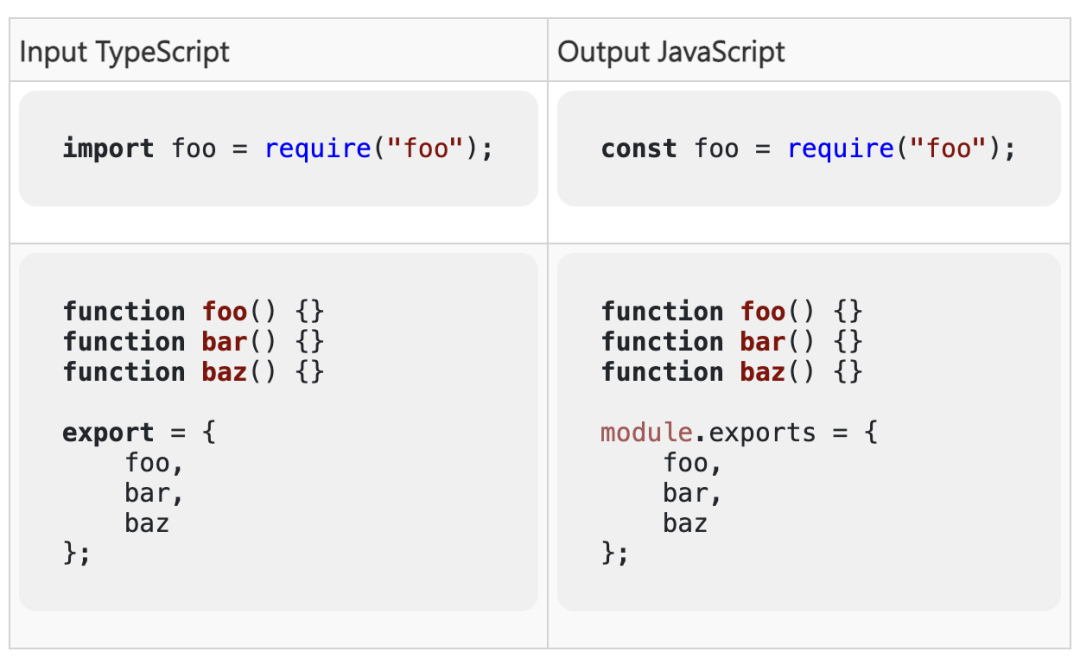 虽然这是一个限制,但它确实有助于使一些问题更加明显。例如,忘记在 --module node16 下的 package.json 中设置 type 字段是很常见的。因此,开发人员会在没有意识到的情况下开始编写 CommonJS 模块而不是 ES 模块,从而给出意外的查找规则和 JavaScript 输出。这个新标志确保有意使用正在使用的文件类型,因为语法是有意不同的。因为 --verbatimModuleSyntax 提供了比 --importsNotUsedAsValues 和 --preserveValueImports 更一致的作用,所以这两个现有标志被弃用了。
// models/vehicles.ts
export class Spaceship {
// ...
}
// models/index.ts
export type * as vehicles from "./vehicles";
// main.ts
import { vehicles } from "./models";
function takeASpaceship(s: vehicles.Spaceship) {
// ✅
}
function makeASpaceship() {
return new vehicles.Spaceship();
// ^^^^^^^^
// vehicles 不能用作值,因为它是使用“export type”导出的。
}interface CompilerOptions {
strict?: boolean;
outDir?: string;
// ...
}
interface ConfigSettings {
compilerOptions?: CompilerOptions;
extends?: string | string[];
// ...
}
let myConfigSettings = {
compilerOptions: {
strict: true,
outDir: "../lib",
// ...
},
extends: [
"@tsconfig/strictest/tsconfig.json",
"../../../tsconfig.base.json"
],
} satisfies ConfigSettings;declare function resolveConfig(configPath: string): CompilerOptions;
let inheritedConfigs = myConfigSettings.extends.map(resolveConfig);// @ts-check
/**
* @typedef CompilerOptions
* @prop {boolean} [strict]
* @prop {string} [outDir]
*/
/**
* @satisfies {CompilerOptions}
*/
let myCompilerOptions = {
outdir: "../lib",
// ~~~~~~ oops! we meant outDir
};// @ts-check
/**
* @typedef CompilerOptions
* @prop {boolean} [strict]
* @prop {string} [outDir]
*/
/**
* @typedef ConfigSettings
* @prop {CompilerOptions} [compilerOptions]
* @prop {string | string[]} [extends]
*/
/**
* @satisfies {ConfigSettings}
*/
let myConfigSettings = {
compilerOptions: {
strict: true,
outDir: "../lib",
},
extends: [
"@tsconfig/strictest/tsconfig.json",
"../../../tsconfig.base.json"
],
};
let inheritedConfigs = myConfigSettings.extends.map(resolveConfig);let myConfigSettings = /** @satisfies {ConfigSettings} */ ({
compilerOptions: {
strict: true,
outDir: "../lib",
},
extends: [
"@tsconfig/strictest/tsconfig.json",
"../../../tsconfig.base.json"
],
});compileCode(/** @satisfies {CompilerOptions} */ ({
// ...
}));// 重载:
function printValue(str: string): void;
function printValue(num: number, maxFractionDigits?: number): void;
// 实现:
function printValue(value: string | number, maximumFractionDigits?: number) {
if (typeof value === "number") {
const formatter = Intl.NumberFormat("en-US", {
maximumFractionDigits,
});
value = formatter.format(value);
}
console.log(value);
}// @ts-check
/**
* @overload
* @param {string} value
* @return {void}
*/
/**
* @overload
* @param {number} value
* @param {number} [maximumFractionDigits]
* @return {void}
*/
/**
* @param {string | number} value
* @param {number} [maximumFractionDigits]
*/
function printValue(value, maximumFractionDigits) {
if (typeof value === "number") {
const formatter = Intl.NumberFormat("en-US", {
maximumFractionDigits,
});
value = formatter.format(value);
}
console.log(value);
}printValue("hello!");
printValue(123.45);
printValue(123.45, 2);
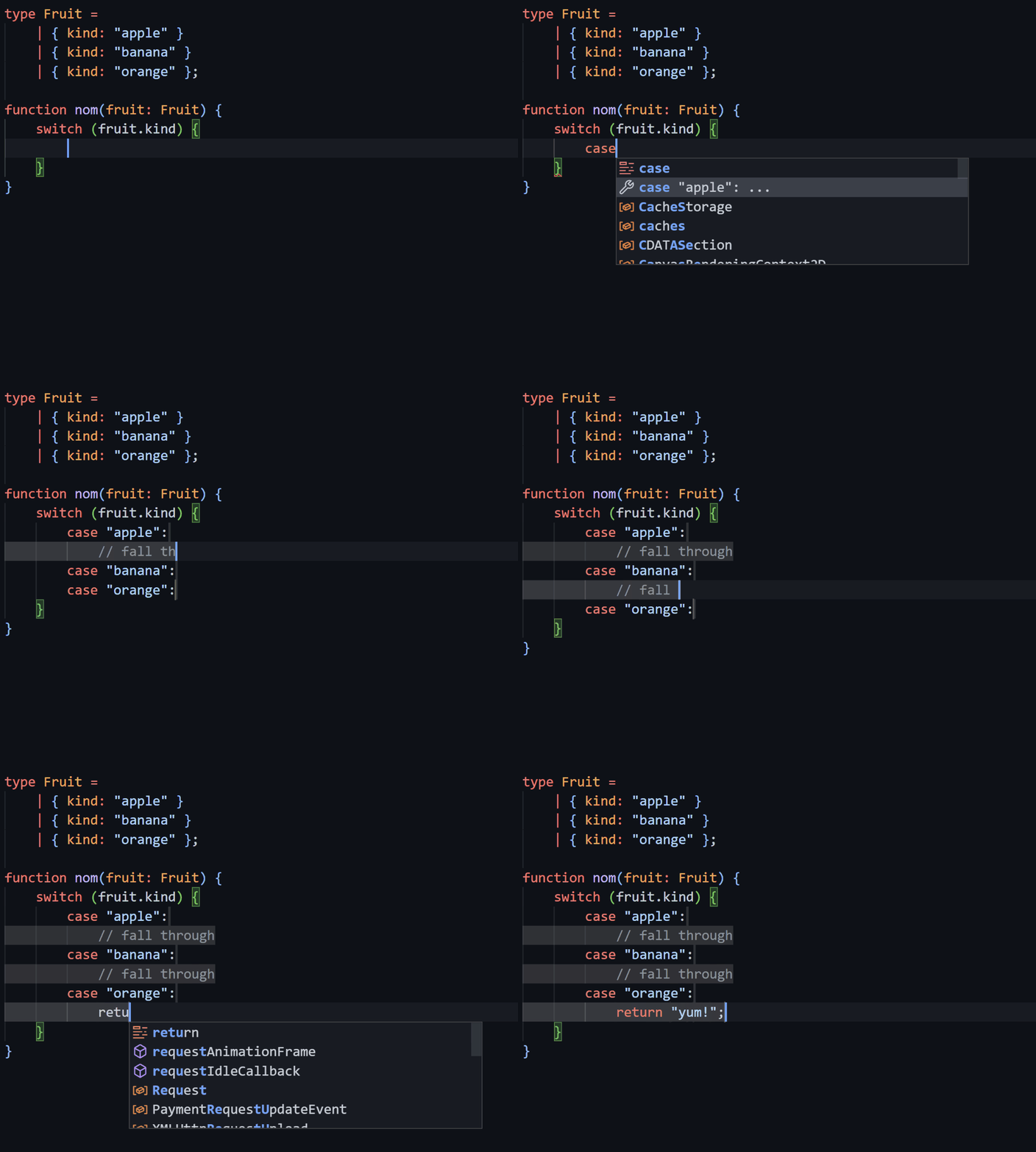
printValue("hello!", 123); // ❌import {
Toggle,
freeze,
toBoolean,
} from "./utils";typescript.unstable 在 VS Code 中选择加入它们。以下是可以尝试的所有选项(设置为默认值):{
"typescript.unstable": {
// Should sorting be case-sensitive? Can be:
// - true
// - false
// - "auto" (auto-detect)
"organizeImportsIgnoreCase": "auto",
// Should sorting be "ordinal" and use code points or consider Unicode rules? Can be:
// - "ordinal"
// - "unicode"
"organizeImportsCollation": "ordinal",
// Under `"organizeImportsCollation": "unicode"`,
// what is the current locale? Can be:
// - [any other locale code]
// - "auto" (use the editor's locale)
"organizeImportsLocale": "en",
// Under `"organizeImportsCollation": "unicode"`,
// should upper-case letters or lower-case letters come first? Can be:
// - false (locale-specific)
// - "upper"
// - "lower"
"organizeImportsCaseFirst": false,
// Under `"organizeImportsCollation": "unicode"`,
// do runs of numbers get compared numerically (i.e. "a1" < "a2" < "a100")? Can be:
// - true
// - false
"organizeImportsNumericCollation": true,
// Under `"organizeImportsCollation": "unicode"`,
// do letters with accent marks/diacritics get sorted distinctly
// from their "base" letter (i.e. is é different from e)? Can be
// - true
// - false
"organizeImportsAccentCollation": true
},
"javascript.unstable": {
// same options valid here...
},
}
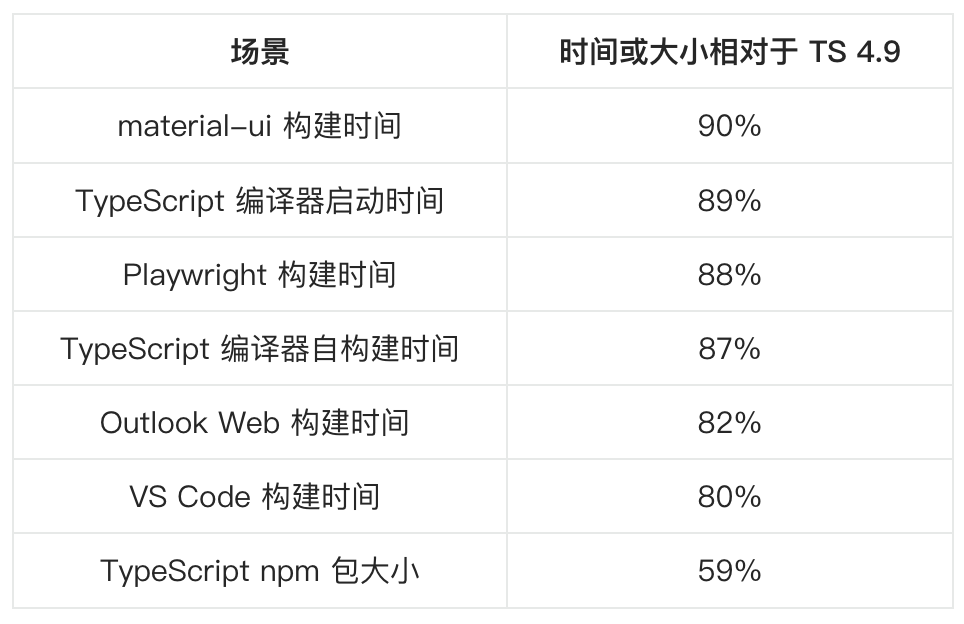 图表形式:
图表形式: TypeScript 包体积变化:
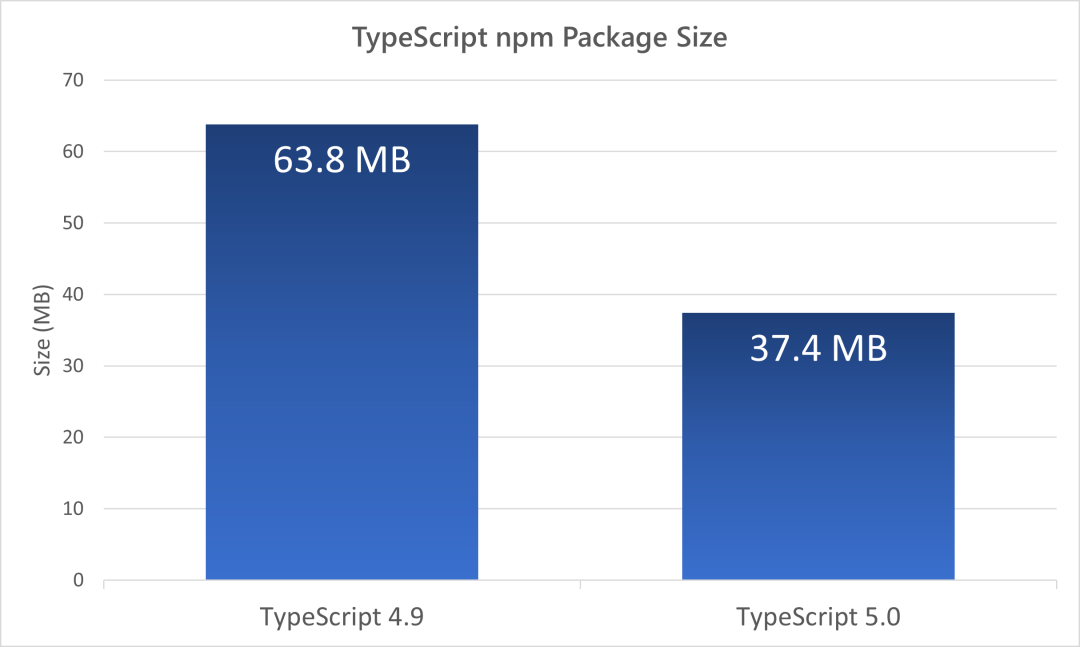 那为什么会有如此大的提升呢?部分优化细节如下:首先,将 TypeScript 从命名空间迁移到模块,这样就能够利用现代构建工具来执行优化。重新审视了打包策略并删除一些已弃用的代码,已将 TypeScript 4.9 的 63.8 MB 包大小减少了约 26.4 MB。还通过直接函数调用带来了显著的速度提升。在将信息序列化为字符串时,执行了一些缓存。类型显示可能作为错误报告、声明触发、代码补全等的一部分发生,最终可能会相当昂贵。TypeScript 现在缓存了一些常用的机制以在这些操作中重用。总的来说,预计大多数代码库应该会看到 TypeScript 5.0 的速度提升,并且始终能够重现 10% 到 20% 之间的提升。当然,这将取决于硬件和代码库特性。
function func(ns: number | string) {
return ns * 4; // 错误,可能存在隐式强制转换
}function func(ns: number | string) {
return ns > 4;
}+显式地将操作数转换为数字:function func(ns: number | string) {
return +ns > 4; // OK
}无论您是想搭建桌面端、WEB端或者移动端APP应用,HOOPSPlatform组件都可以为您提供弹性的3D集成架构,同时,由工业领域3D技术专家组成的HOOPS技术团队也能为您提供技术支持服务。如果您的客户期望有一种在多个平台(桌面/WEB/APP,而且某些客户端是“瘦”客户端)快速、方便地将数据接入到3D应用系统的解决方案,并且当访问数据时,在各个平台上的性能和用户体验保持一致,HOOPSPlatform将帮助您完成。利用HOOPSPlatform,您可以开发在任何环境下的3D基础应用架构。HOOPSPlatform可以帮您打造3D创新型产品,HOOPSSDK包含的技术有:快速且准确的CAD
有人知道在发布新版本的Ruby和Rails时收到电子邮件的方法吗?他们有邮件列表,RubyonRails有一个推特,但我不想听到那些随之而来的喧嚣,我只想知道什么时候发布新版本,尤其是那些有安全修复的版本。 最佳答案 从therailsblog获取提要.http://weblog.rubyonrails.org/feed/atom.xml 关于ruby-on-rails-如何在发布新的Ruby或Rails版本时收到通知?,我们在StackOverflow上找到一个类似的问题:
尝试从我的AngularJS端将数据发布到Rails服务器时出现问题。服务器错误:ActionController::RoutingError(Noroutematches[OPTIONS]"/users"):actionpack(4.1.9)lib/action_dispatch/middleware/debug_exceptions.rb:21:in`call'actionpack(4.1.9)lib/action_dispatch/middleware/show_exceptions.rb:30:in`call'railties(4.1.9)lib/rails/rack/logg
当音乐碰上区块链技术,会擦出怎样的火花?或许周杰伦已经给了我们答案。8月29日下午,B站独家首发周杰伦限定珍藏Demo独家访谈VCR,周杰伦在VCR里分享了《晴天》《青花瓷》《搁浅》《爱在西元前》四首经典歌曲Demo背后的创作故事,并首次公布18年前未发布的神秘作品《纽约地铁》的Demo。在VCR中,方文山和杰威尔音乐提及到“多亏了区块链技术,现在我们可以将这些Demos,变成独一无二具有收藏价值的艺术品,这些Demos可以在薄盒(国内数藏平台)上听到。”如何将音乐与区块链技术相结合,薄盒方面称:“薄盒作为区块链技术服务方,打破传统对于区块链技术只能作为数字收藏的理解。聚焦于区块链技术赋能,在
我想上传我在运行时用Ruby生成的数据,就像从block中提供上传数据一样。我找到的所有示例仅展示了如何流式传输必须在请求之前位于磁盘上的文件,但我不想缓冲该文件。除了滚动我自己的套接字连接之外,最好的解决方案是什么?这是一个伪代码示例:post_stream('127.0.0.1','/stream/')do|body|generate_xmldo|segment|body 最佳答案 有效的代码。require'thread'require'net/http'require'base64'require'openssl'class
昨晚看到IDEA官推宣布IntelliJIDEA2023.1正式发布了。简单看了一下,发现这次的新版本包含了许多改进,进一步优化了用户体验,提高了便捷性。至于是否升级最新版本完全是个人意愿,如果觉得新版本没有让自己感兴趣的改进,完全就不用升级,影响不大。软件的版本迭代非常正常,正确看待即可,不持续改进就会慢慢被淘汰!根据官方介绍:IntelliJIDEA2023.1针对新的用户界面进行了大量重构,这些改进都是基于收到的宝贵反馈而实现的。官方还实施了性能增强措施,使得Maven导入更快,并且在打开项目时IDE功能更早地可用。由于后台提交检查,新版本提供了简化的提交流程。IntelliJIDEA
Unity数据可视化图表插件XCharts3.0发布历时8个多月,业余时间,断断续续,XCharts3.0总算发布了。如果要打个满意度,我给3.0版本来个80分。对于代码框架结构设计的调整改动,基本符合预期,甚是满意。相比之前的1.0和2.0版本,我认为3.0才是一个拿得出手给广大开发者使用的版本。1.0发布的时候,很兴奋,从0.1到1.0,也磨了一年,真的等不及想给大家试用了,还特地写过一篇文章以示庆祝。那个时候,1.0虽然还还不够完善,功能也不够丰富,但它是XCharts的开始,没有1.0,也就没有后面的2.0和3.0。后面的2.0发布,做了很多改进和优化,随着版本迭代,慢慢的发现有不少硬
我有一个模型依赖于一个单独的、联合的模型。classMagazine图像是多态的,可以附加到许多对象(页面和文章),而不仅仅是杂志。杂志需要在相关图像发生任何变化时自行更新该杂志还保存了一张自己的截图,可用于宣传:classMagazine现在如果图像发生变化,杂志也需要更新其截图。所以杂志真的需要知道图片什么时候出了问题。所以我们可以天真地直接从封面图片触发屏幕截图更新classImage...但是图片不应该代表杂志做事然而,图片可以用于许多不同的对象,实际上不应该对杂志进行特定的操作,因为这不是图片的责任。该图像也可能附加到页面或文章,并且不需要为它们做各种事情。“正常”的rail
文/高扬(微信公众号:量子论)据上次3月18号发布的V1.8版,已经过去十天,这期间AI领域发生了很多重大变化。因此,我们对《ChatGPT实用指南》进行了重大改版,增加了大量实用的操作和详细的讲解,保证小白可以轻松上手,快速驾驭ChatGPT。V2.0版本亮点:1、结构更合理。分为基础篇、进阶篇、高级篇,从易到难,由浅入深,符合学习规律。2、内容更充实。扩充了27页的内容,尽量看图说话,将操作步骤一步步地展示出来。3、排版更美观。按图书出版的规范制作,便于知识点查阅。后记:2022年11月底,我们在HackerNews上看到了关于ChatGPT的新闻报道后,开始意识到,人工智能的春天来了,这
人类生活在充满多样性的世界里。长久以来的研究发现,人类的脑与行为受到基因、环境和文化及其相互作用的塑造,然而这种影响发生的机制始终缺乏系统性探索与研究。近年来,前沿神经影像技术方法飞速进步,推动着多模态脑成像大数据集的产生和融合性探索,并让学界得以深入探究人脑宏观结构与功能连接组架构,为包括上述主题在内的许多有趣而重要的科学问题带来了新的启发和思路。2022年12月20日,北京大学物理学院、IDG麦戈文脑科学研究所高家红团队在《NatureNeuroscience》在线发表了题为“IncreasingdiversityinconnectomicswiththeChineseHumanConne
