目录
SpringBoot:注入BSryptPasswordEncoder实例

PasswordEncoder是Spring Security框架默认使用的密码加密器,对应的数据表sys_user的密码password字段需要以明文存储,并且要加上前缀{noop}password,否则就会抛出异常java.lang.IllegalArgumentException: There is no PasswordEncoder mapped for the id "null"(如下图所示),这样使用起来是极其不方便的,但是,Spring Security也允许我们自己替换这个默认使用的PasswordEncoder。

BSryptPasswordEncoder实例 在实际开发中,我们一般使用spring security框架中提供的BSryptPasswordEncoder。
因此,只需要将BSryptPasswordEncoder对象注入到Spring容器中,Spring Security就会使用该对象替换掉默认使用的PasswordEncoder对象,来进行密码校验。
所以,接下来的工作,就是定义一个SpringSecurityConfig配置类(SpringSecurity框架要求这个配置类需要继承WebSecurityConfigureAdapter)。示例代码如下,
package com.xwd.config;

import org.springframework.context.annotation.Bean;
import org.springframework.context.annotation.Configuration;
import org.springframework.security.config.annotation.web.configuration.WebSecurityConfigurerAdapter;
import org.springframework.security.crypto.bcrypt.BCryptPasswordEncoder;
import org.springframework.security.crypto.password.PasswordEncoder;

@Configuration
public class SpringSecurityConfig extends WebSecurityConfigurerAdapter {
    //properties

    //methods

    /**
     * 注入Bean实例
     * @return BCryptPasswordEncoder实例
     */
    @Bean
    public PasswordEncoder getBCryptPasswordEncoder(){
        return new BCryptPasswordEncoder();
    }
}
BSryptPasswordEncoder详解PasswordEncoder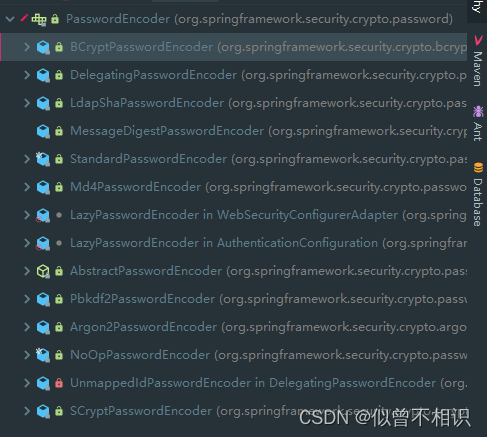
PasswordEncoder是Spring Security框架默认使用的密码加密器。但是Spring Security框架也提供了多个具体的实现子类(如上图所示)。
/**
 * Service interface for encoding passwords.
 *
 * The preferred implementation is {@code BCryptPasswordEncoder}.
 *
 * @author Keith Donald
 */
public interface PasswordEncoder {
    ...
} 其中,Spring Security框架源码中建议:在开发中,首选BCryptPasswordEncoder进行使用。
public interface PasswordEncoder {

	/**
	 * Encode the raw password. Generally, a good encoding algorithm applies a SHA-1 or
	 * greater hash combined with an 8-byte or greater randomly generated salt.
	 */
	String encode(CharSequence rawPassword);

	/**
	 * Verify the encoded password obtained from storage matches the submitted raw
	 * password after it too is encoded. Returns true if the passwords match, false if
	 * they do not. The stored password itself is never decoded.
	 * @param rawPassword the raw password to encode and match
	 * @param encodedPassword the encoded password from storage to compare with
	 * @return true if the raw password, after encoding, matches the encoded password from
	 * storage
	 */
	boolean matches(CharSequence rawPassword, String encodedPassword);

	/**
	 * Returns true if the encoded password should be encoded again for better security,
	 * else false. The default implementation always returns false.
	 * @param encodedPassword the encoded password to check
	 * @return true if the encoded password should be encoded again for better security,
	 * else false.
	 */
	default boolean upgradeEncoding(String encodedPassword) {
		return false;
	}
} 而PasswordEncoder接口中只提供了3个待实现的抽象方法(源码如上),分别如下,
[1] String encode(CharSequence rawPassword);
密码加密:通常地,一个好的加密算法可以是`SHA-1`或者更大的hash与8字节、或者更大的随机生成盐的组合。
[2] boolean matches(CharSequence rawPassword, String encodedPassword);
其中:rawPassword对应用户提交的密码;encodedPassword对应正确密码编码后得到的字符串。
密码校验:校验密码编码后的字符串,与用户登录时提交的密码是否匹配,返回一个boolean布尔值表示是否校验通过。[3] default boolean upgradeEncoding(String encodedPassword) {
return false;
}
如果为了更好的安全性,应当对一次编码后的密码进行二次编码,返回一个boolean值标识是否进行了二次编码。
BSryptPasswordEncoder及其使用成员方法 BCryptPasswordEncoder是PasswordEncoder的实现子类:使用了BCrypt强散列函数。客户端可以选择性的提供一个版本号(version,可选值:$2a, $2b, $2y)和一个加密强度(strength,可选值:a.k.a. log rounds in BCrypt),以及一个SecureRandom实例。
strength加密强度默认值为10,值越大,安全性就越可靠。
除了对PasswordEncoder接口提供的3个方法做了实现之外,也提供了用于获取加密盐的方法getSalt(),
	private String getSalt() {
		if (this.random != null) {
			return BCrypt.gensalt(this.version.getVersion(), this.strength, this.random);
		}
		return BCrypt.gensalt(this.version.getVersion(), this.strength);
	}
SecurityUtils安全服务工具类 在实际开发中使用时,面向密码加密、密码匹配两项操作,参考若依框架中:SecurityUtils安全服务工具类的写法,摘录代码如下,
PS:可以看到,BCryptPasswordEncoder类在使用时,主要还是调用密码加密方法encode()、密码匹配/校验方法matchesPassword()。
 /**
     * 生成BCryptPasswordEncoder密码
     *
     * @param password 密码
     * @return 加密字符串
     */
    public static String encryptPassword(String password)
    {
        BCryptPasswordEncoder passwordEncoder = new BCryptPasswordEncoder();
        return passwordEncoder.encode(password);
    }

    /**
     * 判断密码是否相同
     *
     * @param rawPassword 真实密码
     * @param encodedPassword 加密后字符
     * @return 结果
     */
    public static boolean matchesPassword(String rawPassword, String encodedPassword)
    {
        BCryptPasswordEncoder passwordEncoder = new BCryptPasswordEncoder();
        return passwordEncoder.matches(rawPassword, encodedPassword);
    }
@SpringBootTest
@RunWith(SpringRunner.class)
public class SpringBoot_Demo_Test {
    //properties
    @Autowired
    @Qualifier(value = "BCryptPasswordEncoder") //Bean实例注入已经在本部分开头进行介绍
    private PasswordEncoder passwordEncoder;

    //methods

    @Test
    public void BCryptPasswordEncoder_test(){
        /**
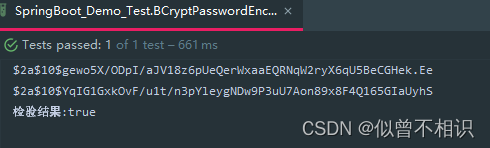
         * 即使是相同的密码,BCryptPasswordEncoder每次的加密结果也是不同的
         * 原因在于:BCryptPasswordEncoder每次加密时都会使用一个随机的加密盐,产生不同的加密结果
         */
        String encode = passwordEncoder.encode("123456");//密码加密操作-将加密之后的结果存储到数据库中
        String encode1 = passwordEncoder.encode("123456");
        System.out.println(encode); // $2a$10$J0HqjTj2g98KceRapnRqW.Y4uQkPzGASFstgx1yba2JQG1muHj7L2
        System.out.println(encode1); //$2a$10$foxH4yrARWiaWwxyTXjFMOkSqkiOXsMaiQ6/oWbxxond5/BZqi1ke

        /**
         * 密码校验-虽然每次加密的结果不同,但是只要是由原来的密码加密过来的字符串,匹配时也都会返回true
         * 参数1:用户登录时输入的结果;参数2:正确的加密后的密码
         */
        boolean matches = passwordEncoder.matches("123456", "$2a$10$foxH4yrARWiaWwxyTXjFMOkSqkiOXsMaiQ6/oWbxxond5/BZqi1ke");
        System.out.println("检验结果:"+matches); //检验结果:true

    }
}
在我的应用程序中,我需要能够找到所有数字子字符串,然后扫描每个子字符串,找到第一个匹配范围(例如5到15之间)的子字符串,并将该实例替换为另一个字符串“X”。我的测试字符串s="1foo100bar10gee1"我的初始模式是1个或多个数字的任何字符串,例如,re=Regexp.new(/\d+/)matches=s.scan(re)给出["1","100","10","1"]如果我想用“X”替换第N个匹配项,并且只替换第N个匹配项,我该怎么做?例如,如果我想替换第三个匹配项“10”(匹配项[2]),我不能只说s[matches[2]]="X"因为它做了两次替换“1fooX0barXg
如何匹配未被反斜杠转义的平衡定界符对(其本身未被反斜杠转义)(无需考虑嵌套)?例如对于反引号,我试过了,但是转义的反引号没有像转义那样工作。regex=/(?!$1:"how\\"#expected"how\\`are"上面的正则表达式不考虑由反斜杠转义并位于反引号前面的反斜杠,但我愿意考虑。StackOverflow如何做到这一点?这样做的目的并不复杂。我有文档文本,其中包括内联代码的反引号,就像StackOverflow一样,我想在HTML文件中显示它,内联代码用一些spanMaterial装饰。不会有嵌套,但转义反引号或转义反斜杠可能出现在任何地方。
我有一个驼峰式字符串,例如:JustAString。我想按照以下规则形成长度为4的字符串:抓取所有大写字母;如果超过4个大写字母,只保留前4个;如果少于4个大写字母,则将最后大写字母后的字母大写并添加字母,直到长度变为4。以下是可能发生的3种情况:ThisIsMyString将产生TIMS(大写字母);ThisIsOneVeryLongString将产生TIOV(前4个大写字母);MyString将生成MSTR(大写字母+tr大写)。我设法用这个片段解决了前两种情况:str.scan(/[A-Z]/).first(4).join但是,我不太确定如何最好地修改上面的代码片段以处理最后一种
我真的为这个而疯狂。我一直在搜索答案并尝试我找到的所有内容,包括相关问题和stackoverflow上的答案,但仍然无法正常工作。我正在使用嵌套资源,但无法使表单正常工作。我总是遇到错误,例如没有路线匹配[PUT]"/galleries/1/photos"表格在这里:/galleries/1/photos/1/edit路线.rbresources:galleriesdoresources:photosendresources:galleriesresources:photos照片Controller.rbdefnew@gallery=Gallery.find(params[:galle
我已经在mountainlion上成功安装了rbenv和rubybuild。运行rbenvinstall1.9.3-p392结束于:校验和不匹配:ruby-1.9.3-p392.tar.gz(文件已损坏)预期f689a7b61379f83cbbed3c7077d83859,得到1cfc2ff433dbe80f8ff1a9dba2fd5636它正在下载的文件看起来没问题,如果我使用curl手动下载文件,我会得到同样不正确的校验和。有没有人遇到过这个?他们是如何解决的? 最佳答案 tl:博士;使用浏览器从http://ftp.rub
@raw_array[i]=~/[\W]/非常简单的正则表达式。当我用一些非拉丁字母(具体来说是俄语)尝试时,条件是错误的。我能用它做什么? 最佳答案 @raw_array[i]=~/[\p{L}]/使用西里尔字符进行测试。引用:http://www.regular-expressions.info/unicode.html#prop 关于ruby-正则表达式将非英文字母匹配为非单词字符,我们在StackOverflow上找到一个类似的问题: https://
前言一般来说,前端根据后台返回code码展示对应内容只需要在前台判断code值展示对应的内容即可,但要是匹配的code码比较多或者多个页面用到时,为了便于后期维护,后台就会使用字典表让前端匹配,下面我将在微信小程序中通过wxs的方法实现这个操作。为什么要使用wxs?{{method(a,b)}}可以看到,上述代码是一个调用方法传值的操作,在vue中很常见,多用于数据之间的转换,但由于微信小程序诸多限制的原因,你并不能优雅的这样操作,可能有人会说,为什么不用if判断实现呢?但是if判断的局限性在于如果存在数据量过大时,大量重复性操作和if判断会让你的代码显得异常冗余。wxswxs相当于是一个独立
我有一个使用SeleniumWebdriver和Nokogiri的Ruby应用程序。我想选择一个类,然后对于那个类对应的每个div,我想根据div的内容执行一个Action。例如,我正在解析以下页面:https://www.google.com/webhp?sourceid=chrome-instant&ion=1&espv=2&ie=UTF-8#q=puppies这是一个搜索结果页面,我正在寻找描述中包含“Adoption”一词的第一个结果。因此机器人应该寻找带有className:"result"的div,对于每个检查它的.descriptiondiv是否包含单词“adoption
我正在我的Rails项目中安装Grape以构建RESTfulAPI。现在一些端点的操作需要身份验证,而另一些则不需要身份验证。例如,我有users端点,看起来像这样:moduleBackendmoduleV1classUsers现在如您所见,除了password/forget之外的所有操作都需要用户登录/验证。创建一个新的端点也没有意义,比如passwords并且只是删除password/forget从逻辑上讲,这个端点应该与用户资源。问题是Grapebefore过滤器没有像except,only这样的选项,我可以在其中说对某些操作应用过滤器。您通常如何干净利落地处理这种情况?
在我做的一些网络开发中,我有多个操作开始,比如对外部API的GET请求,我希望它们同时开始,因为一个不依赖另一个的结果。我希望事情能够在后台运行。我找到了concurrent-rubylibrary这似乎运作良好。通过将其混合到您创建的类中,该类的方法具有在后台线程上运行的异步版本。这导致我编写如下代码,其中FirstAsyncWorker和SecondAsyncWorker是我编写的类,我在其中混合了Concurrent::Async模块,并编写了一个名为“work”的方法来发送HTTP请求:defindexop1_result=FirstAsyncWorker.new.async.
