腾讯位置服务为微信小程序提供了基础的标点能力、线和圆的绘制接口等地图组件和位置展示、地图选点等地图API位置服务能力支持,使得开发者可以自由地实现自己的微信小程序产品。 在此基础上,腾讯位置服务微信小程序JavaScript SDK是专为小程序开发者提供的LBS数据服务工具包,可以在小程序中调用腾讯位置服务的POI检索、关键词输入提示、地址解析、逆地址解析、行政区划和距离计算等数据服务,让您的小程序更强大!
文档地址:微信小程序JavaScript SDK
使用步骤说明:

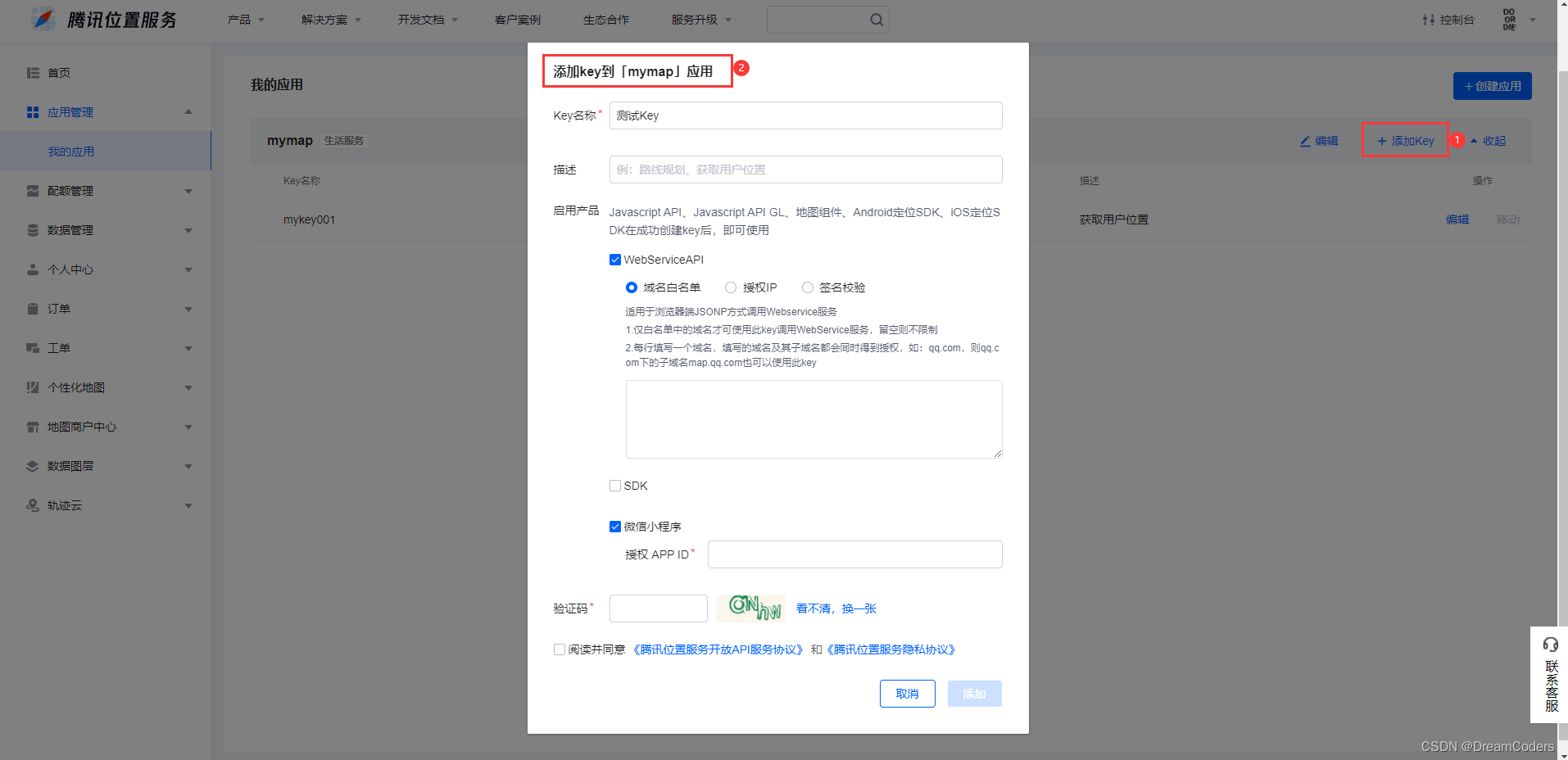
控制台 ->应用管理 -> 我的应用 ->添加key-> 勾选WebServiceAPI -> 保存
(小程序SDK需要用到webserviceAPI的部分服务,所以使用该功能的KEY需要具备相应的权限)
微信小程序JavaScriptSDK v1.1 JavaScriptSDK v1.2 ,这里推荐下载1.2版本,将下载好的SDK放在对应文件夹中,去引用它(即 qqmap-wx-jssdk.min.js 文件)引用到你小程序项目中。
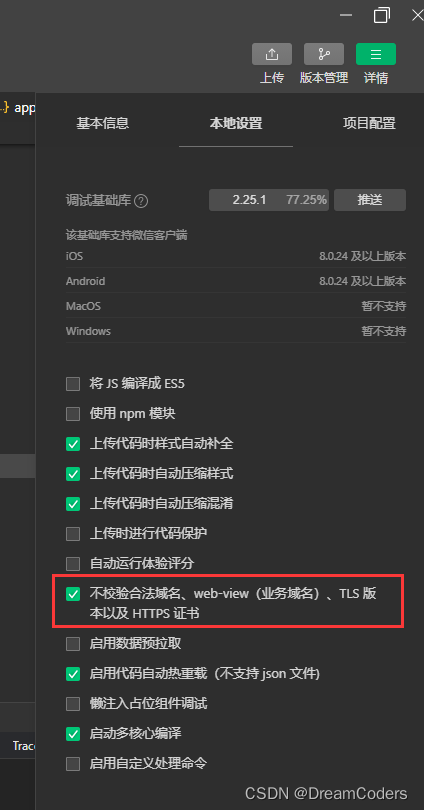
在小程序管理后台 -> 开发 -> 开发管理 -> 开发设置 -> “服务器域名” 中设置request合法域名,添加https://apis.map.qq.com
// 引入SDK核心类,js文件根据自己业务,位置可自行放置
var QQMapWX = require('../../libs/qqmap-wx-jssdk.js');
var qqmapsdk;
Page({

    onLoad: function () {
        // 实例化API核心类
        qqmapsdk = new QQMapWX({
            key: '申请的key'
        });
    },
    onShow: function () {
        // 调用接口
        qqmapsdk.search({
            keyword: 'DreamCoders',
            success: function (res) {
                console.log(res);
            },
            fail: function (res) {
                console.log(res);
            },
        complete: function (res) {
            console.log(res);
        }
     });
  }
})
以 Promise 风格 调用:支持
用户授权:需要 scope.userLocation
小程序插件:支持,需要小程序基础库版本不低于 1.9.6
微信 Windows 版:支持
微信 Mac 版:支持
获取当前的地理位置、速度。当用户离开小程序后,此接口无法调用。开启高精度定位,接口耗时会增加,可指定 highAccuracyExpireTime 作为超时时间。地图相关使用的坐标格式应为 gcj02。 高频率调用会导致耗电,如有需要可使用持续定位接口 wx.onLocationChange。 基础库 2.17.0 版本起 wx.getLocation 增加调用频率限制,相关公告。
自 2022 年 7 月 14 日后发布的小程序,若使用该接口,需要在 app.json 中进行声明,否则将无法正常使用该接口,2022年7月14日前发布的小程序不受影响。具体规则见公告
暂只针对如下类目的小程序开放,需要先通过类目审核,再在小程序管理后台,「开发」-「开发管理」-「接口设置」中自助开通该接口权限。 接口权限申请入口将于2022年3月11日开始内测,于3月31日全量上线。并从4月18日开始,在代码审核环节将检测该接口是否已完成开通,如未开通,将在代码提审环节进行拦截。
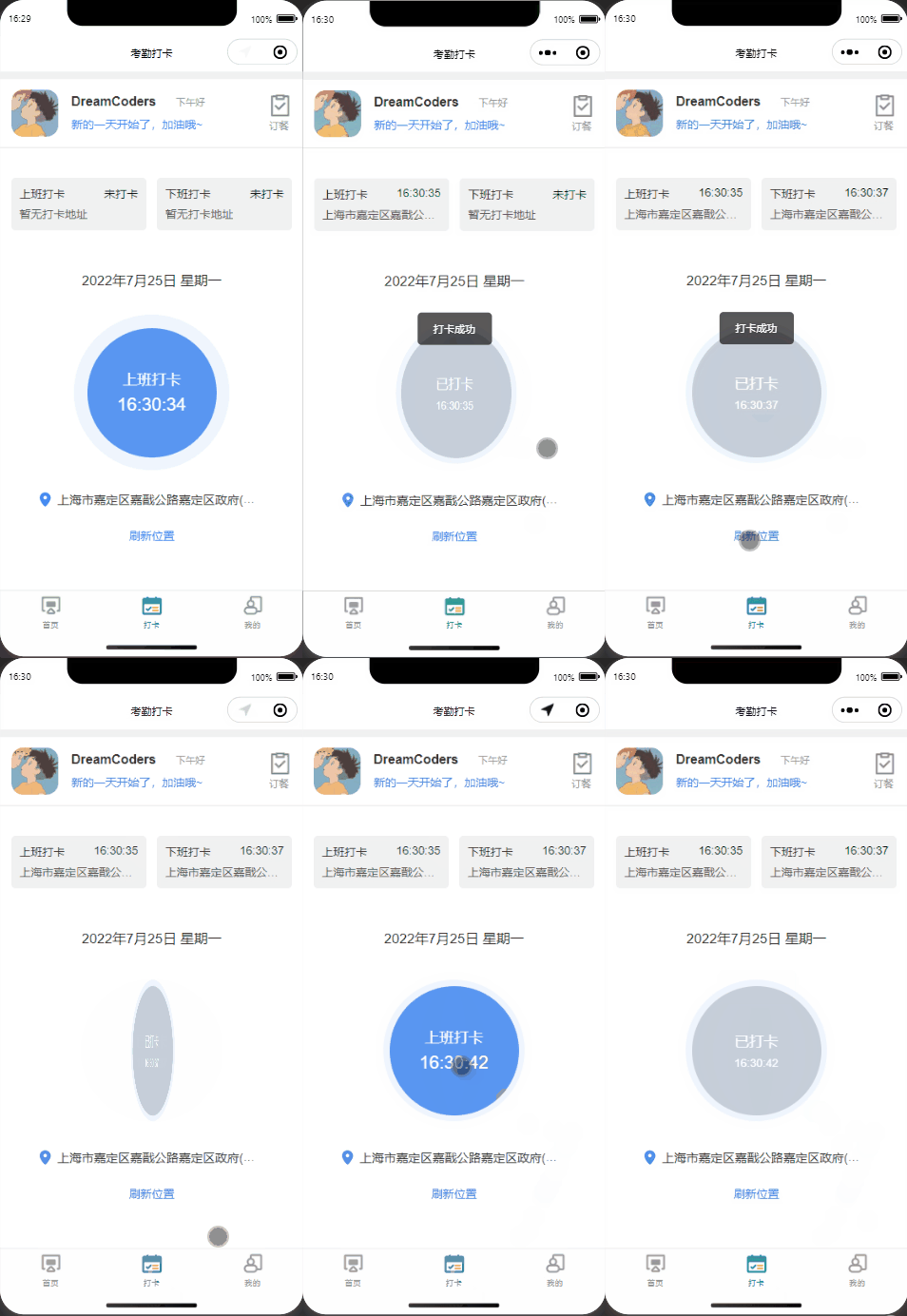
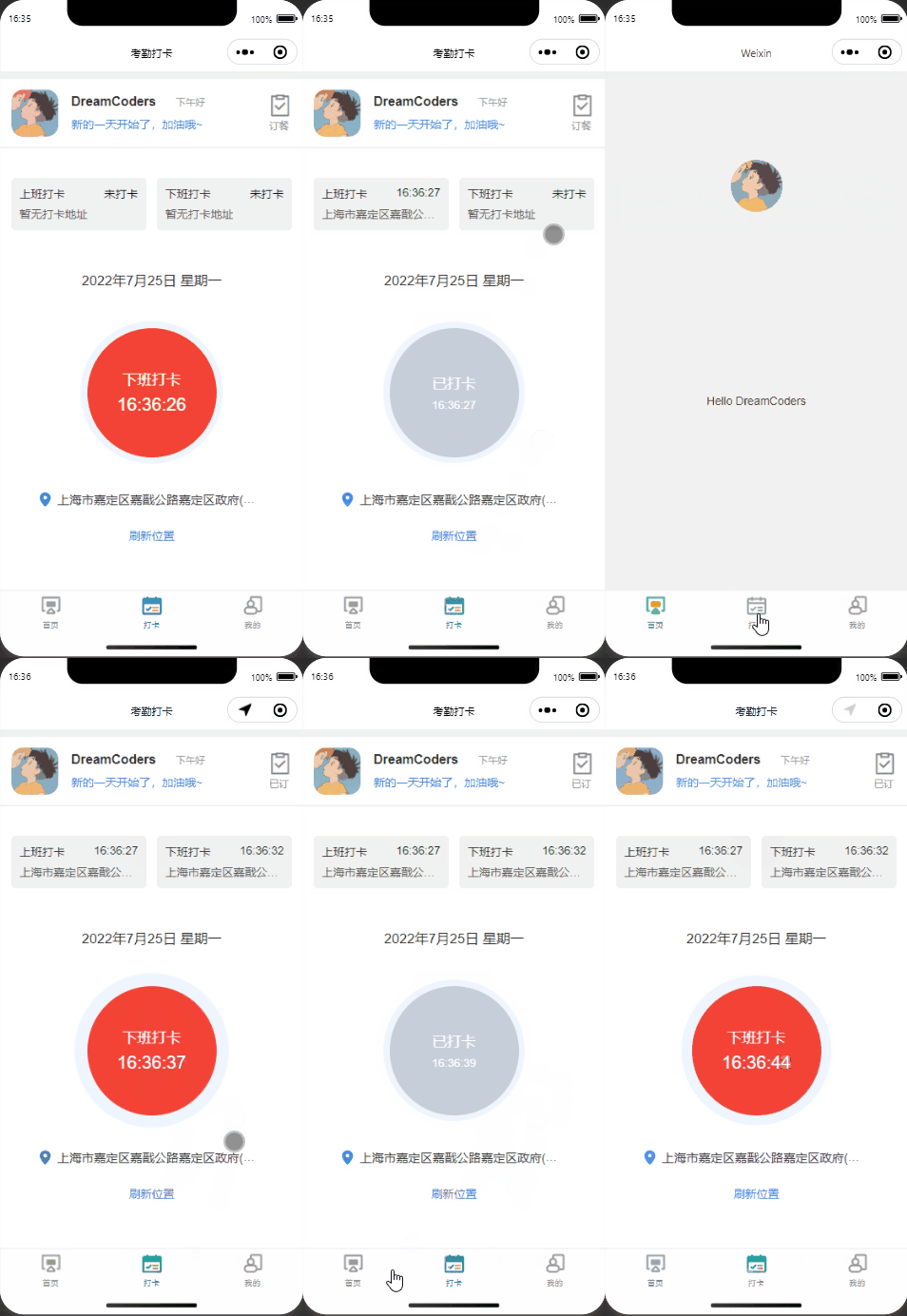
微信小程序获取定位关键方法 getLocation。因此需要在 app.json 中进行声明,后期小程序上线还需要单独申请getLocation 接口权限。
app.json 部分关键代码
{
  "pages": [
    "pages/index/index",
    "pages/sign/sign"
  ],
  "window": {
    "backgroundTextStyle": "light",
    "navigationBarBackgroundColor": "#fff",
    "navigationBarTitleText": "Weixin",
    "navigationBarTextStyle": "black"
  },
  "tabBar": {
		"custom": false,
		"backgroundColor": "#fefefe",
		"color": "#999999",
		"selectedColor": "#1C9D9D",
		"list": [{
				"pagePath": "pages/index/index",
				"text": "首页",
				"iconPath": "/images/home.png",
				"selectedIconPath": "/images/home_cur.png"
			},
			{
				"pagePath": "pages/sign/sign",
				"text": "打卡",
				"iconPath": "/images/day.png",
				"selectedIconPath": "/images/day_cur.png"
			},

			{
        "pagePath": "pages/index/index",
				"text": "我的",
				"iconPath": "/images/my.png",
				"selectedIconPath": "/images/my_cur.png"
			}
		]
	},
  "permission": {
		"scope.userLocation": {
			"desc": "您的位置信息将用于小程序考勤签到功能"
		}
	},
	"requiredPrivateInfos":[
		"getLocation"
	],
  "style": "v2",
  "sitemapLocation": "sitemap.json",
  "lazyCodeLoading": "requiredComponents"
}
部分UI代码参考苏苏就是小苏苏
<!-- 部分UI代码参考苏苏就是小苏苏 -->
<view class="index">
  <!-- 用户信息 -->
  <view class="head ">
    <view class="head_box flex-row" style="justify-content:left">
      <view class="user_ava">
        <open-data type="userAvatarUrl"></open-data>
      </view>
      <view>
        <view class="user_name">DreamCoders <text>{{tip}}</text></view>
        <view class="user_add">新的一天开始了,加油哦~</view>
      </view>
      <view class="mealBtn" bindtap="ToMealTap">
        <image src="/images/meal.png"></image>
        <view class="mealText">{{is_meal==2 ? '已订':'订餐'}}</view>
      </view>
    </view>
  </view>

  <view class="contentBox">
    <!-- 打卡记录 -->
    <view class="signRecord">
      <view class="signInfo">上班打卡
        <text class="text-green">{{record[0].times ? record[0].times : '未打卡'}}</text>
        <view class="sign_address">
          <view class="">{{record[0].address ? record[0].address : '暂无打卡地址'}}</view>
        </view>
      </view>
      <view class="signInfo">下班打卡
        <text class="text-green">{{record[1].times ? record[1].times : '未打卡'}}</text>
        <view class="sign_address">
          <view class="">{{record[1].address ? record[1].address : '暂无打卡地址'}}</view>
        </view>
      </view>
    </view>
    <view class="dateInfo ">
      <text>{{nowDate}} {{nowDay}}</text>
    </view>
    <!-- 打卡按钮 -->
    <view class="c_clock flex-column">
      <view class="clock_time flex-column j_c {{status==1?'c1':''}} {{is_out==2 ? 'outArea' : ''}}" catchtap="signTap">
        <text>{{signType>0 ? "下班打卡" : "上班打卡"}}</text>
        <text>{{now_time}}</text>
      </view>
      <view class="clock_time_over flex-column j_c  {{status==1?'c2':''}}" catchtap="clockInStart">
        <text>已打卡</text>
        <text>{{now_time_stop}}</text>
      </view>
    </view>
    <!-- 打卡地址 -->
    <view class="clock_address ">
      <image src="/images/add0.png" class="add_icon" />
      <text>{{current_address}}</text>
    </view>
    <view class="refresh" catchtap="refreshAdd">刷新位置</view>
  </view>
</view>具体业务逻辑根据实际情况改写
let qqMapSdk= require("../../utils/qqmap.js");
let util = require('../../utils/util.js')

Page({
  /**
   * 页面的初始数据
   */
  data: {
    signType:0,//0上班打卡 1下班打卡
    is_out:2,//1办公地点打卡 2外勤打卡
    is_meal:1,//1未定餐 2已订餐
    now_time: '',//当前时间
    nowDate:'',//当前年月日
    nowDay:'',//星期几
    tip:'',//提示 上午好、下午好
    current_address: '',//当前定位地址
    status: 0, //0未打卡 1已打卡
    latlng:[],//经纬度
    now_time_stop: '', //已打卡时间
    area:{},//考勤点多个
    record:[],//打卡记录
  },


  onLoad: function (options) {
    this.getCurrentTime();
    this.setData({
      now_time: this.getTime(),
      nowDate: util.formatTime(new Date()),
      nowDay: util.formatDay(new Date()),
      tip: util.formatSole(),
    })
  },

  onShow: function () {
    this.getLocation();
    this.setData({
      status:0,
      current_address:'',
    })
  },


  signTap() {
    var that = this;
    if (!that.data.current_address) {
      return wx.showToast({
        title: '未获取当前定位',
        icon: 'error'
      })
    }
    var list =  that.data.record.concat({'times':that.data.now_time,'address':that.data.current_address});
    wx.vibrateLong();//手机震动提示
    that.getSignRecord();
    that.setData({
      status: 1, //已打卡
      record:list,
      now_time_stop: that.data.now_time,
    })
    console.log(list);
    console.log(that.data.record);
    wx.showToast({
      title: '打卡成功',
      icon: 'none'
    })
  },

  getCurrentTime: function () {
    var time = setInterval(() => {
      this.setData({
        now_time: this.getTime()
      })
    }, 1000)
  },
  getTime() {
    let dateTime = '';
    let hh = new Date().getHours()
    let mf = new Date().getMinutes() < 10 ? '0' + new Date().getMinutes() :
      new Date().getMinutes()
    let ss = new Date().getSeconds() < 10 ? '0' + new Date().getSeconds() :
      new Date().getSeconds()
    dateTime = hh + ':' + mf + ':' + ss;
    return dateTime;
  },

  // 请求获取定位授权
  getUserAuth: function () {
    return new Promise((resolve, reject) => {
      wx.authorize({
        scope: 'scope.userLocation'
      }).then(() => {
        resolve()
      }).catch(() => {
        let that = this;
        wx.getSetting({
          success: (res) => {
            if (res.authSetting['scope.userLocation'] != undefined && res.authSetting['scope.userLocation'] != true) {
              wx.showModal({
                title: '请求授权当前位置',
                content: '需要获取您的地理位置,请确认授权',
                success: function (res) {
                  if (res.cancel) {
                    wx.showToast({
                      title: '拒绝授权',
                      icon: 'none',
                      duration: 1000
                    })
                  } else if (res.confirm) {
                    wx.openSetting({
                      success: function (dataAu) {
                        if (dataAu.authSetting["scope.userLocation"] == true) {
                          //再次授权,调用wx.getLocation的API
                          that.getLocation();
                        } else {
                          wx.showToast({
                            title: '授权失败',
                            icon: 'none',
                            duration: 1000
                          })
                        }
                      }
                    })
                  }
                }
              })
            } else if (res.authSetting['scope.userLocation'] == undefined) {
              that.getLocation();
            } else {
              that.getLocation();
            }
          }
        })
      })
    })
  },

  getLocation: function () {
    const that = this
		// 实例化腾讯地图API核心类
    const QQMapWX = new qqMapSdk({
      key: '你申请的KEY'// KEY必填
    });
    //获取当前位置
    wx.getLocation({
      type: 'gcj02',
      success: function(res) {
        that.latitude = res.latitude
        that.longitude = res.longitude
        QQMapWX.reverseGeocoder({
          location: {
            latitude: res.latitude,
            longitude: res.longitude
          },
          success: function(res) {
            let address = res.result.address + res.result.formatted_addresses.recommend;
            that.getSignRecord();
            that.setData({
              current_address:address,
              latlng:[res.result.location.lat,res.result.location.lng]
            })
          },
          fail: function(res) {
            this.getUserAuth()
            wx.showToast({
              title: '获取定位失败,请打开手机定位,重新进入!',
              icon: 'none'
            });
          }
        })
      },
    })
  },
  // 刷新定位
  refreshAdd() {
    this.getLocation(),
    this.getSignRecord()
  },

  //处理打卡记录及判断打卡位置是否办公地点打卡
  getSignRecord: function () {
    var that = this;
    console.log(that.data.latlng);
    var distance = that.getDistance(that.data.latlng[0],that.data.latlng[1],31.370450,121.228252);
    if(distance < 200000000000000){
      that.setData({
        is_out:1,
      })
    }
  },


//经纬度距离计算
getDistance:function (lat1, lng1, lat2, lng2, unit = false) {
    var radLat1 = lat1 * Math.PI / 180.0
    var radLat2 = lat2 * Math.PI / 180.0
    var a = radLat1 - radLat2
    var b = lng1 * Math.PI / 180.0 - lng2 * Math.PI / 180.0
    var s = 2 * Math.asin(Math.sqrt(Math.pow(Math.sin(a / 2), 2) +
      Math.cos(radLat1) * Math.cos(radLat2) * Math.pow(Math.sin(b / 2), 2)))
    s = s * 6378.137 // EARTH_RADIUS;
    s = Math.round(s * 10000) / 10000 //输出为公里
    if (0) { //是否返回带单位
      if (s < 1) { //如果距离小于1km返回m
        s = s.toFixed(3)
        s = s * 1000 + "m"
      } else {
        s = s.toFixed(2)
        s = s + "km"
      }
    } else {
      s = s.toFixed(3)
      s = s * 1000
    }
	return s
},

//订餐操作
ToMealTap:function (e) {
  wx.showToast({
    title: '订餐成功',
    icon: 'none'
  })
  this.setData({
    is_meal: 2,
  })
}

}){
"usingComponents": {},
"navigationBarTitleText": "考勤打卡"
}
page {
  height: calc(100% - 10px)
}

.index {
  margin-top: 10px;
  background: #fff;
  min-height: 100%;
}

.head {
  padding-bottom: 10rpx;
  border-bottom: 2rpx solid #E5E5E5;
}

.head_box {
  padding: 26rpx 28rpx 8px;
  width: 750rpx;
  box-sizing: border-box;
}

.user_ava {
  width: 116rpx;
  height: 116rpx;
  overflow: hidden;
  border-radius: 25%;
  margin-right: 32rpx;
}

.user_name {
  font-size: 32rpx;
  font-weight: 600;
  color: #333333;
  margin-bottom: 18rpx;
}

.user_name text {
  font-size: 24rpx;
  color: #999999;
  font-weight: 400;
  margin-left: 40rpx;
}

.user_add {
  font-size: 28rpx;
  color: #3380F3;
}

.contentBox {
  padding: 44rpx 28rpx;
}

.signRecord{
  display: flex;
  flex-flow: row nowrap;
  justify-content: space-between;
  margin-top: 15px;
}

.dateInfo{
  text-align: center;
  position: relative;
  top: 50px;
  font-size: 35rpx;
}

.c_title {
  font-size: 28rpx;
  color: #666666;
  margin-bottom: 26rpx;
}


.c_section .c_item {
  position: relative;
  font-size: 30rpx;
  font-weight: 600;
  color: #333333;
  padding-left: 40rpx;
  margin-bottom: 110rpx;
}

.c_section text {
  color: #307CED;
  text-overflow: ellipsis;
  overflow: hidden;
  width: 80%;
  white-space: nowrap;
}

.c_section .c_item::before {
  content: '';
  position: absolute;
  width: 18rpx;
  height: 18rpx;
  border: 2rpx solid #999999;
  left: 0;
  top: 50%;
  margin-top: -9rpx;
  border-radius: 50%;
}

.c_section {
  position: relative;
}

.c_section .c_item::after {
  content: '';
  position: absolute;
  width: 2rpx;
  height: 178rpx;
  background: #E6E6E6;
  left: 10rpx;
  top: 34rpx;
}

.c_section view:last-child::after {
  display: none;
}

.start_lo {
  position: absolute;
  top: 30px;
  left: -5px;
}

.start_end {
  position: absolute;
  bottom: -108px;
  left: 20px;
}

.c_clock {
  margin: 180rpx auto 0;
  width: 350rpx;
  height: 380rpx;
  perspective: 1500;
  -webkit-perspective: 1500;
  -moz-perspective: 1500;
}

.clock_time {
  width: 350rpx;
  height: 350rpx;
  margin-bottom: 30rpx;
  position: absolute;
  transition: all 1s;
  backface-visibility: hidden;
}

.clock_time::after {
  content: '';
  top: 0;
  left: 0;
  width: 350rpx;
  height: 350rpx;
  border-radius: 50%;
  position: absolute;
  z-index: 9;
  background: rgba(48, 124, 237, 0.08);
  animation: scale 1s infinite alternate-reverse;
}

/* 已打卡 */
.clock_time_over {
  width: 350rpx;
  height: 350rpx;
  margin-bottom: 30rpx;
  border-radius: 50%;
  background: rgba(48, 124, 237, 0.08);
  position: absolute;
  transition: all 1s;
  backface-visibility: hidden;
  transform: rotateY(-180deg);
}

.clock_time_over::after {
  position: absolute;
  z-index: 11;
  content: '';
  width: 320rpx;
  height: 320rpx;
  background: #C6CED9;
  border-radius: 50%;
  top: 50%;
  left: 50%;
  transform: translate(-50%, -50%);
}


.clock_time_over text {
  position: relative;
  z-index: 13;
  color: #FFFFFF;
}

.clock_time_over text:first-child {
  font-size: 36rpx;
  margin-bottom: 14rpx;
}

.clock_time_over text:last-child {
  font-size: 28rpx;
}

@keyframes scale {

  0% {
    transform: scale(1.1);
  }

  100% {
    transform: scale(1);
  }
}

.clock_time::before {
  position: absolute;
  z-index: 11;
  content: '';
  width: 320rpx;
  height: 320rpx;
  background: rgb(48, 124, 237, 0.79);
  border-radius: 50%;
  top: 50%;
  left: 50%;
  transform: translate(-50%, -50%);
}

.clock_time text {
  position: relative;
  z-index: 13;
  color: #FFFFFF;
}

.clock_time text:first-child {
  font-size: 36rpx;
  margin-bottom: 14rpx;
}

.clock_time text:last-child {
  font-size: 45rpx;
}

.clock_address {
  text-align: center;
  font-size: 30rpx;
  color: #333333;
  width: 80%;
  margin: 20px auto;
  overflow:hidden;
  text-overflow:ellipsis;
  white-space:nowrap;
}

.clock_address text {
  vertical-align: middle;
}

.add_icon {
  width: 28rpx;
  height: 36rpx;
  margin-right: 16rpx;
  vertical-align: middle;
}

.refresh {
  margin-top: 25px;
  color: #307CED;
  display: flex;
  align-items: center;
  justify-content: center;
}


.now_location {
  font-size: 24rpx;
  color: #333333 !important;
}

.upload_box {
  width: 260rpx;
  height: 180rpx;
  background: #F5F5F8;
  border-radius: 5rpx;
}

.upload_box text {
  font-size: 20rpx;
  color: #999 !important;
  font-weight: 100;
}

.camera_icon {
  width: 42rpx;
  height: 44rpx;
  margin-bottom: 10rpx;
}

.clock_img {
  width: 100%;
  height: 100%;
}

.del_icon {
  width: 32rpx;
  height: 32rpx;
  position: absolute;
  right: -4px;
  top: -11rpx;
}

.ative::before {
  background: #307cedc9;
  border: 2rpx solid #307cedc9 !important;
}

.c1 {
  transform: rotateY(180deg)
}

.c1::after {
  animation: none !important;
}

.c2 {
  transform: rotateY(0deg)
}

.mealBtn{
  position: absolute;
  right: 15px;
}
.mealBtn image{
  width: 27px;
  height: 27px;
}
.mealText{
 font-size: 12px;
 color: #999999;
}

.outArea::before{
  background: #f44336 !important;
}
.signInfo{
  width: 48%;
  height: 65px;
  background: #f1f1f1;
  padding: 10px;
  border-radius: 5px;
}
.signInfo text{
  float: inline-end;
}
.sign_address{
  display: flex;
  margin-top: 5px;
}


.sign_address view{
  white-space: nowrap;
  text-overflow: ellipsis;
  overflow: hidden;
  font-size: 14px;
  margin-top: 1px !important;
  color: #5f5a5a;
}

.text-green{
  color: green;
}function formatTime(date) {
var year = date.getFullYear()
var month = date.getMonth() + 1
var day = date.getDate()
return year + "年" + month + "月" + day + "日";
}
const formatDay = dates => {
let _day = new Array('星期日', '星期一', '星期二', '星期三', '星期四', '星期五', '星期六');
let date = new Date(dates);
date.setDate(date.getDate());
let day = date.getDay();
return _day[day];
}
const formatSole = () => {
let timeNow = new Date();
let hours = timeNow.getHours();
let text = ``;
if (hours >= 0 && hours <= 6) {
text = `深夜了,不要熬夜太久哟`;
} else if (hours > 6 && hours <= 8) {
text = `早上好`;
} else if (hours > 8 && hours <= 10) {
text = `上午好`;
} else if (hours > 10 && hours <= 13) {
text = `中午好`;
} else if (hours > 13 && hours <= 17) {
text = `下午好`;
} else if (hours > 17 && hours <= 23) {
text = `晚上好`;
}
return text;
}
module.exports = {
formatTime: formatTime,
formatDay: formatDay,
formatSole: formatSole
}我有一个用户工厂。我希望默认情况下确认用户。但是鉴于unconfirmed特征,我不希望它们被确认。虽然我有一个基于实现细节而不是抽象的工作实现,但我想知道如何正确地做到这一点。factory:userdoafter(:create)do|user,evaluator|#unwantedimplementationdetailshereunlessFactoryGirl.factories[:user].defined_traits.map(&:name).include?(:unconfirmed)user.confirm!endendtrait:unconfirmeddoenden
只是想确保我理解了事情。据我目前收集到的信息,Cucumber只是一个“包装器”,或者是一种通过将事物分类为功能和步骤来组织测试的好方法,其中实际的单元测试处于步骤阶段。它允许您根据事物的工作方式组织您的测试。对吗? 最佳答案 有点。它是一种组织测试的方式,但不仅如此。它的行为就像最初的Rails集成测试一样,但更易于使用。这里最大的好处是您的session在整个Scenario中保持透明。关于Cucumber的另一件事是您(应该)从使用您的代码的浏览器或客户端的角度进行测试。如果您愿意,您可以使用步骤来构建对象和设置状态,但通常您
导读:随着叮咚买菜业务的发展,不同的业务场景对数据分析提出了不同的需求,他们希望引入一款实时OLAP数据库,构建一个灵活的多维实时查询和分析的平台,统一数据的接入和查询方案,解决各业务线对数据高效实时查询和精细化运营的需求。经过调研选型,最终引入ApacheDoris作为最终的OLAP分析引擎,Doris作为核心的OLAP引擎支持复杂地分析操作、提供多维的数据视图,在叮咚买菜数十个业务场景中广泛应用。作者|叮咚买菜资深数据工程师韩青叮咚买菜创立于2017年5月,是一家专注美好食物的创业公司。叮咚买菜专注吃的事业,为满足更多人“想吃什么”而努力,通过美好食材的供应、美好滋味的开发以及美食品牌的孵
华为OD机试题本篇题目:明明的随机数题目输入描述输出描述:示例1输入输出说明代码编写思路最近更新的博客华为od2023|什么是华为od,od薪资待遇,od机试题清单华为OD机试真题大全,用Python解华为机试题|机试宝典【华为OD机试】全流程解析+经验分享,题型分享,防作弊指南华为o
C#实现简易绘图工具一.引言实验目的:通过制作窗体应用程序(C#画图软件),熟悉基本的窗体设计过程以及控件设计,事件处理等,熟悉使用C#的winform窗体进行绘图的基本步骤,对于面向对象编程有更加深刻的体会.Tutorial任务设计一个具有基本功能的画图软件**·包括简单的新建文件,保存,重新绘图等功能**·实现一些基本图形的绘制,包括铅笔和基本形状等,学习橡皮工具的创建**·设计一个合理舒适的UI界面**注明:你可能需要先了解一些关于winform窗体应用程序绘图的基本知识,以及关于GDI+类和结构的知识二.实验环境Windows系统下的visualstudio2017C#窗体应用程序三.
本文主要介绍在使用Selenium进行自动化测试或者任务时,对于使用了iframe的页面,如何定位iframe中的元素文章目录场景描述解决方案具体代码场景描述当我们在使用Selenium进行自动化测试的时候,可能会遇到一些界面或者窗体是使用HTML的iframe标签进行承载的。对于iframe中的标签,如果直接查找是无法找到的,会抛出没有找到元素的异常。比如近在咫尺的例子就是,CSDN的登录窗体就是使用的iframe,大家可以尝试通过F12开发者模式查看到的tag_name,class_name,id或者xpath来定位中的页面元素,会抛出NoSuchElementException异常。解决
MIMO技术的优缺点优点通过下面三个增益来总体概括:阵列增益。阵列增益是指由于接收机通过对接收信号的相干合并而活得的平均SNR的提高。在发射机不知道信道信息的情况下,MIMO系统可以获得的阵列增益与接收天线数成正比复用增益。在采用空间复用方案的MIMO系统中,可以获得复用增益,即信道容量成倍增加。信道容量的增加与min(Nt,Nr)成正比分集增益。在采用空间分集方案的MIMO系统中,可以获得分集增益,即可靠性性能的改善。分集增益用独立衰落支路数来描述,即分集指数。在使用了空时编码的MIMO系统中,由于接收天线或发射天线之间的间距较远,可认为它们各自的大尺度衰落是相互独立的,因此分布式MIMO
前言一般来说,前端根据后台返回code码展示对应内容只需要在前台判断code值展示对应的内容即可,但要是匹配的code码比较多或者多个页面用到时,为了便于后期维护,后台就会使用字典表让前端匹配,下面我将在微信小程序中通过wxs的方法实现这个操作。为什么要使用wxs?{{method(a,b)}}可以看到,上述代码是一个调用方法传值的操作,在vue中很常见,多用于数据之间的转换,但由于微信小程序诸多限制的原因,你并不能优雅的这样操作,可能有人会说,为什么不用if判断实现呢?但是if判断的局限性在于如果存在数据量过大时,大量重复性操作和if判断会让你的代码显得异常冗余。wxswxs相当于是一个独立
项目介绍随着我国经济迅速发展,人们对手机的需求越来越大,各种手机软件也都在被广泛应用,但是对于手机进行数据信息管理,对于手机的各种软件也是备受用户的喜爱小学生兴趣延时班预约小程序的设计与开发被用户普遍使用,为方便用户能够可以随时进行小学生兴趣延时班预约小程序的设计与开发的数据信息管理,特开发了小程序的设计与开发的管理系统。小学生兴趣延时班预约小程序的设计与开发的开发利用现有的成熟技术参考,以源代码为模板,分析功能调整与小学生兴趣延时班预约小程序的设计与开发的实际需求相结合,讨论了小学生兴趣延时班预约小程序的设计与开发的使用。开发环境开发说明:前端使用微信微信小程序开发工具:后端使用ssm:VU
@作者:SYFStrive @博客首页:HomePage📜:微信小程序📌:个人社区(欢迎大佬们加入)👉:社区链接🔗📌:觉得文章不错可以点点关注👉:专栏连接🔗💃:感谢支持,学累了可以先看小段由小胖给大家带来的街舞👉微信小程序(🔥)目录自定义组件-behaviors 1、什么是behaviors 2、behaviors的工作方式 3、创建behavior 4、导入并使用behavior 5、behavior中所有可用的节点 6、同名字段的覆盖和组合规则总结最后自定义组件-behaviors 1、什么是behaviorsbehaviors是小程序中,用于实现
