Json支持的数据结构
数字型:short,int,long,float,double
字符串:“abc”,“你好”,‘abc’
布尔类型:true,false
null:null
数组(列表):[值1,值2]
对象(字典):{"键1":"值1","键2":"值2"}
字符含义
大括号组:对象,字典
中括号组:数组,列表
冒号:赋值,左侧是变量或键,右侧为值
逗号:元素分割符,最后一个元素后,没有逗号
双引号组:修改变量(可以不加),表示string数据类型
单引号组:同双引号组
JSON在游戏中的使用
存储在服务器中的数据
存储在策划配置的Excel中(Excel -> JSON)
将Excel中的数据导出为JSON
填写Excel数据,导出为CSV

C#使用JSON数据
数据存储(序列化):将C#的数据格式,转化为JSON字符串,存储或传输
数据使用(反序列化):将JSON字符串中存储的数据,转化为C#可用的数据格式,实现代码逻辑
序列化(程序数据->JSON字符串)
反序列化(JSON字符串->程序数据)
Unity的JSON工具
类名:JsonUtility
序列化:ToJson()
反序列化:FromJson()
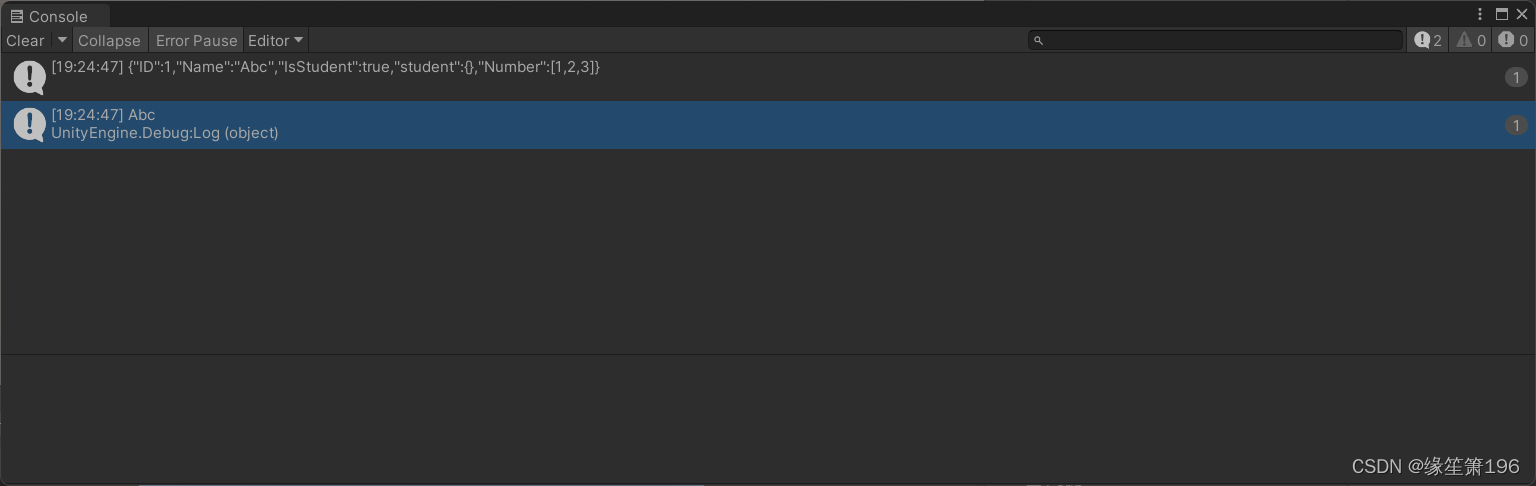
使用Unity的内置JSON解析工具,将C#数据序列化为JSON字符数据
using System.Collections;
using System.Collections.Generic;
using UnityEngine;

public class JsonTest : MonoBehaviour
{
    //类产生的对象数据,可以被序列化
    [System.Serializable]
    public class Student { }

    [System.Serializable]
    public class Date
    {
        public int ID;

        public string Name;

        public bool IsStudent;

        public Student student;

        public List<int> Number;
    }


    void Start()
    {
        Date stu1 = new Date();
        stu1.ID = 1;
        stu1.Name = "Abc";
        stu1.IsStudent = true;
        stu1.student = null;
        stu1.Number = new List<int> { 1, 2, 3 };

        //将C#对象数据,转换为JSON字符串
        string json = JsonUtility.ToJson(stu1);

        Debug.Log(json);
    }


}

解析JSON(反序列化)
using System.Collections;
using System.Collections.Generic;
using UnityEngine;

public class JsonDecode : MonoBehaviour
{
    public class Student { }

    public class Data
    {
        public int ID;

        public string Name;

        public bool IsStudent;

        public Student student;

        public List<int> Number;
    }

    void Start()
    {
        //可以将Unity中以“.json”扩展名结尾的文件,作为Unity的TextAsset数据类型加载
        TextAsset asset = Resources.Load<TextAsset>("Json/test");
        //获取TextAsset内部的文本内容
        string json = asset.text;

        Debug.Log(json);

        //解析JSON(反序列化)
        Data data = JsonUtility.FromJson<Data>(json);

        Debug.Log(data.Name);
    }


}
注意:如果使用Unity的内置解析类,JSON最外层结构必须是对象结构
当一个类需要存储在另外一个成员变量中时,需要给类声明加特性
解决办法:在json链表的外面再包裹一层对象
{
  "Data" :
  [
    {
      "ID": 1,
      "Name": "羊刀",
      "Description": "加攻速",
      "Level": 3,
      "PriceType": 0
    },
    {
      "ID": 2,
      "Name": "黑皇杖",
      "Description": "用一次短一点",
      "Level": 2,
      "PriceType": 0
    },
    {
      "ID": 3,
      "Name": "龙心",
      "Description": "回血",
      "Level": 3,
      "PriceType": 0
    },
    {
      "ID": 4,
      "Name": "体力丹",
      "Description": "恢复一点hp",
      "Level": 1,
      "PriceType": 1
    }
  ]
}
using System.Collections;
using System.Collections.Generic;
using UnityEngine;
public class JsonTable : MonoBehaviour
{
[System.Serializable]
public class ItemRow
{
public int ID;
public string Description;
public int Level;
public int PriceType;
}
[System.Serializable]
public class ItemTable
{
public List<ItemRow> Data;
}
void Start()
{
//加载json道具表的TextAsset
TextAsset asset = Resources.Load<TextAsset>("Json/item");
//获取内部文字
string json = asset.text;
//解析json
ItemTable itemRow = JsonUtility.FromJson<ItemTable>(json);
Debug.Log(itemRow.Data[0].Description);
}
}
LitJson的导入
1.将LitJson的源代码导入到Unity项目的Assets里
链接:https://pan.baidu.com/s/1CLZKG7NT9wahyJRYireZfg
提取码:drxe
使用LitJson可以直接对链表进行操作,不用在外面再包裹一层对象
[
    {
      "ID": 1,
      "Name": "羊刀",
      "Description": "加攻速",
      "Level": 3,
      "PriceType": 0
    },
    {
      "ID": 2,
      "Name": "黑皇杖",
      "Description": "用一次短一点",
      "Level": 2,
      "PriceType": 0
    },
    {
      "ID": 3,
      "Name": "龙心",
      "Description": "回血",
      "Level": 3,
      "PriceType": 0
    },
    {
      "ID": 4,
      "Name": "体力丹",
      "Description": "恢复一点hp",
      "Level": 1,
      "PriceType": 1
    }
  ]
using System.Collections;
using System.Collections.Generic;
using UnityEngine;
//引入LitJson命名空间
using LitJson;
public class TestLitJson : MonoBehaviour
{
[System.Serializable]
public class ItemRow
{
public int ID;
public string Name;
public string Description;
public int Level;
public int PriceType;
}
void Start()
{
//加载json道具表的TextAsset
TextAsset asset = Resources.Load<TextAsset>("Json/item02");
//获取内部文字
string json = asset.text;
//解析json
List<ItemRow> data = JsonMapper.ToObject<List<ItemRow>>(json);
Debug.Log(data[0].Name);
}
}
读取字典:
{
  "a" : 1,
  "b" : 2
}
/// <summary>
/// 字典
/// </summary>
public void TestDictionary()
{
TextAsset asset = Resources.Load<TextAsset>("Json/dic");
string json = asset.text;
Dictionary<string, int> data = JsonMapper.ToObject<Dictionary<string, int>>(json);
Debug.Log(data["a"]);
}
文件的读取与修改
using System.Collections;
using System.Collections.Generic;
using UnityEngine;
//输入输出的命名空间
using System.IO;

public class JsonChange : MonoBehaviour
{

    void Start()
    {
        //Application应用的相关数据存储在内部
        //unity开发应用必定可写的项目
        string path = Application.persistentDataPath + "/save.json";

        InputText(path);
        OutText(path);
    }

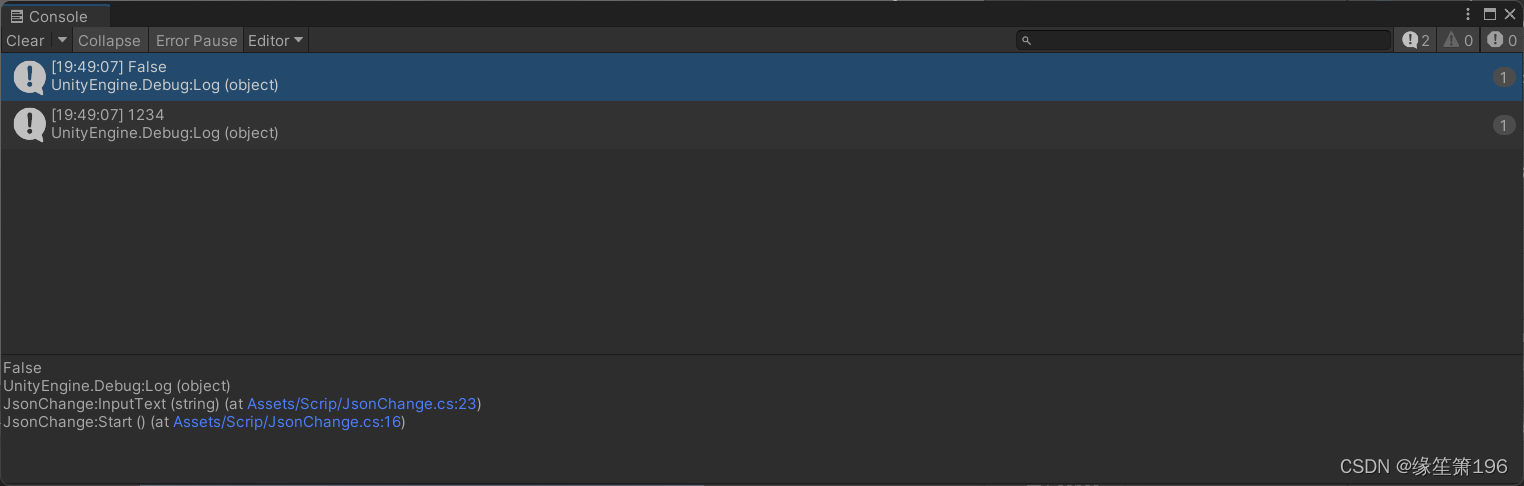
    public void InputText(string path)
    {
        //判断文件石佛营存在,返回的是bool类型
        Debug.Log(File.Exists(path));

        //写入文件所需要的内容
        File.WriteAllText(path, "1234");
    }

    public void OutText(string path)
    {
        //读取文件的所有内容
        Debug.Log(File.ReadAllText(path));
    }
}
Json修改数据
JsonData是引用类型,所以对象的修改,都会直接影响到原始数据
      public void JsonMdfiy(string path)
    {
        //先判断文件是否存在
        if(!File.Exists(path))
        {
            //如果不存在写入内容
            File.WriteAllText(path, "[1,2,3]");
        }
        else
        {
            //Json文件的内容读取
            string content = File.ReadAllText(path);
            //Json字符串解析为JsonData
            JsonData data = JsonMapper.ToObject(content);
            //修改数据
            data[2] = 2000;

            //将变化的内容写入json
            Debug.Log(data[0]);
            Debug.Log(data[1]);
            Debug.Log(data[2]);
            File.WriteAllText(path,data.ToJson());
        }
    }
 if (!File.Exists(path))
            {
                //外层建一个列表
                JsonData list = new JsonData();

                //一行的数据
                JsonData row = new JsonData();
                row["Admin"] = Admin.Name;
                row["Pass"] = Admin.passWorld;

                //一行数据加入列表
                list.Add(row);

                //将列表数据写入json文件
                File.WriteAllText(path, list.ToJson());
            }
            else
            {
                //读取原来数据
                string json = File.ReadAllText(path);

                //将新数据加入
                JsonData list = JsonMapper.ToObject(json);

                //一行的数据
                JsonData row = new JsonData();
                row["Admin"] = Admin.Name;
                row["Pass"] = Admin.passWorld;

                //一行数据加入列表
                list.Add(row);

                //写入文件
                File.WriteAllText(path, list.ToJson());
            }
在我的Controller中,我通过以下方式在我的index方法中支持HTML和JSON:respond_todo|format|format.htmlformat.json{renderjson:@user}end在浏览器中拉起它时,它会自然地以HTML呈现。但是,当我对/user资源进行内容类型为application/json的curl调用时(因为它是索引方法),我仍然将HTML作为响应。如何获取JSON作为响应?我还需要说明什么? 最佳答案 您应该将.json附加到请求的url,提供的格式在routes.rb的路径中定义。这
我有一个非常简单的RubyRack服务器,例如:app=Proc.newdo|env|req=Rack::Request.new(env).paramspreq.inspect[200,{'Content-Type'=>'text/plain'},['Somebody']]endRack::Handler::Thin.run(app,:Port=>4001,:threaded=>true)每当我使用JSON对象向服务器发送POSTHTTP请求时:{"session":{"accountId":String,"callId":String,"from":Object,"headers":
?博客主页:https://xiaoy.blog.csdn.net?本文由呆呆敲代码的小Y原创,首发于CSDN??学习专栏推荐:Unity系统学习专栏?游戏制作专栏推荐:游戏制作?Unity实战100例专栏推荐:Unity实战100例教程?欢迎点赞?收藏⭐留言?如有错误敬请指正!?未来很长,值得我们全力奔赴更美好的生活✨------------------❤️分割线❤️-------------------------
本教程将在Unity3D中混合Optitrack与数据手套的数据流,在人体运动的基础上,添加双手手指部分的运动。双手手背的角度仍由Optitrack提供,数据手套提供双手手指的角度。 01 客户端软件分别安装MotiveBody与MotionVenus并校准人体与数据手套。MotiveBodyMotionVenus数据手套使用、校准流程参照:https://gitee.com/foheart_1/foheart-h1-data-summary.git02 数据转发打开MotiveBody软件的Streaming,开始向Unity3D广播数据;MotionVenus中设置->选项选择Unit
目录1.AdmobSDK下载地址2.将下载好的unityPackagesdk导入到unity里编辑 3.解析依赖到项目中
Unity自动旋转动画1.开门需要门把手先动,门再动2.关门需要门先动,门把手再动3.中途播放过程中不可以再次进行操作觉得太复杂?查看我的文章开关门简易进阶版效果:如果这个门可以直接打开的话,就不需要放置"门把手"如果门把手还有钥匙需要旋转,那就可以把钥匙放在门把手的"门把手",理论上是可以无限套娃的可调整参数有:角度,反向,轴向,速度运行时点击Test进行测试自己写的代码比较垃圾,命名与结构比较拉,高手轻点喷,新手有类似的需求可以拿去做参考上代码usingSystem.Collections;usingSystem.Collections.Generic;usingUnityEngine;u
我正在使用ruby2.1.0我有一个json文件。例如:test.json{"item":[{"apple":1},{"banana":2}]}用YAML.load加载这个文件安全吗?YAML.load(File.read('test.json'))我正在尝试加载一个json或yaml格式的文件。 最佳答案 YAML可以加载JSONYAML.load('{"something":"test","other":4}')=>{"something"=>"test","other"=>4}JSON将无法加载YAML。JSON.load("
我在一个简单的RailsAPI中有以下Controller代码:classApi::V1::AccountsControllerehead:not_foundendendend问题在于,生成的json具有以下格式:{id:2,name:'Simpleaccount',cash_flows:[{id:1,amount:34.3,description:'simpledescription'},{id:2,amount:1.12,description:'otherdescription'}]}我需要我生成的json是camelCase('cashFlows'而不是'cash_flows'
我正在学习如何使用JSONgem解析和生成JSON。我可以轻松地创建数据哈希并将其生成为JSON;但是,在获取一个类的实例(例如Person实例)并将其所有实例变量放入哈希中以转换为JSON时,我脑袋放屁。这是我遇到问题的例子:require"json"classPersondefinitialize(name,age,address)@name=name@age=age@address=addressenddefto_jsonendendp=Person.new('JohnDoe',46,"123ElmStreet")p.to_json我想创建一个.to_json方法,这样我就可以获
我正在构建一个带有Rails后端的JS应用程序,为了不混淆snake和camelcases,我想通过从服务器返回camelcase键名来规范化这一切。因此,当从API返回时,user.last_name将返回user.lastName。我如何实现这一点?谢谢!编辑:添加Controller代码classApi::V1::UsersController 最佳答案 我的方法是使用ActiveModelSerializer和json_api适配器:在你的Gemfile中,添加:gem'active_model_serializers'创建
