Java 版本 1.8
Spring Boot 版本: 2.2.13.RELEASE
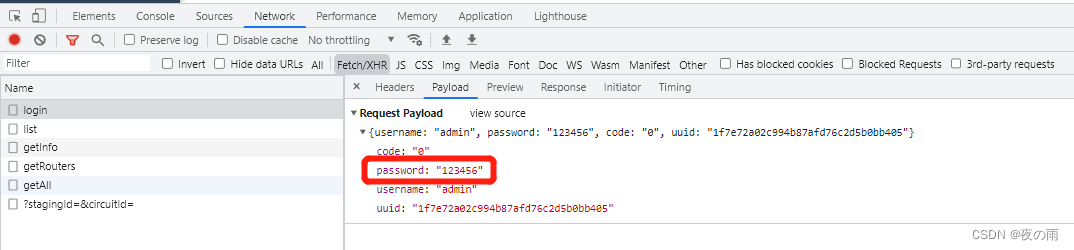
目前登录接口密码是明文传输 为了更高安全性 我准备调整为加密方式传输( 这里选择Rsa加密算法) 并分享下编写过程
更改前
更改后
若依详细登陆流程<<<可以看这里
若依官方的加密方法<<<原本是固定公私秘钥 我改为了随机生成
篇幅过长『请』耐心看完哦?? 有什么问题可以联系我~
目录
import org.apache.commons.codec.binary.Base64;
import org.slf4j.Logger;
import org.slf4j.LoggerFactory;
import org.springframework.context.annotation.Bean;
import org.springframework.stereotype.Component;

import javax.crypto.Cipher;
import java.security.*;
import java.security.interfaces.RSAPrivateKey;
import java.security.interfaces.RSAPublicKey;
import java.security.spec.PKCS8EncodedKeySpec;
import java.security.spec.X509EncodedKeySpec;

@Component
public class RsaUtils {
    // Rsa 私钥 也可固定秘钥对 若依原写法(不安全)
    public static String privateKeys = "";
    private static String publicKeyStr = "";
    private static String privateKeyStr = "";
    private static final RsaKeyPair rsaKeyPair = new RsaKeyPair();
    private static final Logger logger = LoggerFactory.getLogger(MapUtils.class);

    /**
     * 私钥解密
     *
     * @param text 待解密的文本
     * @return 解密后的文本
     */
    public static String decryptByPrivateKey(String text) throws Exception {
//        logger.info(rsaKeyPair.getPrivateKey());
        return decryptByPrivateKey(rsaKeyPair.getPrivateKey(), text);
    }

    /**
     * 公钥解密
     *
     * @param publicKeyString 公钥
     * @param text            待解密的信息
     * @return 解密后的文本
     */
    public static String decryptByPublicKey(String publicKeyString, String text) throws Exception {
        X509EncodedKeySpec x509EncodedKeySpec = new X509EncodedKeySpec(Base64.decodeBase64(publicKeyString));
        KeyFactory keyFactory = KeyFactory.getInstance("RSA");
        PublicKey publicKey = keyFactory.generatePublic(x509EncodedKeySpec);
        Cipher cipher = Cipher.getInstance("RSA");
        cipher.init(Cipher.DECRYPT_MODE, publicKey);
        byte[] result = cipher.doFinal(Base64.decodeBase64(text));
        return new String(result);
    }

    /**
     * 私钥加密
     *
     * @param privateKeyString 私钥
     * @param text             待加密的信息
     * @return 加密后的文本
     */
    public static String encryptByPrivateKey(String privateKeyString, String text) throws Exception {
        PKCS8EncodedKeySpec pkcs8EncodedKeySpec = new PKCS8EncodedKeySpec(Base64.decodeBase64(privateKeyString));
        KeyFactory keyFactory = KeyFactory.getInstance("RSA");
        PrivateKey privateKey = keyFactory.generatePrivate(pkcs8EncodedKeySpec);
        Cipher cipher = Cipher.getInstance("RSA");
        cipher.init(Cipher.ENCRYPT_MODE, privateKey);
        byte[] result = cipher.doFinal(text.getBytes());
        return Base64.encodeBase64String(result);
    }

    /**
     * 私钥解密
     *
     * @param privateKeyString 私钥
     * @param text             待解密的文本
     * @return 解密后的文本
     */
    public static String decryptByPrivateKey(String privateKeyString, String text) throws Exception {
        PKCS8EncodedKeySpec pkcs8EncodedKeySpec5 = new PKCS8EncodedKeySpec(Base64.decodeBase64(privateKeyString));
        KeyFactory keyFactory = KeyFactory.getInstance("RSA");
        PrivateKey privateKey = keyFactory.generatePrivate(pkcs8EncodedKeySpec5);
        Cipher cipher = Cipher.getInstance("RSA");
        cipher.init(Cipher.DECRYPT_MODE, privateKey);
        byte[] result = cipher.doFinal(Base64.decodeBase64(text));
        return new String(result);
    }

    /**
     * 公钥加密
     *
     * @param publicKeyString 公钥
     * @param text            待加密的文本
     * @return 加密后的文本
     */
    public static String encryptByPublicKey(String publicKeyString, String text) throws Exception {
        X509EncodedKeySpec x509EncodedKeySpec2 = new X509EncodedKeySpec(Base64.decodeBase64(publicKeyString));
        KeyFactory keyFactory = KeyFactory.getInstance("RSA");
        PublicKey publicKey = keyFactory.generatePublic(x509EncodedKeySpec2);
        Cipher cipher = Cipher.getInstance("RSA");
        cipher.init(Cipher.ENCRYPT_MODE, publicKey);
        byte[] result = cipher.doFinal(text.getBytes());
        return Base64.encodeBase64String(result);
    }

    /**
     * 构建RSA密钥对
     *
     * @return 生成后的公私钥信息
     */
    @Bean
    public void generateKeyPair() throws NoSuchAlgorithmException, NoSuchProviderException {
        KeyPairGenerator keyPairGenerator = KeyPairGenerator.getInstance("RSA");
        keyPairGenerator.initialize(1024);
        KeyPair keyPair = keyPairGenerator.generateKeyPair();
        RSAPublicKey rsaPublicKey = (RSAPublicKey) keyPair.getPublic();
        RSAPrivateKey rsaPrivateKey = (RSAPrivateKey) keyPair.getPrivate();
        String publicKeyString = Base64.encodeBase64String(rsaPublicKey.getEncoded());
        String privateKeyString = Base64.encodeBase64String(rsaPrivateKey.getEncoded());
        rsaKeyPair.setPrivateKey(privateKeyString);
        rsaKeyPair.setPublicKey(publicKeyString);
        publicKeyStr = publicKeyString;
        privateKeyStr = privateKeyString;
    }


    public static String getPublicKey() {
        return publicKeyStr;
    }

    public static String getPrivateKey() {
        return privateKeyStr;
    }

    public static RsaKeyPair rsaKeyPair() {
        return rsaKeyPair;
    }

    /**
     * RSA密钥对对象
     */
    public static class RsaKeyPair {
        private String publicKey;
        private String privateKey;

        public void setPublicKey(String publicKey) {
            this.publicKey = publicKey;
        }

        public void setPrivateKey(String privateKey) {
            this.privateKey = privateKey;
        }

        public RsaKeyPair() {

        }

        public RsaKeyPair(String publicKey, String privateKey) {
            this.publicKey = publicKey;
            this.privateKey = privateKey;
        }

        public String getPublicKey() {
            return publicKey;
        }

        public String getPrivateKey() {
            return privateKey;
        }
    }
}
RsaUtils添加了@Component注解 generateKeyPair()构建密钥对添加了@Bean注解 在项目启动时通过@Bean的方式将普通类事例化到spring容器中 所以在系统启动后 每次调用接口会是一样的公私秘钥 每次重启后公私钥不同
    /**
     * 获取公钥 前端用来密码加密
     *
     * @return
     */
    @GetMapping("/publicKey")
    public RsaUtils.RsaKeyPair publicKey() {
        //便于测试 公私秘钥都传了 可改为只传公钥
        //RsaUtils.RsaKeyPair rsaKeyPair = new RsaUtils.RsaKeyPair();
        //rsaKeyPair.setPublicKey(RsaUtils.getPublicKey());
        //return rsaKeyPair;
        return RsaUtils.rsaKeyPair();
    }
类修改(重点)测试内部会调用authenticationManager.authenticate()对账号和密码做验证 具体细节推荐看原代码
最终会调用UserDetailsServiceImpl.loadUserByUsername()方法 若依重写了此方法
authentication = authenticationManager.authenticate(new UsernamePasswordAuthenticationToken(username, RsaUtils.decryptByPrivateKey(password)));
   /**
     * 重置密码
     */
    @Log(title = "个人信息", businessType = BusinessType.UPDATE)
    @PutMapping("/updatePwd")
    public AjaxResult updatePwd(String oldPassword, String newPassword) throws Exception {
        LoginUser loginUser = tokenService.getLoginUser(ServletUtils.getRequest());
        String userName = loginUser.getUsername();
        //加密后的
        String password = loginUser.getPassword();
        //解密
        oldPassword = RsaUtils.decryptByPrivateKey(oldPassword);
        newPassword = RsaUtils.decryptByPrivateKey(newPassword);
        //拿原密码和加密后的解密
        if (!SecurityUtils.matchesPassword(oldPassword, password)) {
            return AjaxResult.error("修改密码失败,旧密码错误");
        }
        if (SecurityUtils.matchesPassword(newPassword, password)) {
            return AjaxResult.error("新密码不能与旧密码相同");
        }
        if (userService.resetUserPwd(userName, SecurityUtils.encryptPassword(newPassword)) > 0) {
            // 更新缓存用户密码
            loginUser.getUser().setPassword(SecurityUtils.encryptPassword(newPassword));
            tokenService.setLoginUser(loginUser);
            return AjaxResult.success();
        }
        return AjaxResult.error("修改密码异常,请联系管理员");
    }
/**
  * anonymous() 允许匿名用户访问,不允许已登入用户访问
  * permitAll() 不管登入,不登入 都能访问
  */
  .antMatchers("/publicKey").permitAll()
anonymous()和permitAll()权限是个坑 大家注意
至此后台工作已完成 挪步前端(没错 前后端都是我写的??)
// 获取key
export function getPublicKey() {
  return request({
    url: '/publicKey',
    method: 'get',
  })
}
actions: {
    getPublicKey() {
      return new Promise((resolve, reject) => {
        getPublicKey()
          .then(res => {
            resolve(res)
          })
          .catch(error => {
            reject(error)
          })
      })
    },
    // 登录
    Login({ commit, dispatch }, userInfo) {
      return new Promise((resolve, reject) => {
        dispatch('getPublicKey').then(res => {
          let publicKey = res.publicKey
          const username = userInfo.username.trim()
          //调用加密方法(传密码和公钥)
          const password = encrypt(userInfo.password, publicKey)
          const code = userInfo.code
          const uuid = userInfo.uuid
          login(username, password, code, uuid)
            .then(res => {
              setToken(res.token)
              commit('SET_TOKEN', res.token)
              resolve()
            })
            .catch(error => {
              reject(error)
            })
          })
      })
    },
methods: {
    getPublicKey() {
      return new Promise((resolve, reject) => {
        getPublicKey()
          .then(res => {
            resolve(res)
          })
          .catch(error => {
            reject(error)
          })
      })
    },
      submit() {
      this.$refs["form"].validate(valid => {
        if (valid) {
          this.getPublicKey().then(res=>{
            let publicKey = res.publicKey
            console.log("res.publicKey",res.publicKey)
            const oldPassword = encrypt(this.user.oldPassword, publicKey)
            const newPassword = encrypt(this.user.newPassword, publicKey)
            updateUserPwd(oldPassword, newPassword).then(
              response => {
                this.msgSuccess("修改成功");
              }
            );
          })

        }
      });
    },
    close() {
      this.$store.dispatch("tagsView/delView", this.$route);
      this.$router.push({ path: "/index" });
    }
  }
import JSEncrypt from 'jsencrypt/bin/jsencrypt.min'

// 密钥对生成 http://web.chacuo.net/netrsakeypair

//这里注掉了原来固定的公私钥
//const publicKey = ''
//const privateKey = ''

// 加密
export function encrypt(txt, publicKey) {
  const encryptor = new JSEncrypt()
  encryptor.setPublicKey(publicKey) // 设置公钥
  return encryptor.encrypt(txt) // 对数据
}

// 解密(暂无使用)
export function decrypt(txt) {
  const encryptor = new JSEncrypt()
  encryptor.setPrivateKey(privateKey) // 设置私钥
  return encryptor.decrypt(txt) // 对数据进行解密
}
登陆验证下吧~
有问题欢迎留言讨论??
先自我介绍一下,小编13年上师交大毕业,曾经在小公司待过,去过华为OPPO等大厂,18年进入阿里,直到现在。深知大多数初中级java工程师,想要升技能,往往是需要自己摸索成长或是报班学习,但对于培训机构动则近万元的学费,着实压力不小。自己不成体系的自学效率很低又漫长,而且容易碰到天花板技术停止不前。因此我收集了一份《java开发全套学习资料》送给大家,初衷也很简单,就是希望帮助到想自学又不知道该从何学起的朋友,同时减轻大家的负担。添加下方名片,即可获取全套学习资料哦
Transformers开始在视频识别领域的“猪突猛进”,各种改进和魔改层出不穷。由此作者将开启VideoTransformer系列的讲解,本篇主要介绍了FBAI团队的TimeSformer,这也是第一篇使用纯Transformer结构在视频识别上的文章。如果觉得有用,就请点赞、收藏、关注!paper:https://arxiv.org/abs/2102.05095code(offical):https://github.com/facebookresearch/TimeSformeraccept:ICML2021author:FacebookAI一、前言Transformers(VIT)在图
我在加密来self正在使用的第三方供应商的值时遇到问题。他们的指令如下:1)Converttheencryptionpasswordtoabytearray.2)Convertthevaluetobeencryptedtoabytearray.3)Theentirelengthofthearrayisinsertedasthefirstfourbytesontothefrontofthefirstblockoftheresultantbytearraybeforeencryption.4)EncryptthevalueusingAESwith:1.256-bitkeysize,2.25
有没有办法在Rails中为确认字段自定义消息?例如在设计中我必须输入密码和password_confirmation并且错误消息是:Passwordconfirmationdoesn'tmatchPassword我可以更改事件记录语言环境消息(“不匹配”),但它会在该语言环境消息的开头和结尾输出密码确认和密码,所以我得到如下内容:"PasswordconfirmationmustmatchPassword"有没有办法将其更改为不同的字符串?PasswordconfirmationandPasswordmustmatch.编辑另一件事是拥有完全自定义的消息,例如:'Setpassword
我想开始使用“Sinatra”框架进行编码,但我找不到该框架的“MVC”模式。是“MVC-Sinatra”模式或框架吗? 最佳答案 您可能想查看Padrino这是一个围绕Sinatra构建的框架,可为您的项目提供更“类似Rails”的感觉,但没有那么多隐藏的魔法。这是使用Sinatra可以做什么的一个很好的例子。虽然如果您需要开始使用这很好,但我个人建议您将它用作学习工具,以对您来说最有意义的方式使用Sinatra构建您自己的应用程序。写一些测试/期望,写一些代码,通过测试-重复:)至于ORM,你还应该结帐Sequel其中(imho
首先,关于我们系统的一些信息,它基本上是建筑行业的电子招标解决方案。所以:列表项我们的系统有多家公司每个公司都有多个用户每家公司可以创建多个拍卖然后其他公司可以为可用的拍卖提交他们的出价。一个出价包含数百或数千个单独的项目,我们只需要加密这些记录的“价格”部分。我们面临的问题是,我们的大客户不希望我们知道投标价格,至少在投标过程中是这样,这是完全可以理解的。现在,我们只是通过对称加密对价格进行加密,因此即使价格在数据库中有效加密,他们担心的是我们拥有解密价格的key。因此,我们正在研究某种形式的公钥加密系统。以下是我们对解决方案的初步想法:当一家公司注册时,我们会使用OpenSSL为其
我正在尝试对某些帖子的评论使用简单的身份验证。用户使用即时ID和密码输入评论我使用“bcrypt”gem将密码存储在数据库中。在comments_controller.rb中像这样@comment=Comment.new(comment_params)bcrypted_pwd=BCrypt::Password.create(@comment.user_pwd)@comment.user_pwd=bcrypted_pwd当用户想要删除他们的评论时,我使用data-confirm-modalgem来确认数据在这部分,我必须解密用户输入的密码以与数据库中的加密密码进行比较我怎样才能解密密码,
我有一个允许更新用户记录的表单。它包含:password和:password_confirmation字段,但我不希望在数据库中已存储加密密码时对它们运行验证。View文件中的字段:'ConfirmPassword'%>在互联网上搜索时,我发现了这段代码,我认为它是针对以前版本的Ruby/Rails的。(我会把它放在我的用户模型中。)validates_presence_of:password,:on=>create由于我的用户模型中密码验证的语法不同(如下),我对我需要的语法感到困惑。validates:password,:presence=>true,:confirmation=>
我正在使用devise,当用户更改密码时,网站会将他们注销。我在网上读到,添加sign_in可以解决问题但不起作用,并且当密码更改时用户会注销。这是我的代码if@user.errors[:base].empty?and@user.update_attributes(params[:user])sign_in(current_user,:bypass=>true)flash[:success]="Useraccounthasbeensuccessfullyupdated"redirect_toedit_user_path(params[:site_id],@user)elserender
如果我构建了一个应用程序来访问来自Gmail、Twitter和Facebook的一些数据,并且我希望用户只需输入一次他们的身份验证信息,并且在几天或几周后重置,那会怎样是在Ruby中动态执行此操作的最佳方法吗?我看到很多人只是拥有他们客户/用户凭证的配置文件,如下所示:gmail_account:username:myClientpassword:myClientsPassword这看起来a)非常不安全,b)如果我想为成千上万的用户存储此类信息,它就无法工作。推荐的方法是什么?我希望能够在这些服务之上构建一个界面,因此每次用户进行交易时都必须输入凭据是不可行的。
我想在随机字符串前后添加一个空格。我试过使用"Random_string".center(1,"")但它不起作用。谢谢 最佳答案 我发现这是最优雅的解决方案:padded_string="#{random_string}"走简单的路没有错。 关于ruby-在ruby中的字符串前后添加空格?,我们在StackOverflow上找到一个类似的问题: https://stackoverflow.com/questions/3357897/