# 实现的功能
(1) 滚轮拉近, 推远相机(带惯性)
(2) 鼠标左键左右,上下转动相机(带惯性)
(3) 相机跟随角色
# 待实现功能
(1) 转动相机时,如果相机和跟随角色间出现了障碍物,相机自动拉近
(2) 跟随的角色向左或向右行走时,相机自动缓慢转动
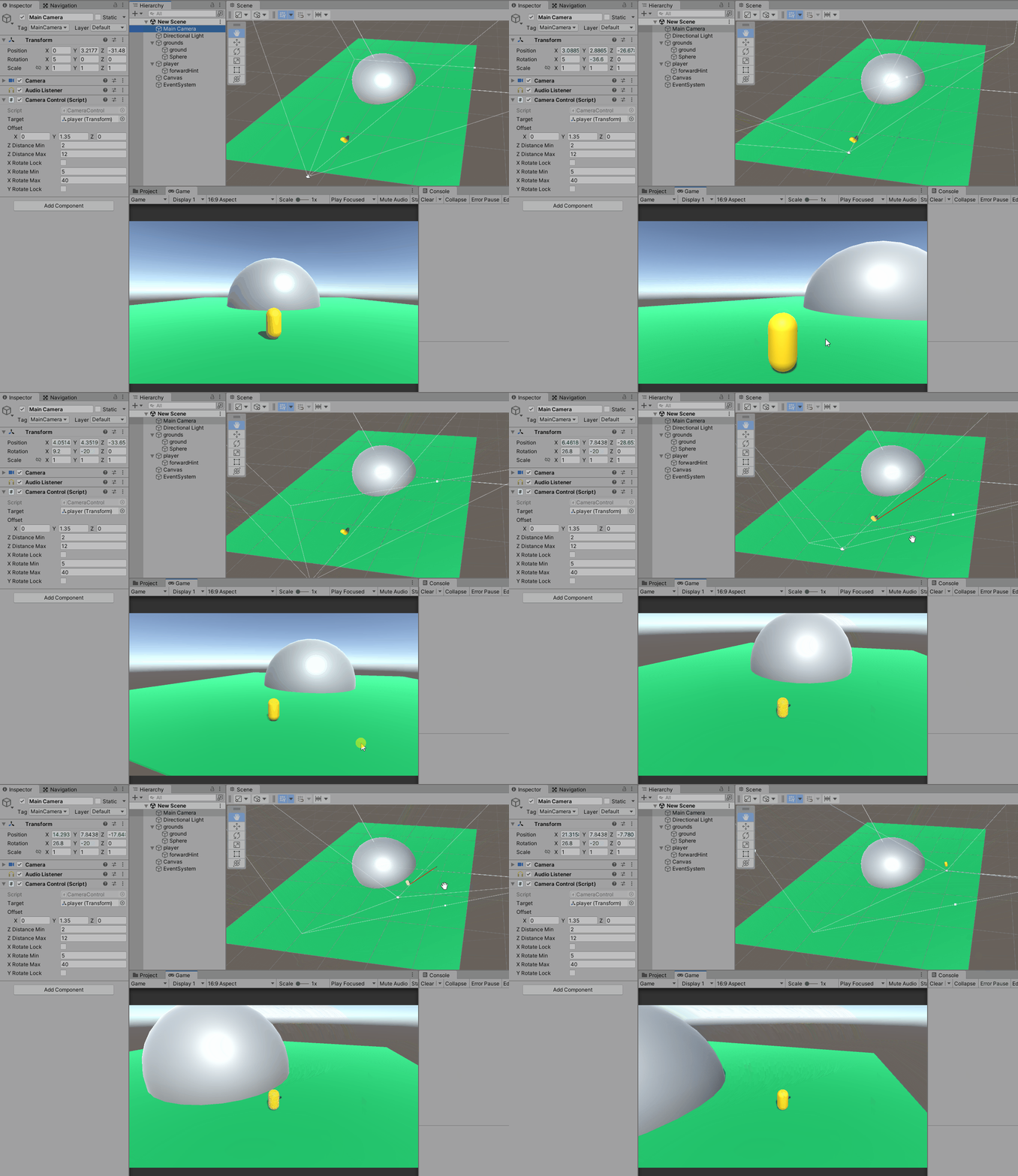
# ground为可行走地面(绿色),Sphere为不可行走区域(灰色),player为相机跟随的角色(黄色)
# EventSystem这边会用到它的拖动触发阈值
# CameraControl挂在Main Camera上, PlayerMove挂在player上
# 相机控制代码
public class CameraControl : MonoBehaviour
{

    public Transform target; //相机跟随目标
    private Vector3 _lastTargetPos;
    public Vector3 offset = new Vector3(0, 1.35f, 0); //与target位置的偏移, 一般只设置y方向(高度)

    public float zDistanceMin = 2;
    public float zDistanceMax = 12;
    private float _zDistance = 9; //相机和跟随目标当前的距离

    private int _zDistanceInertia = 0; //惯性帧数
    private float _zDistanceInertiaStep; //惯性步进

    private int _rotateInertia = 0; //旋转惯性帧数
    private float _rotateDecelerateExp = 0.75f; //减速指数

    private Vector3 _lastMousePosition;
    private Vector3 _deltaMousePosition;
    private bool _drag;

    private float _xCurRotate = 5;
    public bool xRotateLock = false;
    public float xRotateMin = 5;
    public float xRotateMax = 40;

    private float _yCurRotate;
    public bool yRotateLock = false;

    private Quaternion _camRotation;
    private Vector3 _zDistanceVec3;

    void OnEnable()
    {
        UpdateCameraRotateAndPos();
    }

    void Update()
    {
        CheckZoomInertia();
        CheckRotateInertia();

        var mscroll = Input.GetAxis("Mouse ScrollWheel");
        if (mscroll < 0) //zoom out, 推远相机
        {
            if (_zDistance < zDistanceMax)
            {
                _zDistance -= mscroll;
                _zDistance = Mathf.Min(_zDistance, zDistanceMax);
                UpdateCameraPos();

                _zDistanceInertia = 15;
                _zDistanceInertiaStep = mscroll;
            }
        }
        else if (mscroll > 0) //Zoom in, 拉进相机
        {
            if (_zDistance > zDistanceMin)
            {
                _zDistance -= mscroll;
                _zDistance = Mathf.Max(_zDistance, zDistanceMin);
                UpdateCameraPos();

                _zDistanceInertia = 15;
                _zDistanceInertiaStep = mscroll;
            }
        }

        if (Input.GetMouseButtonDown(0))
        {
            _drag = false;
            _lastMousePosition = Input.mousePosition;

            //按下的时候, 停止惯性
            _zDistanceInertia = 0;
            _rotateInertia = 0;
        }
        else if (Input.GetMouseButton(0))
        {
            _deltaMousePosition = Input.mousePosition - _lastMousePosition;
            _lastMousePosition = Input.mousePosition;
            if (_drag)
            {
                RotateCameraByDeltaPos(ref _deltaMousePosition);
            }
            else
            {
                if (_deltaMousePosition.sqrMagnitude >= Mathf.Sqrt(EventSystem.current.pixelDragThreshold)) //超过拖动阈值才进入drag模式
                {
                    _drag = true;
                }
            }
        }
        else if (Input.GetMouseButtonUp(0))
        {
            if (_drag)
            {
                _rotateInertia = 15;
            }
            _drag = false;
            _lastMousePosition = Input.mousePosition;
        }
    }

    ///相机zoom惯性
    private void CheckZoomInertia()
    {
        if (_zDistanceInertia > 0)
        {
            _zDistanceInertia--;
            if (_zDistanceInertiaStep < 0) //惯性推远
            {
                if (_zDistance < zDistanceMax)
                {
                    _zDistance -= _zDistanceInertiaStep;
                    _zDistance = Mathf.Min(_zDistance, zDistanceMax);
                    UpdateCameraPos();
                }
                else
                {
                    _zDistanceInertia = 0;
                    _zDistanceInertiaStep = 0;
                }
            }
            else if (_zDistanceInertiaStep > 0) //惯性拉进
            {
                if (_zDistance > zDistanceMin)
                {
                    _zDistance -= _zDistanceInertiaStep;
                    _zDistance = Mathf.Max(_zDistance, zDistanceMin);
                    UpdateCameraPos();
                }
                else
                {
                    _zDistanceInertia = 0;
                    _zDistanceInertiaStep = 0;
                }
            }
        }
    }

    ///转动相机惯性
    private void CheckRotateInertia()
    {
        if (_rotateInertia > 0)
        {
            _rotateInertia--;

            if (_deltaMousePosition.sqrMagnitude >= 0.0001f)
            {
                RotateCameraByDeltaPos(ref _deltaMousePosition);
                _deltaMousePosition *= _rotateDecelerateExp;
            }
            else
            {
                _rotateInertia = 0;
            }
        }
    }

    private void RotateCameraByDeltaPos(ref Vector3 deltaPos)
    {
        const float Scale_Factor = 0.2f; //缩放系数, 调到看着舒服就行
        if (!xRotateLock)
        {
            _xCurRotate += deltaPos.y * Scale_Factor;
            _xCurRotate = Mathf.Min(Mathf.Max(xRotateMin, _xCurRotate), xRotateMax);
        }

        if (!yRotateLock)
        {
            _yCurRotate += deltaPos.x * Scale_Factor;
        }

        UpdateCameraRotateAndPos();
    }

    private void UpdateCameraRotateAndPos()
    {
        _camRotation = Quaternion.Euler(_xCurRotate, _yCurRotate, 0);
        transform.rotation = _camRotation;
        UpdateCameraPos(); //角度变化同时会引起位置变化
    }

    private void UpdateCameraPos()
    {
        _zDistanceVec3.z = -_zDistance;

        var camPos = _camRotation * _zDistanceVec3 + target.position + offset;
        transform.position = camPos;
    }


    void LateUpdate()
    {
        //相机跟随
        var diff = target.position - _lastTargetPos;
        if (diff.sqrMagnitude >= 0.0001f)
        {
            _lastTargetPos = target.position;
            var camPos = _camRotation * _zDistanceVec3 + target.position + offset;
            transform.position = camPos;
        }
    }

}
# 角色行走控制代码,wasd为手动行走,鼠标右键点击地面为走到点击的点
public class PlayerMove : MonoBehaviour
{
    private NavMeshAgent _agent;
    ///跟随角色的相机
    public Camera followCamera;

    private Vector3[] _pathCorners = new Vector3[10];

    void Start()
    {
        _agent = GetComponent<NavMeshAgent>();
        _agent.isStopped = true;

        if (null == followCamera)
            followCamera = Camera.main;
    }

    void Update()
    {
        if (CheckNavToClickPoint() || CheckWASDMove())
            return;

        if (_agent.enabled)
        {
            if (_agent.remainingDistance <= 0 || _agent.isStopped)
            {
                _agent.isStopped = true;
                _agent.enabled = false;
            }
            else
            {
                DrawNavMeshPath();
            }
        }
    }

    ///寻路过程中, 绘制出路径
    private void DrawNavMeshPath()
    {
        if (_agent.hasPath)
        {
            var len = _agent.path.GetCornersNonAlloc(_pathCorners);
            for (var i = 1; i < len; ++i)
            {
                var p1 = _pathCorners[i - 1];
                var p2 = _pathCorners[i];
                Debug.DrawLine(p1, p2, Color.red);
            }
        }
    }

    ///寻路至点击位置
    private bool CheckNavToClickPoint()
    {
        if (Input.GetMouseButtonUp(1))
        {
            const int maxDistance = 300;
            var ray = Camera.main.ScreenPointToRay(Input.mousePosition); //摄像机方向发射1条射线
            Debug.DrawRay(ray.origin, ray.direction * maxDistance, Color.yellow); //画出这条射线

            if (Physics.Raycast(ray, out var hit, maxDistance))
            {
                Debug.DrawLine(ray.origin, hit.point, Color.red);
                _agent.enabled = true;
                //_agent.Warp(transform.position);
                _agent.SetDestination(hit.point);
                return true;
            }
        }

        return false;
    }

    private bool CheckWASDMove()
    {
        var x = 0;
        if (Input.GetKey(KeyCode.W)) x = 1;
        else if (Input.GetKey(KeyCode.S)) x = -1;

        var y = 0;
        if (Input.GetKey(KeyCode.A)) y = -1;
        else if (Input.GetKey(KeyCode.D)) y = 1;

        if (0 != y || 0 != x)
        {
            if (_agent.enabled) //还在寻路中, 操作了wasd, 就停止寻路
            {
                _agent.isStopped = true;
                _agent.ResetPath();
                _agent.enabled = false;
            }

            var relativeAngle = Mathf.Atan2(y, x) * Mathf.Rad2Deg; //摇杆向上表示与相机forward为0度, 摇杆向右表示与相机forward为90度, 以此类推
            var playerTransform = transform;
            var cameraForwardAngle = followCamera.transform.eulerAngles.y;
            playerTransform.rotation = Quaternion.Euler(0, cameraForwardAngle + relativeAngle, 0); //todo: 这里可以考虑改成Lerp做平滑处理

            playerTransform.Translate(Vector3.forward * 3 * Time.deltaTime, Space.Self); //上面已经调整了转向, 这边只要往前走就好
            return true;
        }

        return false;
    }

}
当我在Rails控制台中按向上或向左箭头时,出现此错误:irb(main):001:0>/Users/me/.rvm/gems/ruby-2.0.0-p247/gems/rb-readline-0.4.2/lib/rbreadline.rb:4269:in`blockin_rl_dispatch_subseq':invalidbytesequenceinUTF-8(ArgumentError)我使用rvm来管理我的ruby安装。我正在使用=>ruby-2.0.0-p247[x86_64]我使用bundle来管理我的gem,并且我有rb-readline(0.4.2)(人们推荐的最少
我正在使用Ruby2.1.1和Rails4.1.0.rc1。当执行railsc时,它被锁定了。使用Ctrl-C停止,我得到以下错误日志:~/.rvm/gems/ruby-2.1.1/gems/spring-1.1.2/lib/spring/client/run.rb:47:in`gets':Interruptfrom~/.rvm/gems/ruby-2.1.1/gems/spring-1.1.2/lib/spring/client/run.rb:47:in`verify_server_version'from~/.rvm/gems/ruby-2.1.1/gems/spring-1.1.
我将我的Rails应用程序部署到OpenShift,它运行良好,但我无法在生产服务器上运行“Rails控制台”。它给了我这个错误。我该如何解决这个问题?我尝试更新rubygems,但它也给出了权限被拒绝的错误,我也无法做到。railsc错误:Warning:You'reusingRubygems1.8.24withSpring.UpgradetoatleastRubygems2.1.0andrun`gempristine--all`forbetterstartupperformance./opt/rh/ruby193/root/usr/share/rubygems/rubygems
说在前面这部分我本来是合为一篇来写的,因为目的是一样的,都是通过独立按键来控制LED闪灭本质上是起到开关的作用,即调用函数和中断函数。但是写一篇太累了,我还是决定分为两篇写,这篇是调用函数篇。在本篇中你主要看到这些东西!!!1.调用函数的方法(主要讲语法和格式)2.独立按键如何控制LED亮灭3.程序中的一些细节(软件消抖等)1.调用函数的方法思路还是比较清晰地,就是通过按下按键来控制LED闪灭,即每按下一次,LED取反一次。重要的是,把按键与LED联系在一起。我打算用K1来作为开关,看了一下开发板原理图,K1连接的是单片机的P31口,当按下K1时,P31是与GND相连的,也就是说,当我按下去时
📢博客主页:https://blog.csdn.net/weixin_43197380📢欢迎点赞👍收藏⭐留言📝如有错误敬请指正!📢本文由Loewen丶原创,首发于CSDN,转载注明出处🙉📢现在的付出,都会是一种沉淀,只为让你成为更好的人✨文章预览:一.分辨率(Resolution)1、工业相机的分辨率是如何定义的?2、工业相机的分辨率是如何选择的?二.精度(Accuracy)1、像素精度(PixelAccuracy)2、定位精度和重复定位精度(RepeatPrecision)三.公差(Tolerance)四.课后作业(Post-ClassExercises)视觉行业的初学者,甚至是做了1~2年
在我的Character模型中,我添加了:字符.rbbefore_savedoself.profile_picture_url=asset_path('icon.png')end但是,对于数据库中已存在的所有角色,它们的profile_picture_url为nil。因此,我想进入控制台并遍历所有这些并进行设置。在我试过的控制台中:Character.find_eachdo|c|c.profile_picture_url=asset_path('icon.png')end但这给出了错误:NoMethodError:undefinedmethod`asset_path'formain:O
当我进入Rails控制台时,我已将pry设置为加载代替irb。我找不到该页面或不记得如何将其恢复为默认行为,因为它似乎干扰了我的Rubymine调试器。有什么建议吗? 最佳答案 我刚发现问题,pry-railsgem。忘记了它的目的是让“railsconsole”打开pry。 关于ruby-on-rails-带有Pry的Rails控制台,我们在StackOverflow上找到一个类似的问题: https://stackoverflow.com/question
我正在尝试将$stdout设置为临时写入一个文件,然后返回到一个文件。test.rb:old_stdout=$stdout$stdout.reopen("mytestfile.out",'w+')puts"thisgoesinmytestfile"$stdout=old_stdoutputs"thisshouldbeontheconsole"$stdout.reopen("mytestfile1.out",'w+')puts"thisgoesinmytestfile1:"$stdout=old_stdoutputs"thisshouldbebackontheconsole"这是输出。r
我在思考流量控制的最佳实践。我应该走哪条路?1)不要检查任何东西并让程序失败(更清晰的代码,自然的错误消息):defself.fetch(feed_id)feed=Feed.find(feed_id)feed.fetchend2)通过返回nil静默失败(但是,“CleanCode”说,你永远不应该返回null):defself.fetch(feed_id)returnunlessfeed_idfeed=Feed.find(feed_id)returnunlessfeedfeed.fetchend3)抛出异常(因为不按id查找feed是异常的):defself.fetch(feed_id
我真的只是不确定这意味着什么或我应该做什么才能让网页在我的本地主机上运行。现在它只是显示一个错误,上面写着“我们很抱歉,但出了点问题。”当我运行railsserver并在chrome中打开localhost:3000时。这是控制台输出:StartedGET"/users/sign_in"for127.0.0.1at2013-07-0512:07:07-0400ProcessingbyDevise::SessionsController#newasHTMLCompleted500InternalServerErrorin55msNoMethodError(undefinedmethod`
