昨天搞这个搞的焦头烂额的,好在最后解决了。所以就记录一下,也是方便已经自己如果再做同样的事情,有地方可以copy
private static InputStream getUrlFile(String imgUrl) {

    InputStream inputStream = null;
    HttpURLConnection httpURLConnection = null;
    try {
        URL url = new URL(imgUrl);
        httpURLConnection = (HttpURLConnection) url.openConnection();
        // 设置网络连接超时时间
        httpURLConnection.setConnectTimeout(3000);
        // 设置应用程序要从网络连接读取数据
        httpURLConnection.setDoInput(true);
        httpURLConnection.setRequestMethod("GET");
        int responseCode = httpURLConnection.getResponseCode();
        if (responseCode == 200) {
            // 从服务器返回一个输入流
            inputStream = httpURLConnection.getInputStream();
        }
    } catch (Exception e) {
        e.getMessage();
    }
    return inputStream;
}

private static String checkImgByInputStream(InputStream inputStream) throws HttpException {
    if (inputStream == null) {
        return null;
    }
    //获取access_token

    String url = String.format("https://api.weixin.qq.com/wxa/img_sec_check?access_token=" + getAccessToken());
    System.out.println(url);
    HttpClient httpclient = HttpClients.createDefault();

    HttpPost request = new HttpPost(url);
    request.addHeader("Content-Type", "application/octet-stream");

    try {
        byte[] byt = new byte[inputStream.available()];
        inputStream.read(byt);
        request.setEntity(new ByteArrayEntity(byt, ContentType.create("image/jpg")));
        HttpResponse response = httpclient.execute(request);
        HttpEntity entity = response.getEntity();
        String resultEntity = EntityUtils.toString(entity, "UTF-8");// 转成string
        System.out.println("图片校验结果: " + resultEntity);
        return resultEntity;
    } catch (IOException e) {
        e.printStackTrace();
    } finally {
        if (inputStream != null) {
            try {
                inputStream.close();
            } catch (IOException e) {
                e.printStackTrace();
            }
        }
    }
    return null;
}private static String checkMsg(String content) throws HttpException {
try {
HttpClient httpclient = HttpClients.createDefault();
String url = String.format("https://api.weixin.qq.com/wxa/msg_sec_check?access_token=" + getAccessToken());
Map<String, Object> map = new HashMap<>();
map.put("content", content);
Gson gson = new Gson();
String json = gson.toJson(map);
HttpPost request = new HttpPost(url);
request.addHeader("Content-Type", "application/json; charset=utf-8");
request.setEntity(new StringEntity(json, Charset.forName("UTF-8")));
HttpResponse response = httpclient.execute(request);
HttpEntity entity = response.getEntity();
String resultEntity = EntityUtils.toString(entity, "UTF-8");// 转成string
System.out.println("文字校验结果: " + resultEntity);
if (StringUtils.isNotBlank(resultEntity)) {
return resultEntity;
}
} catch (IOException e) {
e.printStackTrace();
}
return null;
}最后写一个main方法用来测试
public static void main(String[] args) throws Exception {
	//唯一需要注意的就是,图片路径不能是HTTPS
    String imgFilePath = "https://image.jiangongjia.com/images/zhaohuo/project/tmp_0d75ae36fd0fc0ce5fb19866d4f36683c2b20f45af778f84.jpg";
    imgFilePath = imgFilePath.replace("https", "http");
    System.out.println(imgFilePath);
    InputStream inputStream = getUrlFile(imgFilePath);
    String result = checkImgByInputStream(inputStream);
    System.out.println(result);

	//官方给的违规数据
	System.out.println(checkMsg("特3456书yuuo莞6543李zxcz蒜7782法fgnv级"));
	System.out.println(checkMsg("完2347全dfji试3726测asad感3847知qwez到"));

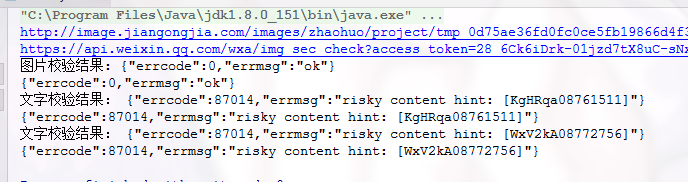
}
<dependency>
    <groupId>org.codehaus.xfire</groupId>
    <artifactId>xfire-core</artifactId>
    <version>1.2.6</version>
</dependency>
<dependency>
    <groupId>org.bouncycastle</groupId>
    <artifactId>bcprov-jdk16</artifactId>
    <version>1.46</version>
</dependency>
/**
* 解析获取手机号,
*
* @param sessionKey 小程序端加密iv和encData时使用的sessionKey
* @param iv 加密算法的初始向量
* @param encData 包括敏感数据在内的完整用户信息的加密数据
* @return
*/
@PostMapping("/getUserPhone")
@ApiOperation("解析获取手机号")
public R getUserPhone(@RequestBody WeChatLoginDTO weChatLoginDTO) {
try {
String userInfo = getUserInfo(weChatLoginDTO.getEncData(), weChatLoginDTO.getSessionKey(), weChatLoginDTO.getIv());
} catch (Exception e) {
e.printStackTrace();
}
return null;
}
public String getUserInfo(String encryptedData, String sessionkey, String iv) {
String result = "";
// 被加密的数据
byte[] dataByte = Base64.decode(encryptedData);
// 加密秘钥
byte[] keyByte = Base64.decode(sessionkey);
// 偏移量
byte[] ivByte = Base64.decode(iv);
try {
// 如果密钥不足16位,那么就补足. 这个if 中的内容很重要
int base = 16;
if (keyByte.length % base != 0) {
int groups = keyByte.length / base + (keyByte.length % base != 0 ? 1 : 0);
byte[] temp = new byte[groups * base];
Arrays.fill(temp, (byte) 0);
System.arraycopy(keyByte, 0, temp, 0, keyByte.length);
keyByte = temp;
}
// 初始化
Security.addProvider(new BouncyCastleProvider());
Cipher cipher = Cipher.getInstance("AES/CBC/PKCS7Padding", "BC");
SecretKeySpec spec = new SecretKeySpec(keyByte, "AES");
AlgorithmParameters parameters = AlgorithmParameters.getInstance("AES");
parameters.init(new IvParameterSpec(ivByte));
// 初始化
cipher.init(Cipher.DECRYPT_MODE, spec, parameters);
byte[] resultByte = cipher.doFinal(dataByte);
if (null != resultByte && resultByte.length > 0) {
result = new String(resultByte, "UTF-8");
}
} catch (NoSuchAlgorithmException e) {
e.printStackTrace();
} catch (NoSuchPaddingException e) {
e.printStackTrace();
} catch (InvalidParameterSpecException e) {
e.printStackTrace();
} catch (IllegalBlockSizeException e) {
e.printStackTrace();
} catch (BadPaddingException e) {
e.printStackTrace();
} catch (UnsupportedEncodingException e) {
e.printStackTrace();
} catch (InvalidKeyException e) {
e.printStackTrace();
} catch (InvalidAlgorithmParameterException e) {
e.printStackTrace();
} catch (NoSuchProviderException e) {
e.printStackTrace();
}
return result;
}微信支付,都会牵扯到一个统一下单API,所以微信的各种支付方式都大同小异
统一下单API:https://pay.weixin.qq.com/wiki/doc/api/jsapi.php?chapter=9_1
H5支付我在前面的文章里有写,所以这里直接放上一个链接:字节跳动小程序技术摘要
APP支付首先也是要请求统一下单API接口,此接口代码在 H5支付 所给链接 字节跳动小程序技术摘要 中有写,所以这里也不多说。
和H5支付相比,APP支付也就多了一个再签名的过程:
// 先请求统一下单API接口,具体代码看另一篇博客
String result = HttpRequest.doPostJson("https://api.mch.weixin.qq.com/pay/unifiedorder", data.toString());

//解析XML数据
XmlMapper xmlMapper = new XmlMapper();
JSONObject jsonObject = xmlMapper.readValue(result, JSONObject.class);
//获取统一下单接口返回的预支付会话标识
String prepayId = jsonObject.getString("prepay_id");
nonceStr = jsonObject.getString("nonce_str");
long timestamp = System.currentTimeMillis() / 1000;

//准备参数集再签名
Map<String, Object> map = new HashMap<String, Object>();
map.put("prepayid", prepayId);
map.put("appid", WeChatConfig.APP_ID);
map.put("timestamp", timestamp);
map.put("noncestr", nonceStr);
map.put("package", "Sign=WXPay");
//网上很多文章说这个是商户ID,不是商户号。而且他们商户ID和商户号不一样,可能是因为微信后来改版的原因,现在版本他们文章所说的商户ID已经找不到了
map.put("partnerid", WeChatConfig.MCH_ID);

//微信支付的密钥,不是小程序的APP_SECRET  这个签名类在字节跳动小程序那篇博客中有
sign = MD5.getSign(WeChatConfig.SECRET, map);
map.put("sign", sign);

//最后把map返回即可解析流获取参数
/**
 * 支付回调
 *
 * @param request
 * @param response
 * @return
 */
@RequestMapping("/url请求路径")
@ResponseBody
public String payResult(HttpServletRequest request, HttpServletResponse response) {
    response.setHeader("Content-type", "text/html;charset=UTF-8");
    try {
        String reqParams = StreamUtil.read(request.getInputStream());
        System.out.println("payResult支付回调结果:" + reqParams);
    } catch (Exception e) {
        e.printStackTrace();
    }
	/*
	按照微信官方文档标注的呢这里是需要按要求返回的
	就比如返回下面这么一段xml数据
	<xml>
	  <return_code><![CDATA[SUCCESS]]></return_code>
	  <return_msg><![CDATA[OK]]></return_msg>
	</xml>

	但是我不这么返回,好像也并没有什么影响,照样可以支付,可以退款,并不影响订单状态
	*/
    return "SUCCESS";
}public class StreamUtil {
public static String read(InputStream is){
try {
ByteArrayOutputStream baos = new ByteArrayOutputStream();
int len = 0;
byte[] buffer = new byte[512];
while((len = is.read(buffer)) != -1){
baos.write(buffer, 0, len);
}
return new String(baos.toByteArray(), 0, baos.size(), "utf-8");
}catch (Exception e) {
e.printStackTrace();
}
return "";
}
}URL地址:https://api.mch.weixin.qq.com/pay/orderquery
同样,参数含义就不一一介绍,官方链接:https://pay.weixin.qq.com/wiki/doc/api/H5.php?chapter=9_2&index=2
<xml>
   <appid>wx2421b1c4370ec43b</appid>
   <mch_id>10000100</mch_id>
   <nonce_str>ec2316275641faa3aacf3cc599e8730f</nonce_str>
   <transaction_id>1008450740201411110005820873</transaction_id>
   <sign>FDD167FAA73459FD921B144BAF4F4CA2</sign>
</xml>签名的话就用上述统一下单的那种签名方式即可
//封装数据 生成签名
Map<String, Object> map = new HashMap<>();
map.put("appid", WeChatConfig.APP_ID);
map.put("mch_id", WeChatConfig.MCH_ID);
map.put("nonce_str", nonce_str);
map.put("out_trade_no", out_trade_no);
String sign = MD5.getSign(WeChatConfig.SECRET, map);/**
* 订单交易状态查询
*
* @param request
* @param response
* @param out_trade_no 商户订单号
* @return
*/
@RequestMapping(value = "/orderQuery")
public JsonResult orderQuery(HttpServletRequest request, HttpServletResponse response, String out_trade_no) {
try {
String nonce_str = RandomStringGenerator.getRandomStringByLength(32);
//封装数据 生成签名
Map<String, Object> map = new HashMap<>();
map.put("appid", WeChatConfig.APP_ID);
map.put("mch_id", WeChatConfig.MCH_ID);
map.put("nonce_str", nonce_str);
map.put("out_trade_no", out_trade_no);
String sign = MD5.getSign(WeChatConfig.SECRET, map);
String url = "https://api.mch.weixin.qq.com/pay/orderquery";
//封装xml请求参数
StringBuffer data = new StringBuffer();
data.append("<xml>");
data.append(" <appid>" + "<![CDATA[" + WeChatConfig.APP_ID + "]]>" + "</appid>");
data.append(" <mch_id>" + WeChatConfig.MCH_ID + "</mch_id>");
data.append(" <nonce_str>" + "<![CDATA[" + nonce_str + "]]>" + "</nonce_str>");
data.append(" <out_trade_no>" + "<![CDATA[" + out_trade_no + "]]>" + "</out_trade_no>");
data.append(" <sign>" + "<![CDATA[" + sign + "]]>" + "</sign>");
data.append("</xml>");
String result = HttpRequest.doPostJson(url, data.toString());
//解析判断返回结果 再返回即可
}接口链接:https://api.mch.weixin.qq.com/secapi/pay/refund
退款和之前的支付以及查询不一样,微信退款需要证书
证书怎么弄这里也不介绍了,官方地址:https://pay.weixin.qq.com/wiki/doc/api/H5.php?chapter=4_3
签名获取方式同上即可
<xml>
   <appid>wx2421b1c4370ec43b</appid>
   <mch_id>10000100</mch_id>
   <nonce_str>6cefdb308e1e2e8aabd48cf79e546a02</nonce_str>
   <out_refund_no>1415701182</out_refund_no>
   <out_trade_no>1415757673</out_trade_no>
   <refund_fee>1</refund_fee>
   <total_fee>1</total_fee>
   <transaction_id>4006252001201705123297353072</transaction_id>
   <sign>FE56DD4AA85C0EECA82C35595A69E153</sign>
</xml>//微信退款流程
String nonce_str = RandomStringGenerator.getRandomStringByLength(32);
Map<String, String> data = new HashMap<String, String>();
// data.put("appid", Configure.getAppID());
data.put("appid", "xxxxxxxxxxxxx");
data.put("mch_id", Configure.getMch_id());
data.put("nonce_str", nonce_str);
data.put("sign_type", "MD5");
data.put("out_trade_no", paymentRecord.getOutTradeNo());//商户订单号
data.put("out_refund_no", RandomStringGenerator.getRandomStringByLength(32));//商户订单号
String money = String.valueOf(paymentRecord.getTotalFee().multiply(new BigDecimal(100)).intValue());
data.put("total_fee", money);//订单金额,这边需要转成字符串类型,否则后面的签名会失败
data.put("refund_fee", money);
data.put("notify_url", Configure.getNotify_url_refund());//退改成功后的回调地址
String prestr = PayUtil.createLinkString(data); // 把数组所有元素,按照“参数=参数值”的模式用“&”字符拼接成字符串
//MD5运算生成签名
String mysign = PayUtil.sign(prestr, Configure.getKey(), "utf-8").toUpperCase();
data.put("sign", mysign);
//这里的退款因为是需要用到证书,所以需要自己写其他逻辑
String result = CertHttpUtil.postData(Configure.getRefundPath(), PayUtil.GetMapToXML(data));
System.out.println("result:-----------------------------------" + result);
//这里还需要对退款状态做个判断
//使用上面说的技术,把xml格式数据转成JSONObject对象来使用
XmlMapper xmlMapper = new XmlMapper();
JSONObject jsonObject = null;
try {
jsonObject = xmlMapper.readValue(result, JSONObject.class);
System.out.println("jsonObject = " + jsonObject);
if ("SUCCESS".equals(jsonObject.get("return_code")) && "SUCCESS".equals(jsonObject.get("result_code"))) {
System.out.println("退款成功");
}
} catch (Exception e) {
e.printStackTrace();
}CertHttpUtil
public class CertHttpUtil {

	private static int socketTimeout = 10000;// 连接超时时间,默认10秒
    private static int connectTimeout = 30000;// 传输超时时间,默认30秒
    private static RequestConfig requestConfig;// 请求器的配置
    private static CloseableHttpClient httpClient;// HTTP请求器

    /**
     * 通过Https往API post xml数据
     * @param url  API地址
     * @param xmlObj   要提交的XML数据对象
     * @return
     */
    public static String postData(String url, String xmlObj) {
        // 加载证书
        try {
            initCert();
        } catch (Exception e) {
            e.printStackTrace();
        }
        String result = null;
        HttpPost httpPost = new HttpPost(url);
        // 得指明使用UTF-8编码,否则到API服务器XML的中文不能被成功识别
        StringEntity postEntity = new StringEntity(xmlObj, "UTF-8");
        httpPost.addHeader("Content-Type", "text/xml");
        httpPost.setEntity(postEntity);
        // 根据默认超时限制初始化requestConfig
        requestConfig = RequestConfig.custom()
                .setSocketTimeout(socketTimeout)
                .setConnectTimeout(connectTimeout)
                .build();
        // 设置请求器的配置
        httpPost.setConfig(requestConfig);
        try {
            HttpResponse response = null;
            try {
                response = httpClient.execute(httpPost);
            }  catch (IOException e) {
                e.printStackTrace();
            }
            HttpEntity entity = response.getEntity();
            try {
                result = EntityUtils.toString(entity, "UTF-8");
            }  catch (IOException e) {
                e.printStackTrace();
            }
        } finally {
            httpPost.abort();
        }
        return result;
    }

    /**
     * 加载证书
     *
     */
    private static void initCert() throws Exception {
        // 证书密码,默认为商户ID
        String key = Configure.getMch_id();
        // 证书的路径
        String path = Configure.getCertPath();
        // 指定读取证书格式为PKCS12
        KeyStore keyStore = KeyStore.getInstance("PKCS12");
        // 读取本机存放的PKCS12证书文件
        FileInputStream instream = new FileInputStream(new File(path));
        try {
            // 指定PKCS12的密码(商户ID)
            keyStore.load(instream, key.toCharArray());
        } finally {
            instream.close();
        }
        SSLContext sslcontext = SSLContexts
                .custom()
                .loadKeyMaterial(keyStore, key.toCharArray())
                .build();
        // 指定TLS版本
        SSLConnectionSocketFactory sslsf = new SSLConnectionSocketFactory(
                sslcontext, new String[] { "TLSv1" }, null,
                SSLConnectionSocketFactory.BROWSER_COMPATIBLE_HOSTNAME_VERIFIER);
        // 设置httpclient的SSLSocketFactory
        httpClient = HttpClients
                .custom()
                .setSSLSocketFactory(sslsf)
                .build();
    }
}
退款的话还有一个退款回调,这个回调和支付回调道理都一样 所以这里就不多写了
源码地址:https://gitee.com/oqy/wxpay-sdk
<!-- 微信支付 -->
<dependency>
    <groupId>com.github.wxpay</groupId>
    <artifactId>wxpay-sdk</artifactId>
    <version>0.0.3</version>
</dependency>/**
* @author 萧一旬
* @date Create in 17:24 2021/6/26
*/
@Component
public class PayConfig implements WXPayConfig {
private String appId;
private String mchId;
private String key;
@Value("${wechat.pay.appId}")
public void setAppId(String appId) {
this.appId = appId;
}
@Value("${wechat.pay.mchId}")
public void setMchId(String mchId) {
this.mchId = mchId;
}
@Value("${wechat.pay.keyPrivate}")
public void setKey(String key) {
this.key = key;
}
@Override
public String getAppID() {
return this.appId;
}
@Override
public String getMchID() {
return this.mchId;
}
@Override
public String getKey() {
return this.key;
}
@Override
public InputStream getCertStream() {
FileInputStream fileInputStream = null;
try {
//退款证书地址 用于退款使用
fileInputStream = new FileInputStream(new File("/data/paySSL/apiclient_cert.p12"));
// fileInputStream = new FileInputStream(new File("D:\\Documents\\WeChat Files\\wxid_pn4cimlph69u22\\FileStorage\\File\\2021-06\\微信支付证书\\微信支付证书\\apiclient_cert.p12"));
} catch (FileNotFoundException e) {
e.printStackTrace();
}
return fileInputStream;
}
@Override
public int getHttpConnectTimeoutMs() {
return 0;
}
@Override
public int getHttpReadTimeoutMs() {
return 0;
}
}因为这是小程序的支付,所以进行了二次签名,具体情况根据支付场景实际开发
private Map<String, String> weChatPay(MemberRecharge memberRecharge) {
    try {
        SimpleDateFormat format = new SimpleDateFormat("yyyyMMddHHmmss");

        WXPay wxPay = new WXPay(payConfig);
        //第一次签名
        Map<String, String> data = new HashMap<>();
        data.put("appid", weChatPayConfig.getAppId());
        data.put("mch_id", weChatPayConfig.getMchId());         //商户号
        data.put("trade_type", "JSAPI");                         //支付场景 APP 微信app支付 JSAPI 公众号支付  NATIVE 扫码支付
        data.put("notify_url", weChatPayConfig.getRechargeNotifyUrl());                     //回调地址
        data.put("spbill_create_ip", "127.0.0.1");             //终端ip
//            data.put("total_fee", String.valueOf(new BigDecimal(100).multiply(memberRecharge.getPaidMoney()).intValue()));       //订单总金额
        data.put("total_fee", "1");       //订单总金额
        data.put("fee_type", "CNY");                           //默认人民币
        data.put("sign_type", "MD5");                            //加密方式
        data.put("receipt", "Y");                       //需要开票
        data.put("out_trade_no","");   //交易号
        data.put("subject", "");                  //商品描述
        data.put("body", "订单 - " + memberRecharge.getOutTradeNo());                  //商品描述
        data.put("time_start", format.format(new Date()));
        data.put("openid", "");
        data.put("nonce_str", UUID.randomUUID().toString());   // 随机字符串小于32位  -10位
        data.put("sign", WXPayUtil.generateSignature(data, weChatPayConfig.getKeyPrivate())); //生成签名
        Map<String, String> respData = wxPay.unifiedOrder(data);//统一下单接口

        //二次签名
        data = new HashMap<>();
        data.put("appId", weChatPayConfig.getAppId());
        data.put("timeStamp", format.format(new Date()));
        data.put("signType", "MD5");
        data.put("nonceStr", UUID.randomUUID().toString());
        data.put("package", "prepay_id=" + respData.get("prepay_id"));
        data.put("paySign", WXPayUtil.generateSignature(data, weChatPayConfig.getKeyPrivate()));
        return data;
    } catch (Exception e) {
        e.printStackTrace();
    }

    return null;
}/**
* 微信支付退款
*
* @param order
* @return
*/
private Map<String, String> weChatRefund(Order order) {
WXPay wxPay = new WXPay(payConfig);
//第一次签名
Map<String, String> data = new HashMap<>();
data.put("appid", weChatPayConfig.getAppId());
data.put("mch_id", weChatPayConfig.getMchId()); //商户号
data.put("notify_url", weChatPayConfig.getRefundBackUrl()); //回调地址
data.put("total_fee", String.valueOf(new BigDecimal(100).multiply(order.getRealPay()).intValue())); //总支付金额
data.put("refund_fee", String.valueOf(new BigDecimal(100).multiply(order.getRealPay()).intValue())); //退款金额
data.put("out_trade_no", order.getOutTradeNo()); //交易号
data.put("out_refund_no", order.getOutRefundNo()); //退款订单号
data.put("nonce_str", UUID.randomUUID().toString()); // 随机字符串小于32位 -10位
try {
data.put("sign", WXPayUtil.generateSignature(data, weChatPayConfig.getKeyPrivate()));
System.out.println(data.toString());
return wxPay.refund(data);
} catch (Exception e) {
e.printStackTrace();
}
return null;
}用第三方api就省去了自己拼装数据以及计算签名的过程
?博客主页:https://xiaoy.blog.csdn.net?本文由呆呆敲代码的小Y原创,首发于CSDN??学习专栏推荐:Unity系统学习专栏?游戏制作专栏推荐:游戏制作?Unity实战100例专栏推荐:Unity实战100例教程?欢迎点赞?收藏⭐留言?如有错误敬请指正!?未来很长,值得我们全力奔赴更美好的生活✨------------------❤️分割线❤️-------------------------
MIMO技术的优缺点优点通过下面三个增益来总体概括:阵列增益。阵列增益是指由于接收机通过对接收信号的相干合并而活得的平均SNR的提高。在发射机不知道信道信息的情况下,MIMO系统可以获得的阵列增益与接收天线数成正比复用增益。在采用空间复用方案的MIMO系统中,可以获得复用增益,即信道容量成倍增加。信道容量的增加与min(Nt,Nr)成正比分集增益。在采用空间分集方案的MIMO系统中,可以获得分集增益,即可靠性性能的改善。分集增益用独立衰落支路数来描述,即分集指数。在使用了空时编码的MIMO系统中,由于接收天线或发射天线之间的间距较远,可认为它们各自的大尺度衰落是相互独立的,因此分布式MIMO
前言一般来说,前端根据后台返回code码展示对应内容只需要在前台判断code值展示对应的内容即可,但要是匹配的code码比较多或者多个页面用到时,为了便于后期维护,后台就会使用字典表让前端匹配,下面我将在微信小程序中通过wxs的方法实现这个操作。为什么要使用wxs?{{method(a,b)}}可以看到,上述代码是一个调用方法传值的操作,在vue中很常见,多用于数据之间的转换,但由于微信小程序诸多限制的原因,你并不能优雅的这样操作,可能有人会说,为什么不用if判断实现呢?但是if判断的局限性在于如果存在数据量过大时,大量重复性操作和if判断会让你的代码显得异常冗余。wxswxs相当于是一个独立
项目介绍随着我国经济迅速发展,人们对手机的需求越来越大,各种手机软件也都在被广泛应用,但是对于手机进行数据信息管理,对于手机的各种软件也是备受用户的喜爱小学生兴趣延时班预约小程序的设计与开发被用户普遍使用,为方便用户能够可以随时进行小学生兴趣延时班预约小程序的设计与开发的数据信息管理,特开发了小程序的设计与开发的管理系统。小学生兴趣延时班预约小程序的设计与开发的开发利用现有的成熟技术参考,以源代码为模板,分析功能调整与小学生兴趣延时班预约小程序的设计与开发的实际需求相结合,讨论了小学生兴趣延时班预约小程序的设计与开发的使用。开发环境开发说明:前端使用微信微信小程序开发工具:后端使用ssm:VU
@作者:SYFStrive @博客首页:HomePage📜:微信小程序📌:个人社区(欢迎大佬们加入)👉:社区链接🔗📌:觉得文章不错可以点点关注👉:专栏连接🔗💃:感谢支持,学累了可以先看小段由小胖给大家带来的街舞👉微信小程序(🔥)目录自定义组件-behaviors 1、什么是behaviors 2、behaviors的工作方式 3、创建behavior 4、导入并使用behavior 5、behavior中所有可用的节点 6、同名字段的覆盖和组合规则总结最后自定义组件-behaviors 1、什么是behaviorsbehaviors是小程序中,用于实现
我刚刚看到whitehouse.gov正在使用drupal作为CMS和门户技术。drupal的优点之一似乎是很容易添加插件,而且编程最少,即重新发明轮子最少。这实际上正是Ruby-on-Rails的DRY理念。所以:drupal的缺点是什么?Rails或其他基于Ruby的技术有哪些不符合whitehouse.org(或其他CMS门户)门户技术的资格? 最佳答案 Whatarethedrawbacksofdrupal?对于Ruby和Rails,这确实是一个相当主观的问题。Drupal是一个可靠的内容管理选项,非常适合面向社区的站点。它
谁能提供一个使用HTTParty和digestauth的例子?我在网上找不到例子,希望有人能提供一些帮助。谢谢。 最佳答案 您可以在定义类时使用digest_auth方法设置用户名和密码classFooincludeHTTPartydigest_auth'username','password'end 关于ruby-HTTParty摘要认证,我们在StackOverflow上找到一个类似的问题: https://stackoverflow.com/questi
当音乐碰上区块链技术,会擦出怎样的火花?或许周杰伦已经给了我们答案。8月29日下午,B站独家首发周杰伦限定珍藏Demo独家访谈VCR,周杰伦在VCR里分享了《晴天》《青花瓷》《搁浅》《爱在西元前》四首经典歌曲Demo背后的创作故事,并首次公布18年前未发布的神秘作品《纽约地铁》的Demo。在VCR中,方文山和杰威尔音乐提及到“多亏了区块链技术,现在我们可以将这些Demos,变成独一无二具有收藏价值的艺术品,这些Demos可以在薄盒(国内数藏平台)上听到。”如何将音乐与区块链技术相结合,薄盒方面称:“薄盒作为区块链技术服务方,打破传统对于区块链技术只能作为数字收藏的理解。聚焦于区块链技术赋能,在
提供3种Ubuntu系统安装微信的方法,在Ubuntu20.04上验证都ok。1.WineHQ7.0安装微信:ubuntu20.04安装最新版微信--可以支持微信最新版,但是适配的不是特别好;比如WeChartOCR.exe报错。2.原生微信安装:linux系统下的微信安装(ubuntu20.04)--微信适配的最好,反应最快,但是微信版本只到2.1.1,版本太老,很多功能都没有。3.深度deepin-wine6安装微信:ubuntu20.04+系统deepin-wine6安装新版微信--综合比较好,当前个人使用此种方法1个月,微信版本3.4;没什么大问题,尚可。一、WineHQ7.0安装微信
对传统的餐饮商家来说,小程序很好地解决了餐厅线下线上连接的问题,在引流获客、节约人力、营销宣传、塑造会员体系、改善消费体验等方面都有很大帮助。小程序点餐可以帮助餐饮企业节省一大把人力开支。一个包含扫码点单、菜品管理、优惠券推送、外卖配送的小程序,商家花几万元就能完成开发测试并投入。商家为什么要开通“扫码点餐”1.解决服务员不够用的问题。2.不怕顾客跑单漏单。3.在微信就能管理菜品、查看营业额。4.订单小票显示顾客桌号和已点菜品。5.可在“附近的小程序”找到您的门店。如今餐饮业常用的三种经营模式:1堂食点单模式客人通过小程序堂食点单。商家可以在微信扫码点餐小程序管理后台根据自己店内情况来设置不同
