vue 模拟 chatgpt 聊天效果:js 实现逐字显示、延时函数模拟对话
模拟 chatgpt 聊天功能,展示对话效果。其中比较有意义的技术点是:js 实现逐字显示、延时函数,同步遍历。
<template>
  <div class="chat-gpt">
    <div id="chat-dialog" class="chat-dialog" ref="chatDialogRef">
      <div id="chat-list" class="chat-list" ref="chatListRef">
        <div v-for="(item, index) in chatList" :key="index">
          <img
            v-if="item.status && index % 2 == 0"
            src="../../public/img/speak1.gif"
            alt=""
          />
          <div :class="index % 2 == 0 ? 'odd' : 'even'">{{ item.content }}</div>
        </div>
      </div>
    </div>
  </div>
</template>

<script>
export default {
  data() {
    return {
      textCount: 0,
      timer: null,
      chatBaseList: [
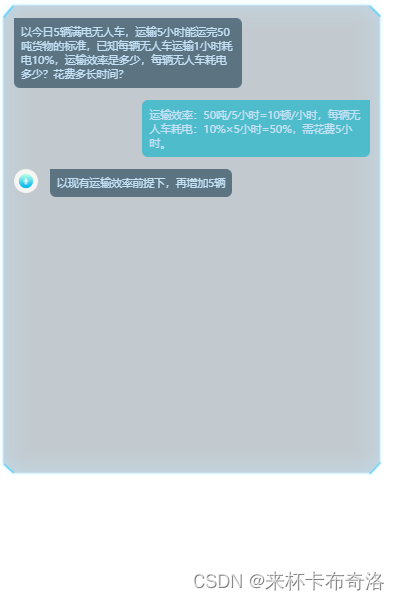
        "以今日5辆满电无人车,运输5小时能运完50吨货物的标准,已知每辆无人车运输1小时耗电10%,运输效率是多少,每辆无人车耗电多少?花费多长时间?",
        "运输效率:50吨/5小时=10顿/小时,每辆无人车耗电:10%×5小时=50%,需花费5小时。",
        "以现有运输效率前提下,再增加5辆无人运输车,完成共计150吨物资的运输任务,整体效率会提高到多少?每辆无人车耗电又是多少?共花费多长时间?",
        "增加到10辆无人车,完成共计150吨物资运输任务,整体效率会提高到15顿/小时,每辆无人车耗电百分比是15%。运完150吨的话,总共要耗用1.5小时。",
        "我来想想是否确认执行此调配操作?",
        "您好,请您慎重考虑。我们将根据您的确认来决定是否执行此调配操作。",
        "是"
      ],
      chatList: []
    };
  },
  mounted() {
    this.initGPT();
  },
  methods: {
    // 延时函数
    sleep(delaytime = 10000) {
      return new Promise(resolve => setTimeout(resolve, delaytime));
    },
    // 同步遍历,自定义延时时间
    async delayDo(
      iterList,
      callback = data => console.log(`数据:${data}`),
      delaytimeList
    ) {
      let len = iterList.length;
      for (let i = 0; i < len; i++) {
        callback(iterList[i], i);

        await this.sleep(delaytimeList[i]);
      }
    },
    // 逐字显示内容
    getChatContent(text, index) {
      this.timer = setInterval(() => {
        this.textCount++;

        if (this.textCount == text.length + 1) {
          this.textCount = 0;
          this.chatList.splice(index, 1, { content: text, status: false });
          clearInterval(this.timer);

          return;
        }

        // 取字符串子串
        let nowStr = text.substring(0, this.textCount);
        this.chatList.splice(index, 1, { content: nowStr, status: true });
      }, 200);
    },
    // 点击开始聊天
    initGPT() {
      // const delaytimeList = [11000, 8000, 6000, 15000, 4000];
      const delaytimeList = [16000, 11000, 16000, 16000, 5000, 7000];

      this.delayDo(
        this.chatBaseList,
        (item, i) => {
          this.getChatContent(item, i);
        },
        delaytimeList
      );
    }
  }
};
</script>

<style lang="scss" scoped>
.chat-gpt {
  width: 33rem;
  height: 43rem;

  .chat-dialog {
    position: relative;
    height: 43rem;
    background: 0/33rem url("../../public/img/chat-bg.png") no-repeat;
    overflow: hidden;

    .close-icon {
      position: absolute;
      top: 1rem;
      right: 1rem;
      width: 3.4rem;
      height: 3.4rem;

      img {
        width: 100%;
        height: 100%;
      }
    }

    .chat-list {
      display: flex;
      flex-direction: column;
      width: 90%;
      margin: 0 auto;
      margin-top: 2rem;
      overflow: auto;

      >div {
        display: flex;
        margin-top: 1rem;

        >div {
          max-width: 19rem;
          padding: 0.6rem;
          opacity: 0.8;

          font-size: 0.9rem;
          font-family: FZLanTingHei-L-GBK;
          font-weight: 400;
          color: #c5e7ff;
          text-align: start;
        }

        .odd {
          align-self: flex-start;
          background: #435e6f;
          border-radius: 0px 16px 16px 16px;
        }

        .even {
          align-self: flex-end;
          background: #31b8c8;
          border-radius: 16px 0px 16px 16px;
        }

        img {
          width: 2rem;
          height: 2rem;
          margin-right: 1rem;
        }
      }

      >div:nth-of-type(odd) {
        align-self: flex-start;
      }

      >div:nth-of-type(even) {
        align-self: flex-end;
      }
    }
  }

  .chat-tips {
    display: flex;
    height: 5.82rem;
    margin-top: 1rem;

    .gpt-icon {
      height: 100%;

      img {
        height: 100%;
      }
    }
  }
}
</style>
chatgpt 聊天效果
是的,我知道最好使用webmock,但我想知道如何在RSpec中模拟此方法:defmethod_to_testurl=URI.parseurireq=Net::HTTP::Post.newurl.pathres=Net::HTTP.start(url.host,url.port)do|http|http.requestreq,foo:1endresend这是RSpec:let(:uri){'http://example.com'}specify'HTTPcall'dohttp=mock:httpNet::HTTP.stub!(:start).and_yieldhttphttp.shou
我想在一个没有Sass引擎的类中使用Sass颜色函数。我已经在项目中使用了sassgem,所以我认为搭载会像以下一样简单:classRectangleincludeSass::Script::FunctionsdefcolorSass::Script::Color.new([0x82,0x39,0x06])enddefrender#hamlengineexecutedwithcontextofself#sothatwithintemlateicouldcall#%stop{offset:'0%',stop:{color:lighten(color)}}endend更新:参见上面的#re
我正在尝试用ruby中的gsub函数替换字符串中的某些单词,但有时效果很好,在某些情况下会出现此错误?这种格式有什么问题吗NoMethodError(undefinedmethod`gsub!'fornil:NilClass):模型.rbclassTest"replacethisID1",WAY=>"replacethisID2andID3",DELTA=>"replacethisID4"}end另一个模型.rbclassCheck 最佳答案 啊,我找到了!gsub!是一个非常奇怪的方法。首先,它替换了字符串,所以它实际上修改了
我有一个用户工厂。我希望默认情况下确认用户。但是鉴于unconfirmed特征,我不希望它们被确认。虽然我有一个基于实现细节而不是抽象的工作实现,但我想知道如何正确地做到这一点。factory:userdoafter(:create)do|user,evaluator|#unwantedimplementationdetailshereunlessFactoryGirl.factories[:user].defined_traits.map(&:name).include?(:unconfirmed)user.confirm!endendtrait:unconfirmeddoenden
我有一些代码在几个不同的位置之一运行:作为具有调试输出的命令行工具,作为不接受任何输出的更大程序的一部分,以及在Rails环境中。有时我需要根据代码的位置对代码进行细微的更改,我意识到以下样式似乎可行:print"Testingnestedfunctionsdefined\n"CLI=trueifCLIdeftest_printprint"CommandLineVersion\n"endelsedeftest_printprint"ReleaseVersion\n"endendtest_print()这导致:TestingnestedfunctionsdefinedCommandLin
英文版英文链接关注公众号在“亚特兰蒂斯的回声”中踏上一段难忘的冒险之旅,深入未知的海洋深处。足智多谋的考古学家AriaSeaborne偶然发现了一件古代神器,揭示了一张通往失落之城亚特兰蒂斯的隐藏地图。在她神秘的导师内森·兰登教授的指导和勇敢的冒险家亚历克斯·默瑟的帮助下,阿丽亚开始了一段危险的旅程,以揭开这座传说中城市的真相。他们的冒险之旅带领他们穿越险恶的大海、神秘的岛屿和充满陷阱和谜语的致命迷宫。随着Aria潜在的魔法能力的觉醒,她被睿智勇敢的QueenNeria的幻象所指引,她让她为即将到来的挑战做好准备。三人组揭开亚特兰蒂斯令人惊叹的隐藏文明,并了解到邪恶的巫师马拉卡勋爵试图利用其古
如何在Ruby中按名称传递函数?(我使用Ruby才几个小时,所以我还在想办法。)nums=[1,2,3,4]#Thisworks,butismoreverbosethanI'dlikenums.eachdo|i|putsiend#InJS,Icouldjustdosomethinglike:#nums.forEach(console.log)#InF#,itwouldbesomethinglike:#List.iternums(printf"%A")#InRuby,IwishIcoulddosomethinglike:nums.eachputs在Ruby中能不能做到类似的简洁?我可以只
华为OD机试题本篇题目:明明的随机数题目输入描述输出描述:示例1输入输出说明代码编写思路最近更新的博客华为od2023|什么是华为od,od薪资待遇,od机试题清单华为OD机试真题大全,用Python解华为机试题|机试宝典【华为OD机试】全流程解析+经验分享,题型分享,防作弊指南华为o
C#实现简易绘图工具一.引言实验目的:通过制作窗体应用程序(C#画图软件),熟悉基本的窗体设计过程以及控件设计,事件处理等,熟悉使用C#的winform窗体进行绘图的基本步骤,对于面向对象编程有更加深刻的体会.Tutorial任务设计一个具有基本功能的画图软件**·包括简单的新建文件,保存,重新绘图等功能**·实现一些基本图形的绘制,包括铅笔和基本形状等,学习橡皮工具的创建**·设计一个合理舒适的UI界面**注明:你可能需要先了解一些关于winform窗体应用程序绘图的基本知识,以及关于GDI+类和结构的知识二.实验环境Windows系统下的visualstudio2017C#窗体应用程序三.
说在前面这部分我本来是合为一篇来写的,因为目的是一样的,都是通过独立按键来控制LED闪灭本质上是起到开关的作用,即调用函数和中断函数。但是写一篇太累了,我还是决定分为两篇写,这篇是调用函数篇。在本篇中你主要看到这些东西!!!1.调用函数的方法(主要讲语法和格式)2.独立按键如何控制LED亮灭3.程序中的一些细节(软件消抖等)1.调用函数的方法思路还是比较清晰地,就是通过按下按键来控制LED闪灭,即每按下一次,LED取反一次。重要的是,把按键与LED联系在一起。我打算用K1来作为开关,看了一下开发板原理图,K1连接的是单片机的P31口,当按下K1时,P31是与GND相连的,也就是说,当我按下去时
