1、常用Linux命令
2、Linux下脚本编写
3、windows下CMD常用命令
文章目录
常用系统变量
$HOME、$PWD、$SHELL、$USER、$PATH等。
[root@VM-0-9-centos ~]# echo $HOME
/root
[root@VM-0-9-centos ~]#
显示当前所有Shell变量:set
[root@VM-0-9-centos ~]# set
BASH=/bin/bash
BASH_ALIASES=()
BASH_ARGC=()
BASH_ARGV=()
基本语法
# 定义变量
A=5
#	撤销变量
unset A
#	静态变量
readonly B=3
静态变量,不能unset
[root@VM-0-9-centos ~]# readonly B=2
[root@VM-0-9-centos ~]# unset B
-bash: unset: B: cannot unset: readonly variable
静态变量,不能重新赋值
[root@VM-0-9-centos ~]# readonly C=3
[root@VM-0-9-centos ~]# echo $C
3
[root@VM-0-9-centos ~]# C=4
-bash: C: readonly variable
[root@VM-0-9-centos ~]# echo $C
3
[root@VM-0-9-centos ~]#
变量默认为字符串,无法进行数值计算
[root@VM-0-9-centos ~]# D=1+2
[root@VM-0-9-centos ~]# echo $D
1+2
[root@VM-0-9-centos ~]#
有空格,需要使用双引号或单引号括起来
D="I love banzhang"
全局变量
export 变量名
export E=3
1. $n
$n(功能描述:n为数字,$0代表该脚本名称,$1-
9
代表第一到第九个参数,十以上的参数,十以上的参数需要用大括号包含,如
9代表第一到第九个参数,十以上的参数,十以上的参数需要用大括号包含,如
9代表第一到第九个参数,十以上的参数,十以上的参数需要用大括号包含,如{10})
新建脚本parameter.sh
#!/bin/bash
echo '==========$n=========='
echo $0	# 文件名
echo $1 # 第1个入参
echo $2 # 第2个入参
执行脚本,并传入参数
[root@VM-0-9-centos ~]# ./parameter.sh 1 2 3 4
==========$n==========
./parameter.sh
1
2
[root@VM-0-9-centos ~]#
2. $#
$#:获取所有输入参数个数,常用于循环,判断参数的个数是否正确以及加强脚本的健壮性。
echo '==========$#=========='
echo $#
输入参数
[root@VM-0-9-centos ~]# ./parameter.sh a b c d e f
==========$#==========
6
[root@VM-0-9-centos ~]#
3. ∗ 、 *、 ∗、@
$*:这个变量代表命令行中所有的参数,$*把所有的参数看成一个整体
$@:这个变量也代表命令行中所有的参数,不过$@把每个参数区分对待
echo '==========$*=========='
echo $*
echo '==========$@=========='
echo $@
输入参数
[root@VM-0-9-centos ~]# ./parameter.sh a b c d e f
==========$*==========
a b c d e f
==========$@==========
a b c d e f
[root@VM-0-9-centos ~]#
4. $?
$?
最后一次执行的命令的返回状态。
如果这个变量的值为0,证明上一个命令正确执行;如果这个变量的值为非0(具体是哪个数,由命令自己来决定),则证明上一个命令执行不正确了
[root@VM-0-9-centos ~]# echo "hello"
hello
[root@VM-0-9-centos ~]# echo $?
0
[root@VM-0-9-centos ~]#
基本语法
“$((运算式))” 或 “$[运算式]”
[root@VM-0-9-centos ~]# echo $[(2+3)*4]
20
[root@VM-0-9-centos ~]#
-eq:等于(equal)-ne:不等于(not equal)-lt:小于(less than)-le:小于等于(less equal)-gt:大于(greater than)-ge:大于等于(greater equal)# 判断23是否大于10
[root@VM-0-9-centos ~]# [ 23 -ge 10 ]
[root@VM-0-9-centos ~]# echo $?
0
[root@VM-0-9-centos ~]#
-r:有读的权限(read)-w:有写的权限(write)-x:有执行的权限(execute# 判断是否有写权限(主要用空格间隔)
[root@VM-0-9-centos ~]# [ -w nohup.out ]
[root@VM-0-9-centos ~]# echo $?
0
[root@VM-0-9-centos ~]#
-e:文件存在(existence)-f:文件存在并且是一个常规的文件(file)-d:文件存在并且是一个目录(directory)# 查询文件是否存在
[root@VM-0-9-centos ~]# [ -e /root/nohup.out ]
[root@VM-0-9-centos ~]# echo $?
0
[root@VM-0-9-centos ~]#
&&:表示前一条命令执行成功时,才执行后一条命令
||:表示上一条命令执行失败后,才执行下一条命令
# 执行成功
[root@VM-0-9-centos ~]# [ atguigu ] && echo OK || echo notOK
OK
#	执行失败
[root@VM-0-9-centos ~]# [ ] && echo OK || echo notOK
notOK
注意事项:
[ 条件判断式 ],中括号和条件判断式之间必须有空格。
if后要有空格。
语法:单分支
#	格式一
if [ 条件判断 ]; then
	程序
fi

# 格式二
if [条件判断]
then
	程序
fi
语法:多分支
if [ 条件判断式 ]
then
	程序
elif [ 条件判断式 ]
then
	程序
else
	程序
fi
案例:
#! /bin/bash
if [ $1 -eq 1 ]
then
        echo "条件一"
elif [ $1 -eq 2 ]
then
        echo "条件二"
fi
执行
[root@VM-0-9-centos shell]# sh ./if.sh 1
条件一
[root@VM-0-9-centos shell]# sh ./if.sh 2
条件二
[root@VM-0-9-centos shell]#
注意事项:
case行尾必须为单词in,每一个模式匹配必须以右括号)结束。;;表示命令序列结束,相当于java中的break。*)表示默认模式,相当于java中的default。基本语法:
case $ 变量名 in
"值1")
	如果变量=1,则执行程序1
;;
"值2")
	如果变量=2,则执行程序2
;;
*)
如果都不符合以上,则执行此程序
;;
esac
案例
#! /bin/bash
case $1 in
"1")
        echo "变量一"
;;
"2")
        echo "变量二"
;;
*)
        echo "其它"
;;
esac
执行
[root@VM-0-9-centos shell]# sh case.sh 1
变量一
[root@VM-0-9-centos shell]# sh case.sh 2
变量二
[root@VM-0-9-centos shell]# sh case.sh 3
其它
[root@VM-0-9-centos shell]#
1. 基本语法—1
for ((初始值;循环控制变量;变量变化))
do
	程序
done
案例
#! /bin/bash

sum=0
for((i=0;i<=100;i++))
do
        sum=$[$sum+$i]
done
echo $sum
执行
[root@VM-0-9-centos shell]# sh ./for1.sh
5050
[root@VM-0-9-centos shell]#
2. 基本语法—2
for 变量 in 值1 值2 值3...
do
	程序
done
案例
#! /bin/bash
# 打印数字

for i in 变量1 变量2 变量3
do
        echo "ban zhang : $i"
done
执行
[root@VM-0-9-centos shell]# sh ./for2.sh
ban zhang : 变量1
ban zhang : 变量2
ban zhang : 变量3
[root@VM-0-9-centos shell]#
案例—比较加""区别
#! /bin/bash
echo '======================$*======================'
for i in $*
do
        echo "one: $i"
done

echo '======================$@======================'
for j in $@
do
        echo "two $j"
done

# 加"",则$*会看成1个整体。
echo '===================$*+ ""====================='
for ii in "$*"
do
        echo "one: $ii"
done

# 加"",会将参数分开执行。
echo '===================$@+ ""====================='
for jj in "$@"
do
        echo "two $jj"
done
执行
[root@VM-0-9-centos shell]# sh ./for3.sh cls mly wls
======================$*======================
one: cls
one: mly
one: wls
======================$@======================
two cls
two mly
two wls
===================$*+ ""=====================
one: cls mly wls
===================$@+ ""=====================
two cls
two mly
two wls
[root@VM-0-9-centos shell]#
语法
while [ 条件判断式 ]
do
	程序
done
案例
#! /bin/bash
sum=0
i=1
while [ $i -le 100 ]
do
        sum=$[ $sum+$i ]
        i=$[ $i+1 ]
done
echo $sum
执行
[root@VM-0-9-centos shell]# sh ./while.sh
5050
[root@VM-0-9-centos shell]#
语法
read  (选项)  (参数)
①选项:
-p:指定读取值时的提示符;
-t:指定读取值时等待的时间(秒)如果-t不加表示一直等待
②参数
	变量:指定读取值的变量名
案例:
#! /bin/bash
read -t 7 -p "Enter your name:" NN
echo $NN
执行
[root@VM-0-9-centos shell]# sh ./read.sh
Enter your name:Mytest
Mytest
[root@VM-0-9-centos shell]#
语法:
输出最后一个/之后内容
suffix:去除内容
basename [string / pathname] [suffix]
案例
[root@VM-0-9-centos ~]# basename /data/test/my.txt
my.txt
[root@VM-0-9-centos ~]# basename /data/test/my.txt .txt
my
[root@VM-0-9-centos ~]# basename /data/test/my.txt xt
my.t
[root@VM-0-9-centos ~]#
取文件绝对路径
从给定的包含绝对路径的文件名中去除文件名(非目录的部分),然后返回剩下的路径(目录的部分)
[root@VM-0-9-centos ~]# dirname /data/test/my.txt
/data/test
[root@VM-0-9-centos ~]#
$?系统变量获得。return。[ function ] funname[()]
{
Action;
[return int;]
}
案例
#! /bin/bash
function sum()
{
        s=0
        s=$[$1+$2]
        echo "$s"
#	自定义函数返回值
return 5;
}
# 调用sum函数
sum  1 2;
执行
[root@VM-0-9-centos shell]# sh ./fun.sh
3
[root@VM-0-9-centos shell]# echo $?
5
[root@VM-0-9-centos shell]#
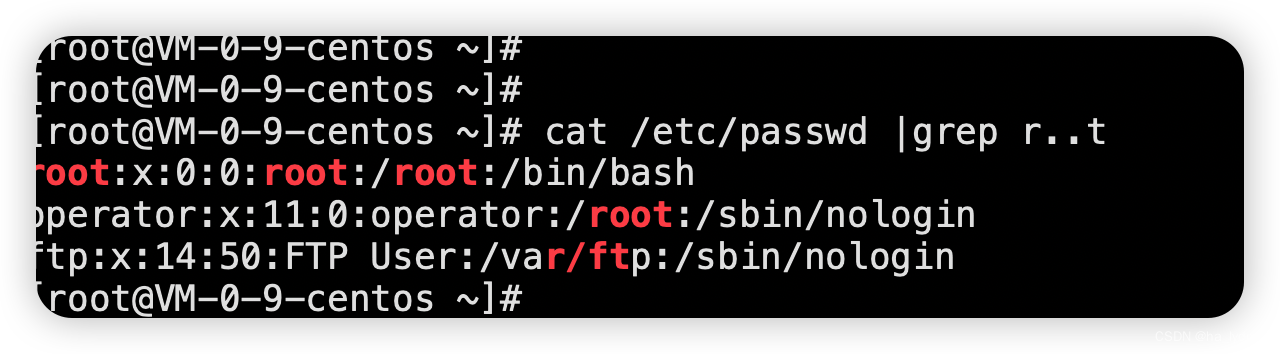
在Linux中,grep,sed,awk等命令都支持通过正则表达式进行模式匹配。
cat /etc/passwd |grep r..t
#!/bin/bash
# 指定启动环境
ENV=prod
nohup /et/profile/jdk-1.8/java -jar -Xms8g -Xmx8g -Dfile.encoding=utf-8 demo-start-jar.jar  --spring.profiles.active=$ENV >> nohup.out 2>&1 &
nohup .... &:后台,不挂断地运行命令。-Xms8g :堆最小内存-Xmx8g:堆最大内存-Dfile.encoding=utf-8:--spring.profiles.active=$ENV:2>&1:错误输出2重定向到标准输出1。Linux系统预留可三个文件描述符:0、1和2,他们的意义如下所示:
0——标准输入(stdin)
1——标准输出(stdout)
2——标准错误(stderr)
我正在寻找执行以下操作的正确语法(在Perl、Shell或Ruby中):#variabletoaccessthedatalinesappendedasafileEND_OF_SCRIPT_MARKERrawdatastartshereanditcontinues. 最佳答案 Perl用__DATA__做这个:#!/usr/bin/perlusestrict;usewarnings;while(){print;}__DATA__Texttoprintgoeshere 关于ruby-如何将脚
我想用ruby编写一个小的命令行实用程序并将其作为gem分发。我知道安装后,Guard、Sass和Thor等某些gem可以从命令行自行运行。为了让gem像二进制文件一样可用,我需要在我的gemspec中指定什么。 最佳答案 Gem::Specification.newdo|s|...s.executable='name_of_executable'...endhttp://docs.rubygems.org/read/chapter/20 关于ruby-在Ruby中编写命令行实用程序
我有一个在Linux服务器上运行的ruby脚本。它不使用rails或任何东西。它基本上是一个命令行ruby脚本,可以像这样传递参数:./ruby_script.rbarg1arg2如何将参数抽象到配置文件(例如yaml文件或其他文件)中?您能否举例说明如何做到这一点?提前谢谢你。 最佳答案 首先,您可以运行一个写入YAML配置文件的独立脚本:require"yaml"File.write("path_to_yaml_file",[arg1,arg2].to_yaml)然后,在您的应用中阅读它:require"yaml"arg
这可能是个愚蠢的问题。但是,我是一个新手......你怎么能在交互式rubyshell中有多行代码?好像你只能有一条长线。按回车键运行代码。无论如何我可以在不运行代码的情况下跳到下一行吗?再次抱歉,如果这是一个愚蠢的问题。谢谢。 最佳答案 这是一个例子:2.1.2:053>a=1=>12.1.2:054>b=2=>22.1.2:055>a+b=>32.1.2:056>ifa>b#Thecode‘if..."startsthedefinitionoftheconditionalstatement.2.1.2:057?>puts"f
我想在Ruby中创建一个用于开发目的的极其简单的Web服务器(不,不想使用现成的解决方案)。代码如下:#!/usr/bin/rubyrequire'socket'server=TCPServer.new('127.0.0.1',8080)whileconnection=server.acceptheaders=[]length=0whileline=connection.getsheaders想法是从命令行运行这个脚本,提供另一个脚本,它将在其标准输入上获取请求,并在其标准输出上返回完整的响应。到目前为止一切顺利,但事实证明这真的很脆弱,因为它在第二个请求上中断并出现错误:/usr/b
//1.验证返回状态码是否是200pm.test("Statuscodeis200",function(){pm.response.to.have.status(200);});//2.验证返回body内是否含有某个值pm.test("Bodymatchesstring",function(){pm.expect(pm.response.text()).to.include("string_you_want_to_search");});//3.验证某个返回值是否是100pm.test("Yourtestname",function(){varjsonData=pm.response.json
我从Ubuntu服务器上的RVM转移到rbenv。当我使用RVM时,使用bundle没有问题。转移到rbenv后,我在Jenkins的执行shell中收到“找不到命令”错误。我内爆并删除了RVM,并从~/.bashrc'中删除了所有与RVM相关的行。使用后我仍然收到此错误:rvmimploderm~/.rvm-rfrm~/.rvmrcgeminstallbundlerecho'exportPATH="$HOME/.rbenv/bin:$PATH"'>>~/.bashrcecho'eval"$(rbenvinit-)"'>>~/.bashrc.~/.bashrcrbenvversions
Region是HBase数据管理的基本单位,region有一点像关系型数据的分区。region中存储这用户的真实数据,而为了管理这些数据,HBase使用了RegionSever来管理region。Region的结构hbaseregion的大小设置默认情况下,每个Table起初只有一个Region,随着数据的不断写入,Region会自动进行拆分。刚拆分时,两个子Region都位于当前的RegionServer,但处于负载均衡的考虑,HMaster有可能会将某个Region转移给其他的RegionServer。RegionSplit时机:当1个region中的某个Store下所有StoreFile
有没有一种简单的方法可以判断ruby脚本是否已经在运行,然后适本地处理它?例如:我有一个名为really_long_script.rb的脚本。我让它每5分钟运行一次。当它运行时,我想看看之前运行的是否还在运行,然后停止第二个脚本的执行。有什么想法吗? 最佳答案 ps是一种非常糟糕的方法,并且可能会出现竞争条件。传统的Unix/Linux方法是将PID写入文件(通常在/var/run中)并在启动时检查该文件是否存在。例如pid文件位于/var/run/myscript.pid然后你会在运行程序之前检查它是否存在。有一些技巧可以避免
我有一个问题。我想从另一个ruby脚本运行一个ruby脚本并捕获它的输出信息,同时让它也输出到屏幕。亚军#!/usr/bin/envrubyprint"Enteryourpassword:"password=gets.chompputs"Hereisyourpassword:#{password}"我运行的脚本文件:开始.rboutput=`runner`putsoutput.match(/Hereisyour(password:.*)/).captures[0].to_s正如您在此处看到的那样,存在问题。在start.rb的第一行,屏幕是空的。我在运行程序中看不到“输入您的密
