目录
官方网址: firebase官网
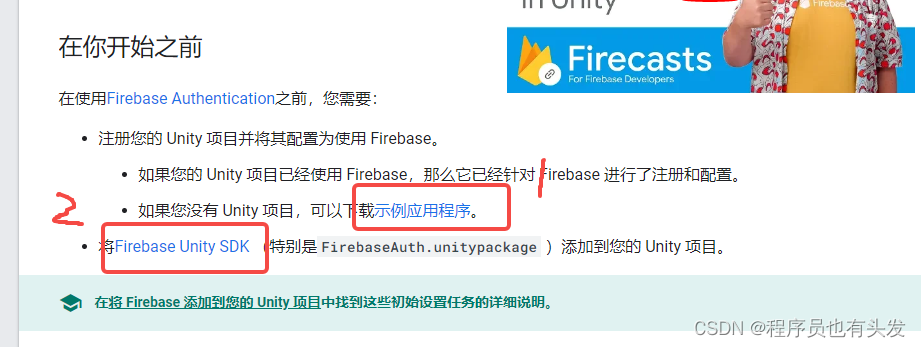
图片中1为demo地址,2为SDK包
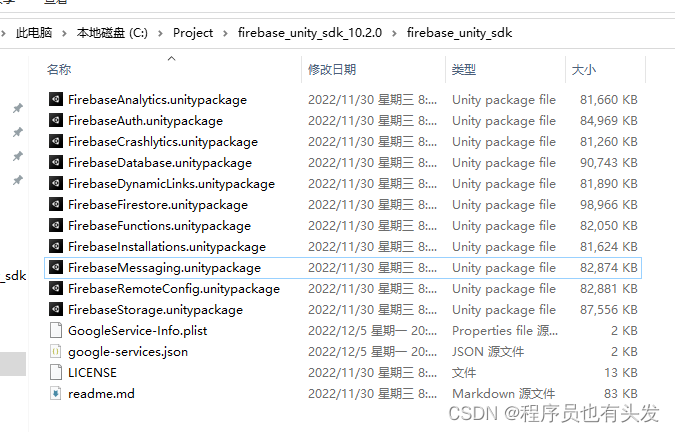
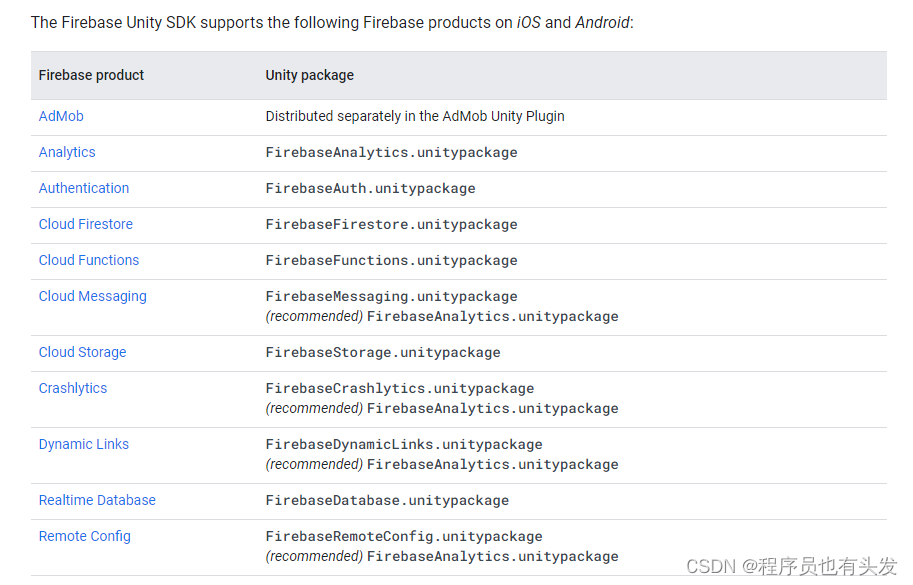
此为firebase的unity包,根据自身需求接入对应的,对应关系如下
public class FireBase : MonoBehaviour
{
    Firebase.FirebaseApp app;
    Firebase.Auth.FirebaseAuth auth;

    private bool firebaseInitialized;

    // Start is called before the first frame update
    IEnumerator Start()
    {
        InitializeFirebaseAndStart();
        while (!firebaseInitialized)
        {
            yield return null;
        }
        auth = Firebase.Auth.FirebaseAuth.DefaultInstance;
    }

	// 初始化firebase
    void InitializeFirebaseAndStart()
    {
        FirebaseApp.CheckAndFixDependenciesAsync().ContinueWithOnMainThread(task =>
        {
            var dependencyStatus = task.Result;
            if (dependencyStatus == DependencyStatus.Available)
            {
                firebaseInitialized = true;
                Debug.Log("firebase Initialized");
            }
            else
            {
                Debug.LogError("Could not resolve all Firebase dependencies: " + dependencyStatus);
                // Application.Quit();
            }
        });
    }
}
在此介绍三种第三方登录,根据官方文档提示,Apple、Google、Facebook 都需要再接入sdk获取token,然后使用firebase的验证获取firebase的token。
注意:本文介绍的是google登录,而非google-play-game登录
在此推荐一个插件 google-signin,地址为: google-signin
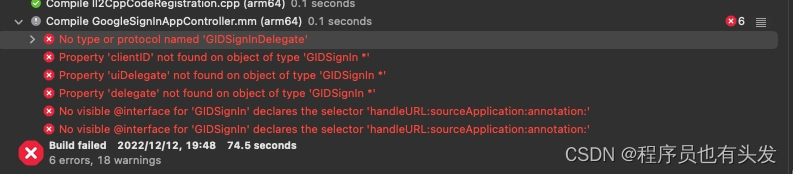
打包测试,Android测试成功,但是iOS会报如下错误
官方推荐是使用老版本,地址如下:https://github.com/googlesamples/google-signin-unity/issues/102,可供参考
因为我使用的sdk都是新版本,在此选择升级,升级后的地址如下
地址:使用google 6.0.0 以上版本地址
 GoogleSignIn.Configuration = new GoogleSignInConfiguration
 {
     RequestIdToken = true,
     // Copy this value from the google-service.json file.
     // oauth_client with type == 3
     //填入在配置谷歌项目SHA1值时给你的Client ID
     WebClientId = " "
 };
 public void GoogleLogin()
 {
     Debug.Log("Enter Google Script Login Method");
     Task<GoogleSignInUser> signIn = GoogleSignIn.DefaultInstance.SignIn();

     signIn.ContinueWithOnMainThread(task =>
     {
         if (task.IsCanceled)
         {
             Debug.Log("task.IsCanceled");
         }
         else if (task.IsFaulted)
         {
             Debug.Log("task.IsFaulted = " + task.Exception.Message);
         }
         else
         {
             var idToken = ((Task<GoogleSignInUser>)task).Result.IdToken;
             Debug.Log("idToken = " + idToken);
             Credential credential = Firebase.Auth.GoogleAuthProvider.GetCredential(idToken, null);
             CredentialSigin(credential);
         }
     });

 }
三种登录方式都用此方法验证
public void CredentialSigin(Credential credential)
{
   auth.SignInWithCredentialAsync(credential).ContinueWith(async authTask =>
   {
       if (authTask.IsCanceled)
       {
           Debug.Log("authTask.IsCanceled");
       // if (LoginResultManager.Instance != null)
       //     LoginResultManager.Instance.OpenLoginResult(false);
       // signInCompleted.SetCanceled();
       }
       else if (authTask.IsFaulted)
       {
           Debug.Log("authTask.IsFaulted");
       // if (LoginResultManager.Instance != null)
       //     LoginResultManager.Instance.OpenLoginResult(false);
       // signInCompleted.SetException(authTask.Exception);
       }
       else
       {
       // signInCompleted.SetResult(((Task<FirebaseUser>)authTask).Result);
           Firebase.Auth.FirebaseUser newUser = authTask.Result;
           Debug.Log(String.Format("User Login Successful : {0} ({1})", newUser.DisplayName, newUser.UserId));

           var token = await newUser.TokenAsync(true);
           Debug.Log("Firebase Token = " + token);

           // 访问服务器

           action_fbToken?.Invoke(token);

       }
   });
}
地址:facebook
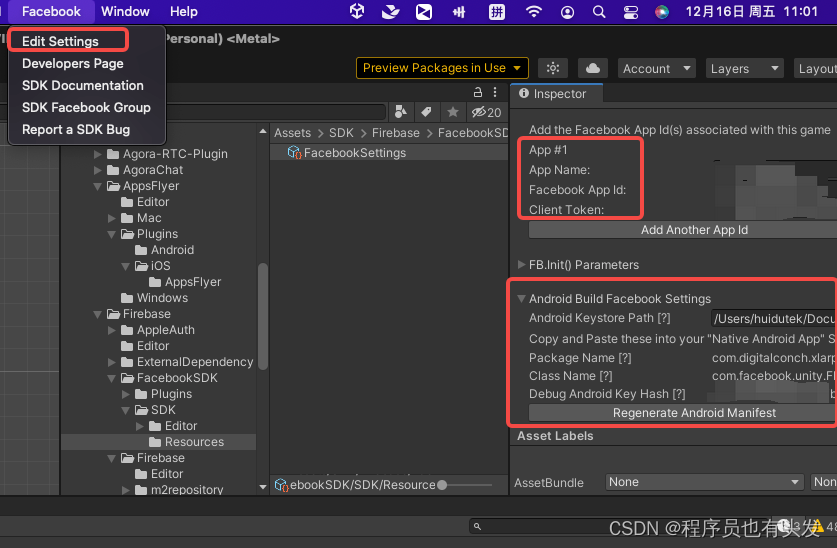
导入相关unity包后,根据下图所示填入信息
public void InitializeFacebook()
{
    if (!FB.IsInitialized)
    {
        // Initialize the Facebook SDK
        FB.Init(InitCallback, OnHideUnity);
    }
    else
    {
        // Already initialized, signal an app activation App Event
        FB.ActivateApp();
    }
}

private void InitCallback()
{
    if (FB.IsInitialized)
    {
        // Signal an app activation App Event
        FB.ActivateApp();
        // Continue with Facebook SDK
        // ...
    }
    else
    {
        Debug.Log("Failed to Initialize the Facebook SDK");
    }
}

private void OnHideUnity(bool isGameShown)
{
    if (!isGameShown)
    {
        // Pause the game - we will need to hide
        Time.timeScale = 0;
    }
    else
    {
        // Resume the game - we're getting focus again
        Time.timeScale = 1;
    }
}
public void FacebookLogin()
{
    if (FB.IsInitialized)
    {
        var perms = new List<string>() { "public_profile", "email" };
        FB.LogInWithReadPermissions(perms, AuthCallback);
    }
    else
    {
        Debug.Log("Not Init");
    }

}

private void AuthCallback(ILoginResult result)
{
    if (result.Error != null)
    {
        Debug.Log("Error: " + result.Error);
    }
    else
    {
        if (FB.IsLoggedIn)
        {
            // AccessToken class will have session details
            var aToken = Facebook.Unity.AccessToken.CurrentAccessToken;
            // Print current access token's User ID
            Debug.Log("aToken.UserId: " + aToken.UserId);
            // Print current access token's granted permissions
            foreach (string perm in aToken.Permissions)
            {
                Debug.Log("perm: " + perm);
            }
            var idToken = aToken.TokenString;

            Credential credential = Firebase.Auth.FacebookAuthProvider.GetCredential(idToken);
            CredentialSigin(credential);
        }
        else
        {
            Debug.Log("User cancelled login");
        }
    }
}
同Google登录接入的第四步
推荐使用此插件,此插件也是官方文档中提到的插件
GitHub地址: Sign in with Apple Unity Plugin
根据文档添加后处理文件
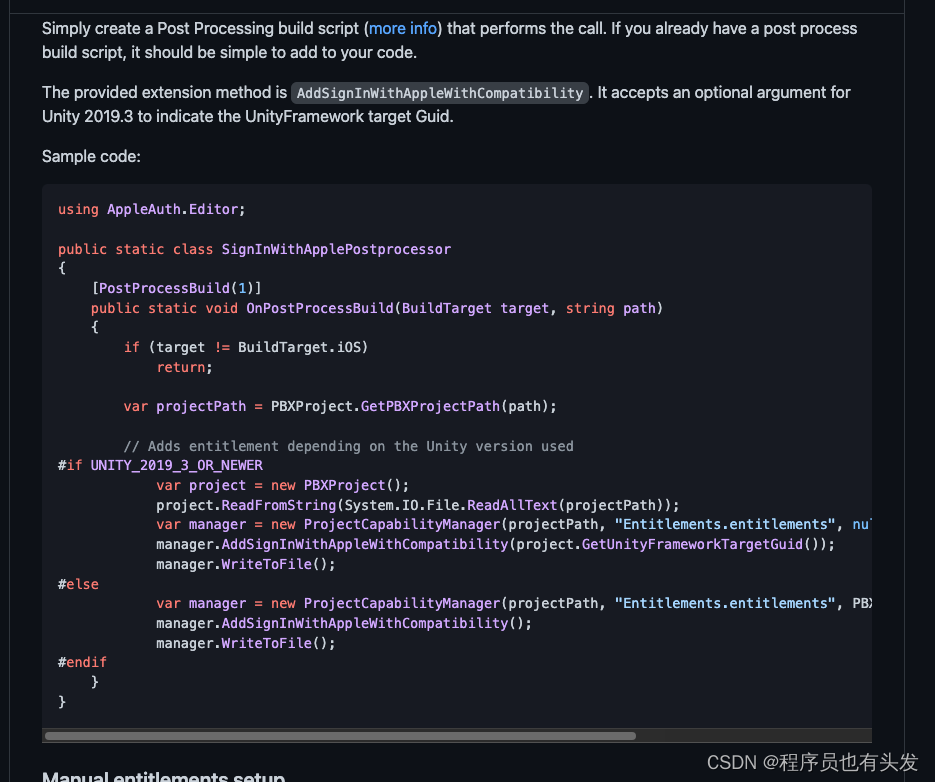
private IAppleAuthManager _appleAuthManager;

void InitializeApple()
{
    if (AppleAuthManager.IsCurrentPlatformSupported)
    {
        // Creates a default JSON deserializer, to transform JSON Native responses to C# instances
        var deserializer = new PayloadDeserializer();
        // Creates an Apple Authentication manager with the deserializer
        this._appleAuthManager = new AppleAuthManager(deserializer);
    }
}

void Update()
{
    // Updates the AppleAuthManager instance to execute
    // pending callbacks inside Unity's execution loop
    if (this._appleAuthManager != null)
    {
        this._appleAuthManager.Update();
    }
}
public void AppleLogin()
{
    var rawNonce = GenerateRandomString(32);
    var nonce = GenerateSHA256NonceFromRawNonce(rawNonce);
    var loginArgs = new AppleAuthLoginArgs(LoginOptions.IncludeEmail | LoginOptions.IncludeFullName, nonce);

    this._appleAuthManager.LoginWithAppleId(
        loginArgs,
        credential =>
        {
        // Obtained credential, cast it to IAppleIDCredential
            var appleIdCredential = credential as IAppleIDCredential;
            if (appleIdCredential != null)
            {
            // Apple User ID
            // You should save the user ID somewhere in the device
                var userId = appleIdCredential.User;
                Debug.Log("app userId = " + userId);
            // PlayerPrefs.SetString(AppleUserIdKey, userId);

            // Email (Received ONLY in the first login)
                var email = appleIdCredential.Email;
                Debug.Log("app email = " + email);

            // Full name (Received ONLY in the first login)
                var fullName = appleIdCredential.FullName;
                Debug.Log("app fullName = " + fullName);

            // Identity token
                var identityToken = Encoding.UTF8.GetString(
                    appleIdCredential.IdentityToken,
                    0,
                    appleIdCredential.IdentityToken.Length);

                Debug.Log("app identityToken = " + identityToken);

            // Authorization code
                var authorizationCode = Encoding.UTF8.GetString(
                    appleIdCredential.AuthorizationCode,
                    0,
                    appleIdCredential.AuthorizationCode.Length);

                Debug.Log("app authorizationCode = " + authorizationCode);

            // And now you have all the information to create/login a user in your system

                Credential FirebaseCredential = Firebase.Auth.OAuthProvider.GetCredential("apple.com", identityToken, rawNonce, authorizationCode);
                CredentialSigin(FirebaseCredential);
            }

        },
        error =>
        {
            var authorizationErrorCode = error.GetAuthorizationErrorCode();
            Debug.LogWarning("Sign in with Apple failed " + authorizationErrorCode.ToString() + " " + error.ToString());

        });
}
同Google登录接入的第四步
希望大家都可以成功接入,有任何问题欢迎评论区提问。
我有一个rubyonrails应用程序。我按照facebook的说明添加了一个像素。但是,要跟踪转化,Facebook要求您将页面置于达到预期结果时出现的转化中。即,如果我想显示客户已注册,我会将您注册后转到的页面作为成功对象进行跟踪。我的问题是,当客户注册时,在我的应用程序中没有登陆页面。该应用程序将用户带回主页。它在主页上显示了一条消息,所以我想看看是否有一种方法可以跟踪来自Controller操作而不是实际页面的转化。我需要计数的Action没有页面,它们是ControllerAction。是否有任何人都知道的关于如何执行此操作的gem、文档或最佳实践?这是进入布局文件的像素
?博客主页:https://xiaoy.blog.csdn.net?本文由呆呆敲代码的小Y原创,首发于CSDN??学习专栏推荐:Unity系统学习专栏?游戏制作专栏推荐:游戏制作?Unity实战100例专栏推荐:Unity实战100例教程?欢迎点赞?收藏⭐留言?如有错误敬请指正!?未来很长,值得我们全力奔赴更美好的生活✨------------------❤️分割线❤️-------------------------
本教程将在Unity3D中混合Optitrack与数据手套的数据流,在人体运动的基础上,添加双手手指部分的运动。双手手背的角度仍由Optitrack提供,数据手套提供双手手指的角度。 01 客户端软件分别安装MotiveBody与MotionVenus并校准人体与数据手套。MotiveBodyMotionVenus数据手套使用、校准流程参照:https://gitee.com/foheart_1/foheart-h1-data-summary.git02 数据转发打开MotiveBody软件的Streaming,开始向Unity3D广播数据;MotionVenus中设置->选项选择Unit
目录1.AdmobSDK下载地址2.将下载好的unityPackagesdk导入到unity里编辑 3.解析依赖到项目中
Unity自动旋转动画1.开门需要门把手先动,门再动2.关门需要门先动,门把手再动3.中途播放过程中不可以再次进行操作觉得太复杂?查看我的文章开关门简易进阶版效果:如果这个门可以直接打开的话,就不需要放置"门把手"如果门把手还有钥匙需要旋转,那就可以把钥匙放在门把手的"门把手",理论上是可以无限套娃的可调整参数有:角度,反向,轴向,速度运行时点击Test进行测试自己写的代码比较垃圾,命名与结构比较拉,高手轻点喷,新手有类似的需求可以拿去做参考上代码usingSystem.Collections;usingSystem.Collections.Generic;usingUnityEngine;u
我试图在我的网站上实现使用Facebook登录功能,但在尝试从Facebook取回访问token时遇到障碍。这是我的代码:ifparams[:error_reason]=="user_denied"thenflash[:error]="TologinwithFacebook,youmustclick'Allow'toletthesiteaccessyourinformation"redirect_to:loginelsifparams[:code]thentoken_uri=URI.parse("https://graph.facebook.com/oauth/access_token
修改(澄清问题)我已经花了几天时间试图弄清楚如何从Facebook游戏中抓取特定信息;但是,我遇到了一堵又一堵砖墙。据我所知,主要问题如下。我可以使用Chrome的检查元素工具手动查找我需要的html-它似乎位于iframe中。但是,当我尝试抓取该iframe时,它是空的(属性除外):如果我使用浏览器的“查看页面源代码”工具,这与我看到的输出相同。我不明白为什么我看不到iframe中的数据。答案不是它是由AJAX之后添加的。(我知道这既是因为“查看页面源代码”可以读取Ajax添加的数据,也是因为我有b/c我一直等到我可以看到数据页面之后才抓取它,但它仍然不存在)。发生这种情况是因为
很高兴看到google代码:google-api-ruby-client项目,因为这对我来说意味着Ruby人员可以使用GoogleAPI-s来完善代码。虽然我现在很困惑,因为给出的唯一示例使用Buzz,并且根据我的实验,Google翻译(v2)api的行为必须与google-api-ruby-client中的Buzz完全不同。.我对“Explorer”演示示例很感兴趣——但据我所知,它并不是一个探索器。它所做的只是调用一个Buzz服务,然后浏览它已经知道的关于Buzz服务的事情。对我来说,Explorer应该让您“发现”所公开的服务和方法/功能,而不一定已经知道它们。我很想听听使用这个
我有两个文本文件,master.txt和926.txt。如果926.txt中有一行不在master.txt中,我想写入一个新文件notinbook.txt。我写了我能想到的最好的东西,但考虑到我是一个糟糕的/新手程序员,它失败了。这是我的东西g=File.new("notinbook.txt","w")File.open("926.txt","r")do|f|while(line=f.gets)x=line.chompifFile.open("master.txt","w")do|h|endwhile(line=h.gets)ifline.chomp!=xputslineendende
我需要从站点抓取数据,但它需要我先登录。我一直在使用hpricot成功地抓取其他网站,但我是使用mechanize的新手,我真的对如何使用它感到困惑。我看到这个例子经常被引用:require'rubygems'require'mechanize'a=Mechanize.newa.get('http://rubyforge.org/')do|page|#Clicktheloginlinklogin_page=a.click(page.link_with(:text=>/LogIn/))#Submittheloginformmy_page=login_page.form_with(:act