目录
前置章节:
[Unity] 使用GraphView实现一个可视化节点的事件行为树系统(序章/Github下载)_Sugarzo的博客-CSDN博客_unity graphview
[Unity] GraphView 可视化节点的事件行为树(一) Runtime Node_Sugarzo的博客-CSDN博客
[Unity] GraphView 可视化节点的事件行为树(二) UI Toolkit介绍,制作事件行为树的UI_Sugarzo的博客-CSDN博客
在前面两个章节中,我们实现了两个部分的内容:Runtime部分的节点逻辑、UI Toolkit绘制Editor UI。这一章节将会用到GraphView框架,完成我们制作的事件行为树剩下的所有内容。
GraphView是Unity内置的节点绘制系统,实际上Unity里内置的Visual Scripting(可视化脚本编辑),URP中的ShaderGraph,都是GraphView制作。
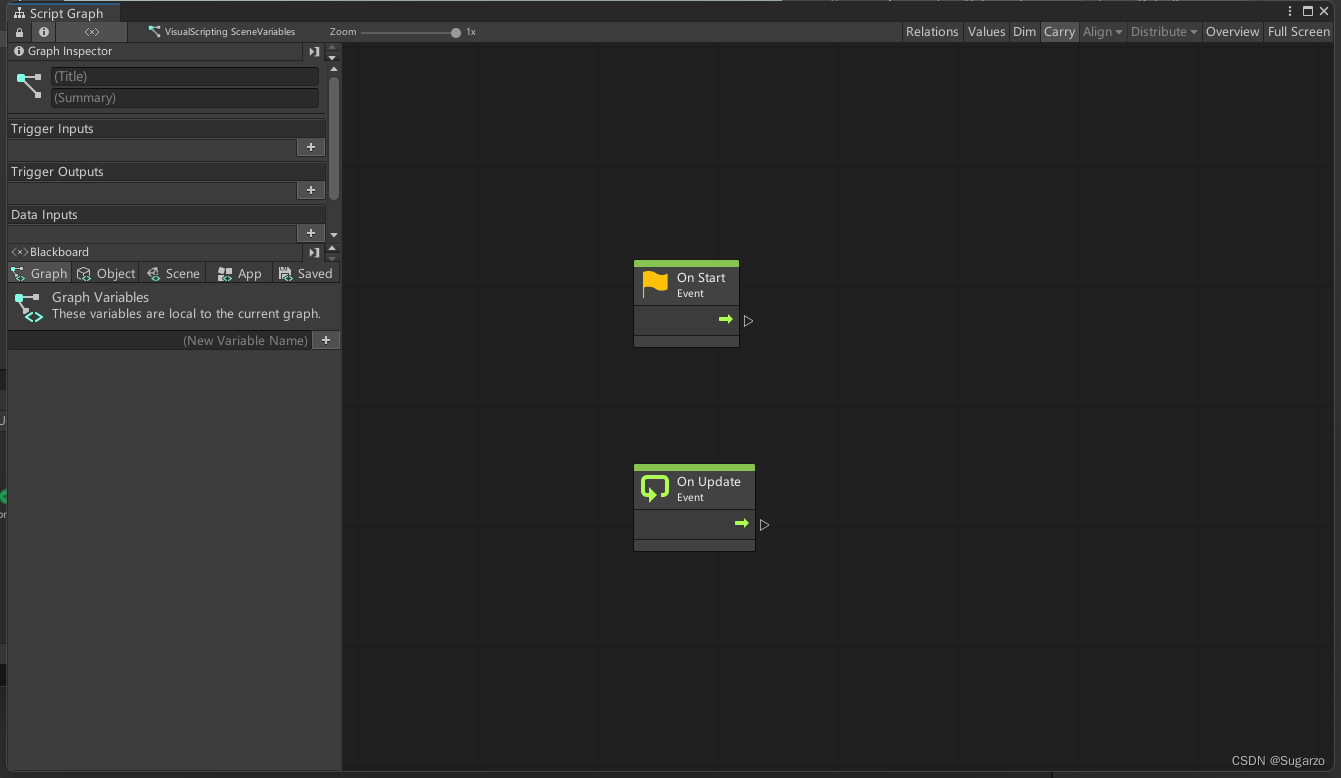
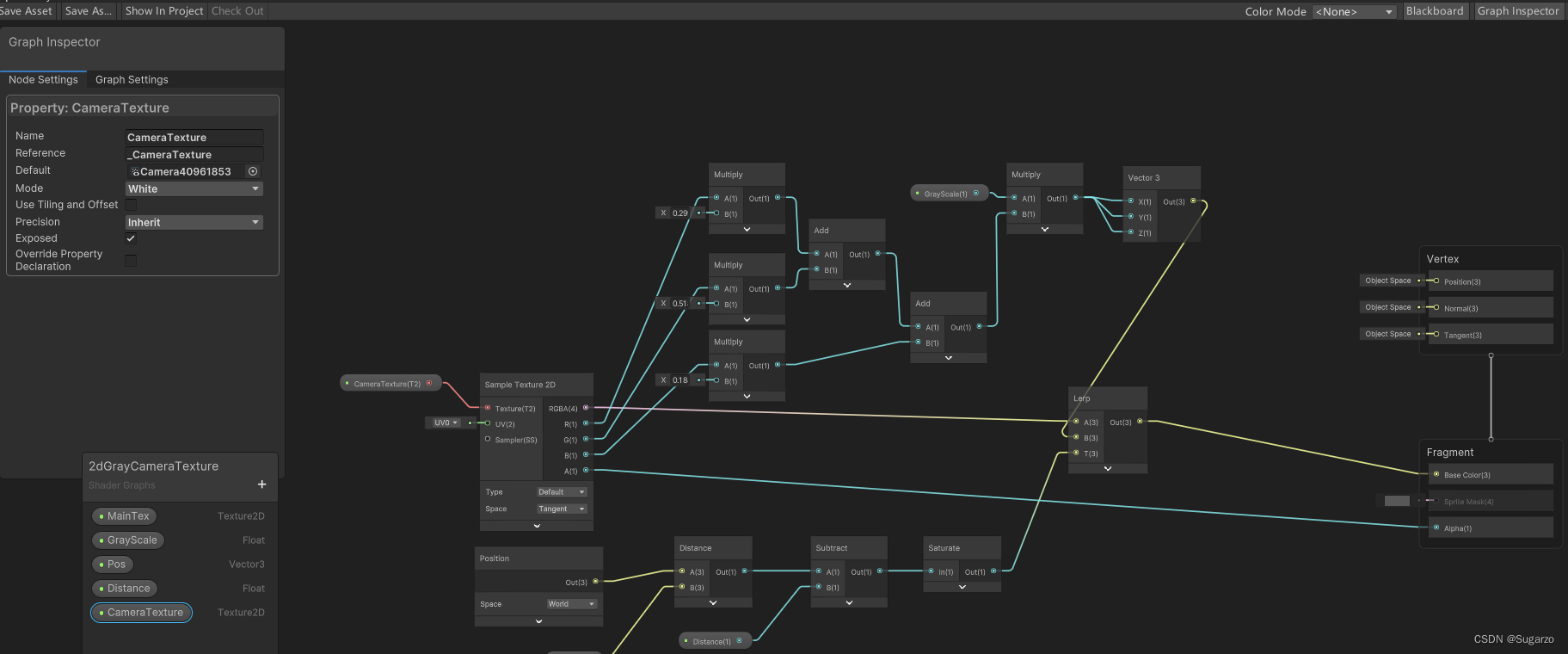
GraphView也属于UI Toolkit的一部分。在Unity 2021版本中,GraphView是Experimental部分。需要引入命名空间:UnityEditor.Experimental.GraphView
using UnityEditor.Experimental.GraphView;
using UnityEngine;
using UnityEngine.UIElements;

public class FlowChartView : GraphView
{
    public new class UxmlFactory : UxmlFactory<FlowChartView, GraphView.UxmlTraits> { }
}
回顾一下我们前两节的内容,给这一部分留下了什么内容。我们用UI Builder写了一个Editor窗口,里面有两个UI元素,是我们继承Visual Element新建的脚本元素。
FlowCharView是左边的Inspector窗口,该窗口的目的是显示Runtime的节点数据(这里的Inspector用的是unity IMGUI默认的Inspector绘制)
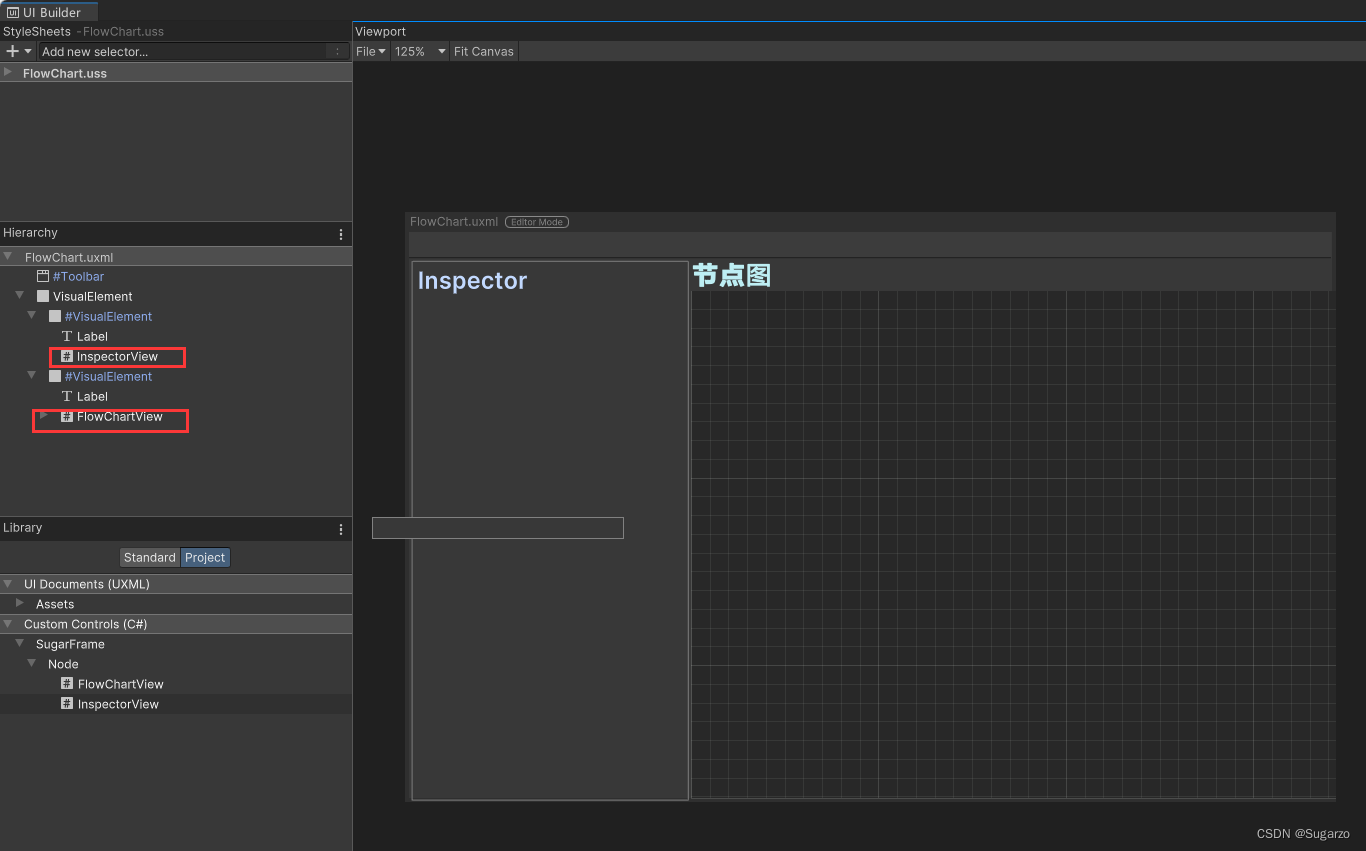
在Runtime部分,每个节点都是一个MonoBehaviour的脚本。忽视掉其他的Runtime逻辑,基类给Editor使用的数据只有:这个节点的位置(Vector2),以及它连接的下一个节点。
public abstract class NodeState : MonoBehaviour
    {
#if UNITY_EDITOR
        [HideInInspector]
        public Vector2 nodePos;
#endif
        //流向下一节点的流
        public MonoState nextFlow;
    }
了解了这些数据,我们就可以开始正式进入GraphView了。
创建脚本,继承GraphView.Node,这就是在GraphView中最基础的节点元素了。
在这里,我们先创建一个节点View的基类。
在下面的脚本里,一个节点View记录了三个数据:
1.具体关联到的Runtime节点(这里指的是前文提到的NodeState)
2.当被点击时触发的委托事件(这个委托要被转发到Inspector面板中)
3.给节点View创建端口函数(Port)
public class BaseNodeView : UnityEditor.Experimental.GraphView.Node
    {
        /// <summary>
        /// 点击该节点时被调用的事件,比如转发该节点信息到Inspector中显示
        /// </summary>
        public Action<BaseNodeView> OnNodeSelected;

        public TextField textField;
        public string GUID;

        public BaseNodeView() : base()
        {
            textField = new TextField();
            GUID = Guid.NewGuid().ToString();

        }
        // 为节点n创建input port或者output port
        // Direction: 是一个简单的枚举,分为Input和Output两种
        public Port GetPortForNode(BaseNodeView n, Direction portDir, Port.Capacity capacity = Port.Capacity.Single)
        {
            // Orientation也是个简单的枚举,分为Horizontal和Vertical两种,port的数据类型是bool
            return n.InstantiatePort(Orientation.Horizontal, portDir, capacity, typeof(bool));
        }

        //告诉Inspector去绘制该节点
        public override void OnSelected()
        {
            base.OnSelected();
            Debug.Log($"{this.name}节点被点击");
            OnNodeSelected?.Invoke(this);
        }

        public abstract NodeState state { get; set; }
    }
因为最后我们需要实现 触发器/行为/序列/判断 四个节点的View,我们这里创建好节点基类的泛型版本。
public class BaseNodeView<State> : BaseNodeView where State : NodeState
    {
        /// <summary>
        /// 关联的State
        /// </summary>
        private State _state;

        public override NodeState state
        {
            get
            {
                return _state;
            }
            set
            {
                if (_state != null)
                    _state.node = null;

                _state = (State)value;
            }
    }
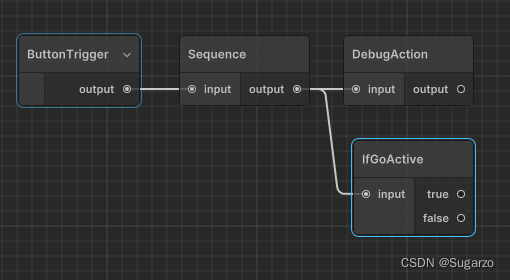
接着就可以继承泛型版本开始写四个节点的View脚本了。在本框架中,四个节点的样式和性质如下:
触发器:只有一个输出端口,输出端口只能单连接。
事件节点:一个输入端口,一个输出端口,输入端口可以多连接,输出端口只能单连接。
条件节点:一种特殊的事件节点,有两个输出端口,都只能单连接。当条件满足时流向true,不满足时流向false
序列节点:一种特殊的事件节点,有一个支持多连接的输出端口(也是目前框架里唯一一个支持输出端口多连接的节点)
public class TriggerNodeView : BaseNodeView<BaseTrigger>
{
    public TriggerNodeView()
    {
        title = state != null ? state.name : "TriggerNode";

        //Trigger只有一个输出端口
        Port output = GetPortForNode(this, Direction.Output, Port.Capacity.Single);
        output.portName = "output";
        outputContainer.Add(output);


    }
}
public class ActionNodeView : BaseNodeView<BaseAction>
{
public ActionNodeView()
{
//Action有一个输出端口一个输入端口,输入接口可以多连接
Port input = GetPortForNode(this, Direction.Input, Port.Capacity.Multi);
Port output = GetPortForNode(this, Direction.Output, Port.Capacity.Single);
input.portName = "input";
output.portName = "output";
title = state != null ? state.name : "ActionNode";
inputContainer.Add(input);
outputContainer.Add(output);
}
}public class SequenceNodeView : BaseNodeView<BaseSequence>
{
public SequenceNodeView()
{
//Sequence有一个输出端口一个输入端口,输入接口只能单连接,输出端口可以多连接
Port input = GetPortForNode(this, Direction.Input, Port.Capacity.Single);
Port output = GetPortForNode(this, Direction.Output, Port.Capacity.Multi);
input.portName = "input";
output.portName = "output";
title = state != null ? state.name : "SequenceNode";
inputContainer.Add(input);
outputContainer.Add(output);
}
}public class BranchNodeView : BaseNodeView<BaseBranch>
{
public BranchNodeView()
{
//Sequence有两个输出端口一个输入端口
Port input = GetPortForNode(this, Direction.Input, Port.Capacity.Multi);
Port output1 = GetPortForNode(this, Direction.Output, Port.Capacity.Single);
Port output2 = GetPortForNode(this, Direction.Output, Port.Capacity.Single);
input.portName = "input";
output1.portName = "true";
output2.portName = "false";
title = state != null ? state.name : "IfNode";
inputContainer.Add(input);
outputContainer.Add(output1);
outputContainer.Add(output2);
}
}这样,我们就制作完成了四种类型的节点View了。
对于每个节点View的端口(Port),都可以进行边Edge的连接。对于判断每个端口间是否可以连接,除了创建这个端口选择的枚举类型Port.Capacity.Single和Port.Capacity.Multi外,可以重写GraphView中的GetCompatiblePorts函数(这里是一个迭代器遍历,连接判断逻辑是一个点不能和自己连接)
下列函数在FlowChartView:GraphView脚本中
//判断每个点是否可以相连
public override List<Port> GetCompatiblePorts(Port startPort, NodeAdapter nodeAdapter)
{
    return ports.ToList().Where(endPort =>
    endPort.direction != startPort.direction &&
    endPort.node != startPort.node).ToList();
}
//连接两个点
private void AddEdgeByPorts(Port _outputPort, Port _inputPort)
{
    if (_outputPort.node == _inputPort.node)
        return;

    Edge tempEdge = new Edge()
    {
        output = _outputPort,
        input = _inputPort
    };
    tempEdge.input.Connect(tempEdge);
    tempEdge.output.Connect(tempEdge);
    Add(tempEdge);
}在InspectorView中给自己添加一个IMGUIContainer(也是Visual Element元素派生),添加Unity自带的Editor窗口。
public class InspectorView : VisualElement
{
    public new class UxmlFactory : UxmlFactory<InspectorView, UxmlTraits> { }

    Editor editor;

    public InspectorView()
    {
    }

    internal void UpdateSelection(BaseNodeView nodeView)
    {
        Clear();
        Debug.Log("显示节点的Inspector面板");
        UnityEngine.Object.DestroyImmediate(editor);
        editor = Editor.CreateEditor(nodeView.state);

        IMGUIContainer container = new IMGUIContainer(() => {
            if (nodeView != null && nodeView.state != null)
            {
                editor.OnInspectorGUI();
            }
        });
        Add(container);
    }
}
将委托连接到NodeView上。其中FlowChartView.OnNodeSelected将在创建节点的函数中绑定。
public class FlowChartEditorWindow : EditorWindow
    {
        public static void OpenWindow()
        {
            FlowChartEditorWindow wnd = GetWindow<FlowChartEditorWindow>();
            wnd.titleContent = new GUIContent("FlowChart");
        }

        /// <summary>
        /// 当前选择的游戏物品
        /// </summary>
        public static GameObject userSeletionGo;

        FlowChartView flowChartView;
        InspectorView inspectorView;

        public void CreateGUI()
        {
            // Each editor window contains a root VisualElement object
            VisualElement root = rootVisualElement;


            // Import UXML
            var visualTree = AssetDatabase.LoadAssetAtPath<VisualTreeAsset>("Assets/SugarzoNode/Editor/UIBuilder/FlowChart.uxml");
            visualTree.CloneTree(root);

            // A stylesheet can be added to a VisualElement.
            // The style will be applied to the VisualElement and all of its children.
            var styleSheet = AssetDatabase.LoadAssetAtPath<StyleSheet>("Assets/SugarzoNode/Editor/UIBuilder/FlowChart.uss");
            root.styleSheets.Add(styleSheet);

            //设置节点视图和Inspector视图
            flowChartView = root.Q<FlowChartView>();
            inspectorView = root.Q<InspectorView>();

            flowChartView.OnNodeSelected = OnNodeSelectionChanged;
            flowChartView.userSeletionGo = userSeletionGo;
            flowChartView.window = this;

            //构造节点
            flowChartView.ResetNodeView();
        }

        void OnNodeSelectionChanged(BaseNodeView nodeView)
        {
            Debug.Log("Editor受到节点被选中信息");
            inspectorView.UpdateSelection(nodeView);
}在本框架中,所有节点都是作为一个Compoment附加到游戏物品上。在上一节中,我们以及写好了一个标记当前选择的游戏物品的脚本逻辑。 创建节点需要操作对于GO上的MonoBehaviour节点进行AddCompoment。
public class FlowChartView : GraphView
    {
        public GameObject userSeletionGo;
        public Action<BaseNodeView> OnNodeSelected;

        public FlowChartView()
        {
            userSeletionGo = userSeletionGo == null ? FlowChartEditorWindow.userSeletionGo : userSeletionGo;
    }
private void CreateNode(Type type, Vector2 pos = default)
{
if (userSeletionGo == null)
return;
BaseNodeView nodeView = null;
if (type.IsSubclassOf(typeof(BaseTrigger)))
nodeView = new TriggerNodeView();
if (type.IsSubclassOf(typeof(BaseAction)))
nodeView = new ActionNodeView();
if (type.IsSubclassOf(typeof(BaseSequence)))
nodeView = new SequenceNodeView();
if (type.IsSubclassOf(typeof(BaseBranch)))
nodeView = new BranchNodeView();
if (nodeView == null)
{
Debug.LogError("节点未找到对应属性的NodeView");
return;
}
//添加Component,关联节点
nodeView.OnNodeSelected = OnNodeSelected;
nodeView.state = (NodeState)userSeletionGo.AddComponent(type);
nodeView.SetPosition(new Rect(pos, nodeView.GetPosition().size));
this.AddElement(nodeView);
}使用GetCompoments来获取游戏物品上的所有节点,再根据它的位置和下一个流的数据,逐个创建点和边还原出来。其中ResetNodeView函数可以由CreateGUI()调用。
下列函数放在FlowChartView : GraphView中。
//重构布局
public void ResetNodeView()
{
    if (userSeletionGo != null)
    {
        Debug.Log("构建节点图");
        var list = userSeletionGo.GetComponents<NodeState>();
        foreach (var item in list)
            CreateBaseNodeView(item);
    }
    if (userSeletionGo != null)
    {
        Debug.Log("构建节点边的关系");
        CreateNodeEdge();
    }
}

//复原节点操作
private void CreateBaseNodeView(NodeState nodeClone)
{
    if (userSeletionGo == null || nodeClone == null)
        return;

    BaseNodeView nodeView = null;
    //判断需要复原的节点
    if (nodeClone is BaseTrigger trigger)
        nodeView = new TriggerNodeView();
    if (nodeClone is BaseAction action)
        nodeView = new ActionNodeView();
    if (nodeClone is BaseSequence sequence)
        nodeView = new SequenceNodeView();
    if (nodeClone is BaseBranch branch)
        nodeView = new BranchNodeView();

    if (nodeView == null)
    {
        Debug.LogError("节点未找到对应属性的NodeView");
        return;
    }

    nodeView.OnNodeSelected = OnNodeSelected;
    nodeView.state = nodeClone;
    nodeView.SetPosition(new Rect(nodeClone.nodePos, nodeView.GetPosition().size));

    nodeView.RefreshExpandedState();
    nodeView.RefreshPorts();

    AddElement(nodeView);
}

//复原节点的边
private void CreateNodeEdge()
{
    if (userSeletionGo == null)
        return;

    //这里有点像图的邻接表
    Dictionary<NodeState, BaseNodeView> map = new Dictionary<NodeState, BaseNodeView>();
    Dictionary<BaseNodeView, Port> inputPorts = new Dictionary<BaseNodeView, Port>();
    Dictionary<BaseNodeView, List<Port>> outputPorts = new Dictionary<BaseNodeView, List<Port>>();

    ports.ForEach(x =>
    {
        var y = x.node;
        var node = y as BaseNodeView;
        if (!map.ContainsKey(node.state))
        {
            map.Add(node.state, node);
        }
        if (!inputPorts.ContainsKey(node))
        {
            inputPorts.Add(node, x);
        }
        if (!outputPorts.ContainsKey(node))
        {
            outputPorts.Add(node, new List<Port>());
        }
        if (x.direction == Direction.Output)
            outputPorts[node].Add(x);
    });

    //只负责连接下面的节点
    foreach (var node in map.Keys)
    {

        if (node is BaseSequence sequence)
        {
            Port x = outputPorts[map[sequence]][0];
            foreach (var nextflow in sequence.nextflows)
            {
                Port y = inputPorts[map[nextflow]];
                AddEdgeByPorts(x, y);
            }
        }
        else if (node is BaseBranch branch)
        {
            var truePorts = outputPorts[map[branch]][0].portName == "true" ? outputPorts[map[branch]][0] : outputPorts[map[branch]][1];
            var falsePorts = outputPorts[map[branch]][0].portName == "false" ? outputPorts[map[branch]][0] : outputPorts[map[branch]][1];

            if (branch.trueFlow != null)
                AddEdgeByPorts(truePorts, inputPorts[map[branch.trueFlow]]);
            if (branch.falseFlow != null)
                AddEdgeByPorts(falsePorts, inputPorts[map[branch.falseFlow]]);
        }
        else if (node is MonoState state)
        {
            //普通的Action或者Trigger,只处理nextFlow就好了
            if (state.nextFlow != null)
                AddEdgeByPorts(outputPorts[map[state]][0], inputPorts[map[state.nextFlow]]);
        }

    }
}对于GraphView的删除,GraphView基类提供了一个委托接口,我们可以关联到它监听图的变化。当对于的点、边、位置被修改时,我们也需要实时更新Runtime节点的数据或者删除节点组件.
public FlowChartView()
{
    //当GraphView变化时,调用方法
    graphViewChanged += OnGraphViewChanged;
}
private GraphViewChange OnGraphViewChanged(GraphViewChange graphViewChange)
{

if (graphViewChange.elementsToRemove != null)
{
    //对于每个被移除的节点
    graphViewChange.elementsToRemove.ForEach(elem =>
    {
        BaseNodeView BaseNodeView = elem as BaseNodeView;
        if (BaseNodeView != null)
        {
            GameObject.DestroyImmediate(BaseNodeView.state);
        }
        Edge edge = elem as Edge;
        if (edge != null)
        {
            BaseNodeView parentView = edge.output.node as BaseNodeView;
            BaseNodeView childView = edge.input.node as BaseNodeView;
            //If和Branch节点特判定
            if (edge.output.node is BranchNodeView view)
            {
                if (edge.input.portName == "true")
                {
                    (parentView.state as BaseBranch).trueFlow = null;
                }
                if (edge.input.portName == "false")
                {
                    (parentView.state as BaseBranch).falseFlow = null;
                }
            }
            else if (edge.output.node is SequenceNodeView sqView)
            {
                (parentView.state as BaseSequence).nextflows.Remove(childView.state as MonoState);
            }
            else
                parentView.state.nextFlow = null;
        }
    });
}
//对于每个被创建的边
if (graphViewChange.edgesToCreate != null)
{
    graphViewChange.edgesToCreate.ForEach(edge =>
    {
        BaseNodeView parentView = edge.output.node as BaseNodeView;
        BaseNodeView childView = edge.input.node as BaseNodeView;
        //If和Branch节点特判定
        if (edge.output.node is BranchNodeView view)
        {
            if (edge.output.portName.Equals("true"))
            {
                (parentView.state as BaseBranch).trueFlow = childView.state as MonoState;
            }
            if (edge.output.portName.Equals("false"))
            {
                (parentView.state as BaseBranch).falseFlow = childView.state as MonoState;
            }
        }
        else if (edge.output.node is SequenceNodeView sqView)
        {
            (parentView.state as BaseSequence).nextflows.Add(childView.state as MonoState);
        }
        else
            parentView.state.nextFlow = childView.state as MonoState;
    });
}
//遍历节点,记录位置点
nodes.ForEach((n) =>
{
    BaseNodeView view = n as BaseNodeView;
    if (view != null && view.state != null)
    {
        view.state.nodePos = view.GetPosition().position;
    }
});

return graphViewChange;
}在右键后,新添一个创建节点的菜单。这里使用了Linq去遍历和寻找项目中的节点脚本。
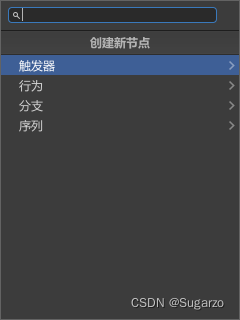
在FlowChartView的构造函数中添加布局
public FlowChartView()
{
            //新建搜索菜单
            var menuWindowProvider = ScriptableObject.CreateInstance<SearchMenuWindowProvider>();
            menuWindowProvider.OnSelectEntryHandler = OnMenuSelectEntry;

            nodeCreationRequest += context =>
            {
                SearchWindow.Open(new SearchWindowContext(context.screenMousePosition), menuWindowProvider);
            };
}
public class SearchMenuWindowProvider : ScriptableObject, ISearchWindowProvider
{
public List<SearchTreeEntry> CreateSearchTree(SearchWindowContext context)
{
var entries = new List<SearchTreeEntry>();
entries.Add(new SearchTreeGroupEntry(new GUIContent("创建新节点"))); //添加了一个一级菜单
entries.Add(new SearchTreeGroupEntry(new GUIContent("触发器")) { level = 1 }); //添加了一个二级菜单
var triggers = GetClassList(typeof(BaseTrigger));
foreach(var trigger in triggers)
{
entries.Add(new SearchTreeEntry(new GUIContent(trigger.Name)) { level = 2,userData = trigger });
}
entries.Add(new SearchTreeGroupEntry(new GUIContent("行为")) { level = 1 });
var actions = GetClassList(typeof(BaseAction));
foreach(var action in actions)
{
entries.Add(new SearchTreeEntry(new GUIContent(action.Name)) { level = 2, userData = action });
}
entries.Add(new SearchTreeGroupEntry(new GUIContent("分支")) { level = 1 });
var branchs = GetClassList(typeof(BaseBranch));
foreach (var action in branchs)
{
entries.Add(new SearchTreeEntry(new GUIContent(action.Name)) { level = 2, userData = action });
}
entries.Add(new SearchTreeGroupEntry(new GUIContent("序列")) { level = 1 });
var sq = GetClassList(typeof(BaseSequence));
foreach (var action in sq)
{
entries.Add(new SearchTreeEntry(new GUIContent(action.Name)) { level = 2, userData = action });
}
return entries;
}
public delegate bool SerchMenuWindowOnSelectEntryDelegate(SearchTreeEntry searchTreeEntry, SearchWindowContext context); //声明一个delegate类
public SerchMenuWindowOnSelectEntryDelegate OnSelectEntryHandler; //delegate回调方法
public bool OnSelectEntry(SearchTreeEntry searchTreeEntry, SearchWindowContext context)
{
if (OnSelectEntryHandler == null)
{
return false;
}
return OnSelectEntryHandler(searchTreeEntry, context);
}
private List<Type> GetClassList(Type type)
{
var q = type.Assembly.GetTypes()
.Where(x => !x.IsAbstract)
.Where(x => !x.IsGenericTypeDefinition)
.Where(x => type.IsAssignableFrom(x));
return q.ToList();
}
}操作HandleEvent的事件句柄,检测"Paste"操作,可以使用UnityEditorInternal.ComponentUtility.PasteComponentValues复制组件的value
    protected BoolClass isDuplicate = new BoolClass();

    public override void HandleEvent(EventBase evt)
    {
        base.HandleEvent(evt);

        if (evt is ValidateCommandEvent commandEvent)
        {
            Debug.Log("Event:");
            Debug.Log(commandEvent.commandName);
            //限制一下0.2s执行一次  不然短时间会多次执行
            if (commandEvent.commandName.Equals("Paste"))
            {
                new EditorDelayCall().CheckBoolCall(0.2f, isDuplicate,
                    OnDuplicate);
            }
        }
    }
    /// <summary>
    /// 复制时
    /// </summary>
    protected void OnDuplicate()
    {
        Debug.Log("复制节点");
        //复制节点
        var nodesDict = new Dictionary<BaseNodeView, BaseNodeView>(); //新旧Node对照

        foreach (var selectable in selection)
        {
            var offset = 1;
            if (selectable is BaseNodeView baseNodeView)
            {
                offset++;
                UnityEditorInternal.ComponentUtility.CopyComponent(baseNodeView.state);

                BaseNodeView nodeView = null;
                var nodeClone = baseNodeView.state;
                //判断需要复原的节点
                if (nodeClone is BaseTrigger trigger)
                    nodeView = new TriggerNodeView();
                if (nodeClone is BaseAction action)
                    nodeView = new ActionNodeView();
                if (nodeClone is BaseSequence sequence)
                    nodeView = new SequenceNodeView();
                if (nodeClone is BaseBranch branch)
                    nodeView = new BranchNodeView();

                if (nodeView == null)
                    return;

                //新旧节点映射
                if (nodeView != null)
                {
                    nodesDict.Add(baseNodeView, nodeView);
                }

                nodeView.OnNodeSelected = OnNodeSelected;
                AddElement(nodeView);
                nodeView.state = (NodeState)userSeletionGo.AddComponent(baseNodeView.state.GetType());
                UnityEditorInternal.ComponentUtility.PasteComponentValues(nodeView.state);

                //调整一下流向
                //保持原来的流向算法好难写,还是全部设置成null把
                nodeView.state.nextFlow = null ;
                if(nodeView.state is BaseSequence sq)
                {
                    sq.nextflows = new List<MonoState>();
                }
                if (nodeView.state is BaseBranch br)
                {
                    br.trueFlow = null;
                    br.falseFlow = null;
                }

                //复制出来的节点位置偏移
                nodeView.SetPosition(new Rect(baseNodeView.GetPosition().position + (Vector2.one * 30 * offset),nodeView.GetPosition().size));
            }
        }

        for (int i = selection.Count - 1; i >= 0; i--)
        {
            //取消选择
            this.RemoveFromSelection(selection[i]);
        }

        foreach (var node in nodesDict.Values)
        {
            //选择新生成的节点
            this.AddToSelection(node);
        }
    }
用到的Editor工具脚本:
using System;
using UnityEditor;
using UnityEngine;

public class EditorDelayCall
{
    public class BoolClass
    {
        public bool value;
    }
    /// <summary>
    /// 延迟秒数
    /// </summary>
    private float _delay;

    private Action _callback;
    private float _startupTime;

    public void Call(float delay, Action callback)
    {
        this._delay = delay;
        this._callback = callback;

        EditorApplication.update += Update;
    }

    public void CheckBoolCall(float delay, BoolClass boolClass,
            Action action)
    {
        if (!boolClass.value)
        {
            boolClass.value = true;
            action?.Invoke();
            Call(delay, delegate { boolClass.value = false; });
        }
    }

    // 主动停止
    public void Stop()
    {
        _startupTime = 0;
        _callback = null;

        EditorApplication.update -= Update;
    }

    private void Update()
    {
        // 时间初始化放在这里是因为如果在某些类的构造函数中获取时间是不允许的
        if (_startupTime <= 0)
        {
            _startupTime = Time.realtimeSinceStartup;
        }

        if (Time.realtimeSinceStartup - _startupTime >= _delay)
        {
            _callback?.Invoke();
            Stop();
        }
    }
}
我有一个用户工厂。我希望默认情况下确认用户。但是鉴于unconfirmed特征,我不希望它们被确认。虽然我有一个基于实现细节而不是抽象的工作实现,但我想知道如何正确地做到这一点。factory:userdoafter(:create)do|user,evaluator|#unwantedimplementationdetailshereunlessFactoryGirl.factories[:user].defined_traits.map(&:name).include?(:unconfirmed)user.confirm!endendtrait:unconfirmeddoenden
我即将开始一个将录制和编辑音频文件的项目,我正在寻找一个好的库(最好是Ruby,但会考虑Java或.NET以外的任何库)以进行实时可视化波形。有人知道我应该从哪里开始搜索吗? 最佳答案 要流入浏览器的数据量很大。Flash或Flex图表可能是唯一能提高内存效率的解决方案。Javascript图表往往会因大型数据集而崩溃。 关于ruby-Ruby中的波形可视化,我们在StackOverflow上找到一个类似的问题: https://stackoverflow.c
是否有简单的方法来更改默认ISO格式(yyyy-mm-dd)的ActiveAdmin日期过滤器显示格式? 最佳答案 您可以像这样为日期选择器提供额外的选项,而不是覆盖js:=f.input:my_date,as::datepicker,datepicker_options:{dateFormat:"mm/dd/yy"} 关于ruby-on-rails-事件管理员日期过滤器日期格式自定义,我们在StackOverflow上找到一个类似的问题: https://s
?博客主页:https://xiaoy.blog.csdn.net?本文由呆呆敲代码的小Y原创,首发于CSDN??学习专栏推荐:Unity系统学习专栏?游戏制作专栏推荐:游戏制作?Unity实战100例专栏推荐:Unity实战100例教程?欢迎点赞?收藏⭐留言?如有错误敬请指正!?未来很长,值得我们全力奔赴更美好的生活✨------------------❤️分割线❤️-------------------------
本教程将在Unity3D中混合Optitrack与数据手套的数据流,在人体运动的基础上,添加双手手指部分的运动。双手手背的角度仍由Optitrack提供,数据手套提供双手手指的角度。 01 客户端软件分别安装MotiveBody与MotionVenus并校准人体与数据手套。MotiveBodyMotionVenus数据手套使用、校准流程参照:https://gitee.com/foheart_1/foheart-h1-data-summary.git02 数据转发打开MotiveBody软件的Streaming,开始向Unity3D广播数据;MotionVenus中设置->选项选择Unit
目录1.AdmobSDK下载地址2.将下载好的unityPackagesdk导入到unity里编辑 3.解析依赖到项目中
Unity自动旋转动画1.开门需要门把手先动,门再动2.关门需要门先动,门把手再动3.中途播放过程中不可以再次进行操作觉得太复杂?查看我的文章开关门简易进阶版效果:如果这个门可以直接打开的话,就不需要放置"门把手"如果门把手还有钥匙需要旋转,那就可以把钥匙放在门把手的"门把手",理论上是可以无限套娃的可调整参数有:角度,反向,轴向,速度运行时点击Test进行测试自己写的代码比较垃圾,命名与结构比较拉,高手轻点喷,新手有类似的需求可以拿去做参考上代码usingSystem.Collections;usingSystem.Collections.Generic;usingUnityEngine;u
我正在尝试将以下SQL查询转换为ActiveRecord,它正在融化我的大脑。deletefromtablewhereid有什么想法吗?我想做的是限制表中的行数。所以,我想删除少于最近10个条目的所有内容。编辑:通过结合以下几个答案找到了解决方案。Temperature.where('id这给我留下了最新的10个条目。 最佳答案 从您的SQL来看,您似乎想要从表中删除前10条记录。我相信到目前为止的大多数答案都会如此。这里有两个额外的选择:基于MurifoX的版本:Table.where(:id=>Table.order(:id).
两个gsub产生不同的结果。谁能解释一下为什么?代码也可在https://gist.github.com/franklsf95/6c0f8938f28706b5644d获得.ver=9999str="\tCFBundleDevelopmentRegion\n\ten\n\tCFBundleVersion\n\t0.1.190\n\tAppID\n\t000000000000000"putsstr.gsub/(CFBundleVersion\n\t.*\.).*()/,"#{$1}#{ver}#{$2}"puts'--------'putsstr.gsub/(CFBundleVersio
我在一段非常简单的代码(如我所想)中得到了一个错误的值:org=4caseorgwhenorg=4val='H'endputsval=>nil请不要生气,我希望我错过了一些非常明显的东西,但我真的想不通。谢谢。 最佳答案 这是典型的Ruby错误。case有两种被调用的方法,一种是你传递一个东西作为分支的基础,另一种是你不传递的东西。如果您确实在case中指定了一个表达式语句然后评估所有其他条件并与===进行比较.在这种情况下org评估为false和org===false显然不是真的。所有其他情况也是如此,它们要么是真的,要么是假的。
