以 Android 12(API 级别 31)或更高版本为目标平台的应用在后台运行时无法启动前台服务,少数特殊情况除外。 如果应用程序在后台运行时尝试启动前台服务,而前台服务不满足其中一种异常情况,系统将抛出 ForegroundServiceStartNotAllowedException。
注意:如果一个应用调用 Context.startForegroundService() 来启动另一个应用拥有的前台服务,则这些限制仅适用于两个应用都以 Android 12 或更高版本为目标的情况。
错误日志如下
12-17 01:14:55.156 1383 12145 W ActivityManager: Background started FGS: Disallowed [callingPackage: com.debug.loggerui; callingUid: 10102; uidState: SVC ; intent: Intent { cmp=com.debug.loggerui/.framework.DebugLoggerUIService }; code:DENIED; tempAllowListReason:; targetSdkVersion:31; callerTargetSdkVersion:31; startForegroundCount:0; bindFromPackage:null]
java.lang.RuntimeException: Unable to create service com.debug.loggerui.framework.DebugLoggerUIService: android.app.ForegroundServiceStartNotAllowedException: startForegroundService() not allowed due to mAllowStartForeground false: service com.debug.loggerui/.framework.DebugLoggerUIService
豁免日志如下:
12-21 01:01:17.121 2399 3193 I am_wtf : [0,2399,system_server,-1,ActivityManager,Background started FGS: Allowed [callingPackage: com.android.providers.contacts; callingUid: 10071; uidState: BFGS; intent: Intent { act=android.intent.action.SIM_STATE_CHANGED cmp=com.android.providers.contacts/com.miui.providers.contacts.sim.SimStateChangedService (has extras) }; code:PROC_STATE_BFGS; tempAllowListReason:<,reasonCode:SYSTEM_ALLOW_LISTED,duration:9223372036854775807,callingUid:-1>; targetSdkVersion:33; callerTargetSdkVersion:33; startForegroundCount:0; bindFromPackage:null]]
FGS 有两个限制:
在 R 中,mAllowWhileInUsePermissionInFgs 是允许在前台服务中使用 while-in-use 权限。 从后台启动的 FGS 中的使用中权限可能会受到限制。 具体见 Bg start FGS的while in use权限
在S中,mAllowStartForeground是允许FGS是否startForeground。 从后台启动的服务可能不会成为 FGS。
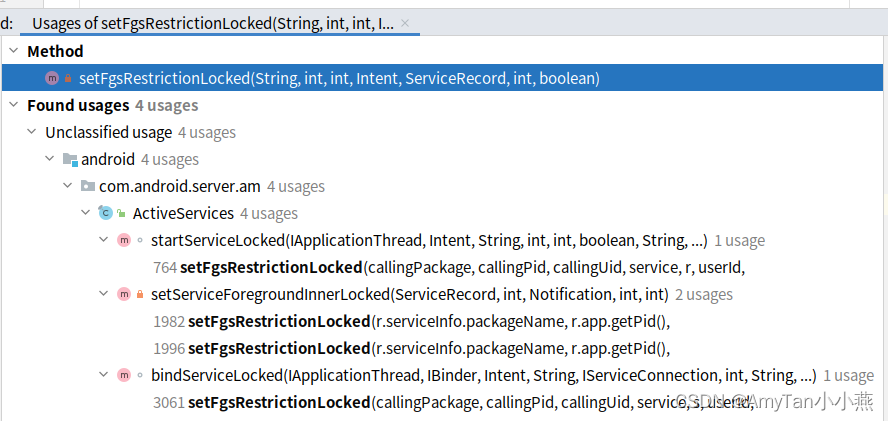
启动或绑定或调用startForeground时会调用setFgsRestrictionLocked方法去校验上面的两个FGS限制。
private void setFgsRestrictionLocked(String callingPackage,
        int callingPid, int callingUid, Intent intent, ServiceRecord r, int userId,
        boolean allowBackgroundActivityStarts) {
    	.......
    if (!r.mAllowWhileInUsePermissionInFgs
            || (r.mAllowStartForeground == REASON_DENIED)) {
        // while in use权限校验
    	......
        // 是否允许后台启动FGS校验
        if (r.mAllowStartForeground == REASON_DENIED) {
            r.mAllowStartForeground = shouldAllowFgsStartForegroundWithBindingCheckLocked(
                    allowWhileInUse, callingPackage, callingPid, callingUid, intent, r,userId);
            }
        }
    }
mAllowStartForeground由shouldAllowFgsStartForegroundWithBindingCheckLocked方法返回值赋值;并计算赋值mInfoAllowStartForeground,以便后面打印相关信息。
是否应该允许 FGS 启动(又名 startForeground())
具体豁免情况见下面的 后台启动限制的豁免
private @ReasonCode int shouldAllowFgsStartForegroundWithBindingCheckLocked(
        @ReasonCode int allowWhileInUse, String callingPackage, int callingPid,
        int callingUid, Intent intent, ServiceRecord r, int userId) {
    ActivityManagerService.FgsTempAllowListItem tempAllowListReason =
            // mDeviceIdleExceptIdleAllowlist 或 mFgsStartTempAllowList列表中
            r.mInfoTempFgsAllowListReason = mAm.isAllowlistedForFgsStartLOSP(callingUid);
    // 见“后台启动限制的豁免”
    int ret = shouldAllowFgsStartForegroundNoBindingCheckLocked(allowWhileInUse, callingPid,callingUid, callingPackage, r);

    String bindFromPackage = null;
    // 查看client是否允许start FGS
    if (ret == REASON_DENIED) {
        bindFromPackage = canBindingClientStartFgsLocked(callingUid);
        if (bindFromPackage != null) {
            ret = REASON_FGS_BINDING;
        }
    }

    final int uidState = mAm.getUidStateLocked(callingUid);
    int callerTargetSdkVersion = -1;
    try {
        callerTargetSdkVersion = mAm.mContext.getPackageManager()
                .getTargetSdkVersion(callingPackage);
    } catch (PackageManager.NameNotFoundException ignored) {
    }
    final String debugInfo =
        // calling 相关信息
            "[callingPackage: " + callingPackage
                    + "; callingUid: " + callingUid
                    + "; uidState: " + ProcessList.makeProcStateString(uidState)
                    // service信息
                    + "; intent: " + intent
                    // 豁免reson code打印
                    + "; code:" + reasonCodeToString(ret)
                    // 打印临时白名单的相关信息
                    + "; tempAllowListReason:<"
                    + (tempAllowListReason == null ? null :
                            (tempAllowListReason.mReason
                                    + ",reasonCode:"
                                    + reasonCodeToString(tempAllowListReason.mReasonCode)
                                    + ",duration:" + tempAllowListReason.mDuration
                                    + ",callingUid:" + tempAllowListReason.mCallingUid))
                    + ">"
                    + "; targetSdkVersion:" + r.appInfo.targetSdkVersion
                    + "; callerTargetSdkVersion:" + callerTargetSdkVersion
                    + "; startForegroundCount:" + r.mStartForegroundCount
                    + "; bindFromPackage:" + bindFromPackage
                    + "]";
    // 赋值mInfoAllowStartForeground以便在logFgsBackgroundStart 打印这些信息
    if (!debugInfo.equals(r.mInfoAllowStartForeground)) {
        r.mLoggedInfoAllowStartForeground = false;
        r.mInfoAllowStartForeground = debugInfo;
    }
    return ret;
}
启动Service时,如果是FGS则会去校验是否允许本次启动,后台启动FGS是否豁免等;如果不满足条件会抛出如上异常。
        if (fgRequired) {
            // 打印Background started FGS相关log,无论是否允许启动都会打印
            logFgsBackgroundStart(r);
            if (r.mAllowStartForeground == REASON_DENIED && isBgFgsRestrictionEnabled(r)) {
                String msg = "startForegroundService() not allowed due to "
                        + "mAllowStartForeground false: service "
                        + r.shortInstanceName;
                // 打印出错信息
                Slog.w(TAG, msg);
                showFgsBgRestrictedNotificationLocked(r);
                logFGSStateChangeLocked(r,
                        FrameworkStatsLog.FOREGROUND_SERVICE_STATE_CHANGED__STATE__DENIED,
                        0, FGS_STOP_REASON_UNKNOWN);
                // 抛出异常
                if (CompatChanges.isChangeEnabled(FGS_START_EXCEPTION_CHANGE_ID, callingUid)) {
                    throw new ForegroundServiceStartNotAllowedException(msg);
                }
                return null;
            }
        }
如果是后台启动FGS,则无论是否豁免均会打印Background started FGS相关log
    private void logFgsBackgroundStart(ServiceRecord r) {
        // Only log if FGS is started from background.
        if (!isFgsBgStart(r.mAllowStartForeground)) {
            return;
        }
        if (!r.mLoggedInfoAllowStartForeground) {
            // 主要豁免信息等保存在mInfoAllowStartForeground中
            final String msg = "Background started FGS: "
                    + ((r.mAllowStartForeground != REASON_DENIED) ? "Allowed " : "Disallowed ")
                    + r.mInfoAllowStartForeground;
            if (r.mAllowStartForeground != REASON_DENIED) {
                if (ActivityManagerUtils.shouldSamplePackageForAtom(r.packageName,
                        mAm.mConstants.mFgsStartAllowedLogSampleRate)) {
                    Slog.wtfQuiet(TAG, msg);
                }
                Slog.i(TAG, msg);
            } else {
                if (ActivityManagerUtils.shouldSamplePackageForAtom(r.packageName,
                        mAm.mConstants.mFgsStartDeniedLogSampleRate)) {
                    Slog.wtfQuiet(TAG, msg);
                }
                Slog.w(TAG, msg);
            }
            // 打印过后赋值为true
            r.mLoggedInfoAllowStartForeground = true;
        }
    }
如果您发现您的应用在从后台运行时启动前台服务,请更新您的应用逻辑以使用 WorkManager。 要查看如何更新您的应用程序的示例,请查看 GitHub 上的 WorkManagerSample。
检查您的应用是否执行后台启动
为了更好地了解您的应用在后台运行时何时尝试启动前台服务,您可以启用每次出现此行为时显示的通知。 为此,请在连接到测试设备或模拟器的开发机器上执行以下 ADB 命令:
adb shell device_config put activity_manager default_fgs_starts_restriction_notification_enabled true
    /**
     * The list of BG-FGS-Launch and temp-allow-list reason code.
     * @hide
     */
    @IntDef(flag = true, prefix = { "REASON_" }, value = {
            // BG-FGS-Launch reasons.
            REASON_DENIED,
            REASON_UNKNOWN,
            REASON_OTHER,
            // 前台procState
            REASON_PROC_STATE_PERSISTENT,
            REASON_PROC_STATE_PERSISTENT_UI,
            REASON_PROC_STATE_TOP,
            REASON_PROC_STATE_BTOP,
            REASON_PROC_STATE_FGS,
            REASON_PROC_STATE_BFGS,
            // 有可见的window
            REASON_UID_VISIBLE,
            // 特殊uid
            REASON_SYSTEM_UID,
            REASON_ACTIVITY_STARTER,
            // pendingIntent通知
            REASON_START_ACTIVITY_FLAG,
            // service的client能从后台启动FGS
            REASON_FGS_BINDING,
            REASON_DEVICE_OWNER,
            // 资料所有者
            REASON_PROFILE_OWNER,
            // 应用使用配套设备管理器并声明
            REASON_COMPANION_DEVICE_MANAGER,
            // bg activity权限
            REASON_BACKGROUND_ACTIVITY_PERMISSION,
            // fgs权限
            REASON_BACKGROUND_FGS_PERMISSION,
            // bg activity权限的instr
            REASON_INSTR_BACKGROUND_ACTIVITY_PERMISSION,
            // fgs权限的instr
            REASON_INSTR_BACKGROUND_FGS_PERMISSION,
            // 悬浮窗权限
            REASON_SYSTEM_ALERT_WINDOW_PERMISSION,
            // 演示模式
            REASON_DEVICE_DEMO_MODE,
            // while-in-use
            REASON_ALLOWLISTED_PACKAGE,
            REASON_APPOP,
            // 5s内可见
            REASON_ACTIVITY_VISIBILITY_GRACE_PERIOD,
            // 应用获得允许ACTIVATE_VPN或ACTIVATE_PLATFORM_VPN权限
            REASON_OP_ACTIVATE_VPN,
            REASON_OP_ACTIVATE_PLATFORM_VPN,
            // 应用是设备当前的输入法
            REASON_CURRENT_INPUT_METHOD,
            // while-in-use
            REASON_TEMP_ALLOWED_WHILE_IN_USE,
    })
    @Retention(RetentionPolicy.SOURCE)
    public @interface ReasonCode {}
在以下情况下,即使您的应用程序在后台运行,您的应用程序也可以启动前台服务:
@PowerExemptionManager.ReasonCode int mAllowStartForeground = REASON_DENIED;
    private @ReasonCode int shouldAllowFgsStartForegroundNoBindingCheckLocked(
            @ReasonCode int allowWhileInUse, int callingPid, int callingUid, String callingPackage,
            @Nullable ServiceRecord targetService) {
        int ret = allowWhileInUse;

        if (ret == REASON_DENIED) {
            final int uidState = mAm.getUidStateLocked(callingUid);
            // Is the calling UID at PROCESS_STATE_TOP or above?
            if (uidState <= PROCESS_STATE_TOP) {
                ret = getReasonCodeFromProcState(uidState);
            }
        }
if (ret == REASON_DENIED) {
    final Integer allowedType = mAm.mProcessList.searchEachLruProcessesLOSP(false, app -> {
        if (app.uid == callingUid) {
            final ProcessStateRecord state = app.mState;
            if (state.isAllowedStartFgs()) {
                return getReasonCodeFromProcState(state.getCurProcState());
            } .......
    @GuardedBy("mService")
    boolean isAllowedStartFgs() {
        return mCurProcState <= PROCESS_STATE_BOUND_FOREGROUND_SERVICE;
    }
        if (ret == REASON_DENIED) {
            // Does the calling UID have any visible activity?
            final boolean isCallingUidVisible = mAm.mAtmInternal.isUidForeground(callingUid);
            if (isCallingUidVisible) {
                ret = REASON_UID_VISIBLE;
            }
        }
细节可参考 BackgroundLaunchProcessController 介绍
        if (ret == REASON_DENIED) {
            // Is the allow activity background start flag on?
            if (allowBackgroundActivityStarts) {
                ret = REASON_START_ACTIVITY_FLAG;
            }
        }
        if (ret == REASON_DENIED) {
            boolean isCallerSystem = false;
            final int callingAppId = UserHandle.getAppId(callingUid);
            switch (callingAppId) {
                case ROOT_UID:
                case SYSTEM_UID:
                case NFC_UID:
                case SHELL_UID:
                    isCallerSystem = true;
                    break;
                default:
                    isCallerSystem = false;
                    break;
            }

            if (isCallerSystem) {
                ret = REASON_SYSTEM_UID;
            }
        }
        if (ret == REASON_DENIED) {
            if (mAm.checkPermission(START_ACTIVITIES_FROM_BACKGROUND, callingPid, callingUid)
                    == PERMISSION_GRANTED) {
                ret = REASON_BACKGROUND_ACTIVITY_PERMISSION;
            }
        }
        if (ret == REASON_DENIED) {
            if (targetService != null && targetService.app != null) {
                ActiveInstrumentation instr = targetService.app.getActiveInstrumentation();
                if (instr != null && instr.mHasBackgroundActivityStartsPermission) {
                    ret = REASON_INSTR_BACKGROUND_ACTIVITY_PERMISSION;
                }
            }
        }
if (ret == REASON_DENIED) {
    final Integer allowedType = mAm.mProcessList.searchEachLruProcessesLOSP(false, app -> {
        if (app.uid == callingUid) {
            final ProcessStateRecord state = app.mState;
            if (state.isAllowedStartFgs()) {
              .......
            } else {
                final ActiveInstrumentation instr = app.getActiveInstrumentation();
                if (instr != null
                        && instr.mHasBackgroundForegroundServiceStartsPermission) {
                    // 调用者是否拥有 START_FOREGROUND_SERVICES_FROM_BACKGROUND 权限
                    return REASON_INSTR_BACKGROUND_FGS_PERMISSION;
                }
               ......
    	if (ret == REASON_DENIED) {
            if (mAm.checkPermission(START_FOREGROUND_SERVICES_FROM_BACKGROUND, callingPid,callingUid) == PERMISSION_GRANTED) {
                ret = REASON_BACKGROUND_FGS_PERMISSION;
            }
        }
if (ret == REASON_DENIED) {
    final Integer allowedType = mAm.mProcessList.searchEachLruProcessesLOSP(false, app -> {
        if (app.uid == callingUid) {
            final ProcessStateRecord state = app.mState;
            if (state.isAllowedStartFgs()) {
              .......
            } else {
              .......
                final long lastInvisibleTime = app.mState.getLastInvisibleTime();
                if (lastInvisibleTime > 0 && lastInvisibleTime < Long.MAX_VALUE) {
                    final long sinceLastInvisible = SystemClock.elapsedRealtime()
                            - lastInvisibleTime;
                    // 5s
                    if (sinceLastInvisible < mAm.mConstants.mFgToBgFgsGraceDuration) {
                        return REASON_ACTIVITY_VISIBILITY_GRACE_PERIOD;
                    }
                }
            }
        }
  ......
}
    	if (ret == REASON_DENIED) {
            if (mAm.mAtmInternal.hasSystemAlertWindowPermission(callingUid, callingPid,
                    callingPackage)) {
                ret = REASON_SYSTEM_ALERT_WINDOW_PERMISSION;
            }
        }
尽可能使用 REQUEST_COMPANION_START_FOREGROUND_SERVICES_FROM_BACKGROUND。
注意:当 CDM 应用程序具有 REQUEST_COMPANION_RUN_IN_BACKGROUND 时,该应用程序也会被放入用户白名单中。 但是,在这种情况下,我们要使用原因代码 REASON_COMPANION_DEVICE_MANAGER,因此此检查需要在 isAllowlistedForFgsStartLOSP 检查之前进行。
        if (ret == REASON_DENIED) {
            final boolean isCompanionApp = mAm.mInternal.isAssociatedCompanionApp(
                    UserHandle.getUserId(callingUid), callingUid);
            if (isCompanionApp) {
                if (isPermissionGranted(
                        REQUEST_COMPANION_START_FOREGROUND_SERVICES_FROM_BACKGROUND,
                        callingPid, callingUid)
                        || isPermissionGranted(REQUEST_COMPANION_RUN_IN_BACKGROUND,
                        callingPid, callingUid)) {
                    ret = REASON_COMPANION_DEVICE_MANAGER;
                }
            }
        }
       if (ret == REASON_DENIED) {
            if (UserManager.isDeviceInDemoMode(mAm.mContext)) {
                ret = REASON_DEVICE_DEMO_MODE;
            }
        }
    	if (ret == REASON_DENIED) {
            // Is the calling UID a profile owner app?
            final boolean isProfileOwner = mAm.mInternal.isProfileOwner(callingUid);
            if (isProfileOwner) {
                ret = REASON_PROFILE_OWNER;
            }
        }
        if (ret == REASON_DENIED) {
            final AppOpsManager appOpsManager = mAm.getAppOpsManager();
            if (appOpsManager.checkOpNoThrow(AppOpsManager.OP_ACTIVATE_VPN, callingUid,
                    callingPackage) == AppOpsManager.MODE_ALLOWED) {
                ret = REASON_OP_ACTIVATE_VPN;
            } else if (appOpsManager.checkOpNoThrow(AppOpsManager.OP_ACTIVATE_PLATFORM_VPN,
                    callingUid, callingPackage) == AppOpsManager.MODE_ALLOWED) {
                ret = REASON_OP_ACTIVATE_PLATFORM_VPN;
            }
        }
if (ret == REASON_DENIED) {
    final String inputMethod =
            Settings.Secure.getStringForUser(mAm.mContext.getContentResolver(),
                    Settings.Secure.DEFAULT_INPUT_METHOD,
                    UserHandle.getUserId(callingUid));
    if (inputMethod != null) {
        final ComponentName cn = ComponentName.unflattenFromString(inputMethod);
        if (cn != null && cn.getPackageName().equals(callingPackage)) {
            ret = REASON_CURRENT_INPUT_METHOD;
        }
    }
}
R.styleable#AndroidManifestApplication_requestForegroundServiceExemption
if (ret == REASON_DENIED) {
    if (mAm.mConstants.mFgsAllowOptOut
            && targetService != null
            && targetService.appInfo.hasRequestForegroundServiceExemption()) {
        ret = REASON_OPT_OUT_REQUESTED;
    }
}
    @TestApi
    public boolean hasRequestForegroundServiceExemption() {
        return (privateFlagsExt
                & ApplicationInfo.PRIVATE_FLAG_EXT_REQUEST_FOREGROUND_SERVICE_EXEMPTION) != 0;
    }
        String bindFromPackage = null;
        if (ret == REASON_DENIED) {
            bindFromPackage = canBindingClientStartFgsLocked(callingUid);
            if (bindFromPackage != null) {
                ret = REASON_FGS_BINDING;
            }
        }
…
if (ret == REASON_DENIED) {
    final Integer allowedType = mAm.mProcessList.searchEachLruProcessesLOSP(false, pr -> {
        if (pr.uid == callingUid) {
        	if (pr.getWindowProcessController().areBackgroundFgsStartsAllowed()) {
                return REASON_ACTIVITY_STARTER;
            }
        }
        return null;
    });
    if (allowedType != null) {
        ret = allowedType;
    }
}
具体参考后台启动FGS的临时白名单
    @Nullable
    @GuardedBy(anyOf = {"this", "mProcLock"})
    FgsTempAllowListItem isAllowlistedForFgsStartLOSP(int uid) {
        if (Arrays.binarySearch(mDeviceIdleExceptIdleAllowlist, UserHandle.getAppId(uid)) >= 0) {
            // 在mDeviceIdleExceptIdleAllowlist名单
        	return FAKE_TEMP_ALLOW_LIST_ITEM;
        }
    	// 在mFgsStartTempAllowList名单里
        final Pair<Long, FgsTempAllowListItem> entry = mFgsStartTempAllowList.get(uid);
        return entry == null ? null : entry.second;
    }
        if (ret == REASON_DENIED) {
            ActivityManagerService.FgsTempAllowListItem item =
                    mAm.isAllowlistedForFgsStartLOSP(callingUid);
            if (item != null) {
                // mDeviceIdleExceptIdleAllowlist  省电白名单
                if (item == ActivityManagerService.FAKE_TEMP_ALLOW_LIST_ITEM) {
                    ret = REASON_SYSTEM_ALLOW_LISTED;
                } else {
                    // mFgsStartTempAllowList,允许从后台启动 FGS 的临时许可名单。
                    ret = item.mReasonCode;
                }
            }
        }
您可以通过将用户发送到系统设置中您应用的应用信息页面来帮助用户找到此选项。为此,调用包含 ACTION_IGNORE_BATTERY_OPTIMIZATION_SETTINGS 意图操作的意图。
如上面代码,如果当前应用在mDeviceIdleExceptIdleAllowlist名单里,则豁免原因为REASON_SYSTEM_ALLOW_LISTED
您的应用收到与地理围栏或活动识别转换相关的事件。
用户对与您的应用程序相关的 UI 元素执行操作。 例如,他们可能会与气泡、通知、小部件或活动进行交互。
您的应用调用确切的警报来完成用户请求的操作。
您的应用使用 Firebase 云消息传递接收高优先级消息。
设备重启并在广播接收器中接收到 ACTION_BOOT_COMPLETED、ACTION_LOCKED_BOOT_COMPLETED 或 ACTION_MY_PACKAGE_REPLACED 意图操作后。
您的应用在广播接收器中接收 ACTION_TIMEZONE_CHANGED、ACTION_TIME_CHANGED 或 ACTION_LOCALE_CHANGED 意图操作。
您的应用程序接收需要 BLUETOOTH_CONNECT 或 BLUETOOTH_SCAN 权限的蓝牙广播。
当前应用在30s内启动过FGS
允许应用程序随时从后台启动前台服务。 此权限不适用于第三方应用程序,唯一的例外是该应用程序是否为默认短信应用程序。 否则,它只能由特权应用程序、应用程序验证器应用程序和具有任何 EMERGENCY 或 SYSTEM GALLERY 角色。
<uses-permission android:name="android.permission.START_FOREGROUND_SERVICES_FROM_BACKGROUND"/>
 <permissions>
     <privapp-permissions package="com.android.bluetooth">
         <permission name="android.permission.START_FOREGROUND_SERVICES_FROM_BACKGROUND" />
 </privapp-permissions>
特权system/priv-app/目录下的app才可以申请豁免
<uses-permission android:name="android.permission.START_ACTIVITIES_FROM_BACKGROUND" />
<permissions>
    <privapp-permissions package="com.android.xxx">
        <permission name="android.permission.START_ACTIVITIES_FROM_BACKGROUND" />
     </privapp-permissions>
</permissions>
**注意:**在 Android 10(Go 版本)上运行的应用无法获得SYSTEM_ALERT_WINDOW权限。
注意:如果应用程序以 API 级别 23 或更高级别为目标,则应用程序用户必须通过权限管理屏幕明确向应用程序授予此权限。
<uses-permission android:name="android.permission.SYSTEM_ALERT_WINDOW" />
最近,当我启动我的Rails服务器时,我收到了一长串警告。虽然它不影响我的应用程序,但我想知道如何解决这些警告。我的估计是imagemagick以某种方式被调用了两次?当我在警告前后检查我的git日志时。我想知道如何解决这个问题。-bcrypt-ruby(3.1.2)-better_errors(1.0.1)+bcrypt(3.1.7)+bcrypt-ruby(3.1.5)-bcrypt(>=3.1.3)+better_errors(1.1.0)bcrypt和imagemagick有关系吗?/Users/rbchris/.rbenv/versions/2.0.0-p247/lib/ru
一、引擎主循环UE版本:4.27一、引擎主循环的位置:Launch.cpp:GuardedMain函数二、、GuardedMain函数执行逻辑:1、EnginePreInit:加载大多数模块int32ErrorLevel=EnginePreInit(CmdLine);PreInit模块加载顺序:模块加载过程:(1)注册模块中定义的UObject,同时为每个类构造一个类默认对象(CDO,记录类的默认状态,作为模板用于子类实例创建)(2)调用模块的StartUpModule方法2、FEngineLoop::Init()1、检查Engine的配置文件找出使用了哪一个GameEngine类(UGame
最近因为项目需要,需要将Android手机系统自带的某个系统软件反编译并更改里面某个资源,并重新打包,签名生成新的自定义的apk,下面我来介绍一下我的实现过程。APK修改,分为以下几步:反编译解包,修改,重打包,修改签名等步骤。安卓apk修改准备工作1.系统配置好JavaJDK环境变量2.需要root权限的手机(针对系统自带apk,其他软件免root)3.Auto-Sign签名工具4.apktool工具安卓apk修改开始反编译本文拿Android系统里面的Settings.apk做demo,具体如何将apk获取出来在此就不过多介绍了,直接进入主题:按键win+R输入cmd,打开命令窗口,并将路
我是ruby的新手,我认为重新构建一个我用C#编写的简单聊天程序是个好主意。我正在使用Ruby2.0.0MRI(Matz的Ruby实现)。问题是我想在服务器运行时为简单的服务器命令提供I/O。这是从示例中获取的服务器。我添加了使用gets()获取输入的命令方法。我希望此方法在后台作为线程运行,但该线程正在阻塞另一个线程。require'socket'#Getsocketsfromstdlibserver=TCPServer.open(2000)#Sockettolistenonport2000defcommandsx=1whilex==1exitProgram=gets.chomp
我想用Capistrano启动sidekiq。下面是代码namespace:sidekiqdotask:startdorun"cd#{current_path}&&bundleexecsidekiq-c10-eproduction-Llog/sidekiq.log&"pcapture("psaux|grepsidekiq|awk'{print$2}'|sed-n1p").strip!endend它执行成功但sidekiq仍然没有在服务器上启动。输出:$capsidekiq:starttriggeringloadcallbacks*2014-06-0315:03:01executing`
因此,在使用Sphinx时,搜索限制为1000个结果。但是,如果will_paginate生成的结果分页链接超过1000个,请不要考虑这一点,并提供指向超过1000/per_page的页面的链接。设置最大页数或类似内容的明显方法是什么?干杯。 最佳答案 我认为最好将参数:total_entries提交给方法paginate:@posts=Post.paginate(:page=>params[:page],:per_page=>30,:total_entries=>1000)will_paginate将仅为显示1000个结果所需的页
我有一个正在升级到Rails3的Rails2.3.5应用程序。我做了所有我需要做的升级以及当我使用启动Rails服务器时要做的事情railsserver它给了我这个PleaseswitchtoRuby1.9'sstandardCSVlibrary.It'sFasterCSVplussupportforRuby1.9'sm17nencodingengine.我正在使用ruby-1.9.2-p0并安装了fastercsv(1.5.3)gem。在puts语句的帮助下,我能够追踪到错误发生的位置。我发现执行在这一行停止了Bundler.require(:default,Rails.env)if
深度学习12.CNN经典网络VGG16一、简介1.VGG来源2.VGG分类3.不同模型的参数数量4.3x3卷积核的好处5.关于学习率调度6.批归一化二、VGG16层分析1.层划分2.参数展开过程图解3.参数传递示例4.VGG16各层参数数量三、代码分析1.VGG16模型定义2.训练3.测试一、简介1.VGG来源VGG(VisualGeometryGroup)是一个视觉几何组在2014年提出的深度卷积神经网络架构。VGG在2014年ImageNet图像分类竞赛亚军,定位竞赛冠军;VGG网络采用连续的小卷积核(3x3)和池化层构建深度神经网络,网络深度可以达到16层或19层,其中VGG16和VGG
电脑启动出现显示器黑屏是一个相当常见的问题。如果您遇到了这个问题,不要惊慌,因为它有很多可能的原因,可以采取一些简单的措施来解决它。在本文中,小编将介绍下面4种常见的电脑启动后显示器黑屏的原因,排查这些原因,快速解决! 演示机型:联想Ideapad700-15ISK-ISE系统版本:Windows10一、显示器问题如果出现电脑启动后显示器黑屏的情况。那么首先您需要检查一下显示器是否正常工作。您可以通过更换另一个显示器或将当前显示器连接到另一台计算机来检查显示器是否存在问题。如果问题仍然存在,那么您可以排除显示器故障的可能性。 二、显卡问题如果您的电脑配备了独立显卡,那么显卡故障也可能是导致电脑
plsql连接Oracle超时,完犊子了肯定是服务器断电了。得马上检查Oracle服务器状态1、检查数据库是否启动su-oracle切换到Oracle用户,输入sqlplus/assysdba显示连接状态。如果末尾显示的状态是Connectedtoanidleinstance.证明未启动2、启动数据库startup启动数据库,末尾出现Databaseopened说明数据库启动成功3、查看数据库监听是否正常先quit;断开Oracle连接,使用lsnrctlstatus查看监听状态,如果出现TNS-开头的Nolistener、Connectionrefused等错误,说明监听未启动4、启动数据库
