找来了一篇好玩的 大伙可以试试啊
如何用眼睛来控制鼠标?一种基于单一前向视角的机器学习眼睛姿态估计方法。在此项目中,每次单击鼠标时,我们都会编写代码来裁剪你们的眼睛图像。使用这些数据,我们可以反向训练模型,从你们您的眼睛预测鼠标的位置。在开始项目之前,我们需要引入第三方库。
import cv2 \# For performing array operations
import numpy as np \# For creating and removing directories
import os
import shutil \# For recognizing and performing actions on mouse presses
from pynput.mouse import Listener
首先让我们了解一下Pynput的Listener工作原理。pynput.mouse.Listener创建一个后台线程,该线程记录鼠标的移动和鼠标的点击。这是一个简化代码,当你们按下鼠标时,它会打印鼠标的坐标:
from pynput.mouse import Listener
def on_click(x, y, button, pressed):
"""
  Args:
    x: the x-coordinate of the mouse
    y: the y-coordinate of the mouse
    button: 1 or 0, depending on right-click or left-click
    pressed: 1 or 0, whether the mouse was pressed or released
  """
if pressed:
print (x, y)
with Listener(on_click = on_click) as listener:
  listener.join()
现在,为了实现我们的目的,让我们扩展这个框架。但是,我们首先需要编写裁剪眼睛边界框的代码。我们稍后将在on_click函数内部调用此函数。我们使用Haar级联对象检测来确定用户眼睛的边界框。你们可以在此处下载检测器文件,让我们做一个简单的演示来展示它是如何工作的:
import cv2
# Load the cascade classifier detection object
cascade = cv2.CascadeClassifier("haarcascade_eye.xml")
# Turn on the web camera
video_capture = cv2.VideoCapture(0)
# Read data from the web camera (get the frame)
_, frame = video_capture.read()
# Convert the image to grayscale
gray = cv2.cvtColor(frame, cv2.COLOR_BGR2GRAY)
# Predict the bounding box of the eyes
boxes = cascade.detectMultiScale(gray, 1.3, 10)
# Filter out images taken from a bad angle with errors
# We want to make sure both eyes were detected, and nothing else
if len(boxes) == 2:
eyes = []
for box in boxes:
    # Get the rectangle parameters for the detected eye
x, y, w, h = box
    # Crop the bounding box from the frame
eye = frame[y:y + h, x:x + w]
    # Resize the crop to 32x32
eye = cv2.resize(eye, (32, 32))
    # Normalize
eye = (eye - eye.min()) / (eye.max() - eye.min())
    # Further crop to just around the eyeball
eye = eye[10:-10, 5:-5]
    # Scale between [0, 255] and convert to int datatype
eye = (eye * 255).astype(np.uint8)
    # Add the current eye to the list of 2 eyes
eyes.append(eye)
  # Concatenate the two eye images into one
eyes = np.hstack(eyes)
现在,让我们使用此知识来编写用于裁剪眼睛图像的函数。首先,我们需要一个辅助函数来进行标准化:
def normalize(x):
  minn, maxx = x.min(), x.max()
return (x - minn) / (maxx - minn)
这是我们的眼睛裁剪功能。如果发现眼睛,它将返回图像。否则,它返回None:
def scan(image_size=(32, 32)):
_, frame = video_capture.read()
gray = cv2.cvtColor(frame, cv2.COLOR_BGR2GRAY)
boxes = cascade.detectMultiScale(gray, 1.3, 10)
if len(boxes) == 2:
eyes = []
for box in boxes:
x, y, w, h = box
eye = frame[y:y + h, x:x + w]
eye = cv2.resize(eye, image_size)
eye = normalize(eye)
eye = eye[10:-10, 5:-5]
eyes.append(eye)
return (np.hstack(eyes) * 255).astype(np.uint8)
else:
return None
现在,让我们来编写我们的自动化,该自动化将在每次按下鼠标按钮时运行。(假设我们之前已经root在代码中将变量定义为我们要存储图像的目录):
def on_click(x, y, button, pressed): \# If the action was a mouse PRESS (not a RELEASE)
if pressed: \# Crop the eyes
    eyes = scan() \# If the function returned None, something went wrong
if not eyes is None: \# Save the image
      filename = root + "{} {} {}.jpeg".format(x, y, button)
      cv2.imwrite(filename, eyes)
现在,我们可以回忆起pynput的实现Listener,并进行完整的代码实现:
import cv2
import numpy as np
import os
import shutil
from pynput.mouse import Listener

root = input("Enter the directory to store the images: ")
if os.path.isdir(root):
  resp = ""
while not resp in ["Y", "N"]:
    resp = input("This directory already exists. If you continue, the contents of the existing directory will be deleted. If you would still like to proceed, enter [Y]. Otherwise, enter [N]: ")
if resp == "Y":
    shutil.rmtree(root)
else:
    exit()
os.mkdir(root)
 \# Normalization helper function
def normalize(x):
  minn, maxx = x.min(), x.max()
return (x - minn) / (maxx - minn)
 \# Eye cropping function
def scan(image_size=(32, 32)):
  _, frame = video_capture.read()
  gray = cv2.cvtColor(frame, cv2.COLOR_BGR2GRAY)
  boxes = cascade.detectMultiScale(gray, 1.3, 10)
if len(boxes) == 2:
    eyes = []
for box in boxes:
      x, y, w, h = box
      eye = frame[y:y + h, x:x + w]
      eye = cv2.resize(eye, image_size)
      eye = normalize(eye)
      eye = eye[10:-10, 5:-5]
      eyes.append(eye)
return (np.hstack(eyes) * 255).astype(np.uint8)
else:
return None

def on_click(x, y, button, pressed): \# If the action was a mouse PRESS (not a RELEASE)
if pressed: \# Crop the eyes
    eyes = scan() \# If the function returned None, something went wrong
if not eyes is None: \# Save the image
      filename = root + "{} {} {}.jpeg".format(x, y, button)
      cv2.imwrite(filename, eyes)

cascade = cv2.CascadeClassifier("haarcascade_eye.xml")
video_capture = cv2.VideoCapture(0)

with Listener(on_click = on_click) as listener:
  listener.join()
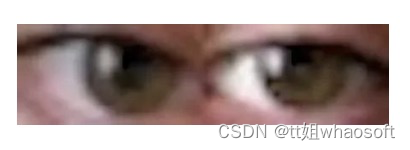
运行此命令时,每次单击鼠标(如果两只眼睛都在视线中),它将自动裁剪网络摄像头并将图像保存到适当的目录中。图像的文件名将包含鼠标坐标信息,以及它是右击还是左击。
这是一个示例图像。在此图像中,我在分辨率为2560x1440的监视器上在坐标(385,686)上单击鼠标左键:
级联分类器非常准确,到目前为止,我尚未在自己的数据目录中看到任何错误。现在,让我们编写用于训练神经网络的代码,以给定你们的眼睛图像来预测鼠标的位置。
import numpy as np
import os
import cv2
import pyautogui
from tensorflow.keras.models import *
from tensorflow.keras.layers import *
from tensorflow.keras.optimizers import *
现在,让我们添加级联分类器:
cascade = cv2.CascadeClassifier("haarcascade_eye.xml")
video_capture = cv2.VideoCapture(0)
正常化:
def normalize(x):
  minn, maxx = x.min(), x.max()
return (x - minn) / (maxx - minn)
捕捉眼睛:
def scan(image_size=(32, 32)):
_, frame = video_capture.read()
gray = cv2.cvtColor(frame, cv2.COLOR_BGR2GRAY)
boxes = cascade.detectMultiScale(gray, 1.3, 10)
if len(boxes) == 2:
eyes = []
for box in boxes:
x, y, w, h = box
eye = frame[y:y + h, x:x + w]
eye = cv2.resize(eye, image_size)
eye = normalize(eye)
eye = eye[10:-10, 5:-5]
eyes.append(eye)
return (np.hstack(eyes) * 255).astype(np.uint8)
else:
return None
让我们定义显示器的尺寸。你们必须根据自己的计算机屏幕的分辨率更改以下参数:
# Note that there are actually 2560x1440 pixels on my screen
# I am simply recording one less, so that when we divide by these
# numbers, we will normalize between 0 and 1. Note that mouse
# coordinates are reported starting at (0, 0), not (1, 1)
width, height = 2559, 1439
现在,让我们加载数据(同样,假设你们已经定义了root)。我们并不在乎是单击鼠标右键还是单击鼠标左键,因为我们的目标只是预测鼠标的位置:
filepaths = os.listdir(root)
X, Y = [], []
for filepath in filepaths:
x, y, _ = filepath.split(' ')
x = float(x) / width
y = float(y) / height
X.append(cv2.imread(root + filepath))
Y.append([x, y])
X = np.array(X) / 255.0
Y = np.array(Y)
print (X.shape, Y.shape)
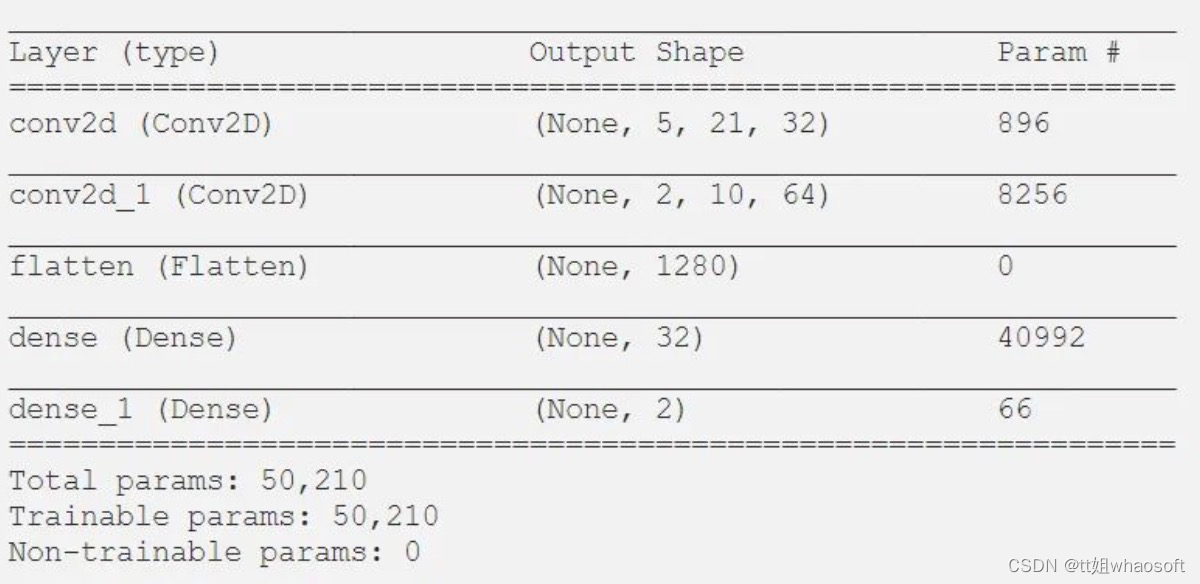
让我们定义我们的模型架构:
model = Sequential()
model.add(Conv2D(32, 3, 2, activation = 'relu', input_shape = (12, 44, 3)))
model.add(Conv2D(64, 2, 2, activation = 'relu'))
model.add(Flatten())
model.add(Dense(32, activation = 'relu'))
model.add(Dense(2, activation = 'sigmoid'))
model.compile(optimizer = "adam", loss = "mean_squared_error")
model.summary()
这是我们的摘要:
接下来的任务是训练模型。我们将在图像数据中添加一些噪点:
epochs = 200
for epoch in range(epochs):
  model.fit(X, Y, batch_size = 32)
现在让我们使用我们的模型来实时移动鼠标。请注意,这需要大量数据才能正常工作。但是,作为概念证明,你们会注意到,实际上只有200张图像,它确实将鼠标移到了你们要查看的常规区域。当然,除非你们拥有更多的数据,否则这是不可控的。
while True:
  eyes = scan()
if not eyes is None:
      eyes = np.expand_dims(eyes / 255.0, axis = 0)
      x, y = model.predict(eyes)[0]
      pyautogui.moveTo(x * width, y * height)
这是一个概念证明的例子。请注意,在进行此屏幕录像之前,我们只训练了很少的数据。这是我们的鼠标根据眼睛自动移动到终端应用程序窗口的视频。就像我说的那样,这很容易,因为数据很少。有了更多的数据,它有望稳定到足以以更高的特异性进行控制。仅用几百张图像,你们就只能将其移动到注视的整个区域内。另外,如果在整个数据收集过程中,你们在屏幕的特定区域(例如边缘)都没有拍摄任何图像,则该模型不太可能在该区域内进行预测。
whaosoft aiot http://143ai.com 完事了 大伙赶紧试试吧
当我在Rails控制台中按向上或向左箭头时,出现此错误:irb(main):001:0>/Users/me/.rvm/gems/ruby-2.0.0-p247/gems/rb-readline-0.4.2/lib/rbreadline.rb:4269:in`blockin_rl_dispatch_subseq':invalidbytesequenceinUTF-8(ArgumentError)我使用rvm来管理我的ruby安装。我正在使用=>ruby-2.0.0-p247[x86_64]我使用bundle来管理我的gem,并且我有rb-readline(0.4.2)(人们推荐的最少
我正在使用Ruby2.1.1和Rails4.1.0.rc1。当执行railsc时,它被锁定了。使用Ctrl-C停止,我得到以下错误日志:~/.rvm/gems/ruby-2.1.1/gems/spring-1.1.2/lib/spring/client/run.rb:47:in`gets':Interruptfrom~/.rvm/gems/ruby-2.1.1/gems/spring-1.1.2/lib/spring/client/run.rb:47:in`verify_server_version'from~/.rvm/gems/ruby-2.1.1/gems/spring-1.1.
我将我的Rails应用程序部署到OpenShift,它运行良好,但我无法在生产服务器上运行“Rails控制台”。它给了我这个错误。我该如何解决这个问题?我尝试更新rubygems,但它也给出了权限被拒绝的错误,我也无法做到。railsc错误:Warning:You'reusingRubygems1.8.24withSpring.UpgradetoatleastRubygems2.1.0andrun`gempristine--all`forbetterstartupperformance./opt/rh/ruby193/root/usr/share/rubygems/rubygems
之前在培训新生的时候,windows环境下配置opencv环境一直教的都是网上主流的vsstudio配置属性表,但是这个似乎对新生来说难度略高(虽然个人觉得完全是他们自己的问题),加之暑假之后对cmake实在是爱不释手,且这样配置确实十分简单(其实都不需要配置),故斗胆妄言vscode下配置CV之法。其实极为简单,图比较多所以很长。如果你看此文还配不好,你应该思考一下是不是自己的问题。闲话少说,直接开始。0.CMkae简介有的人到大二了都不知道cmake是什么,我不说是谁。CMake是一个开源免费并且跨平台的构建工具,可以用简单的语句来描述所有平台的编译过程。它能够根据当前所在平台输出对应的m
说在前面这部分我本来是合为一篇来写的,因为目的是一样的,都是通过独立按键来控制LED闪灭本质上是起到开关的作用,即调用函数和中断函数。但是写一篇太累了,我还是决定分为两篇写,这篇是调用函数篇。在本篇中你主要看到这些东西!!!1.调用函数的方法(主要讲语法和格式)2.独立按键如何控制LED亮灭3.程序中的一些细节(软件消抖等)1.调用函数的方法思路还是比较清晰地,就是通过按下按键来控制LED闪灭,即每按下一次,LED取反一次。重要的是,把按键与LED联系在一起。我打算用K1来作为开关,看了一下开发板原理图,K1连接的是单片机的P31口,当按下K1时,P31是与GND相连的,也就是说,当我按下去时
在我的Character模型中,我添加了:字符.rbbefore_savedoself.profile_picture_url=asset_path('icon.png')end但是,对于数据库中已存在的所有角色,它们的profile_picture_url为nil。因此,我想进入控制台并遍历所有这些并进行设置。在我试过的控制台中:Character.find_eachdo|c|c.profile_picture_url=asset_path('icon.png')end但这给出了错误:NoMethodError:undefinedmethod`asset_path'formain:O
当我进入Rails控制台时,我已将pry设置为加载代替irb。我找不到该页面或不记得如何将其恢复为默认行为,因为它似乎干扰了我的Rubymine调试器。有什么建议吗? 最佳答案 我刚发现问题,pry-railsgem。忘记了它的目的是让“railsconsole”打开pry。 关于ruby-on-rails-带有Pry的Rails控制台,我们在StackOverflow上找到一个类似的问题: https://stackoverflow.com/question
我正在尝试将$stdout设置为临时写入一个文件,然后返回到一个文件。test.rb:old_stdout=$stdout$stdout.reopen("mytestfile.out",'w+')puts"thisgoesinmytestfile"$stdout=old_stdoutputs"thisshouldbeontheconsole"$stdout.reopen("mytestfile1.out",'w+')puts"thisgoesinmytestfile1:"$stdout=old_stdoutputs"thisshouldbebackontheconsole"这是输出。r
我在思考流量控制的最佳实践。我应该走哪条路?1)不要检查任何东西并让程序失败(更清晰的代码,自然的错误消息):defself.fetch(feed_id)feed=Feed.find(feed_id)feed.fetchend2)通过返回nil静默失败(但是,“CleanCode”说,你永远不应该返回null):defself.fetch(feed_id)returnunlessfeed_idfeed=Feed.find(feed_id)returnunlessfeedfeed.fetchend3)抛出异常(因为不按id查找feed是异常的):defself.fetch(feed_id
我真的只是不确定这意味着什么或我应该做什么才能让网页在我的本地主机上运行。现在它只是显示一个错误,上面写着“我们很抱歉,但出了点问题。”当我运行railsserver并在chrome中打开localhost:3000时。这是控制台输出:StartedGET"/users/sign_in"for127.0.0.1at2013-07-0512:07:07-0400ProcessingbyDevise::SessionsController#newasHTMLCompleted500InternalServerErrorin55msNoMethodError(undefinedmethod`
