ESP32-FPV-Camera介绍和使用
ESP32是一款高性价比的嵌入式芯片,且其ESP-IDF工具采用了CMake的Unix Style开发方式,也是笔者比较喜欢的一种工程组织方式。IDE工具对于应用开发带来了便捷性,屏蔽了很多系统,模块,组件,开源(非开源)的底层细节。尤其是IDE工具经常升级,导致很多由于工具升级带来的各种问题(有的时候感觉莫名其妙),但是Makefile/CMake等成熟的嵌入工程组织方式更加稳定、可靠。
规格如下:
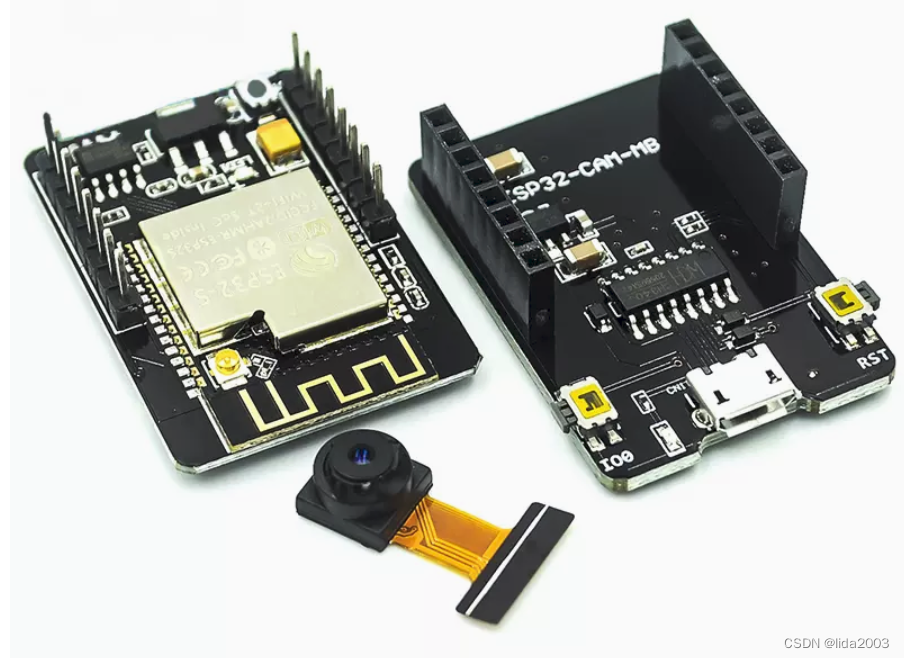
这里基于Ubuntu准备相关的软件配置环境。
$ sudo apt-get update
$ sudo apt-get install git
$ sudo apt-get install gitk git-gui
$ uname -a
Linux daniel-ThinkPad-SL410 5.15.0-58-generic #64~20.04.1-Ubuntu SMP Fri Jan 6 16:42:31 UTC 2023 x86_64 x86_64 x86_64 GNU/Linux

$ lsb_release -a
No LSB modules are available.
Distributor ID: Ubuntu
Description:    Ubuntu 20.04.5 LTS
Release:        20.04
Codename:       focal
$ git clone git@github.com:jeanlemotan/esp32-cam-fpv.git
Cloning into 'esp32-cam-fpv'...
remote: Enumerating objects: 324, done.
remote: Counting objects: 100% (81/81), done.
remote: Compressing objects: 100% (46/46), done.
remote: Total 324 (delta 48), reused 49 (delta 32), pack-reused 243
Receiving objects: 100% (324/324), 927.22 KiB | 856.00 KiB/s, done.
Resolving deltas: 100% (126/126), done.

$ cd esp32-cam-fpv/

$ git log -n 1
commit adc1e5c040bada4780de0db60716af411d326435 (HEAD -> main, origin/main, origin/HEAD)
Merge: 66ae72a c97be43
Author: jeanlemotan <10252034+jeanlemotan@users.noreply.github.com>
Date:   Mon Feb 20 21:49:40 2023 +0100

    Merge pull request #32 from JulesThuillier/main

    Fix typo in gs Makefile for Raspberry Pi check


$ git branch -a
* main
  remotes/origin/HEAD -> origin/main
  remotes/origin/main
注:这里建议大家可以选择下载CELLULAR-Z软件,对WiFi信号进行扫描。
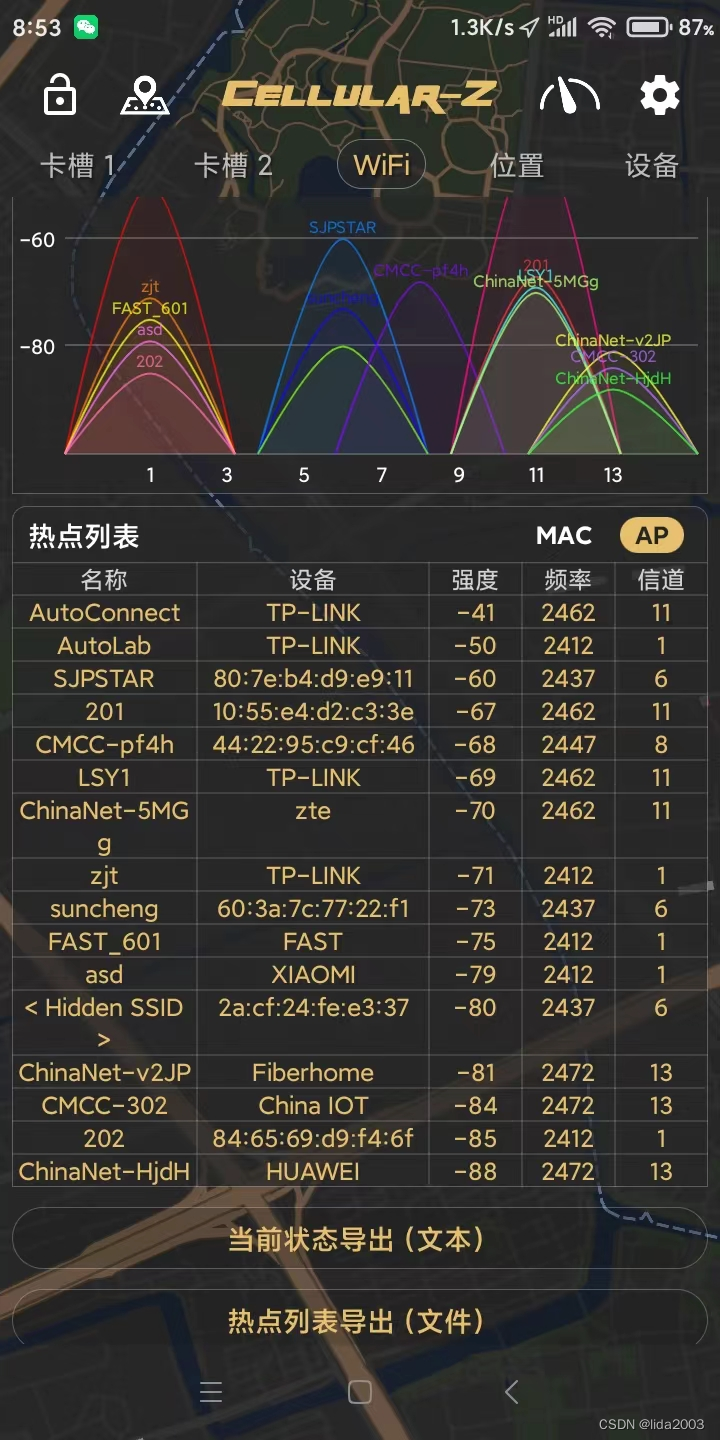 从以上扫描ssid热点信号看,4频段相对来说会受到较少干扰。
注:这里扫描到的是标准的WiFi热点信号,其他非标准干扰信号是无法扫描到的。因此如果仍然存在干扰问题,建议去暗室或更换测试时间或更换测试地点。
详见:WiFi monitor模式的配置和运行检查(Ubuntu系统)
建议:购买8812AU芯片网卡,并安装对应的kms驱动。
天空端:esp32-cam-fpv\air_firmware\main\main.cpp
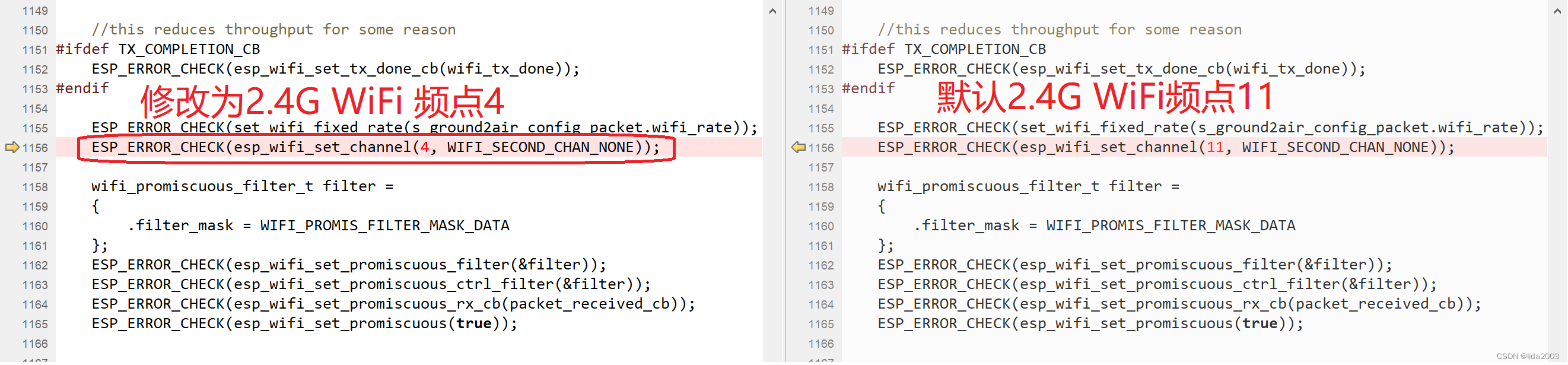
地面端:esp32-cam-fpv\gs\src\main.cpp

笔记本自带一张网卡,笔者又自行购买了两块8812AU网卡(因为Monitor模式下带宽通常不高,多块网卡,分开方式可以减少丢包概率)
地面端:esp32-cam-fpv\gs\src\main.cpp
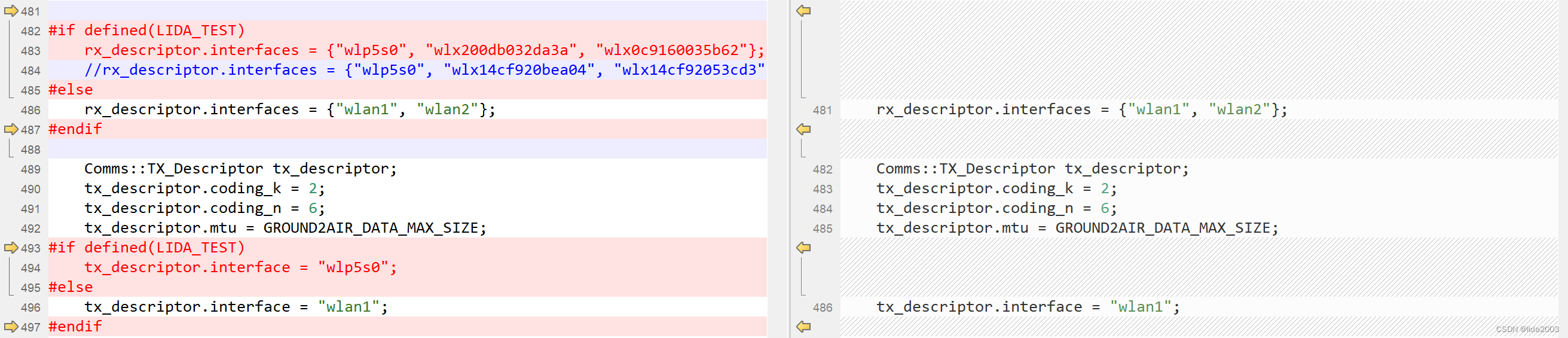
ESP32-FPV-Camera作者jeanlemotan是在Pi 4上做的地面端。不过经过大家的努力,目前已经可以在笔记本电脑上进行地面端程序的运行。
注:这里有一些细节需要关注的就是OpenGL的版本问题。
$ glxinfo|grep version
server glx version string: 1.4
client glx version string: 1.4
GLX version: 1.4
    Max core profile version: 3.3
    Max compat profile version: 3.0
    Max GLES1 profile version: 1.1
    Max GLES[23] profile version: 3.0
OpenGL core profile version string: 3.3 (Core Profile) Mesa 21.2.6
OpenGL core profile shading language version string: 3.30
OpenGL version string: 3.0 Mesa 21.2.6
OpenGL shading language version string: 1.30
OpenGL ES profile version string: OpenGL ES 3.0 Mesa 21.2.6
OpenGL ES profile shading language version string: OpenGL ES GLSL ES 3.00
地面端:esp32-cam-fpv\gs\src\imgui_impl_opengl3.cpp

当前天空端采用ESP-IDF v4.4.4,IDF安装,详见ESP32开发指南。
ESP32 SDK环境设置:
$ cd esp-sdk/esp-idf-v4.4.4/

$ . ./export.sh
Setting IDF_PATH to '/home/daniel/Work/esp-sdk/esp-idf-v4.4.4'
Detecting the Python interpreter
Checking "python" ...
Python 3.8.10
"python" has been detected
Adding ESP-IDF tools to PATH...
Not using an unsupported version of tool openocd-esp32 found in PATH: 0.10.0.
Using Python interpreter in /home/daniel/.espressif/python_env/idf4.4_py3.8_env/bin/python
Checking if Python packages are up to date...
Python requirements from /home/daniel/Work/esp-sdk/esp-idf-v4.4.4/requirements.txt are satisfied.
Added the following directories to PATH:
  /home/daniel/Work/esp-sdk/esp-idf-v4.4.4/components/esptool_py/esptool
  /home/daniel/Work/esp-sdk/esp-idf-v4.4.4/components/espcoredump
  /home/daniel/Work/esp-sdk/esp-idf-v4.4.4/components/partition_table
  /home/daniel/Work/esp-sdk/esp-idf-v4.4.4/components/app_update
  /home/daniel/.espressif/tools/xtensa-esp-elf-gdb/11.2_20220823/xtensa-esp-elf-gdb/bin
  /home/daniel/.espressif/tools/riscv32-esp-elf-gdb/11.2_20220823/riscv32-esp-elf-gdb/bin
  /home/daniel/.espressif/tools/xtensa-esp32-elf/esp-2021r2-patch5-8.4.0/xtensa-esp32-elf/bin
  /home/daniel/.espressif/tools/xtensa-esp32s2-elf/esp-2021r2-patch5-8.4.0/xtensa-esp32s2-elf/bin
  /home/daniel/.espressif/tools/xtensa-esp32s3-elf/esp-2021r2-patch5-8.4.0/xtensa-esp32s3-elf/bin
  /home/daniel/.espressif/tools/riscv32-esp-elf/esp-2021r2-patch5-8.4.0/riscv32-esp-elf/bin
  /home/daniel/.espressif/tools/esp32ulp-elf/2.35_20220830/esp32ulp-elf/bin
  /home/daniel/.espressif/tools/openocd-esp32/v0.11.0-esp32-20221026/openocd-esp32/bin
  /home/daniel/.espressif/python_env/idf4.4_py3.8_env/bin
  /home/daniel/Work/esp-sdk/esp-idf-v4.4.4/tools
Done! You can now compile ESP-IDF projects.
Go to the project directory and run:

  idf.py build
编译天空端固件:
$ cd esp32-cam-fpv/air_firmware/

$ idf.py build

$ idf.py -p /dev/ttyUSB0 flash

$ idf.py -p /dev/ttyUSB0 monitor
$ cd esp32-cam-fpv/gs/

$ make
| 参数 | OV5640 | OV2640 |
|---|---|---|
| array size | 2592 x 1944 | 1600 x 1200 (UXGA) |
| power supply | 1.8 V / 2.8 V | 1.7V to 3.3V |
| power consumption | active: 140 mA | 140 mW (for 15 fps, compressed mode) |
| lens size | 1/4" | 1/4" |
| maximum image transfer rate | QSXGA (2592x1944): 15 fps;1080p: 30 fps;1280 x 960: 45 fps;720p: 60 fps;VGA (640x480): 90 fps;QVGA (320x240): 120 fps | UXGA/SXGA: 15 fps;SVGA: 30 fps;CIF: 60 fps |
从规格的角度看OV5640胜出,但是实测情况貌似OV5640并不理想。
ESP32-FPV-Camera FPS Test
这里采用对比近距离测试:
存在以下几个问题:
ESP32-FPV-Camera与模拟摄像头简单对比
【1】WiFi monitor模式的配置和运行检查(Ubuntu系统)
【2】ESP32-Camera性能(简单)测试评估
我正在学习如何使用Nokogiri,根据这段代码我遇到了一些问题:require'rubygems'require'mechanize'post_agent=WWW::Mechanize.newpost_page=post_agent.get('http://www.vbulletin.org/forum/showthread.php?t=230708')puts"\nabsolutepathwithtbodygivesnil"putspost_page.parser.xpath('/html/body/div/div/div/div/div/table/tbody/tr/td/div
我有一个Ruby程序,它使用rubyzip压缩XML文件的目录树。gem。我的问题是文件开始变得很重,我想提高压缩级别,因为压缩时间不是问题。我在rubyzipdocumentation中找不到一种为创建的ZIP文件指定压缩级别的方法。有人知道如何更改此设置吗?是否有另一个允许指定压缩级别的Ruby库? 最佳答案 这是我通过查看rubyzip内部创建的代码。level=Zlib::BEST_COMPRESSIONZip::ZipOutputStream.open(zip_file)do|zip|Dir.glob("**/*")d
类classAprivatedeffooputs:fooendpublicdefbarputs:barendprivatedefzimputs:zimendprotecteddefdibputs:dibendendA的实例a=A.new测试a.foorescueputs:faila.barrescueputs:faila.zimrescueputs:faila.dibrescueputs:faila.gazrescueputs:fail测试输出failbarfailfailfail.发送测试[:foo,:bar,:zim,:dib,:gaz].each{|m|a.send(m)resc
很好奇,就使用rubyonrails自动化单元测试而言,你们正在做什么?您是否创建了一个脚本来在cron中运行rake作业并将结果邮寄给您?git中的预提交Hook?只是手动调用?我完全理解测试,但想知道在错误发生之前捕获错误的最佳实践是什么。让我们理所当然地认为测试本身是完美无缺的,并且可以正常工作。下一步是什么以确保他们在正确的时间将可能有害的结果传达给您? 最佳答案 不确定您到底想听什么,但是有几个级别的自动代码库控制:在处理某项功能时,您可以使用类似autotest的内容获得关于哪些有效,哪些无效的即时反馈。要确保您的提
假设我做了一个模块如下:m=Module.newdoclassCendend三个问题:除了对m的引用之外,还有什么方法可以访问C和m中的其他内容?我可以在创建匿名模块后为其命名吗(就像我输入“module...”一样)?如何在使用完匿名模块后将其删除,使其定义的常量不再存在? 最佳答案 三个答案:是的,使用ObjectSpace.此代码使c引用你的类(class)C不引用m:c=nilObjectSpace.each_object{|obj|c=objif(Class===objandobj.name=~/::C$/)}当然这取决于
我正在尝试使用ruby和Savon来使用网络服务。测试服务为http://www.webservicex.net/WS/WSDetails.aspx?WSID=9&CATID=2require'rubygems'require'savon'client=Savon::Client.new"http://www.webservicex.net/stockquote.asmx?WSDL"client.get_quotedo|soap|soap.body={:symbol=>"AAPL"}end返回SOAP异常。检查soap信封,在我看来soap请求没有正确的命名空间。任何人都可以建议我
关闭。这个问题是opinion-based.它目前不接受答案。想要改进这个问题?更新问题,以便editingthispost可以用事实和引用来回答它.关闭4年前。Improvethisquestion我想在固定时间创建一系列低音和高音调的哔哔声。例如:在150毫秒时发出高音调的蜂鸣声在151毫秒时发出低音调的蜂鸣声200毫秒时发出低音调的蜂鸣声250毫秒的高音调蜂鸣声有没有办法在Ruby或Python中做到这一点?我真的不在乎输出编码是什么(.wav、.mp3、.ogg等等),但我确实想创建一个输出文件。
我在我的项目目录中完成了compasscreate.和compassinitrails。几个问题:我已将我的.sass文件放在public/stylesheets中。这是放置它们的正确位置吗?当我运行compasswatch时,它不会自动编译这些.sass文件。我必须手动指定文件:compasswatchpublic/stylesheets/myfile.sass等。如何让它自动运行?文件ie.css、print.css和screen.css已放在stylesheets/compiled。如何在编译后不让它们重新出现的情况下删除它们?我自己编译的.sass文件编译成compiled/t
我想将html转换为纯文本。不过,我不想只删除标签,我想智能地保留尽可能多的格式。为插入换行符标签,检测段落并格式化它们等。输入非常简单,通常是格式良好的html(不是整个文档,只是一堆内容,通常没有anchor或图像)。我可以将几个正则表达式放在一起,让我达到80%,但我认为可能有一些现有的解决方案更智能。 最佳答案 首先,不要尝试为此使用正则表达式。很有可能你会想出一个脆弱/脆弱的解决方案,它会随着HTML的变化而崩溃,或者很难管理和维护。您可以使用Nokogiri快速解析HTML并提取文本:require'nokogiri'h
我想为Heroku构建一个Rails3应用程序。他们使用Postgres作为他们的数据库,所以我通过MacPorts安装了postgres9.0。现在我需要一个postgresgem并且共识是出于性能原因你想要pggem。但是我对我得到的错误感到非常困惑当我尝试在rvm下通过geminstall安装pg时。我已经非常明确地指定了所有postgres目录的位置可以找到但仍然无法完成安装:$envARCHFLAGS='-archx86_64'geminstallpg--\--with-pg-config=/opt/local/var/db/postgresql90/defaultdb/po
