参考文章2:【FFmpeg编码实战】(1)将YUV420P图片集编码成H264视频文件
先参考这个文章:【FFmpeg解码实战】(2)分离视频文件中的视频流每一张图片(进阶)(C)
这篇文章的上一篇文章:【FFmpeg解码实战】(1)解码并分离视频文件中的音频流和视频流(C),也是第一篇demp,我们跳过
博主提供了工程下载方式:VS2019-解码视频-工程所有文件.zip
这个下载的项目其实是把解码并分离视频文件中的音频流和视频流和分离视频文件中的视频流每一张图片合在一起了,通过宏开关去控制

里面没有ffmpeg,我们下载博主编译好的或者直接到官网下载
博主给的:
你要ARM 的话,可以使用这个: https://download.csdn.net/download/Ciellee/13027058
windows 的话,可以用这个 : https://download.csdn.net/download/Ciellee/12915075
都是我之前用最新的 4.3 源码自已编译的
我没有用博主的,直接找方法自己编译了一个,不过是4.4版本的,不知道兼容不兼容
Visual Studio 2019 VS编译ffmpeg4.4为静态库或动态库
然后我们在博主的工程里面,添加include和lib两个目录,并且把需要的头文件和库文件拷贝进去
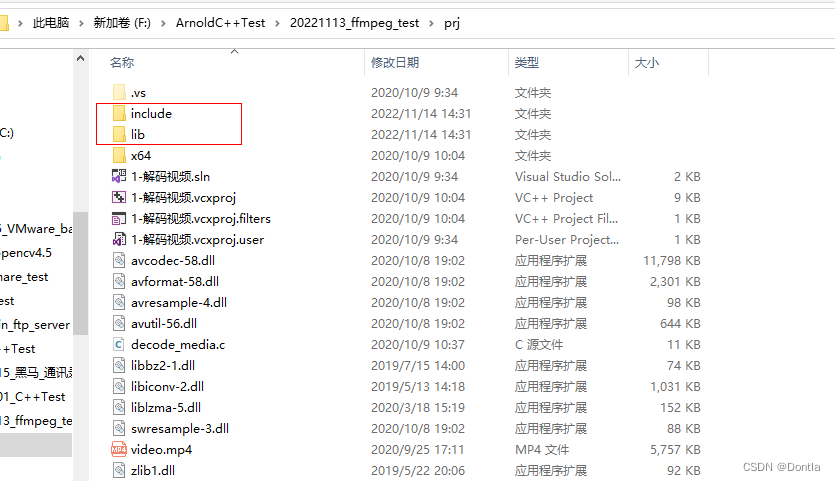
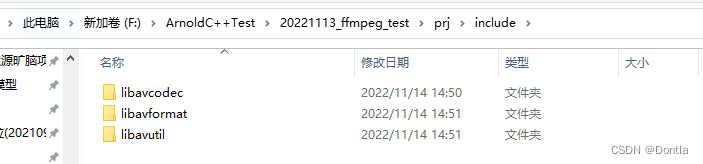

在vs项目种配置附加包含目录和附加库目录
看vs项目的这个地方发现博主是这样包含ffmpeg的头文件和库目录的,我们把它改了
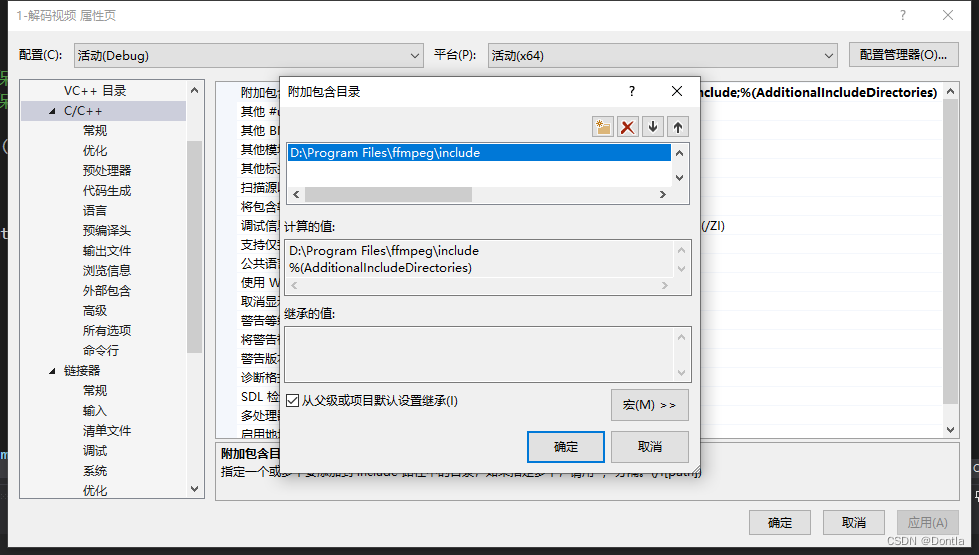
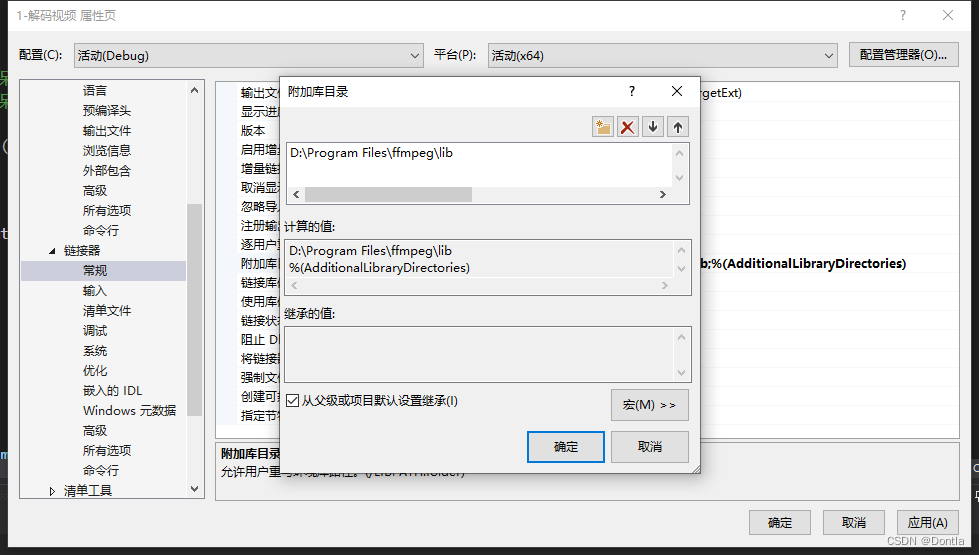
改成这样
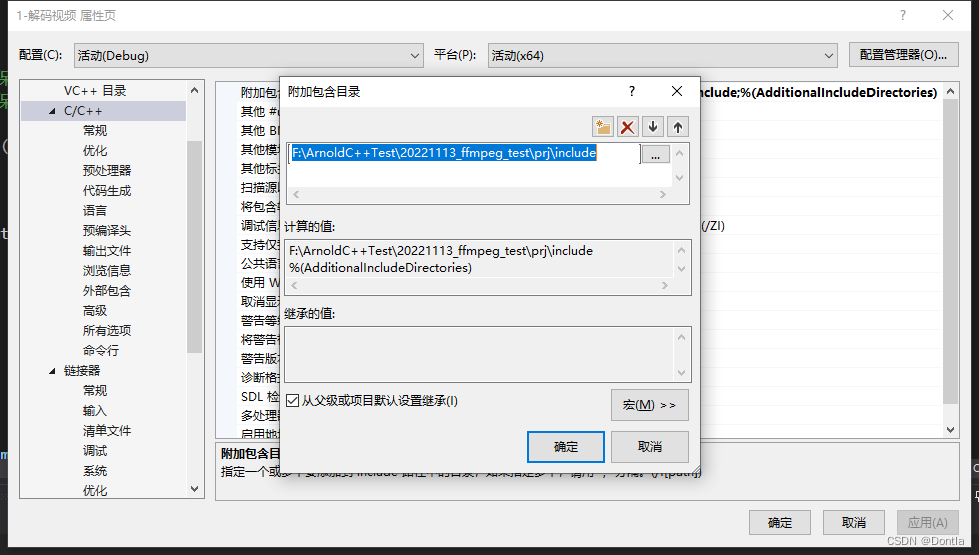
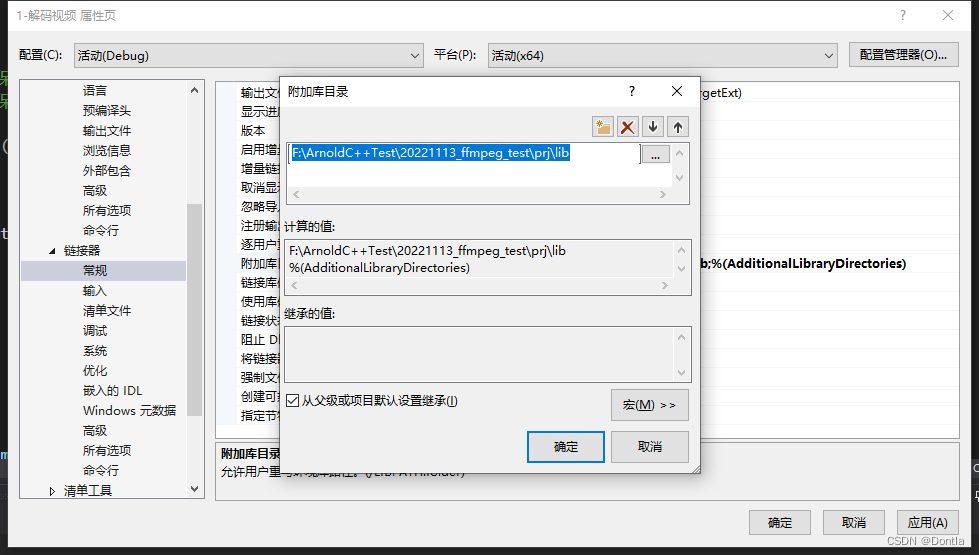
然后运行项目,发现报错了,错误 C4996 'av_init_packet': 被声明为已否决,应该这个函数不推荐使用了,我们看下4.4有没替代接口

在ffmpeg编译工程里查找,发现这个文档,参考文章:ffmpeg的API函数变化记录
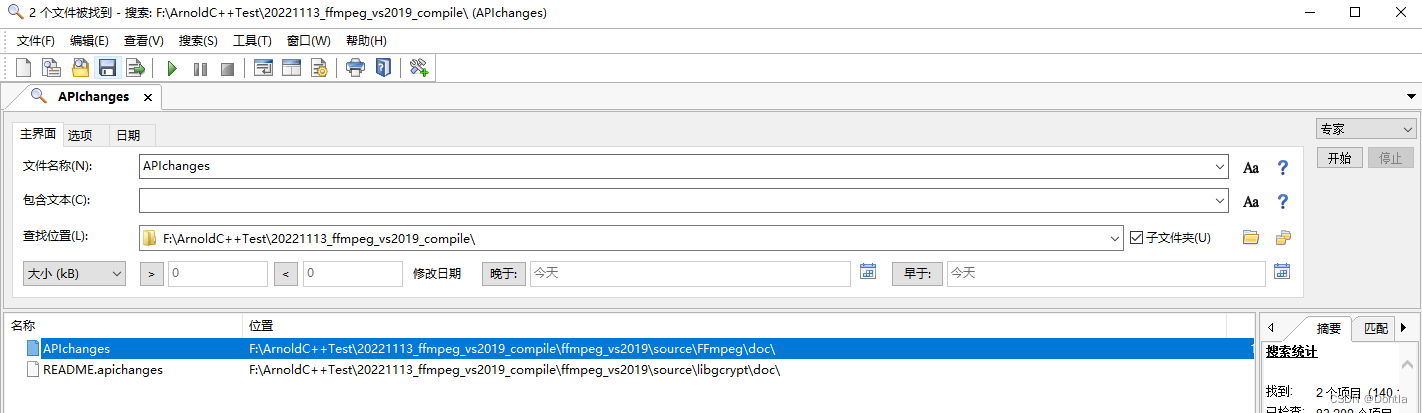
看了下,貌似没替代接口,那么我们只能“沉默”它了

在代码开头添加#pragma warning(disable : 4996)
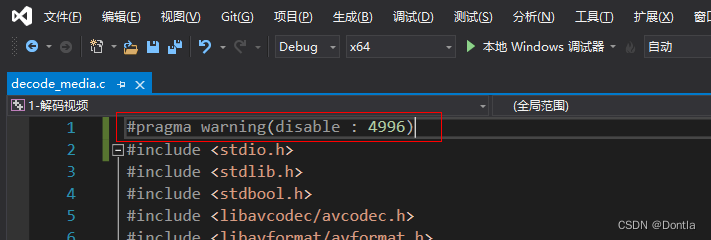
运行报错:
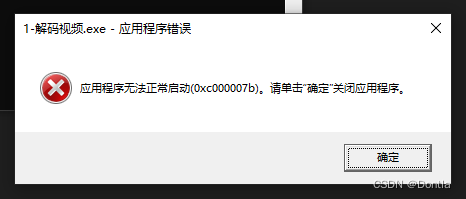
按博主提供的ffmpeg4.3配置了,也还是同样问题
严重性 代码 说明 项目 文件 行 禁止显示状态
警告 MSB8028 中间目录(x64\Debug)包含从另一个项目(1-解码视频.vcxproj)共享的文件。
这会导致错误的清除和重新生成行为。 demux_video C:\Program Files (x86)\Microsoft Visual
Studio\2019\Community\MSBuild\Microsoft\VC\v160\Microsoft.CppBuild.targets 513严重性 代码 说明 项目 文件 行 禁止显示状态
警告 LNK4078 找到多个“.rdata”节,它们具有不同的特性(C0400040) demux_video F:\ArnoldCppTest\20221113_ffmpeg_test\prj\libavformatd.lib(invert_limb_table.obj) 1
遇到很多困难啊,后来发现是博主给的ffmpeg有问题,后来我到ffmpeg官网,图中箭头所指的地方下到了4.3老版本
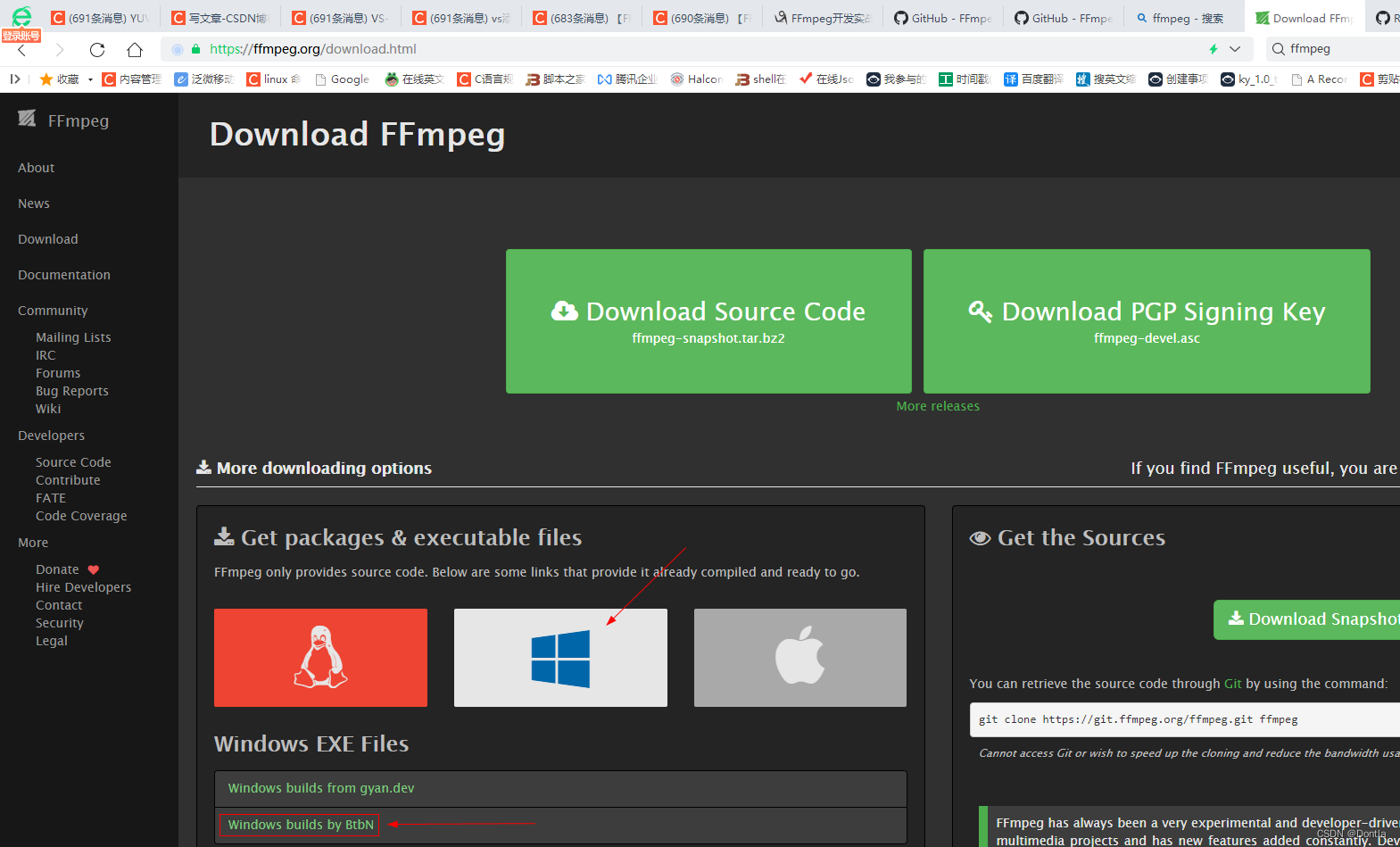
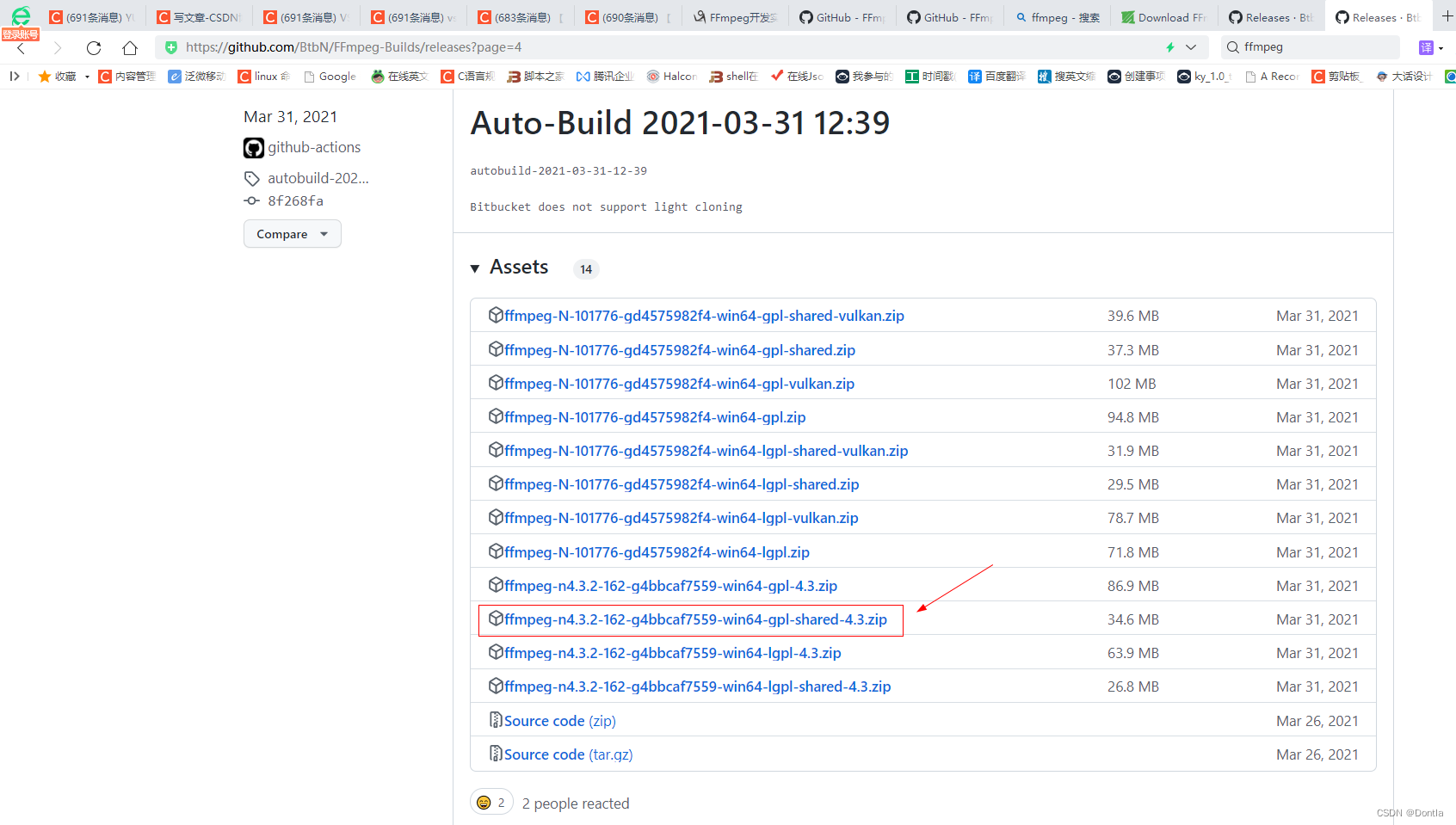
我一直往后面翻,终于找到了4.3老版本,
https://github.com/BtbN/FFmpeg-Builds/releases
然后下载了
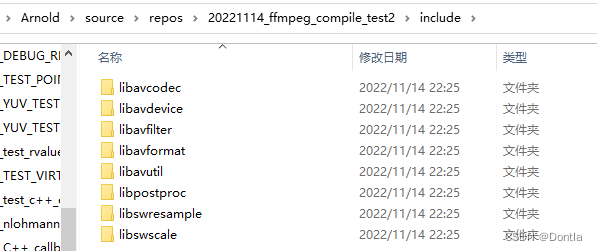
然后下下来解压,把里面的一些东西拷贝到我们项目目录中,主要就是头文件,静态库文件,动态库文件,其中动态库文件注意要放在项目根目录下
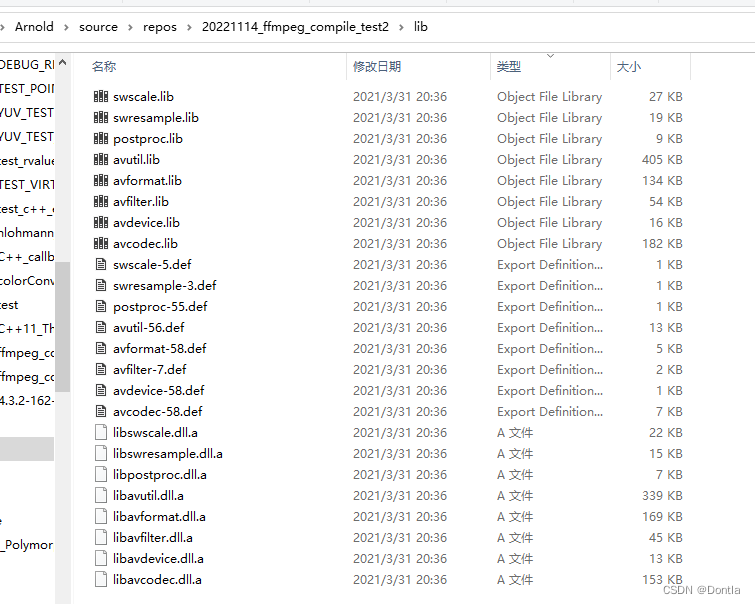
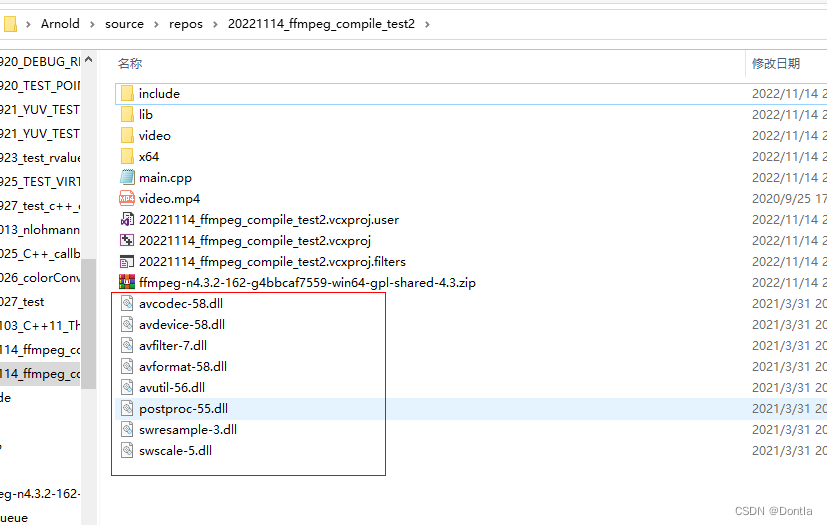
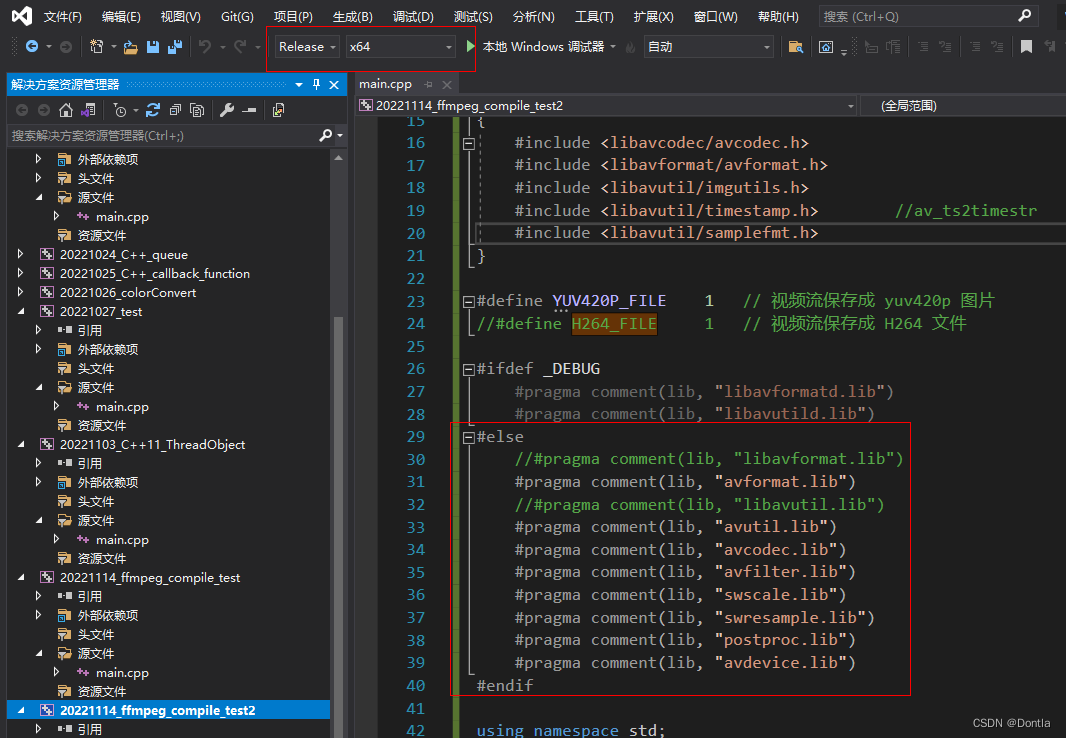
因为下下来的没见带d,所以估计是release版本的,我们在Release x64下配置
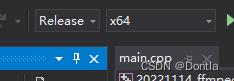
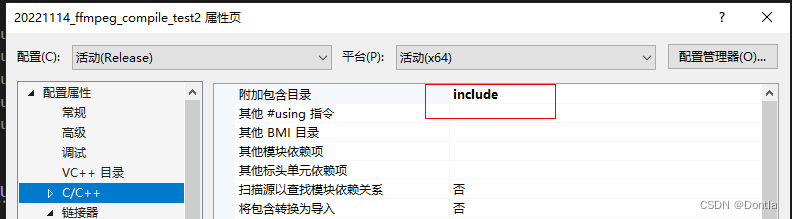
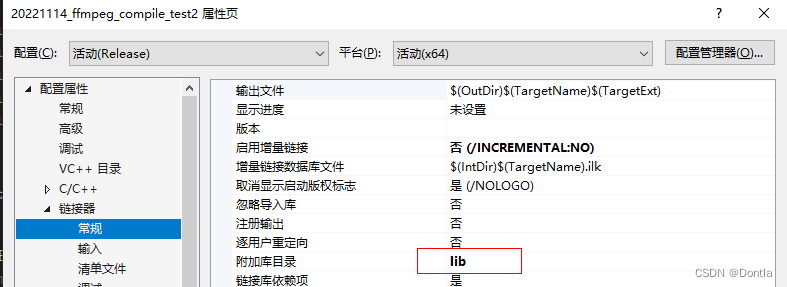
因为我们是在代码中引用附加依赖项的,所以不用在vs里填了
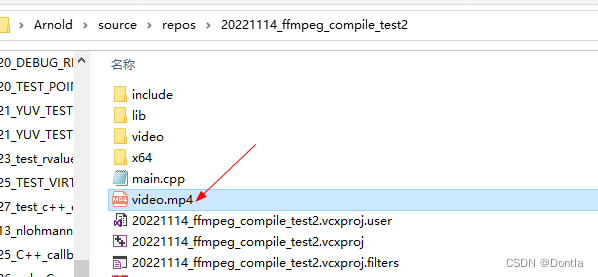
把博主那个视频文件拷贝到项目根目录下
发现有的代码不大对,我们改一下,
main.cpp
/*

ffmpeg lib 测试程序

*/

#include <stdio.h>
#include <stdlib.h>
#include <stdbool.h>
#include <iostream>
#include <io.h>
#include <direct.h>

extern "C"
{
	#include <libavcodec/avcodec.h>
	#include <libavformat/avformat.h>
	#include <libavutil/imgutils.h>
	#include <libavutil/timestamp.h>		//av_ts2timestr
	#include <libavutil/samplefmt.h>
}

#define YUV420P_FILE	1	// 视频流保存成 yuv420p 图片
//#define H264_FILE	    1	// 视频流保存成 H264 文件

#ifdef _DEBUG
	#pragma comment(lib, "libavformatd.lib")
	#pragma comment(lib, "libavutild.lib")
#else
	//#pragma comment(lib, "libavformat.lib")
	#pragma comment(lib, "avformat.lib")
	//#pragma comment(lib, "libavutil.lib")
	#pragma comment(lib, "avutil.lib")
	#pragma comment(lib, "avcodec.lib")
	#pragma comment(lib, "avfilter.lib")
	#pragma comment(lib, "swscale.lib")
	#pragma comment(lib, "swresample.lib")
	#pragma comment(lib, "postproc.lib")
	#pragma comment(lib, "avdevice.lib")
#endif

using namespace std;

static int get_format_from_sample_fmt(const char** fmt, enum AVSampleFormat sample_fmt)
{
	int i;
	struct sample_fmt_entry
	{
		enum AVSampleFormat sample_fmt;
		const char* fmt_be, * fmt_le;
	}
	sample_fmt_entries[] =
	{
		{ AV_SAMPLE_FMT_U8,  "u8",    "u8"    },
		{ AV_SAMPLE_FMT_S16, "s16be", "s16le" },
		{ AV_SAMPLE_FMT_S32, "s32be", "s32le" },
		{ AV_SAMPLE_FMT_FLT, "f32be", "f32le" },
		{ AV_SAMPLE_FMT_DBL, "f64be", "f64le" },
	};
	*fmt = NULL;

	for (i = 0; i < FF_ARRAY_ELEMS(sample_fmt_entries); i++)
	{
		struct sample_fmt_entry* entry = &sample_fmt_entries[i];
		if (sample_fmt == entry->sample_fmt)
		{
			*fmt = AV_NE(entry->fmt_be, entry->fmt_le);
			return 0;
		}
	}

	fprintf(stderr,
		"sample format %s is not supported as output format\n",
		av_get_sample_fmt_name(sample_fmt));
	return -1;
}

// 参考:ffplay.c、demuxing_decoding.c
int main(int argc, char* argv[])
{
	int ret = 0;
	//printf("%s \n",avcodec_configuration());

	// 定义文件名
	const char input_filename[] = "video.mp4";
	const char out_filename[] = "video_out";
	char video_dst_filename[50]; // = "Video_Test_out.h264";
	char audio_dst_filename[50]; // = "Video_Test_out.aac";
	memset(video_dst_filename, '\0', 50);
	memset(audio_dst_filename, '\0', 50);

	// 1. 打开文件,分配AVFormatContext 结构体上下文
	AVFormatContext* fmt_ctx = NULL;	// 定义音视频格式上下文结构体
	if (avformat_open_input(&fmt_ctx, input_filename, NULL, NULL) < 0)
	{
		printf("Could not open source file %s\n", input_filename);
		return 0;
	}
	// 2. 查找文件对应的流信息
	if (avformat_find_stream_info(fmt_ctx, NULL) < 0) {
		printf("Could not find stream information\n");
		return 0;
	}

	// 3. 打印流信息
	av_dump_format(fmt_ctx, 0, input_filename, 0);

	// 4. 视频解码器初始化
	// 4.1 获取视频对应的stream_index
	int video_stream_idx = av_find_best_stream(fmt_ctx, AVMEDIA_TYPE_VIDEO, -1, -1, NULL, 0);
	printf("\n#===> Find video_stream_idx = %d\n", video_stream_idx);

	// 4.2 获取到stream 数据
	AVStream* video_st = fmt_ctx->streams[video_stream_idx];

	// 4.3 根据 codec_id 查找解码器
	AVCodec* video_dec = avcodec_find_decoder(video_st->codecpar->codec_id);
	// 4.4 初始化解码器上下文信息
	AVCodecContext* video_dec_ctx = avcodec_alloc_context3(video_dec);

	// 4.5 复制 codec 相关参数到解码器上下文中
	avcodec_parameters_to_context(video_dec_ctx, video_st->codecpar);
	printf("\n#===> Find decoder: %s,  coded_id:%d  long name: %s  pix_fmt=%d (%s)\n", video_dec->name, video_dec->id, video_dec->long_name, video_dec_ctx->pix_fmt, av_get_pix_fmt_name(video_dec_ctx->pix_fmt));

	// 4.6 初始化并打开解码器
	AVDictionary* video_opts = NULL;
	avcodec_open2(video_dec_ctx, video_dec, &video_opts);


	// 5. 音频解码器初始化
	// 5.1  获取音频对应的stream_index
	int audio_stream_idx = av_find_best_stream(fmt_ctx, AVMEDIA_TYPE_AUDIO, -1, -1, NULL, 0);
	printf("\n#===> Find audio_stream_idx = %d\n", audio_stream_idx);

	// 5.2 获取到stream 数据
	AVStream* audio_st = fmt_ctx->streams[audio_stream_idx];

	// 5.3 根据 codec_id 查找解码器
	AVCodec* audio_dec = avcodec_find_decoder(audio_st->codecpar->codec_id);
	printf("\n#===> Find decoder: %s,  coded_id:%d  long name: %s\n", audio_dec->name, audio_dec->id, audio_dec->long_name);

	// 5.4 初始化解码器上下文信息
	AVCodecContext* audio_dec_ctx = avcodec_alloc_context3(audio_dec);

	// 5.5 复制 codec 相关参数到解码器上下文中
	avcodec_parameters_to_context(audio_dec_ctx, audio_st->codecpar);

	// 5.6 初化并打开音频解码器
	AVDictionary* audio_opts = NULL;
	avcodec_open2(audio_dec_ctx, audio_dec, &audio_opts);

	// 6. 配置视频解复用后要保存的位置
	FILE* video_dst_file = NULL, * audio_dst_file = NULL;

#ifdef H264_FILE
	sprintf_s(video_dst_filename, 50, "%s.%s", out_filename, video_dec->name);
	ret = fopen_s(&video_dst_file, video_dst_filename, "wb");
	printf("open file:%s   ret:%d\n", video_dst_filename, ret);
#endif

#ifdef YUV420P_FILE
	//文件夹名称
	char folderName[] = "video";

	// 文件夹不存在则创建文件夹
	if (_access(folderName, 0) == -1)
	{
		_mkdir(folderName);
	}

	snprintf(audio_dst_filename, 50, "video/%s.%s", out_filename, audio_dec->name);
#else
	sprintf_s(audio_dst_filename, 50, "%s.%s", out_filename, audio_dec->name);
#endif

	ret = fopen_s(&audio_dst_file, audio_dst_filename, "wb");
	printf("open file:%s   ret:%d\n", audio_dst_filename, ret);


	uint8_t* video_dst_data[4] = { NULL };
	int video_dst_linesize[4] = { 0 };

	// 7. 计算视频数据大小
	size_t video_dst_bufsize = av_image_alloc(video_dst_data, video_dst_linesize,
		video_dec_ctx->width, video_dec_ctx->height, video_dec_ctx->pix_fmt, 1);

	// 8. 分配并初始化 AVFrame、AVPacket
	AVFrame* frame = av_frame_alloc();
	AVPacket pkt;
	av_init_packet(&pkt);
	pkt.data = NULL;
	pkt.size = 0;
	int video_frame_count = 0, audio_frame_count = 0;

	printf("Start read frame\n");
	//  9. 循环读取 一帧数据
	while (av_read_frame(fmt_ctx, &pkt) >= 0) {
		// 10. 视频数据解码
		if (pkt.stream_index == video_stream_idx)
		{
			// 10.1 将 packet 数据 发送给解码器
			ret = avcodec_send_packet(video_dec_ctx, &pkt);

			// 10.2 获取解码后的帧数据
			while (ret >= 0) {
				ret = avcodec_receive_frame(video_dec_ctx, frame);

				if (ret == AVERROR_EOF || ret == AVERROR(EAGAIN))
				{
					ret = 0;
					break;
				}
				// 10.3 保存帧数据到视频文件中
				//printf("#===> video_frame n:%d  coded_n:%d  ", video_frame_count++, frame->coded_picture_number);
				av_image_copy(video_dst_data, video_dst_linesize,
					(const uint8_t**)(frame->data), frame->linesize, video_dec_ctx->pix_fmt, video_dec_ctx->width, video_dec_ctx->height);
#ifdef YUV420P_FILE
				// 10.4 写入文件
				sprintf_s(video_dst_filename, 50, "video/%s.%s.%d.yuv", out_filename, av_get_pix_fmt_name(video_dec_ctx->pix_fmt), video_frame_count++);
				ret = fopen_s(&video_dst_file, video_dst_filename, "wb");
				//printf("open file:%s   ret:%d\n", video_dst_filename, ret);
#endif

				ret = (int)fwrite(video_dst_data[0], 1, video_dst_bufsize, video_dst_file);
				//printf("Write Size:%d\n", ret);
#ifdef YUV420P_FILE
				fclose(video_dst_file);
#endif
			}
		}
		// 11. 音频数据解码
		else if (pkt.stream_index == audio_stream_idx)
		{
			// 11.1 将 packet 数据 发送给解码器
			ret = avcodec_send_packet(audio_dec_ctx, &pkt);

			// 11.2 获取解码后的帧数据
			while (ret >= 0) {
				ret = avcodec_receive_frame(audio_dec_ctx, frame);

				if (ret == AVERROR_EOF || ret == AVERROR(EAGAIN))
				{
					ret = 0;
					break;
				}
				// 11.3 写入文件
				//printf("#===> audio_frame n:%d  nb_samples:%d  pts:%s ",
				//		audio_frame_count++, frame->nb_samples, av_ts2timestr(frame->pts, &audio_dec_ctx->time_base));
				ret = (int)fwrite(frame->extended_data[0], 1, frame->nb_samples * av_get_bytes_per_sample((AVSampleFormat)(frame->format)), audio_dst_file);
				//printf("Write Size:%d\n", ret);
			}
		}

		av_frame_unref(frame);
		// 清空AVPacket结构体数据
		av_packet_unref(&pkt);

		if (ret < 0)
			break;
	}

	// 12.发送一个空包,刷新解码器
	ret = avcodec_send_packet(video_dec_ctx, NULL);
	// 12.1 获取解码后的帧数据
	while (ret >= 0) {
		ret = avcodec_receive_frame(video_dec_ctx, frame);

		if (ret == AVERROR_EOF || ret == AVERROR(EAGAIN))
		{
			printf("break, video ret=%d \n", ret);
			ret = 0;
			break;
		}
	}

	ret = avcodec_send_packet(audio_dec_ctx, NULL);

	// 12.2 获取解码后的帧数据
	while (ret >= 0) {
		ret = avcodec_receive_frame(audio_dec_ctx, frame);

		if (ret == AVERROR_EOF || ret == AVERROR(EAGAIN))
		{
			printf("break, audio ret=%d \n", ret);
			ret = 0;
			break;
		}
	}


	// 13. 解复用完毕
	printf("Demuxing succeeded.\n");
	printf("Play the output video file with the command:\n"
		"ffplay -f rawvideo -pix_fmt %s -video_size %dx%d %s\n",
		av_get_pix_fmt_name(video_dec_ctx->pix_fmt), video_dec_ctx->width, video_dec_ctx->height, video_dst_filename);


	FILE* bat_dst_file = NULL;
	char bat_out[100] = "";
	memset(bat_out, '\0', 100);

#ifdef YUV420P_FILE
	memset(video_dst_filename, '\0', 50);
	sprintf_s(video_dst_filename, 50, "%s.%s.%d.yuv", out_filename, av_get_pix_fmt_name(video_dec_ctx->pix_fmt), 0);

#endif

	sprintf_s(bat_out, 99, "ffplay -f rawvideo -pix_fmt %s -video_size %dx%d %s",
		av_get_pix_fmt_name(video_dec_ctx->pix_fmt), video_dec_ctx->width, video_dec_ctx->height, video_dst_filename);

#ifdef YUV420P_FILE
	ret = fopen_s(&bat_dst_file, "video/play_video.bat", "wb");
#else
	ret = fopen_s(&bat_dst_file, "play_video.bat", "wb");
#endif

	ret = (int)fwrite(bat_out, 1, sizeof(bat_out), bat_dst_file);
	fclose(bat_dst_file);


	enum AVSampleFormat sfmt = audio_dec_ctx->sample_fmt;
	int n_channels = audio_dec_ctx->channels;
	const char* fmt;

	if (av_sample_fmt_is_planar(sfmt)) {
		const char* packed = av_get_sample_fmt_name(sfmt);
		printf("Warning: the sample format the decoder produced is planar "
			"(%s). This example will output the first channel only.\n",
			packed ? packed : "?");
		sfmt = av_get_packed_sample_fmt(sfmt);
		n_channels = 1;
	}
	if ((ret = get_format_from_sample_fmt(&fmt, sfmt)) < 0)
		goto end;
	printf("Play the output audio file with the command:\n"
		"ffplay -f %s -ac %d -ar %d %s\n",
		fmt, n_channels, audio_dec_ctx->sample_rate,
		audio_dst_filename);

	memset(bat_out, '\0', 100);
#ifdef YUV420P_FILE
	memset(audio_dst_filename, '\0', 50);
	sprintf_s(audio_dst_filename, 50, "%s.%s", out_filename, audio_dec->name);
#endif
	sprintf_s(bat_out, 99, "ffplay -f %s -ac %d -ar %d %s",
		fmt, n_channels, audio_dec_ctx->sample_rate,
		audio_dst_filename);
#ifdef YUV420P_FILE
	ret = fopen_s(&video_dst_file, "video/play_audio.bat", "wb");
#else
	ret = fopen_s(&video_dst_file, "play_audio.bat", "wb");
#endif
	ret = (int)fwrite(bat_out, 1, sizeof(bat_out), bat_dst_file);
	fclose(video_dst_file);

end:
	avcodec_free_context(&video_dec_ctx);
	avcodec_free_context(&audio_dec_ctx);
	avformat_close_input(&fmt_ctx);

#ifdef H264_FILE
	fclose(video_dst_file);
#endif

	fclose(audio_dst_file);
	av_frame_free(&frame);
	av_free(video_dst_data[0]);

	return 0;
}
然后vs上运行项目(注意重复运行项目时,不要打开里面生成的文件,以免占用)

然后到项目根目录查看,发现多了个video目录,里面有一个.aac文件和很多YUV文件,除此之外,还有俩.bat脚本文件,
play_audio.bat:
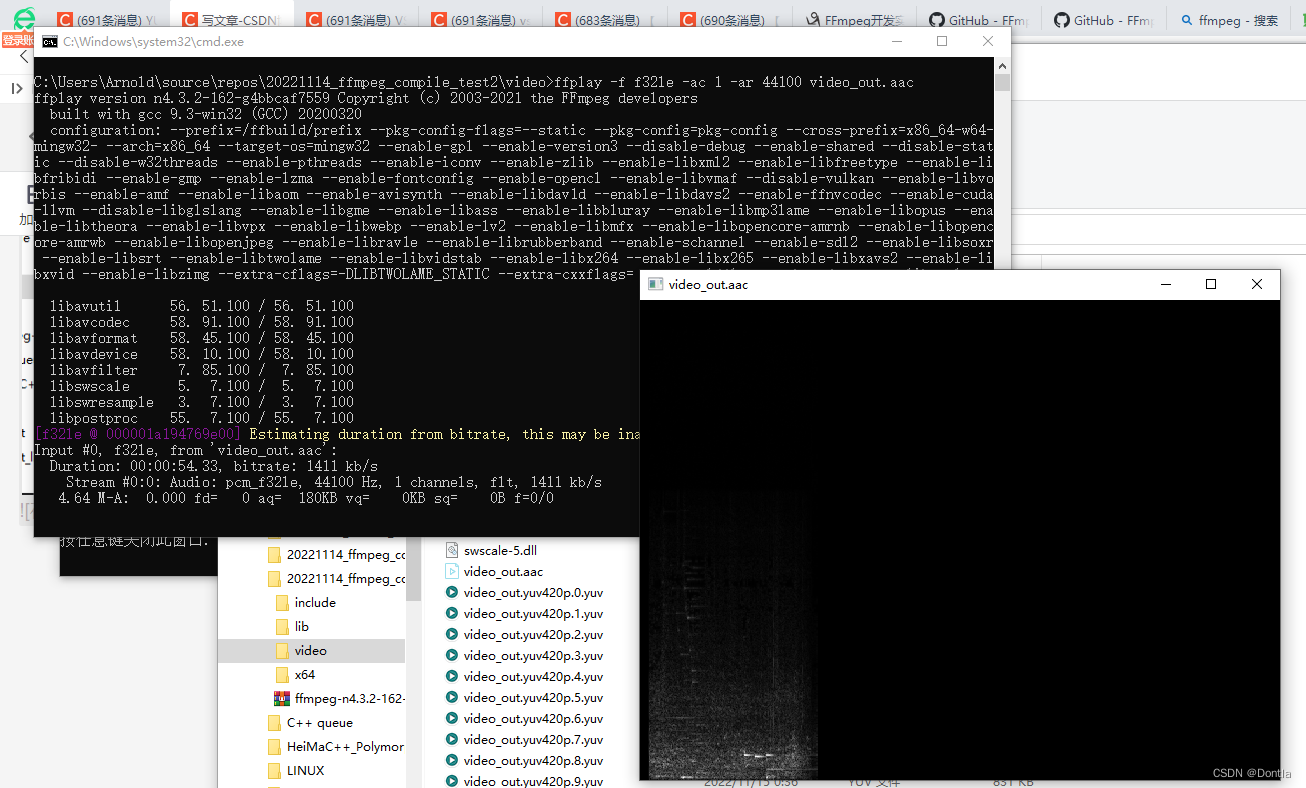
ffplay -f f32le -ac 1 -ar 44100 video_out.aac
play_video.bat
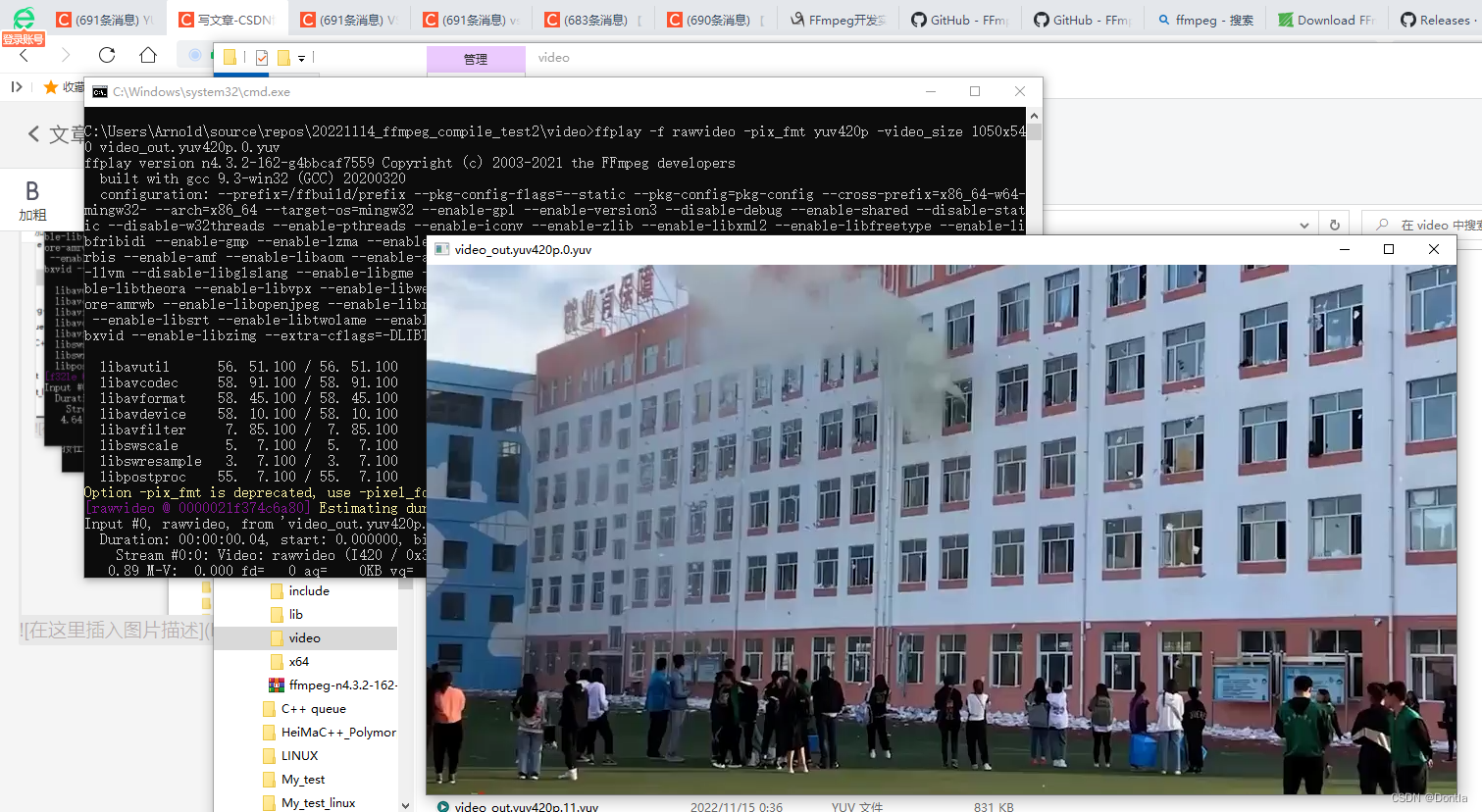
ffplay -f rawvideo -pix_fmt yuv420p -video_size 1050x540 video_out.yuv420p.0.yuv
我们把ffmpeg可执行文件和动态库文件拷贝进来,然后执行那俩脚本文件,就能播放.aac文件和YUV文件了,不过貌似是播放视频的,我们生成的单帧文件,所以就只能播放出第一帧
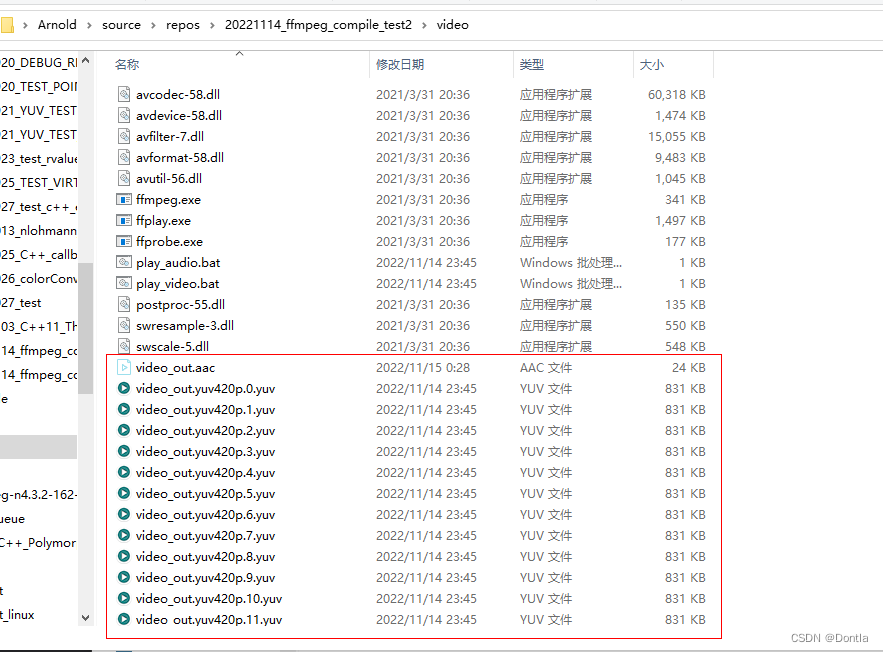
双击play_audio.bat能播放.aac文件:
双击play_video.bat能播放查看YUV第一帧:
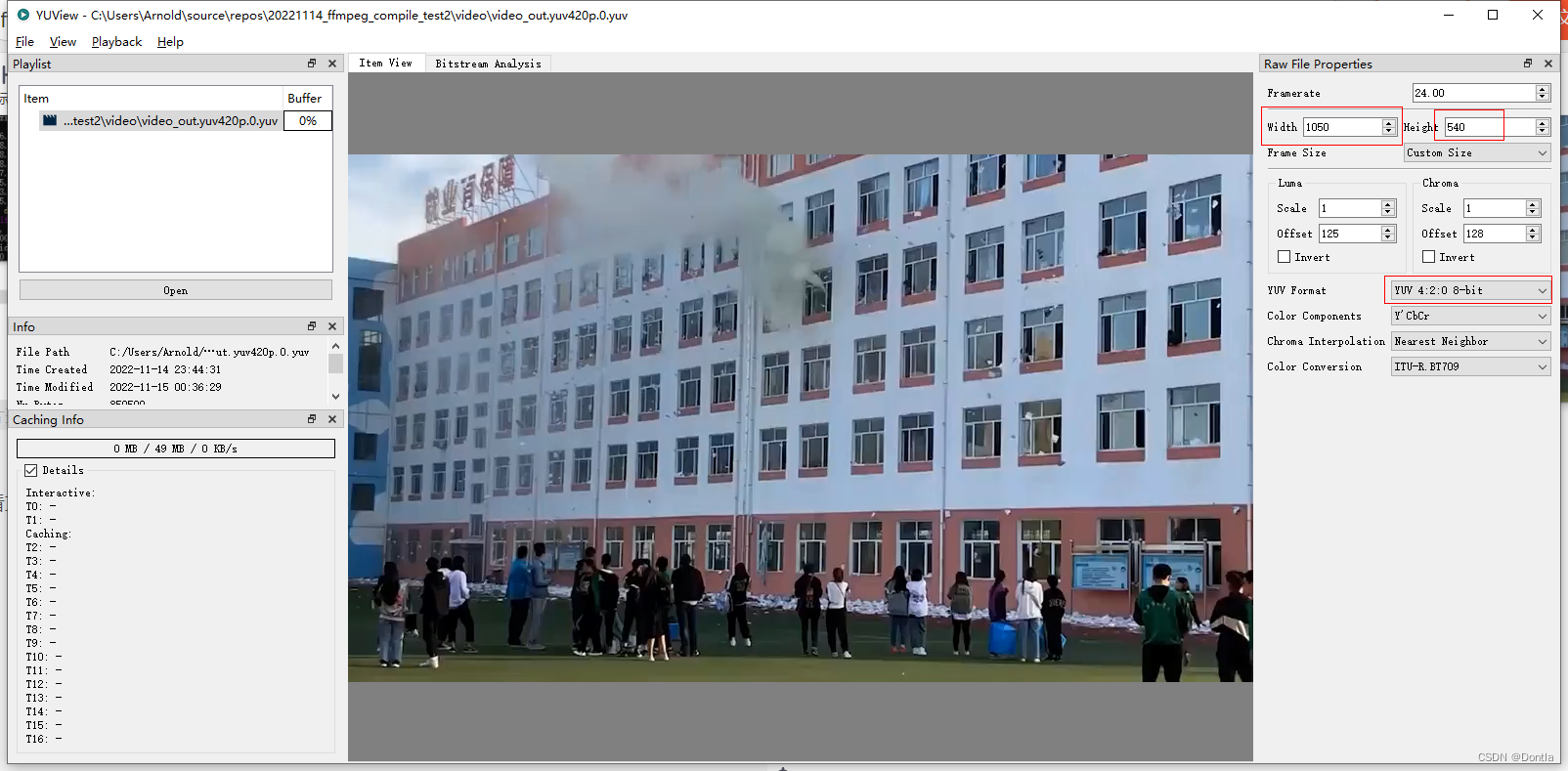
用YUView也能查看文件,不过要把图片正确的宽高和编码方式写对,宽1050,高540
我需要在客户计算机上运行Ruby应用程序。通常需要几天才能完成(复制大备份文件)。问题是如果启用sleep,它会中断应用程序。否则,计算机将持续运行数周,直到我下次访问为止。有什么方法可以防止执行期间休眠并让Windows在执行后休眠吗?欢迎任何疯狂的想法;-) 最佳答案 Here建议使用SetThreadExecutionStateWinAPI函数,使应用程序能够通知系统它正在使用中,从而防止系统在应用程序运行时进入休眠状态或关闭显示。像这样的东西:require'Win32API'ES_AWAYMODE_REQUIRED=0x0
这似乎非常适得其反,因为太多的gem会在window上破裂。我一直在处理很多mysql和ruby-mysqlgem问题(gem本身发生段错误,一个名为UnixSocket的类显然在Windows机器上不能正常工作,等等)。我只是在浪费时间吗?我应该转向不同的脚本语言吗? 最佳答案 我在Windows上使用Ruby的经验很少,但是当我开始使用Ruby时,我是在Windows上,我的总体印象是它不是Windows原生系统。因此,在主要使用Windows多年之后,开始使用Ruby促使我切换回原来的系统Unix,这次是Linux。Rub
之前在培训新生的时候,windows环境下配置opencv环境一直教的都是网上主流的vsstudio配置属性表,但是这个似乎对新生来说难度略高(虽然个人觉得完全是他们自己的问题),加之暑假之后对cmake实在是爱不释手,且这样配置确实十分简单(其实都不需要配置),故斗胆妄言vscode下配置CV之法。其实极为简单,图比较多所以很长。如果你看此文还配不好,你应该思考一下是不是自己的问题。闲话少说,直接开始。0.CMkae简介有的人到大二了都不知道cmake是什么,我不说是谁。CMake是一个开源免费并且跨平台的构建工具,可以用简单的语句来描述所有平台的编译过程。它能够根据当前所在平台输出对应的m
深度学习部署:Windows安装pycocotools报错解决方法1.pycocotools库的简介2.pycocotools安装的坑3.解决办法更多Ai资讯:公主号AiCharm本系列是作者在跑一些深度学习实例时,遇到的各种各样的问题及解决办法,希望能够帮助到大家。ERROR:Commanderroredoutwithexitstatus1:'D:\Anaconda3\python.exe'-u-c'importsys,setuptools,tokenize;sys.argv[0]='"'"'C:\\Users\\46653\\AppData\\Local\\Temp\\pip-instal
动漫制作技巧是很多新人想了解的问题,今天小编就来解答与大家分享一下动漫制作流程,为了帮助有兴趣的同学理解,大多数人会选择动漫培训机构,那么今天小编就带大家来看看动漫制作要掌握哪些技巧?一、动漫作品首先完成草图设计和原型制作。设计草图要有目的、有对象、有步骤、要形象、要简单、符合实际。设计图要一致性,以保证制作的顺利进行。二、原型制作是根据设计图纸和制作材料,可以是手绘也可以是3d软件创建。在此步骤中,要注意的问题是色彩和平面布局。三、动漫制作制作完成后,加工成型。完成不同的表现形式后,就要对设计稿进行加工处理,使加工的难易度降低,并得到一些基本准确的概念,以便于后续的大样、准确的尺寸制定。四、
2022/8/4更新支持加入水印水印必须包含透明图像,并且水印图像大小要等于原图像的大小pythonconvert_image_to_video.py-f30-mwatermark.pngim_dirout.mkv2022/6/21更新让命令行参数更加易用新的命令行使用方法pythonconvert_image_to_video.py-f30im_dirout.mkvFFMPEG命令行转换一组JPG图像到视频时,是将这组图像视为MJPG流。我需要转换一组PNG图像到视频,FFMPEG就不认了。pyav内置了ffmpeg库,不需要系统带有ffmpeg工具因此我使用ffmpeg的python包装p
Transformers开始在视频识别领域的“猪突猛进”,各种改进和魔改层出不穷。由此作者将开启VideoTransformer系列的讲解,本篇主要介绍了FBAI团队的TimeSformer,这也是第一篇使用纯Transformer结构在视频识别上的文章。如果觉得有用,就请点赞、收藏、关注!paper:https://arxiv.org/abs/2102.05095code(offical):https://github.com/facebookresearch/TimeSformeraccept:ICML2021author:FacebookAI一、前言Transformers(VIT)在图
我正在尝试使用以下代码通过将ffmpeg实用程序作为子进程运行并获取其输出并解析它来确定视频分辨率:IO.popen'ffmpeg-i'+path_to_filedo|ffmpegIO|#myparsegoeshereend...但是ffmpeg输出仍然连接到标准输出并且ffmepgIO.readlines是空的。ffmpeg实用程序是否需要一些特殊处理?或者还有其他方法可以获得ffmpeg输出吗?我在WinXP和FedoraLinux下测试了这段代码-结果是一样的。 最佳答案 要跟进mouviciel的评论,您需要使用类似pope
给定一个nxmbool数组:[[true,true,false],[false,true,true],[false,true,true]]有什么简单的方法可以返回“该列中有多少个true?”结果应该是[1,3,2] 最佳答案 使用转置得到一个数组,其中每个子数组代表一列,然后将每一列映射到其中的true数:arr.transpose.map{|subarr|subarr.count(true)}这是一个带有inject的版本,应该在1.8.6上运行,没有任何依赖:arr.transpose.map{|subarr|subarr.in
我在目录“C:\DocumentsandSettings\test.exe”中有一个文件,但是当我用单引号编写命令时`C:\DocumentsandSettings\test.exe(我无法在此框中显示),用于在Ruby中执行命令,我无法这样做,我收到的错误是找不到文件或目录。我尝试用“//”和“\”替换“\”,但似乎没有任何效果。我也使用过系统、IO.popen和exec命令,但所有的努力都是徒劳的。exec命令还使程序退出,这是我不想发生的。提前致谢。 最佳答案 反引号环境就像双引号,所以反斜杠用于转义。此外,Ruby会将空格解
