近期发现关于Unity实现音乐播放器的资源较少,我来放一波!

首先,这个功能的实现仅为demo,给予正在实现本功能的小伙伴一点思路.如果帮到了一些人也属初心所向,不喜勿喷!
工程源码::Demo源码工程
主要依赖于UGUI Scroll View通过调用它的verticalNormalizedPosition属性来实现轮播滚动的效果.
歌词的存储格式常见的为**.lrc文件,通过IO将每一行读取到一个List**里,再由循环将每段歌词实例化在Scroll View 的 Content节点下.
创建一个Scene场景 : VideoScene
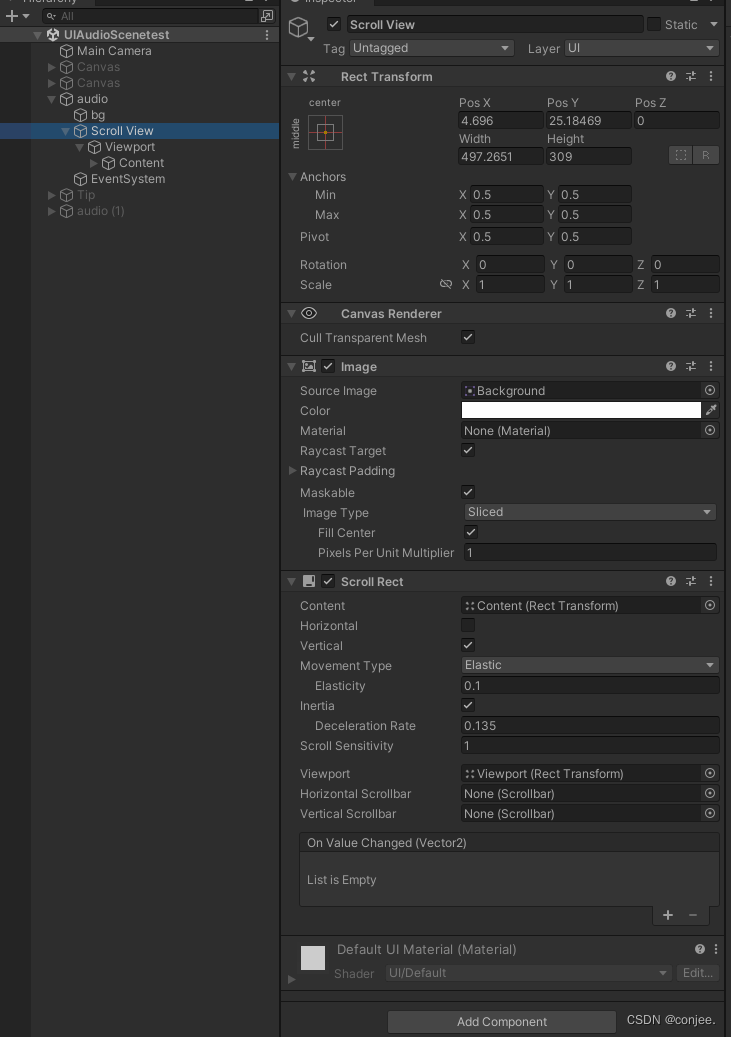
创建一个Scroll View 如图:
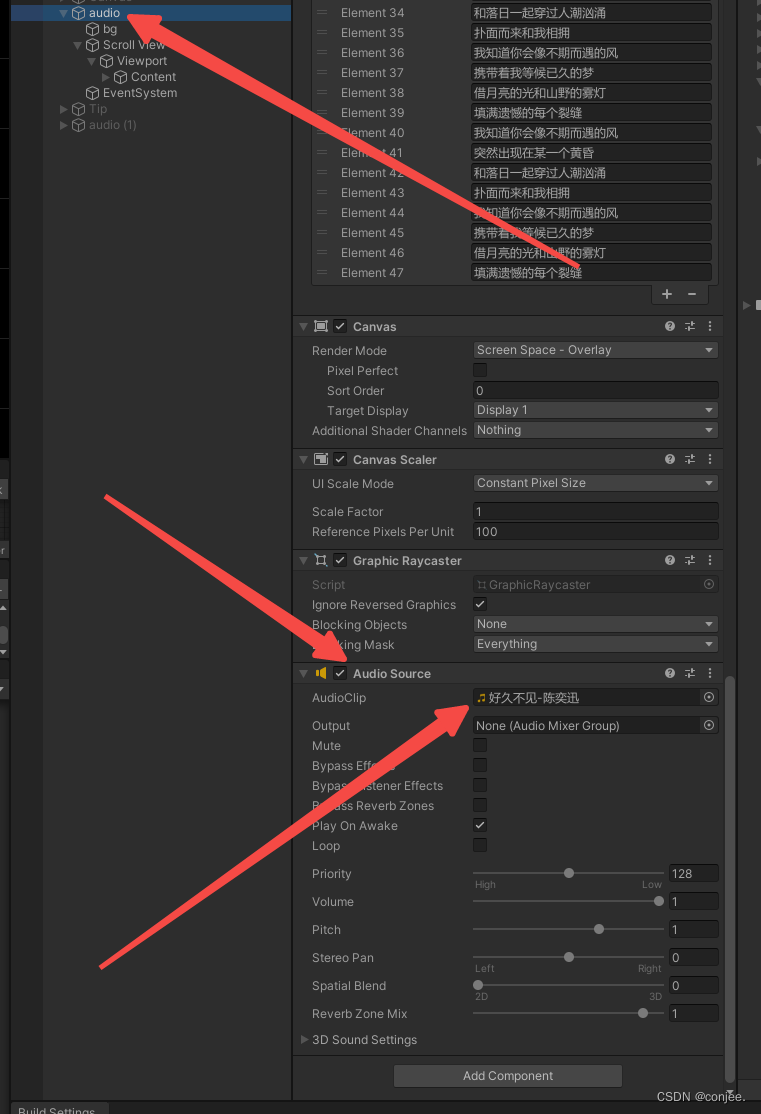
在父物体 Canvas层 挂载一个 Audio Source 同时把我们想要播放的歌曲文件拖到 AudioCilp这个属性里
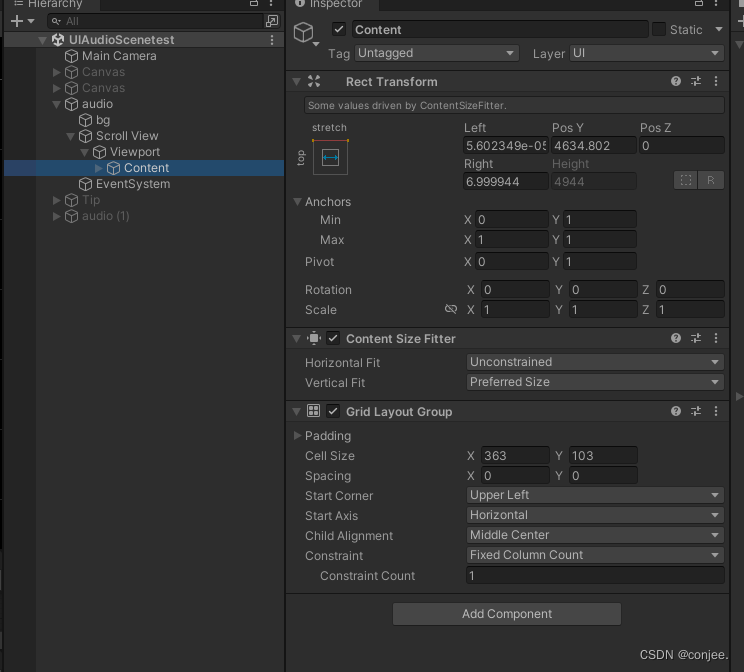
配置 Content节点的组件
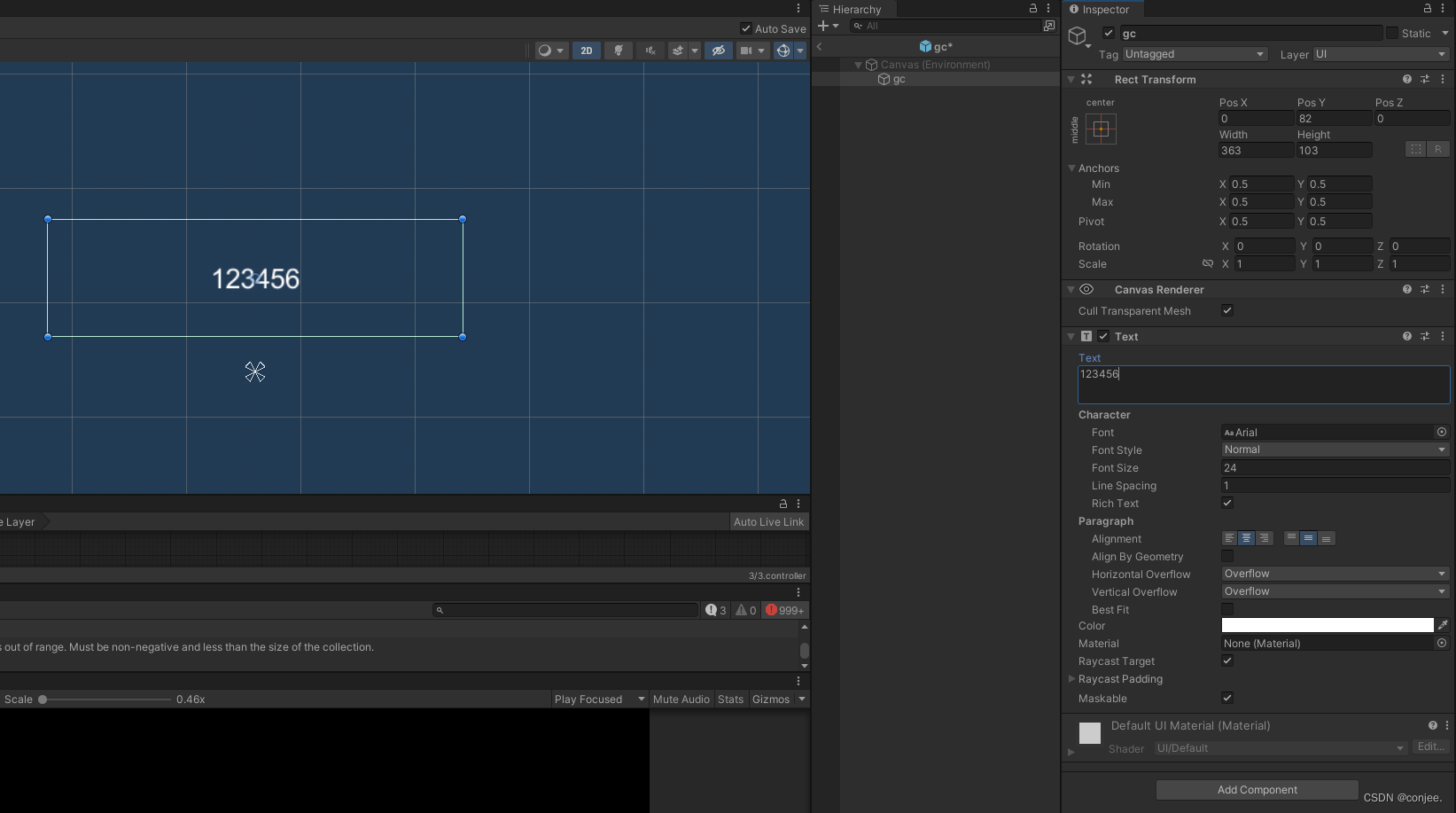
可以创建一个脚本 命名 AudioTest.cs
using System;
using System.Collections;
using System.Collections.Generic;
using System.IO;
using System.Text;
using UnityEngine;
using UnityEngine.UI;
public class AudioTest : MonoBehaviour
{
    public GameObject lrcText;
    public Transform lrcTextparent;
    public ScrollRect ScrollRect;
    public AudioSource audioSource;
    public float GridIndexList;
    public float GridIndexList2;
    public float EndPos;
    private bool m_IsLock = false;
    private void Start()
    {
        audioSource.Play();
        //ProcessingData(ReadLrcFile(Application.dataPath + "/lyric/好久不见-陈奕迅.lrc"));
        ProcessingData(Readlyirc(src));
        Debug.Log("floattimelist:" + floattimelist.Count);
        Debug.Log("stringlyriclist:" + stringlyriclist.Count);

        ShowLrc();
        currindex = 0;
        ScrollRect.verticalNormalizedPosition = 0;
    }
    int lastindex = -1;
    int currindex = 0;
    // private void Update()
    // {
    //     for (int i = 0; i < floattimelist.Count; i++)
    //     {
    //         if (audioSource.time >= floattimelist[i] && audioSource.time < floattimelist[i + 1])
    //         {
    //             currindex = i;
    //             if (currindex != lastindex)
    //             {
    //                 lastindex = currindex;
    //                 Debug.Log("句子:" + currindex);
    //                 ShowLrc(currindex);
    //             }
    //             return;
    //         }
    //     }
    // }

    private void Update()
    {
        if (Input.GetMouseButtonDown(0))
        {
            m_IsLock = true;
        }

        for (int i = 0; i < floattimelist.Count; i++)
        {
            if (audioSource.time >= floattimelist[i] && audioSource.time < floattimelist[i + 1])
            {
                currindex = i;
                if (currindex != lastindex)
                {
                    lastindex = currindex;
                    //Debug.Log("句子:" + ScrollRect.verticalNormalizedPosition);
                    ShowLrc(currindex);
                    m_IsLock = false;
                }
                return;
            }
        }
    }

    private void FixedUpdate()
    {
        if (!m_IsLock)
        {
            PlayUIAnim(EndPos, 0.05f);
        }

    }

    public void PlayUIAnim(float endPos, float endTime)
    {
        ScrollRect.verticalNormalizedPosition = Mathf.Lerp(ScrollRect.verticalNormalizedPosition, endPos, endTime);
    }
    float temp = 1;
    /// <summary>
    /// 显示lyric
    /// </summary>
    /// <param name="index"></param>
    void ShowLrc(int index)
    {

        // if (index >= 1)
        // {
        //     temp -= offest;
        //     if (temp >= 0)
        //     {
        //         ScrollRect.verticalNormalizedPosition = temp;
        //         Debug.Log(temp);
        //     }
        // }
        // texts[index].color = Color.green;
        // if (index > 0 && index < stringlyriclist.Count)
        // {
        //     texts[index - 1].color = Color.gray;
        // }

        index -= 1;
        //ScrollRect.verticalNormalizedPosition = 1f - ((float)index / ((float)texts.Count - 3f));
        EndPos = 1f - ((float)index / ((float)texts.Count - 3f));
        GridIndexList = (index / texts.Count);
        GridIndexList2 = 1f - (index / texts.Count);
        texts[index + 1].color = Color.black;
        texts[index + 1].fontStyle = FontStyle.Bold;
        texts[index + 1].fontSize = 30;
        if (index > 0 && index < stringlyriclist.Count)
        {
            texts[index].color = Color.gray;
            texts[index].fontStyle = FontStyle.Normal;
            texts[index].fontSize = 24;
        }
    }
    List<Text> texts = new List<Text>();
    float offest = 0;
    void ShowLrc()
    {
        ScrollRect.verticalNormalizedPosition = 1;
        offest = 1f / (stringlyriclist.Count / 2f);
        Debug.Log("offset" + offest);
        for (int i = 0; i < stringlyriclist.Count; i++)
        {
            GameObject lyirc = Instantiate<GameObject>(lrcText, lrcTextparent);
            Text text = lyirc.GetComponent<Text>();
            text.text = stringlyriclist[i];
            text.color = Color.gray;
            lyirc.SetActive(true);
            texts.Add(text);
        }
    }
    /// <summary>
    /// 读取 lyric 文件
    /// </summary>
    /// <param name="path"></param>
    /// <returns></returns>
    List<string> ReadLrcFile(string path)
    {
        //存放歌词list
        List<string> lyric = new List<string>();
        StreamReader sr = new StreamReader(path, Encoding.Default);
        string str = "";
        while ((str = sr.ReadLine()) != null)
        {
            lyric.Add(str);
            //Debug.Log(str);
        }
        return lyric;
    }

    /// <summary>
    /// 读取 lyric 文件
    /// </summary>
    /// <param name="path"></param>
    /// <returns></returns>
    List<string> Readlyirc(string lyirc)
    {
        List<string> lyric = new List<string>();
        string[] strArr = lyirc.Split(new char[] { '\n' });
        for (int i = 0; i < strArr.Length; i++)
        {
            lyric.Add(strArr[i]);
        }
        return lyric;
    }
    // 时间
    public List<float> floattimelist = new List<float>();
    // 句子
    public List<string> stringlyriclist = new List<string>();
    /// <summary>
    /// 解析数据
    /// </summary>
    /// <param name="dataList">数据</param>
    /// <returns></returns>
    void ProcessingData(List<string> dataList)
    {
        // 所有数据
        for (int i = 0; i < dataList.Count; i++)
        {

            //Debug.Log(dataList[i]);
            string[] strarry = dataList[i].Split(new char[] { '[', ']' });

            if (strarry != null && strarry.Length > 0)
            {
                for (int j = 1; j < strarry.Length; j++)
                {
                    string tempstr = strarry[j];
                    //这是标题 --- 创作者
                    if (tempstr.StartsWith("ti") || tempstr.StartsWith("ar") || tempstr.StartsWith("al") || tempstr.StartsWith("by") || tempstr.StartsWith("offset"))
                    {
                        string[] strarry1 = tempstr.Split(':');
                        //valuePairs.Add(strarry1[0], strarry1[1]);
                    }
                    else
                    {
                        //这是内容
                        if (tempstr.Contains(":"))
                        {
                            string[] strarry1 = tempstr.Split(':');

                            float m = float.Parse(strarry1[0]) * 60;
                            float s = float.Parse(strarry1[1]);
                            //ms ms = (m + s).ToString();
                            //Debug.Log(ms);
                            //时间
                            floattimelist.Add(m + s);
                        }
                        else
                        {
                            //句子
                            stringlyriclist.Add(tempstr);
                        }
                    }
                }
            }
        }
    }


    string src = "[00:00.17]苏星婕 - 不期而遇的风\n" +
      "[00:00.67]作词:峦无眠\n" +
      "[00:00.88]作曲:辛雯\n" +
      "[00:01.10]编曲:闫天聪\n" +
      "[00:01.31]音乐制作:翌月文化\n" +
      "[00:01.67]监制:成若颖、Wenasa黄嘉雯\n" +
      "[00:02.09]混音、母带:无机草莓\n" +
      "[00:02.45]录音师:无机草莓\n" +
      "[00:02.81]录音棚:莫非录音棚(成都)\n" +
      "[00:03.23]总企划:zoki、佰\n" +
      "[00:03.45]总策划:包包子\n" +
      "[00:03.73]艺人统筹:zoki、佰、要回家\n" +
      "[00:17.80]听说晚风来的时候适合遇见\n" +
      "[00:21.59]如星星和海平面\n" +
      "[00:25.01]总相遇在晴天的夜晚\n" +
      "[00:27.81]我想我和你只是缺对的时间\n" +
      "[00:33.15]你说我对星空许过的每个愿\n" +
      "[00:37.10]有一天都会实现\n" +
      "[00:40.11]而那些放飞过的思念\n" +
      "[00:43.24]会带着你如约而来的出现\n" +
      "[00:47.20]我知道你会像不期而遇的风\n" +
      "[00:51.24]突然出现在某一个黄昏\n" +
      "[00:54.83]和落日一起穿过人潮汹涌\n" +
      "[00:58.81]扑面而来和我相拥\n" +
      "[01:02.58]我知道你会像不期而遇的风\n" +
      "[01:06.69]携带着我等候已久的梦\n" +
      "[01:10.30]借月亮的光和山野的雾灯\n" +
      "[01:14.27]填满遗憾的每个裂缝\n" +
      "[01:35.14]你说我对星空许过的每个愿\n" +
      "[01:38.97]有一天都会实现\n" +
      "[01:41.95]而那些放飞过的思念\n" +
      "[01:45.21]会带着你如约而来的出现\n" +
      "[01:48.95]我知道你会像不期而遇的风\n" +
      "[01:53.08]突然出现在某一个黄昏\n" +
      "[01:56.85]和落日一起穿过人潮汹涌\n" +
      "[02:00.71]扑面而来和我相拥\n" +
      "[02:04.62]我知道你会像不期而遇的风\n" +
      "[02:08.45]携带着我等候已久的梦\n" +
      "[02:12.25]借月亮的光和山野的雾灯\n" +
      "[02:16.18]填满遗憾的每个裂缝\n" +
      "[02:20.04]我知道你会像不期而遇的风\n" +
      "[02:23.88]突然出现在某一个黄昏\n" +
      "[02:27.84]和落日一起穿过人潮汹涌\n" +
      "[02:31.69]扑面而来和我相拥\n" +
      "[02:35.49]我知道你会像不期而遇的风\n" +
      "[02:39.41]携带着我等候已久的梦\n" +
      "[02:43.26]借月亮的光和山野的雾灯\n" +
      "[02:47.16]填满遗憾的每个裂缝";


}
我的目标是转换表单输入,例如“100兆字节”或“1GB”,并将其转换为我可以存储在数据库中的文件大小(以千字节为单位)。目前,我有这个:defquota_convert@regex=/([0-9]+)(.*)s/@sizes=%w{kilobytemegabytegigabyte}m=self.quota.match(@regex)if@sizes.include?m[2]eval("self.quota=#{m[1]}.#{m[2]}")endend这有效,但前提是输入是倍数(“gigabytes”,而不是“gigabyte”)并且由于使用了eval看起来疯狂不安全。所以,功能正常,
我有一个用户工厂。我希望默认情况下确认用户。但是鉴于unconfirmed特征,我不希望它们被确认。虽然我有一个基于实现细节而不是抽象的工作实现,但我想知道如何正确地做到这一点。factory:userdoafter(:create)do|user,evaluator|#unwantedimplementationdetailshereunlessFactoryGirl.factories[:user].defined_traits.map(&:name).include?(:unconfirmed)user.confirm!endendtrait:unconfirmeddoenden
华为OD机试题本篇题目:明明的随机数题目输入描述输出描述:示例1输入输出说明代码编写思路最近更新的博客华为od2023|什么是华为od,od薪资待遇,od机试题清单华为OD机试真题大全,用Python解华为机试题|机试宝典【华为OD机试】全流程解析+经验分享,题型分享,防作弊指南华为o
?博客主页:https://xiaoy.blog.csdn.net?本文由呆呆敲代码的小Y原创,首发于CSDN??学习专栏推荐:Unity系统学习专栏?游戏制作专栏推荐:游戏制作?Unity实战100例专栏推荐:Unity实战100例教程?欢迎点赞?收藏⭐留言?如有错误敬请指正!?未来很长,值得我们全力奔赴更美好的生活✨------------------❤️分割线❤️-------------------------
本教程将在Unity3D中混合Optitrack与数据手套的数据流,在人体运动的基础上,添加双手手指部分的运动。双手手背的角度仍由Optitrack提供,数据手套提供双手手指的角度。 01 客户端软件分别安装MotiveBody与MotionVenus并校准人体与数据手套。MotiveBodyMotionVenus数据手套使用、校准流程参照:https://gitee.com/foheart_1/foheart-h1-data-summary.git02 数据转发打开MotiveBody软件的Streaming,开始向Unity3D广播数据;MotionVenus中设置->选项选择Unit
目录1.AdmobSDK下载地址2.将下载好的unityPackagesdk导入到unity里编辑 3.解析依赖到项目中
Unity自动旋转动画1.开门需要门把手先动,门再动2.关门需要门先动,门把手再动3.中途播放过程中不可以再次进行操作觉得太复杂?查看我的文章开关门简易进阶版效果:如果这个门可以直接打开的话,就不需要放置"门把手"如果门把手还有钥匙需要旋转,那就可以把钥匙放在门把手的"门把手",理论上是可以无限套娃的可调整参数有:角度,反向,轴向,速度运行时点击Test进行测试自己写的代码比较垃圾,命名与结构比较拉,高手轻点喷,新手有类似的需求可以拿去做参考上代码usingSystem.Collections;usingSystem.Collections.Generic;usingUnityEngine;u
C#实现简易绘图工具一.引言实验目的:通过制作窗体应用程序(C#画图软件),熟悉基本的窗体设计过程以及控件设计,事件处理等,熟悉使用C#的winform窗体进行绘图的基本步骤,对于面向对象编程有更加深刻的体会.Tutorial任务设计一个具有基本功能的画图软件**·包括简单的新建文件,保存,重新绘图等功能**·实现一些基本图形的绘制,包括铅笔和基本形状等,学习橡皮工具的创建**·设计一个合理舒适的UI界面**注明:你可能需要先了解一些关于winform窗体应用程序绘图的基本知识,以及关于GDI+类和结构的知识二.实验环境Windows系统下的visualstudio2017C#窗体应用程序三.
MIMO技术的优缺点优点通过下面三个增益来总体概括:阵列增益。阵列增益是指由于接收机通过对接收信号的相干合并而活得的平均SNR的提高。在发射机不知道信道信息的情况下,MIMO系统可以获得的阵列增益与接收天线数成正比复用增益。在采用空间复用方案的MIMO系统中,可以获得复用增益,即信道容量成倍增加。信道容量的增加与min(Nt,Nr)成正比分集增益。在采用空间分集方案的MIMO系统中,可以获得分集增益,即可靠性性能的改善。分集增益用独立衰落支路数来描述,即分集指数。在使用了空时编码的MIMO系统中,由于接收天线或发射天线之间的间距较远,可认为它们各自的大尺度衰落是相互独立的,因此分布式MIMO
遍历文件夹我们通常是使用递归进行操作,这种方式比较简单,也比较容易理解。本文为大家介绍另一种不使用递归的方式,由于没有使用递归,只用到了循环和集合,所以效率更高一些!一、使用递归遍历文件夹整体思路1、使用File封装初始目录,2、打印这个目录3、获取这个目录下所有的子文件和子目录的数组。4、遍历这个数组,取出每个File对象4-1、如果File是否是一个文件,打印4-2、否则就是一个目录,递归调用代码实现publicclassSearchFile{publicstaticvoidmain(String[]args){//初始目录Filedir=newFile("d:/Dev");Datebeg
