MyBatis框架从零入门老杜版笔记(上)
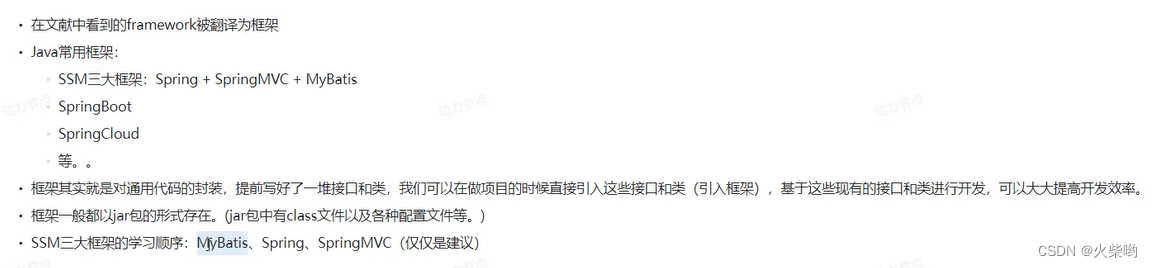
MyBatis是增强版的jdbc,把一些功能通过反射封装好了
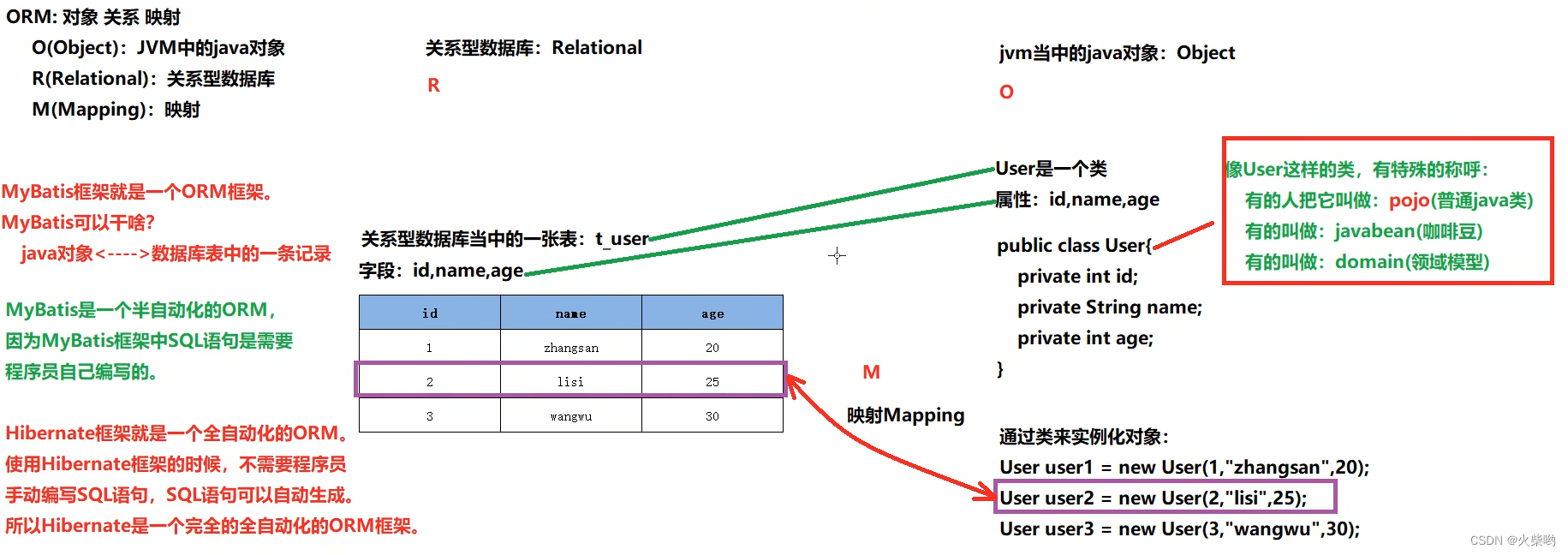
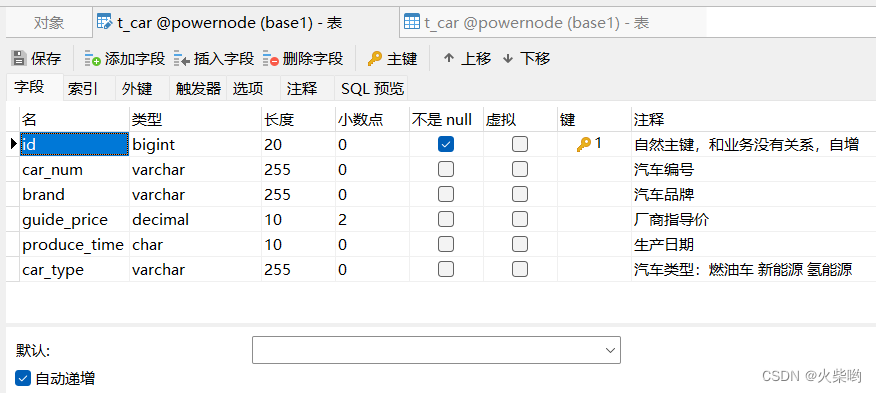
添加两条字段
<packaging>jar</packaging>
<dependencies>
        <!--  MyBatis  -->
        <dependency>
            <groupId>org.mybatis</groupId>
            <artifactId>mybatis</artifactId>
            <version>3.5.11</version>
        </dependency>

        <!--  MySQL  -->
        <dependency>
            <groupId>mysql</groupId>
            <artifactId>mysql-connector-java</artifactId>
            <version>8.0.30</version>
        </dependency>

    </dependencies>
<?xml version="1.0" encoding="UTF-8" ?>
<!DOCTYPE configuration
        PUBLIC "-//mybatis.org//DTD Config 3.0//EN"
        "http://mybatis.org/dtd/mybatis-3-config.dtd">
<configuration>
    <environments default="development">
        <environment id="development">
            <transactionManager type="JDBC"/>
            <dataSource type="POOLED">
                <property name="driver" value="com.mysql.cj.jdbc.Driver"/>
                <property name="url" value="jdbc:mysql://localhost:3306/powernode"/>
                <property name="username" value="xxxx"/>
                <property name="password" value="xxxx"/>
            </dataSource>
        </environment>
    </environments>
    <mappers>
        <mapper resource="CarMapper.xml"/>
    </mappers>
</configuration>
<?xml version="1.0" encoding="UTF-8" ?>
<!DOCTYPE mapper
        PUBLIC "-//mybatis.org//DTD Mapper 3.0//EN"
        "http://mybatis.org/dtd/mybatis-3-mapper.dtd">
<mapper namespace="org.mybatis.example.BlogMapper">
    <insert id="">
        insert into t_car(id,car_num,brand,guide_price,produce_time,car_type)
        values (null,1003,"面包车",13.00,"2020-10-13","飞行汽车")
    </insert>
</mapper>
在xxxMapper中编写sql代码(在3中已完成)
把xxxMapper.txt文件路径放入mybatis-config.txt中(在2中已完成)
<mappers>
        <mapper resource="CarMapper.xml"/>
</mappers>
在mybatis-config.xml中有一行为
<transactionManager type="JDBC"/>
type类型可以写成两种,一种是JDBC另一种是MANAGED(不区分大小写)
注意事项:
   SqlSession sqlSession = null;
   try {
       SqlSessionFactoryBuilder sqlSessionFactoryBuilder = new SqlSessionFactoryBuilder();
       SqlSessionFactory sqlSessionFactory = sqlSessionFactoryBuilder.build(Resources.getResourceAsReader("mybatis-config.xml"));
       sqlSession = sqlSessionFactory.openSession();
       int count = sqlSession.insert("insertCar");
       System.out.println("新增了记录"+count);
       //提交事务
       sqlSession.commit();

   } catch (Exception e) {
       if (sqlSession != null) {
           sqlSession.rollback();
       }
       e.printStackTrace();
   }finally {
       if (sqlSession != null) {
           sqlSession.close();
       }
   }
在maven中添加junit依赖
        <dependency>
            <groupId>junit</groupId>
            <artifactId>junit</artifactId>
            <version>4.13.2</version>
            <scope>test</scope>
        </dependency>
新建test包,以及创建CarMapperTest类
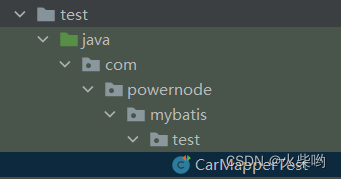
在新建的类中编写MyBatis代码
public class CarMapperTest {
    @Test
    public void insertCar(){
        SqlSession sqlSession = null;
        try {
            SqlSessionFactoryBuilder sqlSessionFactoryBuilder = new SqlSessionFactoryBuilder();
            SqlSessionFactory sqlSessionFactory = sqlSessionFactoryBuilder.build(Resources.getResourceAsReader("mybatis-config.xml"));
            sqlSession = sqlSessionFactory.openSession();
            int count = sqlSession.insert("insertCar");
            System.out.println("新增了记录"+count);
            //提交事务
            sqlSession.commit();

        } catch (Exception e) {
            if (sqlSession != null) {
                sqlSession.rollback();
            }
            e.printStackTrace();
        }finally {
            if (sqlSession != null) {
                sqlSession.close();
            }
        }
    }
}
运行,测试一下,绿色就是没问题
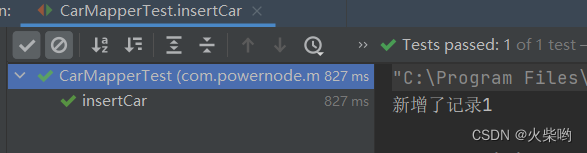
junit小知识点:
logback、log4j、log4j2是同一个作者编写的
若使用STDOUT_LOGGING,需要在mybatis-config.xml里添加配置文件
注意:settings标签必须添加在configuration下面
<configuration>
    <settings>
        <setting name="logImpl" value="STDOUT_LOGGING"/>
    </settings>
</configuration>
这边不使用STDOUT_LOGGING日志组件,我们使用最常用的logback组件
配置步骤:
        <dependency>
            <groupId>ch.qos.logback</groupId>
            <artifactId>logback-classic</artifactId>
            <version>1.2.11</version>
            <scope>test</scope>
        </dependency>
<!-- 删除这些 -->
    <settings>
        <setting name="logImpl" value="STDOUT_LOGGING"/>
    </settings>
<?xml version="1.0" encoding="UTF-8"?>

<!-- 配置文件修改时重新加载,默认true -->
<configuration debug="false">

    <!-- 控制台输出 -->
    <appender name="STDOUT" class="ch.qos.logback.core.ConsoleAppender">
        <encoder class="ch.qos.logback.classic.encoder.PatternLayoutEncoder" charset="UTF-8">
            <!-- 输出日志记录格式 -->
            <pattern>[%thread] %-5level %logger{50} - %msg%n</pattern>
        </encoder>
    </appender>

<!--    mybatis log configure-->
    <logger name="com.apache.ibatis" level="TRACE"/>
    <logger name="java.sql.Connection" level="DEBUG"/>
    <logger name="java.sql.Statement" level="DEBUG"/>
    <logger name="java.sql.PreparedStatement" level="DEBUG"/>


    <!-- 日志输出级别,LOGBACK日志级别包括五个:TRACE < DEBUG < INFO < WARN < ERROR-->
    <root level="DEBUG">
        <appender-ref ref="STDOUT"/>
        <appender-ref ref="FILE"/>
    </root>
</configuration>
在编写代码中,每次都通过SqlSessionFactoryBuilder三步骤获取session太麻烦,我们编写一个工具类get会比较方便点
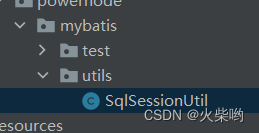
public class SqlSessionUtilTest {

    /**
     * 测试工具类
     */
    @Test
    public void openSessionTest(){
        SqlSession session = SqlSessionUtil.openSession();
        int count = session.insert("insertCar");
        System.out.println(count);
        session.commit();

        session.close();
    }
}
第一个入门程序已完成,现在我们来做MyBatis的CRUD操作
入门程序有个问题:实战的时候新增数据表行数据不可能是固定值
回顾:
<mapper namespace="org.mybatis.example.BlogMapper">
    <insert id="insertCar">
        insert into t_car(id,car_num,brand,guide_price,produce_time,car_type)
        values (null,1003,"面包车",13.00,"2020-10-13","飞行汽车")
    </insert>
</mapper>
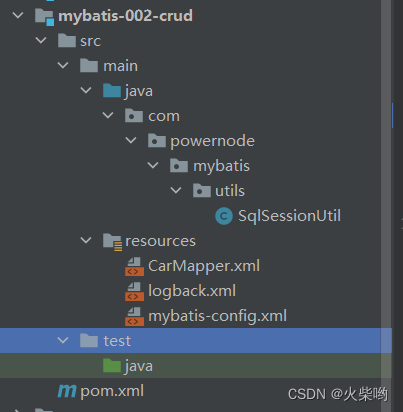
    <insert id="insertCar">
        insert into t_car(id,car_num,brand,guide_price,produce_time,car_type)
        values (null,#{},#{},#{},#{},#{})
    </insert>
public class CarMapperTest {
    @Test
    public void insertCar(){
        SqlSession session = SqlSessionUtil.openSession();
        Map<String,Object> map = new HashMap<>();
        map.put("carNum","1004");
        map.put("brand","比亚迪汉");
        map.put("guidePrice",160.00);
        map.put("produceTime","2022-06-08");
        map.put("carType","新能源汽车");

        int count= session.insert("insertCar", map);
        System.out.println("新增的条目:"+count);
        session.commit();

        session.close();
    }
}
<mapper namespace="org.mybatis.example.BlogMapper">
    <insert id="insertCar">
        insert into t_car(id,car_num,brand,guide_price,produce_time,car_type)
        values (null,#{carNum},#{brand},#{guidePrice},#{produceTime},#{carType})
    </insert>
</mapper>
public class Car {
    private Long id;
    private String carNum;
    private String brand;
    private Double guidePrice;
    private String produceTime;
    private String carType;
    //此处忽略构造方法、getting setting方法
    .....
}
    @Test
    public void insertCar(){
        SqlSession session = SqlSessionUtil.openSession();

        Car car = new Car(null,"1005","比亚迪秦",30.0,"2020-10-20","新能源");

        int count= session.insert("insertCar", car);
        System.out.println("新增的条目:"+count);
        session.commit();

        session.close();
    }
<mapper namespace="org.mybatis.example.BlogMapper">
    <insert id="insertCar">
        insert into t_car(id,car_num,brand,guide_price,produce_time,car_type)
        values (null,#{carNum},#{brand},#{guidePrice},#{produceTime},#{carType})
    </insert>
</mapper>
    <delete id="deleteById">
        delete from t_car where id = #{id}
    </delete>
    @Test
    public void deleteById(){
        SqlSession session = SqlSessionUtil.openSession();
        session.delete("deleteById",17);
        session.commit();
        session.close();
    }
    <update id="updateById">
        update t_car
          set car_num=#{carNum},brand=#{brand},guide_price=#{guidePrice},produce_time=#{produceTime},car_type=#{carType}
        where id=#{id}
    </update>
    @Test
    public void testUpdateById(){
        SqlSession session = SqlSessionUtil.openSession();
        Car car = new Car(3L,"5123","哈哈车",1.5,"2011-01-04","新技术");
        int count = session.update("updateById", car);
        System.out.println(count);
        session.commit();
        session.close();
    }
    <select id="selectOneById" resultType="com.powernode.mybatis.pojo.Car">
        select car_num as carNum,
               brand,guide_price as guidePrice,
               guide_price as guidePrice,
               produce_time as produceTime,
               car_type as carType
        from t_car
        where id = #{id}
    </select>
    @Test
    public void selectOneById(){
        SqlSession session = SqlSessionUtil.openSession();
        Car car = session.selectOne("selectOneById",16L);
        System.out.println(car);
        session.close();
    }
注意事项:
    <select id="selectAll" resultType="com.powernode.mybatis.pojo.Car">
        select car_num as carNum,
               brand,guide_price as guidePrice,
               guide_price as guidePrice,
               produce_time as produceTime,
               car_type as carType
        from t_car
    </select>
    @Test
    public void selectAll(){
        SqlSession session = SqlSessionUtil.openSession();
        List<Car> cars = session.selectList("selectAll");
        cars.forEach( car -> System.out.println(car));
        session.close();
    }
在mapper.xml文件中有一个namespasce,这个属性是用来指定命名空间的,用来防止id重复
在java程序中的写法:
List<Car> cars = session.selectList("namespace.selectAll");
这样写才是严谨、完整的
一个environment对应一个SqlSessionFactory
一个SqlSessionFactory对应一个数据库
    <environments default="development">
        <!-- 一个environment对应一个数据库 -->
        <environment id="development">
            <transactionManager type="JDBC"/>
            <dataSource type="POOLED">
                <property name="driver" value="com.mysql.cj.jdbc.Driver"/>
                <property name="url" value="jdbc:mysql://localhost:3306/powernode"/>
                <property name="username" value="root"/>
                <property name="password" value="root"/>
            </dataSource>
        </environment>

        <environment id="development2">
            <transactionManager type="JDBC"/>
            <dataSource type="POOLED">
                <property name="driver" value="com.mysql.cj.jdbc.Driver"/>
                <property name="url" value="jdbc:mysql://localhost:3306/powernode2"/>
                <property name="username" value="root"/>
                <property name="password" value="root"/>
            </dataSource>
        </environment>
    </environments>
public class testConfiguration {
    @Test
    public void testEnvironment() throws IOException {
        SqlSessionFactoryBuilder sessionFactoryBuilder = new SqlSessionFactoryBuilder();
        SqlSessionFactory sessionFactory = sessionFactoryBuilder.build(Resources.getResourceAsStream("mybatis-config.xml"), "development2");
        SqlSession session = sessionFactory.openSession();
        int count = session.insert("insertCar");
        System.out.println(count);
        session.commit();
        session.close();
    }
}
在mybatis-config.xml配置文件中,有transactionManager子标签,表示设置MyBatis的事务管理器
<transactionManager type="JDBC"/>
MyBatis中有两个事务管理器
MyBatis底层有一个Transaction接口,实现两个事务
<dataSource type="POOLED">
	.......
</dataSource>
问:这个标签有啥用
答:dataSource表示数据源,用来获取Connection对象
它的type属性可以填写三个值:
不同类型的数据源下有不同的属性,比如
<dataSource type="POOLED">
	....
	<properties/>
	....
</dataSource>
和
<dataSource type="JNDI">
	....
	<properties/>
	....
</dataSource>
的
<properties/>
数量、内容是不一样的,具体需要看官方文档
JDNI是:java命名目录接口,Tomcat服务器实现了这个规范
假如需要用第三方数据源,Tomcat中实现了这个数据源,则在properties中填写对应的数据,要和tomat对应上
问:使用连接池有什么好处?
答:
3. 迟内的Connection数量是固定的,比如池子大小是5,如果5个连接都被占用,第6个要获取连接就先等待,数量固定
4. 假如有人一直F5刷新,没有用连接池的话,就会一直创建Connection对象,如果实例化对象过多,可能会导致服务器宕机,数量固定
5. 有新请求,第一反应去池中查找,可以增加效率
<!--连接池最大连接数,默认:10-->
<property name="poolMaximumActiveConnections " value="10"/>
<!--可以同时存在的最大空闲连接数,空闲太多则真正关闭一些Connection-->
<property name="poolMaximumIdleConnections " value="5"/>
<!--超时强制关闭时间,默认20000-->
<property name="poolMaximumCheckoutTime " value="20000"/>
<!--如果连接花费时间很长,连接池会隔断时间尝试重新连接并打印日志-->
<property name="poolTimeToWait " value="2000"/>
在configuration标签下有一个properties子标签,是用来设置变量的
<property name="key" value="value"/>
这样写相当于往map集合里放入一个key,可以通过key拿到value,在mybatis-config.xml的其他地方,可以写成${key}获取到value
<properties resource="jdbc.properties"/>
然后在外部新建一个jdbc.properties,如(等号左边是key右边是value)
driver=com.mysql.cj.jdbc.Driver
url=jdbc:mysql://localhost:3306/powernode
username=root
password=root
不推荐这种写法
<properties url="file:///D://jdbc.properties"/>
建立如下数据库:
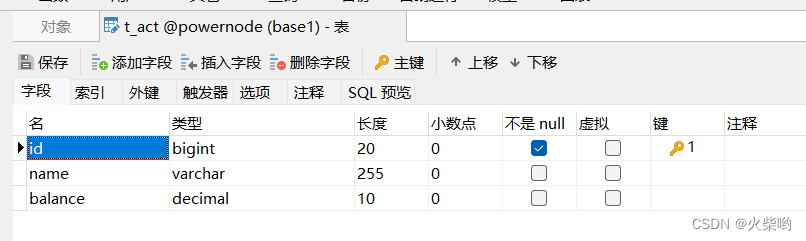
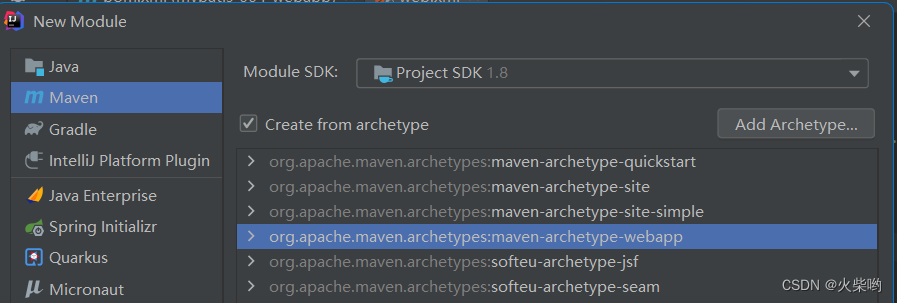
 <dependencies>
    <dependency>
      <groupId>mysql</groupId>
      <artifactId>mysql-connector-java</artifactId>
      <version>8.0.30</version>
    </dependency>
    <dependency>
      <groupId>servletapi</groupId>
      <artifactId>servletapi</artifactId>
      <version>2.4-20040521</version>
    </dependency>
    <dependency>
      <groupId>ch.qos.logback</groupId>
      <artifactId>logback-classic</artifactId>
      <version>1.2.11</version>
    </dependency>
    <dependency>
      <groupId>org.mybatis</groupId>
      <artifactId>mybatis</artifactId>
      <version>3.5.11</version>
    </dependency>
    <dependency>
      <groupId>junit</groupId>
      <artifactId>junit</artifactId>
      <version>4.11</version>
      <scope>test</scope>
    </dependency>

  </dependencies>
<?xml version="1.0" encoding="UTF-8"?>
<web-app xmlns="http://xmlns.jcp.org/xml/ns/javaee"
         xmlns:xsi="http://www.w3.org/2001/XMLSchema-instance"
         xsi:schemaLocation="http://xmlns.jcp.org/xml/ns/javaee
                      http://xmlns.jcp.org/xml/ns/javaee/web-app_3_1.xsd"
         version="3.1"
         metadata-complete="true">
</web-app>
<?xml version="1.0" encoding="UTF-8" ?>
<!DOCTYPE configuration
        PUBLIC "-//mybatis.org//DTD Config 3.0//EN"
        "http://mybatis.org/dtd/mybatis-3-config.dtd">
<configuration>
    <properties resource="jdbc.properties"/>
    <environments default="development">
        <!-- 一个environment对应一个数据库 -->
        <environment id="development">
            <transactionManager type="JDBC"/>
            <dataSource type="POOLED">
                <property name="driver" value="${driver}"/>
                <property name="url" value="${url}"/>
                <property name="username" value="${username}"/>
                <property name="password" value="${password}"/>
            </dataSource>
        </environment>

        <environment id="development2">
            <transactionManager type="JDBC"/>
            <dataSource type="POOLED">
                <property name="driver" value="com.mysql.cj.jdbc.Driver"/>
                <property name="url" value="jdbc:mysql://localhost:3306/powernode2"/>
                <property name="username" value="root"/>
                <property name="password" value="root"/>
            </dataSource>
        </environment>
    </environments>
    <mappers>
        <mapper resource="ActMapper.xml"/>
    </mappers>
</configuration>
driver=com.mysql.cj.jdbc.Driver
url=jdbc:mysql://localhost:3306/powernode
username=root
password=root
<?xml version="1.0" encoding="UTF-8" ?>
<!DOCTYPE mapper
        PUBLIC "-//mybatis.org//DTD Mapper 3.0//EN"
        "http://mybatis.org/dtd/mybatis-3-mapper.dtd">
<mapper namespace="account">
    <insert id="insertAct">
        insert into t_act(id,name,balance)
        values (null,#{name},#{balance})
    </insert>
</mapper>
<?xml version="1.0" encoding="UTF-8"?>

<!-- 配置文件修改时重新加载,默认true -->
<configuration debug="false">

    <!-- 控制台输出 -->
    <appender name="STDOUT" class="ch.qos.logback.core.ConsoleAppender">
        <encoder class="ch.qos.logback.classic.encoder.PatternLayoutEncoder" charset="UTF-8">
            <!-- 输出日志记录格式 -->
            <pattern>{%thread} %-5level %logger{50} - %msg%n</pattern>
        </encoder>
    </appender>

<!--    mybatis log configure-->
    <logger name="com.apache.ibatis" level="TRACE"/>
    <logger name="java.sql.Connection" level="DEBUG"/>
    <logger name="java.sql.Statement" level="DEBUG"/>
    <logger name="java.sql.PreparedStatement" level="DEBUG"/>

    <!-- 日志输出级别,LOGBACK日志级别包括五个:TRACE < DEBUG < INFO < WARN < ERROR-->
    <root level="DEBUG">
        <appender-ref ref="STDOUT"/>
        <appender-ref ref="FILE"/>
    </root>
</configuration>
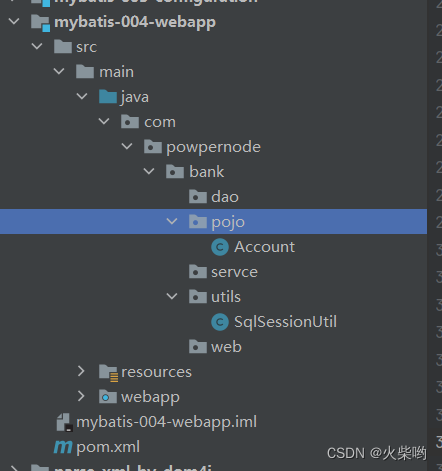
public class Account {
    private Long id;
    private String name;
    private Double balance;
......
//此处省略构造方法、getting setting toString方法,请自行创建
package com.powpernode.bank.utils;

import org.apache.ibatis.io.Resources;
import org.apache.ibatis.session.SqlSession;
import org.apache.ibatis.session.SqlSessionFactory;
import org.apache.ibatis.session.SqlSessionFactoryBuilder;

import java.io.IOException;

/**
 * @author huochai
 * @date 2022/10/15 9:22
 */

public class SqlSessionUtil {

    /**
     * 一个sessionFactory对应一个environment(数据库),所以不要每次运行都new一个新的
     */

    /**
     * 构造方法设置为私有的,防止被实例化
     */
    private SqlSessionUtil(){}

    private static SqlSessionFactory sessionFactory;
    static {
        try {
            sessionFactory = new SqlSessionFactoryBuilder().build(Resources.getResourceAsStream("mybatis-config.xml"));
        } catch (IOException e) {
            e.printStackTrace();
        }
    }

    public static SqlSession openSession(){
        SqlSession session = sessionFactory.openSession();
        return session;
    }
}
<!DOCTYPE html>
<html lang="en">
<head>
  <meta charset="UTF-8">
  <title>银行转账</title>
</head>
<body>
<form action="/bank/transfer" method="post">
  转出账户:<input type="text" name="fromActno"><br>
  转入账户:<input type="text" name="toActno"><br>
  转账金额<input type="text" name="money"><br>
  <input type="submit" value="转账">
</form>
</body>
</html>
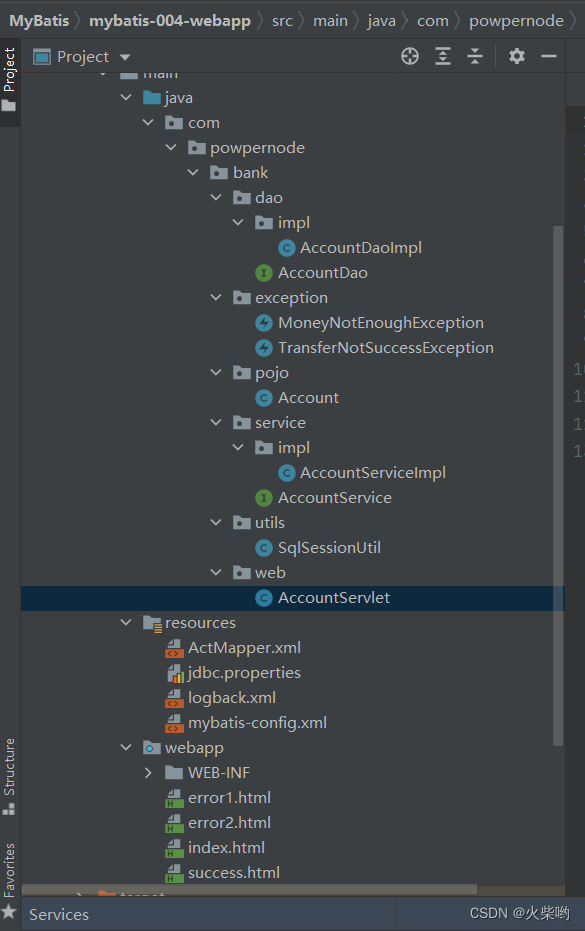
根据前端请求发送的路线完善后端代码
package com.powpernode.bank.web;

import com.powpernode.bank.exception.MoneyNotEnoughException;
import com.powpernode.bank.exception.TransferNotSuccessException;
import com.powpernode.bank.service.AccountService;
import com.powpernode.bank.service.impl.AccountServiceImpl;

import javax.jws.WebService;
import javax.servlet.ServletException;
import javax.servlet.annotation.WebServlet;
import javax.servlet.http.HttpServlet;
import javax.servlet.http.HttpServletRequest;
import javax.servlet.http.HttpServletResponse;
import java.io.IOException;

/**
 * @author huochai
 * @date 2022/10/16 15:15
 */

@WebServlet("/transfer")
public class AccountServlet extends HttpServlet {
    /**
     * 调用业务类处理业务
     */
    private AccountService accountService = new AccountServiceImpl();
    @Override
    protected void doPost(HttpServletRequest request, HttpServletResponse response)
            throws ServletException, IOException {

        //接收前端传来的参数
        String fromActno = request.getParameter("fromActno");
        String toActno = request.getParameter("toActno");
        Double money = Double.parseDouble(request.getParameter("money"));

        //调用业务类处理转账
        try {
            accountService.transfer(fromActno,toActno,money);
            response.sendRedirect(request.getContextPath()+"/success.html");
        } catch (MoneyNotEnoughException e) {
            e.printStackTrace();
            response.sendRedirect(request.getContextPath()+"/error1.html");
        } catch (TransferNotSuccessException e) {
            e.printStackTrace();
            response.sendRedirect(request.getContextPath()+"/error2.html");
        }

    }
}
package com.powpernode.bank.service;

import com.powpernode.bank.exception.MoneyNotEnoughException;
import com.powpernode.bank.exception.TransferNotSuccessException;

/**
 * @author huochai
 * @date 2022/10/16 15:17
 */
public interface AccountService {
    /**
     * 转账业务方法
     * @param fromAct 转出账户
     * @param toAct 转入账户
     * @param money 转账金额
     * @throws MoneyNotEnoughException 转出账户余额不足异常
     * @throws TransferNotSuccessException 转账失败异常
     */
    void transfer(String fromAct,String toAct,Double money) throws MoneyNotEnoughException, TransferNotSuccessException;
}
package com.powpernode.bank.service.impl;
import com.powpernode.bank.dao.AccountDao;
import com.powpernode.bank.dao.impl.AccountDaoImpl;
import com.powpernode.bank.exception.MoneyNotEnoughException;
import com.powpernode.bank.exception.TransferNotSuccessException;
import com.powpernode.bank.pojo.Account;
import com.powpernode.bank.service.AccountService;
import javax.jws.WebService;
/**
 * @author huochai
 * @date 2022/10/16 15:19
 * 只负责处理业务逻辑,不涉及数据库修改
 */

public class AccountServiceImpl implements AccountService {
    private AccountDao accountDao = new AccountDaoImpl();

    @Override
    public void transfer(String fromAct, String toAct, Double money) throws MoneyNotEnoughException, TransferNotSuccessException {
        //判断余额是否充足
        Account fromAccount = accountDao.selectById(Long.parseLong(fromAct));
        if (fromAccount.getBalance()<money) {
            throw new MoneyNotEnoughException("对不起,余额不足");
        }

        //将fromAct减少money,toAct增加money
        Account toAccount = accountDao.selectById(Long.parseLong(toAct));
        fromAccount.setBalance(fromAccount.getBalance()-money);
        toAccount.setBalance(toAccount.getBalance()+money);
        //更新两个账户
        int count = accountDao.updateAccount(fromAccount);
        count += accountDao.updateAccount(toAccount);

        if (count<2){
            throw new TransferNotSuccessException("转账失败,未知错误");
        }
    }
}
package com.powpernode.bank.dao;
import com.powpernode.bank.pojo.Account;
/**
 * @author huochai
 * @date 2022/10/16 15:20
 */
public interface AccountDao {
    /**
     * 根据ID查询账户
     * @param id id
     * @return 返回账户
     */
    Account selectById(Long id);

    /**
     * 更新用户
     * @param account 需要更新的用户
     * @return 1表示更新完成
     */
    int updateAccount(Account account);

    /**
     * 插入用户
     * @param account 需要插入的用户
     * @return 1表示插入完成
     */
    int insertAccount(Account account);
}
package com.powpernode.bank.dao.impl;
import com.powpernode.bank.dao.AccountDao;
import com.powpernode.bank.pojo.Account;
import com.powpernode.bank.utils.SqlSessionUtil;
import org.apache.ibatis.session.SqlSession;
/**
 * @author huochai
 * @date 2022/10/16 15:21
 */
public class AccountDaoImpl implements AccountDao {
    @Override
    public Account selectById(Long id) {
        SqlSession session = SqlSessionUtil.openSession();
        Account account = session.selectOne("account.selectById", id);
        session.close();
        return account;
    }

    @Override
    public int updateAccount(Account account) {
        SqlSession session = SqlSessionUtil.openSession();
        int count = session.update("account.updateById", account);
        session.commit();
        return count;
    }

    @Override
    public int insertAccount(Account account) {
        SqlSession session = SqlSessionUtil.openSession();
        int count = session.insert("account.insertAct", account);
        session.commit();
        return count;
    }
}
/**
 * @author huochai
 * @date 2022/10/16 15:47
 */
public class MoneyNotEnoughException extends Exception{
    public MoneyNotEnoughException(){};
    public MoneyNotEnoughException(String msg){
        super(msg);
    }
}
package com.powpernode.bank.exception;

/**
 * @author huochai
 * @date 2022/10/16 15:51
 */
public class TransferNotSuccessException extends Exception{
    public TransferNotSuccessException(){};
    public TransferNotSuccessException(String msg){
        super(msg);
    }
}
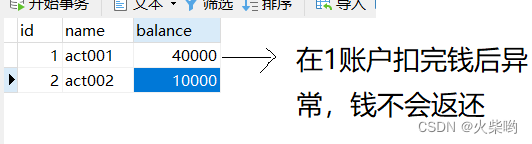
目前为止项目里存在一个问题,没有事务处理机制
如果在更新完账户1之后异常,就会出现少钱的现象
/**
* 完善后的SqlSessionUtil工具类
*/
package com.powpernode.bank.utils;

import org.apache.ibatis.io.Resources;
import org.apache.ibatis.session.SqlSession;
import org.apache.ibatis.session.SqlSessionFactory;
import org.apache.ibatis.session.SqlSessionFactoryBuilder;

import java.io.IOException;

/**
 * @author huochai
 * @date 2022/10/15 9:22
 */

public class SqlSessionUtil {

    public static ThreadLocal<SqlSession> local = new ThreadLocal();
    private SqlSessionUtil(){}
    private static SqlSessionFactory sessionFactory;
    static {
        try {
            sessionFactory = new SqlSessionFactoryBuilder().build(Resources.getResourceAsStream("mybatis-config.xml"));
        } catch (IOException e) {
            e.printStackTrace();
        }
    }
    public static SqlSession openSession(){
        SqlSession session = local.get();
        if (session==null) {
            session = sessionFactory.openSession();
            local.set(session);
        }
        return session;
    }

    public static void close(SqlSession session){
        if (session!=null) {
            session.close();
            local.remove();
        }
    }
}
public class AccountServiceImpl implements AccountService {
    private AccountDao accountDao = new AccountDaoImpl();

    @Override
    public void transfer(String fromAct, String toAct, Double money) throws MoneyNotEnoughException, TransferNotSuccessException {

        SqlSession session = SqlSessionUtil.openSession();
        //判断余额是否充足
        Account fromAccount = accountDao.selectById(Long.parseLong(fromAct));
        if (fromAccount.getBalance()<money) {
            throw new MoneyNotEnoughException("对不起,余额不足");
        }


        //将fromAct减少money,toAct增加money
        Account toAccount = accountDao.selectById(Long.parseLong(toAct));
        fromAccount.setBalance(fromAccount.getBalance()-money);
        toAccount.setBalance(toAccount.getBalance()+money);

        //更新两个账户
        int count = accountDao.updateAccount(fromAccount);
        count += accountDao.updateAccount(toAccount);

        if (count<2){
            throw new TransferNotSuccessException("转账失败,未知错误");
        }

        session.commit();
        SqlSessionUtil.close(session);
    }
}
| 名称 | 生命周期 |
|---|---|
| SqlSessionFactoryBuilder | 只是用来buildFactory的,利用完即可丢弃 |
| SqlSessionFactory | 一个数据库对应一个Factory,最好不要丢弃 |
| SqlSession | 一个线程对应一个SqlSession |
观察项目还有什么问题,发现DAO层代码很少并且很固定
public class AccountDaoImpl implements AccountDao {
//可以发现第一行都是获取Session,第二行执行,第三行return
    @Override
    public Account selectById(Long id) {
        SqlSession session = SqlSessionUtil.openSession();
        Account account = session.selectOne("account.selectById", id);
        return account;
    }

    @Override
    public int updateAccount(Account account) {
        SqlSession session = SqlSessionUtil.openSession();
        int count = session.update("account.updateById", account);
        return count;
    }

    @Override
    public int insertAccount(Account account) {
        SqlSession session = SqlSessionUtil.openSession();
        int count = session.insert("account.insertAct", account);
        return count;
    }
}
有没有什么框架可以代替这种简单重复的工作呢?
答:可以利用javassist框架
通过使用Javassist对字节码操作为JBoss实现动态“AOP”框架
public class JavassistTest{
    @Test
    public void generateClass() throws Exception {
        //获取类池
        ClassPool classPool = ClassPool.getDefault();
        // 制造类
        CtClass ctClass = classPool.makeClass("com.powernode.bank.dao.impl.AccountDaoImpl");
        // 制造方法
        String method = "public void insert(){System.out.println(166);}";
        CtMethod make = CtMethod.make(method, ctClass);
        // 把方法加到类中
        ctClass.addMethod(make);

        //在内存中生成类
        ctClass.toClass();

        Class<?> aClass = Class.forName("com.powernode.bank.dao.impl.AccountDaoImpl");
        Object o = aClass.newInstance();
        Method insert = aClass.getDeclaredMethod("insert");

        insert.invoke(o);
    }
}
    @Test
    public void generateInterface() throws Exception{
        //获取类池
        ClassPool pool = ClassPool.getDefault();
        //制造类
        CtClass ctClass = pool.makeClass("com.powernode.bank.dao.impl.AccountDaoImpl");
        //制造接口
        CtClass ctClass1 = pool.makeInterface("com.powernode.javassist.test.AccountDao");
        //添加接口
        ctClass.addInterface(ctClass1);
        CtMethod make = CtMethod.make("public void delete(){System.out.println(\"Hello delete\");}", ctClass);
        ctClass.addMethod(make);
        //装载类
        Class<?> aClass = ctClass.toClass();
        AccountDao o = (AccountDao) aClass.newInstance();
        o.delete();
    }
	@Test
    public void generateInterfaceAll() throws Exception{
        //获取类池
        ClassPool pool = ClassPool.getDefault();
        //制造类
        CtClass ctClass = pool.makeClass("com.powernode.bank.dao.impl.AccountDaoImpl");
        //制造接口
        CtClass ctInterface = pool.makeInterface("com.powernode.javassist.test.AccountDao");
        //类实现接口
        ctClass.addInterface(ctInterface);

        Method[] declaredMethods = AccountDao.class.getDeclaredMethods();
        //制造方法
        //方法内容

        Arrays.stream(declaredMethods).forEach(method -> {
            try {
                StringBuffer methodValue = new StringBuffer();
                methodValue.append("public ");
                methodValue.append(method.getReturnType().getName()+" ");
                methodValue.append(method.getName()+"(");
                Class<?>[] parameterTypes = method.getParameterTypes();
                for (int i = 0; i < parameterTypes.length; i++) {
                    methodValue.append(parameterTypes[i].getName()+" ");
                    methodValue.append("args"+i);
                    if (i!= parameterTypes.length-1){
                        methodValue.append(",");
                    }
                }
                methodValue.append(")");
                methodValue.append("{System.out.println(\"hello all\");");
                if ("void".equals(method.getReturnType().getName())){
                }else if ("int".equals(method.getReturnType().getName())){
                    methodValue.append("return 1;");
                }else if("java.lang.String".equals(method.getReturnType().getName())){
                    methodValue.append("return \"666\";");
                }
                methodValue.append("}");

                CtMethod make = CtMethod.make(String.valueOf(methodValue), ctClass);
                ctClass.addMethod(make);

            } catch (CannotCompileException e) {
                e.printStackTrace();
            }
        });

        Class<?> toClass = ctClass.toClass();

        AccountDao accountDao = (AccountDao) toClass.newInstance();
        accountDao.delete();
        accountDao.insert("666",50.00);
        accountDao.selectByActno("555");
    }
注意:若想利用GenerateDaoProxy,
则Mapper.xml文件的namespace必须为DAO层接口的全类名,
sqlId必须为DAO层接口中的方法
<?xml version="1.0" encoding="UTF-8" ?>
<!DOCTYPE mapper
        PUBLIC "-//mybatis.org//DTD Mapper 3.0//EN"
        "http://mybatis.org/dtd/mybatis-3-mapper.dtd">

<mapper namespace="com.powpernode.bank.dao.AccountDao">
    <insert id="insertAccount">
        insert into t_act(id,name,balance)
        values (null,#{name},#{balance})
    </insert>

    <select id="selectById" resultType="com.powpernode.bank.pojo.Account">
        select * from t_act where id=#{id}
    </select>

    <update id="updateAccount">
        update t_act set name=#{name},balance=#{balance} where id=#{id}
    </update>
</mapper>
package com.powpernode.bank.utils;

import org.apache.ibatis.javassist.CannotCompileException;
import org.apache.ibatis.javassist.ClassPool;
import org.apache.ibatis.javassist.CtClass;
import org.apache.ibatis.javassist.CtMethod;
import org.apache.ibatis.mapping.SqlCommandType;
import org.apache.ibatis.session.SqlSession;

import java.lang.reflect.Method;
import java.util.Arrays;

/**
 * @author huochai
 * @date 2022/10/16 23:30
 */
public class GenerateDaoProxy {


    /**
     * 这个工具类是框架的开发者提供的
     * 开发者可以给使用者规定传进哪些参数
     *
     * 传进接口,返回实现所有方法的类
     * @param daoInterface 接口
     * @return Impl类
     */
    public static Object generate(SqlSession session, Class daoInterface)  {
        //类池
        ClassPool pool = ClassPool.getDefault();
        //制造类
        CtClass ctClass = pool.makeClass(daoInterface.getName() + "Proxy");
        //制造接口
        CtClass ctInterface = pool.makeInterface(daoInterface.getName());
        ctClass.addInterface(ctInterface);

        Method[] declaredMethods = daoInterface.getDeclaredMethods();

        Arrays.stream(declaredMethods).forEach(method -> {
            try {
                StringBuffer methodCode = new StringBuffer();
                //添加修饰符
                methodCode.append("public ");
                //添加返回值
                methodCode.append(method.getReturnType().getName()+" ");
                methodCode.append(method.getName());
                methodCode.append("(");

                Class<?>[] parameterTypes = method.getParameterTypes();
                for (int i = 0; i < parameterTypes.length; i++) {
                    methodCode.append(parameterTypes[i].getName()+" ");
                    methodCode.append("arg"+i);
                    if (i!= parameterTypes.length-1){
                        methodCode.append(",");
                    }
                }
                methodCode.append("){");
                /**
                 * 括号中间需要写对应的session.insert或session.select方法
                 */
                String sqlId = daoInterface.getName()+"."+method.getName();
                SqlCommandType sqlCommandType = session.getConfiguration().getMappedStatement(sqlId).getSqlCommandType();
                methodCode.append("org.apache.ibatis.session.SqlSession session = com.powpernode.bank.utils.SqlSessionUtil.openSession();");

                if(sqlCommandType == SqlCommandType.INSERT){

                }
                if(sqlCommandType == SqlCommandType.DELETE){

                }
                if(sqlCommandType == SqlCommandType.UPDATE){
                    methodCode.append("return session.update(\""+sqlId+"\", arg0);");
                }
                if(sqlCommandType == SqlCommandType.SELECT){
                    String resultType = method.getReturnType().getName();
                    methodCode.append("return ("+resultType+")session.selectOne(\""+sqlId+"\", arg0);");
                }

                methodCode.append("}");

                System.out.println(methodCode.toString());
                CtMethod ctMethod = CtMethod.make(methodCode.toString(), ctClass);
                ctClass.addMethod(ctMethod);
            } catch (CannotCompileException e) {
                e.printStackTrace();
            }
        });

        Object obj = null;
        try {
            Class<?> toClass = ctClass.toClass();
            obj = toClass.newInstance();
        } catch (Exception e) {
            e.printStackTrace();
        }

        return obj;
    }
}
最后在业务层引用Dao的时候改一下即可:
public class AccountServiceImpl implements AccountService {
    private AccountDao accountDao = (AccountDao) GenerateDaoProxy.generate(SqlSessionUtil.openSession(),AccountDao.class);
.....
写完以后得知一个好消息,MyBatis已经实现了映射机制,不用自己手写代码了(要求和上面一样,对namespace以及sqlId有格式要求)
//自己写的
private AccountDao accountDao = (AccountDao) GenerateDaoProxy.generate(SqlSessionUtil.openSession(),AccountDao.class);
//MyBatis自带
private AccountDao accountDao = SqlSessionUtil.openSession().getMapper(AccountDao.class);
新建maven模块mybatis-005-crud2
添加maven依赖
<?xml version="1.0" encoding="UTF-8"?>
<project xmlns="http://maven.apache.org/POM/4.0.0"
         xmlns:xsi="http://www.w3.org/2001/XMLSchema-instance"
         xsi:schemaLocation="http://maven.apache.org/POM/4.0.0 http://maven.apache.org/xsd/maven-4.0.0.xsd">
    <parent>
        <artifactId>MyBatis</artifactId>
        <groupId>org.example</groupId>
        <version>1.0-SNAPSHOT</version>
    </parent>
    <modelVersion>4.0.0</modelVersion>
    <packaging>jar</packaging>
    <dependencies>
        <dependency>
            <groupId>mysql</groupId>
            <artifactId>mysql-connector-java</artifactId>
            <version>8.0.30</version>
        </dependency>
        <dependency>
            <groupId>javax.servlet</groupId>
            <artifactId>javax.servlet-api</artifactId>
            <version>4.0.1</version>
        </dependency>
        <dependency>
            <groupId>ch.qos.logback</groupId>
            <artifactId>logback-classic</artifactId>
            <version>1.2.11</version>
        </dependency>
        <dependency>
            <groupId>org.mybatis</groupId>
            <artifactId>mybatis</artifactId>
            <version>3.4.6</version>
        </dependency>


        <dependency>
            <groupId>junit</groupId>
            <artifactId>junit</artifactId>
            <version>4.11</version>
            <scope>test</scope>
        </dependency>

    </dependencies>

    <groupId>com.powernode</groupId>
    <artifactId>mybatis-005-crud2</artifactId>

    <properties>
        <maven.compiler.source>8</maven.compiler.source>
        <maven.compiler.target>8</maven.compiler.target>
    </properties>

</project>
添加mapper类
/**
 * @author huochai
 * @date 2022/10/17 9:38
 * 在MyBatis中,一般不叫XXXDao,一般叫xxxMapper
 */
public interface CarMapper {
    /**
     * 插入数据
     * @param car
     * @return 返回1表示正常
     */
    int insert(Car car);

    /**
     * 根据ID删除
     * @param id
     * @return 返回1表示正常
     */
    int deleteById(Long id);

    /**
     * 更新数据
     * @param car
     * @return 返回1表示正常
     */
    int update(Car car);

    /**
     * 根据ID查询
     * @param id
     * @return 返回1表示正常
     */
    Car selectById(Long id);

    /**
     * 查询所有的数据
     * @return 返回给List集合
     */
    List<Car> selectAll();
}
编写CarMapper.xml配置文件
<?xml version="1.0" encoding="UTF-8" ?>
<!DOCTYPE mapper
        PUBLIC "-//mybatis.org//DTD Mapper 3.0//EN"
        "http://mybatis.org/dtd/mybatis-3-mapper.dtd">
<mapper namespace="com.powernode.mybatis.mapper.CarMapper">
    <insert id="insert">
      insert into t_car(id,car_num,brand,guide_price,produce_time,car_type)
      values(null, #{carNum},#{brand},#{guidePrice},#{produceTime},#{carType})
    </insert>

    <delete id="delete">
      delete from t_car where id=#{id}
    </delete>


    <update id="update">
      update t_car
      set car_num=#{carNum},brand=#{brand},guide_price=#{guidePrice},produce_time=#{produceTime},car_type=#{carType}
      where id=#{id}
    </update>


    <select id="selectById" resultType="com.powernode.mybatis.pojo.Car">
      select id,car_num as carNum,brand,guide_price as guidePrice,produce_time as produceTime,car_type as carType
      from t_car where id=#{id}
    </select>

    <select id="selectAll" resultType="com.powernode.mybatis.pojo.Car">
        select id,car_num as carNum,brand,guide_price as guidePrice,produce_time as produceTime,car_type as carType
        from t_car
    </select>
</mapper>
新建工具类,SqlSessionUtil
public class SqlSessionUtil {

    public static ThreadLocal<SqlSession> local = new ThreadLocal();
    private SqlSessionUtil(){}
    private static SqlSessionFactory sessionFactory;
    static {
        try {
            sessionFactory = new SqlSessionFactoryBuilder().build(Resources.getResourceAsStream("mybatis-config.xml"));
        } catch (IOException e) {
            e.printStackTrace();
        }
    }
    public static SqlSession openSession(){
        SqlSession session = local.get();
        if (session==null) {
            session = sessionFactory.openSession();
            local.set(session);
        }
        return session;
    }

    public static void close(SqlSession session){
        if (session!=null) {
            session.close();
            local.remove();
        }
    }
}
编写测试用例
public class TestMapper {
    @Test
    public void insert(){
        SqlSession session = SqlSessionUtil.openSession();
        CarMapper mapper = session.getMapper(CarMapper.class);
        Car car = new Car(null,"5556","兰博基尼六",1952.1,"2060-02-06","跑车");
        mapper.insert(car);
        session.commit();
    }
    @Test
    public void delete(){
        SqlSession session = SqlSessionUtil.openSession();
        CarMapper mapper = session.getMapper(CarMapper.class);
        mapper.deleteById(21L);
        session.commit();
    }
    @Test
    public void update(){
        SqlSession session = SqlSessionUtil.openSession();
        CarMapper mapper = session.getMapper(CarMapper.class);
        Car car = new Car(18L,"5556","兰博基尼六",1952.1,"2060-02-06","跑车");
        mapper.update(car);
        session.commit();
    }
    @Test
    public void selectById(){
        SqlSession session = SqlSessionUtil.openSession();
        CarMapper mapper = session.getMapper(CarMapper.class);
        Car car = mapper.selectById(18L);
        System.out.println(car);
    }
    @Test
    public void selectAll(){
        SqlSession session = SqlSessionUtil.openSession();
        CarMapper mapper = session.getMapper(CarMapper.class);
        List<Car> cars = mapper.selectAll();
        cars.forEach(car -> System.out.println(car));
    }
}
<mapper namespace="com.powernode.mybatis.mapper.CarMapper">
    <select id="selectByType" resultType="com.powernode.mybatis.pojo.Car">
        select id,car_num as carNum,brand,guide_price as guidePrice,produce_time as produceTime,car_type as carType
        from t_car
        order by produce_time ${ascOrDesc}
    </select>
</mapper>
public class CarMapperTest {
    @Test
    public void selectAllSortedTest(){
        SqlSession session = SqlSessionUtil.openSession();
        List<Car> cars = session.getMapper(CarMapper.class).selectByType("desc");
        cars.forEach( car -> System.out.println(car));
        session.close();
    }
}
delete from t_car where id in (123,456,789)
//用美元括号
delete from t_car where id in (${})
    <select id="selectLikeSome" resultType="com.powernode.mybatis.pojo.Car">
        select id,car_num as carNum,brand,guide_price as guidePrice,produce_time as produceTime,car_type as carType
        from t_car
        where car_type like Concat('%',#{str},'%')
    </select>
    <select id="selectLikeSome" resultType="com.powernode.mybatis.pojo.Car">
        select id,car_num as carNum,brand,guide_price as guidePrice,produce_time as produceTime,car_type as carType
        from t_car
        where car_type like "%"#{str}"%"
    </select>
namespace不能起别名
所有别名不区分大小写
    <typeAliases>
        <!--给type起别名,可以直接用alias名称读取到-->
        <typeAlias type="com.powernode.mybatis.pojo.Car" alias="car"/>
        <!--省略alias,默认就是类简名,比如car-->
        <typeAlias type="com.powernode.mybatis.pojo.Car"/>
        <!--包下所有类自动起别名,不区分大小写-->
        <package name="com.powernode.mybatis.pojo"/>
    </typeAliases>
    <mappers>
        <!--1. 根路径下查找CarMapper.xml文件-->
        <mapper resource="CarMapper.xml"/>
        <!--2. 绝对路径查找-->
        <mapper url="file://c:/CarMapper.xml"/>
        <!--3. 查找映射接口同级目录下的Mapper.xml文件-->
        <!--   com/powernode/mybatis/mapper 建包需要这样建-->
        <mapper class="com.powernode.mybatis.mapper.CarMapper"/>
        <!--最常用:路径下自动查找接口对应名字xml文件-->
        <package name="com.powernode.mybatis.mapper"/>
    </mappers>
插入一条数据的时候,自动返回主键到制定属性中
如
useGeneratedKeys=“true” 表示使用自动生成的主键值
keyProperty=“id” 制定属性值赋值给对象的哪个属性
    <insert id="insertCar" useGeneratedKeys="true" keyProperty="id">
        insert into t_car(id,car_num,brand,guide_price,produce_time,car_type)
        values (null,#{carNum},#{brand},#{guidePrice},#{produceTime},#{carType})
    </insert>
    @Test
    public void insertCar(){
        SqlSession session = SqlSessionUtil.openSession();
        Car car = new Car(null,"9851","比亚迪ao",30.0,"2020-10-20","新能源");
        session.getMapper(CarMapper.class).insertCar(car);
        System.out.println(car);
        session.close();
    }
结果:Car{id=22, carNum=‘9851’, brand=‘比亚迪ao’, guidePrice=30.0, produceTime=‘2020-10-20’, carType=‘新能源’}
把自动递增的主键返回给了id
这篇文章是继上一篇文章“Observability:从零开始创建Java微服务并监控它(一)”的续篇。在上一篇文章中,我们讲述了如何创建一个Javaweb应用,并使用Filebeat来收集应用所生成的日志。在今天的文章中,我来详述如何收集应用的指标,使用APM来监控应用并监督web服务的在线情况。源码可以在地址 https://github.com/liu-xiao-guo/java_observability 进行下载。摄入指标指标被视为可以随时更改的时间点值。当前请求的数量可以改变任何毫秒。你可能有1000个请求的峰值,然后一切都回到一个请求。这也意味着这些指标可能不准确,你还想提取最小/
目录前言滤波电路科普主要分类实际情况单位的概念常用评价参数函数型滤波器简单分析滤波电路构成低通滤波器RC低通滤波器RL低通滤波器高通滤波器RC高通滤波器RL高通滤波器部分摘自《LC滤波器设计与制作》,侵权删。前言最近需要学习放大电路和滤波电路,但是由于只在之前做音乐频谱分析仪的时候简单了解过一点点运放,所以也是相当从零开始学习了。滤波电路科普主要分类滤波器:主要是从不同频率的成分中提取出特定频率的信号。有源滤波器:由RC元件与运算放大器组成的滤波器。可滤除某一次或多次谐波,最普通易于采用的无源滤波器结构是将电感与电容串联,可对主要次谐波(3、5、7)构成低阻抗旁路。无源滤波器:无源滤波器,又称
项目介绍随着我国经济迅速发展,人们对手机的需求越来越大,各种手机软件也都在被广泛应用,但是对于手机进行数据信息管理,对于手机的各种软件也是备受用户的喜爱小学生兴趣延时班预约小程序的设计与开发被用户普遍使用,为方便用户能够可以随时进行小学生兴趣延时班预约小程序的设计与开发的数据信息管理,特开发了小程序的设计与开发的管理系统。小学生兴趣延时班预约小程序的设计与开发的开发利用现有的成熟技术参考,以源代码为模板,分析功能调整与小学生兴趣延时班预约小程序的设计与开发的实际需求相结合,讨论了小学生兴趣延时班预约小程序的设计与开发的使用。开发环境开发说明:前端使用微信微信小程序开发工具:后端使用ssm:VU
@作者:SYFStrive @博客首页:HomePage📜:微信小程序📌:个人社区(欢迎大佬们加入)👉:社区链接🔗📌:觉得文章不错可以点点关注👉:专栏连接🔗💃:感谢支持,学累了可以先看小段由小胖给大家带来的街舞👉微信小程序(🔥)目录自定义组件-behaviors 1、什么是behaviors 2、behaviors的工作方式 3、创建behavior 4、导入并使用behavior 5、behavior中所有可用的节点 6、同名字段的覆盖和组合规则总结最后自定义组件-behaviors 1、什么是behaviorsbehaviors是小程序中,用于实现
Transformers开始在视频识别领域的“猪突猛进”,各种改进和魔改层出不穷。由此作者将开启VideoTransformer系列的讲解,本篇主要介绍了FBAI团队的TimeSformer,这也是第一篇使用纯Transformer结构在视频识别上的文章。如果觉得有用,就请点赞、收藏、关注!paper:https://arxiv.org/abs/2102.05095code(offical):https://github.com/facebookresearch/TimeSformeraccept:ICML2021author:FacebookAI一、前言Transformers(VIT)在图
遍历文件夹我们通常是使用递归进行操作,这种方式比较简单,也比较容易理解。本文为大家介绍另一种不使用递归的方式,由于没有使用递归,只用到了循环和集合,所以效率更高一些!一、使用递归遍历文件夹整体思路1、使用File封装初始目录,2、打印这个目录3、获取这个目录下所有的子文件和子目录的数组。4、遍历这个数组,取出每个File对象4-1、如果File是否是一个文件,打印4-2、否则就是一个目录,递归调用代码实现publicclassSearchFile{publicstaticvoidmain(String[]args){//初始目录Filedir=newFile("d:/Dev");Datebeg
ES一、简介1、ElasticStackES技术栈:ElasticSearch:存数据+搜索;QL;Kibana:Web可视化平台,分析。LogStash:日志收集,Log4j:产生日志;log.info(xxx)。。。。使用场景:metrics:指标监控…2、基本概念Index(索引)动词:保存(插入)名词:类似MySQL数据库,给数据Type(类型)已废弃,以前类似MySQL的表现在用索引对数据分类Document(文档)真正要保存的一个JSON数据{name:"tcx"}二、入门实战{"name":"DESKTOP-1TSVGKG","cluster_name":"elasticsear
我想开始使用“Sinatra”框架进行编码,但我找不到该框架的“MVC”模式。是“MVC-Sinatra”模式或框架吗? 最佳答案 您可能想查看Padrino这是一个围绕Sinatra构建的框架,可为您的项目提供更“类似Rails”的感觉,但没有那么多隐藏的魔法。这是使用Sinatra可以做什么的一个很好的例子。虽然如果您需要开始使用这很好,但我个人建议您将它用作学习工具,以对您来说最有意义的方式使用Sinatra构建您自己的应用程序。写一些测试/期望,写一些代码,通过测试-重复:)至于ORM,你还应该结帐Sequel其中(imho
文章目录1.任务背景2.任务目标3.相关知识点4.任务实操4.1安装配置JDK4.2启动FISCOBCOS4.3下载解压WeBASE-Front4.4拷贝sdk证书文件4.5启动节点4.6访问节点4.7检查运行状态5.任务总结1.任务背景FISCOBCOS其实是有控制台管理工具,用来对区块链系统进行各种管理操作。但是对于初学者来说,还是可视化界面更友好,本节就来介绍WeBASE管理平台,这是一款微众银行开源的自研区块链中间件平台,可以降低区块链使用的门槛,大幅提高区块链应用的开发效率。微众银行是腾讯牵头设立的民营银行,在国内民营银行里还是比较出名的。微众银行参与FISCOBCOS生态建设,一定
写在之前Shader变体、Shader属性定义技巧、自定义材质面板,这三个知识点任何一个单拿出来都是一套知识体系,不能一概而论,本文章目的在于将学习和实际工作中遇见的问题进行总结,类似于网络笔记之用,方便后续回顾查看,如有以偏概全、不祥不尽之处,还望海涵。1、Shader变体先看一段代码......Properties{ [KeywordEnum(on,off)]USL_USE_COL("IsUseColorMixTex?",int)=0 [Toggle(IS_RED_ON)]_IsRed("IsRed?",int)=0}......//中间省略,后续会有完整代码 #pragmamulti_c
