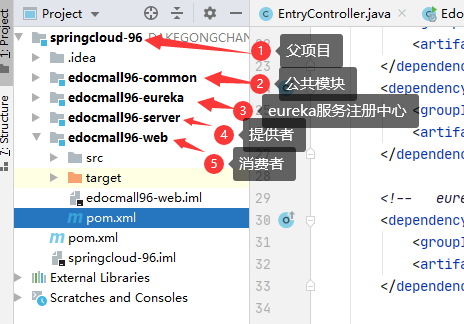
主要依赖 spring-cloud 的 版本控制
<properties>
    <!--   springCloud 版本     -->
    <scd.version>Dalston.SR4</scd.version>
</properties>

<dependencyManagement>
    <dependencies>
        <dependency>
            <groupId>org.springframework.cloud</groupId>
            <artifactId>spring-cloud-dependencies</artifactId>
            <version>${scd.version}</version>
            <type>pom</type>
            <scope>import</scope>
        </dependency>
    </dependencies>
</dependencyManagement>
<!--   eureka 注册中心 依赖     -->
<dependency>
    <groupId>org.springframework.cloud</groupId>
    <artifactId>spring-cloud-starter-eureka-server</artifactId>
</dependency>
# 端口
server:
  port: 8096

# 服务名
spring:
  application:
    name: edocmall-eureka

# eureka 服务注册与发现 配置
eureka:
  client:
    #Eureka 监控页面
    service-url:
      defaultZone: http://127.0.0.1:${server.port}/eureka
    register-with-eureka: false # 是否注册自己的服务到注册中心,默认为true
    on-demand-update-status-change: false # 是否主动拉取其他注册的服务信息,默认也是true
@EnableEurekaServer //eureka服务端启动,可以就接受别人来注册
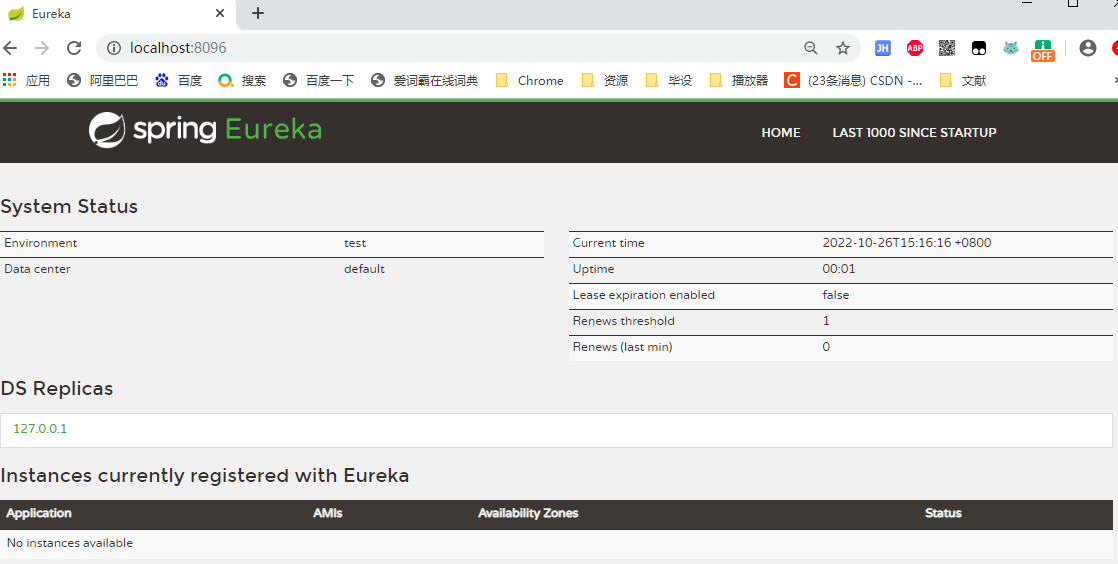
启动项目,访问 http://localhost:8096
<!--   eureka 客户端依赖     -->
<dependency>
    <groupId>org.springframework.cloud</groupId>
    <artifactId>spring-cloud-starter-eureka</artifactId>
</dependency>
# 端口
server:
  port: 8097

# 服务名配置,eureka注册信息,服务调用基于服务名,必须增加
spring:
  application:
    name: edocmall-server
  #数据源配置
  datasource:
    driver-class-name: com.mysql.cj.jdbc.Driver
    url: jdbc:mysql://localhost:3306/kh96_springboot_edocbd?useUnicode=true&characterEncoding=utf-8&useSSL=false&serverTimezone=GMT
    username: root
    password: root

# mybatis-plus 配置
mybatis-plus:
  configuration:
    map-underscore-to-camel-case: true

# eureka 注册中心的配置
eureka:
  client:
    service-url:
      defaultZone: http://127.0.0.1:8096/eureka  # 注册中心的地址
  # 关闭自我保护机制,保证不可用的服务及时剔除
  server:
    enable-self-preservation: false
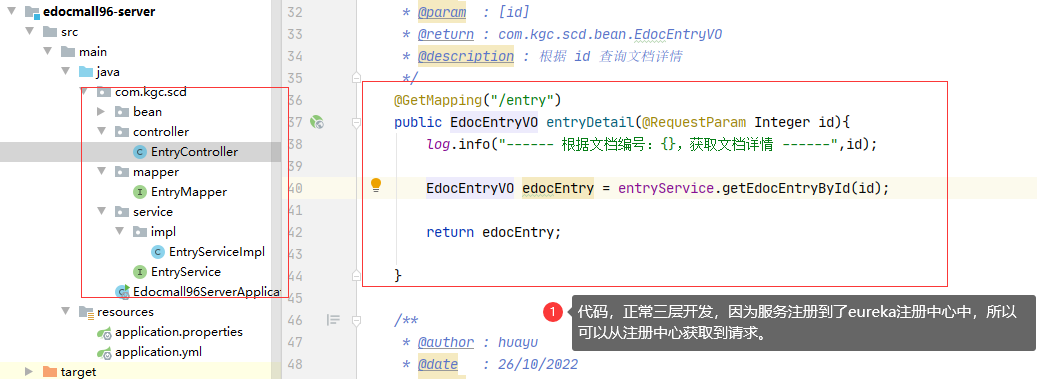
@MapperScan("com.kgc.scd.mapper")
@EnableEurekaClient // 开启 eureka 服务注册,将此服务注册到 eureka中
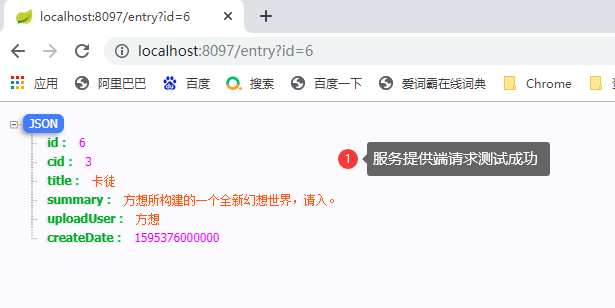
服务提供端的请求最好先单独测试一下,成功后再进行远程调用;
@SpringBootApplication
public class Edocmall96WebApplication {

    public static void main(String[] args) {
        SpringApplication.run(Edocmall96WebApplication.class, args);
    }

    //往容器中添加 restTemplate
    @Bean
    public RestTemplate restTemplate(){
        return new RestTemplate();
    }

}
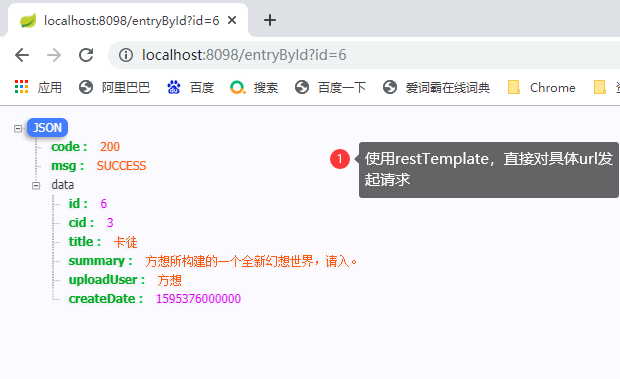
@RestController
public class WebEntryController {

    @Autowired
    private RestTemplate restTemplate;

     // 根据文档编号,获取文档详情
    @GetMapping("/entryById")
    public RequestResult<EdocEntryVO> entryDetail(Integer id){
        log.info("------ 根据文档编号:{},获取文档详情 ------",id);

        //模拟发送http请求请求server端,获取文档详情
        //弊端:消费端,必须在程序内,记录提供者的ip地址,如果地址出现变更,还需要计时更新,如果服务者有多个及其,无法实现负载均衡
        EdocEntryVO edocEntryVO = restTemplate.getForObject("http://127.0.0.1:8097/entry?id="+id,EdocEntryVO.class);

        return ResultBuildUtil.success(edocEntryVO);

    }

}
<!--   eureka 客户端依赖     -->
<dependency>
    <groupId>org.springframework.cloud</groupId>
    <artifactId>spring-cloud-starter-eureka</artifactId>
</dependency>

<!--  feign远程调用依赖      -->
<dependency>
    <groupId>org.springframework.cloud</groupId>
    <artifactId>spring-cloud-starter-feign</artifactId>
    <version>1.3.5.RELEASE</version>
</dependency>
# 端口
server:
  port: 8098

spring:
  application:
    name: edocmall-web
# 服务名

# eureka 注册中心的配置
eureka:
  client:
    service-url:
      defaultZone: http://127.0.0.1:8096/eureka
  # 关闭自我保护机制,保证不可用的服务及时剔除
  server:
    enable-self-preservation: false

# 开启客户端服务降级,默认是关闭的,需要打开
feign:
  hystrix:
    enabled: true
//指定服务名
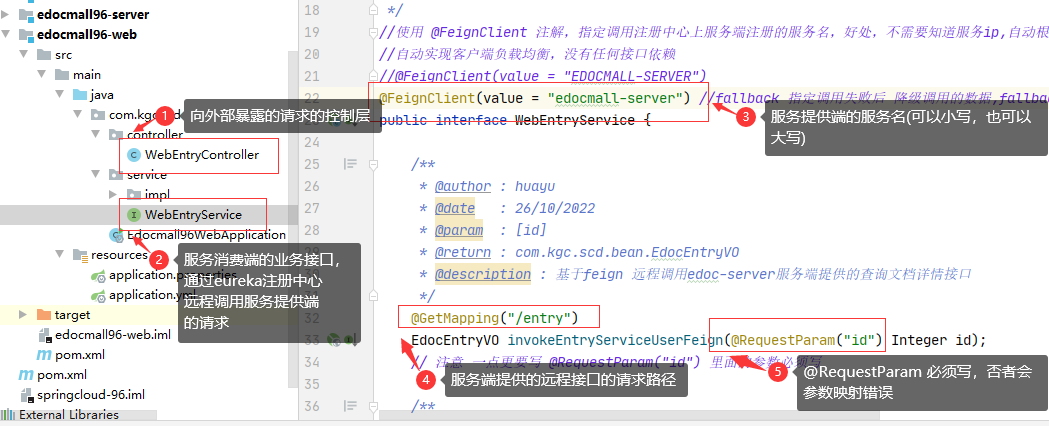
@FeignClient(value = "edocmall-server")
public interface WebEntryService {
    //基于feign 远程调用edoc-server服务端提供的查询文档详情接口
    @GetMapping("/entry") //必须跟远程请求一直
    EdocEntryVO invokeEntryServiceUserFeign(@RequestParam("id") Integer id); //必须写 @RequestParam("id")
    // 注意 一点更要写 @RequestParam("id") 里面的参数必须写

}
@RestController
public class WebEntryController {

    @Autowired
    private WebEntryService webEntryService;

      // 根据文档编号,获取文档详情
    @GetMapping("/entryById")
    public RequestResult<EdocEntryVO> entryDetail(Integer id){
        log.info("------ 根据文档编号:{},获取文档详情 ------",id);

      //基于feign 远程调用服务端接口,获取文档详情
      EdocEntryVO edocEntryVO = webEntryService.invokeEntryServiceUserFeign(id);

       return ResultBuildUtil.success(edocEntryVO);

    }

}
@EnableEurekaClient  // 开启 eureka 服务注册,将此服务注册到 eureka中
@EnableFeignClients  //开启 feign 远程调用服务
eureka 注册中心:

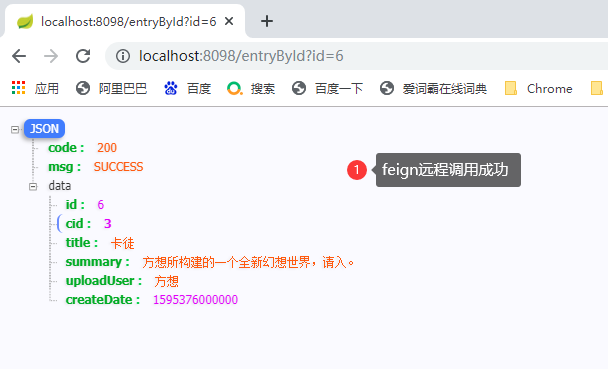
feign远程调用:
由于feign中有hystrix的依赖,所以不用单独添加;

# 开启客户端服务降级,默认是关闭的,需要打开
feign:
  hystrix:
    enabled: true
@FeignClient(value = "edocmall-server",fallback = WebEntryServiceImpl.class) //fallback 指定调用失败后 降级调用的数据
public interface WebEntryService {
    ......
}
@Service
public class WebEntryServiceImpl implements WebEntryService {

    @Override
    public EdocEntryVO invokeEntryServiceUserFeign(Integer id) {
        //此方法,就是regn远程调用,触发服务剪辑的默认实现,正常请求不会调用
        //只用远程 feign调用失败,才会调用
        EdocEntryVO edocEntryVO = new EdocEntryVO();
        edocEntryVO.setId(999);
        edocEntryVO.setCid(0);
        edocEntryVO.setTitle("触发熔断服务降级");
        edocEntryVO.setSummary("当feign远程调用接口失败,默的默认实现");
        edocEntryVO.setUploadUser("feign-hystrix");
        edocEntryVO.setCreateDate(new Date());

        return edocEntryVO;
    }
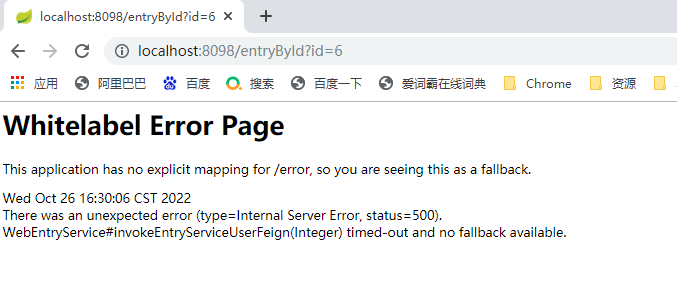
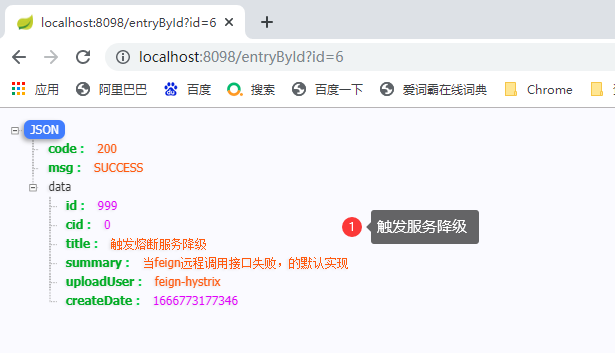

接口报错信息:

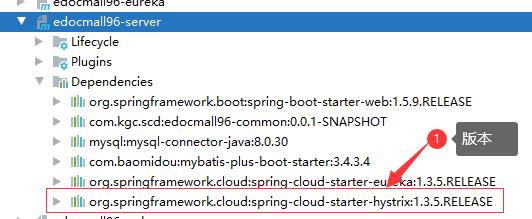
<!--导入Hystrix依赖-->
<dependency>
    <groupId>org.springframework.cloud</groupId>
    <artifactId>spring-cloud-starter-hystrix</artifactId>
</dependency>
@Slf4j
@RestController
public class EntryController {

    @Autowired
    private EntryService entryService;

    //根据 id 查询文档详情
    @GetMapping("/entry")
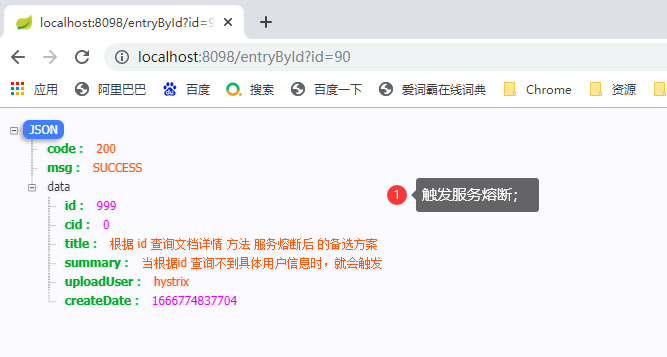
    @HystrixCommand(fallbackMethod = "fallbackStoryDetail")  //指定 服务熔断后的备选方法
    public EdocEntryVO entryDetail(@RequestParam Integer id){
        log.info("------ 根据文档编号:{},获取文档详情 ------",id);

        EdocEntryVO edocEntry = entryService.getEdocEntryById(id);

        if (edocEntry == null){
            //抛出异常,触发 熔断 备选方法
            throw new RuntimeException("id为:"+id+"的用户不存在,触发服务熔断");
        }

        return edocEntry;

    }

    // 根据 id 查询文档详情 方法 服务熔断后  的备选方案
    public EdocEntryVO fallbackStoryDetail(@RequestParam Integer id){
        //此方法,只用服务熔断时,才会被调用
        EdocEntryVO edocEntryVO = new EdocEntryVO();
        edocEntryVO.setId(999);
        edocEntryVO.setCid(0);
        edocEntryVO.setTitle("根据 id 查询文档详情 方法 服务熔断后  的备选方案");
        edocEntryVO.setSummary("当根据id 查询不到具体用户信息时,就会触发");
        edocEntryVO.setUploadUser("hystrix");
        edocEntryVO.setCreateDate(new Date());

        return edocEntryVO;
    }

}
@EnableHystrix //开启熔断服务 旧的开启服务熔断注解: @EnableCircuitBreaker
直接返回错误;
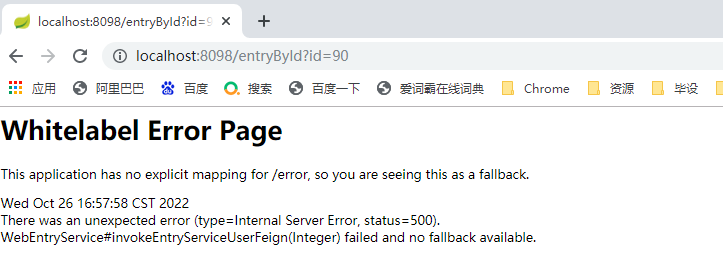
触发服务降级;

触发服务熔断;
<!-- 暴露info端点给外部访问, 需要添加暴露端点的启动依赖: -->
<dependency>
    <groupId>org.springframework.boot</groupId>
    <artifactId>spring-boot-starter-actuator</artifactId>
</dependency>
# 服务信息 eureka 中服务配置的基本信息
info:
  app.name: web 消费端
  company.name: com.kgc.kh96 # 公司域名
  # 其他信息可以自行查询
点击服务路径:
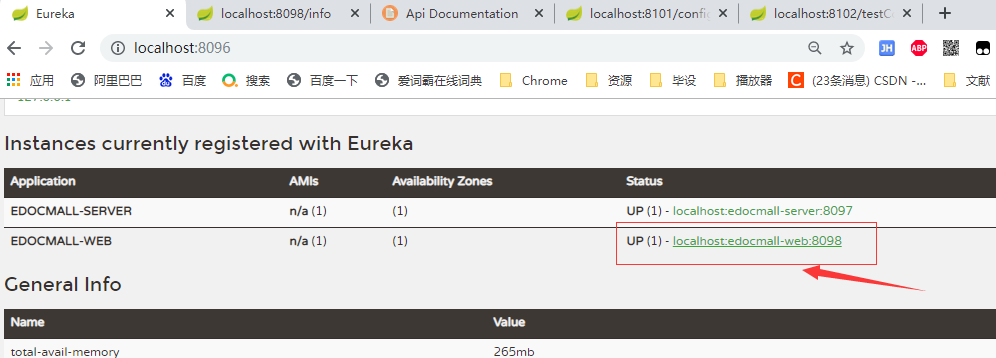
点击后的测试信息:

如果我们不对Eureka进行加密就会导致一些恶意的微服务注册到Eureka注册中心,为了防止这种事情发生我们就要对Eureka进行加密处理。
Eureka 自带了一个 Web 的管理页面,方便我们查询注册到上面的实例信息,但是有一个问题:如果在实际使用中,注册中心地址有公网 IP 的话,必然能直接访问到,这样是不安全的。所以我们需要对 Eureka 进行改造,加上权限认证来保证安全性。
改造我们的 eureka-server,通过集成 Spring-Security 来进行安全认证。
在 pom.xml 中添加 Spring-Security 的依赖包,代码如下所示。
<!-- eureka依赖配置 -->
<dependency>
    <groupId>org.springframework.cloud</groupId>
    <artifactId>spring-cloud-starter-eureka-server</artifactId>
</dependency>

<!-- Spring-Security 的依赖包 -->
<dependency>
    <groupId>org.springframework.boot</groupId>
    <artifactId>spring-boot-starter-security</artifactId>
</dependency>
spring:
  security:
    user:
      name: Your username
      password: Yourpassword
spring.security.user.name: Your username
spring.security.user.name: Your password
package com.dazuizui.eureka1.config;

import org.springframework.context.annotation.Configuration;
import org.springframework.security.config.annotation.web.builders.HttpSecurity;
import org.springframework.security.config.annotation.web.configuration.EnableWebSecurity;
import org.springframework.security.config.annotation.web.configuration.WebSecurityConfigurerAdapter;

@Configuration
@EnableWebSecurity
public class WebSecurityConfig extends WebSecurityConfigurerAdapter {

  /*    @Override
    protected void configure(HttpSecurity http) throws Exception {
        // 关闭csrf
        http.csrf().disable();
        // 支持httpBasic
        http.authorizeRequests().anyRequest().authenticated().and().httpBasic();
    }*/

    @Override
    protected void configure(HttpSecurity http) throws Exception {
        //过滤eureka路径
        http.csrf().ignoringAntMatchers("/eureka/**");
        super.configure(http);
    }
}
#服务名
spring:
  application:
    name: eureka
  basic:
    enable: true

# security在springboot 2.0.0版本后需要在spring的层级下才能成功,2.0.0之前的版本不需要在spring的层级下
security:
  user:
    name: admin
    password: admin

# 端口号
server:
  port: 8096

eureka:
  instance:
    hostname: localhost
  client:
    service-url:
      defaultZone: http://${spring.security.user.name}:${spring.security.user.password}@${eureka.instance.hostname}:${server.port}/eureka/
    fetch-registry: true # 是否主动拉取其它注册的服务信息,默认也是true
    register-with-eureka: false # 是否注册自己的服务到注册中心,默认是true
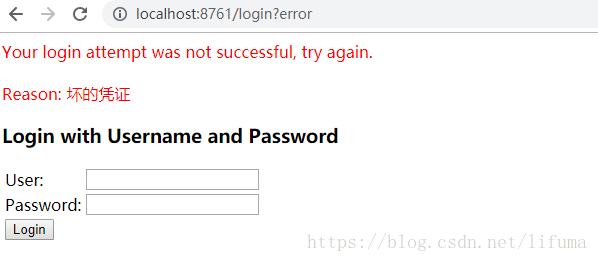
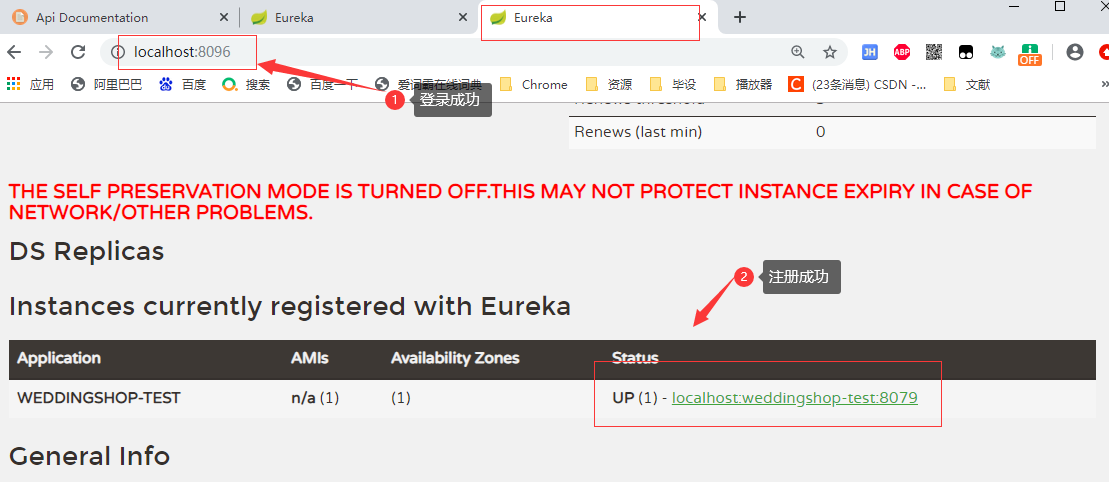
重新启动注册中心,访问 http://localhost:8096/,此时浏览器会提示你输入用户名和密码,输入正确后才能继续访问 Eureka 提供的管理页面。
在 Eureka 开启认证后,客户端注册的配置也要加上认证的用户名和密码信息,需要对应的账户和密码:
# 端口
server:
  port: 8100

# 服务名
spring:
  application:
    name: wyyxmall-hx-server

# eureka注册中心配置
eureka:
  client:
    service-url:
      defaultZone: http://admin:admin@localhost:8096/eureka/
springboot 2.0.0版本之前的 配置文件application.yml配置如下:
# security在springboot 2.0.0版本后需要在spring的层级下才能成功,2.0.0之前的版本不需要在spring的层级下
security:
  basic:
    enable: true
  user:
    name: admin
    password: admin
springboot 2.0.0版本之后的 配置文件application.yml配置如下:
spring:
  security:
    basic:
      enable: true
    user:
      name: admin
      password: admin
我正在尝试编写一个将文件上传到AWS并公开该文件的Ruby脚本。我做了以下事情:s3=Aws::S3::Resource.new(credentials:Aws::Credentials.new(KEY,SECRET),region:'us-west-2')obj=s3.bucket('stg-db').object('key')obj.upload_file(filename)这似乎工作正常,除了该文件不是公开可用的,而且我无法获得它的公共(public)URL。但是当我登录到S3时,我可以正常查看我的文件。为了使其公开可用,我将最后一行更改为obj.upload_file(file
如何在ruby中调用C#dll? 最佳答案 我能想到几种可能性:为您的DLL编写(或找人编写)一个COM包装器,如果它还没有,则使用Ruby的WIN32OLE库来调用它;看看RubyCLR,其中一位作者是JohnLam,他继续在Microsoft从事IronRuby方面的工作。(估计不会再维护了,可能不支持.Net2.0以上的版本);正如其他地方已经提到的,看看使用IronRuby,如果这是您的技术选择。有一个主题是here.请注意,最后一篇文章实际上来自JohnLam(看起来像是2009年3月),他似乎很自在地断言RubyCL
我正在尝试使用boilerpipe来自JRuby。我看过guide从JRuby调用Java,并成功地将它与另一个Java包一起使用,但无法弄清楚为什么同样的东西不能用于boilerpipe。我正在尝试基本上从JRuby中执行与此Java等效的操作:URLurl=newURL("http://www.example.com/some-location/index.html");Stringtext=ArticleExtractor.INSTANCE.getText(url);在JRuby中试过这个:require'java'url=java.net.URL.new("http://www
我需要一些关于TDD概念的帮助。假设我有以下代码defexecute(command)casecommandwhen"c"create_new_characterwhen"i"display_inventoryendenddefcreate_new_character#dostufftocreatenewcharacterenddefdisplay_inventory#dostufftodisplayinventoryend现在我不确定要为什么编写单元测试。如果我为execute方法编写单元测试,那不是几乎涵盖了我对create_new_character和display_invent
在应用开发中,有时候我们需要获取系统的设备信息,用于数据上报和行为分析。那在鸿蒙系统中,我们应该怎么去获取设备的系统信息呢,比如说获取手机的系统版本号、手机的制造商、手机型号等数据。1、获取方式这里分为两种情况,一种是设备信息的获取,一种是系统信息的获取。1.1、获取设备信息获取设备信息,鸿蒙的SDK包为我们提供了DeviceInfo类,通过该类的一些静态方法,可以获取设备信息,DeviceInfo类的包路径为:ohos.system.DeviceInfo.具体的方法如下:ModifierandTypeMethodDescriptionstatic StringgetAbiList()Obt
说在前面这部分我本来是合为一篇来写的,因为目的是一样的,都是通过独立按键来控制LED闪灭本质上是起到开关的作用,即调用函数和中断函数。但是写一篇太累了,我还是决定分为两篇写,这篇是调用函数篇。在本篇中你主要看到这些东西!!!1.调用函数的方法(主要讲语法和格式)2.独立按键如何控制LED亮灭3.程序中的一些细节(软件消抖等)1.调用函数的方法思路还是比较清晰地,就是通过按下按键来控制LED闪灭,即每按下一次,LED取反一次。重要的是,把按键与LED联系在一起。我打算用K1来作为开关,看了一下开发板原理图,K1连接的是单片机的P31口,当按下K1时,P31是与GND相连的,也就是说,当我按下去时
作为新的阿里云用户,您可以50免费试用多种优惠,价值高达1,700美元(或8,500美元)。这将让您了解和体验阿里云平台上提供的一系列产品和服务。如果您以个人身份注册免费试用,您将获得价值1,700美元的优惠。但是,如果您是注册公司,您可以选择企业免费试用,提交基本信息通过企业实名注册验证,即可开始价值$8,500的免费试用!本教程介绍了如何设置您的帐户并使用您的免费试用版。关于免费试用在我们开始此试用之前,您还必须遵守以下条款和条件才能访问您的免费试用:只有在一年内创建的账户才有资格获得阿里云免费试用。通过此免费试用优惠,用户可以免费试用免费试用活动页面上列出的每种产品一次。如果您有多个帐
如何找到调用此方法的位置?defto_xml(options={})binding.pryoptions=options.to_hifoptions&&options.respond_to?(:to_h)serializable_hash(options).to_xml(options)end 最佳答案 键入caller。这将返回当前调用堆栈。文档:Kernel#caller.例子[0]%rspecspec10/16|===================================================62=====
Rails相对较新。我正在尝试调用一个API,它应该向我返回一个唯一的URL。我的应用程序中捆绑了HTTParty。我已经创建了一个UniqueNumberController,并且我已经阅读了几个HTTParty指南,直到我想要什么,但也许我只是有点迷路,真的不知道该怎么做。基本上,我需要做的就是调用API,获取它返回的URL,然后将该URL插入到用户的数据库中。谁能给我指出正确的方向或与我分享一些代码? 最佳答案 假设API为JSON格式并返回如下数据:{"url":"http://example.com/unique-url"
我正在写一篇关于在Ruby中几乎一切都是对象的博客文章,我试图通过以下示例来展示这一点:classCoolBeansattr_accessor:beansdefinitialize@bean=[]enddefcount_beans@beans.countendend所以从类中我们可以看出它有4个方法(当然,除非我错了):它可以在创建新实例时初始化一个默认的空bean数组它可以计算它有多少个bean它可以读取它有多少个bean(通过attr_accessor)它可以向空数组写入(或添加)更多bean(也通过attr_accessor)但是,当我询问类本身它有哪些实例方法时,我没有看到默认
