
? 作者:韩信子@ShowMeAI
? 数据分析实战系列:https://www.showmeai.tech/tutorials/40
? 机器学习实战系列:https://www.showmeai.tech/tutorials/41
? 本文地址:https://www.showmeai.tech/article-detail/401
? 声明:版权所有,转载请联系平台与作者并注明出处
? 收藏ShowMeAI查看更多精彩内容

在过去几年中,客户对航空公司的满意度一直在稳步攀升。在 COVID-19 大流行导致的停顿之后,航空旅行业重新开始,大家越来越关注航空出行的满意度问题,客户也会对一些常见问题,如『不舒服的座位』、『拥挤的空间』、『延误』和『不合标准的设施』等进行反馈。
各家航空公司也越来越关注客户满意度问题并努力提高。对航空公司而言,出色的客户服务,是销量和客户留存的关键;反之,糟糕的客户服务评级会导致客户流失和公司声誉不佳。

在本项目中,我们将对航空满意度数据进行分析建模,对满意度进行预估,并找出影响满意度的核心因素。
这里使用到的主要开发环境是 Jupyter Notebooks,基于 Python 3.9 完成。依赖的工具库包括 用于数据探索分析的Pandas、Numpy、Seaborn 和 Matplotlib 库、用于建模和优化的 XGBoost 和 Scikit-Learn 库,以及用于模型可解释性分析的 SHAP 工具库。

关于以上工具库的用法,ShowMeAI在实战文章中做了详细介绍,大家可以查看以下教程系列和文章

我们本次用到的数据集是 ?Kaggle航空满意度数据集。数据集使用csv格式文件存储,预先切分好了 80% 的训练集 和 20% 的测试集;目标列“Satisfaction/满意度”。大家可以通过 ShowMeAI 的百度网盘地址下载。
? 实战数据集下载(百度网盘):公众号『ShowMeAI研究中心』回复『实战』,或者点击 这里 获取本文 [36]『航班乘客满意度』场景数据分析建模与业务归因解释 『Airline Passenger Satisfaction数据集』
⭐ ShowMeAI官方GitHub:https://github.com/ShowMeAI-Hub
详细的数据列字段如下:
| 字段 | 说明 | 详情 |
|---|---|---|
| Gender | 乘客性别 | Female, Male |
| Customer Type | 乘客类型 | Loyal customer, disloyal customer |
| Age | 乘客年龄 | -- |
| Type of Travel | 乘客出行目的 | Personal Travel, Business Travel |
| Class | 客舱等级 | Business, Eco, Eco Plus |
| Flight distance | 航程距离 | -- |
| Inflight wifi service | 机上WiFi服务满意度 | 0:Not Applicable;1-5 |
| Departure/Arrival time convenient | 起飞/降落舒适度满意度 | -- |
| Ease of Online booking | 在线预定满意度 | -- |
| Gate location | 登机门位置满意度 | -- |
| Food and drink | 机上食物满意度 | -- |
| Online boarding | 在线值机满意度 | -- |
| Seat comfort | 座椅舒适度满意度 | -- |
| Inflight entertainment | 机上娱乐设施满意度 | -- |
| On-board service | 登机服务满意度 | -- |
| Leg room service | 腿部空间满意度 | -- |
| Baggage handling | 行李处理满意度 | -- |
| Check-in service | 值机满意度 | -- |
| Inflight service | 机上服务满意度 | -- |
| Cleanliness | 环境干净度满意度 | -- |
| Departure Delay in Minutes | 起飞延误时间 | -- |
| Arrival Delay in Minutes | 抵达延误时间 | -- |
| Satisfaction | 航线满意度 | Satisfaction, neutral or dissatisfaction |
我们先导入工具库,进行基本的设定,并读取数据。
# 导入工具库
import pandas as pd
import numpy as np
import scipy.stats as sp
import matplotlib.pyplot as plt
import seaborn as sns

import warnings
warnings.filterwarnings("ignore")

# 可视化图例设定
from matplotlib import rcParams
# 字体大小
rcParams['font.size'] = 12
# 图例大小
rcParams['figure.figsize'] = 7, 5

# 读取数据
air_train_df = pd.read_csv('air-train.csv')
air_test_df = pd.read_csv('air-test.csv')

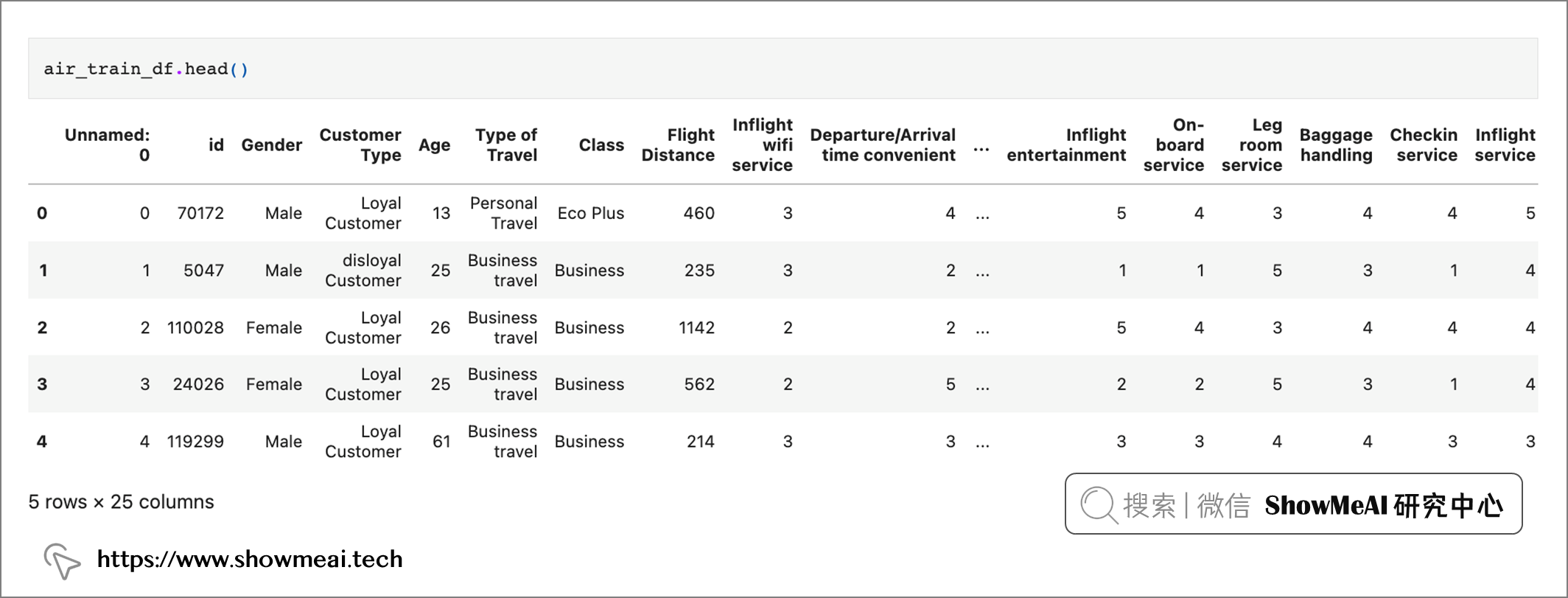
air_train_df.head()
air_train_df.satisfaction.value_counts()
neutral or dissatisfied    58879
satisfied                  45025
Name: satisfaction, dtype: int64
air_train_df.info()

air_test_df.info()
输出的数据信息如下,我们使用到的数据总共包含 129,880 行25 列。数据集被预拆分为包含 103,904 行的训练数据集(19.8MB)和包含 25,976 行的测试数据集(5MB)。
Training Data Set (air_train_df):
<class 'pandas.core.frame.DataFrame'>
RangeIndex: 103904 entries, 0 to 103903
Data columns (total 25 columns):
 #   Column                             Non-Null Count   Dtype
---  ------                             --------------   -----
 0   Unnamed: 0                         103904 non-null  int64
 1   id                                 103904 non-null  int64
 2   Gender                             103904 non-null  object
 3   Customer Type                      103904 non-null  object
 4   Age                                103904 non-null  int64
 5   Type of Travel                     103904 non-null  object
 6   Class                              103904 non-null  object
 7   Flight Distance                    103904 non-null  int64
 8   Inflight wifi service              103904 non-null  int64
 9   Departure/Arrival time convenient  103904 non-null  int64
 10  Ease of Online booking             103904 non-null  int64
 11  Gate location                      103904 non-null  int64
 12  Food and drink                     103904 non-null  int64
 13  Online boarding                    103904 non-null  int64
 14  Seat comfort                       103904 non-null  int64
 15  Inflight entertainment             103904 non-null  int64
 16  On-board service                   103904 non-null  int64
 17  Leg room service                   103904 non-null  int64
 18  Baggage handling                   103904 non-null  int64
 19  Checkin service                    103904 non-null  int64
 20  Inflight service                   103904 non-null  int64
 21  Cleanliness                        103904 non-null  int64
 22  Departure Delay in Minutes         103904 non-null  int64
 23  Arrival Delay in Minutes           103594 non-null  float64
 24  satisfaction                       103904 non-null  object
dtypes: float64(1), int64(19), object(5)
memory usage: 19.8+ MB

Testing Set (air_test_df):
<class 'pandas.core.frame.DataFrame'>
RangeIndex: 25976 entries, 0 to 25975
Data columns (total 25 columns):
 #   Column                             Non-Null Count  Dtype
---  ------                             --------------  -----
 0   Unnamed: 0                         25976 non-null  int64
 1   id                                 25976 non-null  int64
 2   Gender                             25976 non-null  object
 3   Customer Type                      25976 non-null  object
 4   Age                                25976 non-null  int64
 5   Type of Travel                     25976 non-null  object
 6   Class                              25976 non-null  object
 7   Flight Distance                    25976 non-null  int64
 8   Inflight wifi service              25976 non-null  int64
 9   Departure/Arrival time convenient  25976 non-null  int64
 10  Ease of Online booking             25976 non-null  int64
 11  Gate location                      25976 non-null  int64
 12  Food and drink                     25976 non-null  int64
 13  Online boarding                    25976 non-null  int64
 14  Seat comfort                       25976 non-null  int64
 15  Inflight entertainment             25976 non-null  int64
 16  On-board service                   25976 non-null  int64
 17  Leg room service                   25976 non-null  int64
 18  Baggage handling                   25976 non-null  int64
 19  Checkin service                    25976 non-null  int64
 20  Inflight service                   25976 non-null  int64
 21  Cleanliness                        25976 non-null  int64
 22  Departure Delay in Minutes         25976 non-null  int64
 23  Arrival Delay in Minutes           25893 non-null  float64
 24  satisfaction                       25976 non-null  object
dtypes: float64(1), int64(19), object(5)
memory usage: 5.0+ MB
数据集中,19 个 int 数据类型字段,1 个 float 数据类型字段,5 个分类数据类型(对象)字段。
下面我们进行数据清洗:
id和unnamed两列没有作用,我们直接删除。Arrival Delay 列中也存在缺失值——训练集中缺少 310 个,测试集中缺少 83 个。我们在这里用最简单的平均值来填充它们。def clean_data(orig_df):
'''
This function applies 5 steps to the dataframe to clean the data.
1. Dropping of unnecessary columns
2. Uniformize datatypes in delay column
3. Normalizing column names.
4. Normalizing text values in columns.
5. Imputing numeric null values with the mean value of the column.
6. Dropping "zero" values from ranked categorical variables.
7. Creating aggregated flight delay column
Return: Cleaned DataFrame, ready for analysis - final encoding still to be applied.
'''
df = orig_df.copy()
'''1. Dropping off unnecessary columns'''
df.drop(['Unnamed: 0', 'id'], axis = 1, inplace = True)
'''2. Uniformizing datatype in delay column'''
df['Departure Delay in Minutes'] = df['Departure Delay in Minutes'].astype(float)
'''3. Normalizing column names'''
df.columns = df.columns.str.lower()
'''Replacing spaces and other characters with underscores, this is more
for us to make it easier to work with them and so that we can call them using dot notation.'''
special_chars = "/ -"
for special_char in special_chars:
df.columns = [col.replace(special_char, '_') for col in df.columns]
'''4. Normalizing text values in columns'''
cat_cols = ['gender', 'customer_type', 'class', 'type_of_travel', 'satisfaction']
for column in cat_cols:
df[column] = df[column].str.lower()
'''5. Imputing the nulls in the arrival delay column with the mean.
Since we cannot safely equate these nulls to a zero value, the mean value of the column is the
most sensible method of replacement.'''
df['arrival_delay_in_minutes'].fillna(df['arrival_delay_in_minutes'].mean(), inplace = True)
df.round({'arrival_delay_in_minutes' : 1})
'''6. Dropping rows from ranked value columns where "zero" exists as a value
Since these columns are meant to be ranked on a scale from 1 to 5, having zero as a value
does not make sense nor does it help us in any way.'''
rank_list = ["inflight_wifi_service", "departure_arrival_time_convenient", "ease_of_online_booking", "gate_location",
"food_and_drink", "online_boarding", "seat_comfort", "inflight_entertainment", "on_board_service",
"leg_room_service", "baggage_handling", "checkin_service", "inflight_service", "cleanliness"]
'''7. Creating aggregated and categorical flight delay columns'''
df['total_delay_time'] = (df['departure_delay_in_minutes'] + df['arrival_delay_in_minutes'])
df['was_flight_delayed'] = np.nan
df['was_flight_delayed'] = np.where(df['total_delay_time'] > 0, 'yes', 'no')
for col in rank_list:
df.drop(df.loc[df[col]==0].index, inplace=True)
cleaned_df = df
return cleaned_df
完成数据加载与基本的数据清洗后,我们对数据进行进一步的分析挖掘,即EDA(探索性数据分析)的过程。
我们先对目标变量进行分析,即客户满意度情况,这是建模的最终标签,它是一个类别型字段。
air_train_cleaned = clean_data(air_train_df)
air_test_cleaned = clean_data(air_test_df)

fig = plt.figure(figsize = (10,7))
air_train_cleaned.satisfaction.value_counts(normalize = True).plot(kind='bar', alpha = 0.9, rot=0)
plt.title('Customer satisfaction')
plt.ylabel('Percent')
plt.show()
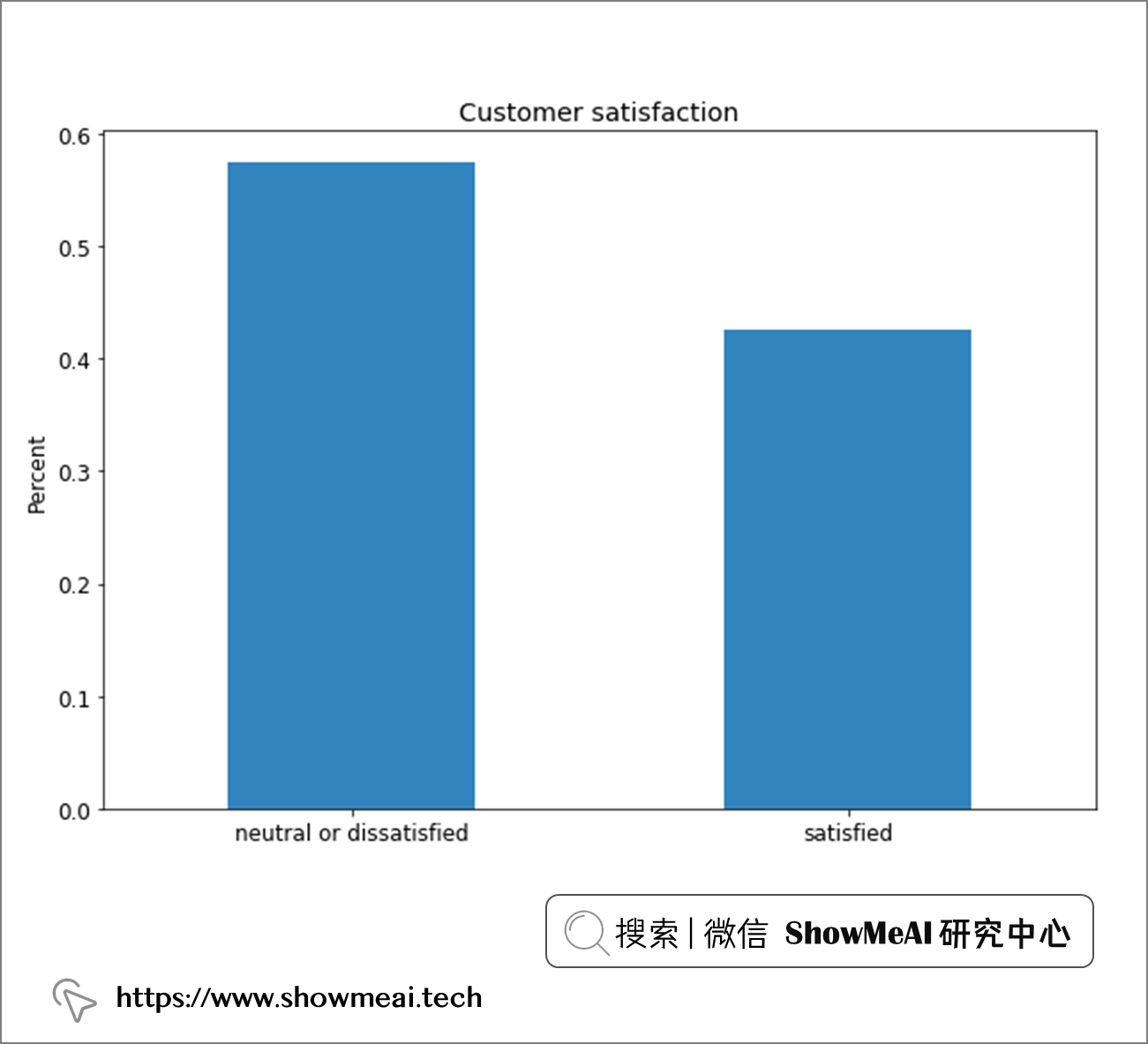
总体来说,标签还算均衡,大约 55% 的中立或不满意,45% 的满意。这种标签比例分布下,我们不需要进行数据采样。
with sns.axes_style(style = 'ticks'):
    d = sns.histplot(x = "gender",  hue= 'satisfaction', data = air_train_cleaned,
                     stat = 'percent', multiple="dodge", palette = 'Set1')
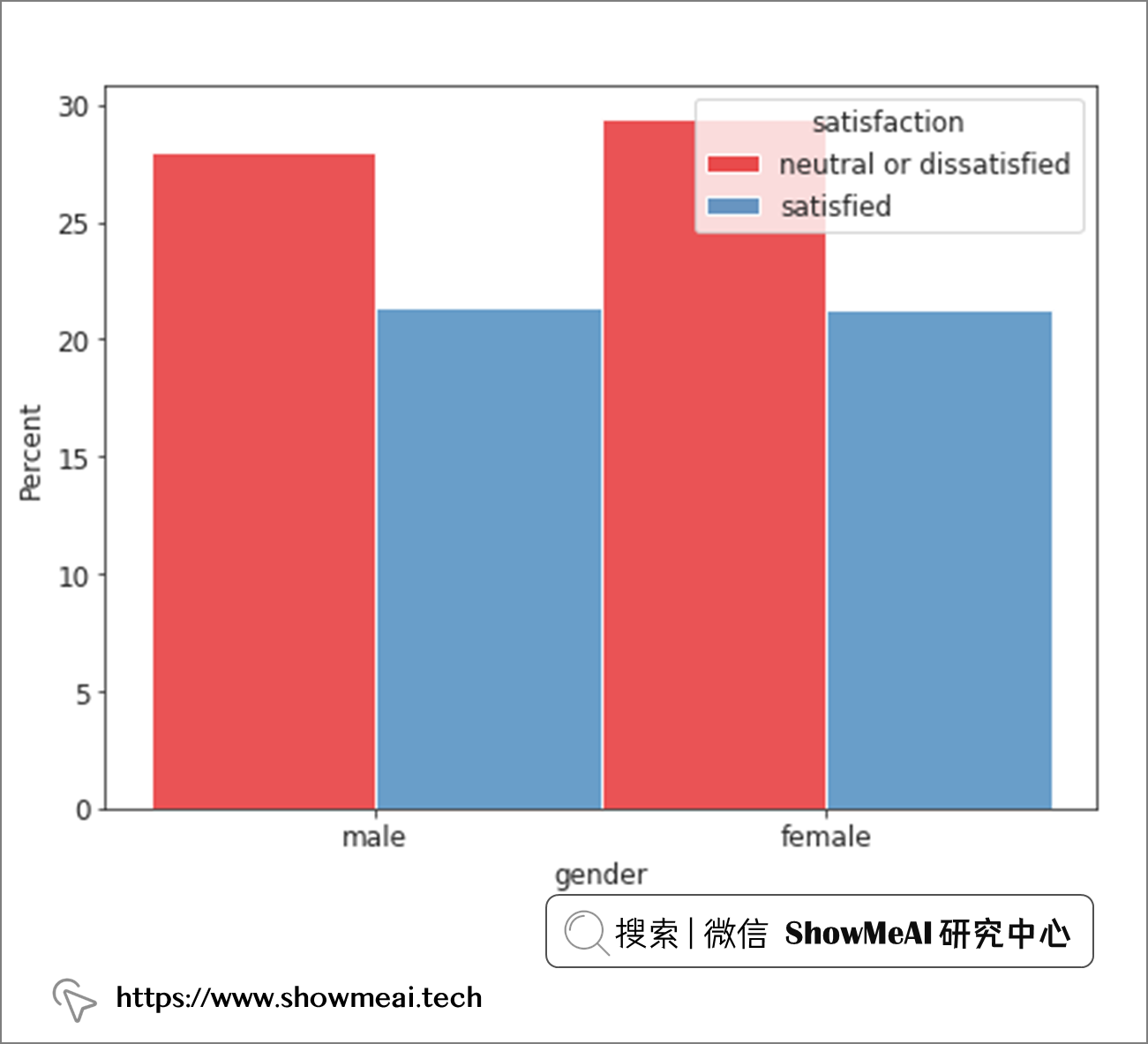
从性别维度来看,男女似乎差别不大,总体满意度可能更取决于其他因素。
with sns.axes_style(style = 'ticks'):
    d = sns.histplot(x = "customer_type",  hue= 'satisfaction', data = air_train_cleaned,
                     stat = 'percent', multiple="dodge", palette = 'Set1')
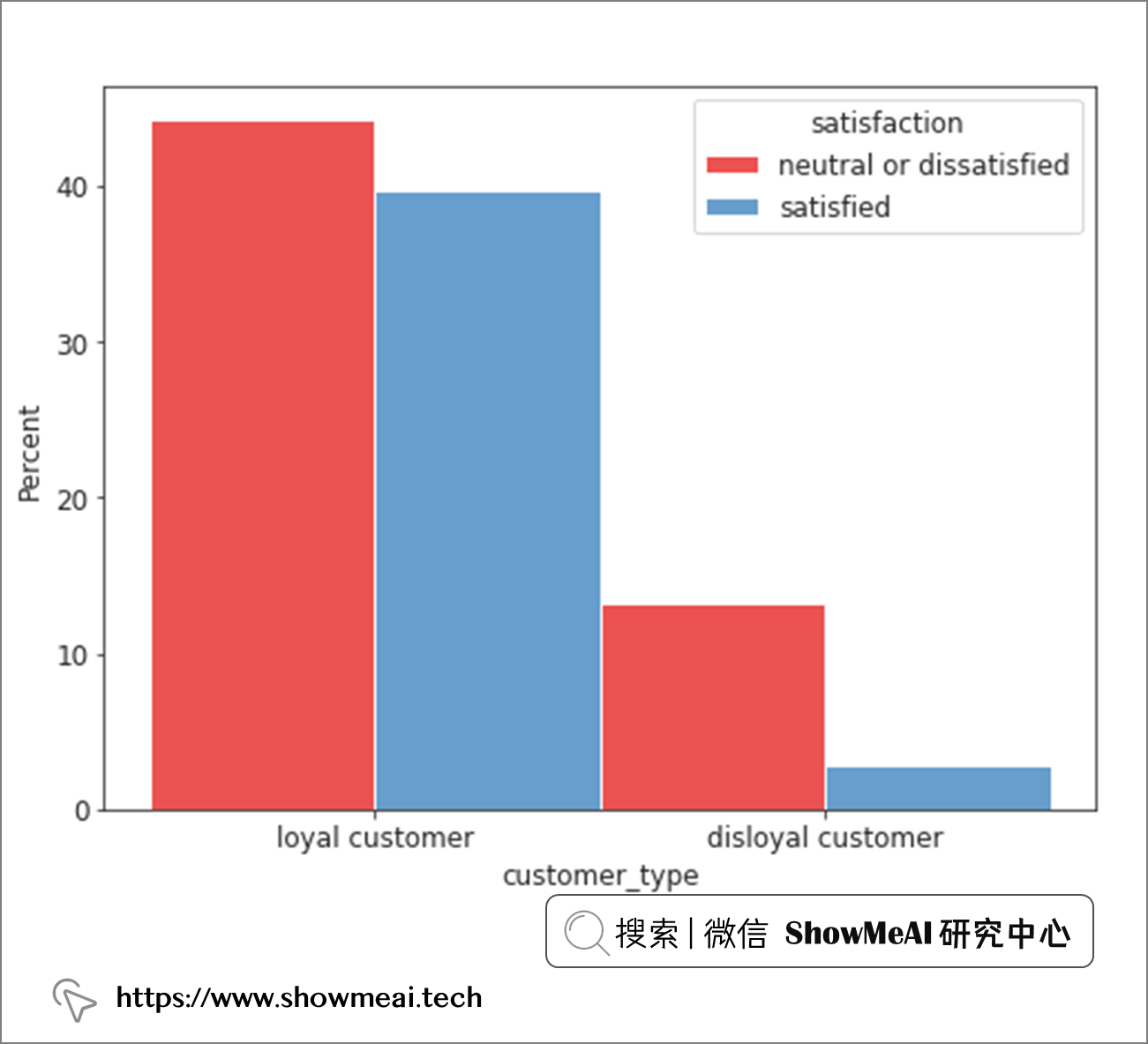
从客户忠诚度角度看,忠诚客户的满意度比例会相对高一点,这也是我们可以直观理解的。
with sns.axes_style(style = 'ticks'):
    d = sns.histplot(x = "class",  hue= 'satisfaction', data = air_train_cleaned,
                     stat = 'percent', multiple="dodge", palette = 'Set1')
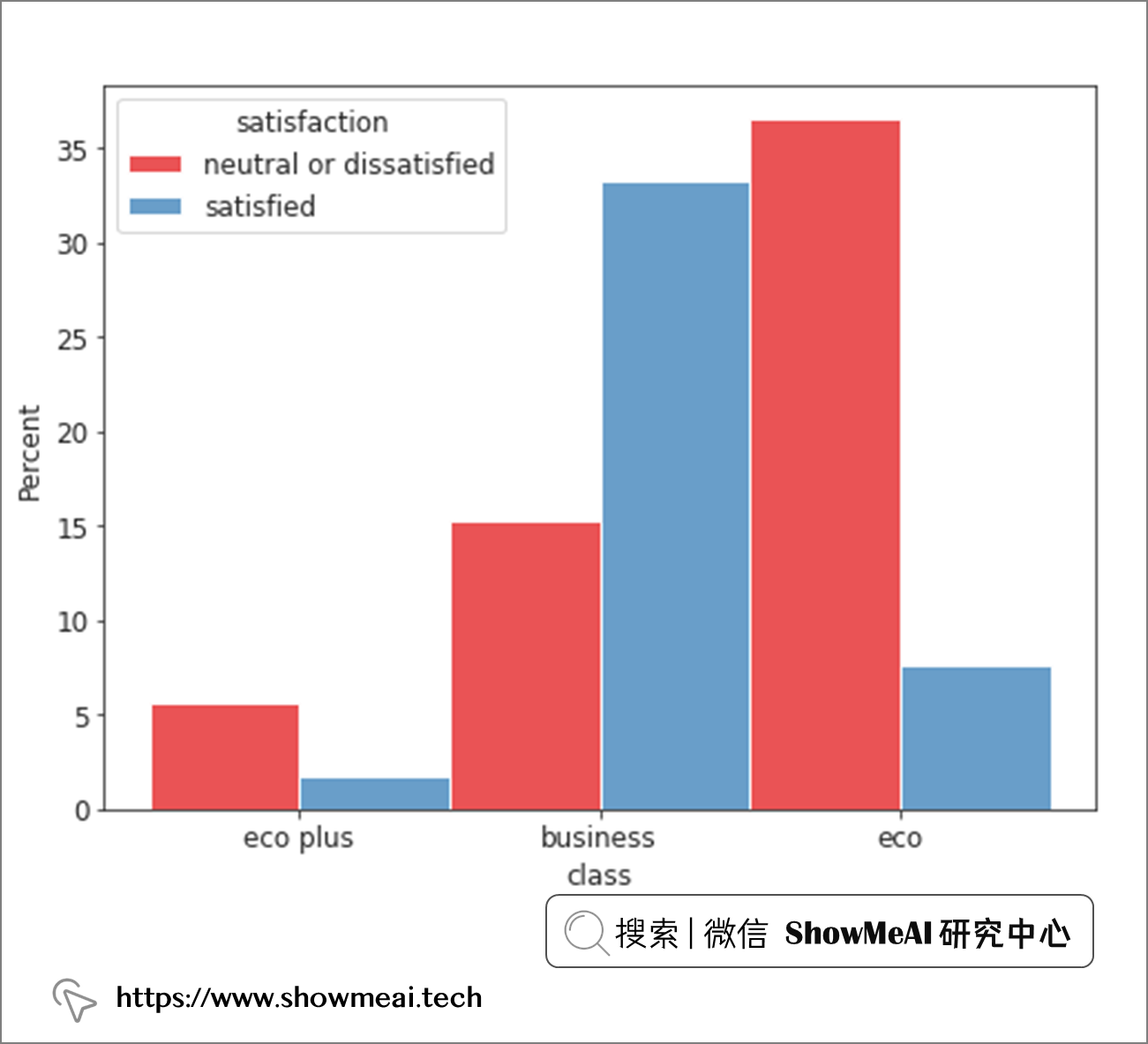
我们分别看一下乘坐经济舱、高级舱和商务舱的旅客的满意度,从上面的分布我们可以观察到乘坐高级舱(商务舱)的乘客与乘坐长途客舱(经济舱或豪华舱)的乘客在满意度上存在根本差异。
那我们进而看一下因个人休闲而出差的乘客
with sns.axes_style(style = 'ticks'):
    d = sns.histplot(x = "type_of_travel",  hue= 'satisfaction', data = air_train_cleaned,
                     stat = 'percent', multiple="dodge", palette = 'Set1')
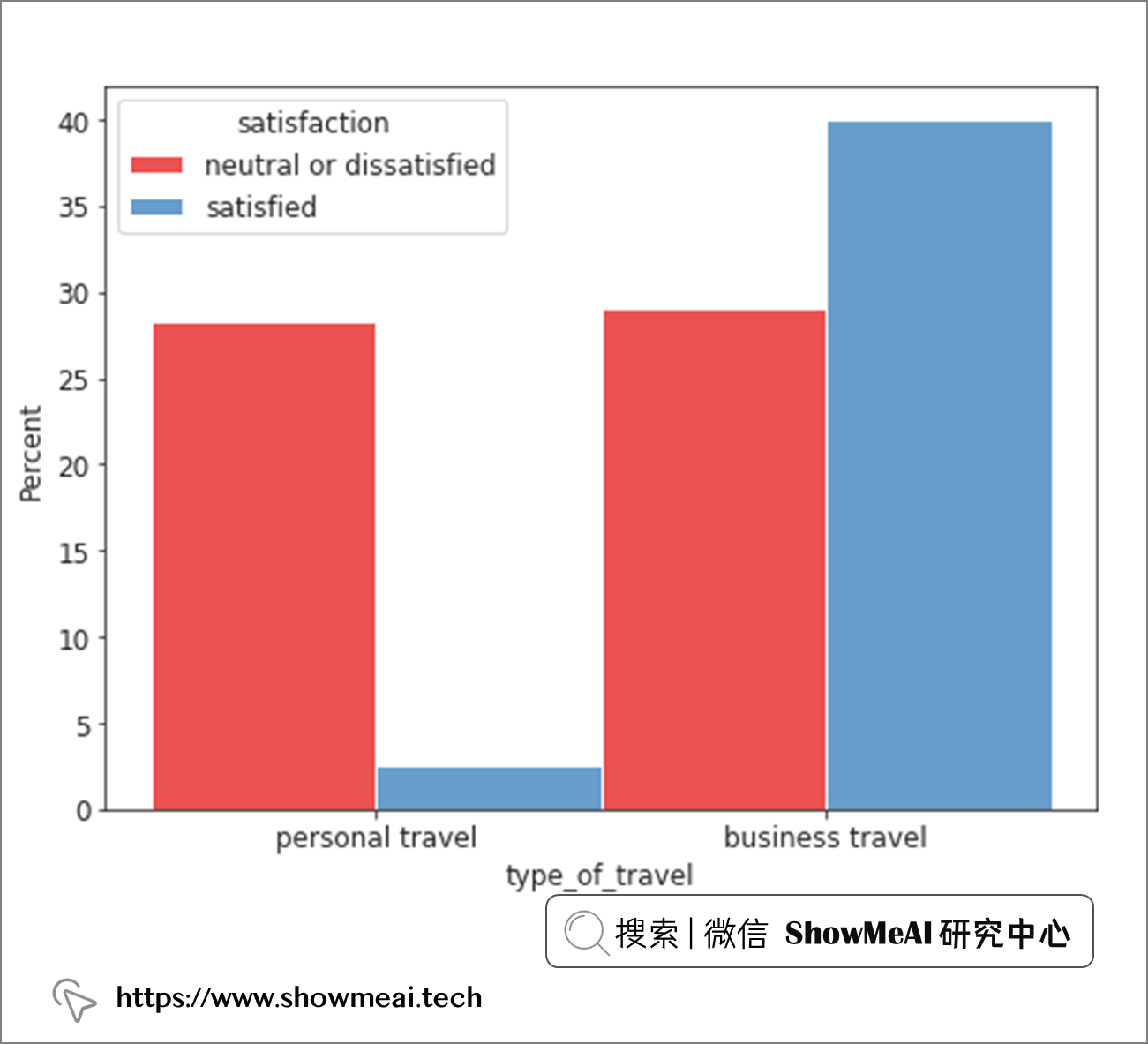
从上面的分析我们发现,商务旅行的乘客与休闲旅行的乘客之间的满意度存在非常显著的差异。
with sns.axes_style('white'):
    g = sns.catplot(x = 'age', data = air_train_cleaned,
                    kind = 'count', hue = 'satisfaction', order = range(7, 80),
                    height = 8.27, aspect=18.7/8.27, legend = False,
                   palette = 'Set1')

plt.legend(loc='upper right');
sns.violinplot(data = air_train_cleaned, x = "satisfaction", y = "age", palette='Set1')

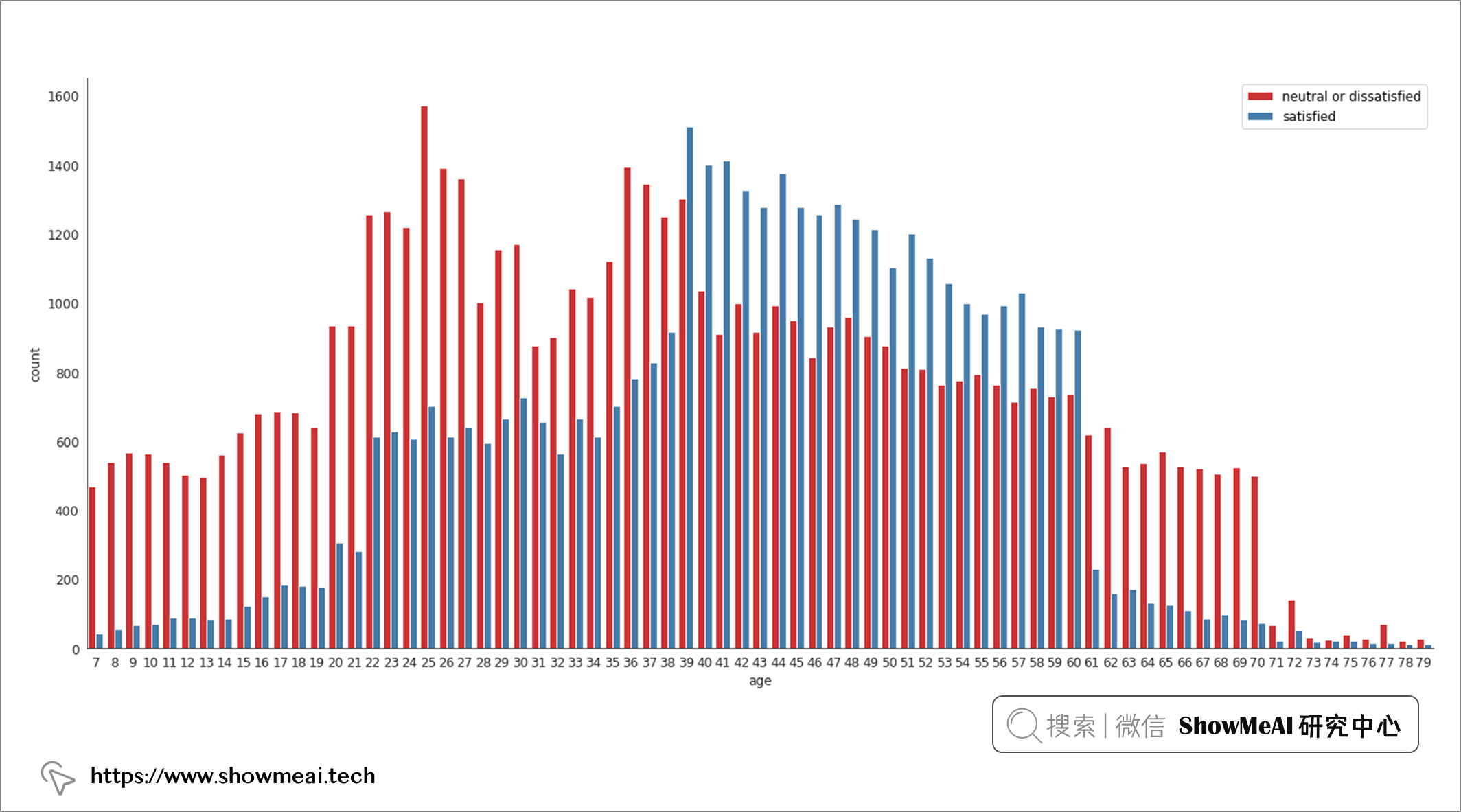
上图是年龄和满意度之间的关系,分析结果非常有趣,37-61 岁年龄组与其他年龄组之间存在显著差异(他们对体验的满意度远远高于其他组的乘客)。另外我们还观察到,这个段的乘客的满意度随着年龄的增长而稳步上升。
sns.violinplot(data = air_train_cleaned, x = "satisfaction", y = "flight_distance", palette = 'Set1')
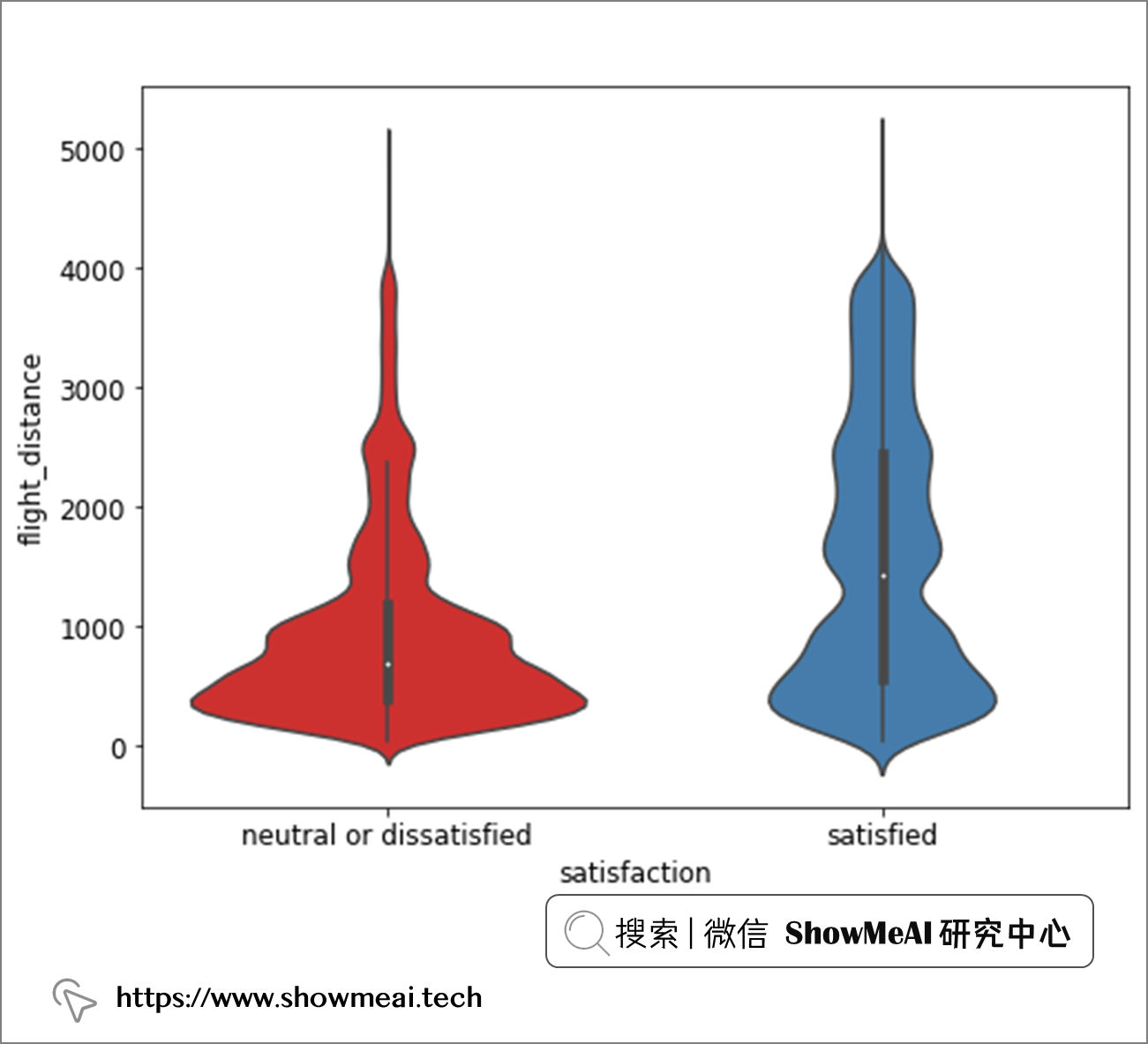
从飞行距离维度,我们看不出显著的满意度差异,而且绝大多数乘客的航班航程为 1,000 英里或更短。
score_cols = ["inflight_wifi_service", "departure_arrival_time_convenient", "ease_of_online_booking",
              "gate_location","food_and_drink", "online_boarding", "seat_comfort", "inflight_entertainment",
              "on_board_service","leg_room_service", "baggage_handling", "checkin_service", "inflight_service","cleanliness"]
plt.figure(figsize=(40, 20))
plt.subplots_adjust(hspace=0.3)

# Loop through scored columns
for n, score_col in enumerate(score_cols):
    # Add a new subplot iteratively
    ax = plt.subplot(4, 4, n + 1)

    # Filter df and plot scored column on new axis
    sns.violinplot(data = air_train_cleaned,
                   x = score_col,
                   y = 'flight_distance',
                   hue = "satisfaction",
                   split = True,
                   ax = ax,
                   palette = 'Set1')

    # Chart formatting
    ax.set_title(score_col)
    ax.legend(loc='upper center', bbox_to_anchor=(0.5, -0.05),
          fancybox=True, shadow=True, ncol=5)
    ax.set_xlabel("")

我们使用小提琴图对航班不同飞行距离和旅客对不同服务维度评级的满意程度进行交叉分析如上,飞行距离对客户满意度的影响还是比较大的。
plt.figure(figsize=(40, 20))
plt.subplots_adjust(hspace=0.3)

# Loop through scored columns
for n, score_col in enumerate(score_cols):
    # Add a new subplot iteratively
    ax = plt.subplot(4, 4, n + 1)

    # Filter df and plot scored column on new axis
    sns.violinplot(data = air_train_cleaned,
                   x = score_col,
                   y = 'age',
                   hue = "satisfaction",
                   split = True,
                   ax = ax,
                   palette = 'Set1')

    # Chart formatting
    ax.set_title(score_col),
    ax.legend(loc='upper center', bbox_to_anchor=(0.5, -0.05),
          fancybox=True, shadow=True, ncol=5)
    ax.set_xlabel("")

同样的方式,我们针对不同的年龄段,对于乘客在不同维度的体验满意度分析如上,我们观察到,在这些分布的大多数中,37-60 岁年龄组有一个明显的高峰。
plt.figure(figsize=(40, 20))
plt.subplots_adjust(hspace=0.3)

# Loop through scored columns
for n, score_col in enumerate(score_cols):
    # Add a new subplot iteratively
    ax = plt.subplot(4, 4, n + 1)

    # Filter df and plot scored column on new axis
    sns.violinplot(data = air_train_cleaned,
                   x = 'class',
                   y = score_col,
                   hue = "satisfaction",
                   split = True,
                   ax = ax,
                   palette = 'Set1')

    # Chart formatting
    ax.set_title(score_col)
    ax.legend(loc='upper center', bbox_to_anchor=(0.5, -0.05),
          fancybox=True, shadow=True, ncol=5)
    ax.set_xlabel("")

plt.figure(figsize=(40, 20))
plt.subplots_adjust(hspace=0.3)

# Loop through scored columns
for n, score_col in enumerate(score_cols):
    # Add a new subplot iteratively
    ax = plt.subplot(4, 4, n + 1)

    # Filter df and plot scored column on new axis
    sns.violinplot(data = air_train_cleaned,
                   x = 'type_of_travel',
                   y = score_col,
                   hue = "satisfaction",
                   split = True,
                   ax = ax,
                   palette = 'Set1')

    # Chart formatting
    ax.set_title(score_col)
    ax.legend(loc='upper center', bbox_to_anchor=(0.5, -0.05),
          fancybox=True, shadow=True, ncol=5)
    ax.set_xlabel("")
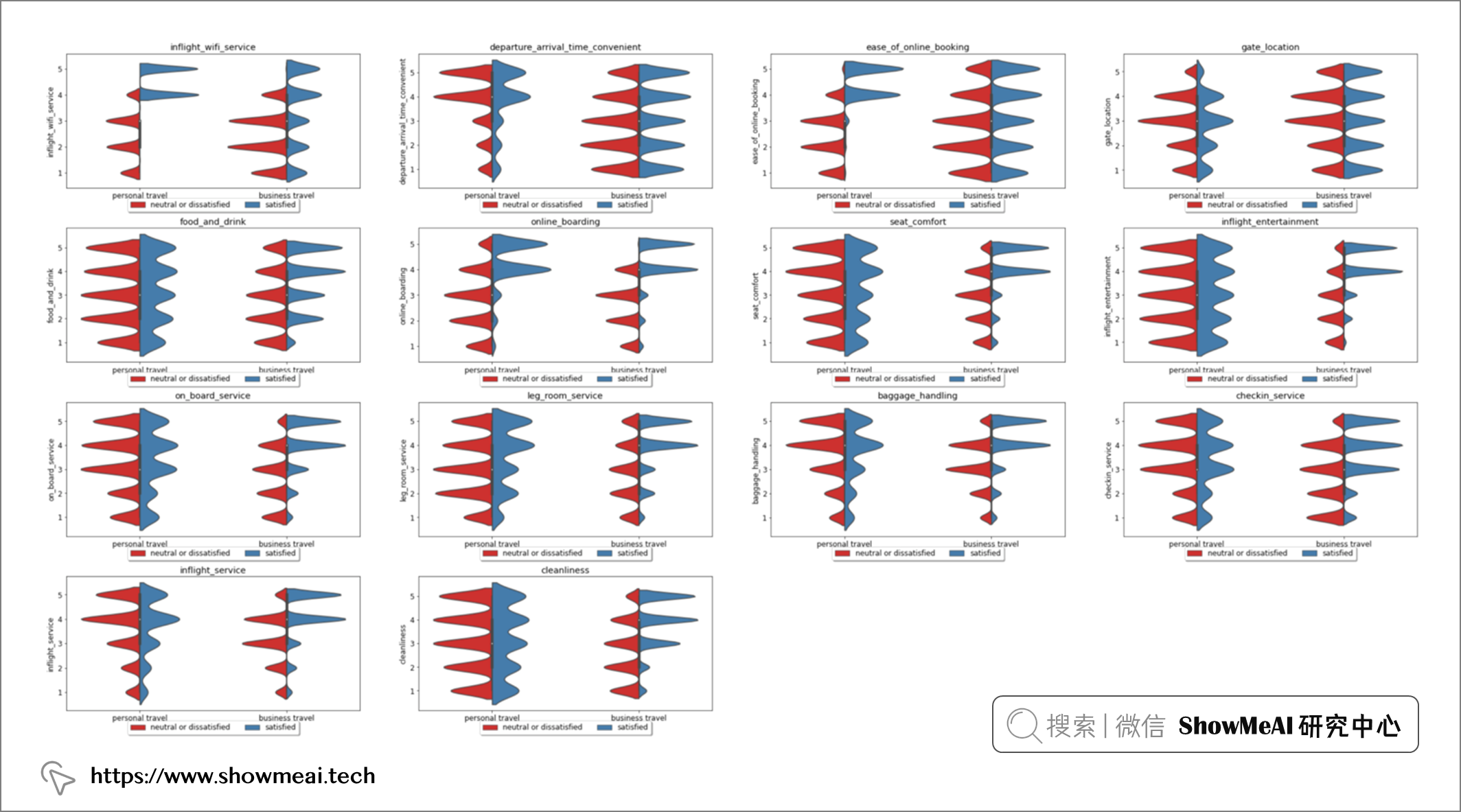
同样的方式,我们针对不同的客舱等级和出行目的,对于乘客在不同维度的体验满意度分析如上,我们观察到,这两个信息很大程度影响乘客满意度。机上 Wi-Fi 服务、在线登机、座椅舒适度、机上娱乐、机上客户服务、腿部空间和机上客户服务的满意度和不满意度都出现了明显的高峰。
很有意思的一点是机上wi-fi服务栏,这一项的满意似乎对乘坐经济舱和经济舱的客户的航班行程满意有很大影响,但它似乎对商务舱旅客的满意度没有太大影响。
在将数据引入模型之前,必须对数据进行编码以便为建模做好准备。我们针对类别型的变量,使用序号编码进行编码映射,具体代码如下(考虑到下面的不同类别取值本身有程度大小关系,以及我们会使用xgboost等非线性模型,因此序号编码是OK的)
关于特征工程的详细知识,欢迎大家查看ShowMeAI的系列教程文章:
from sklearn.preprocessing import OrdinalEncoder

def encode_data(orig_df):
    '''
    Encodes remaining categorical variables of data frame to be ready for model ingestion

    Inputs:
       Dataframe

    Manipulations:
        Encoding of categorical variables.

    Return:
        Encoded Column Values
    '''

    df = orig_df.copy()

    #Ordinal encode of scored rating columns.
    encoder = OrdinalEncoder()

    for j in score_cols:
        df[j] = encoder.fit_transform(df[[j]])

    # Replacement of binary categories.
    df.was_flight_delayed.replace({'no': 0, 'yes' : 1}, inplace = True)
    df['satisfaction'].replace({'neutral or dissatisfied': 0, 'satisfied': 1},inplace = True)
    df.customer_type.replace({'disloyal customer': 0, 'loyal customer': 1}, inplace = True)
    df.type_of_travel.replace({'personal travel': 0, 'business travel': 1}, inplace = True)
    df.gender.replace({'male': 0, 'female' : 1}, inplace = True)

    encoded_df = pd.get_dummies(df, columns = ['class'])

    return encoded_df
# 对训练集和测试集进行编码
air_train_encoded = encode_data(air_train_cleaned)
air_test_encoded = encode_data(air_test_cleaned)

# 查看特征和目标列之间的相关性
train_corr = air_train_encoded.corr()[['satisfaction']]
train_corr = train_corr

plt.figure(figsize=(10, 12))

heatmap = sns.heatmap(train_corr.sort_values(by='satisfaction', ascending=False),
                      vmin=-1, vmax=1, annot=True, cmap='Blues')

heatmap.set_title('Feature Correlation with Target Variable', fontdict={'fontsize':14});

为了更佳的建模效果与更高效的建模效率,在完成特征工程之后我们要进行特征选择,我们这里使用 Scikit-Learn 的内置特征选择功能,使用 K-Best 作为特征筛选器,并使用卡方值作为筛选标准( 卡方是相对合适的标准,因为我们的数据集中有几个分类变量)。
# Pre-processing and scaling dataset for feature selection
from sklearn import preprocessing

r_scaler = preprocessing.MinMaxScaler()
r_scaler.fit(air_train_encoded)

air_train_scaled = pd.DataFrame(r_scaler.transform(air_train_encoded), columns = air_train_encoded.columns)
air_train_scaled.head()

# Feature selection, applying Select K Best and Chi2 to output the 15 most important features
from sklearn.feature_selection import SelectKBest, chi2

X = air_train_scaled.loc[:,air_train_scaled.columns!='satisfaction']
y = air_train_scaled[['satisfaction']]

selector = SelectKBest(chi2, k = 10)
selector.fit(X, y)
X_new = selector.transform(X)

features = (X.columns[selector.get_support(indices=True)])
features
输出:
Index(['type_of_travel', 'inflight_wifi_service', 'online_boarding',
       'seat_comfort', 'inflight_entertainment', 'on_board_service',
       'leg_room_service', 'cleanliness', 'class_business', 'class_eco'],
      dtype='object')
我们通过K-Best筛选过后的特征是旅行类型、机上 wifi 服务、在线登机流程、座椅舒适度、机上娱乐、机上客户服务、座位空间、清洁度和旅行等级(商务舱或经济舱)。
下一步我们可以基于已有数据进行建模了,我们在这里训练的模型包括 逻辑回归 模型、 Adaboost 分类器、 随机森林 分类器、 朴素贝叶斯 分类模型和 Xgboost 分类器。我们会基于准确性和测试准确性、精确度、召回率和 ROC 值等指标对模型进行评估。
import sklearn
from sklearn.model_selection import RandomizedSearchCV
from sklearn.linear_model import LogisticRegression
from sklearn.ensemble import AdaBoostClassifier
from sklearn.ensemble import RandomForestClassifier
from sklearn.naive_bayes import CategoricalNB
import xgboost
from xgboost import XGBClassifier

# Features as selected from feature importance
features = features

# Specifying target variable
target = ['satisfaction']

# Splitting into train and test
X_train = air_train_encoded[features].to_numpy()
X_test = air_test_encoded[features]
y_train = air_train_encoded[target].to_numpy()
y_test = air_test_encoded[target]
import time
from resource import getrusage, RUSAGE_SELF
from sklearn.metrics import accuracy_score, roc_auc_score, plot_confusion_matrix, plot_roc_curve, precision_score, recall_score

# 模型评估与结果绘图
def get_model_metrics(model, X_train, X_test, y_train, y_test):

    '''
    Model activation function, takes in model as a parameter and returns metrics as specified.

    Inputs:
        model,  X_train, y_train, X_test, y_test
    Output:
        Model output metrics, confusion matrix, ROC AUC curve
    '''

    # Mark of current time when model began running
    t0 = time.time()

    # Fit the model on the training data and run predictions on test data
    model.fit(X_train,  y_train)
    y_pred = model.predict(X_test)
    y_pred_proba = model.predict_proba(X_test)[:,1]
    # Obtain training accuracy as a comparative metric using Sklearn's metrics package
    train_score = model.score(X_train, y_train)
    # Obtain testing accuracy as a comparative metric using Sklearn's metrics package
    accuracy = accuracy_score(y_test, y_pred)
    # Obtain precision from predictions using Sklearn's metrics package
    precision = precision_score(y_test, y_pred)
    # Obtain recall from predictions using Sklearn's metrics package
    recall = recall_score(y_test, y_pred)
    # Obtain ROC score from predictions using Sklearn's metrics package
    roc = roc_auc_score(y_test, y_pred_proba)
    # Obtain the time taken used to run the model, by subtracting the start time from the current time
    time_taken = time.time() - t0
    # Obtain the resources consumed in running the model
    memory_used = int(getrusage(RUSAGE_SELF).ru_maxrss / 1024)

    # Outputting the metrics of the model performance
    print("Accuracy on Training = {}".format(train_score))
    print("Accuracy on Test = {} • Precision = {}".format(accuracy, precision))
    print("Recall = {} • ROC Area under Curve = {}".format(recall, roc))
    print("Time taken = {} seconds • Memory consumed = {} Bytes".format(time_taken, memory_used))

    # Plotting the confusion matrix of the model's predictive capabilities
    plot_confusion_matrix(model, X_test, y_test, cmap = plt.cm.Blues, normalize = 'all')
    # Plotting the ROC AUC curve of the model
    plot_roc_curve(model, X_test, y_test)
    plt.show()

    return model, train_score, accuracy, precision, recall, roc, time_taken, memory_used
# 建模与调参
clf = LogisticRegression()

params = {'C': [0.1, 0.5, 1, 5, 10]}

rscv = RandomizedSearchCV(estimator = clf,
                         param_distributions = params,
                         scoring = 'f1',
                         n_iter = 10,
                         verbose = 1)
rscv.fit(X_train, y_train)
rscv.predict(X_test)

# Parameter object to be passed through to function activation
params = rscv.best_params_

print("Best parameters:", params)
model_lr = LogisticRegression(**params)
model_lr, train_lr, accuracy_lr, precision_lr, recall_lr, roc_lr, tt_lr, mu_lr = get_model_metrics(model_lr, X_train, X_test, y_train, y_test)
clf = RandomForestClassifier()

params = { 'max_depth': [5, 10, 15, 20, 25, 30],
           'max_leaf_nodes': [10, 20, 30, 40, 50],
           'min_samples_split': [1, 2, 3, 4, 5]}

rscv = RandomizedSearchCV(estimator = clf,
                         param_distributions = params,
                         scoring = 'f1',
                         n_iter = 10,
                         verbose = 1)
rscv.fit(X_train, y_train)
rscv.predict(X_test)

# Parameter object to be passed through to function activation
params = rscv.best_params_

print("Best parameters:", params)
model_rf = RandomForestClassifier(**params)
model_rf, train_rf, accuracy_rf, precision_rf, recall_rf, roc_rf, tt_rf, mu_rf = get_model_metrics(model_rf, X_train, X_test, y_train, y_test)

clf = AdaBoostClassifier()

params = { 'n_estimators': [25, 50, 75, 100, 125, 150],
           'learning_rate': [0.2, 0.4, 0.6, 0.8, 1.0]}

rscv = RandomizedSearchCV(estimator = clf,
                         param_distributions = params,
                         scoring = 'f1',
                         n_iter = 10,
                         verbose = 1)
rscv.fit(X_train, y_train)
rscv.predict(X_test)

# Parameter object to be passed through to function activation
params = rscv.best_params_

print("Best parameters:", params)
model_ada = AdaBoostClassifier(**params)

# Saving output metrics
model_ada, accuracy_ada, train_ada, precision_ada, recall_ada, roc_ada, tt_ada, mu_ada = get_model_metrics(model_ada, X_train, X_test, y_train, y_test)
clf = CategoricalNB()

params = { 'alpha': [0.0001, 0.001, 0.1, 1, 10, 100, 1000],
           'min_categories': [6, 8, 10]}

rscv = RandomizedSearchCV(estimator = clf,
                         param_distributions = params,
                         scoring = 'f1',
                         n_iter = 10,
                         verbose = 1)
rscv.fit(X_train, y_train)
rscv.predict(X_test)

# Parameter object to be passed through to function activation
params = rscv.best_params_

print("Best parameters:", params)
model_cnb = CategoricalNB(**params)

# Saving Output Metrics
model_cnb, accuracy_cnb, train_cnb, precision_cnb, recall_cnb, roc_cnb, tt_cnb, mu_cnb = get_model_metrics(model_cnb, X_train, X_test, y_train, y_test)

clf = XGBClassifier()

params = { 'max_depth': [3, 5, 6, 10, 15, 20],
           'learning_rate': [0.01, 0.1, 0.2, 0.3],
           'n_estimators': [100, 500, 1000]}

rscv = RandomizedSearchCV(estimator = clf,
                         param_distributions = params,
                         scoring = 'f1',
                         n_iter = 10,
                         verbose = 1)
rscv.fit(X_train, y_train)
rscv.predict(X_test)

# Parameter object to be passed through to function activation
params = rscv.best_params_

print("Best parameters:", params)
model_xgb = XGBClassifier(**params)

# Saving Output Metrics
model_xgb, accuracy_xgb, train_xgb, precision_xgb, recall_xgb, roc_xgb, tt_xgb, mu_xgb = get_model_metrics(model_xgb, X_train, X_test, y_train, y_test)
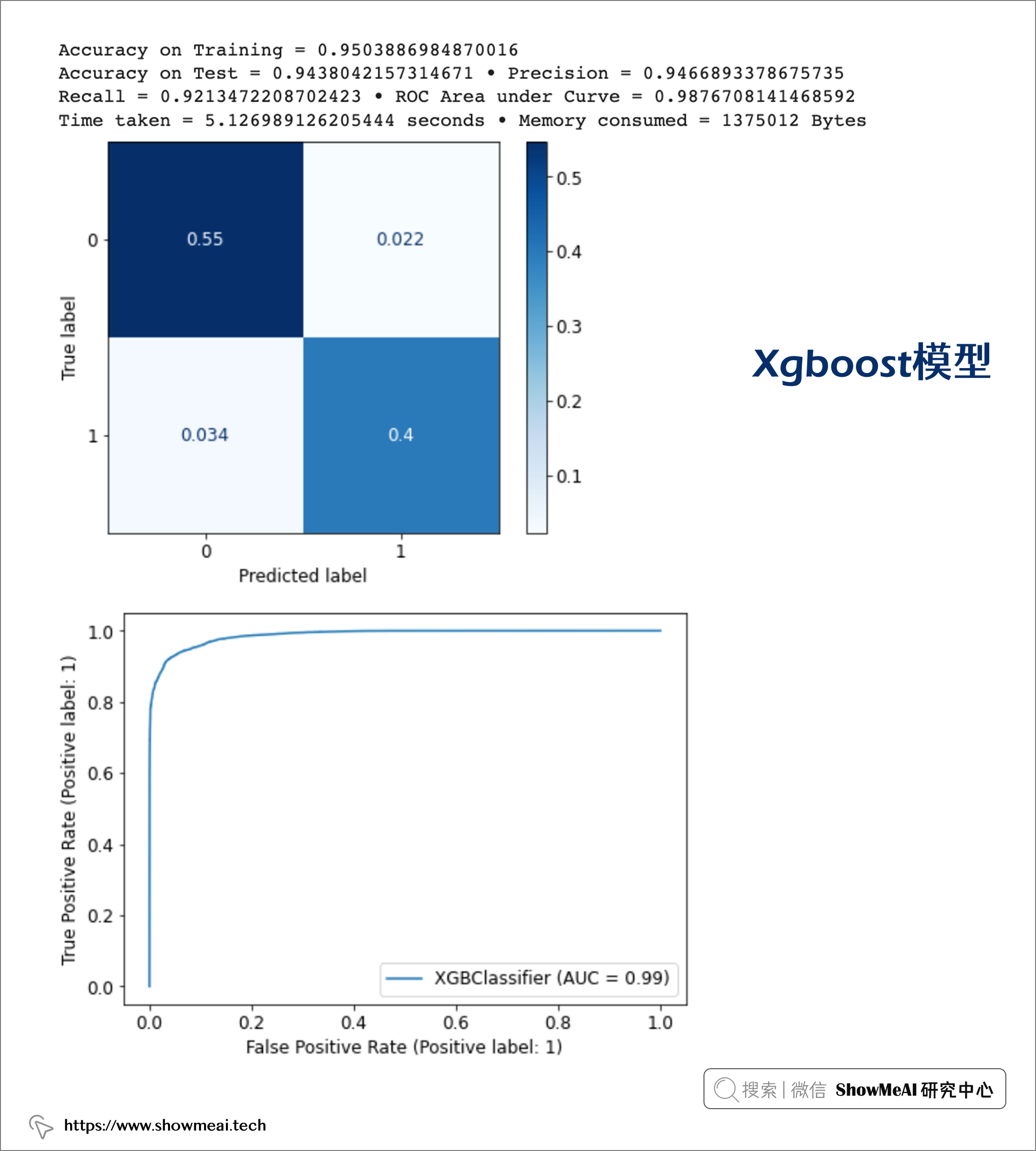
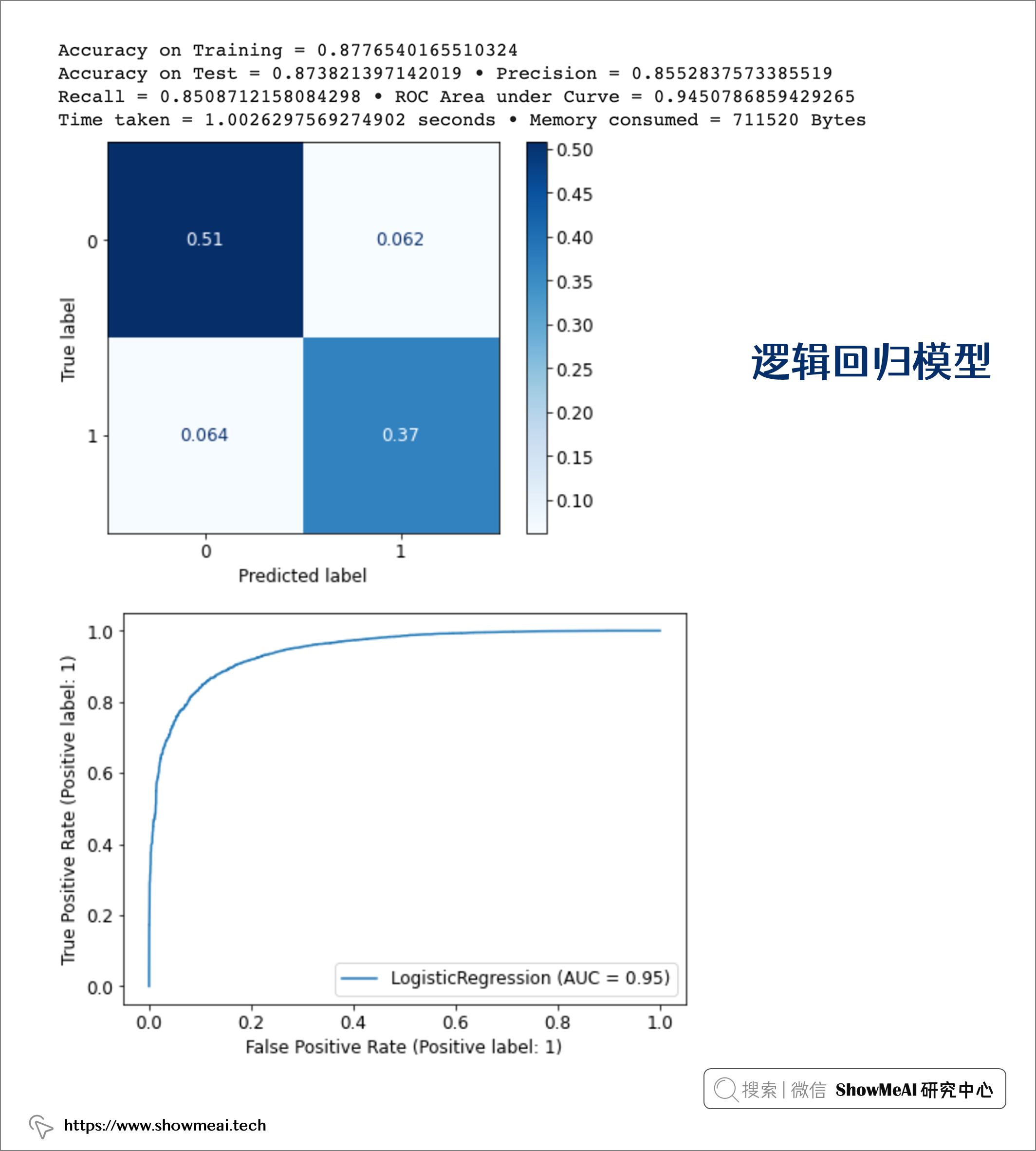
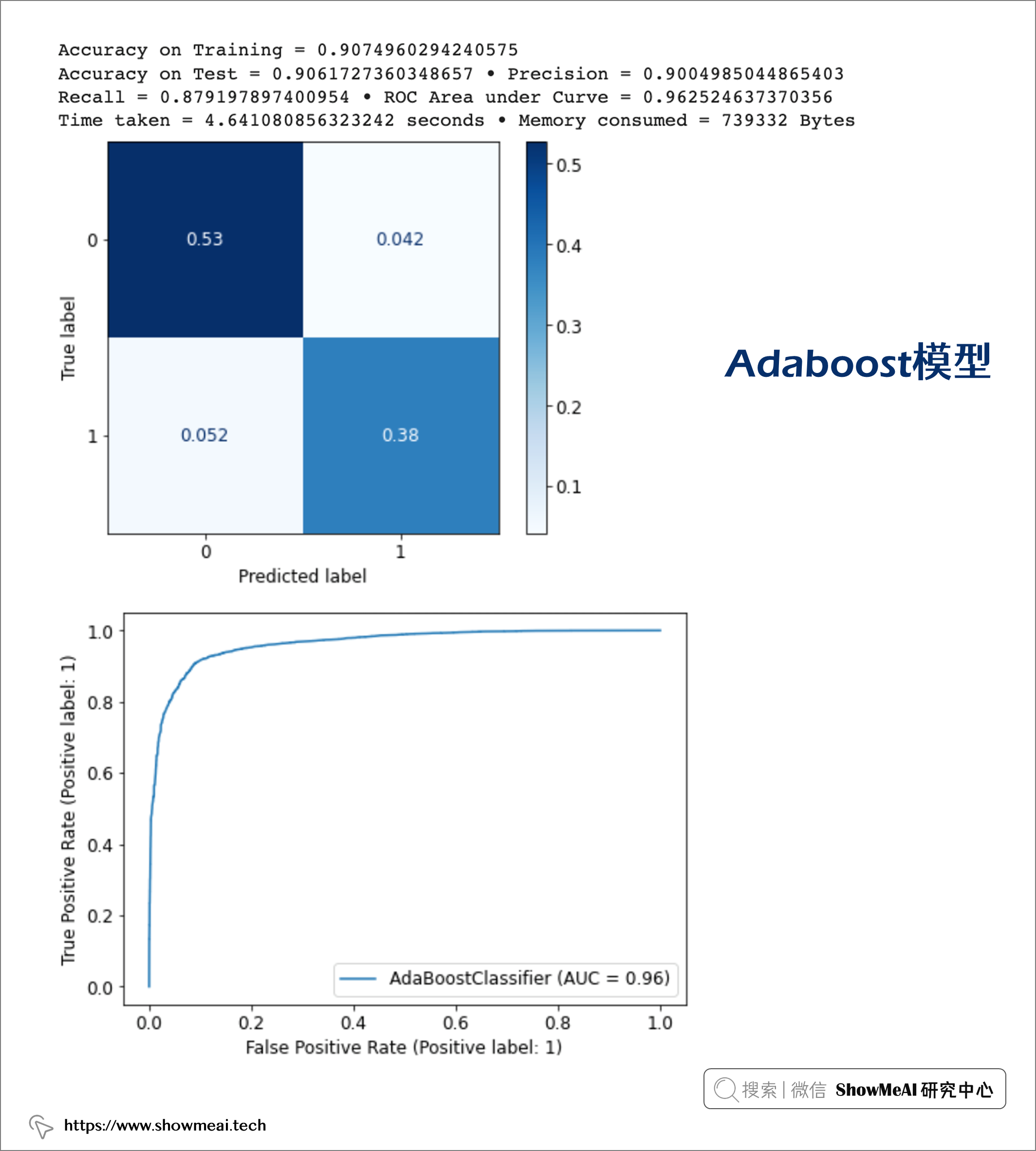
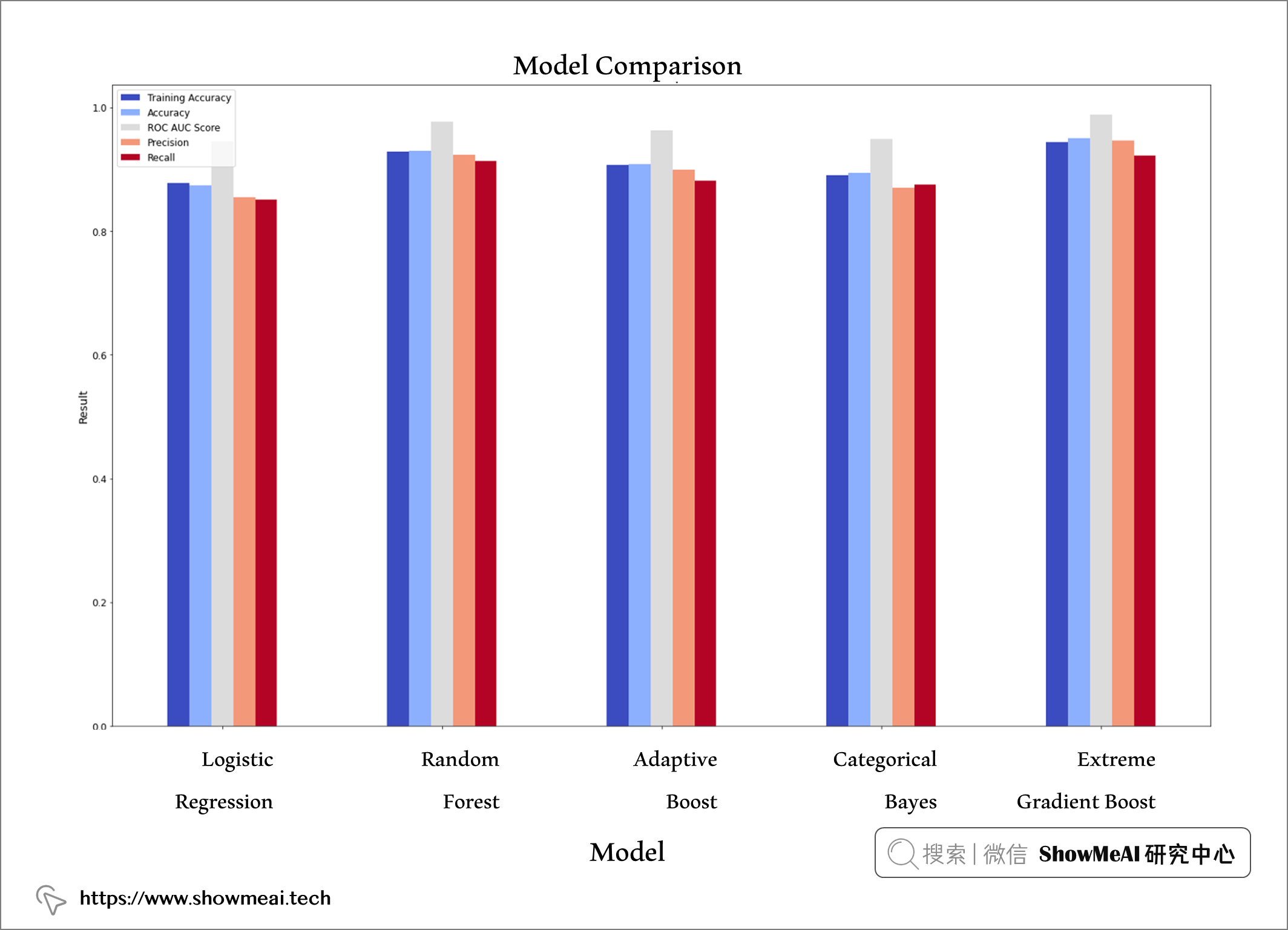
如下我们对效果做一个综合对比,每个模型都应用了参数优化,在训练数据上的准确率不低于 88%,在测试数据上的准确率不低于 87%。
training_scores = [train_lr, train_rf, train_ada, train_cnb, train_xgb]
accuracy = [accuracy_lr, accuracy_rf, accuracy_ada, accuracy_cnb, accuracy_xgb]
roc_scores = [roc_lr, roc_rf, roc_ada, roc_cnb, roc_xgb]
precision = [precision_lr, precision_rf, precision_ada, precision_cnb, precision_xgb]
recall = [recall_lr, recall_rf, recall_ada, recall_cnb, recall_xgb]
time_scores = [tt_lr, tt_rf, tt_ada, tt_cnb, tt_xgb]
memory_scores = [mu_lr, mu_rf, mu_ada, mu_cnb, mu_xgb]

model_data = {'Model': ['Logistic Regression', 'Random Forest', 'Adaptive Boost',
                       'Categorical Bayes', 'Extreme Gradient Boost'],
            'Accuracy on Training' : training_scores,
            'Accuracy on Test' : accuracy,
            'ROC AUC Score' : roc_scores,
            'Precision' : precision,
            'Recall' : recall,
            'Time Elapsed (seconds)' : time_scores,
            'Memory Consumed (bytes)': memory_scores}

model_data = pd.DataFrame(model_data)
model_data

我们最终选择xgboost,它表现最好,在训练和测试中都表现出高性能,测试集上ROC-AUC值为 98,精度为 95,召回率为 92。
plt.rcParams["figure.figsize"] = (25,15)

ax1 = model_data.plot.bar(x = 'Model', y = ["Accuracy on Training", "Accuracy on Test", "ROC AUC Score",
                                            "Precision", "Recall"],
                          cmap = 'coolwarm')
ax1.legend()

ax1.set_title("Model Comparison", fontsize = 18)
ax1.set_xlabel('Model', fontsize = 14)
ax1.set_ylabel('Result', fontsize = 14, color = 'Black');
除了拿到最终性能良好的模型,在机器学习实际应用中,很重要的另外一件事情是结合业务场景进行解释,这能帮助业务后续提升。我们可以基于Xgboost自带的特征重要度和SHAP等完成这项任务。
对于SHAP工具库的使用介绍,欢迎大家阅读ShowMeAI的文章:
from xgboost import plot_importance

model_xgb.get_booster().feature_names = ['type_of_travel', 'inflight_wifi_service', 'online_boarding',
       'seat_comfort', 'inflight_entertainment', 'on_board_service',
       'leg_room_service', 'cleanliness', 'class_business', 'class_eco']

plot_importance(model_xgb)
plt.show()
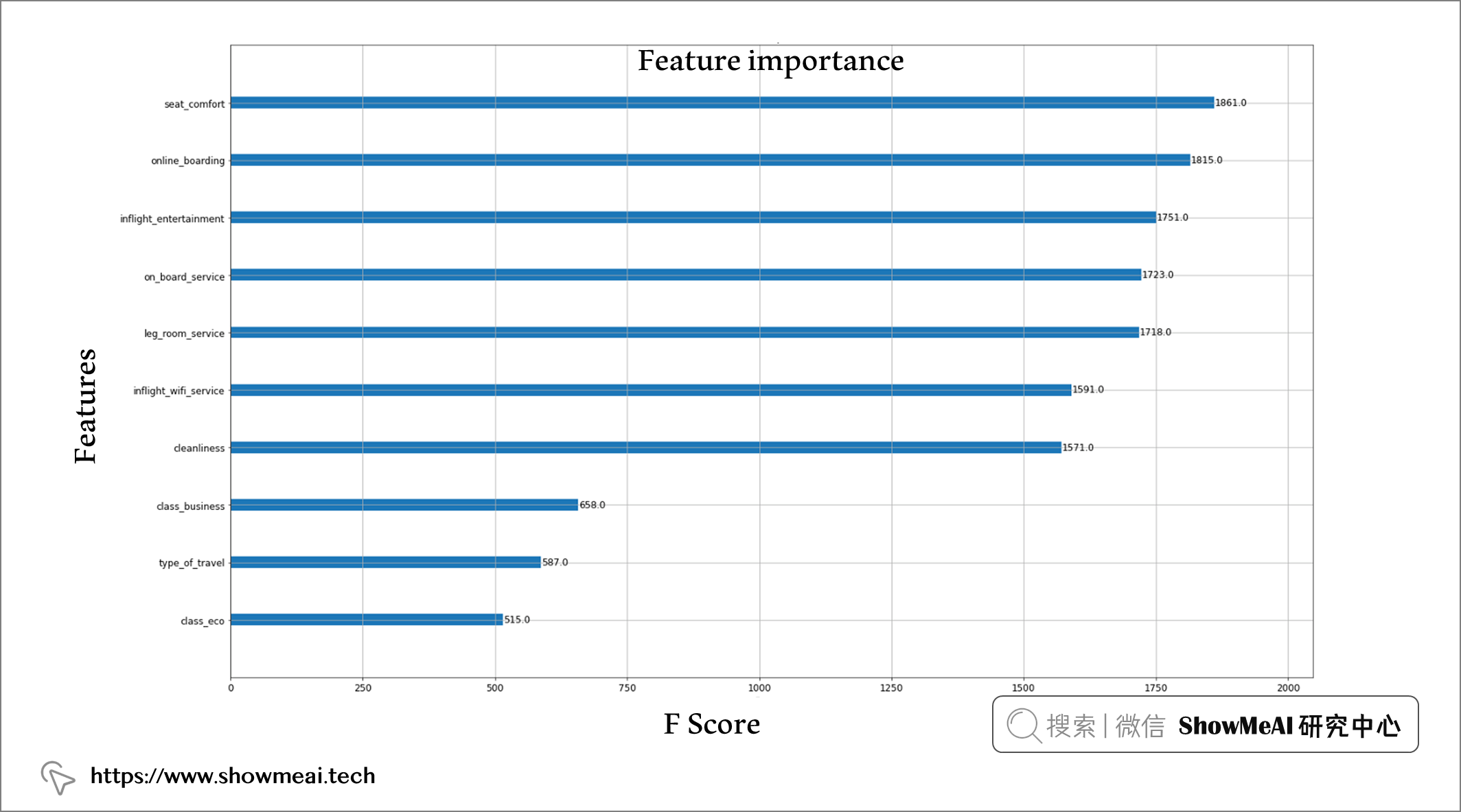
Xgboost给出的最重要的特征依次包括:座椅舒适度、在线登机、机上娱乐、机上服务质量、腿部空间、机上无线网络和清洁度。
为了分析模型在 SHAP 中的特征影响,首先使用 Python 的 pickle 库对模型进行 pickle。然后使用模型管道和我们选择的特征在 Shap 中创建了一个解释器,并将其应用于 X_train 数据集上。
import shap
# Saving test model.
pickle.dump(model_xgb, open('./Models/model_xgb.pkl', 'wb'))

explainer = shap.Explainer(model_xgb, feature_names = features)
shap_values = explainer(X_train)

shap.initjs()
shap.summary_plot(shap_values, X_train, class_names=model_xgb.classes_)
如果将平均 SHAP 值作为我们衡量特征重要性的指标,我们可以看到机上 Wi-Fi 服务是我们数据中最具影响力的特征,紧随其后的是旅行类型和在线登机。
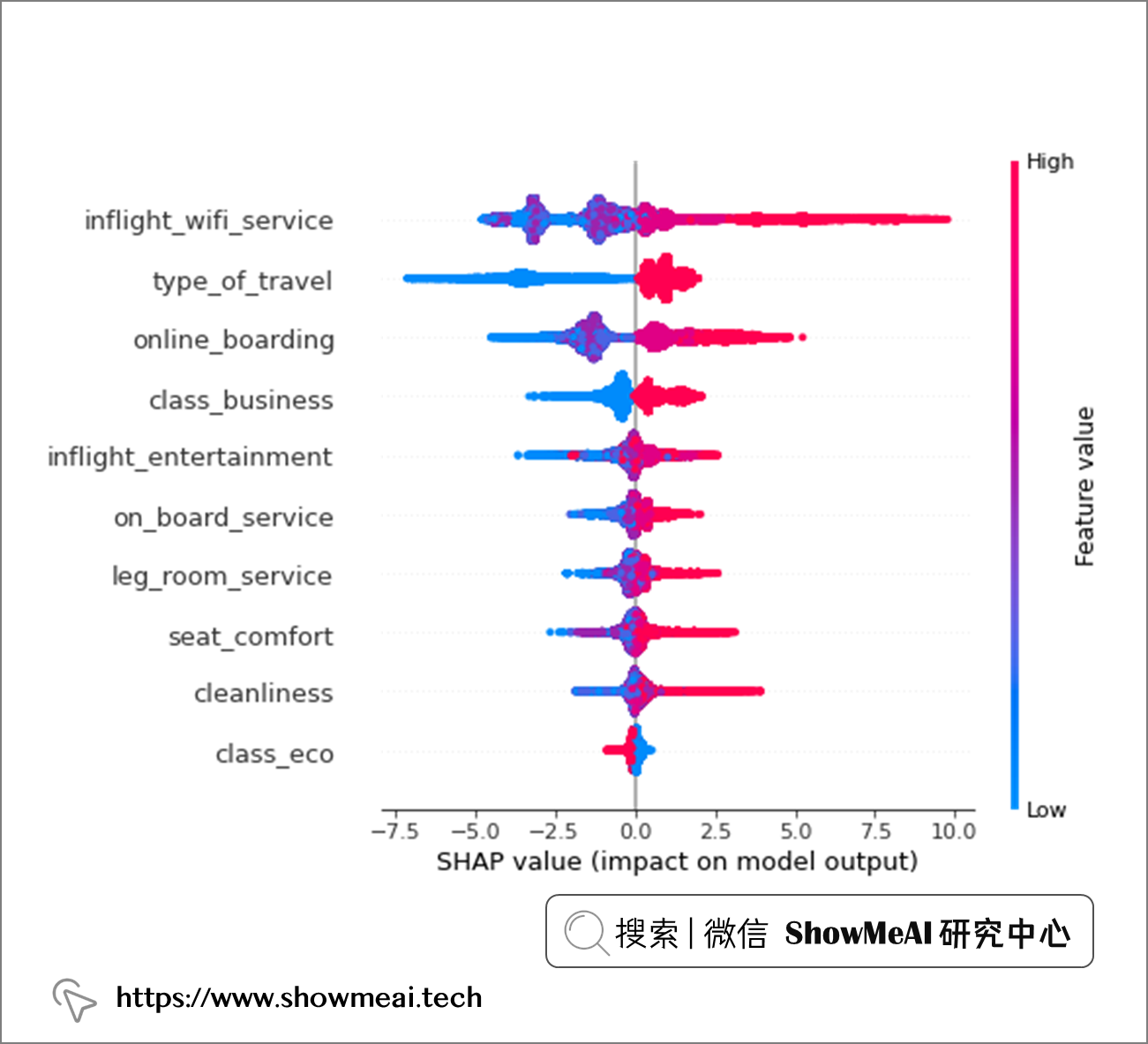
对于几乎每个特征,高取值(大部分是对这个特征维度的满意程度高)对预测有积极影响,而低特征值对预测有负面影响。机上 wi-fi 服务是我们数据集中最具影响力的特征,紧随其后的是旅行类型和在线登机流程。
shap.plots.scatter(shap_values[:, "inflight_wifi_service"], color=shap_values)

我们拿出最重要的特征『机上 Wi-Fi』进行进一步分析。上图中的横坐标为机上wifi满意度得分,纵坐标为SHAP值大小,颜色区分旅行类型(个人旅行编码为 0,商务旅行编码为 1)。
我们观察到:
个人旅行乘客:机上WiFi打分高对最终高满意度有更多的正面影响,而机上WiFi打分低对最终满意度低的贡献更大。
商务旅行乘客:无论他们的 Wi-Fi 服务体验如何,都有一部分是满意的(正 SHAP 值超过负值)。
shap.plots.scatter(shap_values[:, "online_boarding"], color=shap_values)
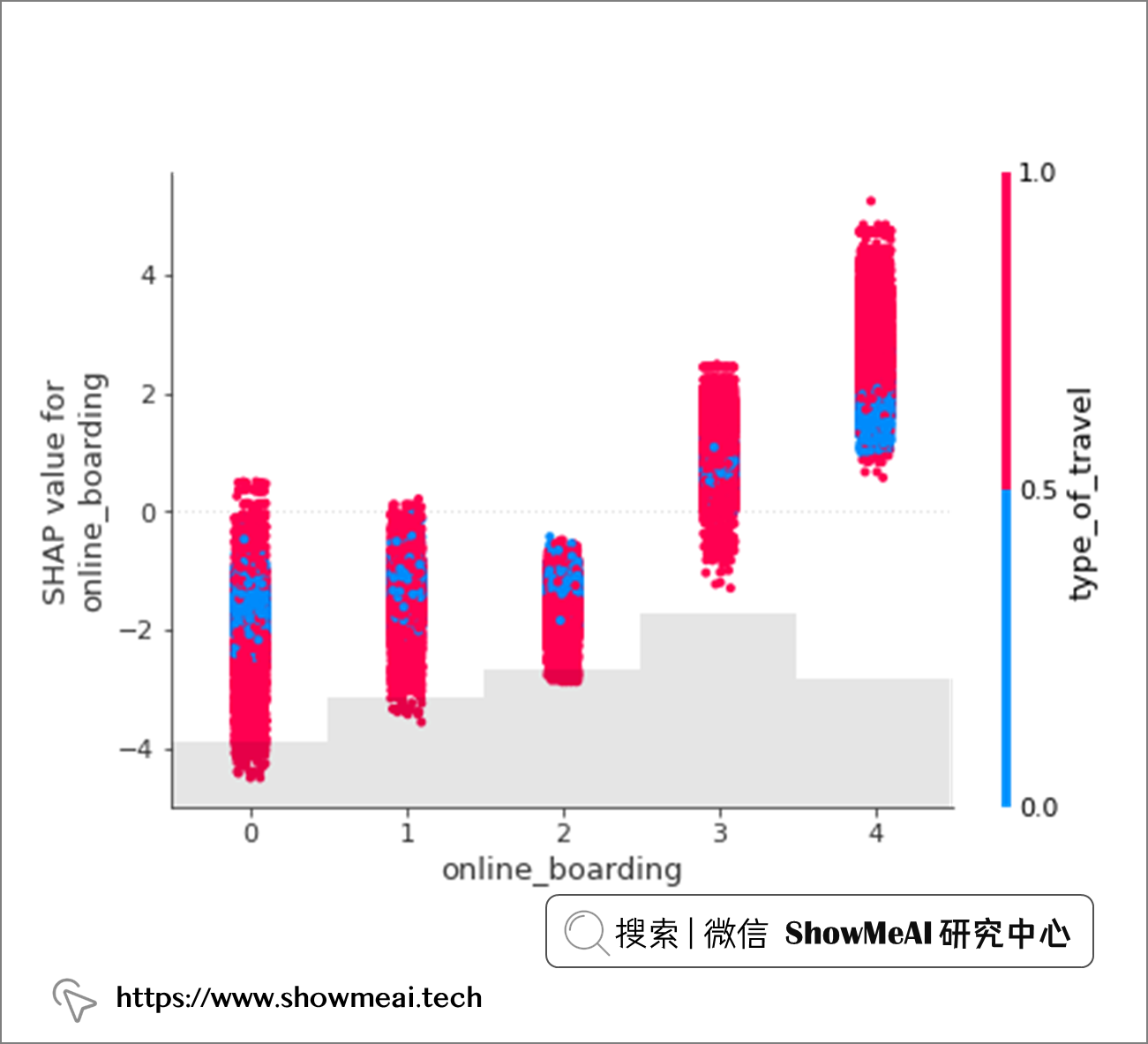
对『在线登机』特征的影响SHAP分析如上。无论是个人旅行还是商务出行,在线登机过程的低分都会对最终满意度输出产生负面影响。
在本篇内容中,我们结合航空出行场景,对航班乘客满意度进行了详尽的数据分析和建模预测,并进行了模型的可解释性分析。
我们效果最好的模型取得了95%的accuracy和0.987的auc得分,模型解释上可以看到影响满意度最重要的因素是机上 Wi-Fi 服务、在线登机、机上娱乐质量、餐饮、座椅舒适度、机舱清洁度和腿部空间。
本文主要介绍在使用Selenium进行自动化测试或者任务时,对于使用了iframe的页面,如何定位iframe中的元素文章目录场景描述解决方案具体代码场景描述当我们在使用Selenium进行自动化测试的时候,可能会遇到一些界面或者窗体是使用HTML的iframe标签进行承载的。对于iframe中的标签,如果直接查找是无法找到的,会抛出没有找到元素的异常。比如近在咫尺的例子就是,CSDN的登录窗体就是使用的iframe,大家可以尝试通过F12开发者模式查看到的tag_name,class_name,id或者xpath来定位中的页面元素,会抛出NoSuchElementException异常。解决
目录0专栏介绍1平面2R机器人概述2运动学建模2.1正运动学模型2.2逆运动学模型2.3机器人运动学仿真3动力学建模3.1计算动能3.2势能计算与动力学方程3.3动力学仿真0专栏介绍?附C++/Python/Matlab全套代码?课程设计、毕业设计、创新竞赛必备!详细介绍全局规划(图搜索、采样法、智能算法等);局部规划(DWA、APF等);曲线优化(贝塞尔曲线、B样条曲线等)。?详情:图解自动驾驶中的运动规划(MotionPlanning),附几十种规划算法1平面2R机器人概述如图1所示为本文的研究本体——平面2R机器人。对参数进行如下定义:机器人广义坐标
网站的日志分析,是seo优化不可忽视的一门功课,但网站越大,每天产生的日志就越大,大站一天都可以产生几个G的网站日志,如果光靠肉眼去分析,那可能看到猴年马月都看不完,因此借助网站日志分析工具去分析网站日志,那将会使网站日志分析工作变得更简单。下面推荐两款网站日志分析软件。第一款:逆火网站日志分析器逆火网站日志分析器是一款功能全面的网站服务器日志分析软件。通过分析网站的日志文件,不仅能够精准的知道网站的访问量、网站的访问来源,网站的广告点击,访客的地区统计,搜索引擎关键字查询等,还能够一次性分析多个网站的日志文件,让你轻松管理网站。逆火网站日志分析器下载地址:https://pan.baidu.
一、机器人介绍 此处是基于MATLABRVC工具箱,对ABB-IRB-1200型号的微型机械臂进行正逆向运动学分析,并利Simulink工具实现对机械臂进行具有动力学参数的末端轨迹规划仿真,最后根据机械模型设计Simulink-Adams联合仿真。 图1.ABBIRB 1200尺寸参数示意图ABBIRB 1200提供的两种型号广泛适用于各作业,且两者间零部件通用,两种型号的工作范围分别为700 mm 和 900 mm,大有效负载分别为 7 kg 和5 kg。 IRB 1200 能够在狭小空间内能发挥其工作范围与性能优势,具有全新的设计、小型化的体积、高效的性能、易于集成、便捷的接
目录一.大致如下常见问题:(1)找不到程序所依赖的Qt库version`Qt_5'notfound(requiredby(2)CouldnotLoadtheQtplatformplugin"xcb"in""eventhoughitwasfound(3)打包到在不同的linux系统下,或者打包到高版本的相同系统下,运行程序时,直接提示段错误即segmentationfault,或者Illegalinstruction(coredumped)非法指令(4)ldd应用程序或者库,查看运行所依赖的库时,直接报段错误二.问题逐个分析,得出解决方法:(1)找不到程序所依赖的Qt库version`Qt_5'
我有一个PORO(普通旧Ruby对象)来处理一些业务逻辑。它接收一个ActiveRecord对象并对其进行分类。为了简单起见,以下面为例:classClassificatorSTATES={1=>"Positive",2=>"Neutral",3=>"Negative"}definitializer(item)@item=itemenddefnameSTATES.fetch(state_id)endprivatedefstate_idreturn1if@item.value>0return2if@item.value==0return3if@item.value但是,我还想根据这些st
我想使用ruby-prof和JMeter分析Rails应用程序。我对分析特定Controller/操作/或模型方法的建议方法不感兴趣,我想分析完整堆栈,从上到下。所以我运行这样的东西:RAILS_ENV=productionruby-prof-fprof.outscript/server>/dev/null然后我在上面运行我的JMeter测试计划。然而,问题是使用CTRL+C或SIGKILL中断它也会在ruby-prof可以写入任何输出之前杀死它。如何在不中断ruby-prof的情况下停止mongrel服务器? 最佳答案
我有生产服务器(Nginx+Passenger)。当我尝试从另一台计算机ab-n3-c3myhost.ru/时,我在我的nginxerror.log中收到此错误日志:[pid=21160thr=139775297914624file=ext/nginx/HelperAgent.cpp:584time=2011-08-3115:25:49.22]:UncaughtexceptioninPassengerServerclientthread:exception:Cannotreadresponsefrombackendprocess:Connectionresetbypeer(104)ba
我用Nginx安装了PhusionPassenger,将Nginx配置为指向正确的目录,然后我运行webapp目录,这已经下载了gemfile,但找不到gem。当我访问该网站时,我看到标准的Passenger错误页面,上面写着:Errormessage:nosuchfiletoload--bundler这是完整的错误:http://tinypic.com/view.php?pic=vpx36r&s=7我做了一个geminstallbundler所以我知道bundler已经安装了,但我认为它在错误的地方寻找gem。似乎Passenger已经安装了ruby-enterprise-1.8
文章目录认识unity打包目录结构游戏逆向流程Unity游戏攻击面可被攻击原因mono的打包建议方案锁血飞天无限金币攻击力翻倍以上统称内存挂透视自瞄压枪瞬移内购破解Unity游戏防御开发时注意数据安全接入第三方反作弊系统外挂检测思路狠人自爆实战查看目录结构用il2cppdumper例子2-森林whoishe后记认识unity打包目录结构dll一般很大,因为里面是所有的游戏功能编译成的二进制码游戏逆向流程开发人员代码被编译打包到GameAssembly.dll中使用il2ppDumper工具,并借助游戏名_Data\il2cpp_data\Metadata\global-metadata.dat
