Tinyalsa->Alsa Driver Flow
前面分析了 Linux 内核中如何写一个简单的 ALSA 驱动,创建 snd_card,但是没讲解在应用层该如何调用来完成对底层硬件的操作。Linux ALSA 在内核层提供了 alsa-driver,在应用层提供了 alsa-lib,应用程序只需要调用 alsa-lib 提供的 API 即可完成对底层硬件的操作。但由于 ALSA 架构太过于庞大,对于嵌入式设备而言很多功能用不到,且会增加功耗,所以 Android 采用了精简后的 tinyalsa。
Android 中使用 tinyalsa 控制管理所有模式的音频通路,也可以使用 tinyalsa 提供的工具进行查看、调试。
Tinyalsa 源码位于 android 源码目录下 external/tinyalsa,可以使用 mmm 命令编译,mmm external/tinyalsa
编译 tinyalsa 后会生成四个小工具:
tinypcminfo 用于查看 pcm 通道的相关信息,如 PCM 采样率,Channels,采样点数等信息。
tinypcminfo -D <cardx>
其中 -D 后边跟的参数为声卡,可以通过 /proc/asound/cards 查看
1)tinymix 可以查看系统的音频控件,可直接执行 tinymix 进行查看;
2)tinymix 可以手动设置控件的值,控件可通过 tinymix 查看,或者通过 mixer_paths.xml 查看。
tinymix -help
	tinymix [option] [control name/#] [value to set]
	options:
	--device|-D <cardx>:use the given card # instead of 0.
	--all-value|-a:show all possible values/rangs for control.
	---tabs-only|-t:separate all columns/values with tabs.
	--value-only|-v:show only the value for the selected control.
tinyplay 是一个简易的音乐播放器,一般用于播放测试。
可以直接进行播放 wav 格式文件,在播放前需要先使用 tinymix 进行相关控件的设置。
tinyplay file.wav [-D card] [-d device] [-p period_size] [-n n_periods]
tinycap 是一个简易的录音软件,一般用于录音测试。
使用之前也需要先设置录音相关的控件,设置好控件后,执行 tinycap xxx.wav 即可将音频录制到 xxx.wav 中。
tinycap file.wav [-D card] [-d device] [-c channels] [-r rate] [-b bits] [-p period_size] [-n n_periods] [-T capture time]
本节主要讲解 tinyalsa 播放音频是如何实现对音频控件控制以及播放的。
对于使用 tinyalsa 播放的时候,通常需要先通过 tinymix 配置通路,如 mixer,mux,volume control 等,本节以对 dummy.c 中的 "Master Volume" 控制为例讲解即可。
在 /tinyalsa/mixer.c 中主要的数据结构是 struct mixer,用来保存该 card 下所有 control info 在 tinyalsa 中的保存,如下:
struct mixer_ctl {
    struct mixer *mixer;
    struct snd_ctl_elem_info *info;
    char **ename;
};

struct mixer {
    int fd;
    struct snd_ctl_card_info card_info;
    /* 为每个 ctl 分配一个 elem_info, 记录该 ctl 的详细信息 */
    struct snd_ctl_elem_info *elem_info;
    /* 为每个 ctl 分配一个 mixer_ctl, 其中主要成员也是 elem_info, 并且 ctl->info = mixer->elem_info */
    struct mixer_ctl *ctl;
    unsigned int count;
};
从上述结构体可以看出每个 ctl 都有一个对应的 elem_info 用来描述该 ctl 详细信息,如下:
struct snd_ctl_elem_info {
	struct snd_ctl_elem_id id;	/* W: element ID */
	snd_ctl_elem_type_t type;	/* R: value type - SNDRV_CTL_ELEM_TYPE_* */
	unsigned int access;		/* R: value access (bitmask) - SNDRV_CTL_ELEM_ACCESS_* */
	unsigned int count;		/* count of values */
	__kernel_pid_t owner;		/* owner's PID of this control */
	union {
		struct {
			long min;		/* R: minimum value */
			long max;		/* R: maximum value */
			long step;		/* R: step (0 variable) */
		} integer;
		struct {
			long long min;		/* R: minimum value */
			long long max;		/* R: maximum value */
			long long step;		/* R: step (0 variable) */
		} integer64;
		struct {
			unsigned int items;	/* R: number of items */
			unsigned int item;	/* W: item number */
			char name[64];		/* R: value name */
			__u64 names_ptr;	/* W: names list (ELEM_ADD only) */
			unsigned int names_length;
		} enumerated;
		unsigned char reserved[128];
	} value;
	union {
		unsigned short d[4];		/* dimensions */
		unsigned short *d_ptr;		/* indirect - obsoleted */
	} dimen;
	unsigned char reserved[64-4*sizeof(unsigned short)];
};
elem_id 主要是用来区分 Control 的,定义如下:struct snd_ctl_elem_id {
unsigned int numid; /* numeric identifier, zero = invalid */
snd_ctl_elem_iface_t iface; /* interface identifier */
unsigned int device; /* device/client number */
unsigned int subdevice; /* subdevice (substream) number */
unsigned char name[SNDRV_CTL_ELEM_ID_NAME_MAXLEN]; /* ASCII name of item */
unsigned int index; /* index of item */
};
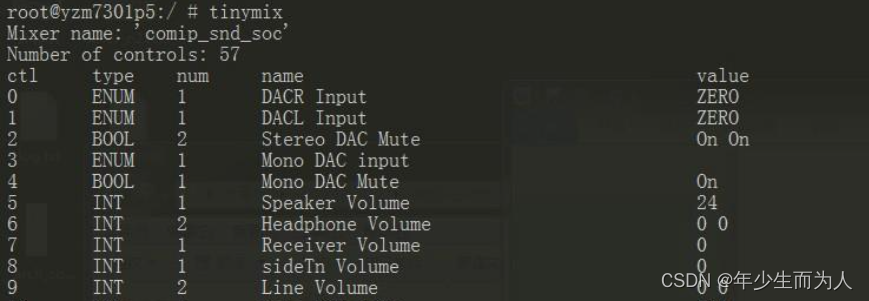
其中 numid 在 snd_ctl_add() 时会递增,用于表示 ctl 编号;name 即该 ctl name,即分别对应 tinymix 下的 ctl & name;
type 表示该 control value 的类型,即对应 tinymix 下的 type;即对应 tinymix 下的 num;即对应 tinymix 下的 value;上述的字段中在 tinymix 中都会显示,如下:
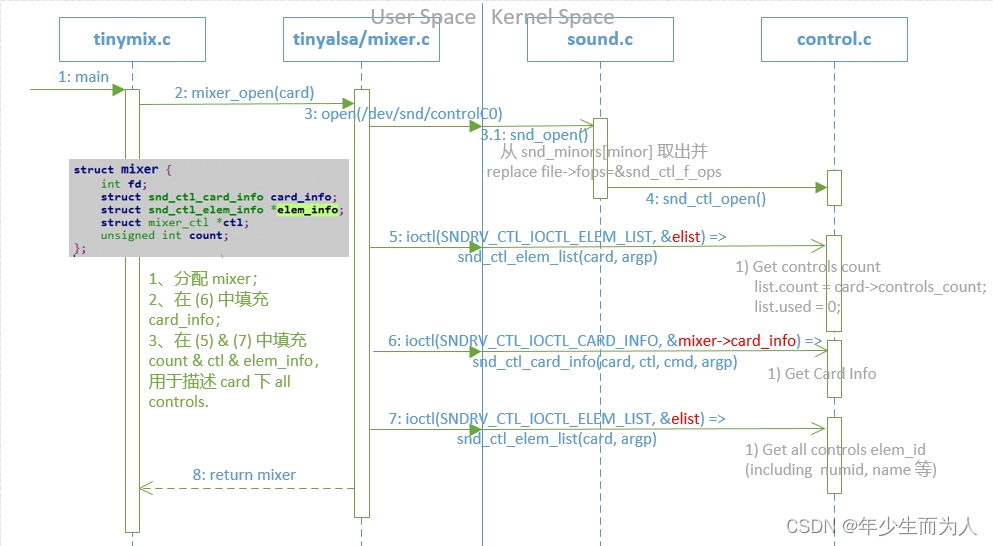
tinymix 首先调用 mixer_open()【/tinyalsa/mixer.c】 打开 mixer 设备,其中该函数主要实现的内容是 open /dev/snd/controlC%u 设备,并且通过 ioctl 函数获取该 card 下所有 kcontrol info,并且填充在 mixer 中,如下:
struct mixer *mixer_open(unsigned int card)
{
	struct snd_ctl_elem_list elist;
	struct snd_ctl_elem_id *eid = NULL;
	struct mixer *mixer = NULL;
	unsigned int n;
	int fd;
	char fn[256];

	//1、打开 /dev/snd/ControlC%u 设备;
	snprintf(fn, sizeof(fn), "/dev/snd/controlC%u", card);
	fd = open(fn, O_RDWR);
	if (fd < 0)
		return 0;

	//2、通过 IOCTL_ELEM_LIST 获取 card->controls_count;
	memset(&elist, 0, sizeof(elist));
	if (ioctl(fd, SNDRV_CTL_IOCTL_ELEM_LIST, &elist) < 0)
		goto fail;

	//3、分配 mixer, 以及为 all controls 分配对应的 ctl & elem_info 等;
	mixer = calloc(1, sizeof(*mixer));
	if (!mixer)
		goto fail;

	mixer->ctl = calloc(elist.count, sizeof(struct mixer_ctl));
	mixer->elem_info = calloc(elist.count, sizeof(struct snd_ctl_elem_info));
	if (!mixer->ctl || !mixer->elem_info)
		goto fail;

	if (ioctl(fd, SNDRV_CTL_IOCTL_CARD_INFO, &mixer->card_info) < 0)
		goto fail;

	eid = calloc(elist.count, sizeof(struct snd_ctl_elem_id));
	if (!eid)
		goto fail;

	mixer->count = elist.count;
	mixer->fd = fd;
	elist.space = mixer->count;
	elist.pids = eid;

	//4、通过 IOCTL_ELEM_LIST 获取 elem_id (including numid, name 等), 并且最终将 elist info 填充到 mixer->ctl 中.
	if (ioctl(fd, SNDRV_CTL_IOCTL_ELEM_LIST, &elist) < 0)
		goto fail;

	for (n = 0; n < mixer->count; n++) {
		struct mixer_ctl *ctl = mixer->ctl + n;

		ctl->mixer = mixer;
		ctl->info = mixer->elem_info + n;
		ctl->info->id.numid = eid[n].numid;
		strncpy((char *)ctl->info->id.name, (char *)eid[n].name,
				SNDRV_CTL_ELEM_ID_NAME_MAXLEN);
		ctl->info->id.name[SNDRV_CTL_ELEM_ID_NAME_MAXLEN - 1] = 0;
	}

	free(eid);
	return mixer;

fail:
	/* TODO: verify frees in failure case */
	if (eid)
		free(eid);
	if (mixer)
		mixer_close(mixer);
	else if (fd >= 0)
		close(fd);
	return 0;
}
针对上述 mixer.c 中 call 到 alsa driver 的内容没有给出详细介绍,这里提供自己画的 flow 时序图,如下:
在前面一节中已经通过 mixer_open() 打开并获得了 mixer,包含了 card 下所有 control info,接下来则可以通过 ctl id/name 找到要控制的 ctl,并设置 control 值到 alsa driver,实现对音频控件的控制,详细实现如下:
static void tinymix_set_value(struct mixer *mixer, const char *control,
                              char **values, unsigned int num_values)
{
    struct mixer_ctl *ctl;
    enum mixer_ctl_type type;
    unsigned int num_ctl_values;
    unsigned int i;

	//1、通过 id / name 找到对应的 ctl
    if (isdigit(control[0]))
        ctl = mixer_get_ctl(mixer, atoi(control));
    else
        ctl = mixer_get_ctl_by_name(mixer, control);

    if (!ctl) {
        fprintf(stderr, "Invalid mixer control\n");
        return;
    }

    type = mixer_ctl_get_type(ctl);
    num_ctl_values = mixer_ctl_get_num_values(ctl);

    if (type == MIXER_CTL_TYPE_BYTE) {
        tinymix_set_byte_ctl(ctl, values, num_values);
        return;
    }

    if (isdigit(values[0][0])) {
        if (num_values == 1) {
            /* Set all values the same */
            int value = atoi(values[0]);

            for (i = 0; i < num_ctl_values; i++) {
            	//2、对相应的 ctl 设置 value
                if (mixer_ctl_set_value(ctl, i, value)) {
                    fprintf(stderr, "Error: invalid value\n");
                    return;
                }
            }
        } else {
            /* Set multiple values */
            if (num_values > num_ctl_values) {
                fprintf(stderr,
                        "Error: %d values given, but control only takes %d\n",
                        num_values, num_ctl_values);
                return;
            }
            for (i = 0; i < num_values; i++) {
                if (mixer_ctl_set_value(ctl, i, atoi(values[i]))) {
                    fprintf(stderr, "Error: invalid value for index %d\n", i);
                    return;
                }
            }
        }
    } else {
        if (type == MIXER_CTL_TYPE_ENUM) {
            if (num_values != 1) {
                fprintf(stderr, "Enclose strings in quotes and try again\n");
                return;
            }
            if (mixer_ctl_set_enum_by_string(ctl, values[0]))
                fprintf(stderr, "Error: invalid enum value\n");
        } else {
            fprintf(stderr, "Error: only enum types can be set with strings\n");
        }
    }
}
最终通过 mixer.c 中的 mixer_ctl_set_value() 函数通过 ioctl 将 value 设置给音频控件,如下:
int mixer_ctl_set_value(struct mixer_ctl *ctl, unsigned int id, int value)
{
    struct snd_ctl_elem_value ev;
    int ret;

    if (!ctl || (id >= ctl->info->count))
        return -EINVAL;

    memset(&ev, 0, sizeof(ev));
    ev.id.numid = ctl->info->id.numid;
    ret = ioctl(ctl->mixer->fd, SNDRV_CTL_IOCTL_ELEM_READ, &ev);
    if (ret < 0)
        return ret;

    switch (ctl->info->type) {
    case SNDRV_CTL_ELEM_TYPE_BOOLEAN:
        ev.value.integer.value[id] = !!value;
        break;

    case SNDRV_CTL_ELEM_TYPE_INTEGER:
        ev.value.integer.value[id] = value;
        break;

    case SNDRV_CTL_ELEM_TYPE_ENUMERATED:
        ev.value.enumerated.item[id] = value;
        break;

    case SNDRV_CTL_ELEM_TYPE_BYTES:
        ev.value.bytes.data[id] = value;
        break;

    default:
        return -EINVAL;
    }

    return ioctl(ctl->mixer->fd, SNDRV_CTL_IOCTL_ELEM_WRITE, &ev);
}
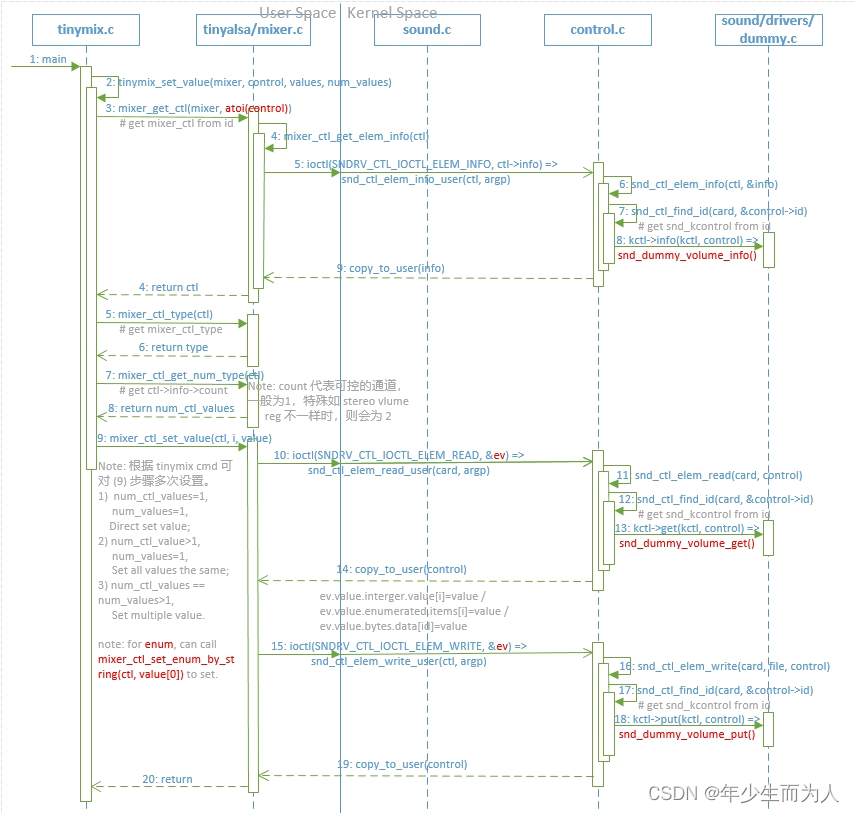
针对上述 mixer.c 中 call 到 alsa driver 的内容没有给出详细介绍,这里提供自己画的 flow 时序图,如下:
在使用 tinymix 配置好音频通路时,就可以使用 tinyplay 播放 wav pcm 文件,本节以对 dummy.c 为例进行播放简单穿插讲解即可。
在 tinyalsa/pcm.c 中重要的数据结构是 struct pcm,用来保存播放 pcm stream 对应的所有 info,定义如下:
struct pcm {
    int fd;	//使用的 pcm dev
    unsigned int flags;	//代表 pcm direction
    int running:1;
    int prepared:1;
    int underruns;
    unsigned int buffer_size;
    unsigned int boundary;
    char error[PCM_ERROR_MAX];
    struct pcm_config config;
    struct snd_pcm_mmap_status *mmap_status;
    struct snd_pcm_mmap_control *mmap_control;
    struct snd_pcm_sync_ptr *sync_ptr;
    void *mmap_buffer;
    unsigned int noirq_frames_per_msec;
    int wait_for_avail_min;
};
flags 代表该 pcm stream 方向,定义有 PCM_OUT、PCM_IN、PCM_MMAP 等;buffer_size 等于 period_size * period_count,在 pcm driver 中会 apply runtime->status->hw_ptr,runtime->control->appl_ptr 在 [0, buffer_size-1];config 播放的 pcm stream 的配置,具体描述看如下定义:/* Configuration for a stream */
struct pcm_config {
unsigned int channels;
unsigned int rate;
unsigned int period_size;
unsigned int period_count;
enum pcm_format format;
/* Values to use for the ALSA start, stop and silence thresholds, and
* silence size. Setting any one of these values to 0 will cause the
* default tinyalsa values to be used instead.
* Tinyalsa defaults are as follows.
*
* start_threshold : period_count * period_size
* stop_threshold : period_count * period_size
* silence_threshold : 0
* silence_size : 0
*/
unsigned int start_threshold;
unsigned int stop_threshold;
unsigned int silence_threshold;
unsigned int silence_size;
/* Minimum number of frames available before pcm_mmap_write() will actually
* write into the kernel buffer. Only used if the stream is opened in mmap mode
* (pcm_open() called with PCM_MMAP flag set). Use 0 for default.
*/
int avail_min;
};
tinyplay 播放 pcm wav 音频时,首先会 parser wav 出 audio pcm data,最后通过 tinyplay.c 下 play_sample() 函数调用 tinyalsa pcm.c 函数,最终通过控制 pcm device 实现将 audio data 送到硬体中。本节省略对 wav parser 等的分析,主要分析 play_sample() 函数。
首先调用 pcm_open() 函数打开并配置 pcm 设备,其中该函数主要实现是根据参数 open(/dev/snd/pcmC%uD%u%c),并且根据 pcm_config 等参数通过 ioctl 设置 hw_params & sw_params,最终返回 pcm 实例,其定义实现如下:
struct pcm *pcm_open(unsigned int card, unsigned int device,
unsigned int flags, struct pcm_config *config)
{
struct pcm *pcm;
struct snd_pcm_info info;
struct snd_pcm_hw_params params;
struct snd_pcm_sw_params sparams;
char fn[256];
int rc;
//1、分配 pcm 实例, 并将相关 input params 填充到 pcm 实例中;
pcm = calloc(1, sizeof(struct pcm));
if (!pcm || !config)
return &bad_pcm; /* TODO: could support default config here */
pcm->config = *config;
snprintf(fn, sizeof(fn), "/dev/snd/pcmC%uD%u%c", card, device,
flags & PCM_IN ? 'c' : 'p');
pcm->flags = flags;
//2、open /dev/snd/pcmC%uD%u%c 设备, 通过 fcntl 设置为阻塞IO
pcm->fd = open(fn, O_RDWR|O_NONBLOCK);
if (pcm->fd < 0) {
oops(pcm, errno, "cannot open device '%s'", fn);
return pcm;
}
if (fcntl(pcm->fd, F_SETFL, fcntl(pcm->fd, F_GETFL) &
~O_NONBLOCK) < 0) {
oops(pcm, errno, "failed to reset blocking mode '%s'", fn);
goto fail_close;
}
if (ioctl(pcm->fd, SNDRV_PCM_IOCTL_INFO, &info)) {
oops(pcm, errno, "cannot get info");
goto fail_close;
}
//3、根据 input params:config 初始化 hw params 并通过 ioctl 设置 hw params 给 pcm device;
param_init(¶ms);
param_set_mask(¶ms, SNDRV_PCM_HW_PARAM_FORMAT,
pcm_format_to_alsa(config->format));
param_set_mask(¶ms, SNDRV_PCM_HW_PARAM_SUBFORMAT,
SNDRV_PCM_SUBFORMAT_STD);
param_set_min(¶ms, SNDRV_PCM_HW_PARAM_PERIOD_SIZE, config->period_size);
param_set_int(¶ms, SNDRV_PCM_HW_PARAM_SAMPLE_BITS,
pcm_format_to_bits(config->format));
param_set_int(¶ms, SNDRV_PCM_HW_PARAM_FRAME_BITS,
pcm_format_to_bits(config->format) * config->channels);
param_set_int(¶ms, SNDRV_PCM_HW_PARAM_CHANNELS,
config->channels);
param_set_int(¶ms, SNDRV_PCM_HW_PARAM_PERIODS, config->period_count);
param_set_int(¶ms, SNDRV_PCM_HW_PARAM_RATE, config->rate);
...
if (flags & PCM_MMAP)
param_set_mask(¶ms, SNDRV_PCM_HW_PARAM_ACCESS,
SNDRV_PCM_ACCESS_MMAP_INTERLEAVED);
else
param_set_mask(¶ms, SNDRV_PCM_HW_PARAM_ACCESS,
SNDRV_PCM_ACCESS_RW_INTERLEAVED);
if (ioctl(pcm->fd, SNDRV_PCM_IOCTL_HW_PARAMS, ¶ms)) {
oops(pcm, errno, "cannot set hw params");
goto fail_close;
}
/* get our refined hw_params */
config->period_size = param_get_int(¶ms, SNDRV_PCM_HW_PARAM_PERIOD_SIZE);
config->period_count = param_get_int(¶ms, SNDRV_PCM_HW_PARAM_PERIODS);
pcm->buffer_size = config->period_count * config->period_size;
...
//4、根据 input params:config 初始化 sw params 并通过 ioctl 设置 sw params 给 pcm device;
memset(&sparams, 0, sizeof(sparams));
sparams.tstamp_mode = SNDRV_PCM_TSTAMP_ENABLE;
sparams.period_step = 1;
if (!config->start_threshold) {
if (pcm->flags & PCM_IN)
pcm->config.start_threshold = sparams.start_threshold = 1;
else
pcm->config.start_threshold = sparams.start_threshold =
config->period_count * config->period_size / 2;
} else
sparams.start_threshold = config->start_threshold;
/* pick a high stop threshold - todo: does this need further tuning */
if (!config->stop_threshold) {
if (pcm->flags & PCM_IN)
pcm->config.stop_threshold = sparams.stop_threshold =
config->period_count * config->period_size * 10;
else
pcm->config.stop_threshold = sparams.stop_threshold =
config->period_count * config->period_size;
}
else
sparams.stop_threshold = config->stop_threshold;
if (!pcm->config.avail_min) {
if (pcm->flags & PCM_MMAP)
pcm->config.avail_min = sparams.avail_min = pcm->config.period_size;
else
pcm->config.avail_min = sparams.avail_min = 1;
} else
sparams.avail_min = config->avail_min;
sparams.xfer_align = config->period_size / 2; /* needed for old kernels */
sparams.silence_threshold = config->silence_threshold;
sparams.silence_size = config->silence_size;
pcm->boundary = sparams.boundary = pcm->buffer_size;
while (pcm->boundary * 2 <= INT_MAX - pcm->buffer_size)
pcm->boundary *= 2;
if (ioctl(pcm->fd, SNDRV_PCM_IOCTL_SW_PARAMS, &sparams)) {
oops(pcm, errno, "cannot set sw params");
goto fail;
}
...
pcm->underruns = 0;
return pcm;
fail:
...
fail_close:
close(pcm->fd);
pcm->fd = -1;
return pcm;
}
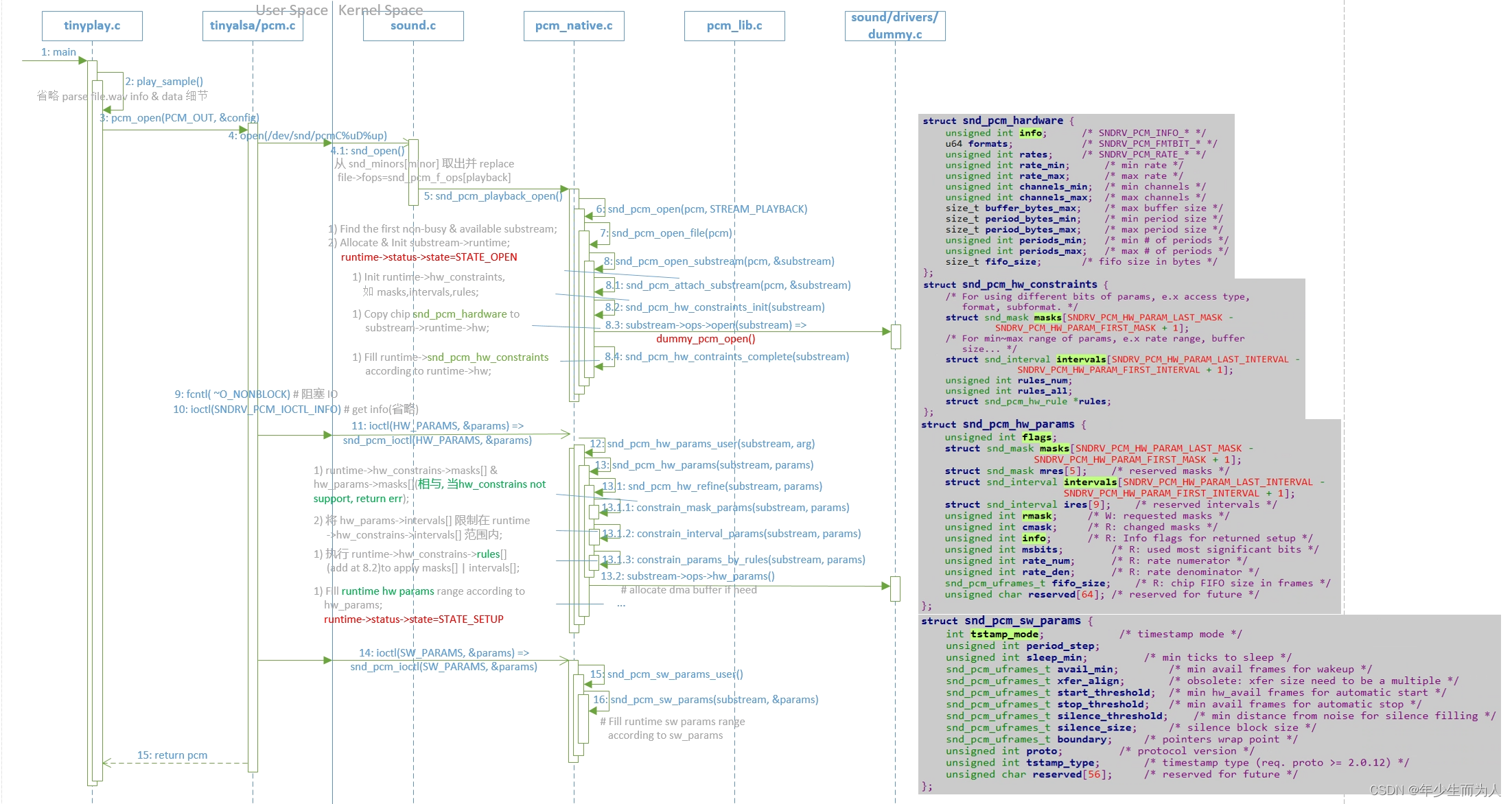
在 open /dev/snd/pcmC%uD%up device 时会嵌入到 alsa core,最终会调用 substream->ops->open() 函数。在该函数主要是找到一个空闲 & 可用的 substream,并且为其分配一个 runtime,通过 substream->ops->open() 拿到该 substream 支持的 snd_pcm_hardware,填充给 runtime->hw,又根据该 hw params 填充 runtime->snd_pcm_hw_constraints,以便后面 Setting Hw Params 时使用。该步骤涉及重要的数据结构有:
1)struct snd_pcm_hardware
/*
 *  Hardware (lowlevel) section
 */

struct snd_pcm_hardware {
	unsigned int info;		/* SNDRV_PCM_INFO_* */
	u64 formats;			/* SNDRV_PCM_FMTBIT_* */
	unsigned int rates;		/* SNDRV_PCM_RATE_* */
	unsigned int rate_min;		/* min rate */
	unsigned int rate_max;		/* max rate */
	unsigned int channels_min;	/* min channels */
	unsigned int channels_max;	/* max channels */
	size_t buffer_bytes_max;	/* max buffer size */
	size_t period_bytes_min;	/* min period size */
	size_t period_bytes_max;	/* max period size */
	unsigned int periods_min;	/* min # of periods */
	unsigned int periods_max;	/* max # of periods */
	size_t fifo_size;		/* fifo size in bytes */
};
该结构体主要描述的是 hw 支持的 pcm 能力(各参数详解略)
2)struct snd_pcm_hw_constraints
struct snd_pcm_hw_constraints {
	struct snd_mask masks[SNDRV_PCM_HW_PARAM_LAST_MASK -
			 SNDRV_PCM_HW_PARAM_FIRST_MASK + 1];
	struct snd_interval intervals[SNDRV_PCM_HW_PARAM_LAST_INTERVAL -
			     SNDRV_PCM_HW_PARAM_FIRST_INTERVAL + 1];
	unsigned int rules_num;
	unsigned int rules_all;
	struct snd_pcm_hw_rule *rules;
};
该结构体主要是在 alsa core 保存对当前 substream 的 hw capability 描述,详解如下:
masks[] 用来描述那些需要使用多个 bits 来描述支持多种能力的参数,如 Access Type(RW/MMAP等),Formats(S16_LE/BE/U16_LE/BE等),每种能力均占用 1 bit,多种能力 ‘|’;intervals[] 用来描述那些有大小范围等的参数,如 Sample/Frame Bits,Channels,Rate,Buffer Size/Bytes 等;rules 用来为那些依赖其他参数的参数创建 rules,起到限制作用,在 snd_pcm_hw_constraints_init() 中创建 rules,如 Sample/Frame Bits 依赖于 Format(8/16/24/32等),Buffer Size/Bytes 依赖于 Peroid_size & Period_count 等等,使用 snd_pcm_hw_rule_add() 创建 rules,其中参数有 runtime,var(who’s rules),rule_func,dep…(即依赖的参数,可变参数);rules_nums 描述当前创建 rules 的数量;rules_all 描述当前分配的可创建 rules 的最大数量(若 rules_nums > rules_all 时,则会重新 + 16).在调用 ioctl(SNDRV_PCM_IOCZTL_HW_PARAMS) 时会传入一个 snd_pcm_hw_params 参数,如前面代码所示,在调用该函数前会先根据 pcm_open() 传入的 pcm_config 转换成相应的 hw_params 中,在 alsa core 中则会利用该 hw_params 与前面 open 时拿到的 substream hw_constraints 进行比较,看 substream 是否支持播放,若支持则会将比较后(masks 相与,intervals 则缩小范围)的结构保存在 hw params,并利用 substream->ops->hw_params(前面已讲解,此处略),若遇到不支持的 hw params 则会直接 return error. 该步骤涉及重要的数据结构有:
1)struct snd_pcm_hw_params
struct snd_pcm_hw_params {
	unsigned int flags;
	struct snd_mask masks[SNDRV_PCM_HW_PARAM_LAST_MASK -
			       SNDRV_PCM_HW_PARAM_FIRST_MASK + 1];
	struct snd_mask mres[5];	/* reserved masks */
	struct snd_interval intervals[SNDRV_PCM_HW_PARAM_LAST_INTERVAL -
				        SNDRV_PCM_HW_PARAM_FIRST_INTERVAL + 1];
	struct snd_interval ires[9];	/* reserved intervals */
	unsigned int rmask;		/* W: requested masks */
	unsigned int cmask;		/* R: changed masks */
	unsigned int info;		/* R: Info flags for returned setup */
	unsigned int msbits;		/* R: used most significant bits */
	unsigned int rate_num;		/* R: rate numerator */
	unsigned int rate_den;		/* R: rate denominator */
	snd_pcm_uframes_t fifo_size;	/* R: chip FIFO size in frames */
	unsigned char reserved[64];	/* reserved for future */
};
该结构体主要保存播放片源 & 硬件支持能力相比较后的结果,参数如下:
在调用 ioctl(SNDRV_PCM_IOCTL_SW_PARAMS) 时会传入一个 snd_pcm_sw_params 参数,如前面代码所示,在调用该函数前也会先根据 pcm_config 转换成相应的 sw params 中,如 threshold,silence,boundary,tstamp_mode,avail_min(用于在 alsa core 中每次等待唤醒的 free space) 等,在 alsa core 则会根据 sw params 填充到 runtime 相应的参数中,主要涉及的数据结构有:
1)struct snd_pcm_sw_params
struct snd_pcm_sw_params {
	int tstamp_mode;			/* timestamp mode */
	unsigned int period_step;
	unsigned int sleep_min;			/* min ticks to sleep */
	snd_pcm_uframes_t avail_min;		/* min avail frames for wakeup */
	snd_pcm_uframes_t xfer_align;		/* obsolete: xfer size need to be a multiple */
	snd_pcm_uframes_t start_threshold;	/* min hw_avail frames for automatic start */
	snd_pcm_uframes_t stop_threshold;	/* min avail frames for automatic stop */
	snd_pcm_uframes_t silence_threshold;	/* min distance from noise for silence filling */
	snd_pcm_uframes_t silence_size;		/* silence block size */
	snd_pcm_uframes_t boundary;		/* pointers wrap point */
	unsigned int proto;			/* protocol version */
	unsigned int tstamp_type;		/* timestamp type (req. proto >= 2.0.12) */
	unsigned char reserved[56];		/* reserved for future */
};
该结构体主要描述播放片源时的各种 sw params,如 threshold,silence,boundary,tstamp_mode,avail_min(用于在 alsa core 中每次等待唤醒的 free space) 等,详细略。
在上述中针对 pcm_open() 函数中调用到 alsa core 都仅仅描述其重要功能,并未描述详细 flow,其 flow 基本如下时序图,
在前面调用 pcm_open() 函数创建并分配好 pcm handle 后,此时就可以利用 pcm handle 调用 pcm_write 将 pcm 数据循环写入到 pcm device 中。
在 pcm_write() 中如果前面为非 running 状态时,先需要下 pcm_prepare(),即 ioctl(SNDRV_PCM_IOCTL_PREPARE),内部会调用 substream->ops->prepare(),用于设置采样率、格式等,并且最后会 do_reset(),即调用 substream->ops->ioctl(IOCTL1_RESET) 实现对 runtime hw_ptr & appl_ptr 做 reset 动作;
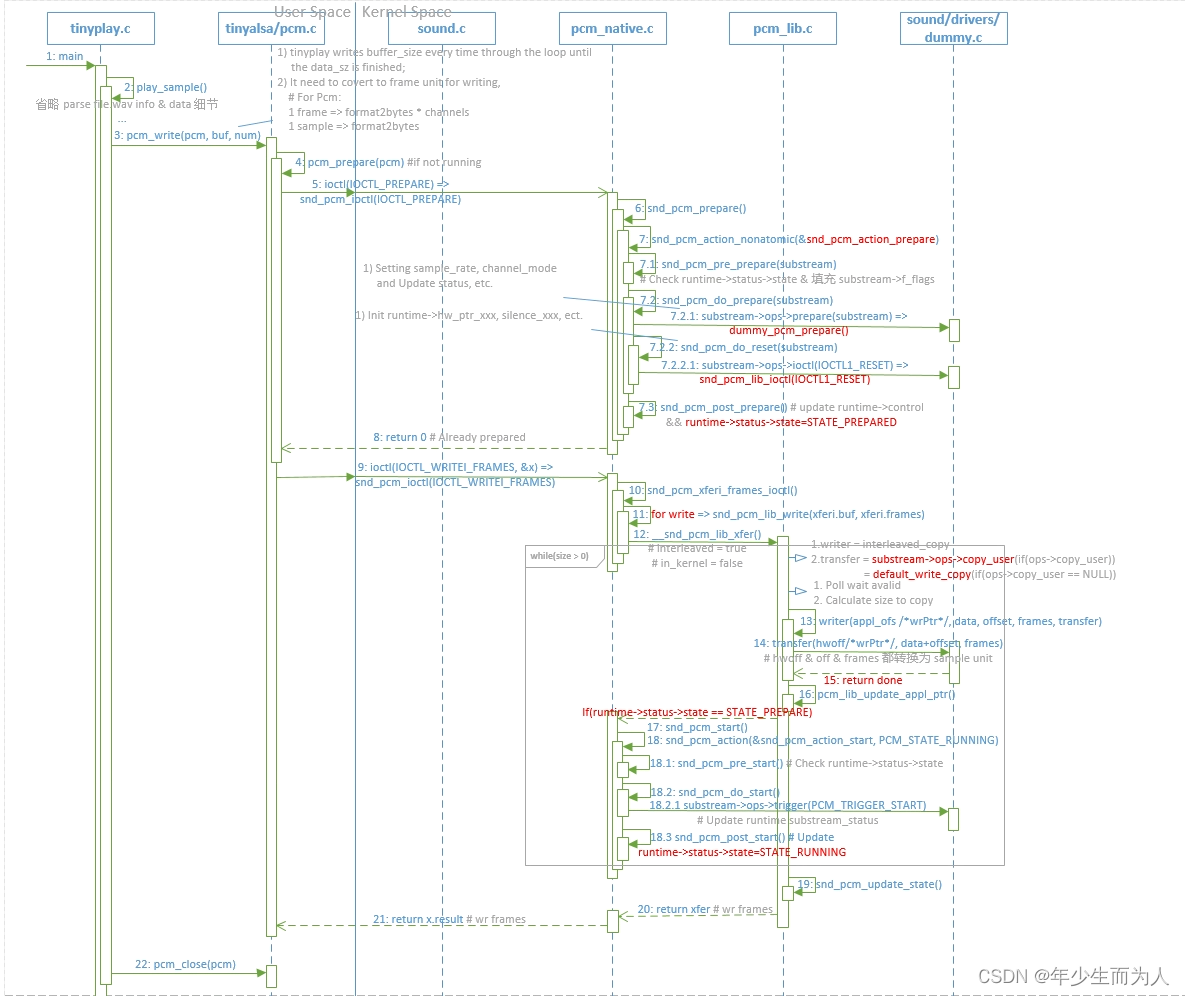
在有做 pcm_prepare() 之后就会循环调用 pcm_write(),即 ioctl(SNDRV_PCM_IOCTL_WRITEI_FRAMES) 每次写不超过 buffer_size=period_count*period_size pcm data,直到写完。在 alsa core 中,会循环等待 avail_min freespace 后唤醒去 copy pcm data 到 dma 缓冲区中,其中 wrptr=>runtime->control->appl_ptr(在每次 copy data 之后由 alsa core 更新),rdptr=>runtime->status->hw_ptr(在 alsa driver 中会有个 period_size timer interrupt call snd_pcm_period_elapsed() 更新),并且在第一次 write 之后会下 snd_pcm_start(substream),即 substream->ops->trigger(SNDRV_PCM_TRIGGER_START),update runtime substream_status.
在上述描述 pcm_write() 中针对 alsa core 的详细 flow 如下时序图:
目录0专栏介绍1平面2R机器人概述2运动学建模2.1正运动学模型2.2逆运动学模型2.3机器人运动学仿真3动力学建模3.1计算动能3.2势能计算与动力学方程3.3动力学仿真0专栏介绍?附C++/Python/Matlab全套代码?课程设计、毕业设计、创新竞赛必备!详细介绍全局规划(图搜索、采样法、智能算法等);局部规划(DWA、APF等);曲线优化(贝塞尔曲线、B样条曲线等)。?详情:图解自动驾驶中的运动规划(MotionPlanning),附几十种规划算法1平面2R机器人概述如图1所示为本文的研究本体——平面2R机器人。对参数进行如下定义:机器人广义坐标
网站的日志分析,是seo优化不可忽视的一门功课,但网站越大,每天产生的日志就越大,大站一天都可以产生几个G的网站日志,如果光靠肉眼去分析,那可能看到猴年马月都看不完,因此借助网站日志分析工具去分析网站日志,那将会使网站日志分析工作变得更简单。下面推荐两款网站日志分析软件。第一款:逆火网站日志分析器逆火网站日志分析器是一款功能全面的网站服务器日志分析软件。通过分析网站的日志文件,不仅能够精准的知道网站的访问量、网站的访问来源,网站的广告点击,访客的地区统计,搜索引擎关键字查询等,还能够一次性分析多个网站的日志文件,让你轻松管理网站。逆火网站日志分析器下载地址:https://pan.baidu.
一、机器人介绍 此处是基于MATLABRVC工具箱,对ABB-IRB-1200型号的微型机械臂进行正逆向运动学分析,并利Simulink工具实现对机械臂进行具有动力学参数的末端轨迹规划仿真,最后根据机械模型设计Simulink-Adams联合仿真。 图1.ABBIRB 1200尺寸参数示意图ABBIRB 1200提供的两种型号广泛适用于各作业,且两者间零部件通用,两种型号的工作范围分别为700 mm 和 900 mm,大有效负载分别为 7 kg 和5 kg。 IRB 1200 能够在狭小空间内能发挥其工作范围与性能优势,具有全新的设计、小型化的体积、高效的性能、易于集成、便捷的接
目录一.大致如下常见问题:(1)找不到程序所依赖的Qt库version`Qt_5'notfound(requiredby(2)CouldnotLoadtheQtplatformplugin"xcb"in""eventhoughitwasfound(3)打包到在不同的linux系统下,或者打包到高版本的相同系统下,运行程序时,直接提示段错误即segmentationfault,或者Illegalinstruction(coredumped)非法指令(4)ldd应用程序或者库,查看运行所依赖的库时,直接报段错误二.问题逐个分析,得出解决方法:(1)找不到程序所依赖的Qt库version`Qt_5'
我想使用ruby-prof和JMeter分析Rails应用程序。我对分析特定Controller/操作/或模型方法的建议方法不感兴趣,我想分析完整堆栈,从上到下。所以我运行这样的东西:RAILS_ENV=productionruby-prof-fprof.outscript/server>/dev/null然后我在上面运行我的JMeter测试计划。然而,问题是使用CTRL+C或SIGKILL中断它也会在ruby-prof可以写入任何输出之前杀死它。如何在不中断ruby-prof的情况下停止mongrel服务器? 最佳答案
文章目录认识unity打包目录结构游戏逆向流程Unity游戏攻击面可被攻击原因mono的打包建议方案锁血飞天无限金币攻击力翻倍以上统称内存挂透视自瞄压枪瞬移内购破解Unity游戏防御开发时注意数据安全接入第三方反作弊系统外挂检测思路狠人自爆实战查看目录结构用il2cppdumper例子2-森林whoishe后记认识unity打包目录结构dll一般很大,因为里面是所有的游戏功能编译成的二进制码游戏逆向流程开发人员代码被编译打包到GameAssembly.dll中使用il2ppDumper工具,并借助游戏名_Data\il2cpp_data\Metadata\global-metadata.dat
在笔者前面有一篇文章《驱动开发:断链隐藏驱动程序自身》通过摘除驱动的链表实现了断链隐藏自身的目的,但此方法恢复时会触发PG会蓝屏,偶然间在网上找到了一个作者介绍的一种方法,觉得有必要详细分析一下他是如何实现的进程隐藏的,总体来说作者的思路是最终寻找到MiProcessLoaderEntry的入口地址,该函数的作用是将驱动信息加入链表和移除链表,运用这个函数即可动态处理驱动的添加和移除问题。MiProcessLoaderEntry(pDriverObject->DriverSection,1)添加MiProcessLoaderEntry(pDriverObject->DriverSection,
目录1. 研究范围定义2. 流程中台市场分析3. 厂商评估:微宏科技4. 入选证书 1. 研究范围定义近年来,随着外部市场环境快速变化、客户需求愈发多样,企业逐渐意识到,自身业务需要更加敏捷、高效,具备根据市场需求快速迭代的能力。业务流程的自动化能够帮助企业实现业务的敏捷高效,因此受到越来越多企业的关注。企业的“自动化武器库”品类丰富,包括低/零代码平台、RPA、BPM、AI等。企业可以使用多项自动化工具,但结果往往是各项自动化工具处于各自的“自动化烟囱”之中,仅能实现碎片式自动化。例如,某企业的IT团队可能在使用低代码平台、财务团队可能在使用RPA、呼叫中心则可能在使用聊天机器人。自动
我可以使用什么来分析1.9.2中的代码?我发现所有版本的ruby-prof都针对1.9.2存在段错误。例如,当我添加gem"ruby-prof"到我的Rails项目的Gemfile并运行bundlebundleexecruby-profconfig/environment.rb我遇到段错误。城里有新的分析gem吗?有没有办法让ruby-prof玩得很好? 最佳答案 不确定它是否有帮助,但我偶然发现了这一点,它可能会增加一点清晰度或引导您走上不同的道路:http://www.devheads.net/development/r
查看原文>>>基于”PLUS模型+“生态系统服务多情景模拟预测实践技术应用目录第一章、理论基础与软件讲解第二章、数据获取与制备第三章、土地利用格局模拟第四章、生态系统服务评估第五章、时空变化及驱动机制分析第六章、论文撰写技巧及案例分析基于ArcGISPro、Python、USLE、INVEST模型等多技术融合的生态系统服务构建生态安全格局基于生态系统服务(InVEST模型)的人类活动、重大工程生态成效评估、论文写作等具体应用基于ArcGISPro、R、INVEST等多技术融合下生态系统服务权衡与协同动态分析实践应用 本文从数据、方法、实践三方面对生态系统服务多情景预测进行讲解。内容涵盖多
