MyBatis 是一款优秀的持久层框架,它支持自定义 SQL、存储过程以及高级映射。
在之前的文章中我们学习了MYSQL和JDBC,但是这些东西远远不足以支持我们书写JavaWeb相关的内容
在学习MyBatis前,请先学习Java,Mysql,JDBC,Maven内容
首先我们先简单介绍一下MyBatis:
我们再来介绍一下JavaEE概念:
最后我们了解一下框架:
我们在前面提到MyBatis的产生是为了简化JDBC开发
那么我们就先来介绍一下JDBC的缺点:
我们通过一段代码进行解析:
package com.itheima.jdbc;

import org.junit.Test;

import java.sql.*;
import java.util.Date;

    @Test
    public void testPreparedStatement2() throws  Exception {

        // 前置链接操作
        String url = "jdbc:mysql:///db1?useSSL=false&useServerPrepStmts=true";
        String username = "root";
        String password = "1234";
        Connection conn = DriverManager.getConnection(url, username, password);

        // 接收用户输入 用户名和密码
        String name = "zhangsan";
        String pwd = "' or '1' = '1";

        // 定义sql
        String sql = "select * from tb_user where username = ? and password = ?";

        // 获取pstmt对象
        PreparedStatement pstmt = conn.prepareStatement(sql);


        Thread.sleep(10000);
        // 设置?的值
        pstmt.setString(1,name);
        pstmt.setString(2,pwd);
        ResultSet rs = null;
                // 执行sql
        rs = pstmt.executeQuery();


        // 设置?的值
        pstmt.setString(1,"aaa");
        pstmt.setString(2,"bbb");

        // 执行sql
        rs = pstmt.executeQuery();


        // 判断登录是否成功
        if(rs.next()){
            System.out.println("登录成功~");
        }else{
            System.out.println("登录失败~");
        }

        //7. 释放资源
        rs.close();
        pstmt.close();
        conn.close();
    }
}
在上述代码中,我们可以注意到:
/*
硬编码概念: 代码展现形式固定,如果有所更改需要手动修改代码
硬编码动作:注册驱动,获得链接,SQL语句
*/

		// 前置链接操作
        String url = "jdbc:mysql:///db1?useSSL=false&useServerPrepStmts=true";
        String username = "root";
        String password = "1234";
        Connection conn = DriverManager.getConnection(url, username, password);

        // 接收用户输入 用户名和密码
        String name = "zhangsan";
        String pwd = "' or '1' = '1";

/*
操作繁琐:大量代码堆叠
操作繁琐动作:手动设置参数,手动封装结果
*/

		// 获取pstmt对象
        PreparedStatement pstmt = conn.prepareStatement(sql);


        Thread.sleep(10000);
        // 设置?的值
        pstmt.setString(1,name);
        pstmt.setString(2,pwd);
        ResultSet rs = null;
                // 执行sql
        rs = pstmt.executeQuery();


        // 设置?的值
        pstmt.setString(1,"aaa");
        pstmt.setString(2,"bbb");

        // 执行sql
        rs = pstmt.executeQuery();
因而为了解决JDBC的这些缺点,MyBatis应运而生!
MyBatis解决思想:
MyBatis免除了几乎所有的JDBC代码以及设置参数和获得结果集的工作
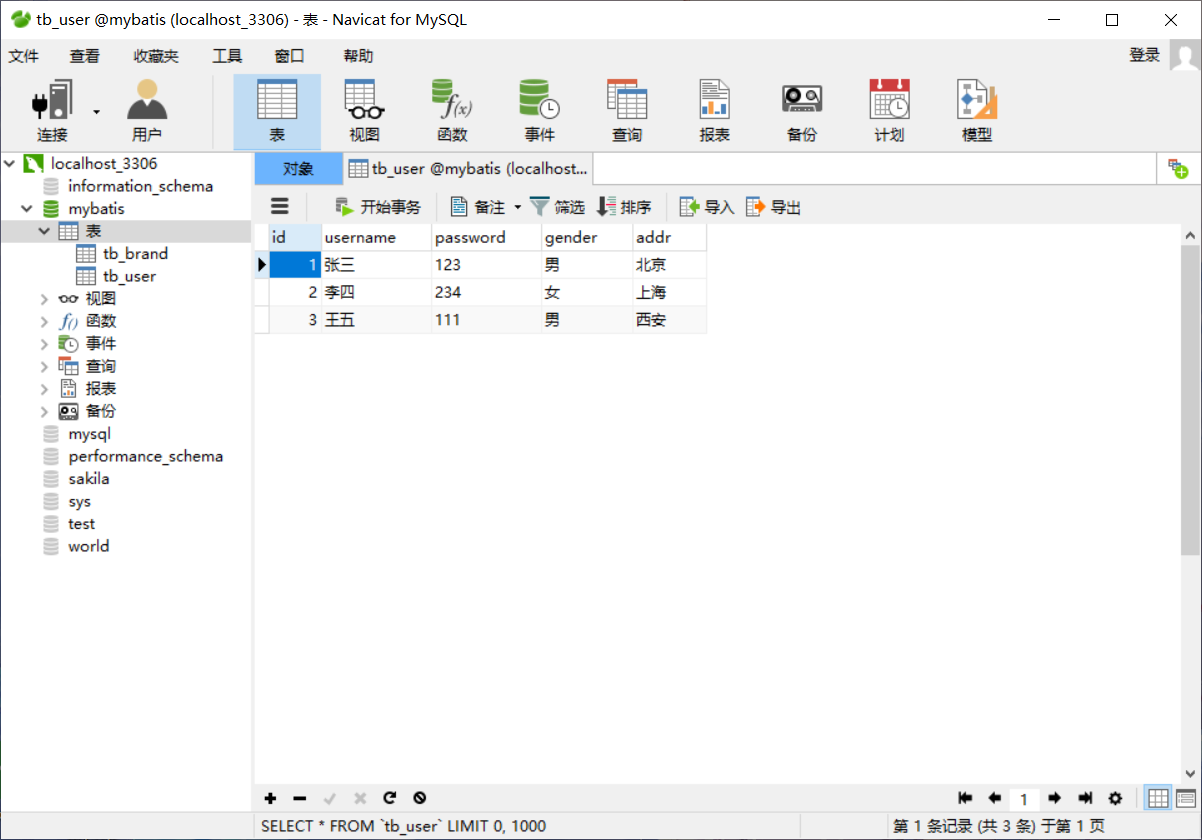
我们将以一个案例进行MyBatis的快速入门(资源来自B站黑马程序员老陈的JavaWeb课程)
我们以步骤形式逐步进行:
<!--
我们使用mybatis,导入mybatis坐标
我们使用mysql,导入mysql坐标
我们需要进行单元测试,导入junit坐标
我们需要日志,查看错误信息,导入日志坐标(注意:需要导入logback.xml包,可在网络查询)
->

<dependencies>
        <!--mybatis 依赖-->
        <dependency>
            <groupId>org.mybatis</groupId>
            <artifactId>mybatis</artifactId>
            <version>3.5.5</version>
        </dependency>

        <!--mysql 驱动-->
        <dependency>
            <groupId>mysql</groupId>
            <artifactId>mysql-connector-java</artifactId>
            <version>5.1.46</version>
        </dependency>

        <!--junit 单元测试-->
        <dependency>
            <groupId>junit</groupId>
            <artifactId>junit</artifactId>
            <version>4.13</version>
            <scope>test</scope>
        </dependency>


        <!-- 添加slf4j日志api -->
        <dependency>
            <groupId>org.slf4j</groupId>
            <artifactId>slf4j-api</artifactId>
            <version>1.7.20</version>
        </dependency>
        <!-- 添加logback-classic依赖 -->
        <dependency>
            <groupId>ch.qos.logback</groupId>
            <artifactId>logback-classic</artifactId>
            <version>1.2.3</version>
        </dependency>
        <!-- 添加logback-core依赖 -->
        <dependency>
            <groupId>ch.qos.logback</groupId>
            <artifactId>logback-core</artifactId>
            <version>1.2.3</version>
        </dependency>

    </dependencies>
<!--
创建mybatis-config.xml,
写入下列信息(MyBatis官网可查找)

<?xml version="1.0" encoding="UTF-8" ?>
<!DOCTYPE configuration
  PUBLIC "-//mybatis.org//DTD Config 3.0//EN"
  "http://mybatis.org/dtd/mybatis-3-config.dtd">
<configuration>
  <environments default="development">
    <environment id="development">
      <transactionManager type="JDBC"/>
      <dataSource type="POOLED">
        <property name="driver" value="${driver}"/>
        <property name="url" value="${url}"/>
        <property name="username" value="${username}"/>
        <property name="password" value="${password}"/>
      </dataSource>
    </environment>
  </environments>
  <mappers>
    <mapper resource="org/mybatis/example/BlogMapper.xml"/>
  </mappers>
</configuration>

然后我们需要对上述信息进行修改,使其完成连接数据库的问题
-->

<?xml version="1.0" encoding="UTF-8" ?>
<!DOCTYPE configuration
  PUBLIC "-//mybatis.org//DTD Config 3.0//EN"
  "http://mybatis.org/dtd/mybatis-3-config.dtd">
<configuration>
  <environments default="development">
    <environment id="development">
      <transactionManager type="JDBC"/>
        <!--注意:这里dataSource表示数据库连接--->
      <dataSource type="POOLED">
          <!--
			我们需要修改下述信息
			driver:固定com.mysql.jdbc.Driver
			url:jdbc:mysql:/// + 数据库名称 + ?useSSL=false
			username:数据库账号
			password:数据库密码
			-->
        <property name="driver" value="com.mysql.jdbc.Driver"/>
        <property name="url" value="jdbc:mysql:///mybatis?useSSL=false"/>
        <property name="username" value="root"/>
        <property name="password" value="123456"/>
      </dataSource>
    </environment>
  </environments>
    <!--这里mapper表示映射地址:我们所需要的Mapper.xml,在后续我们会在Mapper.xml中书写SQL语句-->
  <mappers>
    <mapper resource="com/itheima/mapper/UserMapper.xml"/>
  </mappers>
</configuration>
<!--
同样自己创建Mapper.xml文档,这里注意在前面加上前缀,如果你是Usr用户的数据库操作,命名为UserMapper.xml便于区分
导入下述代码(同样,在Mybatis官网可以找到)

<?xml version="1.0" encoding="UTF-8" ?>
<!DOCTYPE mapper
  PUBLIC "-//mybatis.org//DTD Mapper 3.0//EN"
  "http://mybatis.org/dtd/mybatis-3-mapper.dtd">
<mapper namespace="org.mybatis.example.BlogMapper">
  <select id="selectBlog" resultType="Blog">
    select * from Blog where id = #{id}
  </select>
</mapper>

在创建完成后,不要忘记回到上一步,把mapper的resource地址改为该文档所在地址

-->

<?xml version="1.0" encoding="UTF-8" ?>
<!DOCTYPE mapper
  PUBLIC "-//mybatis.org//DTD Mapper 3.0//EN"
  "http://mybatis.org/dtd/mybatis-3-mapper.dtd">
<!--
namespace:名称空间,在后续需要与Mapper接口名称一致保证互联(这里暂时设置为test)
id:查找方法的唯一表示
resultType:返回类型
在<select></select>中间书写语句即可

后续会继续介绍
-->
<mapper namespace="test">
  <select id="selectAll" resultType="User">
    select * from Blog where id = #{id}
  </select>
</mapper>
// 注意:数据为private,书写get和set方法以及toString方法

package com.itheima.pojo;


// alt + 鼠标左键 整列编辑
public class User {

    private Integer id;
    private String username;
    private String password;
    private String gender;
    private String addr;

    public Integer getId() {
        return id;
    }

    public void setId(Integer id) {
        this.id = id;
    }

    public String getUsername() {
        return username;
    }

    public void setUsername(String username) {
        this.username = username;
    }

    public String getPassword() {
        return password;
    }

    public void setPassword(String password) {
        this.password = password;
    }

    public String getGender() {
        return gender;
    }

    public void setGender(String gender) {
        this.gender = gender;
    }

    public String getAddr() {
        return addr;
    }

    public void setAddr(String addr) {
        this.addr = addr;
    }

    @Override
    public String toString() {
        return "User{" +
                "id=" + id +
                ", username='" + username + '\'' +
                ", password='" + password + '\'' +
                ", gender='" + gender + '\'' +
                ", addr='" + addr + '\'' +
                '}';
    }
}
// 创建主代码

package com.itheima;


import com.itheima.pojo.User;
import org.apache.ibatis.io.Resources;
import org.apache.ibatis.session.SqlSession;
import org.apache.ibatis.session.SqlSessionFactory;
import org.apache.ibatis.session.SqlSessionFactoryBuilder;

import java.io.IOException;
import java.io.InputStream;
import java.util.List;

/**
 * Mybatis 快速入门代码
 */
public class MyBatisDemo {

    public static void main(String[] args) throws IOException {

        //1. 加载mybatis的核心配置文件,获取 SqlSessionFactory(官网下载)

        /*
        下述为官网下载,我们只需要修改第一行的mybatis-config.xml地址即可
        String resource = "org/mybatis/example/mybatis-config.xml";
		InputStream inputStream = Resources.getResourceAsStream(resource);
		SqlSessionFactory sqlSessionFactory = new SqlSessionFactoryBuilder().build(inputStream);
        */

        String resource = "mybatis-config.xml";
        InputStream inputStream = Resources.getResourceAsStream(resource);
        SqlSessionFactory sqlSessionFactory = new SqlSessionFactoryBuilder().build(inputStream);

        //2. 获取SqlSession对象,用它来执行sql(sqlSessionFactory方法)
        SqlSession sqlSession = sqlSessionFactory.openSession();

        //3. 执行sql(这里的test.selectList是我们的UserMapper.xml中所设置的名称空间.id)
        List<User> users = sqlSession.selectList("test.selectAll");
        System.out.println(users);

        //4. 释放资源
        sqlSession.close();

    }
}
至此,我们已经了解了MyBatis的整体创建流程
在下面我们会以上述入门为标准,进行各种流程上的简化开发
我们在Mapper.xml中书写sql语句时,可能会出现sql表名显示红色(报错)现象
产生原因:IDEA和数据库没有建立连接,不识别表信息
解决方法:在IDEA中配置MYSQL数据库连接
解决优点:代码不再报错,显示所有SQL语句以及表列的补全信息
解决方法:
我们在入门代码中创建了Mapper.xml,并在其中书写代码
我们在主项目的代码中包含有以下这段:
List<User> users = sqlSession.selectList("test.selectAll");
但test.selectAll属于硬编码阶段,且书写方式麻烦
因而产生了Mapper代理开发,同样我们采用案例的形式逐步书写:
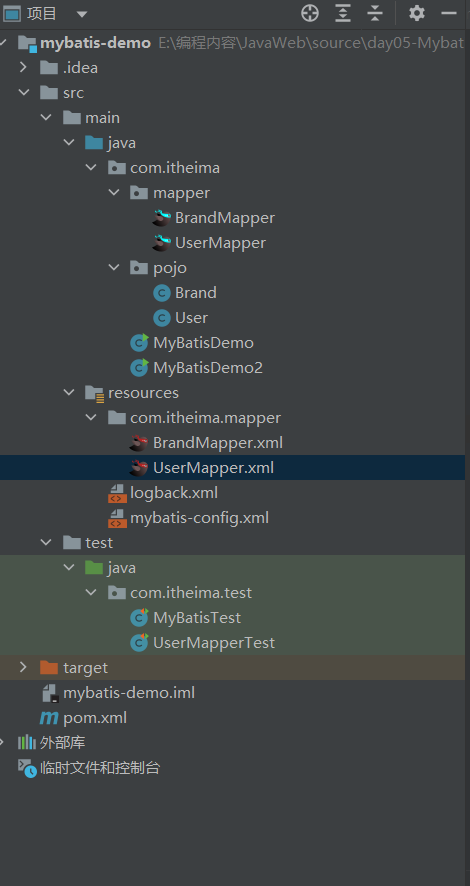
<?xml version="1.0" encoding="UTF-8" ?>
<!DOCTYPE mapper
        PUBLIC "-//mybatis.org//DTD Mapper 3.0//EN"
        "http://mybatis.org/dtd/mybatis-3-mapper.dtd">

<!--
    namespace:名称空间
-->

<mapper namespace="com.itheima.mapper.UserMapper">

    <!--statement-->
    <select id="selectAll" resultType="user">
        select *
        from tb_user;
    </select>
</mapper>
package com.itheima.mapper;

import com.itheima.pojo.User;
import org.apache.ibatis.annotations.Param;
import org.apache.ibatis.annotations.Select;

import java.util.Collection;
import java.util.List;
import java.util.Map;
import java.util.Set;

public interface UserMapper {

    List<User> selectAll();

}
package com.itheima;


import com.itheima.mapper.UserMapper;
import com.itheima.pojo.User;
import org.apache.ibatis.io.Resources;
import org.apache.ibatis.session.SqlSession;
import org.apache.ibatis.session.SqlSessionFactory;
import org.apache.ibatis.session.SqlSessionFactoryBuilder;

import java.io.IOException;
import java.io.InputStream;
import java.util.List;

/**
 * Mybatis 代理开发
 */
public class MyBatisDemo2 {

    public static void main(String[] args) throws IOException {

        //1. 加载mybatis的核心配置文件,获取 SqlSessionFactory
        String resource = "mybatis-config.xml";
        InputStream inputStream = Resources.getResourceAsStream(resource);
        SqlSessionFactory sqlSessionFactory = new SqlSessionFactoryBuilder().build(inputStream);

        //2. 获取SqlSession对象,用它来执行sql
        SqlSession sqlSession = sqlSessionFactory.openSession();

        //3.1 获取UserMapper接口的代理对象
        //(采用sqlSession方法获得接口类产生对象,调用对象的方法[这里方法来自xml],并根据Mapper接口设置的返回参数)
        UserMapper userMapper = sqlSession.getMapper(UserMapper.class);
        List<User> users = userMapper.selectAll();

        System.out.println(users);
        //4. 释放资源
        sqlSession.close();

    }
}
在mybatis-config.xml文件中我们设置过mapper内容:
    <mappers>
        <!--加载sql映射文件-->
       <mapper resource="com/itheima/mapper/UserMapper.xml">
    </mappers>
但随着sql映射文件增多,单个书写过于麻烦,所以开发出了package方法
    <mappers>
        <!--加载sql映射文件-->
       <!-- <mapper resource="com/itheima/mapper/UserMapper.xml"/>-->

        <!--Mapper代理方式:通过包扫描的方法,将包中所对应的mapper.xml映射过来-->
        <package name="com.itheima.mapper"/>

    </mappers>
Mybatis核心配置文件就是我们之前写入的mybatis-config.xml文件
现在我们对MyBatis的相关内容进行分析:
下面给出代码展示:
<?xml version="1.0" encoding="UTF-8" ?>
<!DOCTYPE configuration
        PUBLIC "-//mybatis.org//DTD Config 3.0//EN"
        "http://mybatis.org/dtd/mybatis-3-config.dtd">
<configuration>


    <typeAliases>
        <package name="com.itheima.pojo"/>
    </typeAliases>

    <!--
    environments:配置数据库连接环境信息。可以配置多个environment,通过default属性切换不同的environment
    -->
    <environments default="development">
        <environment id="development">
            <transactionManager type="JDBC"/>
            <dataSource type="POOLED">
                <!--数据库连接信息-->
                <property name="driver" value="com.mysql.jdbc.Driver"/>
                <property name="url" value="jdbc:mysql:///mybatis?useSSL=false"/>
                <property name="username" value="root"/>
                <property name="password" value="123456"/>
            </dataSource>
        </environment>

        <environment id="test">
            <transactionManager type="JDBC"/>
            <dataSource type="POOLED">
                <!--数据库连接信息-->
                <property name="driver" value="com.mysql.jdbc.Driver"/>
                <property name="url" value="jdbc:mysql:///mybatis?useSSL=false"/>
                <property name="username" value="root"/>
                <property name="password" value="1234"/>
            </dataSource>
        </environment>
    </environments>
    <mappers>
        <!--加载sql映射文件-->
       <!-- <mapper resource="com/itheima/mapper/UserMapper.xml"/>-->

        <!--Mapper代理方式-->
        <package name="com.itheima.mapper"/>

    </mappers>


</configuration>
在下述内容中,我们会通过一个案例进行MyBatis的增删改查并且补充相应知识点
在开始前,我们同样准备环境:
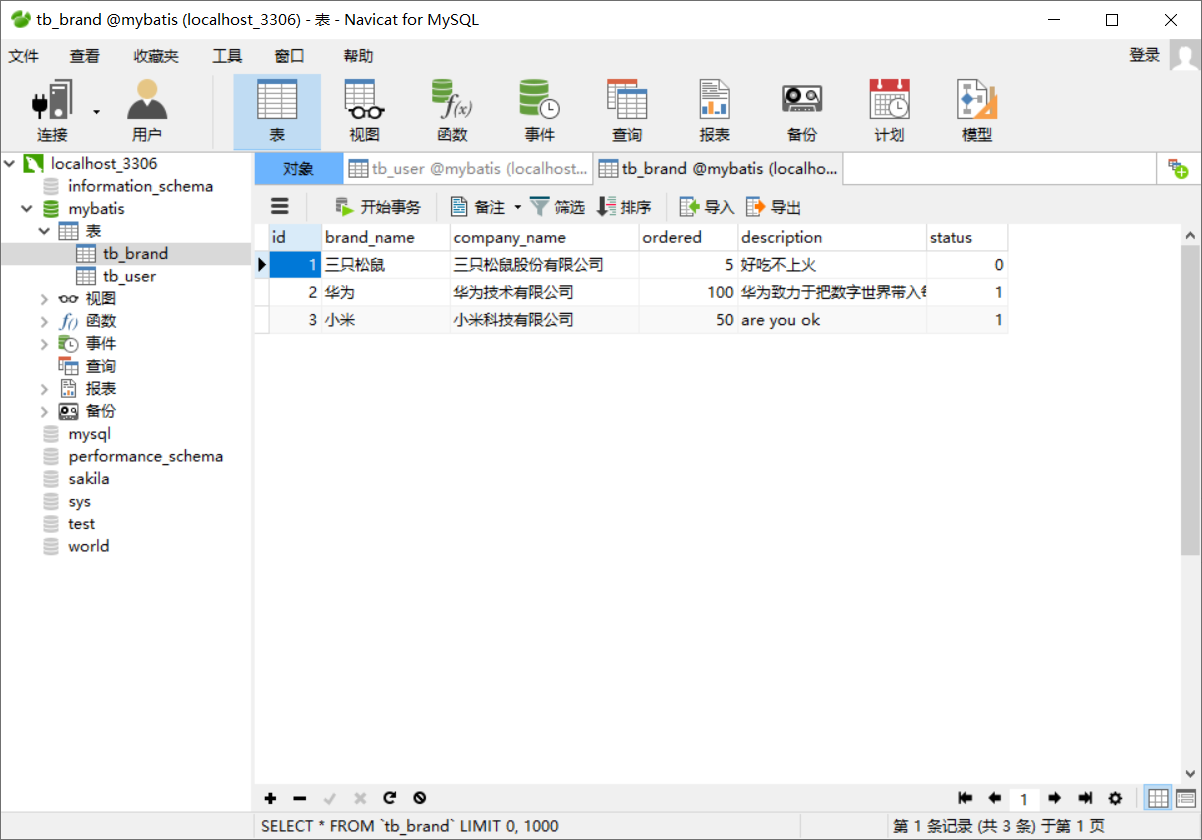
package com.itheima.pojo;

/**
 * 品牌
 *
 * alt + 鼠标左键:整列编辑
 *
 * 在实体类中,基本数据类型建议使用其对应的包装类型
 */

public class Brand {
    // id 主键
    private Integer id;
    // 品牌名称
    private String brandName;
    // 企业名称
    private String companyName;
    // 排序字段
    private Integer ordered;
    // 描述信息
    private String description;
    // 状态:0:禁用  1:启用
    private Integer status;


    public Integer getId() {
        return id;
    }

    public void setId(Integer id) {
        this.id = id;
    }

    public String getBrandName() {
        return brandName;
    }

    public void setBrandName(String brandName) {
        this.brandName = brandName;
    }

    public String getCompanyName() {
        return companyName;
    }

    public void setCompanyName(String companyName) {
        this.companyName = companyName;
    }

    public Integer getOrdered() {
        return ordered;
    }

    public void setOrdered(Integer ordered) {
        this.ordered = ordered;
    }

    public String getDescription() {
        return description;
    }

    public void setDescription(String description) {
        this.description = description;
    }

    public Integer getStatus() {
        return status;
    }

    public void setStatus(Integer status) {
        this.status = status;
    }

    @Override
    public String toString() {
        return "Brand{" +
                "id=" + id +
                ", brandName='" + brandName + '\'' +
                ", companyName='" + companyName + '\'' +
                ", ordered=" + ordered +
                ", description='" + description + '\'' +
                ", status=" + status +
                '}';
    }
}
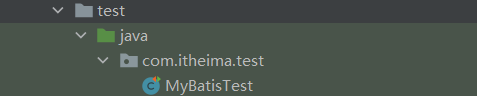
我们将会介绍三种数据查询方法:
接下来我们逐一讲解:
查询所有数据步骤:
package com.itheima.mapper;


import com.itheima.pojo.Brand;
import org.apache.ibatis.annotations.Param;
import org.apache.ibatis.annotations.ResultMap;
import org.apache.ibatis.annotations.Select;

import java.util.List;
import java.util.Map;

public interface BrandMapper {


    /**
     * 查询所有
     */
    List<Brand> selectAll();
}
    <select id="selectAll" resultType="brand">
        select *
        from tb_brand;
    </select>
    @Test
    public void testSelectAll() throws IOException {
        //1. 获取SqlSessionFactory
        String resource = "mybatis-config.xml";
        InputStream inputStream = Resources.getResourceAsStream(resource);
        SqlSessionFactory sqlSessionFactory = new SqlSessionFactoryBuilder().build(inputStream);

        //2. 获取SqlSession对象
        SqlSession sqlSession = sqlSessionFactory.openSession();

        //3. 获取Mapper接口的代理对象
        BrandMapper brandMapper = sqlSession.getMapper(BrandMapper.class);

        //4. 执行方法
        List<Brand> brands = brandMapper.selectAll();
        System.out.println(brands);

        //5. 释放资源
        sqlSession.close();

    }
但是这种方法中,我们会发现brandName和companyName并没有显示
主要原因:
解决方法有两种:
<mapper namespace="com.itheima.mapper.BrandMapper">
	<select id="selectAll" resultMap="brandResultMap">
        select id, brand_name as brandName, company_name as companyName, ordered, description, status
        from tb_brand;
    </select>
</mapper>
<mapper namespace="com.itheima.mapper.BrandMapper">
<!--
        数据库表的字段名称  和  实体类的属性名称 不一样,则不能自动封装数据
            * 起别名:对不一样的列名起别名,让别名和实体类的属性名一样
                * 缺点:每次查询都要定义一次别名
                    * sql片段
                        * 缺点:不灵活
            * resultMap:
                1. 定义<resultMap>标签
                2. 在<select>标签中,使用resultMap属性替换 resultType属性

    -->
    <!--
        id:唯一标识
        type:映射的类型,支持别名
    -->
    <resultMap id="brandResultMap" type="brand">
        <!--
            id:完成主键字段的映射
                column:表的列名
                property:实体类的属性名
            result:完成一般字段的映射
                column:表的列名
                property:实体类的属性名
        -->
        <result column="brand_name" property="brandName"/>
        <result column="company_name" property="companyName"/>
    </resultMap>

   <select id="selectAll" resultMap="brandResultMap">
        select *
        from tb_brand;
    </select>

   <select id="selectAll" resultMap="brand">
        select *
        from tb_brand;
    </select>
</mapper>
单个查询步骤:
Brand selectById(int id);
    <select id="selectById" resultMap="brandResultMap">
        select *
        from tb_brand
        where id = #{id};
    </select>
    @Test
    public void testSelectById() throws IOException {
        //接收参数
        int id = 1;

        //1. 获取SqlSessionFactory
        String resource = "mybatis-config.xml";
        InputStream inputStream = Resources.getResourceAsStream(resource);
        SqlSessionFactory sqlSessionFactory = new SqlSessionFactoryBuilder().build(inputStream);

        //2. 获取SqlSession对象
        SqlSession sqlSession = sqlSessionFactory.openSession();

        //3. 获取Mapper接口的代理对象
        BrandMapper brandMapper = sqlSession.getMapper(BrandMapper.class);

        //4. 执行方法
        Brand brand = brandMapper.selectById(id);
        System.out.println(brand);

        //5. 释放资源
        sqlSession.close();

    }
知识点讲解:
这里我们介绍多条件查询:
    /**
     * 条件查询
     *  * 参数接收
     *      1. 散装参数:如果方法中有多个参数,需要使用@Param("SQL参数占位符名称")
     *      2. 对象参数:对象的属性名称要和参数占位符名称一致
     *      3. map集合参数
     *
     */

    List<Brand> selectByCondition(@Param("status") int status, @Param("companyName") String companyName, @Param("brandName") String brandName);


    List<Brand> selectByCondition(Brand brand);


    List<Brand> selectByCondition(Map map);
    <!--
        条件查询:
		这里#{}中的元素和Param所书写的属性相同;
		如果是Brand,则与Brand的属性相同;
		如果是Map,则与Map集合的键相同即可
    -->
    <select id="selectByCondition" resultMap="brandResultMap">
         select *
         from tb_brand
         where status = #{status}
           and company_name like #{companyName}
           and brand_name like #{brandName}
     </select>
    @Test
    public void testSelectByCondition() throws IOException {
        //接收参数
        int status = 1;
        String companyName = "华为";
        String brandName = "华为";

        // 处理参数
        companyName = "%" + companyName + "%";
        brandName = "%" + brandName + "%";

        //封装对象
       /* Brand brand = new Brand();
        brand.setStatus(status);
        brand.setCompanyName(companyName);
        brand.setBrandName(brandName);*/

        Map map = new HashMap();
        // map.put("status" , status);
        map.put("companyName", companyName);
        // map.put("brandName" , brandName);

        //1. 获取SqlSessionFactory
        String resource = "mybatis-config.xml";
        InputStream inputStream = Resources.getResourceAsStream(resource);
        SqlSessionFactory sqlSessionFactory = new SqlSessionFactoryBuilder().build(inputStream);

        //2. 获取SqlSession对象
        SqlSession sqlSession = sqlSessionFactory.openSession();

        //3. 获取Mapper接口的代理对象
        BrandMapper brandMapper = sqlSession.getMapper(BrandMapper.class);

        //4. 执行方法

        //List<Brand> brands = brandMapper.selectByCondition(status, companyName, brandName);
//        List<Brand> brands = brandMapper.selectByCondition(brand);
        List<Brand> brands = brandMapper.selectByCondition(map);
        System.out.println(brands);

        //5. 释放资源
        sqlSession.close();

    }
动态查询概念:
动态SQL语句:
<!--
if标签:整体框架
test:判断条件
  <if test="title != null">
		sql语句内容
  </if>
-->

<select id="findActiveBlogWithTitleLike"
     resultType="Blog">
  SELECT * FROM BLOG
  WHERE state = ‘ACTIVE’
  <if test="title != null">
    AND title like #{title}
  </if>
</select>
    <!--
        动态条件查询
            * if: 条件判断
                * test:逻辑表达式
            * 问题:
                * 恒等式
                * <where> 替换 where 关键字
    -->

<!--这里的where会根据实际情况,自行添加and或者删除and-->
	<select id="selectByCondition" resultMap="brandResultMap">
        select *
        from tb_brand
        /* where 1 = 1*/
        <where>

            <if test="status != null">
                and status = #{status}
            </if>
            <if test="companyName != null and companyName != '' ">
                and company_name like #{companyName}
            </if>
            <if test="brandName != null and brandName != '' ">
                and brand_name like #{brandName}
            </if>

        </where>
<!--

<choose> <!--相当于switch-->
<when test="status != null"> <!--相当于case-->

-->


<select id="findActiveBlogLike"
     resultType="Blog">
  SELECT * FROM BLOG WHERE state = ‘ACTIVE’
  <choose>
    <when test="title != null">
      AND title like #{title}
    </when>
    <when test="author != null and author.name != null">
      AND author_name like #{author.name}
    </when>
    <otherwise>
      AND featured = 1
    </otherwise>
  </choose>
</select>
我们根据两个案例来解释上述语法:
List<Brand> selectByCondition(Brand brand);
    <!--
        动态条件查询
            * if: 条件判断
                * test:逻辑表达式
            * 问题:
                * 恒等式
                * <where> 替换 where 关键字
    -->
    <select id="selectByCondition" resultMap="brandResultMap">
        select *
        from tb_brand
        /* where 1 = 1*/
        <!--这里使用where,防止无条件或者and位置错误-->
        <where>

            <if test="status != null">
                and status = #{status}
            </if>
            <if test="companyName != null and companyName != '' ">
                and company_name like #{companyName}
            </if>
            <if test="brandName != null and brandName != '' ">
                and brand_name like #{brandName}
            </if>

        </where>

    </select>
    @Test
    public void testSelectByCondition() throws IOException {
        //接收参数
        int status = 1;
        String companyName = "华为";
        String brandName = "华为";

        // 处理参数
        companyName = "%" + companyName + "%";
        brandName = "%" + brandName + "%";

        //封装对象
        Brand brand = new Brand();
        brand.setStatus(status);
        brand.setCompanyName(companyName);
        brand.setBrandName(brandName);

        //1. 获取SqlSessionFactory
        String resource = "mybatis-config.xml";
        InputStream inputStream = Resources.getResourceAsStream(resource);
        SqlSessionFactory sqlSessionFactory = new SqlSessionFactoryBuilder().build(inputStream);

        //2. 获取SqlSession对象
        SqlSession sqlSession = sqlSessionFactory.openSession();

        //3. 获取Mapper接口的代理对象
        BrandMapper brandMapper = sqlSession.getMapper(BrandMapper.class);

        //4. 执行方法
		List<Brand> brands = brandMapper.selectByCondition(brand);
        System.out.println(brands);

        //5. 释放资源
        sqlSession.close();

    }
List<Brand> selectByConditionSingle(Brand brand);
    <select id="selectByConditionSingle" resultMap="brandResultMap">
        select *
        from tb_brand
        <!--这里使用where防止无条件出现导致错误-->
        <where>
            <choose><!--相当于switch-->
                <when test="status != null"><!--相当于case-->
                    status = #{status}
                </when>
                <when test="companyName != null and companyName != '' "><!--相当于case-->
                    company_name like #{companyName}
                </when>
                <when test="brandName != null and brandName != ''"><!--相当于case-->
                    brand_name like #{brandName}
                </when>

            </choose>
        </where>
    </select>
    @Test
    public void testSelectByConditionSingle() throws IOException {
        //接收参数
        int status = 1;
        String companyName = "华为";
        String brandName = "华为";

        // 处理参数
        companyName = "%" + companyName + "%";
        brandName = "%" + brandName + "%";

        //封装对象
        Brand brand = new Brand();
        //brand.setStatus(status);
        brand.setCompanyName(companyName);
        //brand.setBrandName(brandName);

        //1. 获取SqlSessionFactory
        String resource = "mybatis-config.xml";
        InputStream inputStream = Resources.getResourceAsStream(resource);
        SqlSessionFactory sqlSessionFactory = new SqlSessionFactoryBuilder().build(inputStream);

        //2. 获取SqlSession对象
        SqlSession sqlSession = sqlSessionFactory.openSession();

        //3. 获取Mapper接口的代理对象
        BrandMapper brandMapper = sqlSession.getMapper(BrandMapper.class);

        //4. 执行方法

        List<Brand> brands = brandMapper.selectByConditionSingle(brand);
        System.out.println(brands);

        //5. 释放资源
        sqlSession.close();

    }
在这小节我们会讲到添加功能并附带返回主键:
添加功能步骤:
void add(Brand brand);
<!--

useGeneratedKeys:对于支持自动生成记录主键的数据库,如:MySQL,SQL Server,此时设置useGeneratedKeys参数值为true,在执行添加记录之后可以获取到数据库自动生成的主键ID。

keyProperty:后面跟数据库中自动增长的列名,这时该属性值就会反馈在Java代码中

-->
<insert id="add" useGeneratedKeys="true" keyProperty="id">
        insert into tb_brand (brand_name, company_name, ordered, description, status)
        values (#{brandName}, #{companyName}, #{ordered}, #{description}, #{status});
    </insert>
    @Test
    public void testAdd() throws IOException {
        //接收参数
        int status = 1;
        String companyName = "波导手机";
        String brandName = "波导";
        String description = "手机中的战斗机";
        int ordered = 100;


        //封装对象
        Brand brand = new Brand();
        brand.setStatus(status);
        brand.setCompanyName(companyName);
        brand.setBrandName(brandName);
        brand.setDescription(description);
        brand.setOrdered(ordered);

        //1. 获取SqlSessionFactory
        String resource = "mybatis-config.xml";
        InputStream inputStream = Resources.getResourceAsStream(resource);
        SqlSessionFactory sqlSessionFactory = new SqlSessionFactoryBuilder().build(inputStream);

        //2. 获取SqlSession对象
        SqlSession sqlSession = sqlSessionFactory.openSession();
        // 这里openSession的参数未设置时为手动提交信息,设置true后为自动提交事务
        //SqlSession sqlSession = sqlSessionFactory.openSession(true);

        //3. 获取Mapper接口的代理对象
        BrandMapper brandMapper = sqlSession.getMapper(BrandMapper.class);

        //4. 执行方法(这里就可以对brand的id进行提取,并输出)

        brandMapper.add(brand);
        Integer id = brand.getId();
        System.out.println(id);

        // 执行add后并未立刻执行,我们需要提交事务才能反馈到数据库中
        sqlSession.commit();

        //5. 释放资源
        sqlSession.close();

    }
该小节中我们会介绍两种修改方法:
我们会在下述内容中一一讲解:
int update(Brand brand);
    <update id="update">
        update tb_brand
        set	brand_name = #{brandName},
            company_name = #{companyName},
            ordered = #{ordered},
            description = #{description},
            status = #{status}
        where id = #{id};
    </update>
    @Test
    public void testUpdate() throws IOException {
        //接收参数
        int status = 0;
        String companyName = "波导手机";
        String brandName = "波导";
        String description = "波导手机,手机中的战斗机";
        int ordered = 200;
        int id = 6;


        //封装对象
        Brand brand = new Brand();
        brand.setStatus(status);
        brand.setCompanyName(companyName);
        brand.setBrandName(brandName);
        brand.setDescription(description);
        brand.setOrdered(ordered);
        brand.setId(id);

        //1. 获取SqlSessionFactory
        String resource = "mybatis-config.xml";
        InputStream inputStream = Resources.getResourceAsStream(resource);
        SqlSessionFactory sqlSessionFactory = new SqlSessionFactoryBuilder().build(inputStream);

        //2. 获取SqlSession对象
        SqlSession sqlSession = sqlSessionFactory.openSession();
        //SqlSession sqlSession = sqlSessionFactory.openSession(true);

        //3. 获取Mapper接口的代理对象
        BrandMapper brandMapper = sqlSession.getMapper(BrandMapper.class);

        //4. 执行方法
        int count = brandMapper.update(brand);
        System.out.println(count);
        //提交事务
        sqlSession.commit();

        //5. 释放资源
        sqlSession.close();

    }
int update(Brand brand);
    <update id="update">
        update tb_brand
        <set>
            <if test="brandName != null and brandName != ''">
                brand_name = #{brandName},
            </if>
            <if test="companyName != null and companyName != ''">
                company_name = #{companyName},
            </if>
            <if test="ordered != null">
                ordered = #{ordered},
            </if>
            <if test="description != null and description != ''">
                description = #{description},
            </if>
            <if test="status != null">
                status = #{status}
            </if>
        </set>
        where id = #{id};
    </update>
    @Test
    public void testUpdate() throws IOException {
        //接收参数
        int status = 0;
        String companyName = "波导手机";
        String brandName = "波导";
        String description = "波导手机,手机中的战斗机";
        int ordered = 200;
        int id = 6;


        //封装对象
        Brand brand = new Brand();
        brand.setStatus(status);
//        brand.setCompanyName(companyName);
//        brand.setBrandName(brandName);
//        brand.setDescription(description);
//        brand.setOrdered(ordered);
        brand.setId(id);

        //1. 获取SqlSessionFactory
        String resource = "mybatis-config.xml";
        InputStream inputStream = Resources.getResourceAsStream(resource);
        SqlSessionFactory sqlSessionFactory = new SqlSessionFactoryBuilder().build(inputStream);

        //2. 获取SqlSession对象
        SqlSession sqlSession = sqlSessionFactory.openSession();
        //SqlSession sqlSession = sqlSessionFactory.openSession(true);

        //3. 获取Mapper接口的代理对象
        BrandMapper brandMapper = sqlSession.getMapper(BrandMapper.class);

        //4. 执行方法


        int count = brandMapper.update(brand);
        System.out.println(count);
        //提交事务
        sqlSession.commit();

        //5. 释放资源
        sqlSession.close();

    }
这节介绍删除功能的两种形式:
我们将会在下面一一讲解:
void deleteById(int id);
    <delete id="deleteById">
        delete from tb_brand where id = #{id};
    </delete>
    @Test
    public void testDeleteById() throws IOException {
        //接收参数

        int id = 6;


        //1. 获取SqlSessionFactory
        String resource = "mybatis-config.xml";
        InputStream inputStream = Resources.getResourceAsStream(resource);
        SqlSessionFactory sqlSessionFactory = new SqlSessionFactoryBuilder().build(inputStream);

        //2. 获取SqlSession对象
        SqlSession sqlSession = sqlSessionFactory.openSession();
        //SqlSession sqlSession = sqlSessionFactory.openSession(true);

        //3. 获取Mapper接口的代理对象
        BrandMapper brandMapper = sqlSession.getMapper(BrandMapper.class);

        //4. 执行方法

        brandMapper.deleteById(id);

        //提交事务
        sqlSession.commit();

        //5. 释放资源
        sqlSession.close();

    }
void deleteByIds(int[] ids);
    <!--
        mybatis会将数组参数,封装为一个Map集合。
            * 默认:array = 数组
            * 使用@Param注解改变map集合的默认key的名称
    -->

    <!--
    foreach:类似于for强化语句
    collection:集合/数组
    item:数组中的单个值
    separator:分割符
    open:开始处添加符号
    close:结尾处添加符合
    -->

    <delete id="deleteByIds">
        delete from tb_brand where id
        in
        <!--这部分整合出来类似于:(id1,id2,id3....)-->
            <foreach collection="array" item="id" separator="," open="(" close=")">
                #{id}
            </foreach>
             ;
    </delete>
    @Test
    public void testDeleteByIds() throws IOException {
        //接收参数

        int[] ids = {5,7,8};


        //1. 获取SqlSessionFactory
        String resource = "mybatis-config.xml";
        InputStream inputStream = Resources.getResourceAsStream(resource);
        SqlSessionFactory sqlSessionFactory = new SqlSessionFactoryBuilder().build(inputStream);

        //2. 获取SqlSession对象
        SqlSession sqlSession = sqlSessionFactory.openSession();
        //SqlSession sqlSession = sqlSessionFactory.openSession(true);

        //3. 获取Mapper接口的代理对象
        BrandMapper brandMapper = sqlSession.getMapper(BrandMapper.class);

        //4. 执行方法

        brandMapper.deleteByIds(ids);

        //提交事务
        sqlSession.commit();

        //5. 释放资源
        sqlSession.close();

    }
MyBatis接口方法中可以接收各种各样的参数,MyBatis底层对这些参数有着不同的封装处理方法
我们在下面一一介绍:
在接口多参数传递中会把所有参数转移为Map集合
会转化为两种Map集合:
arg集合,下标从0开始: arg[0]
Param集合,下标从1开始: Param[1]
我们在xml中也可以直接使用arg或param来直接表示(但不推荐,因为不能直观得到信息)
我们所推荐的做法是使用@Param注解:
在参数前加上注解@Param("")
注意:这里使用Param注解实际上是对Param集合的键进行修改,也就是说你的Param集合将不再能够使用
常见的单参数传递分为六种:
POJO类型: 直接使用, 属性名 和 参数占位符 名称一致即可
Map集合: 直接使用,键名 和 参数占位符 名称一致即可
Collection: 封装为Map集合
List: 封装为Map集合
Array:封装为Map
其他类型:直接使用
我们先来介绍注解开发的格式:
// 相当于节省了xml的一步,直接在接口中定义方法

@Select("select * from tb_user where id = #{id}")
List<Brand> selectAll();
当然,注解的方法也分为四种:
注解的优缺点:
使用注解来映射简单语句会使代码显得更加简洁,但对于稍微复杂一点的语句,Java 注解不仅力不从心,还会让你本就复杂的 SQL 语句更加混乱不堪。 因此,如果你需要做一些很复杂的操作,最好用 XML 来映射语句。
选择何种方式来配置映射,以及认为是否应该要统一映射语句定义的形式,完全取决于你和你的团队。 换句话说,永远不要拘泥于一种方式,你可以很轻松的在基于注解和 XML 的语句映射方式间自由移植和切换。
好的,关于MyBatis的内容就介绍到这里,希望能为你带来帮助!
该文章属于学习内容,具体参考B站黑马程序员陈老师的JavaWeb课程
这里附上链接:01-MyBatis简介_哔哩哔哩_bilibili
我主要使用Ruby来执行此操作,但到目前为止我的攻击计划如下:使用gemsrdf、rdf-rdfa和rdf-microdata或mida来解析给定任何URI的数据。我认为最好映射到像schema.org这样的统一模式,例如使用这个yaml文件,它试图描述数据词汇表和opengraph到schema.org之间的转换:#SchemaXtoschema.orgconversion#data-vocabularyDV:name:namestreet-address:streetAddressregion:addressRegionlocality:addressLocalityphoto:i
有时我需要处理键/值数据。我不喜欢使用数组,因为它们在大小上没有限制(很容易不小心添加超过2个项目,而且您最终需要稍后验证大小)。此外,0和1的索引变成了魔数(MagicNumber),并且在传达含义方面做得很差(“当我说0时,我的意思是head...”)。散列也不合适,因为可能会不小心添加额外的条目。我写了下面的类来解决这个问题:classPairattr_accessor:head,:taildefinitialize(h,t)@head,@tail=h,tendend它工作得很好并且解决了问题,但我很想知道:Ruby标准库是否已经带有这样一个类? 最佳
我正在尝试使用Curbgem执行以下POST以解析云curl-XPOST\-H"X-Parse-Application-Id:PARSE_APP_ID"\-H"X-Parse-REST-API-Key:PARSE_API_KEY"\-H"Content-Type:image/jpeg"\--data-binary'@myPicture.jpg'\https://api.parse.com/1/files/pic.jpg用这个:curl=Curl::Easy.new("https://api.parse.com/1/files/lion.jpg")curl.multipart_form_
无论您是想搭建桌面端、WEB端或者移动端APP应用,HOOPSPlatform组件都可以为您提供弹性的3D集成架构,同时,由工业领域3D技术专家组成的HOOPS技术团队也能为您提供技术支持服务。如果您的客户期望有一种在多个平台(桌面/WEB/APP,而且某些客户端是“瘦”客户端)快速、方便地将数据接入到3D应用系统的解决方案,并且当访问数据时,在各个平台上的性能和用户体验保持一致,HOOPSPlatform将帮助您完成。利用HOOPSPlatform,您可以开发在任何环境下的3D基础应用架构。HOOPSPlatform可以帮您打造3D创新型产品,HOOPSSDK包含的技术有:快速且准确的CAD
本教程将在Unity3D中混合Optitrack与数据手套的数据流,在人体运动的基础上,添加双手手指部分的运动。双手手背的角度仍由Optitrack提供,数据手套提供双手手指的角度。 01 客户端软件分别安装MotiveBody与MotionVenus并校准人体与数据手套。MotiveBodyMotionVenus数据手套使用、校准流程参照:https://gitee.com/foheart_1/foheart-h1-data-summary.git02 数据转发打开MotiveBody软件的Streaming,开始向Unity3D广播数据;MotionVenus中设置->选项选择Unit
文章目录一、概述简介原理模块二、配置Mysql使用版本环境要求1.操作系统2.mysql要求三、配置canal-server离线下载在线下载上传解压修改配置单机配置集群配置分库分表配置1.修改全局配置2.实例配置垂直分库水平分库3.修改group-instance.xml4.启动监听四、配置canal-adapter1修改启动配置2配置映射文件3启动ES数据同步查询所有订阅同步数据同步开关启动4.验证五、配置canal-admin一、概述简介canal是Alibaba旗下的一款开源项目,Java开发。基于数据库增量日志解析,提供增量数据订阅&消费。Git地址:https://github.co
我正在尝试在Rails上安装ruby,到目前为止一切都已安装,但是当我尝试使用rakedb:create创建数据库时,我收到一个奇怪的错误:dyld:lazysymbolbindingfailed:Symbolnotfound:_mysql_get_client_infoReferencedfrom:/Library/Ruby/Gems/1.8/gems/mysql2-0.3.11/lib/mysql2/mysql2.bundleExpectedin:flatnamespacedyld:Symbolnotfound:_mysql_get_client_infoReferencedf
文章目录1.开发板选择*用到的资源2.串口通信(个人理解)3.代码分析(注释比较详细)1.主函数2.串口1配置3.串口2配置以及中断函数4.注意问题5.源码链接1.开发板选择我用的是STM32F103RCT6的板子,不过代码大概在F103系列的板子上都可以运行,我试过在野火103的霸道板上也可以,主要看一下串口对应的引脚一不一样就行了,不一样的就更改一下。*用到的资源keil5软件这里用到了两个串口资源,采集数据一个,串口通信一个,板子对应引脚如下:串口1,TX:PA9,RX:PA10串口2,TX:PA2,RX:PA32.串口通信(个人理解)我就从串口采集传感器数据这个过程说一下我自己的理解,
SPI接收数据左移一位问题目录SPI接收数据左移一位问题一、问题描述二、问题分析三、探究原理四、经验总结最近在工作在学习调试SPI的过程中遇到一个问题——接收数据整体向左移了一位(1bit)。SPI数据收发是数据交换,因此接收数据时从第二个字节开始才是有效数据,也就是数据整体向右移一个字节(1byte)。请教前辈之后也没有得到解决,通过在网上查阅前人经验终于解决问题,所以写一个避坑经验总结。实际背景:MCU与一款芯片使用spi通信,MCU作为主机,芯片作为从机。这款芯片采用的是它规定的六线SPI,多了两根线:RDY和INT,这样从机就可以主动请求主机给主机发送数据了。一、问题描述根据从机芯片手
前言一般来说,前端根据后台返回code码展示对应内容只需要在前台判断code值展示对应的内容即可,但要是匹配的code码比较多或者多个页面用到时,为了便于后期维护,后台就会使用字典表让前端匹配,下面我将在微信小程序中通过wxs的方法实现这个操作。为什么要使用wxs?{{method(a,b)}}可以看到,上述代码是一个调用方法传值的操作,在vue中很常见,多用于数据之间的转换,但由于微信小程序诸多限制的原因,你并不能优雅的这样操作,可能有人会说,为什么不用if判断实现呢?但是if判断的局限性在于如果存在数据量过大时,大量重复性操作和if判断会让你的代码显得异常冗余。wxswxs相当于是一个独立
