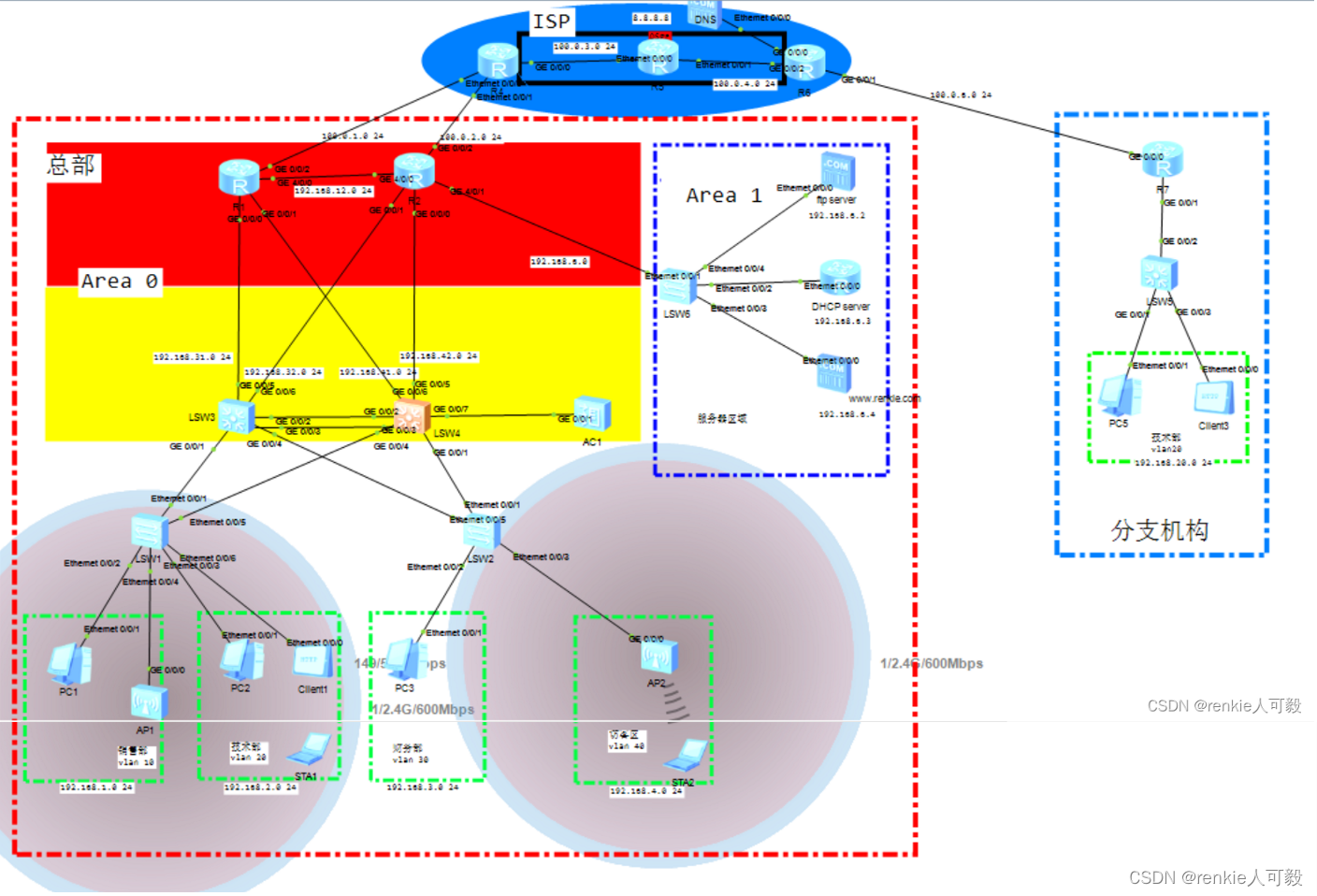
总公司一共有三个部门:销售部、技术部、财务部,临设访客区域。分公司这里简化为只有一个技术部门
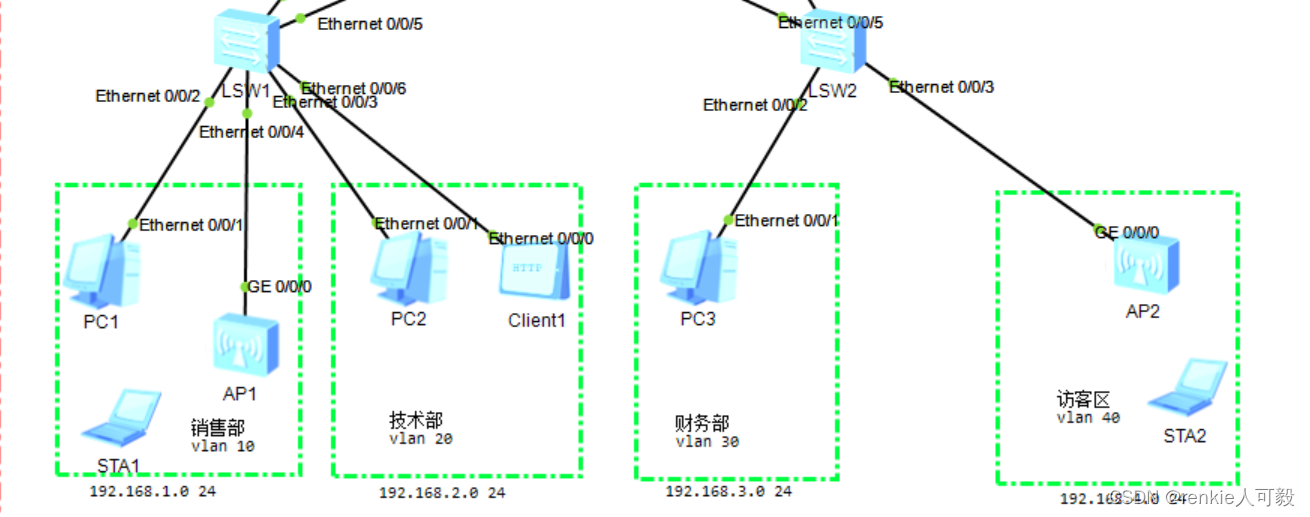
分别在LSW1和LSW2基于接口划分VLAN,终端不必配置ip地址,后面配置DHCP自动获取 。
以LSW1为例:
interface Ethernet0/0/2
 port link-type access
 port default vlan 10

interface Ethernet0/0/3
 port link-type access
 port default vlan 20

interface Ethernet0/0/6
 port link-type access
 port default vlan 20
注意:连接AP的接口,我们后面在WLAN在进行配置。
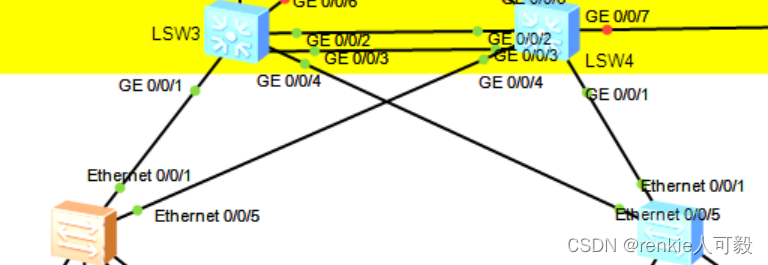
首先二层交换机与三层交换机的链路类型采用Trunk,允许VLAN10~VLAN40通过,在LSW3、LSW4上创建vlan10 -vlan20的vlanif接口。(这里的链路、设备做了冗余。)
以LSW1、LSW3为例:
#LSW1:
vlan batch 10 20 30 40
interface Ethernet0/0/1
 port link-type trunk
 port trunk allow-pass vlan 10 20 30 40

interface Ethernet0/0/5
 port link-type trunk
 port trunk allow-pass vlan 10 20 30 40
*******************************************************************************************
#LSW3:
vlan batch 10 20 30 to 32 40
interface Vlanif10
 ip address 192.168.1.1 255.255.255.0
interface Vlanif20
 ip address 192.168.2.1 255.255.255.0
interface Vlanif30
 ip address 192.168.3.1 255.255.255.0
interface Vlanif40
 ip address 192.168.2.1 255.255.255.0
interface GigabitEthernet0/0/1
 port link-type trunk
 port trunk allow-pass vlan 10 20 30 40
interface GigabitEthernet0/0/4
 port link-type trunk
port trunk allow-pass vlan 10 20 30 40 以LSW3为例:
interface Eth-Trunk1
 port link-type trunk
 port trunk allow-pass vlan 10 20 30 40
 mode lacp-static
trunkport GigabitEthernet 0/0/2 0/0/3在LSW3和LSW4分别配置实例,将VLAN10和VLAN20划分进实例1,将VLAN20和VLAN30划分进实例2,LSW3为实例1的主根,LSW4为实例2的主根。
在LSW1、LSW2、LSW3、LSW4配置:
stp mode mstp
stp region-configuration
 instance 1 vlan 10 20
 instance 2 vlan 30 40
 active region-configuration
在LSW3上配置和LSW4上配置:
LSW3:
stp instance 1 root primary
stp instance 2 root secondary
*******************************************************************************************
LSW4:
stp instance 2 root primary
stp instance 1 root secondary
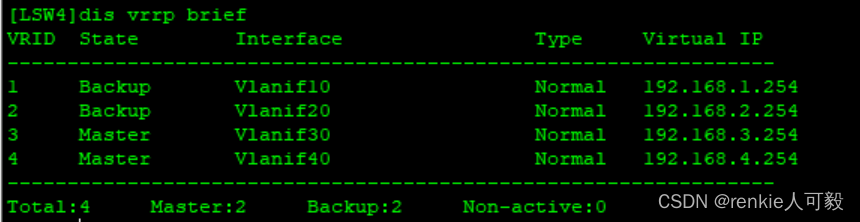
配置VRRP,vlan10、vlan20的master路由器为LSW3,vlan30、vlan40的主master路由器为LSW4,且配置抢占延时为60s。
LSW3:
interface Vlanif10
 ip address 192.168.1.1 255.255.255.0
 vrrp vrid 1 virtual-ip 192.168.1.254
 vrrp vrid 1 priority 120
 vrrp vrid 1 preempt-mode timer delay 60

interface Vlanif20
 ip address 192.168.2.1 255.255.255.0
 vrrp vrid 2 virtual-ip 192.168.2.254
 vrrp vrid 2 priority 120
 vrrp vrid 2 preempt-mode timer delay 60

interface Vlanif30
 ip address 192.168.3.1 255.255.255.0
 vrrp vrid 3 virtual-ip 192.168.3.254

interface Vlanif40
 ip address 192.168.4.1 255.255.255.0
 vrrp vrid 4 virtual-ip 192.168.4.254
*****************************************************************************************
LSW4:
interface Vlanif10
 ip address 192.168.1.2 255.255.255.0
 vrrp vrid 1 virtual-ip 192.168.1.254

interface Vlanif20
 ip address 192.168.2.2 255.255.255.0
 vrrp vrid 2 virtual-ip 192.168.2.254

interface Vlanif30
 ip address 192.168.3.2 255.255.255.0
 vrrp vrid 3 virtual-ip 192.168.3.254
 vrrp vrid 3 priority 120
 vrrp vrid 3 preempt-mode timer delay 60

interface Vlanif40
 ip address 192.168.4.2 255.255.255.0
 vrrp vrid 4 virtual-ip 192.168.4.254
 vrrp vrid 4 priority 120
 vrrp vrid 4 preempt-mode timer delay 60
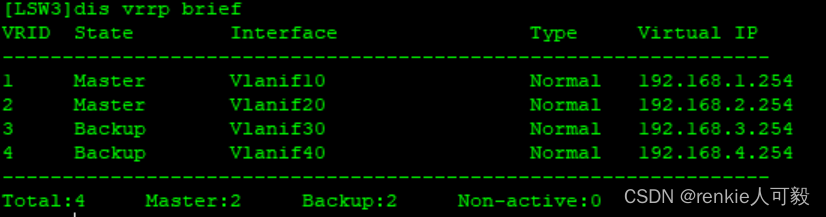
分别在LSW3/LSW4查看VRRP状态:
 将交换机连接路由器和终端的接口配置为边缘接口,以LSW1为例:
port-group group-member Ethernet 0/0/2 Ethernet 0/0/4 Ethernet 0/0/3 Ethernet 0/0/6
stp edged-port enable
port-group group-member 用于批量配置接口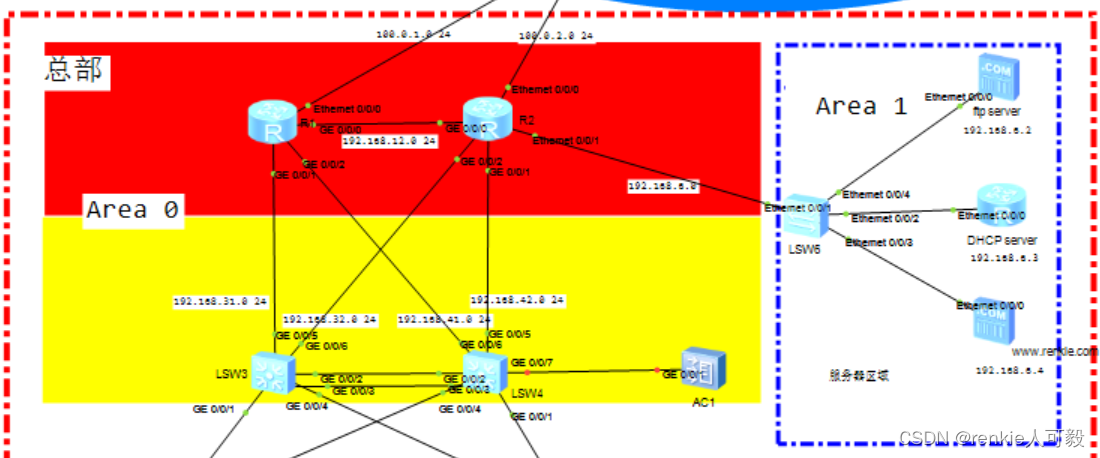 由于模拟器不支持直接在三层接口配置ip地址,所以采用vlanif接口来配置。以LSW3和R1互联为例:
LSW3:
vlan batch 31 32
interface Vlanif31
 ip address 192.168.31.1 255.255.255.252
#
interface Vlanif32
 ip address 192.168.32.1 255.255.255.252
#
interface GigabitEthernet0/0/5
 port link-type trunk
 port trunk pvid vlan 31
 port trunk allow-pass vlan 31
#
interface GigabitEthernet0/0/6
 port link-type trunk
 port trunk pvid vlan 32
 port trunk allow-pass vlan 32
*******************************************************************************************
R1:
interface GigabitEthernet0/0/1
 ip address 192.168.31.2 255.255.255.252
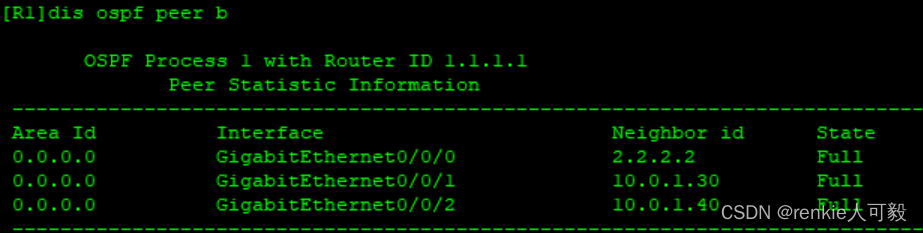
在三层交换机和路由器上配置ospf协议,将其互联网段宣告进ospf area0中,以R1为例:
ospf 1 router-id 1.1.1.1
 area 0.0.0.0
  network 192.168.31.2 0.0.0.0
  network 192.168.41.2 0.0.0.0
  network 192.168.12.1 0.0.0.0
  network 1.1.1.1 0.0.0.0
  network 192.168.13.1 0.0.0.0
查看ospf邻居建立情况:
将三层交换机下连直连网段引入ospf中,并通过路由策略,过滤不必要路由。
acl number 2000
 rule 5 permit source 192.168.0.0 0.0.255.255
route-policy im permit node 10
 if-match acl 2000
ospf 1
 import-route direct route-policy im
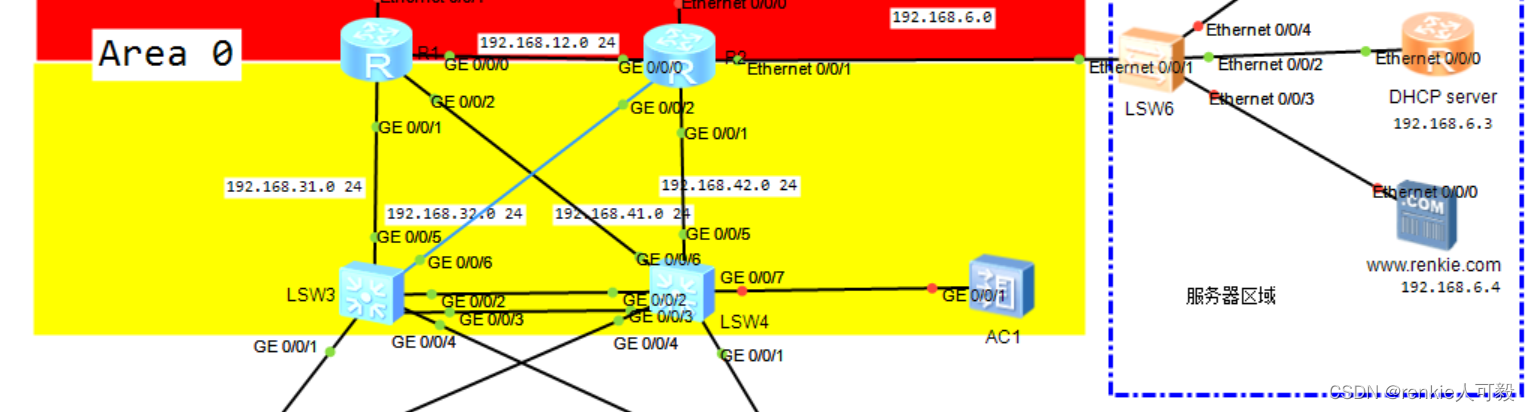
将R2连接的服务器区域网络宣告进area1 中,并把区域1配置totally stub区域,减小区域1的路由规模,防止区域0引起的路由震荡问题。
 area 0.0.0.1
  network 192.168.6.0 0.0.0.255
  stub no-summary
在R1和R2上配置静态缺省出口路由,并在ospf中下发缺省路由。
至此全网互通。
这里我们用路由器模拟DHCP服务器,由于服务器与待分配的ip不在同一网段,所以需要配置DHCP Relay。
DHCP Server配置 :
dhcp enable

ip pool vlan10
 gateway-list 192.168.1.254
 network 192.168.1.0 mask 255.255.255.0
 dns-list 8.8.8.8

ip pool vlan20
 gateway-list 192.168.2.254
 network 192.168.2.0 mask 255.255.255.0
 dns-list 8.8.8.8

ip pool vlan30
 gateway-list 192.168.3.254
 network 192.168.3.0 mask 255.255.255.0
 dns-list 8.8.8.8

ip pool vlan40
 gateway-list 192.168.4.254
 network 192.168.4.0 mask 255.255.255.0
 dns-list 8.8.8.8

interface Ethernet0/0/0
 ip address 192.168.6.3 255.255.255.0
 dhcp select global
ip route-static 0.0.0.0 0.0.0.0 192.168.6.1 #由与DHCP server用的是路由器,没有到area 0的路由,故写一条静态默认路由到R2。
在LSW3和LSW3上配置DHCP Relay,以LSW3为例:
interface Vlanif10
 dhcp select relay
 dhcp relay server-ip 192.168.6.3
interface Vlanif20
 dhcp select relay
 dhcp relay server-ip 192.168.6.3
interface Vlanif30
 dhcp select relay
 dhcp relay server-ip 192.168.6.3
interface Vlanif40
 dhcp select relay
 dhcp relay server-ip 192.168.6.3
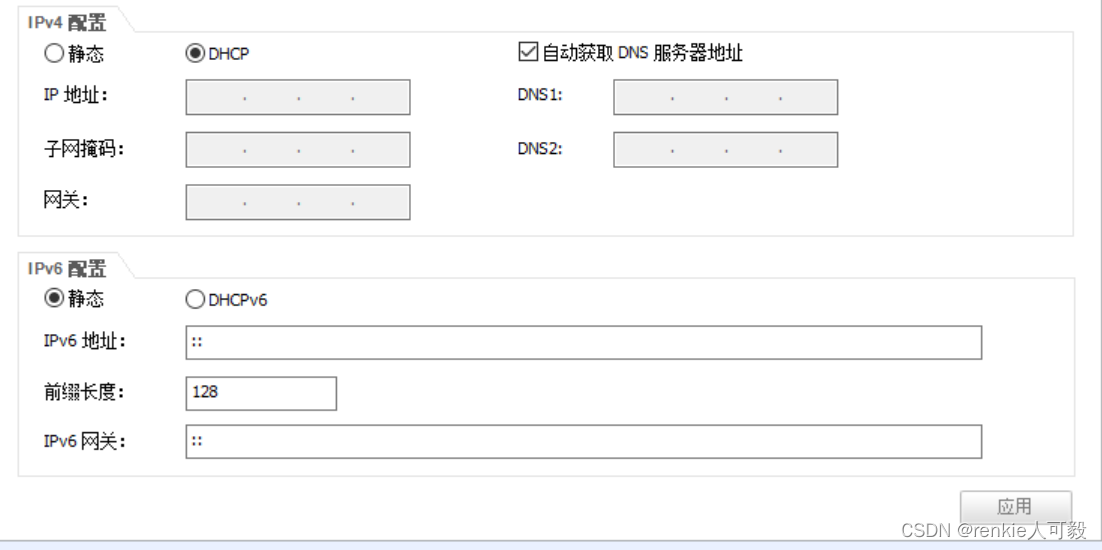
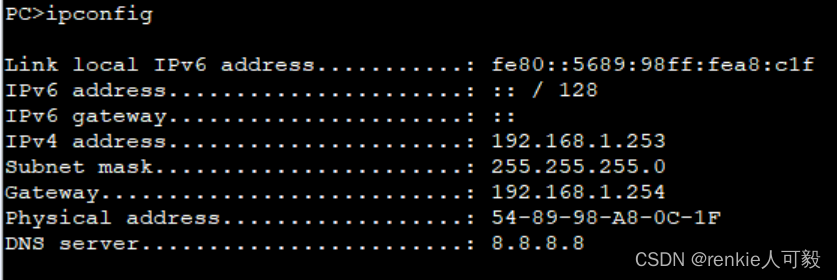
选择DHCP,点击应用,查看配置信息,成功获取到ip地址。
我们采用二层旁挂式直接转发组网的方式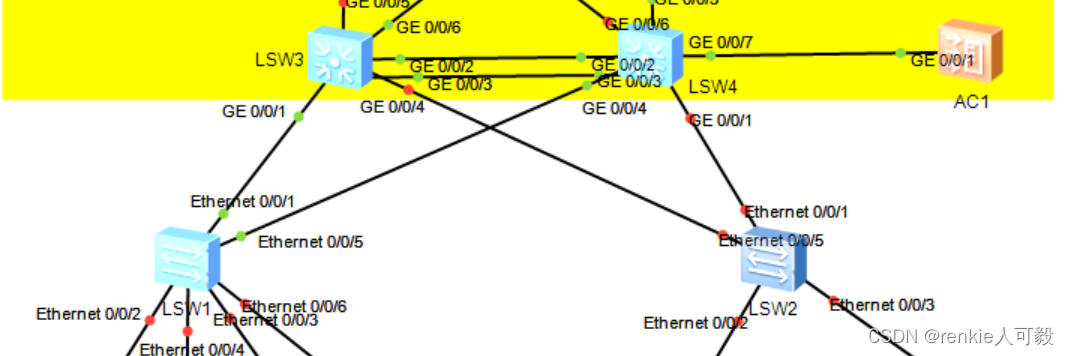
首先我们在AC上创建一个管理VLAN100,用来管理AP:给AP分配地址。
vlan batch 100
interface Vlanif100
 ip address 192.168.100.254 255.255.255.0
在交换机与交换机、交换机与AC的互联链路允许VLAN100通过。以AC为例:
vlan batch 100
interface GigabitEthernet0/0/1
 port link-type trunk
 port trunk allow-pass vlan 100
在AC上创建地址池,用于给AP分配ip地址,并在接口下配置全局应用。
dhcp enable
ip pool ap
 gateway-list 192.168.100.254
 network 192.168.100.0 mask 255.255.255.0
int vlanif 100
 dhcp select global
将交换机连接AP的接口链路类型配置为trunk,允许vlan100以及STA业务流量vlan20通过。
interface Ethernet0/0/4
 port link-type trunk
 port trunk pvid vlan 100
 port trunk allow-pass vlan 20 100
AP通过DHCP获取到了IP地址


在AC上创建AP组
# 创建AP组,用于将相同配置的AP都加入同一AP组中
[AC] wlan
[AC-wlan-view] ap-group name ap-group1
[AC-wlan-ap-group-ap-group1] quit
[AC-wlan-view] ap-group name ap-group2
创建域管理模板,并配置AC的国家码。
AC-wlan-view] regulatory-domain-profile name default
[AC-wlan-regulate-domain-default] country-code cn
[AC-wlan-regulate-domain-default] quit
[AC-wlan-view] ap-group name ap-group1
[AC-wlan-ap-group-ap-group1] regulatory-domain-profile default

Warning: Modifying the country code will clear channel, power and antenna gain configurations of the radio and reset the AP. Continue?[Y/N]:y

[AC-wlan-view] ap-group name ap-group2
[AC-wlan-ap-group-ap-group2] regulatory-domain-profile default

Warning: Modifying the country code will clear channel, power and antenna gain configurations of the radio and reset the AP. Continue?[Y/N]:y
配置AC的源接口。
[AC] capwap source interface vlanif 100
在AC上离线导入AP。
[AC] wlan
[AC-wlan-view] ap auth-mode mac-auth
[AC-wlan-view] ap-id 0 ap-mac 00e0-fc0f-6500
[AC-wlan-ap-0] ap-name area_1
Warning: This operation may cause AP reset. Continue? [Y/N]:y

[AC-wlan-ap-0] ap-group ap-group1
Warning: This operation may cause AP reset. If the country code changes, it will clear channel, power and antenna gain configurations of the radio, Whether to continue? [Y/N]:y

[AC-wlan-view] ap-id 1 ap-mac  00e0-fce3-4190
[AC-wlan-ap-0] ap-name area_2
Warning: This operation may cause AP reset. Continue? [Y/N]:y
[AC-wlan-ap-0] ap-group ap-group2
Warning: This operation may cause AP reset. If the country code changes, it will clear channel, power and antenna gain configurations of the radio, Whether to continue? [Y/N]:y

注:ap-mac可通过在AP上执行'dis interface Vlanif 1'查看,和本实验的mac地址是不一样的。
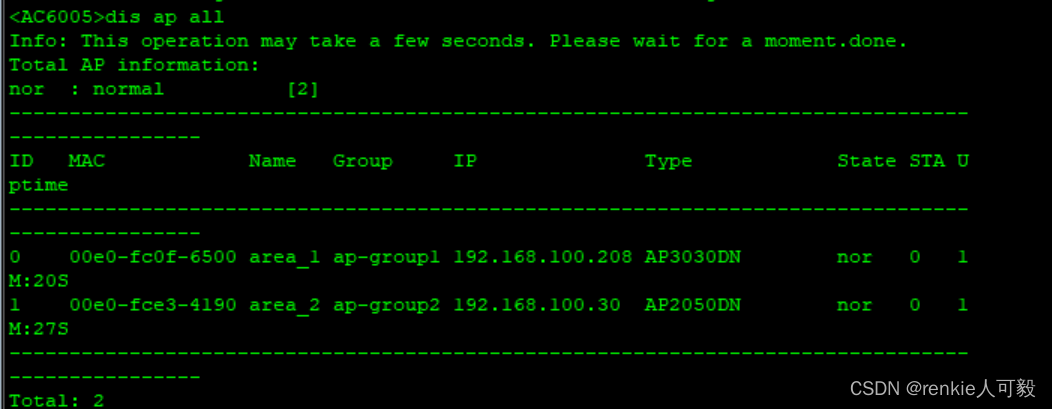
查看AP上线
创建名为“wlan-net”的安全模板,并配置安全策略。
[AC-wlan-view] security-profile name wlan-net
[AC-wlan-sec-prof-wlan-net] security wpa-wpa2 psk pass-phrase a1234567 aes
[AC-wlan-sec-prof-wlan-net] quit
创建名为“JiShu”的SSID模板,并配置SSID名称为“JiShu”,名为“FangKe”的SSID模板,并配置SSID名称为“FangKe”。
[AC-wlan-view] ssid-profile name JiShu
[AC-wlan-ssid-prof-wlan-net] ssid JiShu
[AC-wlan-ssid-prof-wlan-net] quit
[AC-wlan-view] ssid-profile name FangKe
[AC-wlan-ssid-prof-wlan-net] ssid FangKe
分别创建名为“JiShu”、“FangKe”的VAP模板,配置业务数据转发模式、业务VLAN,并且引用安全模板和SSID模板。
[AC-wlan-view] vap-profile name JiShu
[AC-wlan-vap-prof-wlan-net] forward-mode direct-forward
[AC-wlan-vap-prof-wlan-net] service-vlan vlan-id 20
[AC-wlan-vap-prof-wlan-net] security-profile wlan-net
[AC-wlan-vap-prof-wlan-net] ssid-profile JiShu
[AC-wlan-vap-prof-wlan-net] quit

[AC-wlan-view] vap-profile name FangKe
[AC-wlan-vap-prof-wlan-net] forward-mode direct-forward
[AC-wlan-vap-prof-wlan-net] service-vlan vlan-id 40
[AC-wlan-vap-prof-wlan-net] security-profile wlan-net
[AC-wlan-vap-prof-wlan-net] ssid-profile FangKe
[AC-wlan-vap-prof-wlan-net] quit
配置AP组引用VAP模板,AP上射频0使用VAP模板“wlan-net”的配置。
[AC-wlan-view] ap-group name ap-group1
[AC-wlan-ap-group-ap-group1] vap-profile JiShu wlan 1 radio 0
[AC-wlan-ap-group-ap-group1] vap-profile JiShu wlan 1 radio 1
[AC-wlan-ap-group-ap-group1] quit
[AC-wlan-view] ap-group name ap-group2
[AC-wlan-ap-group-ap-group1] vap-profile FangKe wlan 1 radio 0
[AC-wlan-ap-group-ap-group1] vap-profile FangKe wlan 1 radio 1
[AC-wlan-ap-group-ap-group1] quit
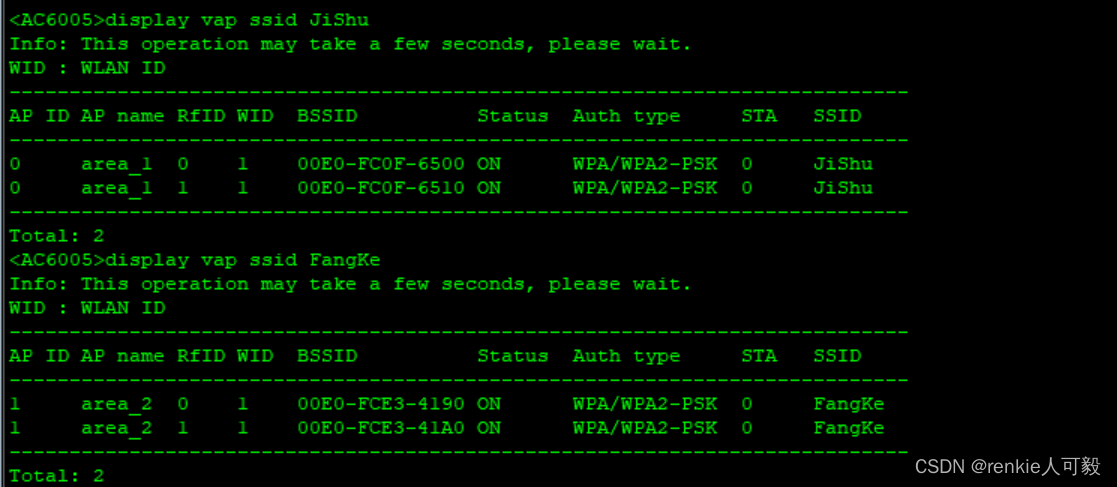
查看VAP模板信息
WLAN业务配置会自动下发给AP,配置完成后,通过执行命令查看如下信息,当“Status”项显示为“ON”时,表示AP对应的射频上的VAP已创建成功。
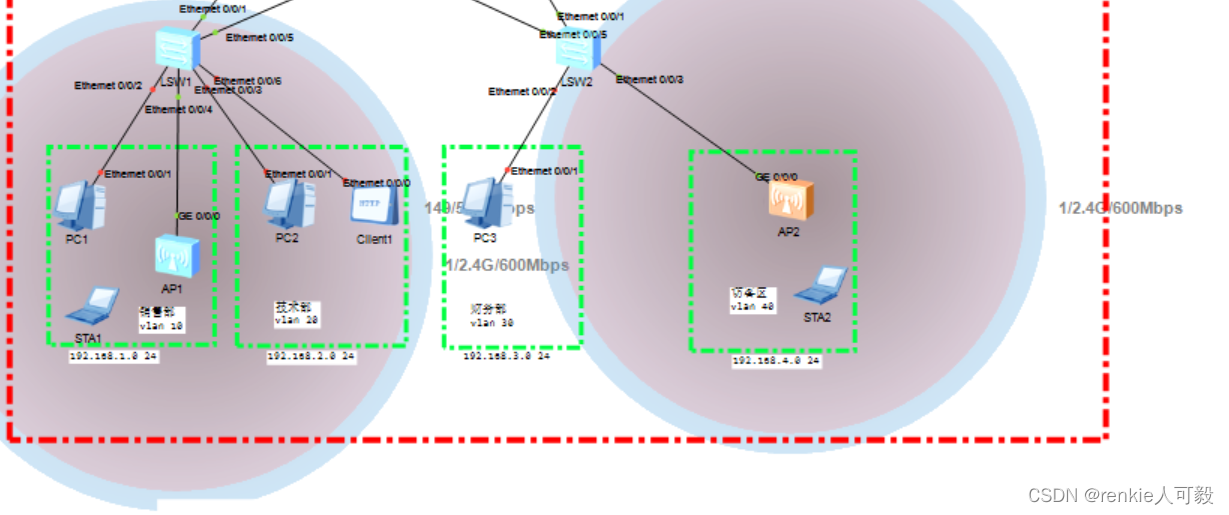
此时AP附近出现了无线信号圈
结果验证 :
STA通过DHCP获取地址
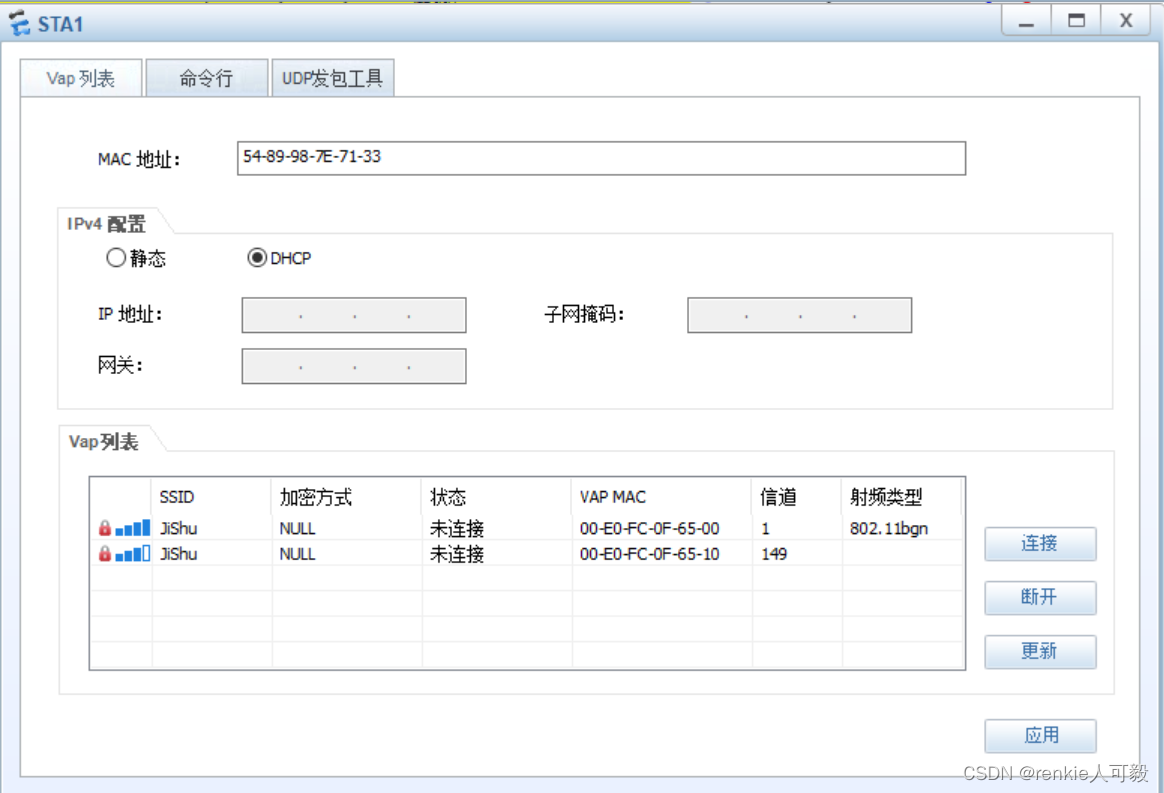
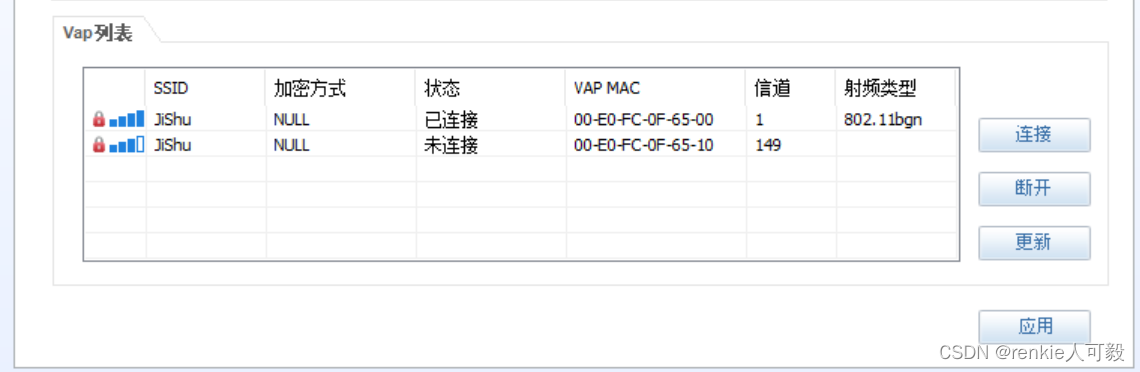
1.将STA获取ip地址的方式选为DHCP,点击应用。注意,在没有点击连接的时候,STA是无法自动获取到ip地址的。
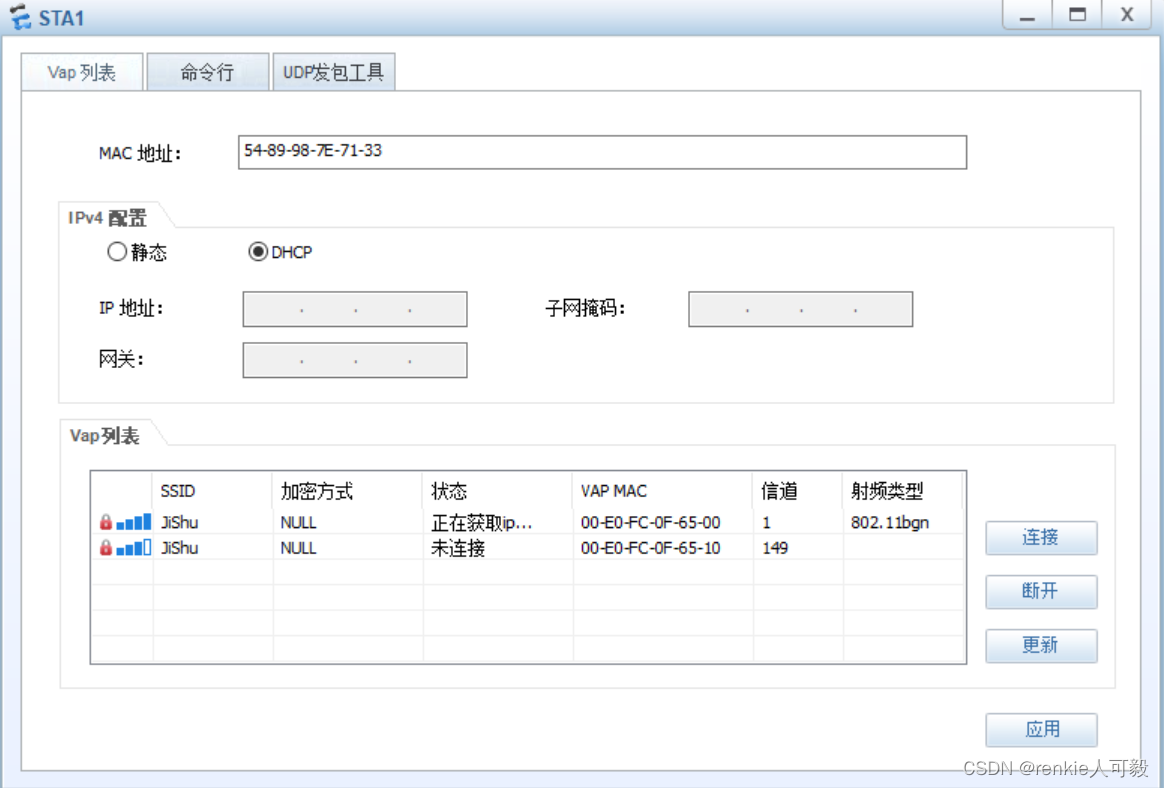
2.双击vap列表的wlan,弹出输入密码界面,输入前面配置的密码:a1234567 。可以看到正在获取ip...到已连接的阶段。
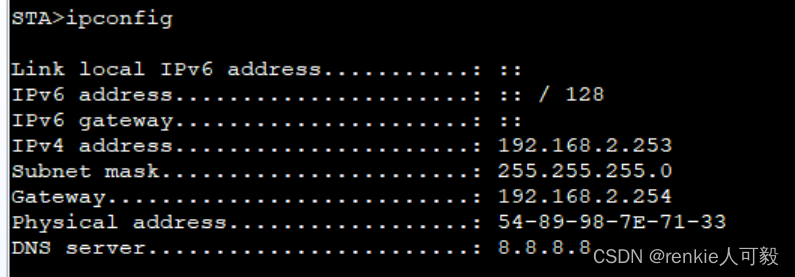
 3.通过ipconfig命令可以看到STA已获取ip地址
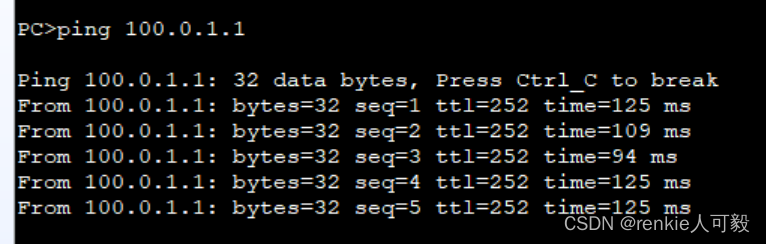
此时测试PC1访问位于公网的R4的e0/0/0地址,可以访问。
在R1、R2上配置easy-ip,模拟器上只能用AR系列的路由器,配置如下:
acl 2000
interface GigabitEthernet0/0/2
 nat outbound 2000
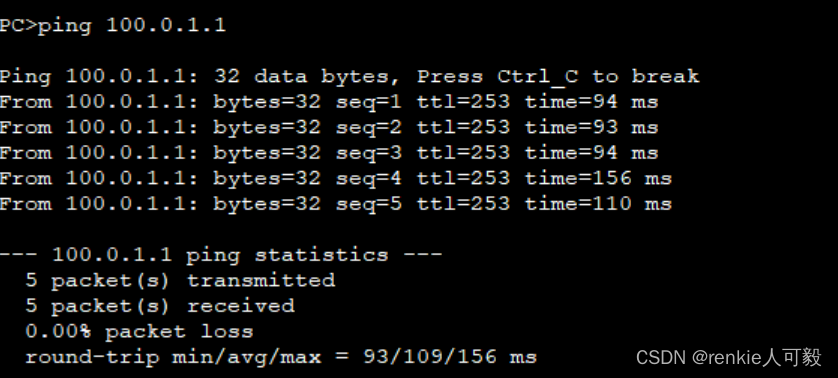
PC1能ping通外网
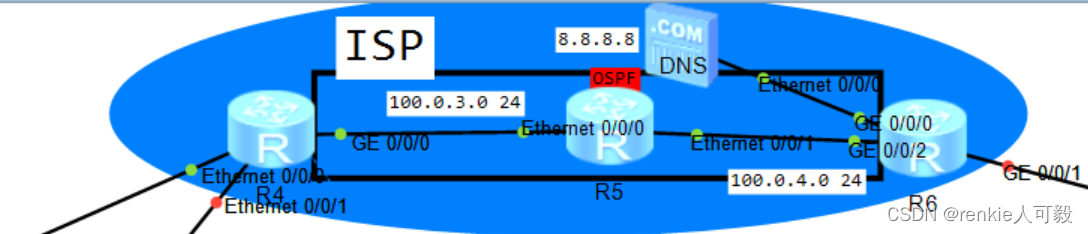
配置IGP协议:OSPF,此步骤略。
R4与R6建立BGP邻居关系,为了防止路由黑洞,我们这里采用将R4和R6边缘接口宣告进ospf。
R4
bgp 100
 peer 6.6.6.6 as-number 100
 peer 6.6.6.6 connect-interface LoopBack0
ospf 1
 area 0.0.0.0
  network 100.0.1.0 0.0.0.255
  network 100.0.2.0 0.0.0.255
*******************************************************************************************
R6
bgp 100
 peer 4.4.4.4 as-number 100
 peer 4.4.4.4 connect-interface LoopBack0
ospf 1
 are 0
network 100.0.6.0 0.0.0.255 分支机构通过PPPoE拨号获取出口公网地址
R6配置:
ip pool ppoe
 network 100.0.6.0 mask 255.255.255.0
 dns-list 8.8.8.8
interface Virtual-Template1
 remote address pool ppoe
 ip address unnumbered interface GigabitEthernet0/0/1 #用g0/0/1的ip地址作为Virtual-Template1地址
aaa
 local-user huawei password cipher huawei@123
 local-user huawei service-type ppp
interface GigabitEthernet0/0/1
pppoe-server bind Virtual-Template 1
R7配置:
interface Dialer1
 link-protocol ppp
 ppp chap user huawei
 ppp chap password cipher huawei@123
 ip address ppp-negotiate
 dialer user huawei
 dialer bundle 1
 dialer-group 1
interface GigabitEthernet0/0/0
 pppoe-client dial-bundle-number 1
R7获取到了地址

NAT配置 ,采用easy-ip。
acl number 2000
 rule 5 permit source 192.168.20.0 0.0.0.255
ip route-static 0.0.0.0 0.0.0.0 Dialer1
interface Dialer1
nat outbound 2000NAT server配置,以R1为例:
nat server protocol tcp global current-interface www inside 192.168.6.4 www
##
AR路由器在配置NAT映射时,公网IP不能与接口IP地址相同,否则会提示冲突,导致配置不上去。如果只有一个公网IP时,可以做端口映射,公网IP使用current-interface参考代替,如下:
nat server protocol tcp global current-interface 80 inside xxxxx 80
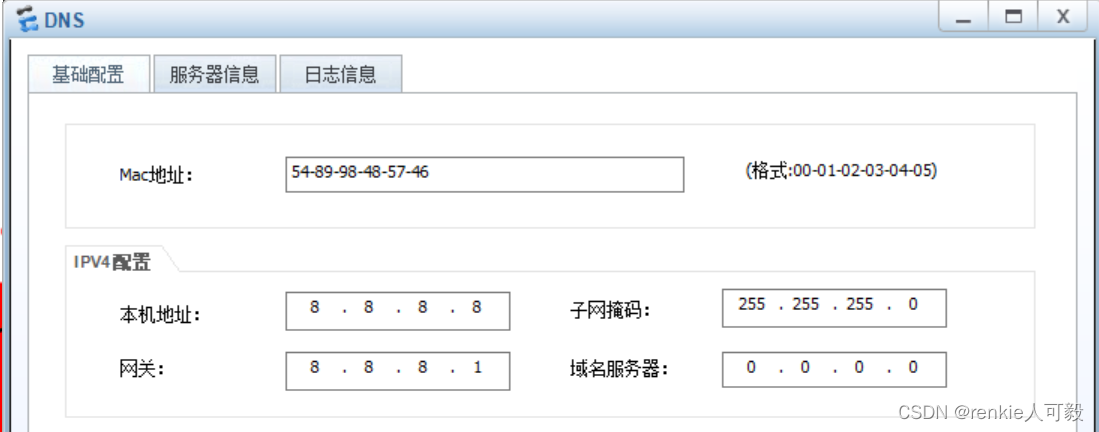
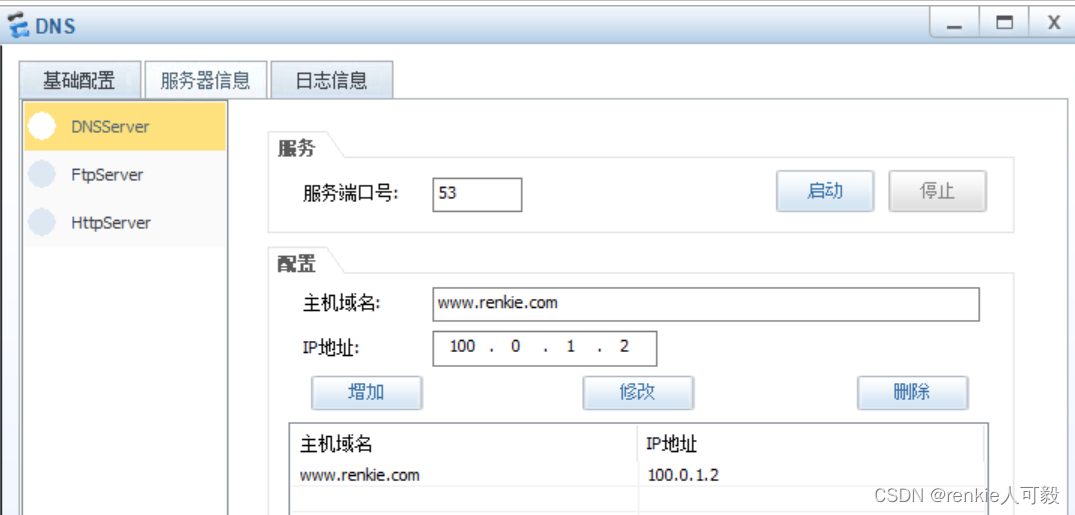
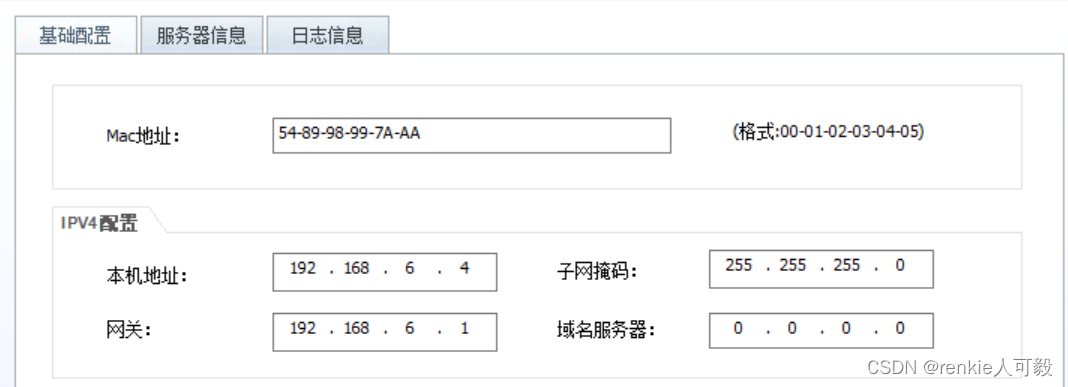
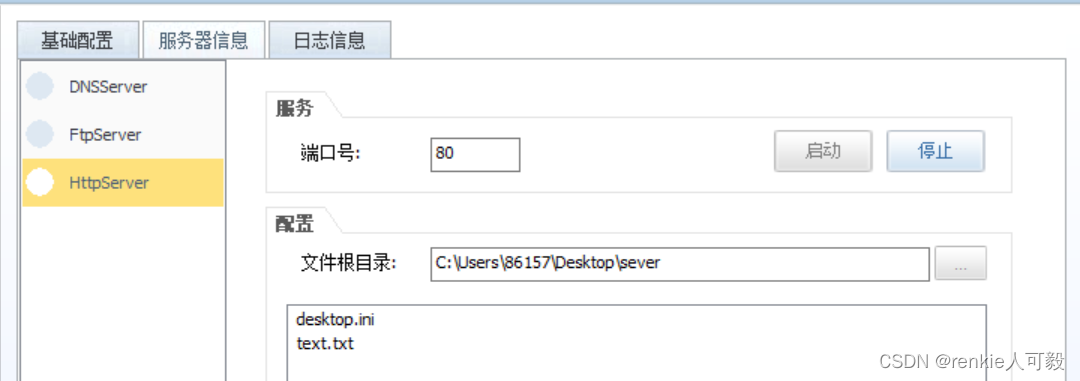
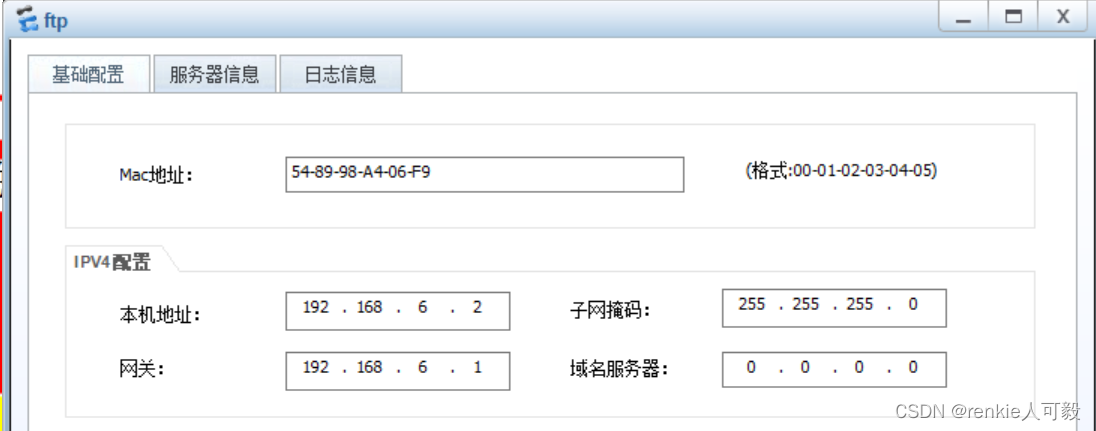
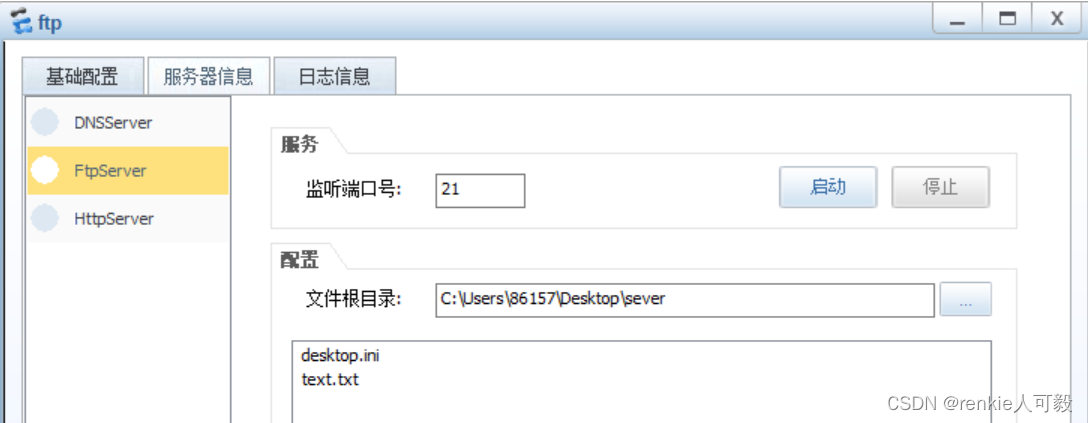
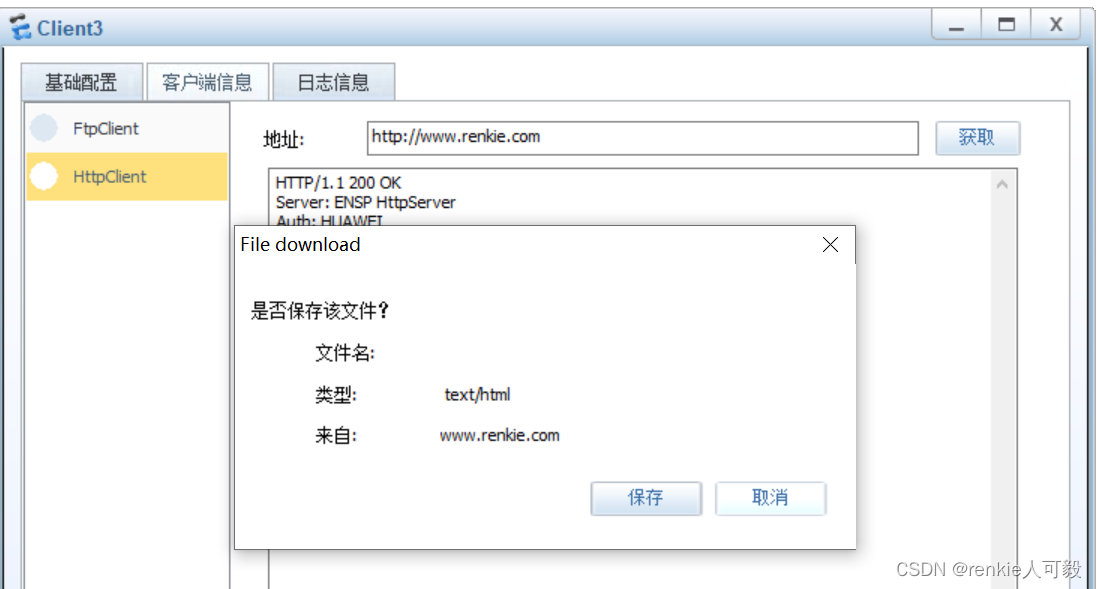
Client3访问WEb服务器
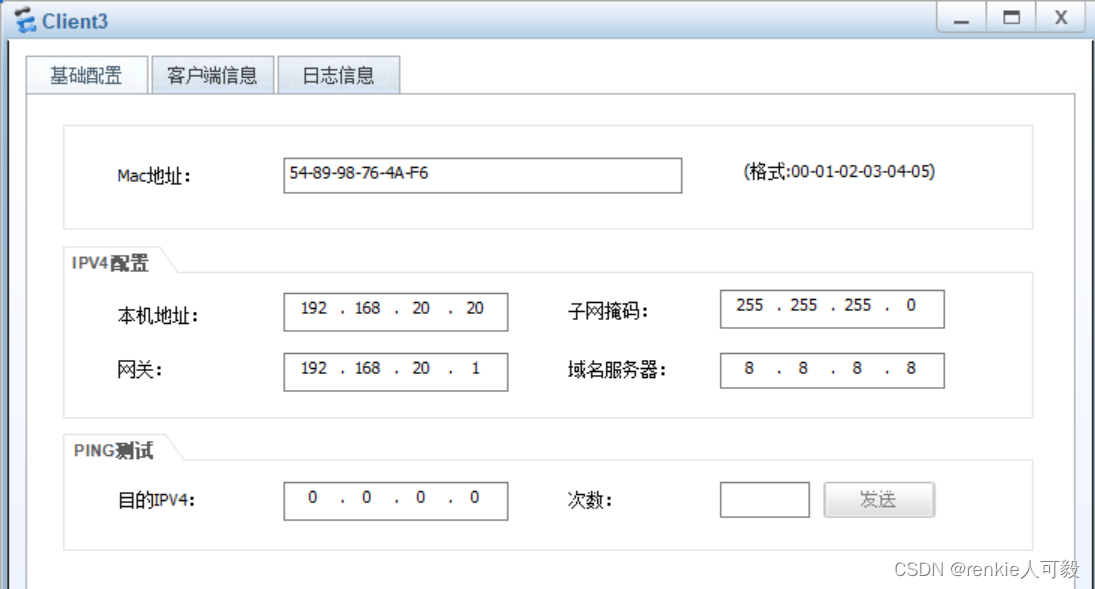
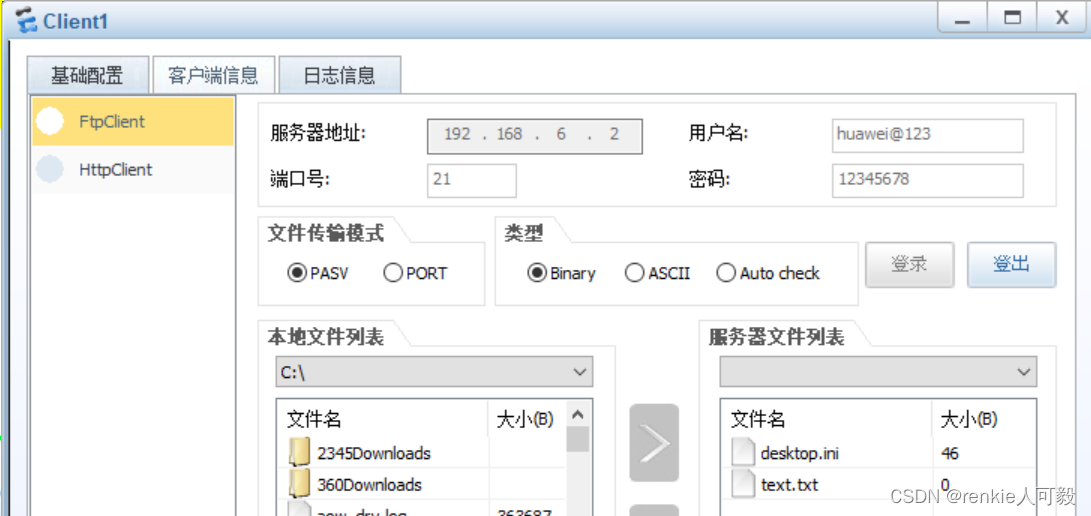
模拟FTP客户端下载文件
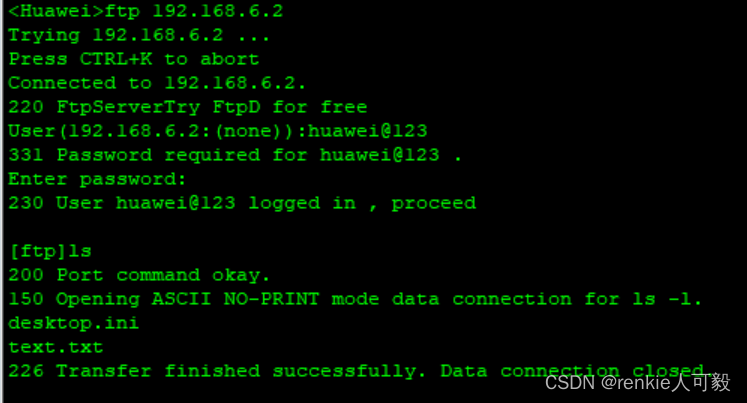
当交换机作为ftp客户端时
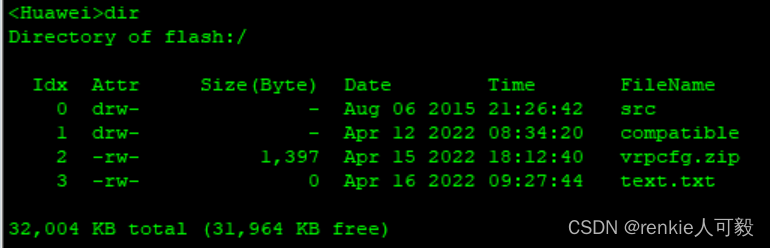
 下载text.txt文件
文件下载成功
在某些应用中,私网用户希望通过域名访问位于同一私网的内部服务器,而DNS服务器却位于公网。由于通常DNS响应报文中携带的是内部服务器的公网IP地址,因此若NAT设备未将DNS Server解析的公网IP替换成内部服务器对应的私网IP,私网用户将无法通过域名访问到内部服务器。这个问题可以使用DNS Mapping方式来解决,通过配置“域名—公网IP地址—公网端口—协议类型”映射表,建立内部服务器的域名与其公网信息间的对应关系。
当R1设备收到DNS响应报文后,先根据其中携带的域名查找DNS Mapping映射表,再根据“公网IP地址—公网端口—协议类型”查找Web Server,然后将DNS响应报文中的公网IP地址替换成Web Server的私网IP地址。
以R1配置为例:
nat dns-map www.renkie.com 100.0.1.2 80 tcp
nat alg dns enable   #配置了DNS Mapping后必须执行nat alg dns enable命令使能ALG DNS功能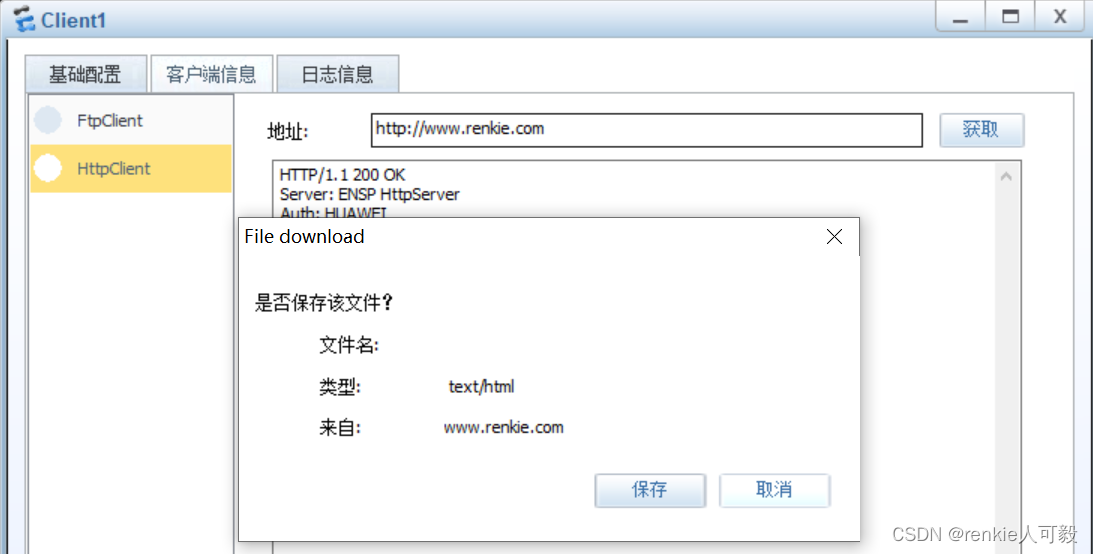
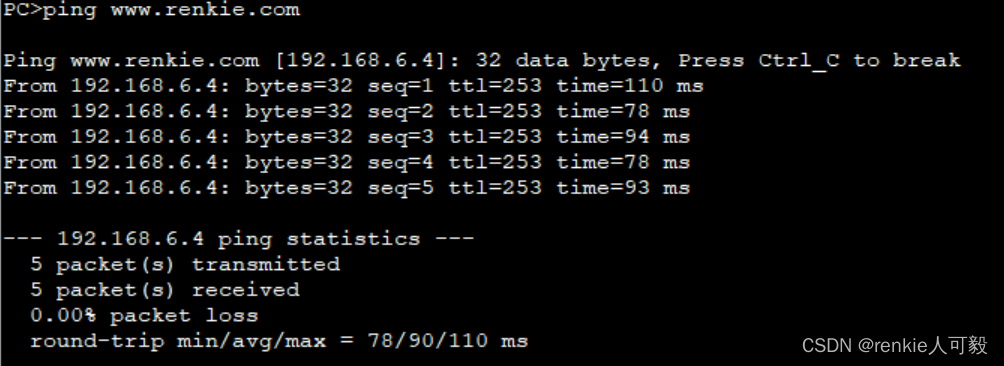
此时ping www.renkie.com,地址也被转换成私网地址了。
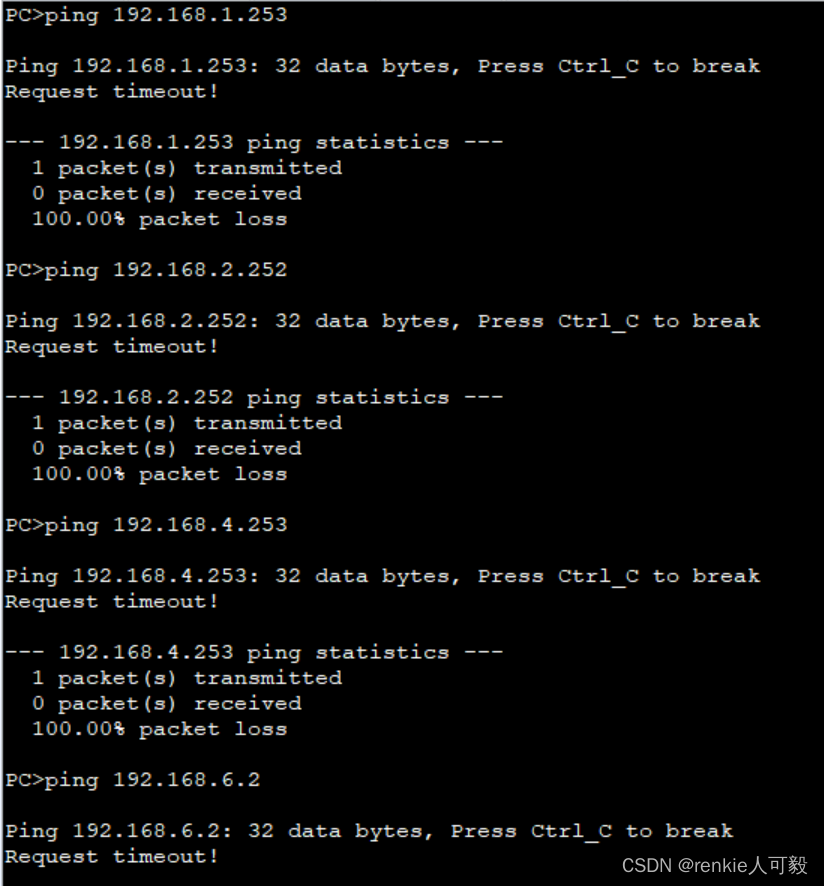
其他部门不能访问财务部,财务部不能访问服务器区域的FTP服务器,财务部不能访问外网,以LSW3配置为例:。
ACL 3000
 rule 1 deny ip source 192.168.3.0 0.0.0.255 destination 192.168.1.0 0.0.0.255
 rule 5 deny ip source 192.168.3.0 0.0.0.255 destination 192.168.2.0 0.0.0.255
 rule 10 deny ip source 192.168.3.0 0.0.0.255 destination 192.168.4.0 0.0.0.255
 rule 15 deny ip source 192.168.3.0 0.0.0.255 destination 192.168.6.2 0.0.0.0
traffic-filter vlan 30 inbound acl 3000
PC3的测试结果如下:
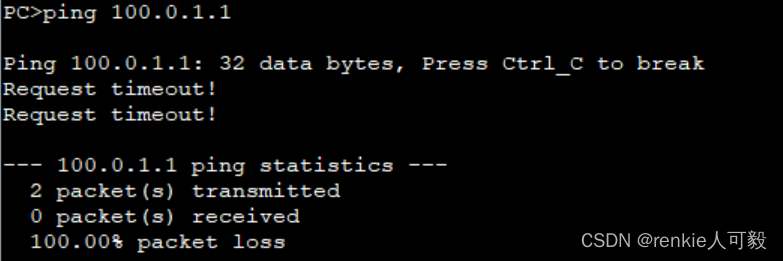
财务部不能访问外网,可以在nat转换时,过滤掉财务部门流量。
acl number 2000
 rule 1 deny source 192.168.3.0 0.0.0.255
PC3测试结果如下:
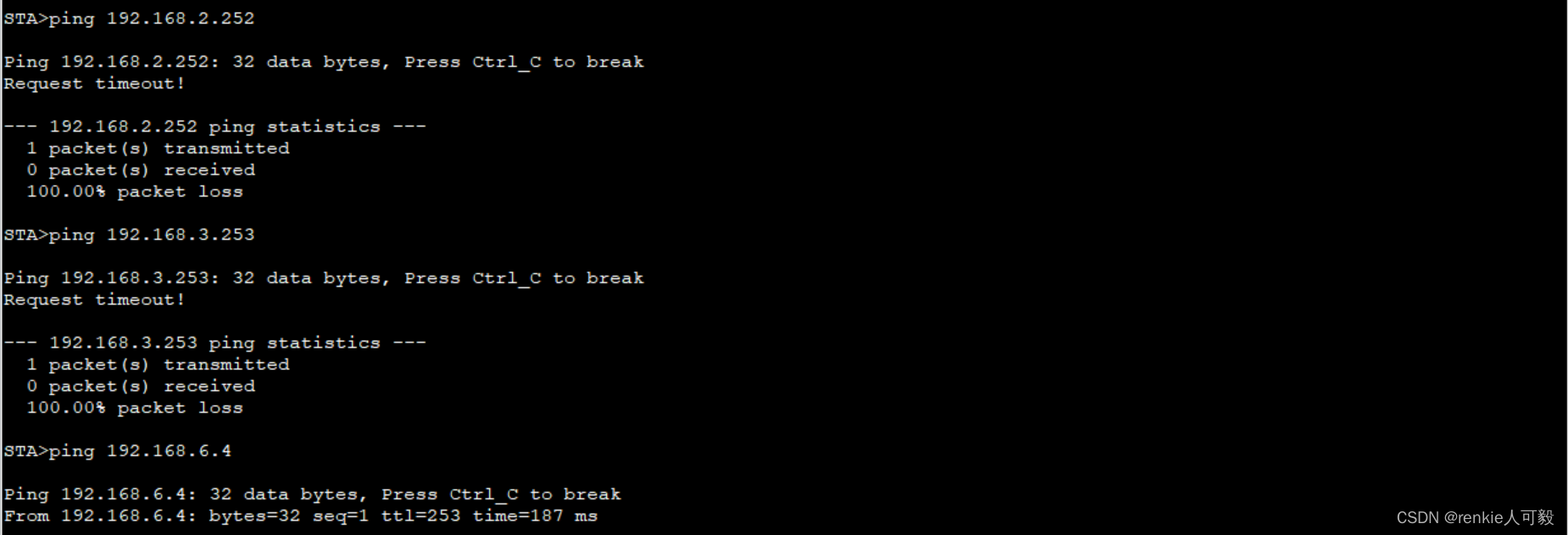
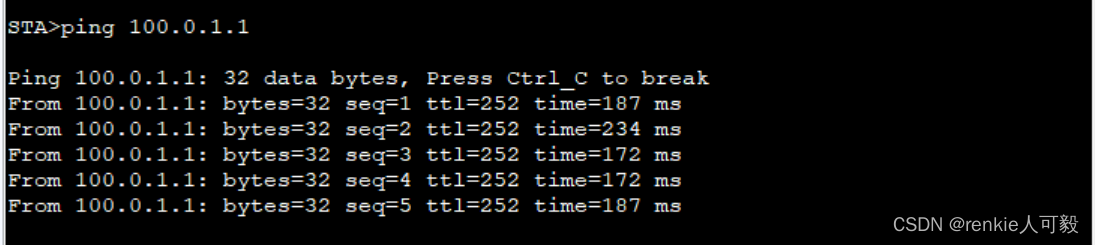
访客区域只能访问公司web服务器以及外网。
acl 3001
 rule 1 permit ip source 192.168.4.0 0.0.0.255 destination 192.168.6.4 0.0.0.0
 rule 5 permit ip source 192.168.4.0 0.0.0.255 destination 192.168.6.3 0.0.0.0
 rule 10 deny ip source 192.168.4.0 0.0.0.255 destination 192.168.0.0 0.0.255.255
traffic-filter vlan 40 inbound acl 3001
STA的测试结果如下:
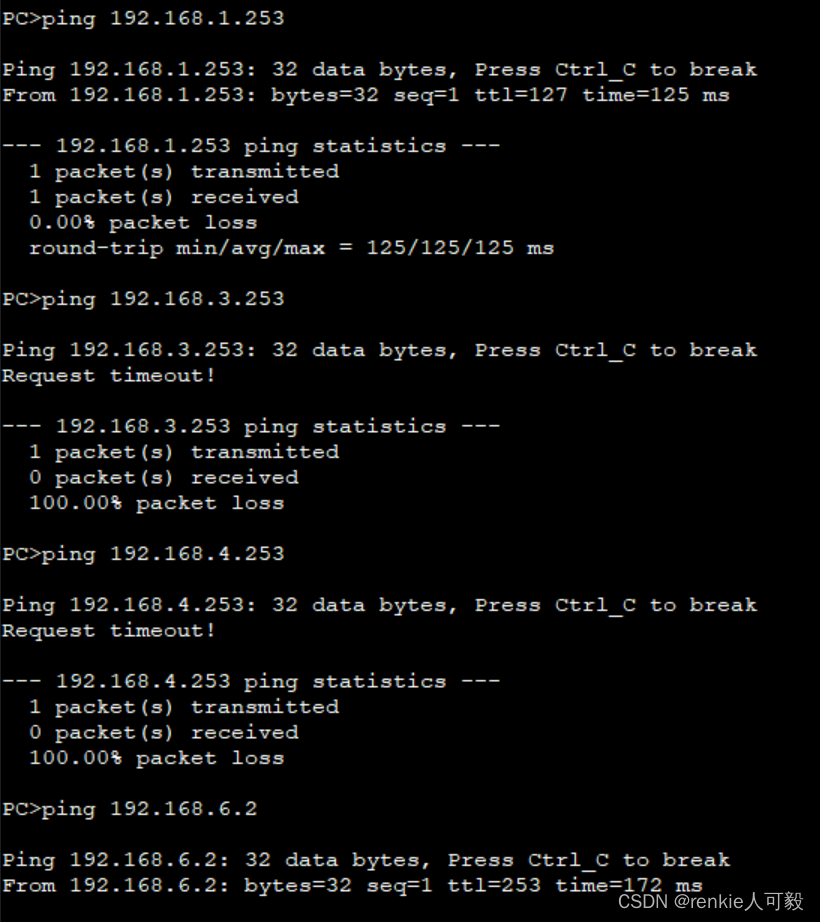
技术部与销售部可以互访,且能访问财务部。
acl 3002
 rule 5 permit ip source 192.168.2.0 0.0.0.255 destination 192.168.6.2 0
 rule 10 deny ip destination 192.168.6.2 0
在PC2上测试结果如下:
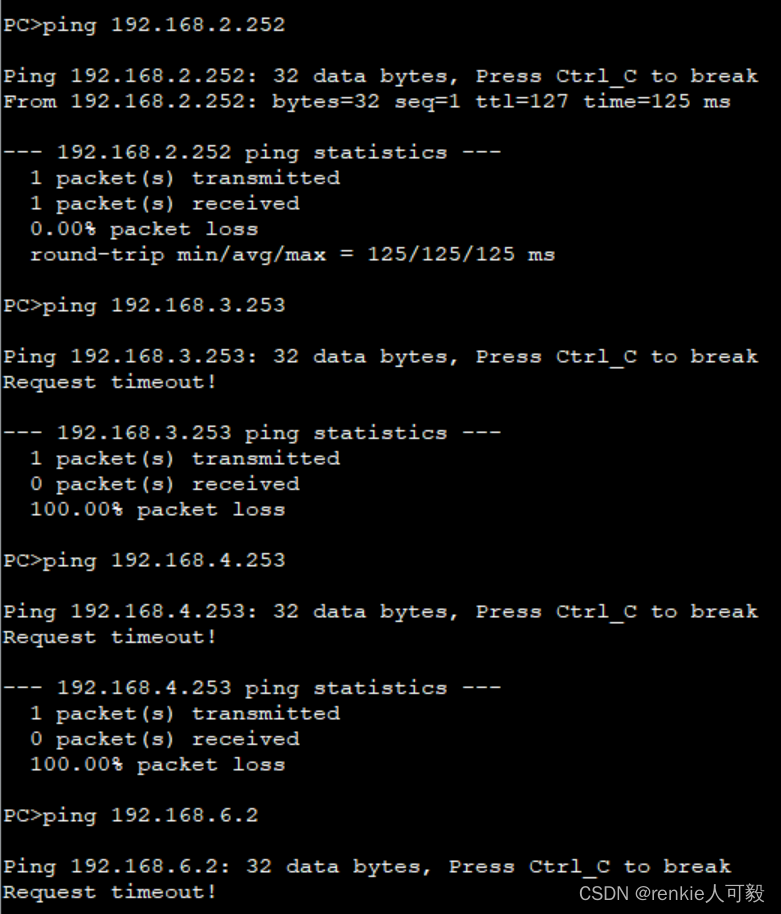
销售部可以与技术部互访,但不能访问FTP服务器
acl 3003
rule 5 permit ip source 192.168.1.0 0.0.0.255 destination 192.168.2.0 0.0.0.255
rule 10 permit ip source 192.168.1.0 0.0.0.255 destination 192.168.3.0 0.0.0.255
rule 15 permit ip source 192.168.1.0 0.0.0.255 destination 192.168.4.0 0.0.0.255
rule 20 deny ip source 192.168.1.0 0.0.0.255 destination 192.168.6.2 0.0.0.0
traffic-filter vlan 10 inbound acl 3003
PC1测试结果如下:
在R2与R7之间建立IPSec VPN隧道

在R2、R1上建立IPSec VPN隧道,首先要保证总部和分公司的公网地址要可达,即100.0.2.0 和100.0.6.0要互通,前面步骤中将他们都宣告进了ISP的网络中,故而是可达的。
分公司只能访问总部的服务器区域
以R1配置为例。
1.创建ACL,用作感兴趣流,匹配总公司和分部互访的流量。
R2:
acl number 3000
 rule 5 permit ip source 192.168.6.0 0.0.0.255 destination 192.168.20.0 0.0.0.255
*******************************************************************************************
R7:
acl number 3000
 rule 15 permit ip source 192.168.20.0 0.0.0.255 destination 192.168.6.0 0.0.0.255
2.配置安全提议
R2:
ipsec proposal huawei
 esp authentication-algorithm sha1 #设置加密方式,默认为MD5
*******************************************************************************************
R7:
ipsec proposal huawei
 esp authentication-algorithm sha1
3.配置ipsec安全策略,策略名为huawei,编号为10,模式为手动配置模式。
R2:
ipsec policy huawei 10 manual
 security acl 3000                         #匹配感兴趣流
 proposal huawei                           #应用名为huawei的提议
 tunnel local 100.0.2.2                    #本地隧道地址
 tunnel remote 100.0.6.254                 #对端隧道地址
 sa spi inbound esp 54321                  #安全联盟入方向,SPI为54321和对端出方向SPI一致
 sa string-key inbound esp cipher huawei   #安全联盟密钥,入方向为加密的huawei,本段入和对端出一致
 sa spi outbound esp 12345                 #安全联盟出方向,SPI为54321和对端入方向SPI一致
 sa string-key outbound esp cipher huawei  #安全联盟密钥,出方向为加密的huawei,本段出和对端入一致
*****************************************************************************************
R7:
ipsec policy huawei 10 manual
 security acl 3000
 proposal huawei
 tunnel local 100.0.6.254
 tunnel remote 100.0.2.2
 sa spi inbound esp 12345
 sa string-key inbound esp cipher huawei
 sa spi outbound esp 54321
 sa string-key outbound esp cipher huawei
#
4.在R2、R7端口应用ipsec policy
R2:
interface GigabitEthernet0/0/2
ipsec policy huawei
*******************************************************************************************
R7:
interface Dialer 1
ipsec policy huawei
在PC5上访问总部服务器区域,如FTP服务器。
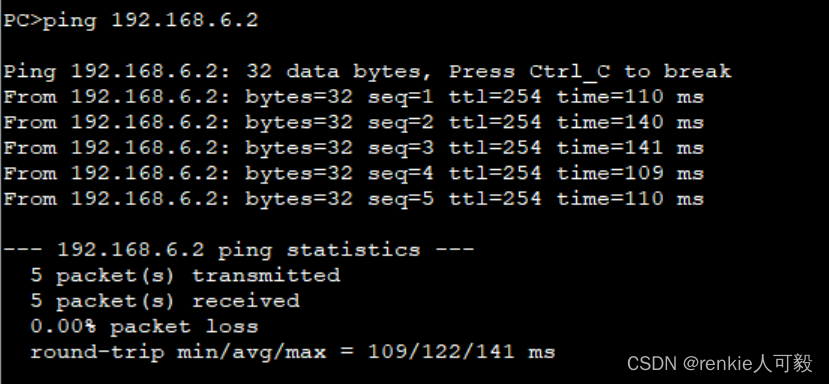
抓包来看,只能看见隧道两端的公网地址,私网地址被ipsec封装了

路由器采用loopback0作为管理ip地址。交换机采用vlan 1作为管理ip地址。
以LSW1为例,创建管理vlan:
interface Vlanif1
 ip address 10.0.1.10 255.255.255.0
ip route-static 0.0.0.0 0.0.0.0 10.0.1.40 #LSW3的vlan1地址
ip route-static 0.0.0.0 0.0.0.0 10.0.1.30 #LSW4的vlan1地址
配置SSH协议:
stelnet server enable
ssh authentication-type default password
user-inter vty 0 4
au aaa
protocol inbound ssh
aaa
 local-user python password cipher %NS[+B0ZNI]NZPO3JBXBHA!!
 local-user python privilege level 15
 local-user python service-type ssh
验证
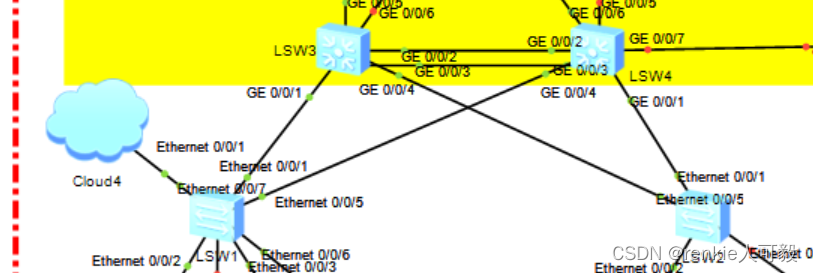
将自己的主机桥接到ensp的交换机上 。
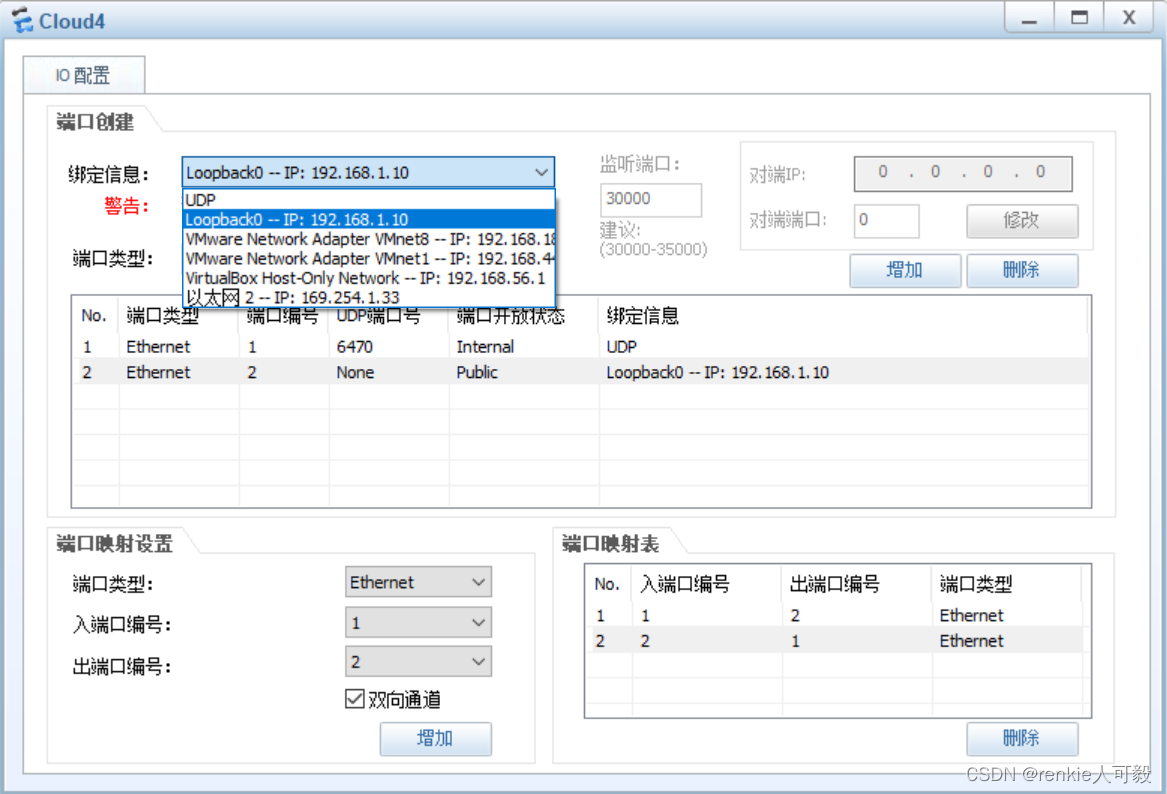
在自己主机创建虚拟网卡loopback0的方法,请自行百度。
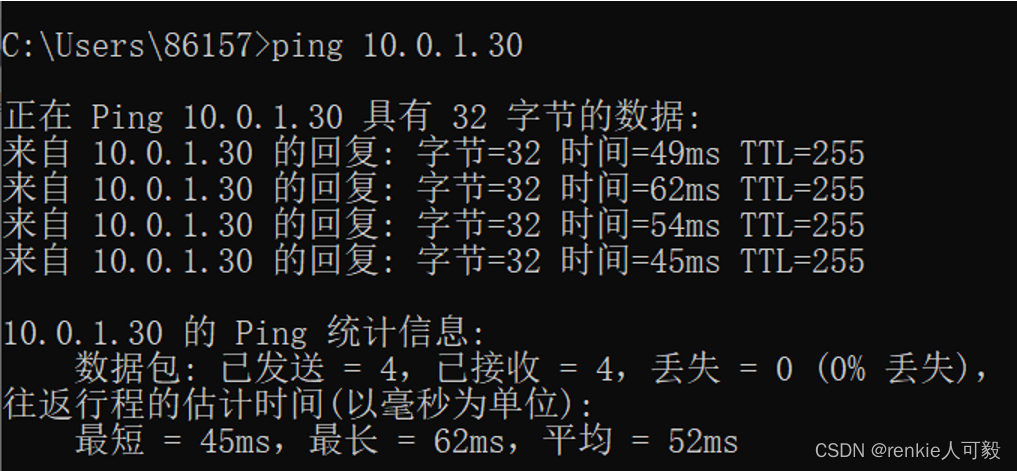
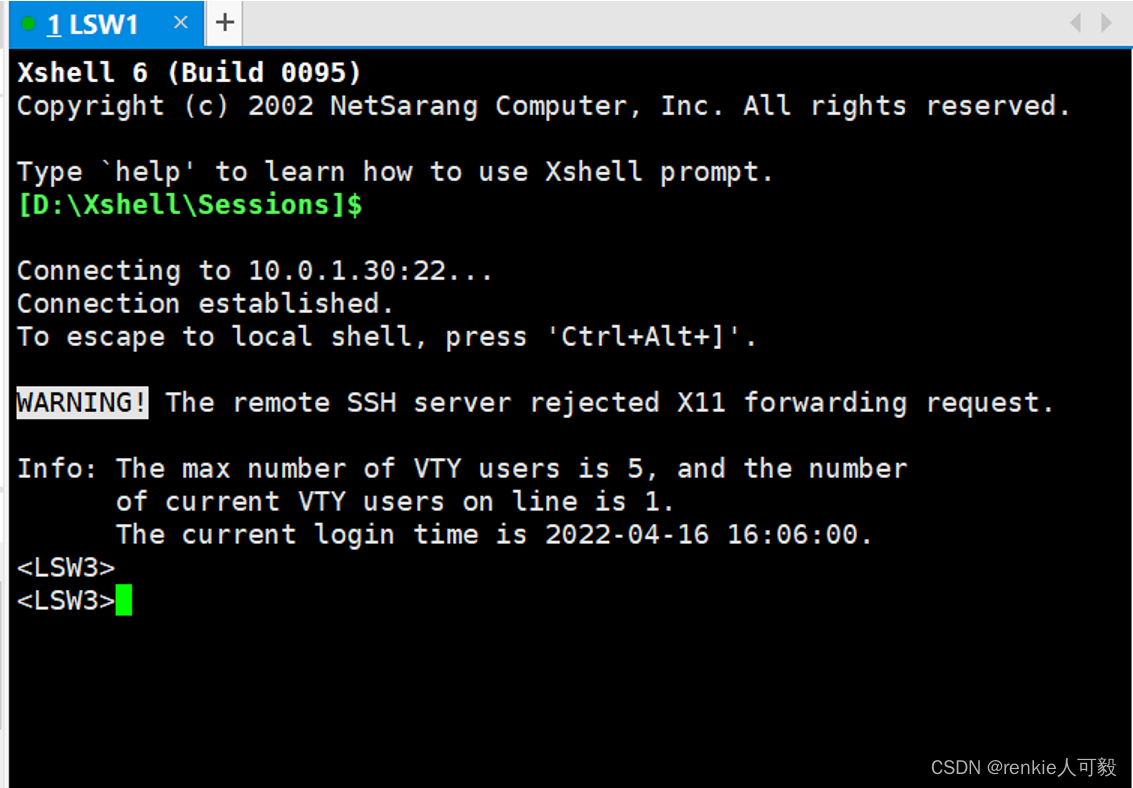
打开cmd,ping LSW3的管理ip地址10.0.1.30,能够ping通,注意要断开自己的网络,不然ping不通。有时ping不通,等待一小段时间就好了,可能网络信息还没变更。
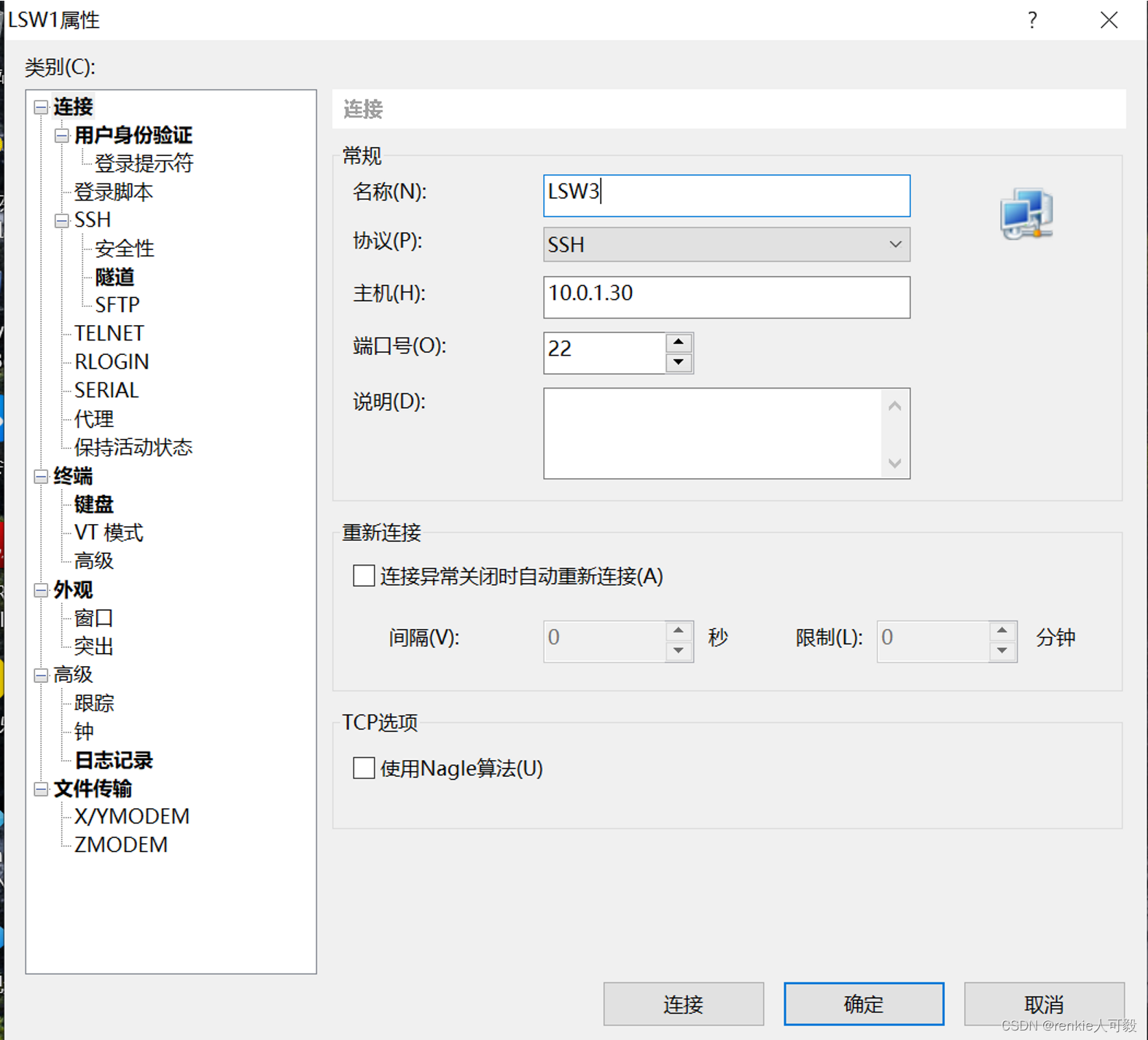
打开xshell,新建一个会话,用来连接LSW3。
点击连接
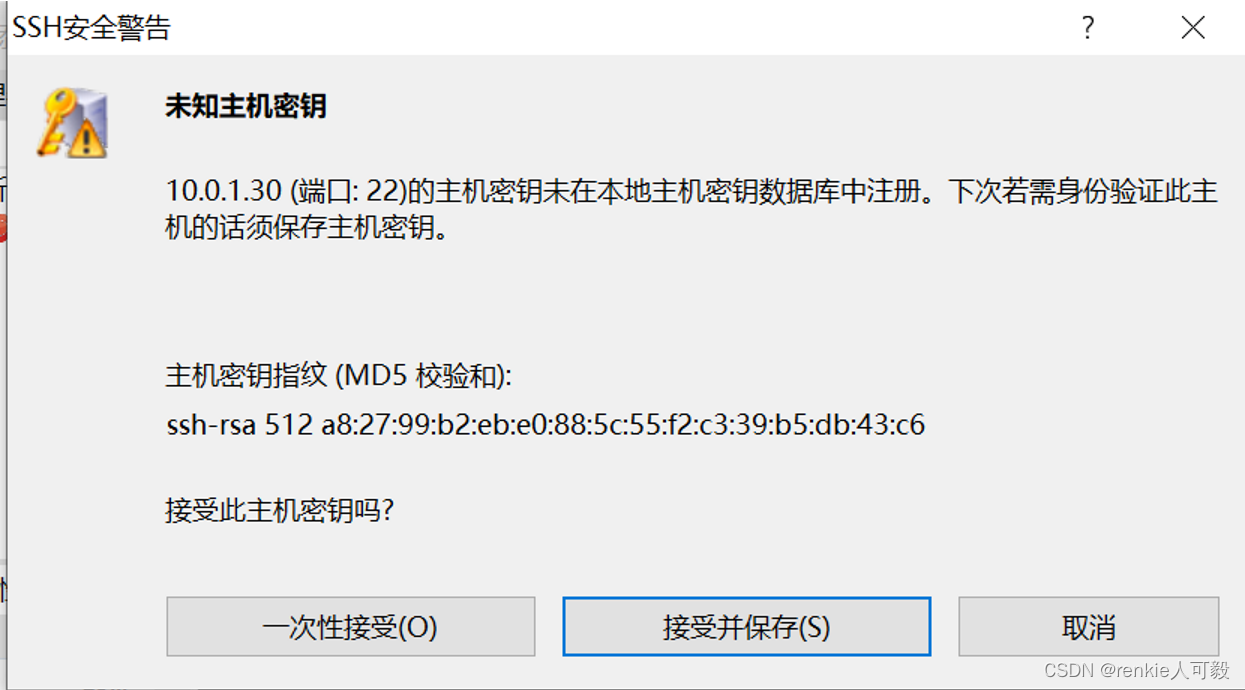 点击接收并保存,输入配置的用户名:huawie,密码:huawei@123
l
我想在Ruby中创建一个用于开发目的的极其简单的Web服务器(不,不想使用现成的解决方案)。代码如下:#!/usr/bin/rubyrequire'socket'server=TCPServer.new('127.0.0.1',8080)whileconnection=server.acceptheaders=[]length=0whileline=connection.getsheaders想法是从命令行运行这个脚本,提供另一个脚本,它将在其标准输入上获取请求,并在其标准输出上返回完整的响应。到目前为止一切顺利,但事实证明这真的很脆弱,因为它在第二个请求上中断并出现错误:/usr/b
网络编程套接字网络编程基础知识理解源`IP`地址和目的`IP`地址理解源MAC地址和目的MAC地址认识端口号理解端口号和进程ID理解源端口号和目的端口号认识`TCP`协议认识`UDP`协议网络字节序socket编程接口`sockaddr``UDP`网络程序服务器端代码逻辑:需要用到的接口服务器端代码`udp`客户端代码逻辑`udp`客户端代码`TCP`网络程序服务器代码逻辑多个版本服务器单进程版本多进程版本多线程版本线程池版本服务器端代码客户端代码逻辑客户端代码TCP协议通讯流程TCP协议的客户端/服务器程序流程三次握手(建立连接)数据传输四次挥手(断开连接)TCP和UDP对比网络编程基础知识
是否可以在不实际下载文件的情况下检查文件是否存在?我有这么大的(~40mb)文件,例如:http://mirrors.sohu.com/mysql/MySQL-6.0/MySQL-6.0.11-0.glibc23.src.rpm这与ruby不严格相关,但如果发件人可以设置内容长度就好了。RestClient.get"http://mirrors.sohu.com/mysql/MySQL-6.0/MySQL-6.0.11-0.glibc23.src.rpm",headers:{"Content-Length"=>100} 最佳答案
我在这方面尝试了很多URL,在我遇到这个特定的之前,它们似乎都很好:require'rubygems'require'nokogiri'require'open-uri'doc=Nokogiri::HTML(open("http://www.moxyst.com/fashion/men-clothing/underwear.html"))putsdoc这是结果:/Users/macbookair/.rvm/rubies/ruby-2.0.0-p481/lib/ruby/2.0.0/open-uri.rb:353:in`open_http':404NotFound(OpenURI::HT
深度学习12.CNN经典网络VGG16一、简介1.VGG来源2.VGG分类3.不同模型的参数数量4.3x3卷积核的好处5.关于学习率调度6.批归一化二、VGG16层分析1.层划分2.参数展开过程图解3.参数传递示例4.VGG16各层参数数量三、代码分析1.VGG16模型定义2.训练3.测试一、简介1.VGG来源VGG(VisualGeometryGroup)是一个视觉几何组在2014年提出的深度卷积神经网络架构。VGG在2014年ImageNet图像分类竞赛亚军,定位竞赛冠军;VGG网络采用连续的小卷积核(3x3)和池化层构建深度神经网络,网络深度可以达到16层或19层,其中VGG16和VGG
(本文是网络的宏观的概念铺垫)目录计算机网络背景网络发展认识"协议"网络协议初识协议分层OSI七层模型TCP/IP五层(或四层)模型报头以太网碰撞路由器IP地址和MAC地址IP地址与MAC地址总结IP地址MAC地址计算机网络背景网络发展 是最开始先有的计算机,计算机后来因为多项技术的水平升高,逐渐的计算机变的小型化、高效化。后来因为计算机其本身的计算能力比较的快速:独立模式:计算机之间相互独立。 如:有三个人,每个人做的不同的事物,但是是需要协作的完成。 而这三个人所做的事是需要进行协作的,然而刚开始因为每一台计算机之间都是互相独立的。所以前面的人处理完了就需要将数据
第一步,先创建一个回环端口,不要用自己的网卡,很不稳定,会断的。①先找到“设备管理器”,点击②进入设备管理器点击“操作”,然后再点击“添加过时硬盘”,记得点击“操作”前先随便在空白处点击一下,不然点击“点击操作”会出现第二张图的内容。 ③点击“下一页”④点击“手动”,然后再点击下一页。 ⑤点击“网络适配器”,点击下一页 ⑥点击“Microsoft”,然后点击“环回适配器”。 创建完成后,在下图中会有一个“环回适配器”, 第二步,ensp和真机进行桥接①打开ensp,并且配置一个“云”②先添加一个内网接口,点击添加③选择“绑定信息”中的以太网2,点击“增加”,添加外网。如果找不到你的环回网卡
安全产品安全网关类防火墙Firewall防火墙防火墙主要用于边界安全防护的权限控制和安全域的划分。防火墙•信息安全的防护系统,依照特定的规则,允许或是限制传输的数据通过。防火墙是一个由软件和硬件设备组合而成,在内外网之间、专网与公网之间的界面上构成的保护屏障。下一代防火墙•下一代防火墙,NextGenerationFirewall,简称NGFirewall,是一款可以全面应对应用层威胁的高性能防火墙,提供网络层应用层一体化安全防护。生产厂家•联想网御、CheckPoint、深信服、网康、天融信、华为、H3C等防火墙部署部署于内、外网编辑额,用于权限访问控制和安全域划分。UTM统一威胁管理(Un
Linux操作系统——网络配置与SSH远程安装完VMware与系统后,需要进行网络配置。第一个目标为进行SSH连接,可以从本机到VMware进行文件传送,首先需要进行网络配置。1.下载远程软件首先需要先下载安装一款远程软件:FinalShell或者xhell7FinalShellxhell7FinalShell下载:Windows下载http://www.hostbuf.com/downloads/finalshell_install.exemacOS下载http://www.hostbuf.com/downloads/finalshell_install.pkg2.配置CentOS网络安装好
在神经网络方面,我完全是个初学者。我整天都在与ruby-fann和ai4r搏斗,不幸的是我没有任何东西可以展示,所以我想我会来到StackOverflow并询问这里的知识渊博的人。我有一组样本——每天都有一个数据点,但它们不符合我能够找出的任何明确模式(我尝试了几次回归)。不过,我认为看看是否有任何方法可以仅从日期预测future的数据会很好,而且我认为神经网络将是生成希望表达这种关系的函数的好方法.日期是DateTime对象,数据点是十进制数,例如7.68。我一直在将DateTime对象转换为float,然后除以10,000,000,000得到一个介于0和1之间的数字,我一直在将
