关于producer到comsuner全流程,可以参考文章:【打怪升级】【rocketMq】如何保证消息顺序消费
在rocket4.X版本中,其实所有的生产者都是client,对应的其实就是MQProducer具体的实现,主要分为DefaultMQProducer和TransactionMQProducer。
首先我们看一下MQProducer的继承关系:
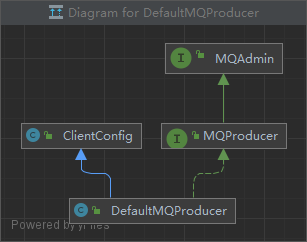

其中,MQAdmin是上层一些基础方法的抽象,例如创建topic、查询message、查询对应最大最小消费点位;
ClientConfig主要是一些基本的客户端公共配置;
我们可以看到默认提供的producer是DefaultMQProducer,而针对事务消息的producer又继承了DefaultMQProducer,这里可以发现发送事务消息的机制其实也是在DefaultMQProducer中,只是有了针对Transaction的机制
 /**
     * The number of produced messages.
     */
    public static final int MESSAGE_COUNT = 100;
    public static final String PRODUCER_GROUP = "producer_test_group_hanxl";
    public static final String DEFAULT_NAMESRVADDR = "127.0.0.1:9876";
    public static final String TOPIC = "hanxl";
    public static final String TAG = "hanxlTag";

    public static void main(String[] args) throws MQClientException, InterruptedException {

        /*
         * Instantiate with a producer group name.
         */
        DefaultMQProducer producer = new DefaultMQProducer(PRODUCER_GROUP);

        /*
         * Specify name server addresses.
         *
         * Alternatively, you may specify name server addresses via exporting environmental variable: NAMESRV_ADDR
         * <pre>
         * {@code
         *  producer.setNamesrvAddr("name-server1-ip:9876;name-server2-ip:9876");
         * }
         * </pre>
         */
        // Uncomment the following line while debugging, namesrvAddr should be set to your local address
        producer.setNamesrvAddr(DEFAULT_NAMESRVADDR);

        /*
         * Launch the instance.
         */
        producer.start();

        for (int i = 0; i < MESSAGE_COUNT; i++) {
            try {

                /*
                 * Create a message instance, specifying topic, tag and message body.
                 */
                Message msg = new Message(TOPIC /* Topic */,
                    TAG /* Tag */,
                    ("Hello RocketMQ " + i).getBytes(RemotingHelper.DEFAULT_CHARSET) /* Message body */
                );

                /*
                 * Call send message to deliver message to one of brokers.
                 */
                SendResult sendResult = producer.send(msg);
                /*
                 * There are different ways to send message, if you don't care about the send result,you can use this way
                 * {@code
                 * producer.sendOneway(msg);
                 * }
                 * if you want to get the send result in a synchronize way, you can use this send method
                 * {@code
                 * SendResult sendResult = producer.send(msg);
                 * System.out.printf("%s%n", sendResult);
                 * }
                 */

                /*
                 * if you want to get the send result in a asynchronize way, you can use this send method
                 * {@code
                 *
                 *  producer.send(msg, new SendCallback() {
                 *  @Override
                 *  public void onSuccess(SendResult sendResult) {
                 *      // do something
                 *  }
                 *
                 *  @Override
                 *  public void onException(Throwable e) {
                 *      // do something
                 *  }
                 *});
                 *
                 *}
                 */

                System.out.printf("%s%n", sendResult);
            } catch (Exception e) {
                e.printStackTrace();
                Thread.sleep(1000);
            }
        }

        /*
         * Shut down once the producer instance is no longer in use.
         */
        producer.shutdown();
    }
这是一个quick start启动类,它的作用就是发送一些消息到MQServer,那么我们通过start启动源码和send发送两方面去观察。
/**
     * Start this producer instance. </p>
     *
     * <strong> Much internal initializing procedures are carried out to make this instance prepared, thus, it's a must
     * to invoke this method before sending or querying messages. </strong> </p>
     *
     * @throws MQClientException if there is any unexpected error.
     */
    @Override
    public void start() throws MQClientException {
        //填充对应的producerGroup
        this.setProducerGroup(withNamespace(this.producerGroup));
        this.defaultMQProducerImpl.start();
        if (null != traceDispatcher) {
            try {
                traceDispatcher.start(this.getNamesrvAddr(), this.getAccessChannel());
            } catch (MQClientException e) {
                logger.warn("trace dispatcher start failed ", e);
            }
        }
    }
可以看到,producerClinet在启动时,最核心的是 this.defaultMQProducerImpl.start();
/**
     * TODO default producer client启动核心流程
     * @param startFactory
     * @throws MQClientException
     */
    public void start(final boolean startFactory) throws MQClientException {
        switch (this.serviceState) {
            case CREATE_JUST:
                //默认在启动时,通过当前状态启动
                this.serviceState = ServiceState.START_FAILED;

                //校验配置,校验定义的group
                this.checkConfig();

                if (!this.defaultMQProducer.getProducerGroup().equals(MixAll.CLIENT_INNER_PRODUCER_GROUP)) {
                    this.defaultMQProducer.changeInstanceNameToPID();
                }

                //通过当前实例获取一个单例的factoryInstance,这里是通过
                this.mQClientFactory = MQClientManager.getInstance().getOrCreateMQClientInstance(this.defaultMQProducer, rpcHook);

                //注册producer,其实这里只是预处理
                boolean registerOK = mQClientFactory.registerProducer(this.defaultMQProducer.getProducerGroup(), this);
                //如果这里预注册失败,则直接异常中断
                if (!registerOK) {
                    this.serviceState = ServiceState.CREATE_JUST;
                    throw new MQClientException("The producer group[" + this.defaultMQProducer.getProducerGroup()
                        + "] has been created before, specify another name please." + FAQUrl.suggestTodo(FAQUrl.GROUP_NAME_DUPLICATE_URL),
                        null);
                }

                this.topicPublishInfoTable.put(this.defaultMQProducer.getCreateTopicKey(), new TopicPublishInfo());

                //默认都是true
                if (startFactory) {
                    mQClientFactory.start();
                }

                log.info("the producer [{}] start OK. sendMessageWithVIPChannel={}", this.defaultMQProducer.getProducerGroup(),
                    this.defaultMQProducer.isSendMessageWithVIPChannel());
                this.serviceState = ServiceState.RUNNING;
                break;
                //如果是其他类型,说明已经启动成功至少一次了,不需要再重新启动了
            case RUNNING:
            case START_FAILED:
            case SHUTDOWN_ALREADY:
                throw new MQClientException("The producer service state not OK, maybe started once, "
                    + this.serviceState
                    + FAQUrl.suggestTodo(FAQUrl.CLIENT_SERVICE_NOT_OK),
                    null);
            default:
                break;
        }

        //给所有的broker发送心跳并锁定,其实除了这个之外还有给broker更新了定义的filter
        this.mQClientFactory.sendHeartbeatToAllBrokerWithLock();

        //开启定时任务执行定时清理
        RequestFutureHolder.getInstance().startScheduledTask(this);

    }
需要注意的一点是,在getInstance时获取对应的单例工厂,其实它的生成规则是通过ip和unitName,这是在client中封装的,往往producer和consumer都存在这种问题:比如一个消费者集群通过k8s,这时常规的操作例如我们不同机器的consumer是这样的:
consumerGroup
127.0.0.1@consumer;127.0.0.2@consumer。k8s容器的虚拟ip可能会导致重复,这种情况会出现多个consumer实例但可能只有一个consumer在正常消费的问题。
public String buildMQClientId() {
        StringBuilder sb = new StringBuilder();
        sb.append(this.getClientIP());

        sb.append("@");
        sb.append(this.getInstanceName());
        if (!UtilAll.isBlank(this.unitName)) {
            sb.append("@");
            sb.append(this.unitName);
        }

        if (enableStreamRequestType) {
            sb.append("@");
            sb.append(RequestType.STREAM);
        }

        return sb.toString();
    }
同时,在启动时,就先去做预注册,其实这里的注册是先写到 ConcurrentMap中,这个ConcurrentMap是后面在clientFactory后进行网络通信的。
public synchronized boolean registerProducer(final String group, final DefaultMQProducerImpl producer) {
        if (null == group || null == producer) {
            return false;
        }

        MQProducerInner prev = this.producerTable.putIfAbsent(group, producer);
        if (prev != null) {
            log.warn("the producer group[{}] exist already.", group);
            return false;
        }

        return true;
    }
默认 startFactory都为true,所以其他主要处理封装在了clientFactory中。
/**
     * clientFactory 实例启动时要做的事情
     * @throws MQClientException
     */
    public void start() throws MQClientException {
        //先进行加锁,保证启动实例只能有一个
        synchronized (this) {
            switch (this.serviceState) {
                case CREATE_JUST:
                    this.serviceState = ServiceState.START_FAILED;
                    // If not specified,looking address from name server
                    //如果没有对应的nameServer地址,则通过client找一个nameServer地址
                    if (null == this.clientConfig.getNamesrvAddr()) {
                        this.mQClientAPIImpl.fetchNameServerAddr();
                    }
                    // Start request-response channel
                    //开启client remoting发送
                    this.mQClientAPIImpl.start();
                    // Start various schedule tasks
                    // TODO 开启定时任务执行对应任务
                    this.startScheduledTask();
                    // Start pull service
                    // TODO 开启定时拉取消息任务
                    this.pullMessageService.start();
                    // Start rebalance service
                    // TODO 开启定时消费重排任务
                    this.rebalanceService.start();
                    // Start push service
                    this.defaultMQProducer.getDefaultMQProducerImpl().start(false);
                    log.info("the client factory [{}] start OK", this.clientId);
                    this.serviceState = ServiceState.RUNNING;
                    break;
                case START_FAILED:
                    throw new MQClientException("The Factory object[" + this.getClientId() + "] has been created before, and failed.", null);
                default:
                    break;
            }
        }
    }
这里的流程,其实最核心的在于中间三点:定时处理任务、定时拉取消息、定时消费重排;前面处理的是nameServer,并向nameServer保持长连接
private void startScheduledTask() {
        if (null == this.clientConfig.getNamesrvAddr()) {
            //如果没有指定对应的nameServer,则需要定时查找nameServer
            this.scheduledExecutorService.scheduleAtFixedRate(() -> {
                try {
                    MQClientInstance.this.mQClientAPIImpl.fetchNameServerAddr();
                } catch (Exception e) {
                    log.error("ScheduledTask fetchNameServerAddr exception", e);
                }
            }, 1000 * 10, 1000 * 60 * 2, TimeUnit.MILLISECONDS);
        }

        //定时修改对应的topic路由信息
        this.scheduledExecutorService.scheduleAtFixedRate(() -> {
            try {
                MQClientInstance.this.updateTopicRouteInfoFromNameServer();
            } catch (Exception e) {
                log.error("ScheduledTask updateTopicRouteInfoFromNameServer exception", e);
            }
        }, 10, this.clientConfig.getPollNameServerInterval(), TimeUnit.MILLISECONDS);

        //定时发送心跳,并清理下线的broker
        this.scheduledExecutorService.scheduleAtFixedRate(() -> {
            try {
                MQClientInstance.this.cleanOfflineBroker();
                MQClientInstance.this.sendHeartbeatToAllBrokerWithLock();
            } catch (Exception e) {
                log.error("ScheduledTask sendHeartbeatToAllBroker exception", e);
            }
        }, 1000, this.clientConfig.getHeartbeatBrokerInterval(), TimeUnit.MILLISECONDS);

        //定时将对应的消费进度持久化
        this.scheduledExecutorService.scheduleAtFixedRate(() -> {
            try {
                MQClientInstance.this.persistAllConsumerOffset();
            } catch (Exception e) {
                log.error("ScheduledTask persistAllConsumerOffset exception", e);
            }
        }, 1000 * 10, this.clientConfig.getPersistConsumerOffsetInterval(), TimeUnit.MILLISECONDS);

        //定时调整线程池
        this.scheduledExecutorService.scheduleAtFixedRate(() -> {
            try {
                MQClientInstance.this.adjustThreadPool();
            } catch (Exception e) {
                log.error("ScheduledTask adjustThreadPool exception", e);
            }
        }, 1, 1, TimeUnit.MINUTES);
    }
这里如果producer指定了监听nameServer地址,就不会再定时去拉取对应的nameServer;
updateTopicRouteInfoFromNameServer:先通过load加载的consumerTable获取到消费者的信息,会发现其实对应的consumerTable就是配置读取解析的 private final ConcurrentMap<String, MQConsumerInner> consumerTable = new ConcurrentHashMap<>();其中key是对应的consumerGroup,value为封装的 MQConsumerInner,它们是broker在启动时通过load加载,详细注册流程参考 ConsumerManager#registerConsumer,本篇对此不做说明。每个MQConsumerInner封装了对应不同类型的consumer封装。这里解析到所有的topic遍历添加到topicList中;
再将 producerTable加载到producer的配置信息,并将每一个producer对应的topic加载进topicList中,然后遍历所有的topic更新到nameServer中。
rocket提供的transcation事务消息,方式其实跟默认的defaultProducer类似,只是在启动时多了针对事务消息检查的异步组件
public void initTransactionEnv() {
        TransactionMQProducer producer = (TransactionMQProducer) this.defaultMQProducer;
        if (producer.getExecutorService() != null) {
            this.checkExecutor = producer.getExecutorService();
        } else {
            this.checkRequestQueue = new LinkedBlockingQueue<>(producer.getCheckRequestHoldMax());
            this.checkExecutor = new ThreadPoolExecutor(
                producer.getCheckThreadPoolMinSize(),
                producer.getCheckThreadPoolMaxSize(),
                1000 * 60,
                TimeUnit.MILLISECONDS,
                this.checkRequestQueue);
        }
    }
对于producer来说,除了启动初始化,最重要的就是发送消息了。
对于默认的defaultMQProducer来说,提供了三种方式,分别为同步发送、异步发送、单向发送:
                SendResult sendResult = producer.send(msg);
//                producer.send(msg, new SendCallback() {
//                    @Override
//                    public void onSuccess(SendResult sendResult) {
//
//                    }
//
//                    @Override
//                    public void onException(Throwable e) {
//
//                    }
//                });
//                producer.sendOneway(msg);
同步发送消息,会阻塞等待一个sendResult,并给当前任务设置一个过期时间。异步消息会在完成后进行回调,单向消息就只管发送不管其他了。
/**
     * TODO 发送同步消息的入口
     * @param msg
     */
    public SendResult send(Message msg,
        long timeout) throws MQClientException, RemotingException, MQBrokerException, InterruptedException {
        return this.sendDefaultImpl(msg, CommunicationMode.SYNC, null, timeout);
    }
/**
* TODO 异步发送任务的入口
*/
public void send(Message msg,
SendCallback sendCallback) throws MQClientException, RemotingException, InterruptedException {
send(msg, sendCallback, this.defaultMQProducer.getSendMsgTimeout());
}/**
* TODO 发送单向消息入口
* @param msg
*/
public void sendOneway(Message msg) throws MQClientException, RemotingException, InterruptedException {
try {
this.sendDefaultImpl(msg, CommunicationMode.ONEWAY, null, this.defaultMQProducer.getSendMsgTimeout());
} catch (MQBrokerException e) {
throw new MQClientException("unknown exception", e);
}
}/**
* TODO 针对默认发送消息核心处理代码 包含了不同消息的处理
*/
private SendResult sendDefaultImpl(
Message msg,
final CommunicationMode communicationMode,
final SendCallback sendCallback,
final long timeout
) throws MQClientException, RemotingException, MQBrokerException, InterruptedException {
//校验client端的状态
this.makeSureStateOK();
//检查消息信息是否合法
Validators.checkMessage(msg, this.defaultMQProducer);
final long invokeID = random.nextLong();
long beginTimestampFirst = System.currentTimeMillis();
long beginTimestampPrev = beginTimestampFirst;
long endTimestamp = beginTimestampFirst;
//获取topic对应的路由
TopicPublishInfo topicPublishInfo = this.tryToFindTopicPublishInfo(msg.getTopic());
if (topicPublishInfo != null && topicPublishInfo.ok()) {
boolean callTimeout = false;
MessageQueue mq = null;
Exception exception = null;
SendResult sendResult = null;
//根据消息类型设置重试次数
int timesTotal = communicationMode == CommunicationMode.SYNC ? 1 + this.defaultMQProducer.getRetryTimesWhenSendFailed() : 1;
int times = 0;
String[] brokersSent = new String[timesTotal];
for (; times < timesTotal; times++) {
String lastBrokerName = null == mq ? null : mq.getBrokerName();
//选择一个指定的queue来发送消息,可以在send指定对应的规则选择queue 这里的select都是默认取模
MessageQueue mqSelected = this.selectOneMessageQueue(topicPublishInfo, lastBrokerName);
if (mqSelected != null) {
mq = mqSelected;
//这里其实针对同步消息异常做了处理,第一次发送broker1失败,下一次可能就会发broker2
brokersSent[times] = mq.getBrokerName();
try {
beginTimestampPrev = System.currentTimeMillis();
if (times > 0) {
//Reset topic with namespace during resend.
msg.setTopic(this.defaultMQProducer.withNamespace(msg.getTopic()));
}
long costTime = beginTimestampPrev - beginTimestampFirst;
//如果超时处理了,那么下文会有timeOutException
if (timeout < costTime) {
callTimeout = true;
break;
}
//发送消息核心代码
sendResult = this.sendKernelImpl(msg, mq, communicationMode, sendCallback, topicPublishInfo, timeout - costTime);
endTimestamp = System.currentTimeMillis();
this.updateFaultItem(mq.getBrokerName(), endTimestamp - beginTimestampPrev, false);
//如果是异步或单向,不需要等待直接返回,如果是同步消息,要考虑是否需要消息重试
switch (communicationMode) {
case ASYNC:
return null;
case ONEWAY:
return null;
case SYNC:
if (sendResult.getSendStatus() != SendStatus.SEND_OK) {
if (this.defaultMQProducer.isRetryAnotherBrokerWhenNotStoreOK()) {
continue;
}
}
return sendResult;
default:
break;
}
} catch (RemotingException | MQClientException e) {
endTimestamp = System.currentTimeMillis();
this.updateFaultItem(mq.getBrokerName(), endTimestamp - beginTimestampPrev, true);
log.warn("sendKernelImpl exception, resend at once, InvokeID: %s, RT: %sms, Broker: %s", invokeID, endTimestamp - beginTimestampPrev, mq, e);
log.warn(msg.toString());
exception = e;
continue;
} catch (MQBrokerException e) {
endTimestamp = System.currentTimeMillis();
this.updateFaultItem(mq.getBrokerName(), endTimestamp - beginTimestampPrev, true);
log.warn("sendKernelImpl exception, resend at once, InvokeID: %s, RT: %sms, Broker: %s", invokeID, endTimestamp - beginTimestampPrev, mq, e);
log.warn(msg.toString());
exception = e;
//如果是broker异常,则要考虑进行重试
if (this.defaultMQProducer.getRetryResponseCodes().contains(e.getResponseCode())) {
continue;
} else {
if (sendResult != null) {
return sendResult;
}
throw e;
}
} catch (InterruptedException e) {
endTimestamp = System.currentTimeMillis();
this.updateFaultItem(mq.getBrokerName(), endTimestamp - beginTimestampPrev, false);
log.warn("sendKernelImpl exception, throw exception, InvokeID: %s, RT: %sms, Broker: %s", invokeID, endTimestamp - beginTimestampPrev, mq, e);
log.warn(msg.toString());
throw e;
}
} else {
break;
}
}
if (sendResult != null) {
return sendResult;
}
String info = String.format("Send [%d] times, still failed, cost [%d]ms, Topic: %s, BrokersSent: %s",
times,
System.currentTimeMillis() - beginTimestampFirst,
msg.getTopic(),
Arrays.toString(brokersSent));
//记录一些失败数据并处理异常信息
info += FAQUrl.suggestTodo(FAQUrl.SEND_MSG_FAILED);
MQClientException mqClientException = new MQClientException(info, exception);
if (callTimeout) {
throw new RemotingTooMuchRequestException("sendDefaultImpl call timeout");
}
if (exception instanceof MQBrokerException) {
mqClientException.setResponseCode(((MQBrokerException) exception).getResponseCode());
} else if (exception instanceof RemotingConnectException) {
mqClientException.setResponseCode(ClientErrorCode.CONNECT_BROKER_EXCEPTION);
} else if (exception instanceof RemotingTimeoutException) {
mqClientException.setResponseCode(ClientErrorCode.ACCESS_BROKER_TIMEOUT);
} else if (exception instanceof MQClientException) {
mqClientException.setResponseCode(ClientErrorCode.BROKER_NOT_EXIST_EXCEPTION);
}
throw mqClientException;
}
validateNameServerSetting();
throw new MQClientException("No route info of this topic: " + msg.getTopic() + FAQUrl.suggestTodo(FAQUrl.NO_TOPIC_ROUTE_INFO),
null).setResponseCode(ClientErrorCode.NOT_FOUND_TOPIC_EXCEPTION);
}首先根据发送消息的核心处理,先获取到对应的topic路由:
private TopicPublishInfo tryToFindTopicPublishInfo(final String topic) {
        /* 从本地缓存中获取 如果是第一次在client中还没有对应的topic信息*/
        TopicPublishInfo topicPublishInfo = this.topicPublishInfoTable.get(topic);
        if (null == topicPublishInfo || !topicPublishInfo.ok()) {
            //如果找不到 就去nameServer找一次对应的topic
            this.topicPublishInfoTable.putIfAbsent(topic, new TopicPublishInfo());
            this.mQClientFactory.updateTopicRouteInfoFromNameServer(topic);
            topicPublishInfo = this.topicPublishInfoTable.get(topic);
        }

        if (topicPublishInfo.isHaveTopicRouterInfo() || topicPublishInfo.ok()) {
            return topicPublishInfo;
        } else {
            this.mQClientFactory.updateTopicRouteInfoFromNameServer(topic, true, this.defaultMQProducer);
            topicPublishInfo = this.topicPublishInfoTable.get(topic);
            return topicPublishInfo;
        }
    }
然后设置重试次数,设置指定的队列,如果我们没有重写Selector ,则默认是根据取模去拿到对应的queue,但是这里有一个保障机制,我们会尽量去获取不同broker的队列信息,主要是为了如果再处理brokerException是不至于重试的消息也会经过同一个broker导致大量重试消息都会异常:
 /**
     * 默认发送消息选择Queue
     * @param lastBrokerName
     */
    public MessageQueue selectOneMessageQueue(final String lastBrokerName) {
        if (lastBrokerName == null) {
            //如果是第一次发送消息,那么通过计数器取模拿到一个queue
            return selectOneMessageQueue();
        } else {
            for (int i = 0; i < this.messageQueueList.size(); i++) {
                int index = this.sendWhichQueue.incrementAndGet();
                int pos = index % this.messageQueueList.size();
                MessageQueue mq = this.messageQueueList.get(pos);
                //如果上一次已经选中了broker,这一次尽量选中不同的broker,如果没有可用的broker了那只能再取模拿到一个queue
                if (!mq.getBrokerName().equals(lastBrokerName)) {
                    return mq;
                }
            }
            return selectOneMessageQueue();
        }
    }
然后发送消息到broker,同时根据不同类型的消息做不同的处理,异步消息会再处理完成后回调onSuccess或onException,同步消息会阻塞等待resp,单向消息发送完成后直接返回不做任何处理。
/**
     * TODO producer client 发送消息核心代码
     */
    private SendResult sendKernelImpl(final Message msg,
        final MessageQueue mq,
        final CommunicationMode communicationMode,
        final SendCallback sendCallback,
        final TopicPublishInfo topicPublishInfo,
        final long timeout) throws MQClientException, RemotingException, MQBrokerException, InterruptedException {
        long beginStartTime = System.currentTimeMillis();
        //获取对应的broker信息
        String brokerName = this.mQClientFactory.getBrokerNameFromMessageQueue(mq);
        String brokerAddr = this.mQClientFactory.findBrokerAddressInPublish(brokerName);
        if (null == brokerAddr) {
            tryToFindTopicPublishInfo(mq.getTopic());
            brokerName = this.mQClientFactory.getBrokerNameFromMessageQueue(mq);
            brokerAddr = this.mQClientFactory.findBrokerAddressInPublish(brokerName);
        }

        SendMessageContext context = null;
        if (brokerAddr != null) {
            brokerAddr = MixAll.brokerVIPChannel(this.defaultMQProducer.isSendMessageWithVIPChannel(), brokerAddr);

            byte[] prevBody = msg.getBody();
            try {
                //for MessageBatch,ID has been set in the generating process
                if (!(msg instanceof MessageBatch)) {
                    MessageClientIDSetter.setUniqID(msg);
                }

                boolean topicWithNamespace = false;
                if (null != this.mQClientFactory.getClientConfig().getNamespace()) {
                    msg.setInstanceId(this.mQClientFactory.getClientConfig().getNamespace());
                    topicWithNamespace = true;
                }

                int sysFlag = 0;
                boolean msgBodyCompressed = false;
                if (this.tryToCompressMessage(msg)) {
                    sysFlag |= MessageSysFlag.COMPRESSED_FLAG;
                    sysFlag |= compressType.getCompressionFlag();
                    msgBodyCompressed = true;
                }

                final String tranMsg = msg.getProperty(MessageConst.PROPERTY_TRANSACTION_PREPARED);
                if (Boolean.parseBoolean(tranMsg)) {
                    sysFlag |= MessageSysFlag.TRANSACTION_PREPARED_TYPE;
                }

                //是否有前置检查钩子函数
                if (hasCheckForbiddenHook()) {
                    CheckForbiddenContext checkForbiddenContext = new CheckForbiddenContext();
                    checkForbiddenContext.setNameSrvAddr(this.defaultMQProducer.getNamesrvAddr());
                    checkForbiddenContext.setGroup(this.defaultMQProducer.getProducerGroup());
                    checkForbiddenContext.setCommunicationMode(communicationMode);
                    checkForbiddenContext.setBrokerAddr(brokerAddr);
                    checkForbiddenContext.setMessage(msg);
                    checkForbiddenContext.setMq(mq);
                    checkForbiddenContext.setUnitMode(this.isUnitMode());
                    this.executeCheckForbiddenHook(checkForbiddenContext);
                }

                //是否有发送消息钩子函数
                if (this.hasSendMessageHook()) {
                    context = new SendMessageContext();
                    context.setProducer(this);
                    context.setProducerGroup(this.defaultMQProducer.getProducerGroup());
                    context.setCommunicationMode(communicationMode);
                    context.setBornHost(this.defaultMQProducer.getClientIP());
                    context.setBrokerAddr(brokerAddr);
                    context.setMessage(msg);
                    context.setMq(mq);
                    context.setNamespace(this.defaultMQProducer.getNamespace());
                    String isTrans = msg.getProperty(MessageConst.PROPERTY_TRANSACTION_PREPARED);
                    if (isTrans != null && isTrans.equals("true")) {
                        context.setMsgType(MessageType.Trans_Msg_Half);
                    }

                    if (msg.getProperty("__STARTDELIVERTIME") != null || msg.getProperty(MessageConst.PROPERTY_DELAY_TIME_LEVEL) != null) {
                        context.setMsgType(MessageType.Delay_Msg);
                    }
                    this.executeSendMessageHookBefore(context);
                }

                //组装请求头
                SendMessageRequestHeader requestHeader = new SendMessageRequestHeader();
                requestHeader.setProducerGroup(this.defaultMQProducer.getProducerGroup());
                requestHeader.setTopic(msg.getTopic());
                requestHeader.setDefaultTopic(this.defaultMQProducer.getCreateTopicKey());
                requestHeader.setDefaultTopicQueueNums(this.defaultMQProducer.getDefaultTopicQueueNums());
                requestHeader.setQueueId(mq.getQueueId());
                requestHeader.setSysFlag(sysFlag);
                requestHeader.setBornTimestamp(System.currentTimeMillis());
                requestHeader.setFlag(msg.getFlag());
                requestHeader.setProperties(MessageDecoder.messageProperties2String(msg.getProperties()));
                requestHeader.setReconsumeTimes(0);
                requestHeader.setUnitMode(this.isUnitMode());
                requestHeader.setBatch(msg instanceof MessageBatch);
                requestHeader.setBname(brokerName);
                if (requestHeader.getTopic().startsWith(MixAll.RETRY_GROUP_TOPIC_PREFIX)) {
                    String reconsumeTimes = MessageAccessor.getReconsumeTime(msg);
                    if (reconsumeTimes != null) {
                        requestHeader.setReconsumeTimes(Integer.valueOf(reconsumeTimes));
                        MessageAccessor.clearProperty(msg, MessageConst.PROPERTY_RECONSUME_TIME);
                    }

                    String maxReconsumeTimes = MessageAccessor.getMaxReconsumeTimes(msg);
                    if (maxReconsumeTimes != null) {
                        requestHeader.setMaxReconsumeTimes(Integer.valueOf(maxReconsumeTimes));
                        MessageAccessor.clearProperty(msg, MessageConst.PROPERTY_MAX_RECONSUME_TIMES);
                    }
                }

                SendResult sendResult = null;
                switch (communicationMode) {
                    case ASYNC:
                        Message tmpMessage = msg;
                        boolean messageCloned = false;
                        if (msgBodyCompressed) {
                            //If msg body was compressed, msgbody should be reset using prevBody.
                            //Clone new message using commpressed message body and recover origin massage.
                            //Fix bug:https://github.com/apache/rocketmq-externals/issues/66
                            tmpMessage = MessageAccessor.cloneMessage(msg);
                            messageCloned = true;
                            msg.setBody(prevBody);
                        }

                        if (topicWithNamespace) {
                            if (!messageCloned) {
                                tmpMessage = MessageAccessor.cloneMessage(msg);
                                messageCloned = true;
                            }
                            msg.setTopic(NamespaceUtil.withoutNamespace(msg.getTopic(), this.defaultMQProducer.getNamespace()));
                        }

                        long costTimeAsync = System.currentTimeMillis() - beginStartTime;
                        if (timeout < costTimeAsync) {
                            throw new RemotingTooMuchRequestException("sendKernelImpl call timeout");
                        }
                        //向broker发送发送消息
                        sendResult = this.mQClientFactory.getMQClientAPIImpl().sendMessage(
                            brokerAddr,
                            brokerName,
                            tmpMessage,
                            requestHeader,
                            timeout - costTimeAsync,
                            communicationMode,
                            sendCallback,
                            topicPublishInfo,
                            this.mQClientFactory,
                            this.defaultMQProducer.getRetryTimesWhenSendAsyncFailed(),
                            context,
                            this);
                        break;
                    case ONEWAY:
                    case SYNC:
                        long costTimeSync = System.currentTimeMillis() - beginStartTime;
                        if (timeout < costTimeSync) {
                            throw new RemotingTooMuchRequestException("sendKernelImpl call timeout");
                        }
                        sendResult = this.mQClientFactory.getMQClientAPIImpl().sendMessage(
                            brokerAddr,
                            brokerName,
                            msg,
                            requestHeader,
                            timeout - costTimeSync,
                            communicationMode,
                            context,
                            this);
                        break;
                    default:
                        assert false;
                        break;
                }

                if (this.hasSendMessageHook()) {
                    context.setSendResult(sendResult);
                    this.executeSendMessageHookAfter(context);
                }

                return sendResult;
            } catch (RemotingException | InterruptedException | MQBrokerException e) {
                if (this.hasSendMessageHook()) {
                    context.setException(e);
                    this.executeSendMessageHookAfter(context);
                }
                throw e;
            } finally {
                msg.setBody(prevBody);
                msg.setTopic(NamespaceUtil.withoutNamespace(msg.getTopic(), this.defaultMQProducer.getNamespace()));
            }
        }

        throw new MQClientException("The broker[" + brokerName + "] not exist", null);
    }
针对异步发送消息,其实也是创建异步任务执行
/**
     * TODO 异步消息发送入口
     */
    @Deprecated
    public void send(final Message msg, final SendCallback sendCallback, final long timeout)
        throws MQClientException, RemotingException, InterruptedException {
        final long beginStartTime = System.currentTimeMillis();
        Runnable runnable = new Runnable() {
            @Override
            public void run() {
                long costTime = System.currentTimeMillis() - beginStartTime;
                if (timeout > costTime) {
                    try {
                        sendDefaultImpl(msg, CommunicationMode.ASYNC, sendCallback, timeout - costTime);
                    } catch (Exception e) {
                        sendCallback.onException(e);
                    }
                } else {
                    sendCallback.onException(
                            new RemotingTooMuchRequestException("DEFAULT ASYNC send call timeout"));
                }
            }
        };
        executeAsyncMessageSend(runnable, msg, sendCallback, timeout, beginStartTime);
    }
针对事务消息发送的方式,其实与默认的消息并没有太大差异,只是在发送时需要校验对应的transactionListener事务监听器
/**
     * TODO 事务消息发送的入口
     * @param msg Transactional message to send.
     * @param arg Argument used along with local transaction executor.
     */
    @Override
    public TransactionSendResult sendMessageInTransaction(final Message msg,
        final Object arg) throws MQClientException {
        if (null == this.transactionListener) {
            throw new MQClientException("TransactionListener is null", null);
        }

        msg.setTopic(NamespaceUtil.wrapNamespace(this.getNamespace(), msg.getTopic()));
        return this.defaultMQProducerImpl.sendMessageInTransaction(msg, null, arg);
    }
发送成功后,进行 本地事务处理,并通知broker
 public TransactionSendResult sendMessageInTransaction(final Message msg,
        final LocalTransactionExecuter localTransactionExecuter, final Object arg)
        throws MQClientException {
        TransactionListener transactionListener = getCheckListener();
        if (null == localTransactionExecuter && null == transactionListener) {
            throw new MQClientException("tranExecutor is null", null);
        }

        // ignore DelayTimeLevel parameter
        if (msg.getDelayTimeLevel() != 0) {
            MessageAccessor.clearProperty(msg, MessageConst.PROPERTY_DELAY_TIME_LEVEL);
        }

        Validators.checkMessage(msg, this.defaultMQProducer);

        SendResult sendResult = null;
        //添加事务消息属性
        MessageAccessor.putProperty(msg, MessageConst.PROPERTY_TRANSACTION_PREPARED, "true");
        MessageAccessor.putProperty(msg, MessageConst.PROPERTY_PRODUCER_GROUP, this.defaultMQProducer.getProducerGroup());
        try {
            sendResult = this.send(msg);
        } catch (Exception e) {
            throw new MQClientException("send message Exception", e);
        }

        LocalTransactionState localTransactionState = LocalTransactionState.UNKNOW;
        Throwable localException = null;
        switch (sendResult.getSendStatus()) {
            case SEND_OK: {
                try {
                    if (sendResult.getTransactionId() != null) {
                        msg.putUserProperty("__transactionId__", sendResult.getTransactionId());
                    }
                    String transactionId = msg.getProperty(MessageConst.PROPERTY_UNIQ_CLIENT_MESSAGE_ID_KEYIDX);
                    if (null != transactionId && !"".equals(transactionId)) {
                        msg.setTransactionId(transactionId);
                    }
                    if (null != localTransactionExecuter) {
                        localTransactionState = localTransactionExecuter.executeLocalTransactionBranch(msg, arg);
                    } else {
                        /**
                         * TODO 发送成功后,执行本地事务方法
                         */
                        log.debug("Used new transaction API");
                        localTransactionState = transactionListener.executeLocalTransaction(msg, arg);
                    }
                    if (null == localTransactionState) {
                        localTransactionState = LocalTransactionState.UNKNOW;
                    }

                    if (localTransactionState != LocalTransactionState.COMMIT_MESSAGE) {
                        log.info("executeLocalTransactionBranch return: {} messageTopic: {} transactionId: {} tag: {} key: {}",
                            localTransactionState, msg.getTopic(), msg.getTransactionId(), msg.getTags(), msg.getKeys());
                    }
                } catch (Throwable e) {
                    log.error("executeLocalTransactionBranch exception, messageTopic: {} transactionId: {} tag: {} key: {}",
                        msg.getTopic(), msg.getTransactionId(), msg.getTags(), msg.getKeys(), e);
                    localException = e;
                }
            }
            break;
            case FLUSH_DISK_TIMEOUT:
            case FLUSH_SLAVE_TIMEOUT:
            case SLAVE_NOT_AVAILABLE:
                localTransactionState = LocalTransactionState.ROLLBACK_MESSAGE;
                break;
            default:
                break;
        }

        try {
            this.endTransaction(msg, sendResult, localTransactionState, localException);
        } catch (Exception e) {
            log.warn("local transaction execute " + localTransactionState + ", but end broker transaction failed", e);
        }

        TransactionSendResult transactionSendResult = new TransactionSendResult();
        transactionSendResult.setSendStatus(sendResult.getSendStatus());
        transactionSendResult.setMessageQueue(sendResult.getMessageQueue());
        transactionSendResult.setMsgId(sendResult.getMsgId());
        transactionSendResult.setQueueOffset(sendResult.getQueueOffset());
        transactionSendResult.setTransactionId(sendResult.getTransactionId());
        transactionSendResult.setLocalTransactionState(localTransactionState);
        return transactionSendResult;
    }
同理,其实DefaultMQProducer是客户端发送消息的核心类,只是在上层做了一些特殊的处理,比如:初始化预处理、包装、消息压缩、队列选择方式等等;
/**
     * TODO 自定义队列选择发送消息入口
     */
    private SendResult sendSelectImpl(
        Message msg,
        MessageQueueSelector selector,
        Object arg,
        final CommunicationMode communicationMode,
        final SendCallback sendCallback, final long timeout
    ) throws MQClientException, RemotingException, MQBrokerException, InterruptedException {
        long beginStartTime = System.currentTimeMillis();
        this.makeSureStateOK();
        Validators.checkMessage(msg, this.defaultMQProducer);

        TopicPublishInfo topicPublishInfo = this.tryToFindTopicPublishInfo(msg.getTopic());
        if (topicPublishInfo != null && topicPublishInfo.ok()) {
            MessageQueue mq = null;
            try {
                List<MessageQueue> messageQueueList =
                    mQClientFactory.getMQAdminImpl().parsePublishMessageQueues(topicPublishInfo.getMessageQueueList());
                Message userMessage = MessageAccessor.cloneMessage(msg);
                String userTopic = NamespaceUtil.withoutNamespace(userMessage.getTopic(), mQClientFactory.getClientConfig().getNamespace());
                userMessage.setTopic(userTopic);

                mq = mQClientFactory.getClientConfig().queueWithNamespace(selector.select(messageQueueList, userMessage, arg));
            } catch (Throwable e) {
                throw new MQClientException("select message queue threw exception.", e);
            }

            long costTime = System.currentTimeMillis() - beginStartTime;
            if (timeout < costTime) {
                throw new RemotingTooMuchRequestException("sendSelectImpl call timeout");
            }
            if (mq != null) {
                return this.sendKernelImpl(msg, mq, communicationMode, sendCallback, null, timeout - costTime);
            } else {
                throw new MQClientException("select message queue return null.", null);
            }
        }

        validateNameServerSetting();
        throw new MQClientException("No route info for this topic, " + msg.getTopic(), null);
    }
尝试通过RVM将RubyGems升级到版本1.8.10并出现此错误:$rvmrubygemslatestRemovingoldRubygemsfiles...Installingrubygems-1.8.10forruby-1.9.2-p180...ERROR:Errorrunning'GEM_PATH="/Users/foo/.rvm/gems/ruby-1.9.2-p180:/Users/foo/.rvm/gems/ruby-1.9.2-p180@global:/Users/foo/.rvm/gems/ruby-1.9.2-p180:/Users/foo/.rvm/gems/rub
我在我的Rails项目中使用Pow和powifygem。现在我尝试升级我的ruby版本(从1.9.3到2.0.0,我使用RVM)当我切换ruby版本、安装所有gem依赖项时,我通过运行railss并访问localhost:3000确保该应用程序正常运行以前,我通过使用pow访问http://my_app.dev来浏览我的应用程序。升级后,由于错误Bundler::RubyVersionMismatch:YourRubyversionis1.9.3,butyourGemfilespecified2.0.0,此url不起作用我尝试过的:重新创建pow应用程序重启pow服务器更新战俘
我实际上是在尝试使用RVM在我的OSX10.7.5上更新ruby,并在输入以下命令后:rvminstallruby我得到了以下回复:Searchingforbinaryrubies,thismighttakesometime.Checkingrequirementsforosx.Installingrequirementsforosx.Updatingsystem.......Errorrunning'requirements_osx_brew_update_systemruby-2.0.0-p247',pleaseread/Users/username/.rvm/log/138121
我最近决定从我的系统中卸载RVM。在thispage提出的一些论点说服我:实际上,我的决定是,我根本不想担心Ruby的多个版本。我只想使用1.9.2-p290版本而不用担心其他任何事情。但是,当我在我的Mac上运行ruby--version时,它告诉我我的版本是1.8.7。我四处寻找如何简单地从我的Mac上卸载这个Ruby,但奇怪的是我没有找到任何东西。似乎唯一想卸载Ruby的人运行linux,而使用Mac的每个人都推荐RVM。如何从我的Mac上卸载Ruby1.8.7?我想升级到1.9.2-p290版本,并且我希望我的系统上只有一个版本。 最佳答案
一、引擎主循环UE版本:4.27一、引擎主循环的位置:Launch.cpp:GuardedMain函数二、、GuardedMain函数执行逻辑:1、EnginePreInit:加载大多数模块int32ErrorLevel=EnginePreInit(CmdLine);PreInit模块加载顺序:模块加载过程:(1)注册模块中定义的UObject,同时为每个类构造一个类默认对象(CDO,记录类的默认状态,作为模板用于子类实例创建)(2)调用模块的StartUpModule方法2、FEngineLoop::Init()1、检查Engine的配置文件找出使用了哪一个GameEngine类(UGame
我完全不是程序员,正在学习使用Ruby和Rails框架进行编程。我目前正在使用Ruby1.8.7和Rails3.0.3,但我想知道我是否应该升级到Ruby1.9,因为我真的没有任何升级的“遗留”成本。缺点是什么?我是否会遇到与普通gem的兼容性问题,或者甚至其他我不太了解甚至无法预料的问题? 最佳答案 你应该升级。不要坚持从1.8.7开始。如果您发现不支持1.9.2的gem,请避免使用它们(因为它们很可能不被维护)。如果您对gem是否兼容1.9.2有任何疑问,您可以在以下位置查看:http://www.railsplugins.or
我们有一个目前在Rails2.3.12版和Ruby1.8.7版上运行的应用程序。我们想将我们的应用程序更新到Rails4.0和Ruby2.1.0。我们有大约200个模型和150个Controller。我想知道升级过程需要多大的努力。您还可以提供升级可以遵循的步骤。我们应该先升级Ruby然后再升级Rails还是相反? 最佳答案 您想要实现的目标将是史诗般的努力。我无法为您提供分步说明,因为不可能在一个答案中涵盖所有情况。我建议不要同时升级Ruby和Rails,而是分步升级。升级本身的复杂性是巨大的,但只要您的应用程序具有合理的测试覆盖
目录0专栏介绍1平面2R机器人概述2运动学建模2.1正运动学模型2.2逆运动学模型2.3机器人运动学仿真3动力学建模3.1计算动能3.2势能计算与动力学方程3.3动力学仿真0专栏介绍?附C++/Python/Matlab全套代码?课程设计、毕业设计、创新竞赛必备!详细介绍全局规划(图搜索、采样法、智能算法等);局部规划(DWA、APF等);曲线优化(贝塞尔曲线、B样条曲线等)。?详情:图解自动驾驶中的运动规划(MotionPlanning),附几十种规划算法1平面2R机器人概述如图1所示为本文的研究本体——平面2R机器人。对参数进行如下定义:机器人广义坐标
网站的日志分析,是seo优化不可忽视的一门功课,但网站越大,每天产生的日志就越大,大站一天都可以产生几个G的网站日志,如果光靠肉眼去分析,那可能看到猴年马月都看不完,因此借助网站日志分析工具去分析网站日志,那将会使网站日志分析工作变得更简单。下面推荐两款网站日志分析软件。第一款:逆火网站日志分析器逆火网站日志分析器是一款功能全面的网站服务器日志分析软件。通过分析网站的日志文件,不仅能够精准的知道网站的访问量、网站的访问来源,网站的广告点击,访客的地区统计,搜索引擎关键字查询等,还能够一次性分析多个网站的日志文件,让你轻松管理网站。逆火网站日志分析器下载地址:https://pan.baidu.
1.回顾.TransportServicepublicclassTransportServiceextendsAbstractLifecycleComponentTransportService:方法:1publicfinalTextendsTransportResponse>voidsendRequest(finalTransport.Connectionconnection,finalStringaction,finalTransportRequestrequest,finalTransportRequestOptionsoptions,TransportResponseHandlerT>
