ALSA(Advanced Linux Sound Architecture-高级linux声音架构),目前已经成为了linux的主流音频体系结构,ALSA在内核部分提供alsa-driver对音频驱动进行耦合和管理,在用户空间空间提供alsa-lib,应用开发人员可以使用alsa-lib接口控制声卡。
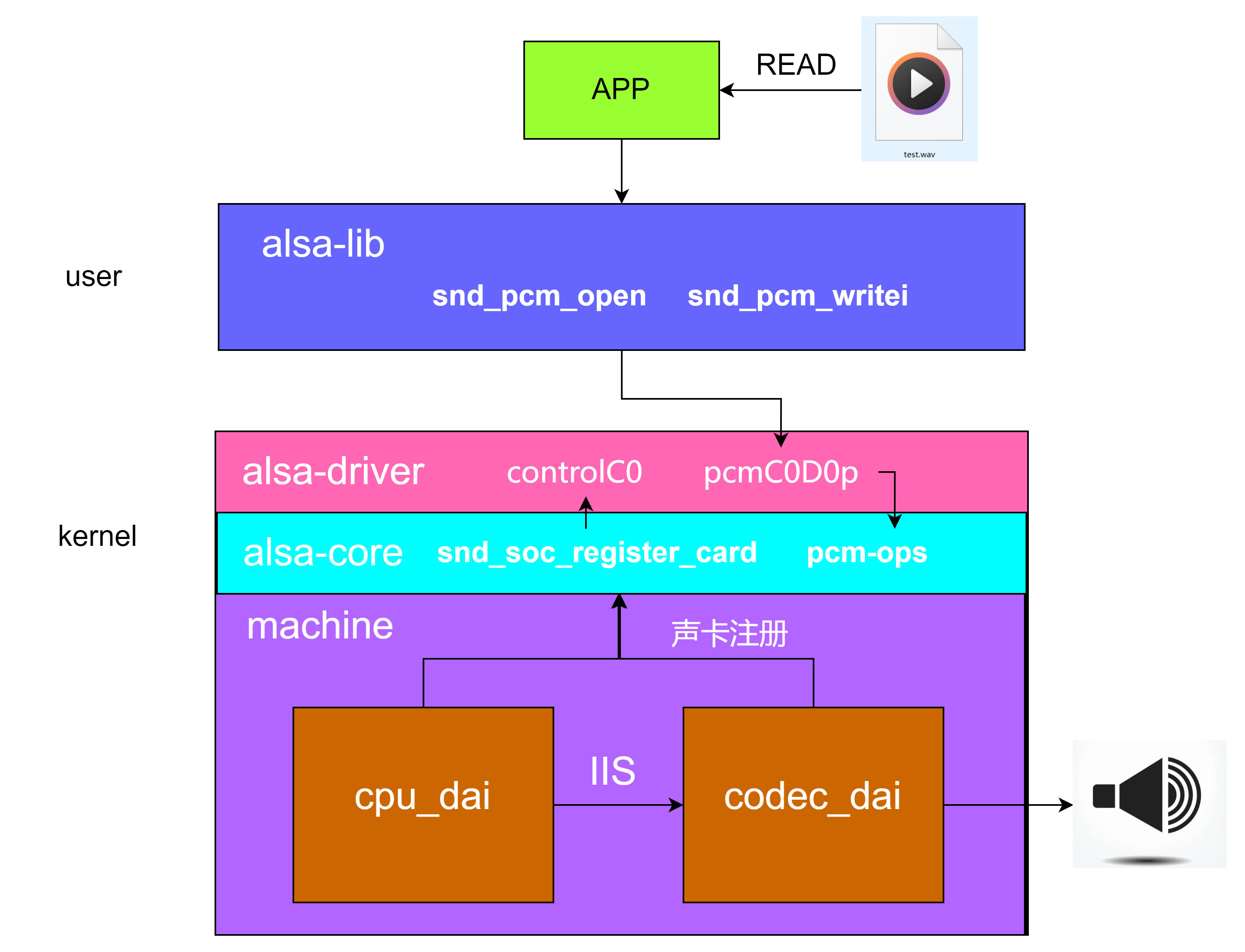
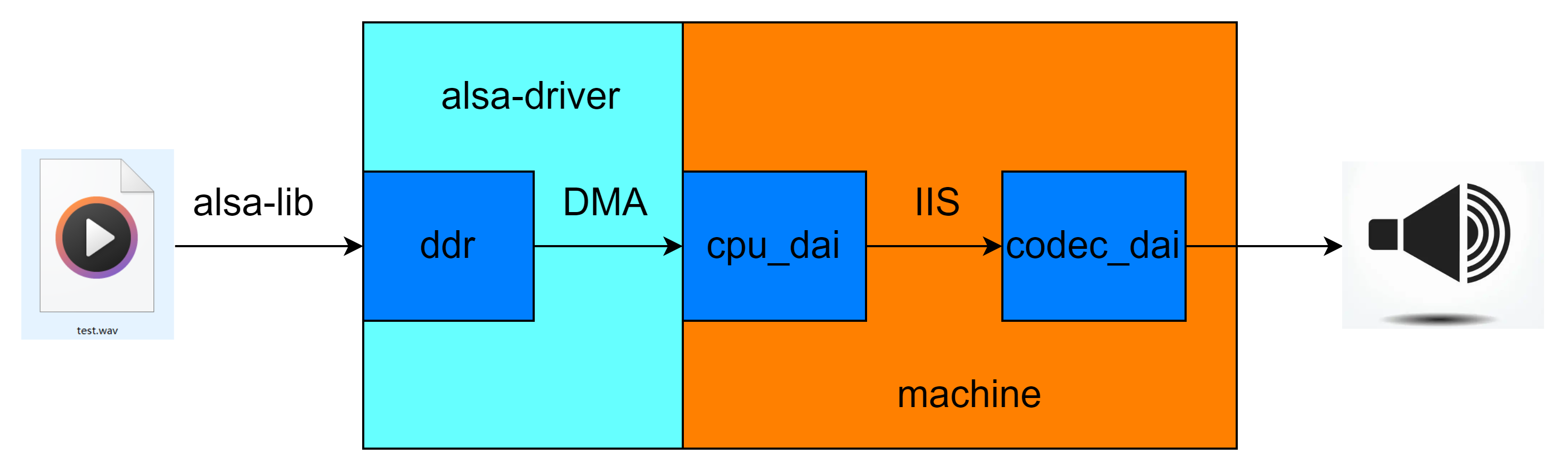
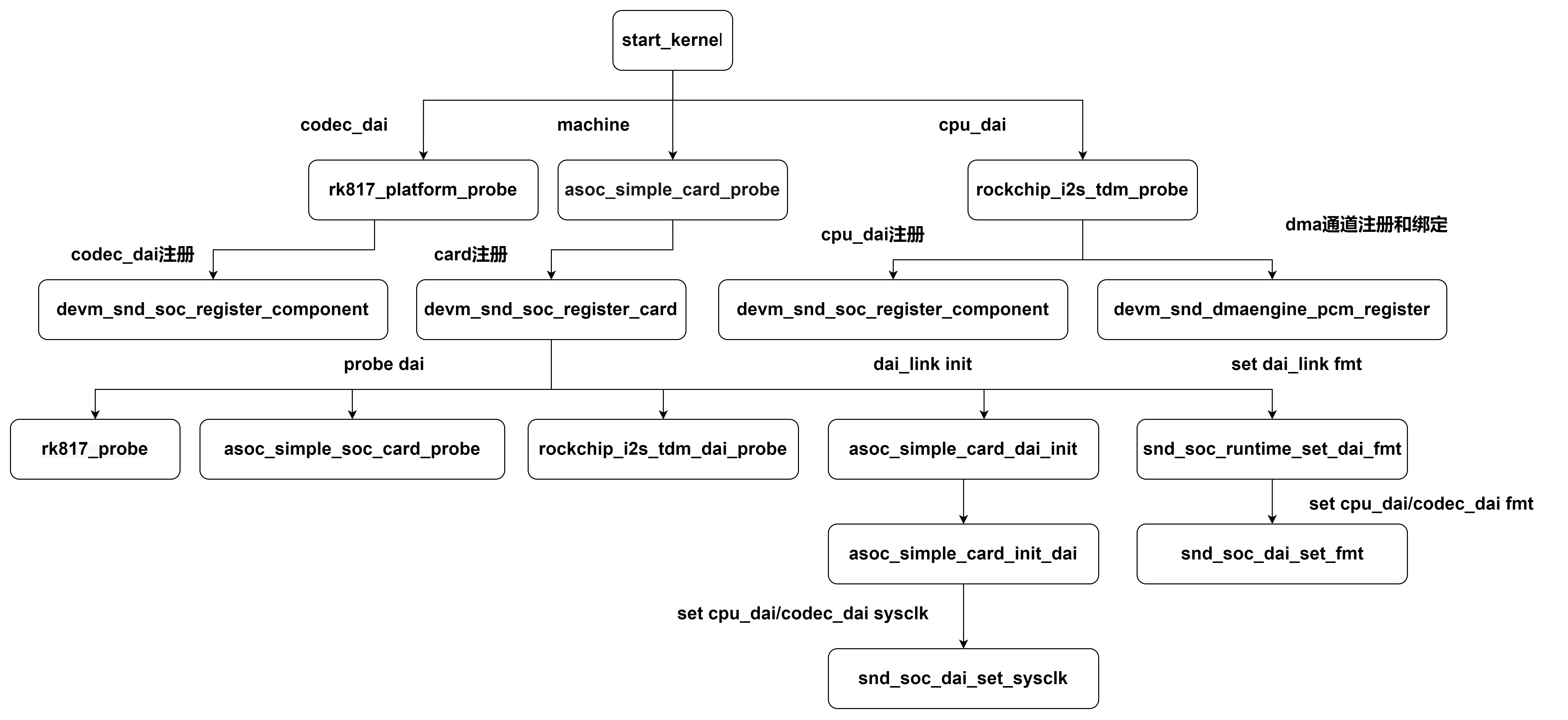
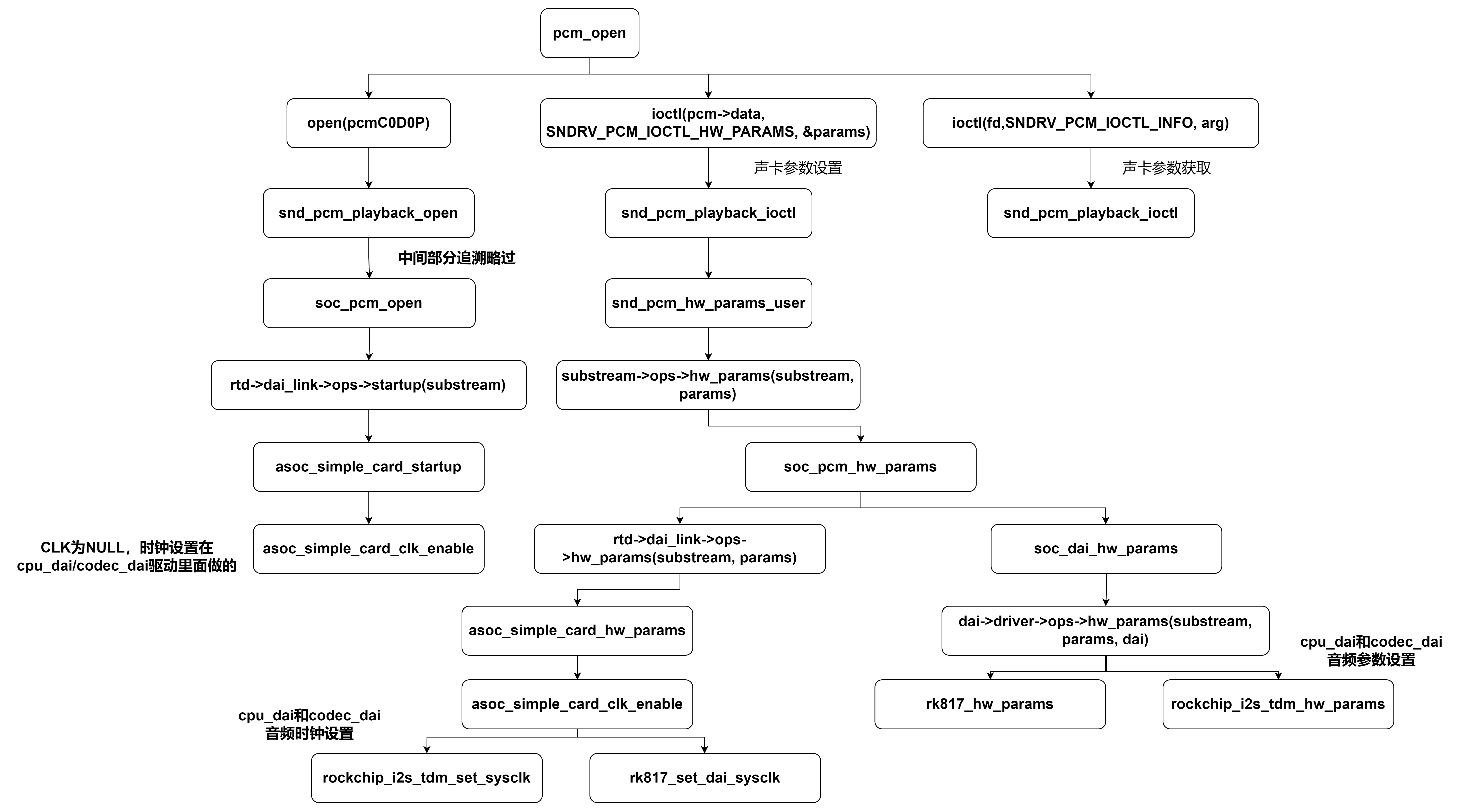
一个音频文件的播放流程如下图,由dma将音频文件的内容从内存搬运到IIS控制器,后传送到codec音频解码芯片,将数字信号转换为模拟信号输出给耳机或者喇叭 目录:/dev/snd controlC0:用于声卡的控制,例如通道选择,混音,麦克风的控制等; midiC0D0:用于播放midi音频; pcmC0D0c : 用于录音的pcm设备; pcmC0D0p :用于播放的pcm设备; seq :音序器; timer :定时器; cpu_dai驱动从dts获取到cpu_dai硬件信息后进入static int rockchip_i2s_tdm_probe(struct platform_device *pdev)函数,进行一系列cpu_dai的硬件初始化工作 snd_soc_register_component(dev, cmpnt_drv, dai_drv, num_dai)后续分析 该函数被传入两个关键参数struct snd_soc_component_driver cmpnt_drv、struct snd_soc_dai_driver dai_drv,定义如下 snd_soc_add_platform(dev, &pcm->platform,&dmaengine_pcm_platform)后续分析 platform中需要完成音频数据管理和音频数据的dma搬运,其中就涉及到了dma相关的操作,snd_soc_add_platform的目的就是完成dma通道的申请,并将pcm和dma关联起来 codec_dai驱动从dts获取到硬件信息后进入static int rk817_platform_probe(struct platform_device *pdev)函数,进行一系列codec_dai的硬件初始化工作 devm_snd_soc_register_component后续分析:初始化snd_soc_component的实例,然后注册dai,最终将注册的dai放入component->dai_list中,然后将分配的component放入到component_list链表中,遍历全局的component链表可以找到cpu_dai,codec_dai codec_dai驱动从dts获取到cpu_dai和codec_dai的连接关系和节点后,进入asoc_simple_card_probe,进行声卡的注册和初始化工作 devm_snd_soc_register_card(dev, card)的分析流程如下: 下图是板子内核启动到probe完成阶段的流程图,可以看到ALSA初始化音频的整个流程是怎么初始化声卡,和配置一些基本参数的 先看下pcm的fops,接口如下,定义在pcm_native.c substream是pcm ops的下一层,绝大部分任务都是在substream中处理,substream的ops定义在soc-pcm.c,定义如下 下图使用tinyalsa测试,可以看到alsa-driver在pcm_open阶段做了哪些工作,流程是什么 下图使用tinyalsa测试,可以看到alsa-driver在pcm_write阶段做了哪些工作,流程是什么 至此整个ALSA-DRIVER框架的内容就分析完了,可能有一些细节的东西内容太多导致没法去描述,有需求的话,可以自行根据需求分析2、音频播放流程
3、alsa设备文件介绍
二、CPU_DAI驱动分析
1、CPU_DAI相关的重要数据,便于对cpu_dai驱动进行理解
struct snd_soc_dai {
	const char *name;  //描述dai的名称
	int id;
	struct device *dev;

	/* driver ops */
	struct snd_soc_dai_driver *driver;    //指向snd_soc_dai_driver,这个结构里描述了cpu_dai的支持类型和各种对cpu_dai进行操作的api

	/* DAI runtime info */
	unsigned int capture_active:1;		/* stream is in use */
	unsigned int playback_active:1;		/* stream is in use */
	unsigned int symmetric_rates:1;
	unsigned int symmetric_channels:1;
	unsigned int symmetric_samplebits:1;
	unsigned int active;
	unsigned char probed:1;

	struct snd_soc_dapm_widget *playback_widget;
	struct snd_soc_dapm_widget *capture_widget;

	/* DAI DMA data */
	void *playback_dma_data;    //cpu_dai播放时使用的dma
	void *capture_dma_data;    //cpu_dai录制时使用的dma

	/* Symmetry data - only valid if symmetry is being enforced */
	unsigned int rate;
	unsigned int channels;
	unsigned int sample_bits;

	/* parent platform/codec */
	struct snd_soc_codec *codec;    //指向所关联的codec设备
	struct snd_soc_component *component;     //指向所关联的component

	/* CODEC TDM slot masks and params (for fixup) */
	unsigned int tx_mask;
	unsigned int rx_mask;

	struct list_head list;
};
struct snd_soc_dai_driver {
/* DAI description */
const char *name;
unsigned int id;
unsigned int base;
struct snd_soc_dobj dobj;
/* DAI driver callbacks */
int (*probe)(struct snd_soc_dai *dai);
int (*remove)(struct snd_soc_dai *dai);
int (*suspend)(struct snd_soc_dai *dai); //休眠接口
int (*resume)(struct snd_soc_dai *dai); //唤醒接口
/* compress dai */
int (*compress_new)(struct snd_soc_pcm_runtime *rtd, int num);
/* Optional Callback used at pcm creation*/
int (*pcm_new)(struct snd_soc_pcm_runtime *rtd,
struct snd_soc_dai *dai);
/* DAI is also used for the control bus */
bool bus_control;
/* ops */
const struct snd_soc_dai_ops *ops; //对cpu_dai进行操作的api接口集合
const struct snd_soc_cdai_ops *cops;
/* DAI capabilities */
struct snd_soc_pcm_stream capture; //描述播放模式dai支持的参数
struct snd_soc_pcm_stream playback; //描述录制模式dai支持的参数
unsigned int symmetric_rates:1;
unsigned int symmetric_channels:1;
unsigned int symmetric_samplebits:1;
/* probe ordering - for components with runtime dependencies */
int probe_order;
int remove_order;
};
struct snd_soc_dai_ops {
	/*
	 * DAI clocking configuration, all optional.
	 * Called by soc_card drivers, normally in their hw_params.
	 */

        //设置时钟
	int (*set_sysclk)(struct snd_soc_dai *dai,
		int clk_id, unsigned int freq, int dir);
        //设置锁相环
	int (*set_pll)(struct snd_soc_dai *dai, int pll_id, int source,
		unsigned int freq_in, unsigned int freq_out);
        //设置时钟分频系数
	int (*set_clkdiv)(struct snd_soc_dai *dai, int div_id, int div);
	int (*set_bclk_ratio)(struct snd_soc_dai *dai, unsigned int ratio);

	/*
	 * DAI format configuration
	 * Called by soc_card drivers, normally in their hw_params.
	 */
	int (*set_fmt)(struct snd_soc_dai *dai, unsigned int fmt);
	int (*xlate_tdm_slot_mask)(unsigned int slots,
		unsigned int *tx_mask, unsigned int *rx_mask);
	int (*set_tdm_slot)(struct snd_soc_dai *dai,
		unsigned int tx_mask, unsigned int rx_mask,
		int slots, int slot_width);
	int (*set_channel_map)(struct snd_soc_dai *dai,
		unsigned int tx_num, unsigned int *tx_slot,
		unsigned int rx_num, unsigned int *rx_slot);
	int (*get_channel_map)(struct snd_soc_dai *dai,
			unsigned int *tx_num, unsigned int *tx_slot,
			unsigned int *rx_num, unsigned int *rx_slot);
	int (*set_tristate)(struct snd_soc_dai *dai, int tristate);

	int (*set_sdw_stream)(struct snd_soc_dai *dai,
			void *stream, int direction);
	/*
	 * DAI digital mute - optional.
	 * Called by soc-core to minimise any pops.
	 */
	int (*digital_mute)(struct snd_soc_dai *dai, int mute);
	int (*mute_stream)(struct snd_soc_dai *dai, int mute, int stream);

	/*
	 * ALSA PCM audio operations - all optional.
	 * Called by soc-core during audio PCM operations.
	 */
	int (*startup)(struct snd_pcm_substream *,
		struct snd_soc_dai *);
	void (*shutdown)(struct snd_pcm_substream *,
		struct snd_soc_dai *);
	int (*hw_params)(struct snd_pcm_substream *,
		struct snd_pcm_hw_params *, struct snd_soc_dai *);
	int (*hw_free)(struct snd_pcm_substream *,
		struct snd_soc_dai *);
	int (*prepare)(struct snd_pcm_substream *,
		struct snd_soc_dai *);
	/*
	 * NOTE: Commands passed to the trigger function are not necessarily
	 * compatible with the current state of the dai. For example this
	 * sequence of commands is possible: START STOP STOP.
	 * So do not unconditionally use refcounting functions in the trigger
	 * function, e.g. clk_enable/disable.
	 */
	int (*trigger)(struct snd_pcm_substream *, int,
		struct snd_soc_dai *);
	int (*bespoke_trigger)(struct snd_pcm_substream *, int,
		struct snd_soc_dai *);
	/*
	 * For hardware based FIFO caused delay reporting.
	 * Optional.
	 */
	snd_pcm_sframes_t (*delay)(struct snd_pcm_substream *,
		struct snd_soc_dai *);
};
2、DTS-NODE
i2s1_8ch: i2s@fe410000 {
        compatible = "rockchip,rk3568-i2s-tdm";
        reg = <0x0 0xfe410000 0x0 0x1000>;
        interrupts = <GIC_SPI 53 IRQ_TYPE_LEVEL_HIGH>;
        clocks = <&cru MCLK_I2S1_8CH_TX>, <&cru MCLK_I2S1_8CH_RX>, <&cru HCLK_I2S1_8CH>;
        clock-names = "mclk_tx", "mclk_rx", "hclk";
        dmas = <&dmac1 2>, <&dmac1 3>;
        dma-names = "tx", "rx";
        resets = <&cru SRST_M_I2S1_8CH_TX>, <&cru SRST_M_I2S1_8CH_RX>;
        reset-names = "tx-m", "rx-m";
        rockchip,cru = <&cru>;
        rockchip,grf = <&grf>;
        #sound-dai-cells = <0>;
        pinctrl-names = "default";
        pinctrl-0 = <&i2s1m0_sclktx
                 &i2s1m0_sclkrx
                 &i2s1m0_lrcktx
                 &i2s1m0_lrckrx
                 &i2s1m0_sdi0
                 &i2s1m0_sdi1
                 &i2s1m0_sdi2
                 &i2s1m0_sdi3
                 &i2s1m0_sdo0
                 &i2s1m0_sdo1
                 &i2s1m0_sdo2
                 &i2s1m0_sdo3>;
        status = "disabled";
};
3、rockchip_i2s_tdm_probe分析
static int rockchip_i2s_tdm_probe(struct platform_device *pdev)
{
    ...
    //初始化snd_soc_dai_driver结构,dai的支持配置和各种用于控制dai的api接口
    rockchip_i2s_tdm_dai_prepare(pdev, &soc_dai);
    //从设备树获取bclk_fs值,没有默认64
    i2s_tdm->bclk_fs = 64;
    if (!of_property_read_u32(node, "rockchip,bclk-fs", &val)) {
	if ((val >= 32) && (val % 2 == 0))
		i2s_tdm->bclk_fs = val;
    }
    //从设备树中读取各种初始化cpu_dai相关的设置保存到i2s_tdm,例如I2S的时钟参数等
    of_property_read_u32(node, ..., &val);
    devm_reset_control_get(&pdev->dev, ...);
    devm_clk_get(&pdev->dev, "hclk")
    devm_clk_get(&pdev->dev, "mclk_tx");
    devm_clk_get(&pdev->dev, "mclk_rx")

    //获取cpu_dai的寄存器地址,并初始化cpu_dai
    platform_get_resource(pdev, IORESOURCE_MEM, 0);
    devm_ioremap_resource(&pdev->dev, res);
   //初始化regmap
   devm_regmap_init_mmio(&pdev->dev, regs, &rockchip_i2s_tdm_regmap_config);

    //TX/RX的dma参数获取
    i2s_tdm->playback_dma_data.addr = res->start + I2S_TXDR;
    i2s_tdm->playback_dma_data.addr_width = DMA_SLAVE_BUSWIDTH_4_BYTES;
    i2s_tdm->playback_dma_data.maxburst = 8;
    i2s_tdm->capture_dma_data.addr = res->start + I2S_RXDR;
    i2s_tdm->capture_dma_data.addr_width = DMA_SLAVE_BUSWIDTH_4_BYTES;
    i2s_tdm->capture_dma_data.maxburst = 8;

    //初始化cpu_dai的tx和rx通路
    rockchip_i2s_tdm_tx_path_prepare(i2s_tdm, node);
    rockchip_i2s_tdm_rx_path_prepare(i2s_tdm, node);
    i2s_tdm->soc_data->init(&pdev->dev, res->start);

    //注册component组件
    devm_snd_soc_register_component(&pdev->dev,
					      &rockchip_i2s_tdm_component,
					      soc_dai, 1);
        - >snd_soc_register_component(dev, cmpnt_drv, dai_drv, num_dai);
    //获取dma
    devm_snd_dmaengine_pcm_register(&pdev->dev, NULL, 0);
        ->snd_soc_add_platform(dev, &pcm->platform,&dmaengine_pcm_platform);
    return 0;
}
snd_soc_register_component(dev, cmpnt_drv, dai_drv, num_dai)->
    snd_soc_component_initialize(cmpnt, cmpnt_drv, dev); //初始化component
            //注册了一个dai,并填充snd_soc_dai_driver数据
            snd_soc_register_dais(cmpnt, dai_drv, num_dai, true);
            //将component加入component_list链表
            snd_soc_component_add(cmpnt);
static const struct snd_soc_component_driver rockchip_i2s_component = {
	.name = DRV_NAME,
};
struct snd_soc_dai_driver rockchip_i2s_tdm_dai = {
		.probe = rockchip_i2s_tdm_dai_probe,
		.playback = {
			.stream_name = "Playback",
			.channels_min = 2,
			.channels_max = 16,
			.rates = SNDRV_PCM_RATE_8000_192000,
			.formats = (SNDRV_PCM_FMTBIT_S8 |
				    SNDRV_PCM_FMTBIT_S16_LE |
				    SNDRV_PCM_FMTBIT_S20_3LE |
				    SNDRV_PCM_FMTBIT_S24_LE |
				    SNDRV_PCM_FMTBIT_S32_LE),
		},
		.capture = {
			.stream_name = "Capture",
			.channels_min = 2,
			.channels_max = 16,
			.rates = SNDRV_PCM_RATE_8000_192000,
			.formats = (SNDRV_PCM_FMTBIT_S8 |
				    SNDRV_PCM_FMTBIT_S16_LE |
				    SNDRV_PCM_FMTBIT_S20_3LE |
				    SNDRV_PCM_FMTBIT_S24_LE |
				    SNDRV_PCM_FMTBIT_S32_LE),
		},
                //对cpu_dai的api操作集合,如dai的时钟配置、格式配置等
		.ops = &rockchip_i2s_tdm_dai_ops,
};
dmaengine_pcm_request_chan_of(pcm, dev, config);
    //根据name去dts中找资源,申请对应的DMA通道
    chan = dma_request_slave_channel_reason(dev, name);
         return of_dma_request_slave_channel(dev->of_node, name);
     //注册platform到ASoC Core
     ret = snd_soc_add_platform(dev, &pcm->platform,&dmaengine_pcm_platform);
三、CODEC驱动分析
1、CODEC相关的重要数据
static const struct regmap_config rk817_codec_regmap_config = {
	.name = "rk817-codec",
	.reg_bits = 8,    //寄存器地址位数(必选项)
	.val_bits = 8,    //寄存器值位数(必选项)
	.reg_stride = 1,
	.max_register = 0x4f,    //最大寄存器值
	.cache_type = REGCACHE_FLAT,
	.volatile_reg = rk817_volatile_register,
	.writeable_reg = rk817_codec_register,    //寄存器是否可写
	.readable_reg = rk817_codec_register,   //寄存器是否可写读
	.reg_defaults = rk817_reg_defaults,    //默认寄存器配置参数
	.num_reg_defaults = ARRAY_SIZE(rk817_reg_defaults),
};
2、DTS-NODE
rk809_codec: codec {
            #sound-dai-cells = <0>;
            compatible = "rockchip,rk809-codec", "rockchip,rk817-codec";
            clocks = <&cru I2S1_MCLKOUT>;
            clock-names = "mclk";
            assigned-clocks = <&cru I2S1_MCLKOUT>, <&cru I2S1_MCLK_TX_IOE>;
            assigned-clock-rates = <12288000>;
            assigned-clock-parents = <&cru I2S1_MCLKOUT_TX>, <&cru I2S1_MCLKOUT_TX>;
            pinctrl-names = "default","spk_gpio";
            pinctrl-0 = <&i2s1m0_mclk>;
            pinctrl-1 = <&spk_ctl_gpio>;
            hp-volume = <20>;
            spk-volume = <3>;
            //mic-in-differential;

            capture-volume = <0>;
            io-channels = <&saradc 4>;
            hp-det-adc-value = <1000>;
            spk-ctl-gpios = <&gpio3 RK_PC5 GPIO_ACTIVE_HIGH>;
            status = "okay";
};
3、rk817_platform_probe分析
static int rk817_platform_probe(struct platform_device *pdev)
{
    ...
    rk817_codec_data = devm_kzalloc(&pdev->dev,sizeof(struct rk817_codec_priv),
    GFP_KERNEL);    //给rk817_codec_data申请空间
    platform_set_drvdata(pdev, rk817_codec_data); //rk817_codec_data绑定pdev

    //从dts节点中获取adc通道、gpio节点、volume值等
    rk817_codec_parse_dt_property(&pdev->dev, rk817_codec_data);
    //regmap初始化
    rk817_codec_data->regmap = devm_regmap_init_i2c(rk817->i2c,
					    &rk817_codec_regmap_config);
    //mclk获取
    rk817_codec_data->mclk = devm_clk_get(&pdev->dev, "mclk");
    //componen注册
    devm_snd_soc_register_component(&pdev->dev, &soc_codec_dev_rk817,
					      rk817_dai, ARRAY_SIZE(rk817_dai));
    ...
}
devm_snd_soc_register_component->
    snd_soc_register_component->
        snd_soc_add_component->
            snd_soc_component_initialize    //component初始化
            snd_soc_register_dais    //dai注册
            snd_soc_component_add    //component加入全局链表
四、MACHINE(simple-card.c)驱动分析
1、MACHINE相关的重要数据
struct snd_soc_dai_link {
	/* config - must be set by machine driver */
	const char *name;			/* Codec name */
	const char *stream_name;		/* Stream name */
	/*
	 * You MAY specify the link's CPU-side device, either by device name,
	 * or by DT/OF node, but not both. If this information is omitted,
	 * the CPU-side DAI is matched using .cpu_dai_name only, which hence
	 * must be globally unique. These fields are currently typically used
	 * only for codec to codec links, or systems using device tree.
	 */
	const char *cpu_name;
	struct device_node *cpu_of_node;
	/*
	 * You MAY specify the DAI name of the CPU DAI. If this information is
	 * omitted, the CPU-side DAI is matched using .cpu_name/.cpu_of_node
	 * only, which only works well when that device exposes a single DAI.
	 */
	const char *cpu_dai_name;
	/*
	 * You MUST specify the link's codec, either by device name, or by
	 * DT/OF node, but not both.
	 */
	const char *codec_name;
	struct device_node *codec_of_node;
	/* You MUST specify the DAI name within the codec */
	const char *codec_dai_name;

	struct snd_soc_dai_link_component *codecs;
	unsigned int num_codecs;

	/*
	 * You MAY specify the link's platform/PCM/DMA driver, either by
	 * device name, or by DT/OF node, but not both. Some forms of link
	 * do not need a platform.
	 */
	const char *platform_name;
	struct device_node *platform_of_node;
	int id;	/* optional ID for machine driver link identification */

	const struct snd_soc_pcm_stream *params;
	unsigned int num_params;

	unsigned int dai_fmt;           /* format to set on init */

	enum snd_soc_dpcm_trigger trigger[2]; /* trigger type for DPCM */

	/* codec/machine specific init - e.g. add machine controls */
	int (*init)(struct snd_soc_pcm_runtime *rtd);

	/* optional hw_params re-writing for BE and FE sync */
	int (*be_hw_params_fixup)(struct snd_soc_pcm_runtime *rtd,
			struct snd_pcm_hw_params *params);

	/* machine stream operations */
	const struct snd_soc_ops *ops;
	const struct snd_soc_compr_ops *compr_ops;

	/* Mark this pcm with non atomic ops */
	bool nonatomic;

	/* For unidirectional dai links */
	unsigned int playback_only:1;
	unsigned int capture_only:1;

	/* Keep DAI active over suspend */
	unsigned int ignore_suspend:1;

	/* Symmetry requirements */
	unsigned int symmetric_rates:1;
	unsigned int symmetric_channels:1;
	unsigned int symmetric_samplebits:1;

	/* Do not create a PCM for this DAI link (Backend link) */
	unsigned int no_pcm:1;

	/* This DAI link can route to other DAI links at runtime (Frontend)*/
	unsigned int dynamic:1;

	/* This DAI link can be reconfigured at runtime (Backend) */
	unsigned int dynamic_be:1;

	/*
	 * This DAI can support no host IO (no pcm data is
	 * copied to from host)
	 */
	unsigned int no_host_mode:2;

	/* DPCM capture and Playback support */
	unsigned int dpcm_capture:1;
	unsigned int dpcm_playback:1;

	/* DPCM used FE & BE merged format */
	unsigned int dpcm_merged_format:1;
	/* DPCM used FE & BE merged channel */
	unsigned int dpcm_merged_chan:1;
	/* DPCM used FE & BE merged rate */
	unsigned int dpcm_merged_rate:1;

	/* pmdown_time is ignored at stop */
	unsigned int ignore_pmdown_time:1;

	/* Do not create a PCM for this DAI link (Backend link) */
	unsigned int ignore:1;

	struct list_head list; /* DAI link list of the soc card */
	struct snd_soc_dobj dobj; /* For topology */

	/* this value determines what all ops can be started asynchronously */
	enum snd_soc_async_ops async_ops;
};
struct snd_soc_card {
	const char *name;
	const char *long_name;
	const char *driver_name;
	char dmi_longname[80];
	char topology_shortname[32];

	struct device *dev;
	struct snd_card *snd_card;
	struct module *owner;

	struct mutex mutex;
	struct mutex dapm_mutex;
	struct mutex dapm_power_mutex;

	bool instantiated;
	bool topology_shortname_created;

	int (*probe)(struct snd_soc_card *card);
	int (*late_probe)(struct snd_soc_card *card);
	int (*remove)(struct snd_soc_card *card);

	/* the pre and post PM functions are used to do any PM work before and
	 * after the codec and DAI's do any PM work. */
	int (*suspend_pre)(struct snd_soc_card *card);
	int (*suspend_post)(struct snd_soc_card *card);
	int (*resume_pre)(struct snd_soc_card *card);
	int (*resume_post)(struct snd_soc_card *card);

	/* callbacks */
	int (*set_bias_level)(struct snd_soc_card *,
			      struct snd_soc_dapm_context *dapm,
			      enum snd_soc_bias_level level);
	int (*set_bias_level_post)(struct snd_soc_card *,
				   struct snd_soc_dapm_context *dapm,
				   enum snd_soc_bias_level level);

	int (*add_dai_link)(struct snd_soc_card *,
			    struct snd_soc_dai_link *link);
	void (*remove_dai_link)(struct snd_soc_card *,
			    struct snd_soc_dai_link *link);

	long pmdown_time;

	/* CPU <--> Codec DAI links  */
	struct snd_soc_dai_link *dai_link;  /* predefined links only */
	int num_links;  /* predefined links only */
	struct list_head dai_link_list; /* all links */
	int num_dai_links;

	struct list_head rtd_list;
	int num_rtd;

	/* optional codec specific configuration */
	struct snd_soc_codec_conf *codec_conf;
	int num_configs;

	/*
	 * optional auxiliary devices such as amplifiers or codecs with DAI
	 * link unused
	 */
	struct snd_soc_aux_dev *aux_dev;
	int num_aux_devs;
	struct list_head aux_comp_list;

	const struct snd_kcontrol_new *controls;
	int num_controls;

	/*
	 * Card-specific routes and widgets.
	 * Note: of_dapm_xxx for Device Tree; Otherwise for driver build-in.
	 */
	const struct snd_soc_dapm_widget *dapm_widgets;
	int num_dapm_widgets;
	const struct snd_soc_dapm_route *dapm_routes;
	int num_dapm_routes;
	const struct snd_soc_dapm_widget *of_dapm_widgets;
	int num_of_dapm_widgets;
	const struct snd_soc_dapm_route *of_dapm_routes;
	int num_of_dapm_routes;
	bool fully_routed;

	struct work_struct deferred_resume_work;

	/* lists of probed devices belonging to this card */
	struct list_head component_dev_list;

	struct list_head widgets;
	struct list_head paths;
	struct list_head dapm_list;
	struct list_head dapm_dirty;

	/* attached dynamic objects */
	struct list_head dobj_list;

	/* Generic DAPM context for the card */
	struct snd_soc_dapm_context dapm;
	struct snd_soc_dapm_stats dapm_stats;
	struct snd_soc_dapm_update *update;

#ifdef CONFIG_DEBUG_FS
	struct dentry *debugfs_card_root;
	struct dentry *debugfs_pop_time;
#endif
	u32 pop_time;

	void *drvdata;
};
2、DTS-NODE
    rk809_sound: rk809-sound {
        status = "okay";
        compatible = "simple-audio-card";
        simple-audio-card,format = "i2s";
        simple-audio-card,name = "rockchip,rk809-codec";
        simple-audio-card,mclk-fs = <256>;
        simple-audio-card,widgets =
                        "Microphone", "Mic Jack",
                        "Headphone", "Headphone Jack";
        simple-audio-card,routing =
                        "Mic Jack", "MICBIAS1",
                        "IN1P", "Mic Jack",
                        "Headphone Jack", "HPOL",
                        "Headphone Jack", "HPOR";
        simple-audio-card,cpu {
            sound-dai = <&i2s1_8ch>;
        };
        simple-audio-card,codec {
            sound-dai = <&rk809_codec>;
        };
    };
3、asoc_simple_card_probe分析
static int asoc_simple_card_probe(struct platform_device *pdev)
{
    struct snd_soc_dai_link *dai_link;
    struct snd_soc_card *card;
    ...
    //初始化snd_soc_card
    card = simple_priv_to_card(priv);
    card->owner		= THIS_MODULE;
    card->dev		= dev;
    card->dai_link		= priv->dai_link;
    card->num_links		= num;
    card->probe		= asoc_simple_soc_card_probe;

    //从DTS中获取cpu_dai\codec_dai节点、widgets、routing等信息,填充snd_soc_dai_link
    asoc_simple_card_parse_of(priv);->
        asoc_simple_card_of_parse_widgets(card, PREFIX);
        asoc_simple_card_of_parse_routing(card, PREFIX, 1);
        asoc_simple_card_dai_link_of(node, priv, 0, true);

    //实例化和填充card,绑定dailink,创建音频节点pcmC0D0P,并完成cpu_dai和codec的probe
    devm_snd_soc_register_card(dev, card);
            snd_soc_register_card(card);->
            snd_soc_instantiate_card(card);
    ...
}
    devm_snd_soc_register_card(dev, card);
            snd_soc_register_card(card);->
            snd_soc_instantiate_card(card); ->
                soc_bind_dai_link(card, &card->dai_link[i]);
                snd_card_new(card->dev, SNDRV_DEFAULT_IDX1, SNDRV_DEFAULT_STR1,card->owner, 0, &card->snd_card); //绑定完成后申请一个声卡
                card->probe(card); //仅初始化一次声卡
                soc_probe_link_components(card, rtd, order); //probe 该声卡dai_link上的所有components组件
                soc_probe_link_dais(card, rtd, order); //probe 该声卡所有dai_link->
                    //建立playback stream/capture stream,相应的substream也同时建立,ops绑定snd_pcm_dev_register,回调函数会在声卡的 注册阶段被调用
                    soc_new_pcm(rtd, num);
                    // 设置操作该pcm的控制/操作接口函数
                    snd_pcm_set_ops(pcm, SNDRV_PCM_STREAM_PLAYBACK, &rtd->ops);
               snd_card_register(card->snd_card);   //注册声卡,遍历声卡下的所有逻辑设备,调用各设备的注册回调函数,对于pcm,就是上面提到的snd_pcm_dev_register函数,该回调函数建立了和用户空间应用程序(alsa-lib)通信所用的设备文件节点:/dev/snd/pcmCxxDxxp 和 /dev/snd/pcmCxxDxxc
五、ALSA-Probe的流程
六、Tinyalsa pcm_open的调用流程
const struct file_operations snd_pcm_f_ops[2] = {
	{
		.owner =		THIS_MODULE,
		.write =		snd_pcm_write,
		.write_iter =		snd_pcm_writev,
		.open =			snd_pcm_playback_open,
		.release =		snd_pcm_release,
		.llseek =		no_llseek,
		.poll =			snd_pcm_playback_poll,
		.unlocked_ioctl =	snd_pcm_playback_ioctl,
		.compat_ioctl = 	snd_pcm_ioctl_compat,
		.mmap =			snd_pcm_mmap,
		.fasync =		snd_pcm_fasync,
		.get_unmapped_area =	snd_pcm_get_unmapped_area,
	},
	{
		.owner =		THIS_MODULE,
		.read =			snd_pcm_read,
		.read_iter =		snd_pcm_readv,
		.open =			snd_pcm_capture_open,
		.release =		snd_pcm_release,
		.llseek =		no_llseek,
		.poll =			snd_pcm_capture_poll,
		.unlocked_ioctl =	snd_pcm_capture_ioctl,
		.compat_ioctl = 	snd_pcm_ioctl_compat,
		.mmap =			snd_pcm_mmap,
		.fasync =		snd_pcm_fasync,
		.get_unmapped_area =	snd_pcm_get_unmapped_area,
	}
};
int soc_new_pcm(struct snd_soc_pcm_runtime *rtd, int num)
{
        ...
    	/* ASoC PCM operations */
	if (rtd->dai_link->dynamic) {
		rtd->ops.open		= dpcm_fe_dai_open;
		rtd->ops.hw_params	= dpcm_fe_dai_hw_params;
		rtd->ops.prepare	= dpcm_fe_dai_prepare;
		rtd->ops.trigger	= dpcm_fe_dai_trigger;
		rtd->ops.hw_free	= dpcm_fe_dai_hw_free;
		rtd->ops.close		= dpcm_fe_dai_close;
		rtd->ops.pointer	= soc_pcm_pointer;
		rtd->ops.ioctl		= soc_pcm_ioctl;
	} else {
		rtd->ops.open		= soc_pcm_open;
		rtd->ops.hw_params	= soc_pcm_hw_params;
		rtd->ops.prepare	= soc_pcm_prepare;
		rtd->ops.trigger	= soc_pcm_trigger;
		rtd->ops.hw_free	= soc_pcm_hw_free;
		rtd->ops.close		= soc_pcm_close;
		rtd->ops.pointer	= soc_pcm_pointer;
		rtd->ops.ioctl		= soc_pcm_ioctl;
	}
        ...
	if (playback)
		snd_pcm_set_ops(pcm, SNDRV_PCM_STREAM_PLAYBACK, &rtd->ops);

	if (capture)
		snd_pcm_set_ops(pcm, SNDRV_PCM_STREAM_CAPTURE, &rtd->ops);
        ...
}
七、Tinyalsa pcm_write的调用流程

按照目前的情况,这个问题不适合我们的问答形式。我们希望答案得到事实、引用或专业知识的支持,但这个问题可能会引发辩论、争论、投票或扩展讨论。如果您觉得这个问题可以改进并可能重新打开,visitthehelpcenter指导。关闭10年前。问题1)我想知道rubyonrails是否有功能类似于primefaces的gem。我问的原因是如果您使用primefaces(http://www.primefaces.org/showcase-labs/ui/home.jsf),开发人员无需担心javascript或jquery的东西。据我所知,JSF是一个规范,基于规范的各种可用实现,prim
本教程将在Unity3D中混合Optitrack与数据手套的数据流,在人体运动的基础上,添加双手手指部分的运动。双手手背的角度仍由Optitrack提供,数据手套提供双手手指的角度。 01 客户端软件分别安装MotiveBody与MotionVenus并校准人体与数据手套。MotiveBodyMotionVenus数据手套使用、校准流程参照:https://gitee.com/foheart_1/foheart-h1-data-summary.git02 数据转发打开MotiveBody软件的Streaming,开始向Unity3D广播数据;MotionVenus中设置->选项选择Unit
Transformers开始在视频识别领域的“猪突猛进”,各种改进和魔改层出不穷。由此作者将开启VideoTransformer系列的讲解,本篇主要介绍了FBAI团队的TimeSformer,这也是第一篇使用纯Transformer结构在视频识别上的文章。如果觉得有用,就请点赞、收藏、关注!paper:https://arxiv.org/abs/2102.05095code(offical):https://github.com/facebookresearch/TimeSformeraccept:ICML2021author:FacebookAI一、前言Transformers(VIT)在图
我想开始使用“Sinatra”框架进行编码,但我找不到该框架的“MVC”模式。是“MVC-Sinatra”模式或框架吗? 最佳答案 您可能想查看Padrino这是一个围绕Sinatra构建的框架,可为您的项目提供更“类似Rails”的感觉,但没有那么多隐藏的魔法。这是使用Sinatra可以做什么的一个很好的例子。虽然如果您需要开始使用这很好,但我个人建议您将它用作学习工具,以对您来说最有意义的方式使用Sinatra构建您自己的应用程序。写一些测试/期望,写一些代码,通过测试-重复:)至于ORM,你还应该结帐Sequel其中(imho
目录0专栏介绍1平面2R机器人概述2运动学建模2.1正运动学模型2.2逆运动学模型2.3机器人运动学仿真3动力学建模3.1计算动能3.2势能计算与动力学方程3.3动力学仿真0专栏介绍?附C++/Python/Matlab全套代码?课程设计、毕业设计、创新竞赛必备!详细介绍全局规划(图搜索、采样法、智能算法等);局部规划(DWA、APF等);曲线优化(贝塞尔曲线、B样条曲线等)。?详情:图解自动驾驶中的运动规划(MotionPlanning),附几十种规划算法1平面2R机器人概述如图1所示为本文的研究本体——平面2R机器人。对参数进行如下定义:机器人广义坐标
网站的日志分析,是seo优化不可忽视的一门功课,但网站越大,每天产生的日志就越大,大站一天都可以产生几个G的网站日志,如果光靠肉眼去分析,那可能看到猴年马月都看不完,因此借助网站日志分析工具去分析网站日志,那将会使网站日志分析工作变得更简单。下面推荐两款网站日志分析软件。第一款:逆火网站日志分析器逆火网站日志分析器是一款功能全面的网站服务器日志分析软件。通过分析网站的日志文件,不仅能够精准的知道网站的访问量、网站的访问来源,网站的广告点击,访客的地区统计,搜索引擎关键字查询等,还能够一次性分析多个网站的日志文件,让你轻松管理网站。逆火网站日志分析器下载地址:https://pan.baidu.
一、机器人介绍 此处是基于MATLABRVC工具箱,对ABB-IRB-1200型号的微型机械臂进行正逆向运动学分析,并利Simulink工具实现对机械臂进行具有动力学参数的末端轨迹规划仿真,最后根据机械模型设计Simulink-Adams联合仿真。 图1.ABBIRB 1200尺寸参数示意图ABBIRB 1200提供的两种型号广泛适用于各作业,且两者间零部件通用,两种型号的工作范围分别为700 mm 和 900 mm,大有效负载分别为 7 kg 和5 kg。 IRB 1200 能够在狭小空间内能发挥其工作范围与性能优势,具有全新的设计、小型化的体积、高效的性能、易于集成、便捷的接
目录一.大致如下常见问题:(1)找不到程序所依赖的Qt库version`Qt_5'notfound(requiredby(2)CouldnotLoadtheQtplatformplugin"xcb"in""eventhoughitwasfound(3)打包到在不同的linux系统下,或者打包到高版本的相同系统下,运行程序时,直接提示段错误即segmentationfault,或者Illegalinstruction(coredumped)非法指令(4)ldd应用程序或者库,查看运行所依赖的库时,直接报段错误二.问题逐个分析,得出解决方法:(1)找不到程序所依赖的Qt库version`Qt_5'
按照目前的情况,这个问题不适合我们的问答形式。我们希望答案得到事实、引用或专业知识的支持,但这个问题可能会引发辩论、争论、投票或扩展讨论。如果您觉得这个问题可以改进并可能重新打开,visitthehelpcenter指导。关闭10年前。我一直在Rails上做两个项目,它们运行良好,但在这个过程中重新发明了轮子,自来水(和热水)和止痛药,正如我随后了解到的那样,这些已经存在于框架中。那么基本上,正确了解框架中所有智能部分的最佳方法是什么,这将节省时间而不是自己构建已经实现的功能?从第1页开始阅读文档?是否有公开所有内容的特定示例应用程序?一个特定的开源项目?所有的rails交通?还是完全
我想使用ruby-prof和JMeter分析Rails应用程序。我对分析特定Controller/操作/或模型方法的建议方法不感兴趣,我想分析完整堆栈,从上到下。所以我运行这样的东西:RAILS_ENV=productionruby-prof-fprof.outscript/server>/dev/null然后我在上面运行我的JMeter测试计划。然而,问题是使用CTRL+C或SIGKILL中断它也会在ruby-prof可以写入任何输出之前杀死它。如何在不中断ruby-prof的情况下停止mongrel服务器? 最佳答案
