在游戏研发过程中,有时候会对一个物体经过多次围绕不同的轴进行不同角度的旋转,从而计算得到一个方向,以此来检测在该对应的方向上是否有对应的物体或别的对象,因此本节对Quaternion.AngleAxis进行简单的记录;
对该API进行理解:
整体就是:指定一个轴,围绕该轴旋转指定的角度,得到一个新的旋转结果;
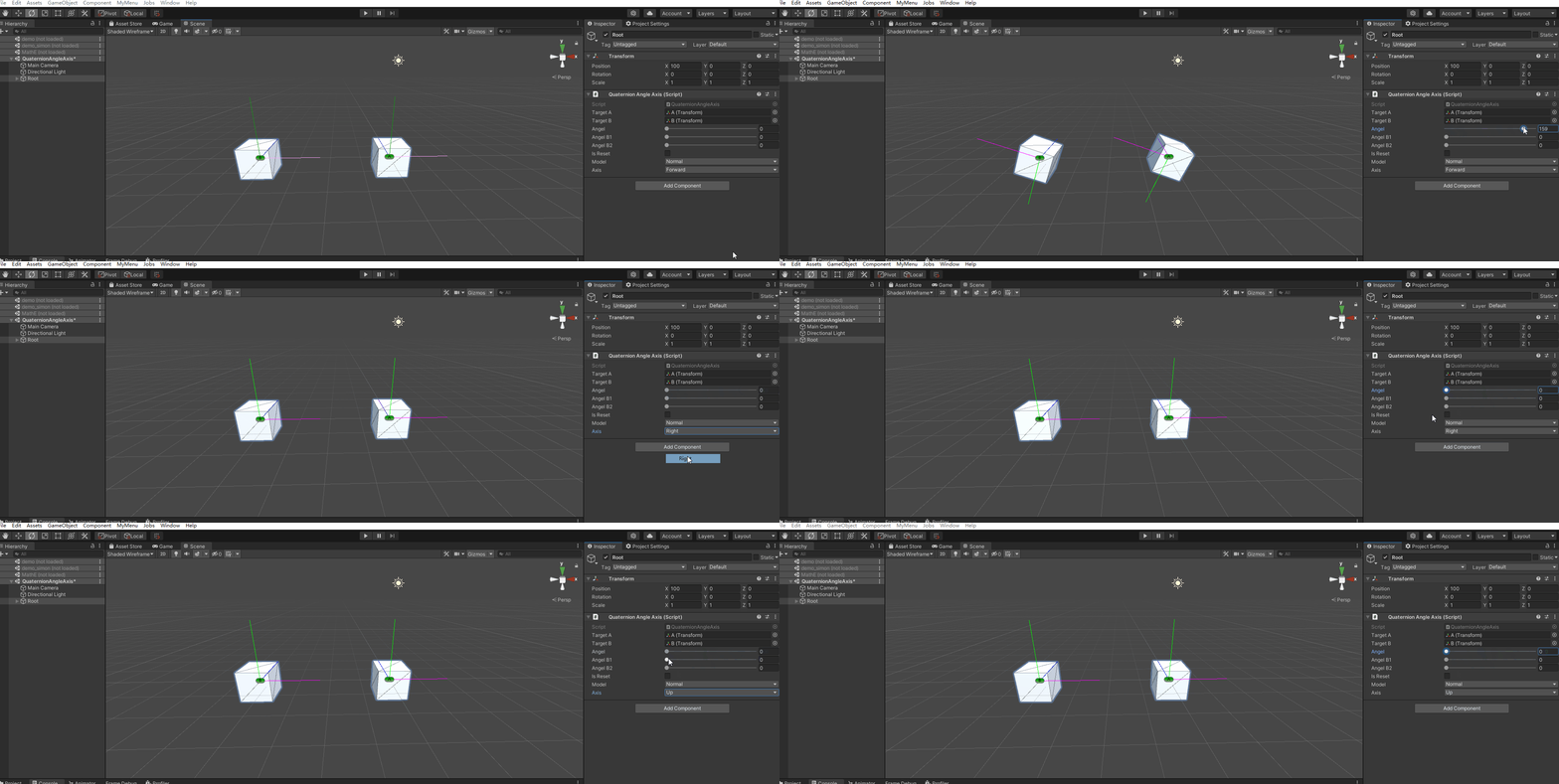
在上图中可以看到有两个Cube,都在以相同的角度,围绕相同的轴在旋转;这里只是简单的用了该API的结果:
 targetA.rotation = Quaternion.AngleAxis(angel, direction);
 targetB.rotation = Quaternion.AngleAxis(angel, direction);
Angel:代表旋转多少度,比如上图中的滑动条控制的数值0-180;当然0是不会有任何变化的;
direction:代表的是轴,也就是围绕哪一个轴进行旋转;上面的动画中只是采用基本的
Vector3.up、Vector3.right,Vector3.forward进行基本的演示。但在实际的操作中的方向大多数不是这几个基本的的方向,有更多其它的方向。
动画演示:
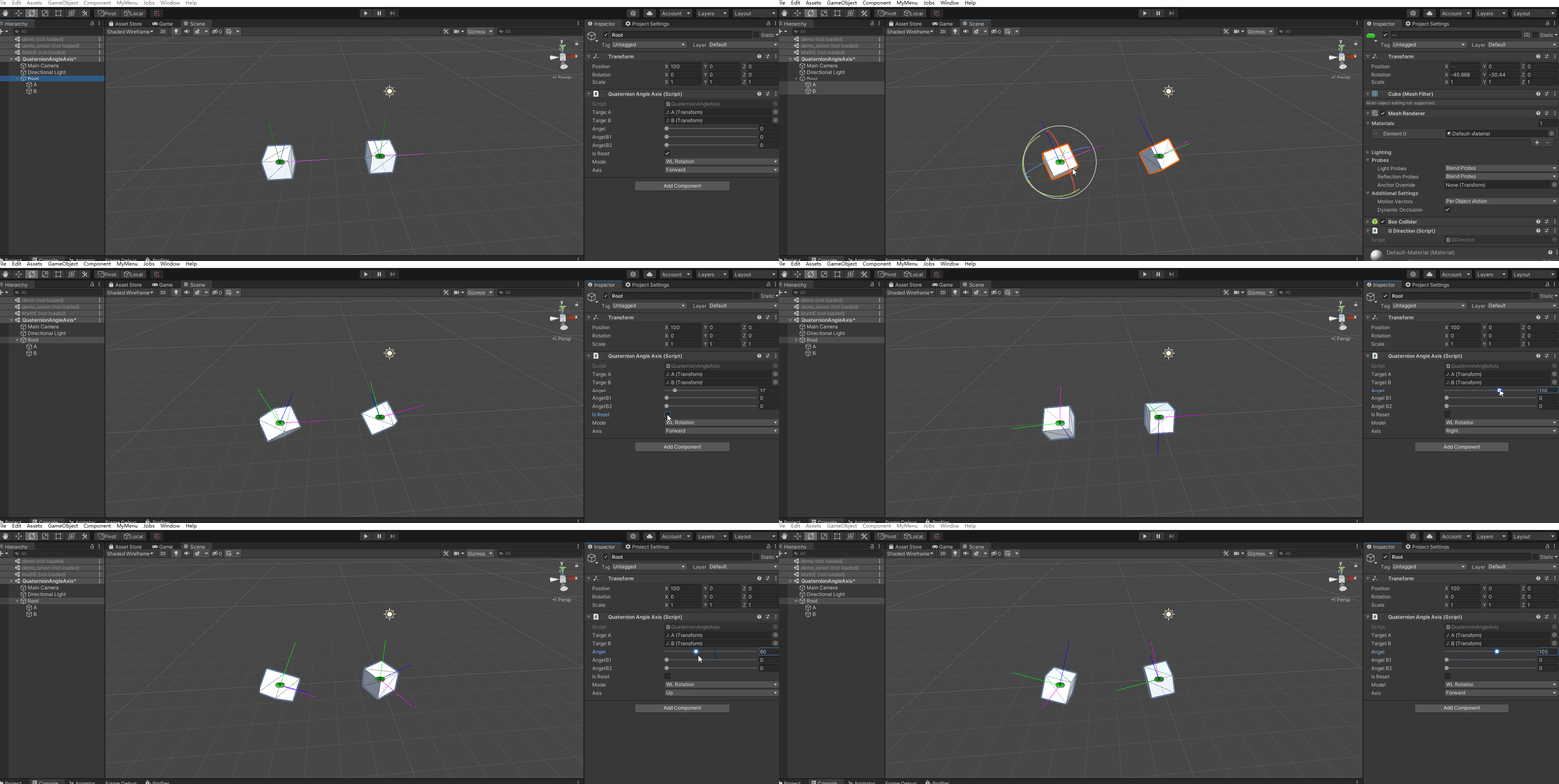
首先将CubeA和CubeB都调整一个相同的旋转角度;然后在分别在有右侧的面板中调节参数,对它们进行旋转;可以发现旋转的实际效果是不一样的【可以根据xyz轴的方向来发明细发现】;这是因为旋转的时候采用的坐标轴不一样;
CubeA:采用世界坐标轴的方式进行旋转;
CubeB:采用的是CubeB本身的坐标轴进行旋转的;
targetA.rotation = Quaternion.AngleAxis(angel, direction);
targetB.rotation = Quaternion.AngleAxis(angel, rotationB * direction);
rotationB * direction:表示CubeB本身的指定轴的方向;比如Vector3.right表示的是右侧,但是它不能直接代表Cube本身的右侧,其中的原因是Cube本身是存在旋转的;
如果两个旋转的方向结果相乘,那么结果会是什么:看演示
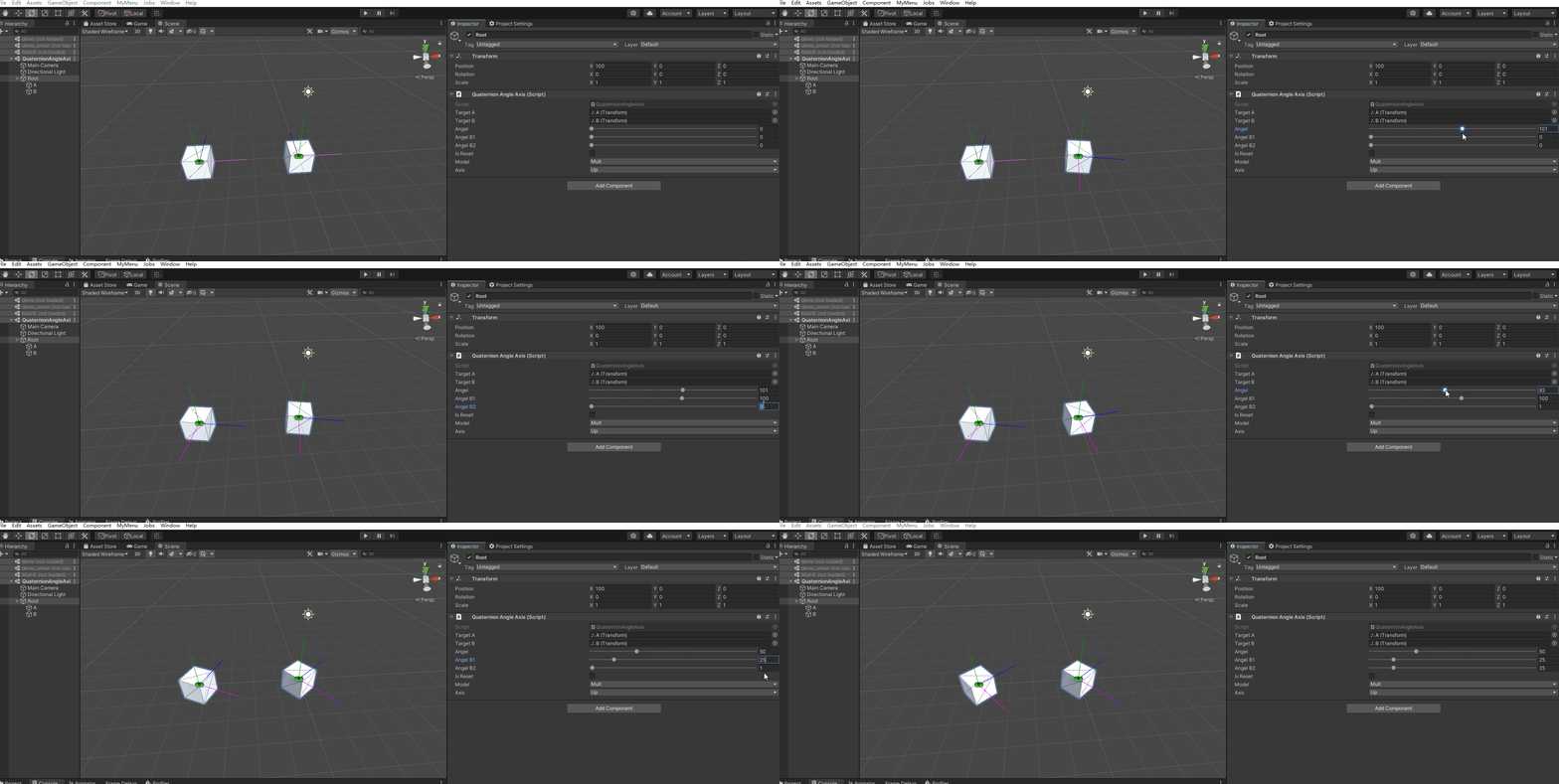
从上面的动画可以看出:
 targetA.rotation = Quaternion.AngleAxis(angel, rotationA * direction);


 targetB.rotation = Quaternion.AngleAxis(angelB1, rotationB * direction) *
                           Quaternion.AngleAxis(angelB2, rotationB * direction);
两个Quaternion.AngleAxis 相乘;也就是Quaternion相乘其实就是表示两个旋转角度累加;
using System;
using System.Collections;
using System.Collections.Generic;
using UnityEngine;

public class QuaternionAngleAxis : MonoBehaviour
{
    [SerializeField] private Transform targetA;
    [SerializeField] private Transform targetB;
    [SerializeField] [Range(0, 180)] private int angel;
    [SerializeField] [Range(0, 180)] private int angelB1;
    [SerializeField] [Range(0, 180)] private int angelB2;

    [SerializeField] private bool isReset;


    public enum Axis
    {
        Up,
        Forward,
        Right,
    }


    public enum TestModel
    {
        /// <summary>
        /// 普通旋转
        /// </summary>
        Normal,

        /// <summary>
        /// 世界坐标和本身旋转
        /// </summary>
        WLRotation,

        /// <summary>
        /// 旋转相乘
        /// </summary>
        Mult,
    }

    private Quaternion rotationA;
    private Quaternion rotationB;

    public TestModel model;
    public Axis axis = Axis.Right;
    private Vector3 direction;

    private void OnDrawGizmos()
    {
        if (isReset)
        {
            rotationA = targetA.rotation;
            rotationB = targetB.rotation;
            return;
        }


        switch (axis)
        {
            case Axis.Forward:
                direction = Vector3.forward;
                break;
            case Axis.Right:
                direction = Vector3.right;
                break;
            case Axis.Up:
                direction = Vector3.up;
                break;
        }


        switch (model)
        {
            case TestModel.Normal:
                NormalAngelAxis();
                break;
            case TestModel.WLRotation:
                WLRotationAngelAxis();
                break;
            case TestModel.Mult:
                MultAngelAxis();
                break;
        }
    }


    void NormalAngelAxis()
    {
        targetA.rotation = Quaternion.AngleAxis(angel, direction);
        targetB.rotation = Quaternion.AngleAxis(angel, direction);
    }


    void WLRotationAngelAxis()
    {
        targetA.rotation = Quaternion.AngleAxis(angel, direction);
        targetB.rotation = Quaternion.AngleAxis(angel, rotationB * direction);
    }

    void MultAngelAxis()
    {
        targetA.rotation = Quaternion.AngleAxis(angel, rotationA * direction);


        targetB.rotation = Quaternion.AngleAxis(angelB1, rotationB * direction) *
                           Quaternion.AngleAxis(angelB2, rotationB * direction);
    }
}
最近好像开始长胖了–【valaki】
?博客主页:https://xiaoy.blog.csdn.net?本文由呆呆敲代码的小Y原创,首发于CSDN??学习专栏推荐:Unity系统学习专栏?游戏制作专栏推荐:游戏制作?Unity实战100例专栏推荐:Unity实战100例教程?欢迎点赞?收藏⭐留言?如有错误敬请指正!?未来很长,值得我们全力奔赴更美好的生活✨------------------❤️分割线❤️-------------------------
本教程将在Unity3D中混合Optitrack与数据手套的数据流,在人体运动的基础上,添加双手手指部分的运动。双手手背的角度仍由Optitrack提供,数据手套提供双手手指的角度。 01 客户端软件分别安装MotiveBody与MotionVenus并校准人体与数据手套。MotiveBodyMotionVenus数据手套使用、校准流程参照:https://gitee.com/foheart_1/foheart-h1-data-summary.git02 数据转发打开MotiveBody软件的Streaming,开始向Unity3D广播数据;MotionVenus中设置->选项选择Unit
目录1.AdmobSDK下载地址2.将下载好的unityPackagesdk导入到unity里编辑 3.解析依赖到项目中
Unity自动旋转动画1.开门需要门把手先动,门再动2.关门需要门先动,门把手再动3.中途播放过程中不可以再次进行操作觉得太复杂?查看我的文章开关门简易进阶版效果:如果这个门可以直接打开的话,就不需要放置"门把手"如果门把手还有钥匙需要旋转,那就可以把钥匙放在门把手的"门把手",理论上是可以无限套娃的可调整参数有:角度,反向,轴向,速度运行时点击Test进行测试自己写的代码比较垃圾,命名与结构比较拉,高手轻点喷,新手有类似的需求可以拿去做参考上代码usingSystem.Collections;usingSystem.Collections.Generic;usingUnityEngine;u
最近在学习CAN,记录一下,也供大家参考交流。推荐几个我觉得很好的CAN学习,本文也是在看了他们的好文之后做的笔记首先是瑞萨的CAN入门,真的通透;秀!靠这篇我竟然2天理解了CAN协议!实战STM32F4CAN!原文链接:https://blog.csdn.net/XiaoXiaoPengBo/article/details/116206252CAN详解(小白教程)原文链接:https://blog.csdn.net/xwwwj/article/details/105372234一篇易懂的CAN通讯协议指南1一篇易懂的CAN通讯协议指南1-知乎(zhihu.com)视频推荐CAN总线个人知识总
Transformers开始在视频识别领域的“猪突猛进”,各种改进和魔改层出不穷。由此作者将开启VideoTransformer系列的讲解,本篇主要介绍了FBAI团队的TimeSformer,这也是第一篇使用纯Transformer结构在视频识别上的文章。如果觉得有用,就请点赞、收藏、关注!paper:https://arxiv.org/abs/2102.05095code(offical):https://github.com/facebookresearch/TimeSformeraccept:ICML2021author:FacebookAI一、前言Transformers(VIT)在图
关闭。这个问题不符合StackOverflowguidelines.它目前不接受答案。我们不允许提问寻求书籍、工具、软件库等的推荐。您可以编辑问题,以便用事实和引用来回答。关闭3年前。Improvethisquestion我正处于学习Ruby的阶段,我想查看一些小型库的源代码以了解它们是如何构建的。我不知道什么是小型图书馆,但希望SO能推荐一些易于理解的图书馆来学习。因此,如果有人知道一两个非常小的库,这是新手Rubyists学习的好例子,请推荐!我想使用Manveru'sInnatelib,因为它试图保持在2000LOC以下,但我还不熟悉其中经常使用的Ruby速记。也许大约100-5
由于匿名block和散列block看起来大致相同。我正在玩它。我做了一些严肃的观察,如下所示:{}.class#=>Hash好的,这很酷。空block被视为Hash。print{}.class#=>NilClassputs{}.class#=>NilClass为什么上面的代码和NilClass一样,下面的代码又显示了Hash?puts({}.class)#Hash#=>nilprint({}.class)#Hash=>nil谁能帮我理解上面发生了什么?我完全不同意@Lindydancer的观点你如何解释下面几行:print{}.class#NilClassprint[].class#A
我很难理解Ruby中sender和receiver的实际含义。它们一般是什么意思?到目前为止,我只是将它们理解为方法调用和获取其返回值的调用。但是,我知道我的理解还远远不够。谁能给我一个Ruby中发送者和接收者的具体解释? 最佳答案 面向对象中的一个核心概念是消息传递和早期概念化,这在很大程度上借鉴了计算的Actor模型。艾伦·凯(AlanKay)创造了面向对象一词并发明了最早的OO语言之一SmallTalk,他拥有voicedregretatusingatermwhichputthefocusonobjectsinsteadofo
rails新手。只是想了解\assests目录中的这两个文件。例如,application.js文件有如下行://=requirejquery//=requirejquery_ujs//=require_tree.我理解require_tree。只是将所有JS文件添加到当前目录中。根据上下文,我可以看出requirejquery添加了jQuery库。但是它从哪里得到这些jQuery库呢?我没有在我的Assets文件夹中看到任何jquery.js文件——或者直接在我的整个应用程序中没有看到任何jquery.js文件?同样,我正在按照一些说明安装TwitterBootstrap(http:
