官方:https://source.android.com/devices/architecture/aidl/aidl-hals.
Google 在Android 11引入了AIDL for HALs,旨在代替HIDL原先的作用。在之后的Android版本推荐使用AIDL 实现Hal层的访问。
这样做的原因,应该有以下几点:
再详细的展开说就是:
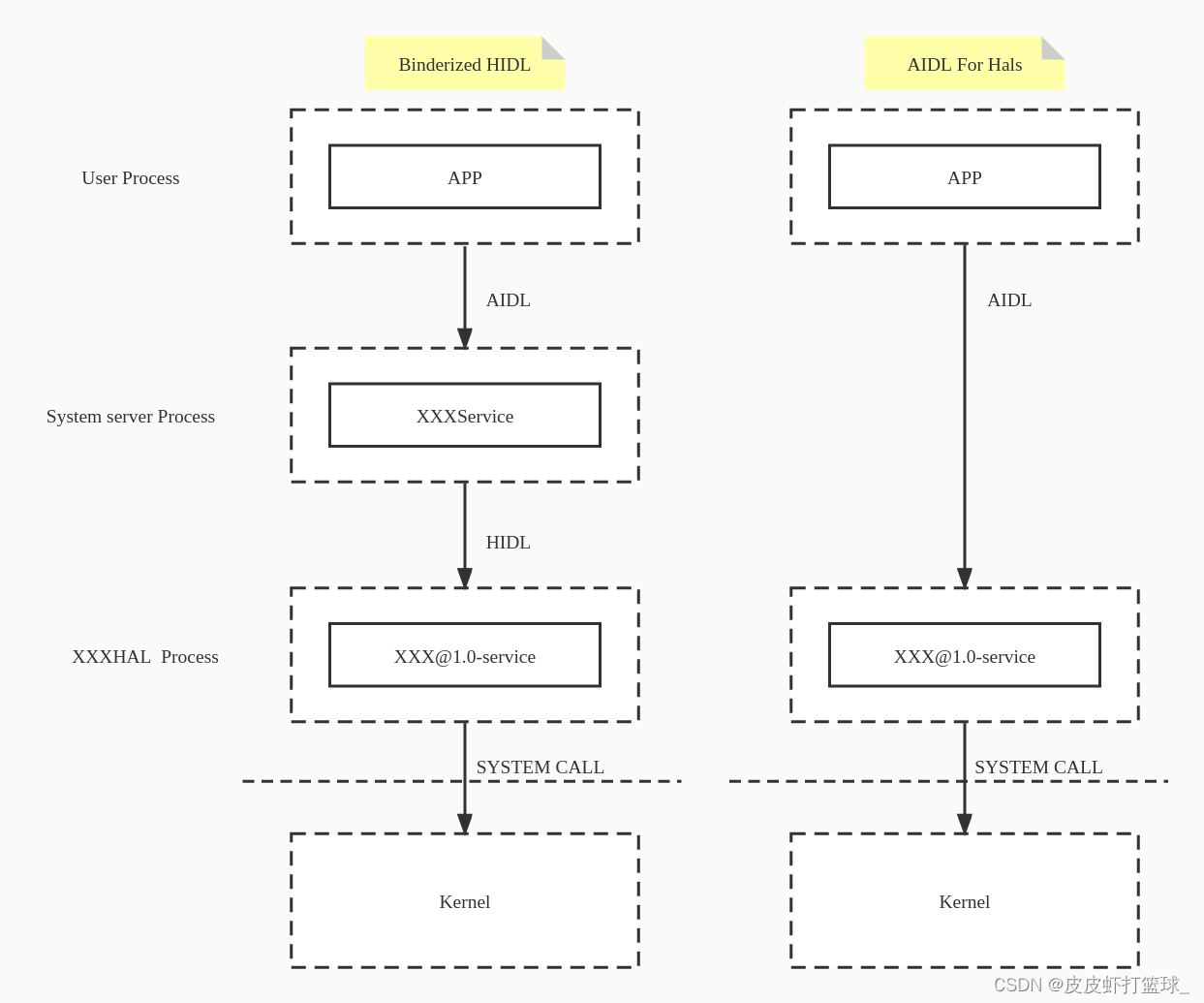
值得注意的是:在HAL 层使用AIDL必须使用Stable AIDL, 和我们在应用层或者框架层稍微不同,因为和vendor的接口设计要兼顾稳定性,system和vendor的更新速率不一样。
HALs using AIDL to communicate between framework components must use Stable AIDL.
创建对应的模块目录:/hardware/interfaces/hongxi/aidl/
创建aidl文件:/hardware/interfaces/hongxi/aidl/android/hardware/hongxi/IHongxi.aidl
package android.hardware.hongxi;

@VintfStability
interface IHongxi {
    String getName();

    void setName(in String msg);
}
每个类型定义都必须使用@VintfStability进行注释。
如果想要定义类型,参考同用的AIDL的定义就行,同时比通用的AIDL多了枚举、结构体、parcelable类型(注意这些类型跟Android版本有关,13以下的版本不一定有全)
创建顶层Android.bp:/hardware/interfaces/hongxi/aidl/Android.bp
aidl_interface {
   name: "android.hardware.hongxi",
   vendor: true,
   srcs: ["android/hardware/hongxi/*.aidl"],
   stability: "vintf",
   owner: "hongxi.zhu",
   backend: {
       cpp: {
           enabled: false,
       },
       java: {
       	   enabled: false,
       },
   },
}
backend: 服务的后端,AIDL支持四种后端,分别是C++/JAVA/NDK/RUST, 我们将使用NDK(谷歌推荐),因此将CPP和JAVA后端声明为false(实际上我试了这两个,编译有问题,还没解决,后续解决了更新出来)。
为了方便测试,设置vendor:true并删除vendor_available,因为这是一个自定义供应商HAL,删除vndk部分,因此这个HAL仅位于vendor分区,不受VNDK限制,真正开发中,如需开启需要自己解决VNDK的限制问题,这里就不单独列出。
mmm hardware/interfaces/hongxi/
然后就会报错:
[ 74% 227/303] echo "API dump for the current version of AIDL interface android.hardware.hongxi does not exist." && echo Run "m android.hardware.hongxi-update-api", or add "unstable: true" to the build ru
FAILED: out/soong/.intermediates/hardware/interfaces/hongxi/aidl/android.hardware.hongxi-api/checkapi_current.timestamp
echo "API dump for the current version of AIDL interface android.hardware.hongxi does not exist." && echo Run "m android.hardware.hongxi-update-api", or add "unstable: true" to the build rule for the inte
rface if it does not need to be versioned && false
API dump for the current version of AIDL interface android.hardware.hongxi does not exist.
Run m android.hardware.hongxi-update-api, or add unstable: true to the build rule for the interface if it does not need to be versioned
19:29:13 ninja failed with: exit status 1
原因是当前版本没有这个接口,需要更新下API,按照提示来:
m android.hardware.hongxi-update-api
然后再重新编译模块:
mmm hardware/interfaces/hongxi/
We will use the ndk_platfrom library, therefore, let check the generated code for ndk_platform.我们需要在实现的接口编译脚本中引用模块的ndk_platfrom, 且我们要实现的接口在编译时都生成了对应的源码,我们只需要拷贝出来并实现,所以先看下,刚才的编译都生成了什么:
cd out/soong/.intermediates/hardware/interfaces/hongxi/aidl/android.hardware.hongxi-ndk_platform-source
find .
.
./gen
./gen/android
./gen/android/hardware
./gen/android/hardware/hongxi
./gen/android/hardware/hongxi/IHongxi.cpp.d
./gen/android/hardware/hongxi/IHongxi.cpp
./gen/include
./gen/include/aidl
./gen/include/aidl/android
./gen/include/aidl/android/hardware
./gen/include/aidl/android/hardware/hongxi
./gen/include/aidl/android/hardware/hongxi/BpHongxi.h
./gen/include/aidl/android/hardware/hongxi/BnHongxi.h
./gen/include/aidl/android/hardware/hongxi/IHongxi.h
./gen/timestamp
在IHongxi.h头文件中找到我们要实现的接口:
  virtual ::ndk::ScopedAStatus getName(std::string* _aidl_return) = 0;
  virtual ::ndk::ScopedAStatus setName(const std::string& in_msg) = 0;
接下来就需要创建后端源码文件,来实现这些接口:
/hardware/interfaces/hongxi/aidl/default/Hongxi.h
#pragma once

#include <aidl/android/hardware/hongxi/BnHongxi.h>

namespace aidl {
namespace android {
namespace hardware {
namespace hongxi {

class Hongxi : public BnHongxi {
    public:
        //String getName();
        ndk::ScopedAStatus getName(std::string* _aidl_return);

        //void setName(in String msg);
        ndk::ScopedAStatus setName(const std::string& in_msg);

    private:
        std::string name = "";
};

}  // namespace hongxi
}  // namespace hardware
}  // namespace android
}  // namespace aidl
/hardware/interfaces/hongxi/aidl/default/Hongxi.cpp
#define LOG_TAG "Hongxi"

#include <utils/Log.h>
#include <iostream>
#include "Hongxi.h"

namespace aidl {
namespace android {
namespace hardware {
namespace hongxi {

ndk::ScopedAStatus Hongxi::getName(std::string* _aidl_return) {

    *_aidl_return = name;

    return ndk::ScopedAStatus::ok();
}

ndk::ScopedAStatus Hongxi::setName(const std::string& in_msg) {

    name = in_msg;

    return ndk::ScopedAStatus::ok();
}

}  // namespace hongxi
}  // namespace hardware
}  // namespace android
}  // namespace aidl
/hardware/interfaces/hongxi/aidl/default/main.cpp
#define LOG_TAG "Hongxi"

#include <android-base/logging.h>
#include <android/binder_manager.h>
#include <android/binder_process.h>
#include <binder/ProcessState.h>
#include <binder/IServiceManager.h>
#include "Hongxi.h"

using aidl::android::hardware::hongxi::Hongxi;
using std::string_literals::operator""s;

int main() {
    // Enable vndbinder to allow vendor-to-venfor binder call
    android::ProcessState::initWithDriver("/dev/vndbinder"); //使用vnbinder的配置

    ABinderProcess_setThreadPoolMaxThreadCount(0); // vnbinder的线程池独立,需要单独配置
    ABinderProcess_startThreadPool();

    std::shared_ptr<Hongxi> hongxi = ndk::SharedRefBase::make<Hongxi>();
    const std::string desc = Hongxi::descriptor + "/default"s;

    if (hongxi != nullptr) {
        if(AServiceManager_addService(hongxi->asBinder().get(), desc.c_str()) != STATUS_OK) {
            ALOGE("Failed to register IHongxi service");
            return -1;
        }
    } else {
        ALOGE("Failed to get IHongxi instance");
        return -1;
    }

    ALOGD("IHongxi service starts to join service pool");
    ABinderProcess_joinThreadPool();

    return EXIT_FAILURE;  // should not reached
}
/hardware/interfaces/hongxi/aidl/default/android.hardware.hongxi-service.rc
service android.hardware.hongxi-service /vendor/bin/hw/android.hardware.hongxi-service
        interface aidl android.hardware.hongxi.IHongxi/default
        class hal
        user system
        group system
/hardware/interfaces/hongxi/aidl/default/android.hardware.hongxi-service.xml
<manifest version="1.0" type="device">
    <hal format="aidl">
        <name>android.hardware.hongxi</name>
        <fqname>IHongxi/default</fqname>
    </hal>
</manifest>
/hardware/interfaces/hongxi/aidl/default/Android.bp
cc_binary {
    name: "android.hardware.hongxi-service",
    vendor: true,
    relative_install_path: "hw",
    init_rc: ["android.hardware.hongxi-service.rc"],
    vintf_fragments: ["android.hardware.hongxi-service.xml"],

    srcs: [
        "Hongxi.cpp",
        "main.cpp",
    ],

    cflags: [
        "-Wall",
        "-Werror",
    ],

    shared_libs: [
        "libbase",
        "liblog",
        "libhardware",
        "libbinder_ndk",
        "libbinder",
        "libutils",
        "android.hardware.hongxi-ndk_platform",
    ],
}
/build/target/product/base_vendor.mk
# add for Hongxi
PRODUCT_PACKAGES += \
    android.hardware.hongxi \
    android.hardware.hongxi-service \
# (选下标最新的那个)
hardware/interfaces/compatibility_matrices/compatibility_matrix.5.xml
#(这个不一定有,如果没有就不加)
hardware/interfaces/compatibility_matrices/compatibility_matrix.current.xml
    <hal format="aidl" optional="true">
        <name>android.hardware.hongxi</name>
        <version>1.0</version>
        <interface>
            <name>IHongxi</name>
            <instance>default</instance>
        </interface>
    </hal>
这个后续补充,测试中,会有宏版本和直接添加的版本
@作者:SYFStrive @博客首页:HomePage📜:微信小程序📌:个人社区(欢迎大佬们加入)👉:社区链接🔗📌:觉得文章不错可以点点关注👉:专栏连接🔗💃:感谢支持,学累了可以先看小段由小胖给大家带来的街舞👉微信小程序(🔥)目录自定义组件-behaviors 1、什么是behaviors 2、behaviors的工作方式 3、创建behavior 4、导入并使用behavior 5、behavior中所有可用的节点 6、同名字段的覆盖和组合规则总结最后自定义组件-behaviors 1、什么是behaviorsbehaviors是小程序中,用于实现
最近在工作中,看到一些新手测试同学,对接口测试存在很多疑问,甚至包括一些从事软件测试3,5年的同学,在聊到接口时,也是一知半解;今天借着这个机会,对接口测试做个实战教学,顺便总结一下经验,分享给大家。计划拆分成4个模块跟大家做一个分享,(接口测试、接口基础知识、接口自动化、接口进阶)感兴趣的小伙伴记得关注,希望对你的日常工作和求职面试,带来一些帮助。注:文章较长有5000多字,希望小伙伴们认真看完,当然有些内容对小白同学不是太友好,如果你需要详细了解其中的一些概念或者名词,请在文章之后留言,后续我将针对大家的疑问,整理输出一些大家感兴趣的文章。随着开发模式的迭代更新,前后端分离已不是新的概念,
目录FIFO一.自定义同步FIFO1.1代码设计1.2Testbech1.3行为仿真***学习位宽计算函数$clog2()***$clog2()系统函数使用,可以不关注***分布式资源或者BLOCKBRAM二.异步FIFO2.1在FIFO判满的时候有两种方式:2.2异步FIFO为什么要使用格雷码2.2.1介绍格雷码2.2.2格雷码在异步FIFO中的应用2.2.2格雷码判满2.4二进制与格雷码之间的转换2.4.1二进制码转换为格雷码的方法2.4.2格雷码转换为二进制码的方法2.3实现框图2.5实现及仿真代码2.6仿真图验证2.7结论FIFO 这篇更多的是记录FIFO学习,参考了众多优秀的文章,
运行有问题或需要源码请点赞关注收藏后评论区留言一、利用ContentResolver读写联系人在实际开发中,普通App很少会开放数据接口给其他应用访问。内容组件能够派上用场的情况往往是App想要访问系统应用的通讯数据,比如查看联系人,短信,通话记录等等,以及对这些通讯数据及逆行增删改查。首先要给AndroidMaifest.xml中添加响应的权限配置 下面是往手机通讯录添加联系人信息的例子效果如下分成三个步骤先查出联系人的基本信息,然后查询联系人号码,再查询联系人邮箱代码 ContactAddActivity类packagecom.example.chapter07;importandroid
📝学技术、更要掌握学习的方法,一起学习,让进步发生👩🏻作者:一只IT攻城狮。💐学习建议:1、养成习惯,学习java的任何一个技术,都可以先去官网先看看,更准确、更专业。💐学习建议:2、然后记住每个技术最关键的特性(通常一句话或者几个字),从主线入手,由浅入深学习。❤️《SpringCloud入门实战系列》解锁SpringCloud主流组件入门应用及关键特性。带你了解SpringCloud主流组件,是如何一战解决微服务诸多难题的。项目demo:源码地址👉🏻SpringCloud入门实战系列不迷路👈🏻:SpringCloud入门实战(一)什么是SpringCloud?SpringCloud入门实战
快捷目录前言一、涉及到的相关技术简介二、具体实现过程及踩坑杂谈1.安卓手机改造成linux系统实现方案2.改造后的手机Linux中软件的安装3.手机Linux中安装MySQL5.7踩坑实录4.手机Linux中安装软件的正确方法三、Linux服务器部署前后端分离项目流程1.前提准备(安装必要软件,搭建环境):2.前后端分离项目的详细部署过程:总结前言总体概述:本篇文章隶属于“手机改造服务器部署前后端分离项目”系列专栏,该专栏将分多个板块,每个板块独立成篇来详细记录:手机(安卓)改造成个人服务器(Linux)、Linux中安装软件、配置开发环境、部署JAVA+VUE+MySQL5.7前后端分离项目
前言 Neo4j是一个高性能的,Nosql图形数据库。Nosql=nosql,即与传统的将数据结构化并存储在表中的数据库不一样。Neo4j将数据存储在网络上,我们也可以把Neo4j视为一个图引擎。我们打交道的是一个面对对象的、灵活的网络结构而不是严格的、静态的表。传统关系型数据库,当数据量很大时,查询性能会明显受影响,尤其是一度以上的查询。但是图形数据库却在这方面表现得很好。neo4j支持多种主流编程语言,包括.Net、Java、JavaScript、Python。本文主要是涉及到jdk和neo4j安装和适配。 注意事项:neo4j安装版本与JDK版本需要对应,不
🚗Es学习·第五站~🚩Es学习起始站:【微服务】Elasticsearch概述&环境搭建(一)🚩本文已收录至专栏:微服务探索之旅👍希望您能有所收获一.引入综合前几站所学,我们已经对Elasticsearch的使用有了一定的了解,接下来让我们一起通过一个综合实战案例来复习前几站所学内容,体会在实际生产中的作用。我们一起实现如下功能:酒店搜索和分页酒店结果过滤我周边的酒店酒店竞价排名数据聚合筛选选项搜索框自动补全酒店数据的同步二.环境搭建按照第一站的学习部署Elasticsearch并启动运行。按照第二站的学习中的如下步骤,初始化测试项目并在Es导入数据。使用Elasticsearch,肯定离不开
目录开发环境 数据描述功能需求数据准备数据清洗用户行为分析找出有价值的用户开发环境 Hadoop+Hive+Spark+HBase启动Hadoop:start-all.sh启动zookeeper:zkServer.shstart启动Hive:nohuphiveserver21>/dev/null2>&1&beeline-ujdbc:hive2://192.168.152.192:10000启动Hbase:start-hbase.shhbaseshell启动Spark:spark-shell数据描述数据描述UserBehavior是阿里巴巴提供的一个淘宝用户行为数据集。本数据集包含了2017-0
CSDN:如果用两个关键词来总结2022年云原生的发展态势,您会有哪些评价?——繁荣和普惠。“繁荣”代表当前云原生的技术和产品蓬勃发展;“普惠”代表云原生技术从互联网走向金融、零售、政企等行业,普惠千行百业构建丰富应用。(阿里云智能云原生应用平台产品负责人李国强)2022年,云原生技术日趋成熟,伴随容器、Serverless、微服务等技术快速发展,已逐步构建出繁荣的技术体系。如今云原生凭借降本增效、提高持续交付能力、易于开发等优势,正在不断激活应用构建范式,引起企业系统架构、生产方式、商业模式等发生变革,毋庸置疑,云原生已成为企业数字化转型的最短路径。那么,2022年云原生领域有哪些新进展?未
